Yes! You can use AI to fill out Application for business rates for self-catering properties in England

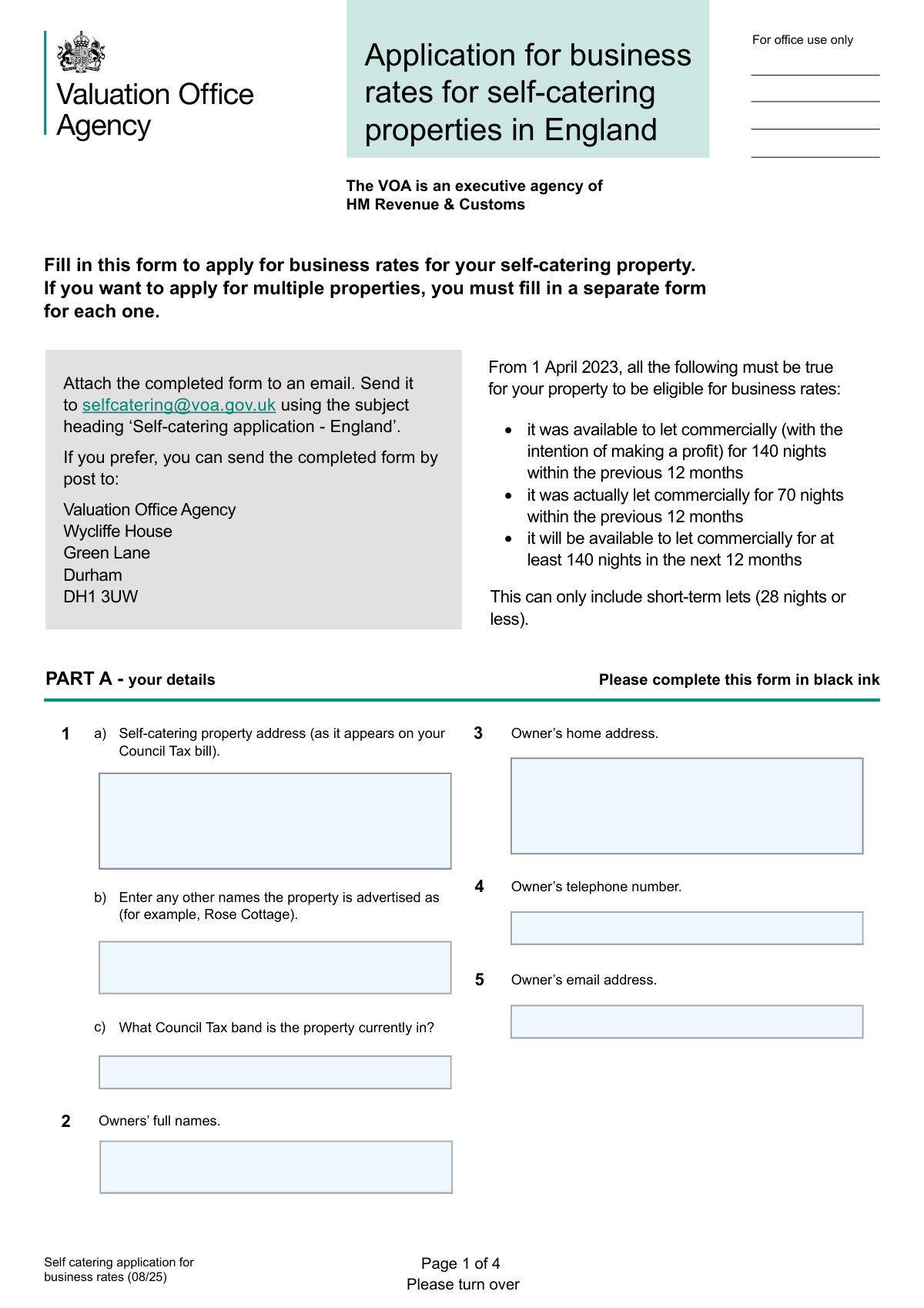
This form is an application submitted to the UK's Valuation Office Agency (VOA) by owners of self-catering properties in England. Its purpose is to determine if a property qualifies to be moved from Council Tax to business rates, based on specific commercial letting availability and occupancy criteria. Today, this form can be filled out quickly and accurately using AI-powered services like Instafill.ai, which can also convert non-fillable PDF versions into interactive fillable forms.
Our AI automatically handles information lookup, data retrieval, formatting, and form filling.
It takes less than a minute to fill out Self catering application for business rates (08/25) using our AI form filling.
Securely upload your data. Information is encrypted in transit and deleted immediately after the form is filled out.

Form specifications

Form name: Application for business rates for self-catering properties in England
Number of pages: 4
Language: English
Categories: business forms
main-image

Instafill Demo: How to fill out PDF forms in seconds with AI

How to Fill Out Self catering application for business rates (08/25) Online for Free in 2026

Are you looking to fill out a SELF CATERING APPLICATION FOR BUSINESS RATES (08/25) form online quickly and accurately? Instafill.ai offers the #1 AI-powered PDF filling software of 2026, allowing you to complete your SELF CATERING APPLICATION FOR BUSINESS RATES (08/25) form in just 37 seconds or less.
Follow these steps to fill out your SELF CATERING APPLICATION FOR BUSINESS RATES (08/25) form online using Instafill.ai:
  1. 1 Navigate to Instafill.ai and upload the 'Application for business rates for self-catering properties in England' form.
  2. 2 Provide your personal details in Part A, including the owner's name, address, and contact information, along with the property address.
  3. 3 Complete Part B by detailing the property's history, such as whether it has been on business rates before and the date it became commercially available.
  4. 4 Enter the required letting and availability statistics in Part C to demonstrate the property meets the eligibility criteria for business rates.
  5. 5 Fill out Part D with specific property details, including advertising methods, weekly charges, and the number of bed spaces.
  6. 6 Finalize the application by completing the declaration in Part E, including your signature, name, and the date.
  7. 7 Review all the information populated by the AI for accuracy before submitting the completed form to the VOA via email or post.

Our AI-powered system ensures each field is filled out correctly, reducing errors and saving you time.

Why Choose Instafill.ai for Your Fillable Self catering application for business rates (08/25) Form?

Speed

Complete your Self catering application for business rates (08/25) in as little as 37 seconds.

Up-to-Date

Always use the latest 2026 Self catering application for business rates (08/25) form version.

Cost-effective

No need to hire expensive lawyers.

Accuracy

Our AI performs 10 compliance checks to ensure your form is error-free.

Security

Your personal information is protected with bank-level encryption.

Frequently Asked Questions About Form Self catering application for business rates (08/25)

This form is used to apply for your self-catering property in England to be assessed for business rates instead of Council Tax.

Owners of self-catering properties who want to be moved from Council Tax to business rates and meet the specific letting eligibility criteria must fill out this form.

Your property must have been available to let commercially for 140 nights and actually let for 70 nights in the previous 12 months, and be available for 140 nights in the next 12 months.

No, you must complete and submit a separate form for each individual property you wish to apply for.

You can attach the completed form to an email and send it to [email protected], or you can mail the printed form to the Valuation Office Agency address in Durham.

You need to list all the ways you advertise your property and provide the full web addresses (URLs) for any online listings in Part D.

Count single beds as 1 space and double-or-larger beds as 2 spaces. Do not include temporary beds like sofa beds or pull-out beds.

A short-term let is defined as a commercial letting period of 28 nights or less. Only these lets count towards your eligibility.

Yes, an agent can complete the form, but they must sign the declaration in Part E and provide signed proof that they are authorized to act on your behalf.

You can use the 'Further information or remarks' section on Page 4 to provide clarification or extra details for any of the questions.

Yes, services like Instafill.ai use AI to accurately auto-fill form fields with your saved information, which saves time and helps prevent errors.

Simply upload the form to the Instafill.ai platform. It will make the document interactive, allowing you to easily type in your information and use AI to autofill relevant fields.

You can use a service like Instafill.ai, which can convert flat, non-fillable PDFs into interactive forms that you can complete and sign digitally on your computer.

Compliance Self catering application for business rates (08/25)
Validation Checks by Instafill.ai

1
Ensures Owner's Full Name is Provided
This check verifies that the 'Owners’ full names' field (Question 2) is not empty. This is a mandatory field required for legal identification of the property owner and for all official correspondence. An application without the owner's name is incomplete and cannot be processed.
2
Validates Self-Catering Property Address is Complete
This validation ensures the 'Self-catering property address' field (Question 1) is fully completed, including a valid postcode. This address is critical for identifying the specific property being assessed and linking it to the correct Council Tax record. Failure to provide a complete address will prevent the VOA from locating the property and processing the application.
3
Verifies Owner's Email Address Format
This check confirms that the value entered in the 'Owner’s email address' field (Question 5) follows the standard email format, such as '[email protected]'. A valid email is essential for communication regarding the application, including requests for more information or notification of the outcome. An invalid format would lead to communication failures and application delays.
4
Validates Online Listing Web Address Format
This check ensures that all entries in the 'full web addresses for all places your property is advertised online' field (Question 8b) are valid and complete URLs. The VOA uses these links to verify that the property is being actively and commercially marketed, which is a key part of the eligibility assessment. Invalid or broken links would prevent this verification and could lead to the application being rejected.
5
Ensures All Dates are in a Valid Format
This validation rule checks that all date fields on the form (Questions 6b, 7a, 7b, and the Declaration Date) are entered in a valid and parseable Day/Month/Year format. Consistent and correct date formatting is crucial for performing chronological calculations and verifying eligibility timelines. An invalid date format would cause calculation errors and halt the processing of the application.
6
Cross-Validates 140-Night Availability Date
This validation confirms that the date entered in Question 7a ('date had the property been available to let for 140 nights') is at least 140 nights after the date entered in Question 6b ('date did the property become commercially available'). This rule is explicitly stated on the form and is a critical check to ensure the property meets the minimum availability period. An invalid entry indicates a misunderstanding of the criteria or a data entry error, making the application ineligible on its face.
7
Cross-Validates 70-Night Actual Let Date
This check verifies that the date entered in Question 7b ('date had the property been actually let for 70 nights') is at least 70 nights after the date entered in Question 6b. Similar to the 140-night rule, this is a mandatory logical check based on the form's instructions. It ensures the property meets the minimum threshold for actual lettings, and failure to meet this condition would result in an immediate rejection of the application.
8
Ensures Nights Let Does Not Exceed Nights Available
This rule validates the data in the table for Question 7c, ensuring that for each financial year, the 'Nights property was actually let' is not greater than the 'Nights it was available'. It is logically impossible to let a property for more nights than it was available for letting. This check prevents data entry errors and ensures the provided letting statistics are plausible.
9
Validates Lowest and Highest Weekly Charges
This check ensures the 'Lowest weekly charge' entered in Question 8c is less than or equal to the 'Highest weekly charge'. This simple logical check prevents data entry errors and ensures the financial information provided is coherent. Incoherent pricing data could cast doubt on the commercial nature of the letting operation.
10
Confirms Future Availability Intention
This validation checks that the answer to Question 7d, 'Will the property be available for commercial lets for 140 nights or more in the next 12 months?', is 'Yes'. A 'No' response indicates the property will not meet the forward-looking eligibility criteria required from 1 April 2023. This serves as a direct check of future eligibility and a 'No' would likely result in the application being deemed ineligible.
11
Ensures Declaration is Dated
This check verifies that the 'Date form completed' field in the Declaration section (Part E) has been filled in. The date of declaration is a legal requirement, confirming when the applicant certified the information as true and correct. An undated form is legally incomplete and cannot be accepted for processing.
12
Flags Requirement for Agent's Proof of Authority
This validation checks if 'Owner’s Agent' or 'Occupier’s Agent' is selected in the Declaration (Part E). If so, the system should flag that signed proof of authorization is required, as stated in the form's instructions. This ensures the person completing the form has the legal right to act on the owner's behalf, preventing fraudulent or unauthorized applications.
13
Validates Number of Bed Spaces is a Positive Integer
This check ensures the value entered for 'Number of bed spaces' (Question 8d) is a whole, positive number. The number of bed spaces is a key metric used to help calculate the property's rateable value. A non-numeric, zero, or negative value would be invalid and prevent a correct valuation from being determined.
14
Verifies Letting Data Meets Eligibility Thresholds
This validation examines the data in Question 7c for the relevant 12-month period (e.g., 1 April 22 - 31 March 23). It checks if 'Nights it was available' is at least 140 and 'Nights property was actually let' is at least 70. This is the core eligibility test, and failing to meet these minimums means the property does not qualify for business rates under the new rules.

Common Mistakes in Completing Self catering application for business rates (08/25)

Applying Without Meeting Eligibility Criteria

Applicants often fail to verify they meet the strict letting thresholds (available for 140 nights, actually let for 70 nights) before filling out the form. This usually happens due to a misunderstanding of the rules that came into effect on 1 April 2023. Submitting an application for a property that is not eligible results in an automatic rejection and wastes the applicant's time. Always confirm your letting history against the criteria on the first page before you begin the application.

Using One Form for Multiple Properties

Owners with several self-catering properties at the same or nearby locations sometimes try to list them all on a single form. The instructions explicitly state that a separate form must be completed for each individual property. This error will lead to the application being returned and will significantly delay the process, as the applicant will have to resubmit separate forms for each property.

Inconsistent or Illogical Date Calculations

The form requires dates in Part C (7a and 7b) to be calculated based on the start date in Part B (6b). Applicants often make calculation errors, providing dates that are not at least 140 or 70 nights after the commercial availability start date. This mathematical error invalidates the eligibility claim and leads to rejection. To avoid this, carefully calculate the periods and double-check your dates before entering them.

Providing Incomplete or Broken Website Links

In question 8b, applicants are required to provide full, direct web addresses to their property listings. A common mistake is to provide a generic URL like 'Airbnb.com' or a broken link, which prevents the agency from verifying the property is commercially advertised. Always copy and paste the complete URL directly from your browser's address bar for each listing to ensure the links are functional.

Confusing 'Nights Available' with 'Nights Let'

In question 7c, people frequently mix up the concepts of 'available' and 'let'. 'Nights available' refers to the total number of nights the property was advertised and ready for booking, whereas 'nights let' is the number of nights it was actually occupied by paying guests. This confusion leads to inaccurate data entry, which can cause an application to be incorrectly assessed or rejected. Maintain clear booking records to distinguish between these two figures.

Incorrectly Calculating Bed Spaces

Question 8d has very specific rules for counting bed spaces, such as excluding sofa beds and counting double beds as two spaces. Applicants often misread these instructions and provide an incorrect count, for example by including temporary beds. This mistake can directly impact the rateable value calculation for the property. Carefully read the detailed instructions for this question to ensure an accurate count.

Submitting with an Incorrect Email Subject Line

The form specifies that email submissions must use the subject heading ‘Self-catering application - England’. Applicants often overlook this and use a generic subject, which can cause the email to be missed by automated sorting rules or delayed in processing. To ensure your application is handled promptly, always use the exact subject line as instructed. AI-powered tools like Instafill.ai can help manage submission details to prevent such oversights.

Agent Submitting Without Proof of Authorization

Agents or representatives filling out the form on behalf of an owner frequently forget to include the required 'Authority to Act' form. The declaration section clearly states this is mandatory for non-owners. Submitting without this proof will lead to the application being put on hold or rejected until the proper authorization is provided. Always ensure this separate form is completed, signed, and attached with the main application.

Property Address Does Not Match Council Tax Bill

In question 1, the form requires the property address 'as it appears on your Council Tax bill'. Applicants may enter a more common or postal address, leading to a mismatch with official records and delaying verification. To prevent this, have your Council Tax bill on hand and copy the address exactly as it is written. Smart form-fillers like Instafill.ai can help by storing and accurately populating verified address formats.

Incomplete or Unsigned Declaration Section

It is a classic mistake for applicants to leave the declaration in Part E incomplete, forgetting to type their name, sign (even a typed signature is allowed), or enter the date. An unsigned or incomplete declaration invalidates the entire application. Always perform a final review of the form before submission, paying special attention to the declaration to ensure every field is completed. Since this form is a non-fillable PDF, a tool like Instafill.ai can convert it to a fillable version, making it easier to complete all fields digitally.

Entering the Wrong Address for the Owner

The form asks for the 'Self-catering property address' in question 1 and the 'Owner’s home address' in question 3. Applicants sometimes mistakenly enter the property address in both fields, especially when rushing. This prevents the VOA from having the correct correspondence address for the owner. To avoid this, carefully read each field label and provide the owner's primary residence address where requested.
Saved over 80 hours a year

“I was never sure if my IRS forms like W-9 were filled correctly. Now, I can complete the forms accurately without any external help.”

Kevin Martin Green

Your data stays secure with advanced protection from Instafill and our subprocessors

Robust compliance program

Transparent business model

You’re not the product. You always know where your data is and what it is processed for.

ISO 27001, HIPAA, and GDPR

Our subprocesses adhere to multiple compliance standards, including but not limited to ISO 27001, HIPAA, and GDPR.

Security & privacy by design

We consider security and privacy from the initial design phase of any new service or functionality. It’s not an afterthought, it’s built-in, including support for two-factor authentication (2FA) to further protect your account.

Fill out Self catering application for business rates (08/25) with Instafill.ai

Worried about filling PDFs wrong? Instafill securely fills application-for-business-rates-for-self-catering-properties-in-england forms, ensuring each field is accurate.