Yes! You can use AI to fill out Schedule C (Form 1040), Profit or Loss From Business (Sole Proprietorship)

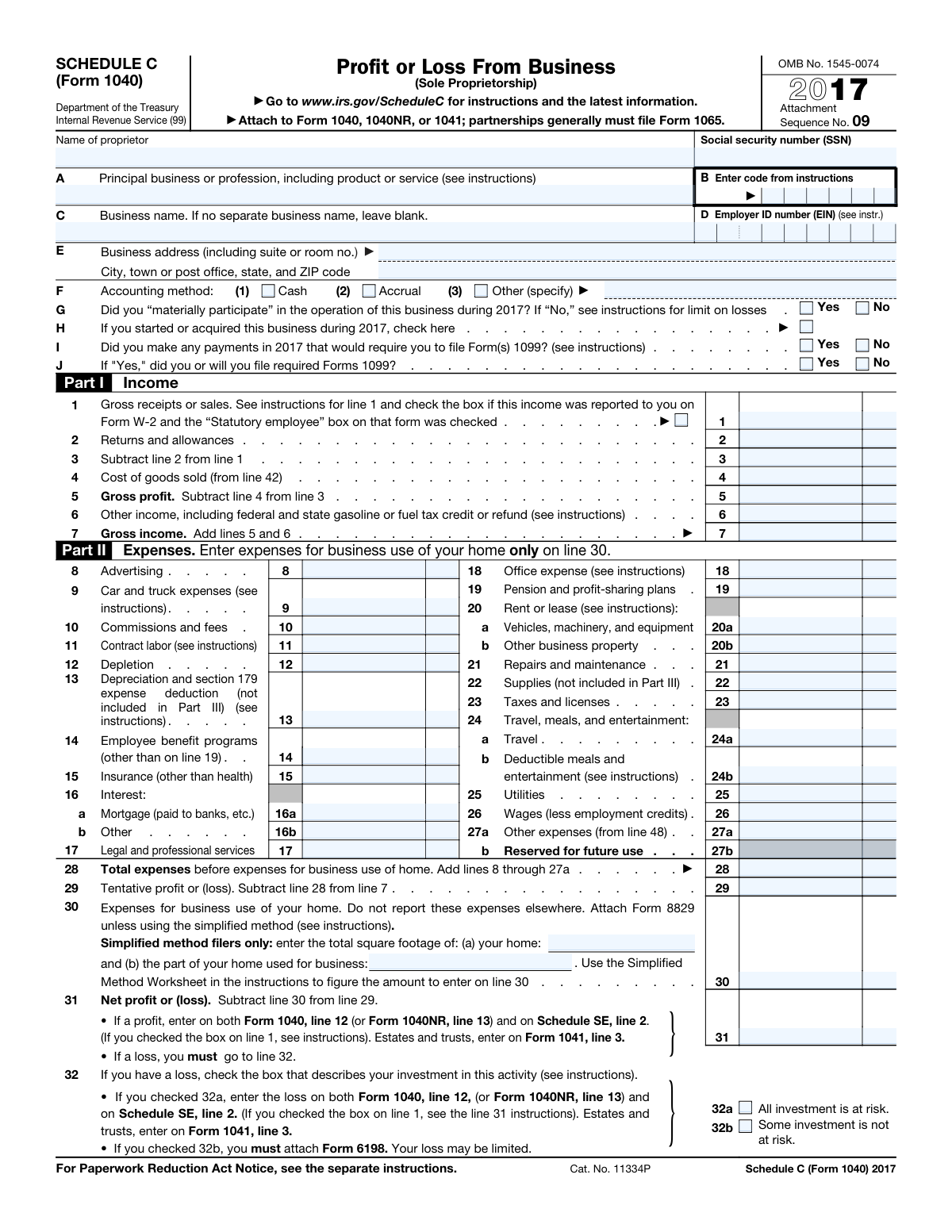
Schedule C is an IRS tax form attached to Form 1040 that sole proprietors use to report the income, expenses, and net profit or loss from their business operations. It covers all aspects of business finances including gross receipts, cost of goods sold, deductible expenses, vehicle use, and home office deductions. Accurate completion of Schedule C is critical as the resulting net profit or loss directly affects the taxpayer's self-employment tax and overall federal income tax liability. Today, this form can be filled out quickly and accurately using AI-powered services like Instafill.ai, which can also convert non-fillable PDF versions into interactive fillable forms.
Our AI automatically handles information lookup, data retrieval, formatting, and form filling.
It takes less than a minute to fill out Schedule C using our AI form filling.
Securely upload your data. Information is encrypted in transit and deleted immediately after the form is filled out.

Form specifications

Form name: Schedule C (Form 1040), Profit or Loss From Business (Sole Proprietorship)
Number of pages: 2
Language: English
main-image

Instafill Demo: filling out a legal form in seconds

How to Fill Out Schedule C Online for Free in 2026

Are you looking to fill out a SCHEDULE C form online quickly and accurately? Instafill.ai offers the #1 AI-powered PDF filling software of 2026, allowing you to complete your SCHEDULE C form in just 37 seconds or less.
Follow these steps to fill out your SCHEDULE C form online using Instafill.ai:
  1. 1 Navigate to Instafill.ai and upload your Schedule C (Form 1040) PDF or select it from the available IRS forms library.
  2. 2 Enter your personal and business identification information, including your name, Social Security Number, business name, EIN, business address, and principal business activity code.
  3. 3 Select your accounting method (cash, accrual, or other) and answer the preliminary questions about material participation, business start date, and Form 1099 payment obligations.
  4. 4 Complete Part I (Income) by entering your gross receipts or sales, returns and allowances, cost of goods sold, and any other income to calculate your total gross income.
  5. 5 Fill in Part II (Expenses) by entering all applicable business expenses such as advertising, car and truck expenses, depreciation, insurance, rent, wages, and home office expenses.
  6. 6 Complete Parts III, IV, and V as applicable — reporting cost of goods sold details, vehicle information, and any additional other expenses not listed on lines 8–26.
  7. 7 Review all entries for accuracy using Instafill.ai's AI-powered validation, then download, sign, and attach the completed Schedule C to your Form 1040 before filing.

Our AI-powered system ensures each field is filled out correctly, reducing errors and saving you time.

Why Choose Instafill.ai for Your Fillable Schedule C Form?

Speed

Complete your Schedule C in as little as 37 seconds.

Up-to-Date

Always use the latest 2026 Schedule C form version.

Cost-effective

No need to hire expensive lawyers.

Accuracy

Our AI performs 10 compliance checks to ensure your form is error-free.

Security

Your personal information is protected with bank-level encryption.

Frequently Asked Questions About Form Schedule C

Schedule C is used to report profit or loss from a sole proprietorship business. You need to file it if you are self-employed, a freelancer, an independent contractor, or run a single-owner business, and you must attach it to your Form 1040, 1040NR, or 1041 when filing your taxes.

This version of Schedule C covers the 2017 tax year. You should use the version of the form that corresponds to the tax year you are filing for, and always check the IRS website at www.irs.gov/ScheduleC for the most current version.

You will need your full name, Social Security Number (SSN), your principal business or profession, the business activity code from the instructions, your business name (if different from your own name), your Employer Identification Number (EIN) if applicable, your business address, and your accounting method (cash, accrual, or other).

Material participation means you were actively involved in the operations of your business on a regular, continuous, and substantial basis during 2017. If you did not materially participate, your ability to deduct business losses may be limited under passive activity loss rules, so it is important to answer this question accurately.

The cash method means you report income when you actually receive it and deduct expenses when you actually pay them. The accrual method means you report income when it is earned and deduct expenses when they are incurred, regardless of when money actually changes hands. Most small businesses use the cash method.

Cost of Goods Sold is calculated in Part III (lines 33–42) by adding your beginning inventory, purchases, cost of labor, materials and supplies, and other costs, then subtracting your ending inventory. The resulting figure from line 42 is then entered on line 4 in Part I to reduce your gross profit.

Yes, home office expenses are reported on line 30 of Schedule C. You can use either the simplified method (based on square footage) or the regular method by attaching Form 8829. These expenses must not be reported anywhere else on the form, and you must calculate the business-use percentage of your home.

If you have a net loss, you must complete line 32 to indicate whether all or only some of your investment in the business is at risk. If all investment is at risk (32a), you can enter the loss on Form 1040 line 12 and Schedule SE. If some investment is not at risk (32b), you must attach Form 6198, as your loss may be limited.

You can deduct car and truck expenses used for business purposes on line 9, either using the standard mileage rate or actual expenses. You must complete Part IV of Schedule C with details about your vehicle, including miles driven for business, commuting, and personal use, and you should maintain written evidence (such as a mileage log) to support your deduction.

Lines I and J ask whether you made payments in 2017 that require filing Form 1099 (generally payments of $600 or more to non-employees or unincorporated service providers). If yes, you must indicate whether you filed or will file the required 1099 forms, as failure to do so can result in penalties.

Additional business expenses that don't fit into the standard categories on lines 8–26 should be listed individually in Part V (Other Expenses) on page 2, with a description and amount for each. The total from Part V is entered on line 48 and carried to line 27a on page 1.

Yes, AI-powered services like Instafill.ai can help you accurately auto-fill Schedule C by guiding you through each field and reducing the chance of errors. These tools can save significant time, especially if you have many expense categories or complex business income to report.

You can visit Instafill.ai, upload your Schedule C PDF, and use the AI-powered tool to fill in all required fields interactively. The service walks you through each section, helps ensure accuracy, and allows you to download the completed form ready for submission with your tax return.

If you have a flat, non-fillable PDF version of Schedule C, Instafill.ai can convert it into an interactive fillable form so you can type directly into the fields. This eliminates the need to print and handwrite your information, making the process faster and more accurate.

Schedule C must be attached to and submitted with your Form 1040 (or 1040NR/1041) — it is not filed separately. You can submit your tax return by mail to the IRS or electronically through e-file. Processing times vary, but e-filed returns with direct deposit refunds are typically processed within 21 days.

Compliance Schedule C
Validation Checks by Instafill.ai

1
Proprietor Social Security Number Format Validation
Validates that the Proprietor Social Security Number (SSN) is entered in the correct 9-digit format (XXX-XX-XXXX) and contains only numeric characters with the appropriate dashes. The SSN is a required field and serves as the primary taxpayer identifier linking Schedule C to the correct Form 1040 filing. If the SSN is missing, incorrectly formatted, or contains non-numeric characters, the form cannot be properly processed by the IRS and may result in filing rejection or misapplication of the tax return.
2
Accounting Method Mutual Exclusivity Check
Ensures that exactly one accounting method is selected among Cash, Accrual, or Other, and that no more than one option is checked simultaneously. If 'Other' is selected, the corresponding text field specifying the method must also be populated with a valid description. Selecting multiple accounting methods or leaving this field blank is invalid because the IRS requires a single, consistent accounting method to be declared for the business. Failure to select exactly one method or to specify the 'Other' method will result in an incomplete and potentially rejected filing.
3
Line 3 Net Receipts Arithmetic Consistency Check
Validates that the value entered on Line 3 (Net Receipts) equals Line 1 (Gross Receipts or Sales) minus Line 2 (Returns and Allowances), including both dollar and cents components. This is a required arithmetic relationship defined explicitly on the form and ensures the income section is internally consistent. If the calculated value does not match the entered value, it indicates a data entry error that could misrepresent the taxpayer's income and trigger an IRS audit or notice.
4
Line 5 Gross Profit Arithmetic Consistency Check
Validates that the value on Line 5 (Gross Profit) equals Line 3 (Net Receipts) minus Line 4 (Cost of Goods Sold), verifying both the dollar and cents portions. This arithmetic relationship is explicitly defined on the form and is critical for accurately representing the business's profitability. An inconsistency between these values suggests a calculation error that could understate or overstate taxable income, potentially resulting in penalties or an IRS inquiry.
5
Line 7 Gross Income Arithmetic Consistency Check
Validates that the value on Line 7 (Gross Income) equals the sum of Line 5 (Gross Profit) and Line 6 (Other Income), including both dollars and cents. This is a fundamental arithmetic check that ensures the total gross income figure used throughout the rest of the form is accurate. If this value is inconsistent with its component lines, all downstream calculations including tentative profit, net profit, and tax liability will be incorrect.
6
Line 28 Total Expenses Summation Validation
Validates that Line 28 (Total Expenses Before Business Use of Home) equals the sum of all individual expense lines 8 through 27a, including advertising, car and truck expenses, commissions, contract labor, depletion, depreciation, employee benefits, insurance, interest, legal services, office expense, pension plans, rent, repairs, supplies, taxes, travel, utilities, wages, and other expenses. This check ensures the total expenses figure is arithmetically correct before it is used to calculate tentative profit or loss. An incorrect total will cascade errors into Lines 29 and 31, ultimately affecting the net profit or loss reported on Form 1040.
7
Line 29 Tentative Profit or Loss Arithmetic Consistency Check
Validates that Line 29 (Tentative Profit or Loss) equals Line 7 (Gross Income) minus Line 28 (Total Expenses), verifying both dollar and cents components. This is a required arithmetic relationship that bridges the income and expense sections of the form. If the tentative profit or loss is inconsistent with its component lines, the final net profit or loss figure on Line 31 will also be incorrect, leading to an inaccurate tax liability on Form 1040.
8
Line 31 Net Profit or Loss Arithmetic Consistency Check
Validates that Line 31 (Net Profit or Loss) equals Line 29 (Tentative Profit or Loss) minus Line 30 (Expenses for Business Use of Home), and that either the Net Profit or Net Loss field is populated but not both. If a loss is reported on Line 31, the form must proceed to Line 32 where the taxpayer must indicate whether all or some investment is at risk. Failure to correctly compute or report this value directly impacts the amount transferred to Form 1040 Line 12 and Schedule SE Line 2, affecting both income tax and self-employment tax calculations.
9
Loss on Line 32 Investment Risk Selection Requirement
Validates that when a net loss is reported on Line 31, exactly one of the two investment risk checkboxes on Line 32 (32a: All investment is at risk, or 32b: Some investment is not at risk) is selected. If 32b is checked, the form must have Form 6198 attached to limit the loss. Leaving Line 32 blank when a loss exists, or checking both boxes, renders the loss reporting incomplete and may result in the IRS disallowing the loss deduction or requiring additional documentation.
10
Form 1099 Filing Consistency Check
Validates that if 'Yes' is selected for Line I (payments requiring Form 1099 were made), then Line J (whether Form 1099 was or will be filed) must also be answered with either 'Yes' or 'No'. Conversely, if 'No' is selected for Line I, then Line J should not be answered. This conditional logic ensures the taxpayer's 1099 filing obligations are fully and consistently disclosed. Leaving Line J blank when Line I is 'Yes' creates an incomplete disclosure that may trigger IRS follow-up.
11
Part IV Vehicle Information Completeness When Car Expenses Claimed
Validates that if a non-zero amount is entered on Line 9 (Car and Truck Expenses) and Form 4562 is not required, then all fields in Part IV must be completed, including the vehicle service date (month, day, year), business miles, commuting miles, other miles, and all Yes/No questions on lines 45 through 47b. The IRS requires this information to substantiate vehicle expense deductions. Incomplete vehicle information when car expenses are claimed may result in disallowance of the deduction.
12
Vehicle Service Date Format and Tax Year Validity Check
Validates that the vehicle service date entered in Part IV (Line 43) is in a valid date format with a real calendar month (01-12), day (01-31 appropriate to the month), and a four-digit year. Additionally, the service date must be on or before December 31, 2017, since this is a 2017 tax year form, and if the business was not started or acquired in 2017 (Line H unchecked), the vehicle service date should be consistent with prior-year use. An invalid or future date would indicate a data entry error that could invalidate the vehicle expense deduction.
13
Total Vehicle Miles Reasonableness and Consistency Check
Validates that the sum of business miles (Line 44a), commuting miles (Line 44b), and other miles (Line 44c) in Part IV represents a plausible total annual mileage, and that business miles are greater than zero when car and truck expenses are claimed on Line 9. The total mileage should not exceed a reasonable annual maximum (e.g., approximately 100,000 miles) and business miles must be a positive number to justify the deduction. If business miles are zero or the total mileage is implausibly high, the car and truck expense deduction may be flagged for review or disallowed.
14
Cost of Goods Sold Cross-Reference Consistency Check
Validates that the value entered on Line 4 (Cost of Goods Sold) matches the value calculated on Line 42 in Part III (Cost of Goods Sold = Line 40 minus Line 41), including both dollar and cents components. The form explicitly instructs that Line 42 should be entered on Line 4, making this a required cross-reference. A discrepancy between these two values indicates either a transcription error or an arithmetic mistake in Part III that would misstate the gross profit and all downstream income calculations.
15
Part III Cost of Goods Sold Arithmetic Validation
Validates that Line 40 in Part III equals the sum of Lines 35 through 39 (Inventory at Beginning of Year + Purchases Less Cost + Cost of Labor + Materials and Supplies + Other Costs), and that Line 42 equals Line 40 minus Line 41 (Inventory at End of Year). Both arithmetic relationships are explicitly defined on the form and must be internally consistent. Errors in these calculations will propagate to Line 4 and ultimately distort the gross profit, gross income, and net profit or loss figures reported on the form.
16
Total Other Expenses Line 48 and Line 27a Cross-Reference Check
Validates that the Total Other Expenses amount entered on Line 48 in Part V matches the value entered on Line 27a, and that Line 48 equals the sum of all individual other expense amounts listed in Part V. The form explicitly instructs that Line 48 should be entered on Line 27a, making this a required cross-reference that ensures all itemized other expenses are correctly totaled and carried forward. A mismatch between Line 48 and Line 27a, or between Line 48 and the sum of its component expenses, will result in an incorrect total expenses figure on Line 28.

Common Mistakes in Completing Schedule C

Using the wrong Social Security Number or EIN

Many sole proprietors confuse their personal Social Security Number (SSN) with their Employer Identification Number (EIN), entering the wrong one in the wrong field. The SSN goes in the 'Social security number' field at the top for the proprietor, while the EIN (if the business has one) goes in field D. Mixing these up can trigger IRS matching errors and processing delays. Always double-check which identifier belongs in each field, and note that not all sole proprietors have an EIN — if you don't have one, leave field D blank rather than entering your SSN there. Tools like Instafill.ai can help auto-populate these fields correctly to prevent transposition errors.

Entering an incorrect or missing Business Activity Code

Field B requires a specific six-digit principal business activity code from the Schedule C instructions, and many filers either leave it blank, guess incorrectly, or use an outdated code. Using the wrong code can cause IRS matching discrepancies and may flag your return for review. You must look up the code in the official IRS Schedule C instructions under the 'Principal Business or Professional Activity Codes' table and select the one that most closely matches your business. AI-powered tools like Instafill.ai can help identify and validate the correct business code based on your described profession.

Incorrectly reporting meals and entertainment expenses

A very common mistake is deducting 100% of meal and entertainment expenses on line 24b instead of the allowable 50% limit. The IRS only allows a deduction of 50% of qualifying business meals and entertainment, and entering the full amount overstates your deductions and can trigger an audit. Filers should calculate 50% of their total qualifying meals and entertainment costs before entering the figure on line 24b. Keeping detailed records of each expense and using tax preparation tools that automatically apply the 50% limitation can help avoid this error.

Reporting home office expenses incorrectly or in the wrong place

Many filers either include home office expenses scattered among other expense lines (such as utilities or insurance) instead of reporting them exclusively on line 30, or they fail to attach Form 8829 when required. The instructions explicitly state that home office expenses should only be reported on line 30, and filers using the regular method must attach Form 8829. Those using the simplified method must complete the square footage fields and use the Simplified Method Worksheet. Mixing home office costs into other expense categories can result in double-counting or disallowed deductions.

Failing to correctly calculate and transfer Cost of Goods Sold

Filers who sell products often make errors in Part III (Cost of Goods Sold) by omitting opening or closing inventory, including personal-use withdrawals in purchases, or including their own labor costs in line 37. The instructions specifically state not to include amounts paid to yourself in the cost of labor on line 37. Additionally, the final cost of goods sold figure from line 42 must be correctly transferred to line 4 on page 1 — forgetting this transfer or entering a different number is a frequent arithmetic mistake. Carefully reconcile your inventory records and verify the line 42 figure matches line 4.

Claiming vehicle expenses without proper documentation or mileage records

Many filers claim car and truck expenses on line 9 without maintaining a contemporaneous mileage log, which is required by the IRS to substantiate the deduction. Part IV asks detailed questions about business, commuting, and other miles, and answering 'No' to question 47a (evidence to support deduction) while still claiming the expense is a red flag for audits. Commuting miles are never deductible and must be separated from business miles. Always maintain a written mileage log with dates, destinations, and business purposes, and answer all Part IV questions accurately.

Misunderstanding material participation and answering Question G incorrectly

Question G asks whether you 'materially participated' in the business, and many filers check 'Yes' without understanding the IRS's specific seven-test definition of material participation, or they check 'No' when they actually did participate. Incorrectly answering 'No' subjects your losses to passive activity loss limitations, potentially disallowing deductions you are entitled to. The IRS defines material participation as involvement in the business on a regular, continuous, and substantial basis — generally 500 or more hours per year. Review the Schedule C instructions carefully to determine which participation test you meet before answering this question.

Not reporting all gross receipts or underreporting income on Line 1

A significant mistake is failing to include all sources of business income on line 1, such as cash payments, barter income, income reported on 1099-K forms from payment processors, or income from multiple clients. The IRS cross-references 1099-MISC and 1099-K forms against reported income, so omissions are easily detected and can result in penalties and interest. Filers should reconcile all 1099 forms received with their own records and include all business income regardless of whether a 1099 was issued. If income was reported on a W-2 as a statutory employee, the checkbox on line 1 must also be marked.

Incorrectly selecting or omitting the accounting method in Field F

Many filers skip Field F or select the wrong accounting method without understanding the difference between cash and accrual accounting. The cash method records income when received and expenses when paid, while the accrual method records them when earned or incurred — and you must use the same method consistently year to year. Changing methods without IRS approval or selecting 'Other' without attaching a proper explanation can cause compliance issues. If you are unsure which method you use, consult a tax professional, and note that most small sole proprietors use the cash method.

Failing to answer Form 1099 questions (Lines I and J) accurately

Lines I and J ask whether you made payments requiring Form 1099 filing (such as paying a contractor $600 or more) and whether you filed or will file those forms. Many filers answer 'No' to line I when they actually paid contractors, vendors, or service providers $600 or more during the year, which constitutes a failure to comply with information reporting requirements. Answering 'Yes' to line I but 'No' to line J signals non-compliance and can result in penalties. Review all payments made to non-employees during the year and ensure required 1099-MISC or 1099-NEC forms are filed by the applicable deadlines.

Incorrectly handling the net loss and investment risk checkboxes on Line 32

When a Schedule C results in a net loss, filers must complete line 32 to indicate whether all or only some of their investment is at risk, but many filers skip this step entirely or check the wrong box. If some investment is not at risk (box 32b), Form 6198 must be attached to calculate the allowable loss — failing to do so can result in an overstated loss deduction. Filers who check 32a (all at risk) can report the full loss on Form 1040 and Schedule SE, but those who financed the business with non-recourse loans may incorrectly check this box. Carefully review the at-risk rules in the instructions before completing line 32.

Arithmetic errors in totaling expenses and calculating net profit or loss

Manual calculation errors are extremely common on Schedule C, particularly when adding lines 8 through 27a for total expenses on line 28, subtracting line 28 from line 7 for line 29, and then subtracting line 30 to arrive at the net profit or loss on line 31. Even a small addition or subtraction error cascades through the form and affects the amounts transferred to Form 1040 and Schedule SE. Filers should use a calculator or tax software to verify every computed line, and double-check that the net profit or loss on line 31 is correctly transferred to both Form 1040 line 12 and Schedule SE line 2. AI-powered tools like Instafill.ai can automatically perform these calculations and validate that all totals are consistent across the form.
Saved over 80 hours a year

“I was never sure if my IRS forms like W-9 were filled correctly. Now, I can complete the forms accurately without any external help.”

Kevin Martin Green

Your data stays secure with advanced protection from Instafill and our subprocessors

Robust compliance program

Transparent business model

You’re not the product. You always know where your data is and what it is processed for.

ISO 27001, HIPAA, and GDPR

Our subprocesses adhere to multiple compliance standards, including but not limited to ISO 27001, HIPAA, and GDPR.

Security & privacy by design

We consider security and privacy from the initial design phase of any new service or functionality. It’s not an afterthought, it’s built-in, including support for two-factor authentication (2FA) to further protect your account.

Fill out Schedule C with Instafill.ai

Worried about filling PDFs wrong? Instafill securely fills schedule-c-form-1040-profit-or-loss-from-business-sole-proprietorship forms, ensuring each field is accurate.



