Yes! You can use AI to fill out Merrill Business Investor Account (BIA) and Working Capital Management Account (WCMA) Account Application Booklet and Agreements
The Merrill Business Investor Account (BIA) and Working Capital Management Account (WCMA) Application is the primary document for U.S. businesses, including corporations, LLCs, and sole proprietorships, to open a new investment or cash management account with Merrill. This comprehensive booklet gathers essential details about the business entity, its principals, financial status, and investment objectives to establish the appropriate account type. Completing this multi-section application correctly is crucial for accessing Merrill's suite of business financial services. Today, this form can be filled out quickly and accurately using AI-powered services like Instafill.ai, which can also convert non-fillable PDF versions into interactive fillable forms.
Merrill BIA and WCMA Application is part of the
business forms, financial account forms, investment account forms, business account forms, account management forms, Merrill forms, capital management forms, investor forms, investor application forms, brokerage account forms, account application forms and work agreement forms categories on Instafill.
Rather not fill this in by hand? Instafill is an online form filler that completes PDF forms automatically — upload the blank form, answer a few questions, and the AI fills every field.
Form specifications
| Form name: | Merrill Business Investor Account (BIA) and Working Capital Management Account (WCMA) Account Application Booklet and Agreements |
| Number of pages: | 1 |
| Language: | English |
Our AI automatically handles information lookup, data retrieval, formatting, and form filling.
It takes less than a minute to fill out Merrill BIA and WCMA Application using our AI form filling.
Securely upload your data. Information is encrypted in transit and deleted immediately after the form is filled out.
Instafill Demo: How to fill out PDF forms in seconds with AI
How to Fill Out Merrill BIA and WCMA Application Online for Free in 2026
Are you looking to fill out a MERRILL BIA AND WCMA APPLICATION form online quickly and accurately? Instafill.ai offers the #1 AI-powered PDF filling software of 2026, allowing you to complete your MERRILL BIA AND WCMA APPLICATION form in just 37 seconds or less.
Follow these steps to fill out your MERRILL BIA AND WCMA APPLICATION form online using Instafill.ai:
- 1 Navigate to Instafill.ai and upload or select the Merrill BIA and WCMA Application form.
- 2 Use the AI assistant to select the desired account type (BIA or WCMA) and provide initial business details like name, TIN, and entity type.
- 3 Follow the guided process to input detailed company information, including business addresses, contact details, and financial information such as revenue and net worth.
- 4 Complete the section for Business Principals, Authorized Representatives, and Beneficial Owners, providing personal and affiliation information for each required individual.
- 5 Fill out the integrated Tax Certification Form (similar to a W-9) to certify the business's tax status and identification number.
- 6 Complete the appropriate Business Entity Authorization Form (Corporation, LLC, etc.) and have all required parties e-sign the document securely within the platform.
- 7 Review all entered information for accuracy, download the completed application booklet, and submit it to Merrill along with any other required documents.
Our AI-powered system ensures each field is filled out correctly, reducing errors and saving you time.
Why Choose Instafill.ai for Your Fillable Merrill BIA and WCMA Application Form?
Speed
Complete your Merrill BIA and WCMA Application in as little as 37 seconds.
Up-to-Date
Always use the latest 2026 Merrill BIA and WCMA Application form version.
Cost-effective
No need to hire expensive lawyers.
Accuracy
Our AI performs 10 compliance checks to ensure your form is error-free.
Security
Your personal information is protected with bank-level encryption.
Frequently Asked Questions About Merrill BIA and WCMA Application
This booklet is for U.S. businesses, such as Corporations, LLCs, Partnerships, and Sole Proprietorships, to apply for a Merrill Business Investor Account (BIA) or a Working Capital Management Account (WCMA).
A Business Investor Account (BIA) is an investment-only account for trading securities. A Working Capital Management Account (WCMA) is a more comprehensive option that combines investment features with banking services like check writing and a Visa business card.
You must submit the completed application, an Authorized Representative Designation Form for each authorized person, and specific formation documents for your business, such as a Certificate of Good Standing or Articles of Incorporation.
The application booklet contains separate authorization forms for each entity type. You only need to complete the one that applies to your business: Section VII for Corporations, VIII for Partnerships, IX for LLCs, or X for Sole Proprietorships.
You must complete a copy of this section for every individual who is an authorized representative, has significant control (like a CEO or manager), or has a beneficial ownership of 25% or more in the company.
A P.O. Box cannot be used for the Business Legal Address. However, you may use a P.O. Box for your Business Mailing Address if it is different from the legal address.
You can submit the completed application and required documents by standard mail, express delivery, or fax. The specific addresses and fax number are listed on the first page of the application booklet.
The Sweep Program automatically moves (sweeps) available cash balances from your account into an interest-earning bank deposit program. You can also choose the 'No Sweep' option, but your cash balances will not earn interest.
No, the check writing and WCMA® Business Visa® Card features described in Section V are only available for Working Capital Management Accounts (WCMA).
No, the instructions state that you can either provide a completed IRS Form W-9 or fill out the Tax Certification form within the application booklet.
If the PDF is a flat, non-fillable file, you can use a service like Instafill.ai to convert it into an interactive, fillable form. This allows you to easily type your information into the fields before printing.
Yes, services like Instafill.ai use AI to accurately auto-fill form fields, which can save you time and help reduce errors when completing complex applications like this one.
You can use a platform like Instafill.ai to upload the PDF and fill it out electronically. The service provides an intuitive interface to complete all necessary sections before you download the completed form for submission.
Compliance Merrill BIA and WCMA Application
Validation Checks by Instafill.ai
1
Validates Legal Address is a Physical Location
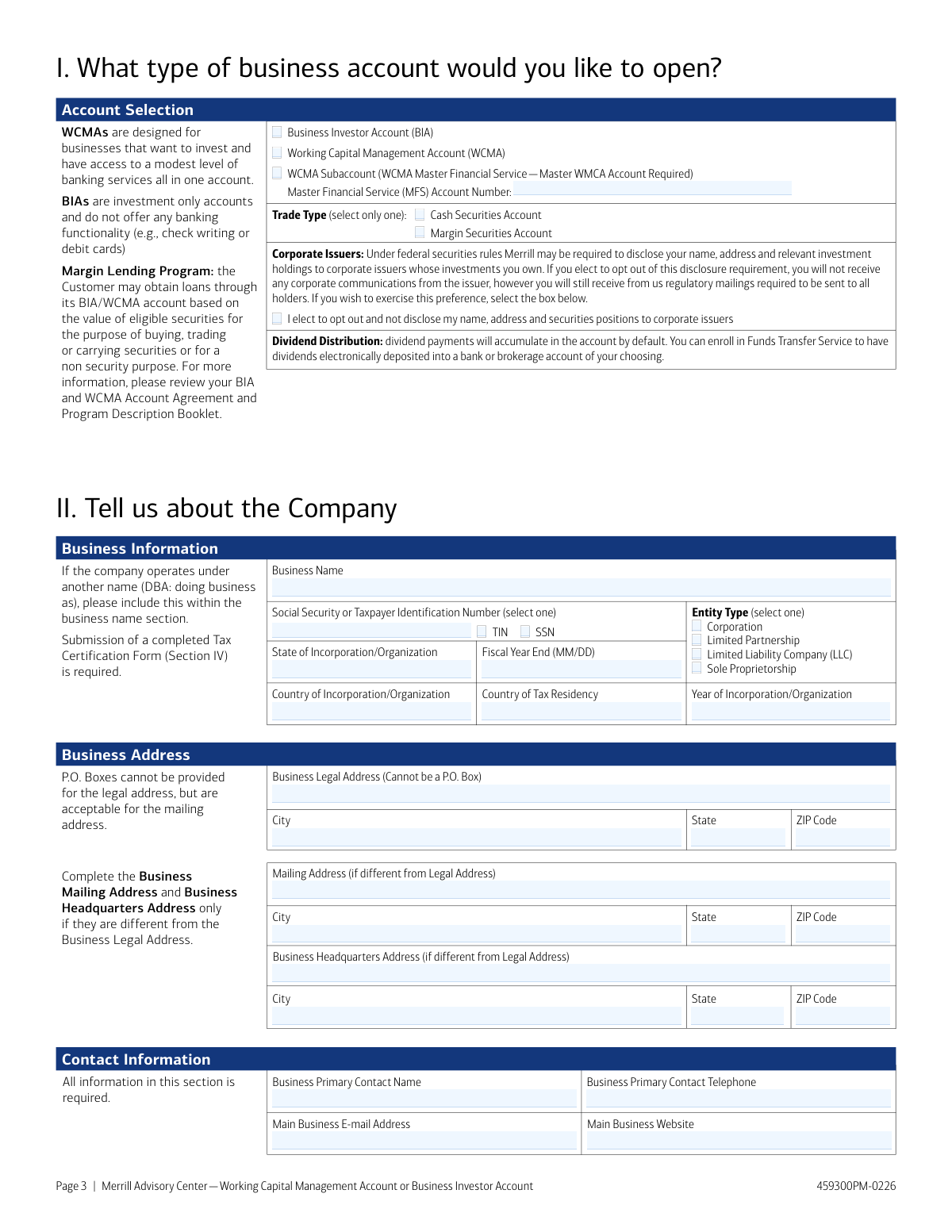
This check ensures that the 'Business Legal Address' on page 3 and the 'Residential Address' for principals on page 7 are physical locations and not P.O. Boxes. This is crucial for regulatory compliance, including Know Your Customer (KYC) rules, which require a verifiable physical address for the legal entity and its controllers. If a P.O. Box is detected, the form will display an error and require the user to enter a valid street address.
2
Ensures Tax ID Number Format and Type Consistency
This validation confirms that the Taxpayer Identification Number (TIN) or Social Security Number (SSN) provided on pages 3 and 8 matches the standard format for the selected type (e.g., 9 digits for SSN, XX-XXXXXXX for EIN). It ensures the number is correctly formatted for submission to the IRS for tax reporting purposes. A mismatch or incorrect format will prevent form submission and prompt the user for correction, avoiding future tax-related issues.
3
Requires Details for 'Yes' on Trading Experience
This is a conditional logic check on page 5. If an applicant answers 'Yes' to 'Does the Authorized Representative(s) of the entity have any trading experience?', the system requires completion of the subsequent fields specifying trading type, product experience, and start year. This is vital for assessing the client's investment sophistication and risk tolerance, ensuring suitability of recommendations and services. Failure to provide these details will block the application's progress.
4
Mandates Disclosure for Financial Affiliation
This check enforces a regulatory requirement on page 5. If a user answers 'Yes' to the question about affiliation with a broker-dealer or other financial institution, the fields for 'Affiliation Type', 'Name of affiliated Company', 'Name of Person', and 'Position with Company' become mandatory. This information is required by FINRA to monitor for potential conflicts of interest and insider trading. An incomplete disclosure will result in a validation error.
5
Verifies Beneficial Ownership Percentage is Valid
On the 'Business Principals' section (page 7), if an individual is designated as a 'Beneficial Owner', this check validates that the ownership percentage field contains a numeric value greater than 0 and up to 100. This is a critical component of Anti-Money Laundering (AML) regulations, which require the identification of individuals with significant ownership. An invalid or missing percentage will trigger an error.
6
Confirms Principal is of Legal Age
This validation examines the 'Date of Birth' provided for each business principal on page 7 to ensure the individual is of legal age to enter into a binding contract (typically 18 years or older). This protects both the financial institution and the applicant by confirming legal capacity. An invalid date or an age below the legal minimum will prevent the form from being submitted.
7
Enforces Single, Correct Entity Authorization Form
This validation ensures that the applicant completes and signs only one of the entity-specific authorization forms (Sections VII-X) and that the completed form matches the 'Entity Type' selected on page 3. This is a critical logical check to ensure the correct legal authorization is on file for the business structure. Submitting multiple or mismatched forms will result in a hard stop, requiring the user to correct the discrepancy.
8
Requires Master Account Number for Subaccounts
If 'WCMA Subaccount' is chosen as the account type on page 3, this check makes the 'Master Financial Service (MFS) Account Number' field mandatory. It also validates that the entered number conforms to a valid account number format. This is essential for correctly linking the new subaccount to the existing master account for billing and reporting. The application cannot proceed without a valid master account number in this scenario.
9
Mandates Explanation for 'Other' Selections
In sections like 'Source of Income', 'Source of Wealth', and 'Industry' (page 4), if the user selects the 'Other' radio button or checkbox, the corresponding text field for explanation becomes a required field. This prevents submission of ambiguous data and ensures that compliance and account-opening teams have the necessary details to understand the client's business and financial profile. The form will show an error if 'Other' is selected but the explanation is left blank.
10
Validates LLC Tax Classification Selection
When 'Limited Liability Company (LLC)' is selected on page 3, this check ensures that a corresponding tax classification ('C', 'S', or 'P') is selected on the Tax Certification Form (page 8). Because LLCs have flexible tax structures, this information is not optional and is fundamental for correct IRS reporting and account setup. The form will be considered incomplete if the LLC tax classification is missing.
11
Prevents Corporate Secretary Signature Conflict
For corporations (Section VII), this complex rule validates that the person signing page 13 as an 'Agreement Signer' is not the same person who signed page 12 as the Corporate Secretary. An exception is allowed only if another 'Agreement Signer' also signs page 13, or if the individual is the sole officer and initials a confirmation box. This check enforces proper corporate governance and authorization protocols, preventing an individual from self-authorizing in a way that may violate corporate bylaws.
12
Restricts WCMA-Only Features for BIA Accounts
This validation disables the entire 'Account Features/Services' section on page 9, including check writing and Visa card options, if the applicant selected 'Business Investor Account (BIA)' on page 3. This prevents users from requesting features that are not part of the BIA product offering. It improves user experience by hiding irrelevant options and ensures the application is accurate for the selected account type.
13
Flags Documentation Requirement for Non-U.S. Residents
On page 7, if a principal indicates their primary residence is not in the United States, this check flags the mandatory requirement for uploading supporting documents (U.S. Permanent Resident Card and a valid passport). This is a critical compliance step for KYC and AML procedures for non-U.S. persons. The system would prevent final submission until the required documents are attached or acknowledged.
14
Cross-references 'Agreement Signer' Authority
This check verifies that the individual(s) signing the final entity authorization form (e.g., page 13 for Corporations) has been designated with 'Agreement Signer' authority in the 'Business Principals' section on page 7. This ensures the person legally binding the company to the terms and conditions has been explicitly granted that power within the application itself. A mismatch would trigger a validation failure, as the signature would be considered unauthorized.
Common Mistakes in Completing Merrill BIA and WCMA Application
Applicants often overlook the list of 'Additional Required Documents' on page 2, failing to submit items like a Certificate of Good Standing, Articles of Incorporation, or a Fictitious Name Certificate. This happens because the list is separate from the main application fields. Missing documents are a primary cause for application rejection or significant processing delays, as Merrill cannot verify the business entity's legal status without them.
The instructions for LLCs in Section IV are complex and frequently misunderstood, especially for single-member LLCs (SMLLCs). Applicants often incorrectly enter the LLC's name and EIN instead of the owner's name and SSN/TIN, or they fail to enter the correct tax classification (C, S, or P). These errors lead to tax reporting issues and require the form to be corrected and resubmitted, delaying account opening.
Sections VII through X have very specific signature requirements that are often missed. For example, an LLC application (Section IX) requires all members or all managers to sign, a Partnership (Section VIII) requires all General Partners, and a Corporation (Section VII) has specific rules about who can sign which page. A single missing or incorrect signature will invalidate the authorization and halt the application process until a correctly signed version is provided.
Section III explicitly states to 'make additional copies of this page as needed' for every business principal, authorized representative, and beneficial owner with 25% or greater interest. Applicants frequently submit only one page for the primary contact, assuming it's sufficient. This results in an incomplete application, as federal regulations require financial institutions to identify all key individuals associated with a business account.
On page 3, the form clearly states 'Cannot be a P.O. Box' for the Business Legal Address, yet applicants often enter one out of habit. This mistake occurs because people may not distinguish between a mailing address and a required physical legal address. Using a P.O. Box here will cause the application to be flagged for correction, as regulatory and identity verification rules require a physical location for the entity.
In Section II, the form requires a clear description of the business's activities and revenue generation, but applicants often provide generic, one-word answers like 'Consulting' or 'Services'. This is insufficient for regulatory compliance, as the financial institution needs to understand the nature of the business to assess risk. A vague description will trigger a request for more information, delaying the account approval.
Applicants in Section II often provide the same information for both 'Source of Income' and 'Source of Wealth' without understanding the distinction. 'Source of Income' refers to the entity's ongoing revenue stream, while 'Source of Wealth' refers to the origin of the entity's substantial assets (e.g., initial capital from sale of a business). This confusion leads to inaccurate financial profiling and may require clarification from the applicant.
In the 'Affiliation Information' sections (pages 5 and 7), applicants may fail to disclose if they, their spouse, or other principals are employed by a broker-dealer, SRO, or other financial institution. This oversight can happen due to a misunderstanding of the scope of the question or simply forgetting a spouse's employment. Failure to disclose these affiliations is a serious regulatory issue that can lead to application rejection or future compliance problems.
The application booklet contains separate, multi-page authorization forms for Corporations (Sec VII), Partnerships (Sec VIII), LLCs (Sec IX), and Sole Proprietorships (Sec X). A common error is for an applicant to fill out the incorrect section for their business type, for example, completing the Corporation form for an LLC. This invalidates the entire authorization and requires the applicant to redo several pages, causing significant delays.
In Section III, applicants must designate individuals as a Business Principal, Authorized Representative, and/or Beneficial Owner, but the definitions can be confusing. An individual is often more than one of these, and applicants may only check one box, leading to an incomplete profile. For instance, an LLC member with 30% ownership who also signs trades is all three, and this must be accurately reflected for compliance purposes.
Saved over 80 hours a year
“I was never sure if my IRS forms like W-9 were filled correctly. Now, I can complete the forms accurately without any external help.”
Kevin Martin Green
Your data stays secure with advanced protection from Instafill and our subprocessors




Robust compliance program
Transparent business model
You’re not the product. You always know where your data is and what it is processed for.
ISO 27001, HIPAA, and GDPR
Our subprocesses adhere to multiple compliance standards, including but not limited to ISO 27001, HIPAA, and GDPR.
Security & privacy by design
We consider security and privacy from the initial design phase of any new service or functionality. It’s not an afterthought, it’s built-in, including support for two-factor authentication (2FA) to further protect your account.
Fill out Merrill BIA and WCMA Application with Instafill.ai
Worried about filling PDFs wrong? Instafill securely fills merrill-business-investor-account-bia-and-working-capital-management-account-wcma-account-application-booklet-and forms, ensuring each field is accurate.
