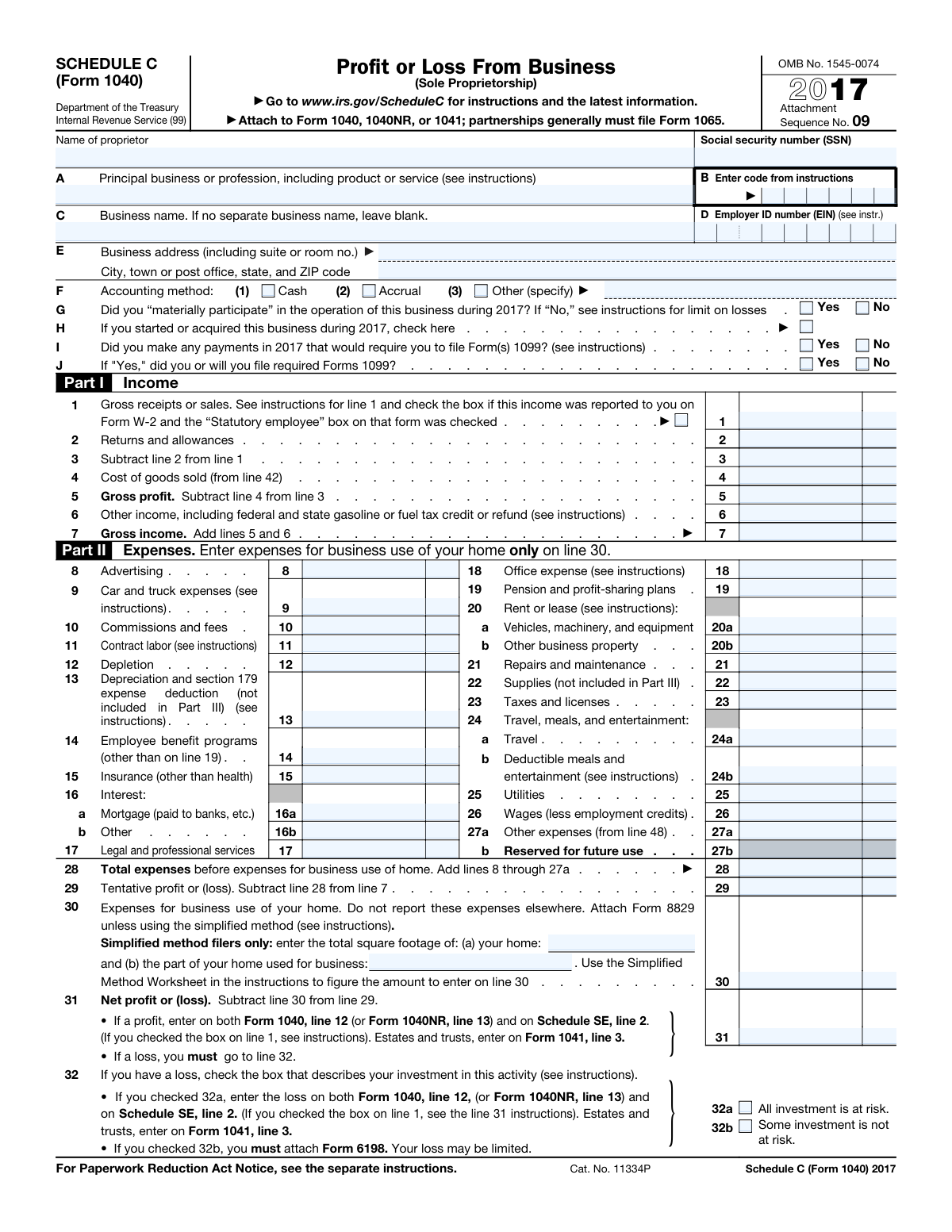
Yes! You can use AI to fill out Schedule C (Form 1040), Profit or Loss From Business (Sole Proprietorship) (2017)

Schedule C (Form 1040) is an Internal Revenue Service tax schedule that sole proprietors (and certain single-member LLCs treated as disregarded entities) use to report gross receipts, cost of goods sold, deductible business expenses, and the resulting net profit or loss for the year. The net amount generally flows to Form 1040 (and may also affect self-employment tax via Schedule SE), making it a key document for accurately calculating taxable income and allowable deductions. It also captures important business details such as the principal business activity code, accounting method, and whether 1099 filing requirements apply. Today, this form can be filled out quickly and accurately using AI-powered services like Instafill.ai, which can also convert non-fillable PDF versions into interactive fillable forms.
Our AI automatically handles information lookup, data retrieval, formatting, and form filling.
It takes less than a minute to fill out Schedule C (Form 1040) using our AI form filling.
Securely upload your data. Information is encrypted in transit and deleted immediately after the form is filled out.

Form specifications

Form name: Schedule C (Form 1040), Profit or Loss From Business (Sole Proprietorship) (2017)
Number of pages: 2
Filled form examples: Form Schedule C (Form 1040) Examples
Language: English
Categories: business tax forms, tax forms, IRS forms, business forms, small business forms
main-image

Instafill Demo: filling out a legal form in seconds

How to Fill Out Schedule C (Form 1040) Online for Free in 2026

Are you looking to fill out a SCHEDULE C (FORM 1040) form online quickly and accurately? Instafill.ai offers the #1 AI-powered PDF filling software of 2026, allowing you to complete your SCHEDULE C (FORM 1040) form in just 37 seconds or less.
Follow these steps to fill out your SCHEDULE C (FORM 1040) form online using Instafill.ai:
  1. 1 Go to Instafill.ai and upload the Schedule C (Form 1040) PDF (or select it from the form library).
  2. 2 Enter or import your taxpayer and business identification details (name, SSN, business name/DBA, EIN if any, business address, principal business/profession, and business activity code).
  3. 3 Use the AI prompts to input your income figures for Part I (gross receipts/sales, returns/allowances, other income) and confirm whether any income was reported as statutory employee on Form W-2.
  4. 4 If applicable, complete Part III (Cost of Goods Sold) by providing inventory method, beginning/ending inventory, purchases, labor, materials, and other costs so the system calculates COGS for line 4.
  5. 5 Enter deductible expenses in Part II (advertising, vehicle, contract labor, depreciation/Section 179, insurance, interest, rent/lease, repairs, supplies, taxes, travel/meals, utilities, wages, and other expenses) and let the AI total lines 8–27a and compute tentative profit/loss.
  6. 6 Add home office information for line 30 (simplified method square footage or attach Form 8829 details) and have the AI calculate net profit or loss on line 31 and guide any required at-risk loss selection on line 32.
  7. 7 If claiming vehicle expenses, complete Part IV (placed-in-service date, mileage, availability, and substantiation questions), then review the final calculations, run validation checks, and export/attach the completed Schedule C to your Form 1040/1040NR/1041 filing package.

Our AI-powered system ensures each field is filled out correctly, reducing errors and saving you time.

Why Choose Instafill.ai for Your Fillable Schedule C (Form 1040) Form?

Speed

Complete your Schedule C (Form 1040) in as little as 37 seconds.

Up-to-Date

Always use the latest 2026 Schedule C (Form 1040) form version.

Cost-effective

No need to hire expensive lawyers.

Accuracy

Our AI performs 10 compliance checks to ensure your form is error-free.

Security

Your personal information is protected with bank-level encryption.

Frequently Asked Questions About Form Schedule C (Form 1040)

Schedule C is used to report income and expenses from a business you operated as a sole proprietor (or as a single-member LLC treated as a disregarded entity). It calculates your net profit or loss that flows to your main tax return.

You generally file Schedule C if you had self-employment income from a trade or business you ran yourself (not as a corporation or partnership). If your business is a partnership, it generally files Form 1065 instead.

Schedule C is not filed by itself—it must be attached to Form 1040, 1040NR, or 1041 (as applicable). You submit it with your annual federal income tax return, typically by e-filing or mailing the full return package.

Have your business income records (1099s, invoices, sales reports), expense receipts, and mileage logs ready. If you sell products, you’ll also need inventory and cost of goods sold details (beginning inventory, purchases, ending inventory).

No—many sole proprietors use their SSN and leave the EIN field blank. If you have an EIN (for example, because you have employees or certain tax filings), enter it on line D.

Line B requires a code from the IRS Schedule C instructions that best matches your principal business activity. Choose the code that most closely describes what you primarily do, not every service you offer.

Material participation generally means you were actively involved in running the business during the year. If you answer “No,” your loss deduction may be limited under passive activity rules, so the instructions may require additional steps.

Check the box on line H indicating you started or acquired the business during 2017. You still report all income and expenses for the portion of the year you operated the business.

They ask whether you made payments that require filing Forms 1099 (for example, certain payments to independent contractors) and whether you did or will file them. If you answer “Yes” on line I, you must answer line J.

If your income was reported on a W-2 with the “Statutory employee” box checked, you still report it on Schedule C and check the box on line 1. This helps the IRS understand why W-2 wages are being reported as business receipts.

Home office expenses are reported only on line 30, not spread across other expense lines. You generally attach Form 8829 unless you use the simplified method, in which case you enter your home and business square footage and compute the simplified amount.

Complete Part III if your business sells products and you have cost of goods sold to report on line 4. You’ll enter inventory method, beginning inventory, purchases, labor (not including payments to yourself), materials, other costs, and ending inventory.

Only complete Part IV if you claim car or truck expenses on line 9 and you are not required to file Form 4562 for this business. You’ll need the in-service date, business/commuting/other miles, and whether you have written evidence (like a mileage log).

Yes—AI tools can help organize your information and auto-fill fields to reduce manual entry errors. Services like Instafill.ai use AI to auto-fill form fields accurately and save time, but you should still review the final numbers against your records.

You can upload your Schedule C PDF to Instafill.ai, then provide your business details and totals (income, expenses, mileage, inventory) so the AI can map and auto-fill the correct fields. If your PDF is flat/non-fillable, Instafill.ai can convert it into an interactive fillable form before auto-filling.

Compliance Schedule C (Form 1040)
Validation Checks by Instafill.ai

1
Proprietor Name Required and Plausible Full Legal Name
Validates that the proprietor name field is present and contains a plausible full legal name (e.g., at least two alphabetic tokens, not only initials or placeholder text like 'N/A'). This is important because Schedule C must be tied to the taxpayer’s identity on the associated Form 1040/1040NR/1041. If validation fails, the submission should be rejected or routed for manual review because identity matching and e-filing acceptance may fail.
2
SSN Format and Disallowed Values Check
Ensures the SSN is exactly 9 digits (allowing common formatting like XXX-XX-XXXX) and is not an obviously invalid value (e.g., all zeros, 123456789). This prevents misidentification and downstream IRS matching errors. If validation fails, block submission and prompt for correction because the return cannot be properly associated with the taxpayer.
3
Business Activity Code Format and Presence
Checks that the business activity code is provided and matches the expected numeric format from IRS instructions (typically a 6-digit NAICS-based code). This matters because the IRS uses the code for classification and compliance analytics. If invalid or missing, flag as an error and require correction before acceptance.
4
Principal Business Description Completeness
Validates that the principal business/profession description is non-empty and sufficiently descriptive (not just 'business' or a single generic word). This is important for consistency with the activity code and for audit clarity. If it fails, require the filer to provide a clearer description or route to review.
5
EIN Format and Conditional Requirement
If an EIN is provided, validates it is 9 digits and matches EIN formatting rules (commonly XX-XXXXXXX) and is not identical to the SSN. If the filer indicates business circumstances that typically require an EIN in your workflow (e.g., wages paid on line 26 > 0), enforce EIN presence or require an explanation. If validation fails, block or warn depending on policy because incorrect EINs cause IRS matching failures and payroll-related inconsistencies.
6
Business Address Completeness and ZIP/State Validation
Ensures street address, city, state, and ZIP are present, and validates state as a valid US state/territory abbreviation and ZIP as 5 digits (or ZIP+4). A complete address is required for correspondence and identity verification. If invalid, require correction; if partially missing, prevent submission due to incomplete required identification data.
7
Accounting Method Selection is Exactly One (and 'Other' Requires Specification)
Validates that exactly one accounting method is selected: Cash, Accrual, or Other. If 'Other' is selected, the 'Other (specify)' text and/or the accounting method code must be provided and non-blank. If this fails, reject submission because the accounting method affects income/expense timing and IRS processing.
8
Yes/No Checkbox Pairs are Mutually Exclusive (G, I, J, 34, 45, 46, 47a, 47b)
Checks that for each Yes/No question, the filer selected one and only one option (not both, not neither where required). This prevents ambiguous responses that break business rules and e-file schemas. If validation fails, require the user to correct the selection before submission.
9
Form 1099 Logic: J Must Be Answered Only When I = Yes
Enforces that line J (will you file required Forms 1099) is answered only if line I is 'Yes', and that J is blank/disabled when I is 'No'. This is important because J is a dependent question and inconsistent answers can trigger compliance flags. If violated, block submission and prompt the filer to correct the dependency.
10
Income Arithmetic: Line 3 = Line 1 − Line 2 (Dollars/Cents Consistency)
Validates that the computed value of line 3 equals line 1 minus line 2, including proper handling of cents fields (two digits) and borrowing when needed. This prevents math errors that cascade into gross profit and net profit calculations. If the numbers do not reconcile, either auto-calculate line 3 or reject with a clear discrepancy message.
11
COGS Arithmetic: Line 5 = Line 3 − Line 4 and Line 7 = Line 5 + Line 6
Checks that line 5 equals line 3 minus line 4, and that line 7 equals line 5 plus line 6 (per column where applicable), with correct cents precision. These are core Schedule C computations and must reconcile for accurate taxable income. If validation fails, auto-recompute where allowed or block submission to prevent incorrect tax results.
12
Expenses Arithmetic: Line 28 = Sum of Lines 8–27a and Line 29 = Line 7 − Line 28
Ensures line 28 equals the sum of all expense lines 8 through 27a (respecting the correct column mapping) and that line 29 equals line 7 minus line 28. This is critical because it determines tentative profit/loss and affects self-employment tax. If mismatched, the system should recalculate totals or require correction before filing.
13
Home Office Simplified Method Square Footage Constraints
If simplified method square footage fields are provided, validates that total home square footage and business square footage are positive integers and that business square footage is less than or equal to total home square footage. This prevents impossible home office claims and calculation errors. If invalid, block submission or require corrected values before allowing a line 30 amount.
14
Net Profit/Loss Logic: Line 31 = Line 29 − Line 30 and Loss Requires 32a or 32b
Validates that line 31 equals line 29 minus line 30, and if line 31 is negative (a loss), exactly one of 32a or 32b must be checked. This is important because at-risk rules and required attachments depend on the loss classification. If validation fails, prevent submission and prompt for the correct at-risk selection (and attachment requirement if 32b).
15
Cost of Goods Sold (Part III) Reconciliation to Line 4
If any Part III fields are populated, validates that line 40 equals lines 35–39 summed, line 42 equals line 40 minus line 41, and Schedule C line 4 equals line 42 (dollars/cents aligned). This ensures COGS is internally consistent and correctly carried to Part I. If it fails, require correction or auto-calculate to avoid misstated gross profit.
16
Vehicle Section Required When Claiming Line 9 (and Mileage/Date Validations)
If car and truck expenses (line 9) are greater than zero and the filer is completing Part IV, validate that the placed-in-service date is a valid calendar date and not after 12/31/2017, and that miles (business/commuting/other) are non-negative integers with at least one mile entered. Also validate that 47b is answered only if 47a = Yes. If any checks fail, block submission because vehicle deductions are high-risk and require consistent substantiation data.

Common Mistakes in Completing Schedule C (Form 1040)

Using a nickname or mismatched proprietor name/SSN

People often enter a shortened name (e.g., “Mike” instead of “Michael”) or a name that doesn’t match IRS/SSA records, or they transpose digits in the SSN. This can trigger IRS matching issues, slow processing, or cause notices requesting clarification. Always use your full legal name exactly as it appears on your Social Security card and double-check the SSN digit-by-digit; AI-powered tools like Instafill.ai can help by validating identity fields and flagging formatting or mismatch risks before submission.

Confusing business name (DBA) with proprietor name (or filling both incorrectly)

Many filers repeat their personal name in the “Business name” field even when they have no DBA, or they leave the DBA blank when they actually operate under a trade name. This can create inconsistencies with bank accounts, 1099s received, state registrations, or prior-year filings, increasing the chance of IRS questions. Enter the trade/DBA name only if it’s different from your legal name; otherwise leave it blank as instructed—Instafill.ai can prompt the correct choice based on your prior entries and business profile.

Entering the wrong EIN (or entering an EIN when none applies)

A common error is entering a payroll EIN from another activity, a prior business’s EIN, or putting an EIN in the field when the sole proprietor doesn’t have one for this business. Incorrect EINs can misroute IRS matching, cause correspondence, or create confusion with 1099 reporting and payroll filings. Only enter the EIN issued for this specific business (if you have one); otherwise leave it blank—Instafill.ai can help ensure the EIN format is correct and consistent with the business identity information.

Incomplete or non-mailing business address

Filers frequently omit suite/room numbers, use an old address, or enter a physical location that isn’t where they reliably receive mail. This can lead to missed IRS notices, delayed correspondence, and processing delays if the IRS needs clarification. Use a complete, current mailing address (street + unit, city, state, ZIP) and keep it consistent with your Form 1040 address when appropriate; Instafill.ai can standardize address formatting and catch missing ZIP/unit details.

Vague principal business description and incorrect business activity code (Lines A & B)

People often write broad descriptions like “consulting” or “sales” and then pick a business activity code that doesn’t match the actual service/product. An incorrect code can affect how the return is reviewed, complicate audits, and create inconsistencies with industry norms and 1099s. Provide a specific description (e.g., “graphic design services” or “online retail of clothing”) and select the matching IRS code from the instructions; Instafill.ai can suggest likely codes and validate that the description and code align.

Selecting the wrong accounting method (Cash/Accrual/Other) or checking multiple boxes

Some filers check both Cash and Accrual, or choose Accrual without actually tracking receivables/payables, or select “Other” but forget to specify the method/code. This can create inconsistencies with reported income/expenses and may require amended returns if the method is wrong. Choose the method you actually used for your books and records for the year and check only one box; if “Other,” clearly specify it—Instafill.ai can enforce single-selection logic and require the “Other” specification when needed.

Misunderstanding material participation and passive loss implications (Line G)

Filers sometimes answer “Yes” automatically without meeting the IRS tests, or answer “No” without realizing it can limit deductible losses. Incorrectly answering can lead to disallowed losses, additional tax, and potential penalties if the IRS challenges the classification. Review the IRS material participation tests and answer based on your actual involvement and time spent; Instafill.ai can provide guided prompts and consistency checks against your business facts.

Incorrect 1099 answers (Lines I & J) and forgetting required filings

A frequent mistake is checking “No” on Line I even though the business paid contractors, attorneys, or others who may require 1099-NEC/1099-MISC reporting, or checking “Yes” on I but leaving J inconsistent. This can trigger IRS compliance notices and penalties for missing information returns. Track vendor payments and determine whether 1099s are required, then ensure Line I and Line J are logically consistent; Instafill.ai can help by prompting 1099 considerations when contract labor is entered.

Gross receipts errors: netting out expenses, mixing personal income, or mishandling W-2 statutory employee box (Line 1)

People often report net income instead of gross receipts, include personal reimbursements, or forget to check the statutory employee box when income was reported on a W-2 with that designation. Underreporting gross receipts can increase audit risk and cause mismatches with 1099-K/1099-NEC/1099-MISC or W-2 data. Report total business receipts before expenses, keep personal items out, and check the statutory employee box only when the W-2 indicates it; Instafill.ai can reconcile totals and flag likely mismatches with common tax documents.

Cost of Goods Sold and inventory mistakes (Parts I & III)

Common issues include claiming COGS without completing Part III, entering beginning inventory that doesn’t match last year’s ending inventory, forgetting to subtract personal withdrawals from purchases (Line 36), or failing to explain inventory valuation changes (Line 34). These errors can materially distort profit and invite IRS questions or adjustments. Complete Part III whenever you have inventory/COGS, keep inventory roll-forwards consistent year-to-year, and attach explanations when required; Instafill.ai can auto-calculate roll-forwards and require explanations when “Yes” is selected.

Double-dipping or misplacing home office expenses (Line 30) and missing Form 8829/simplified method details

Filers often deduct home office costs again in utilities/rent/repairs lines and also on Line 30, or they enter a Line 30 amount without attaching Form 8829 (when required) or without providing square footage for the simplified method. This can lead to overstated deductions, disallowance on audit, and recalculated tax. Put business-use-of-home expenses only on Line 30, follow either Form 8829 or the simplified method rules, and provide the required square footage figures; Instafill.ai can prevent duplicate categorization and ensure the correct attachments/inputs are included.

Vehicle expense documentation and mileage allocation errors (Line 9 and Part IV)

People claim car/truck expenses on Line 9 but leave Part IV incomplete, enter mileage totals that don’t add up (business + commuting + other), or answer “Yes” to written evidence without having a contemporaneous log. Inadequate substantiation is one of the most common reasons vehicle deductions are reduced or denied. Keep a mileage log, ensure totals reconcile, and answer evidence questions truthfully; Instafill.ai can validate that mileage categories sum correctly and prompt for required vehicle details when Line 9 is used.
Saved over 80 hours a year

“I was never sure if my IRS forms like W-9 were filled correctly. Now, I can complete the forms accurately without any external help.”

Kevin Martin Green

Your data stays secure with advanced protection from Instafill and our subprocessors

Robust compliance program

Transparent business model

You’re not the product. You always know where your data is and what it is processed for.

ISO 27001, HIPAA, and GDPR

Our subprocesses adhere to multiple compliance standards, including but not limited to ISO 27001, HIPAA, and GDPR.

Security & privacy by design

We consider security and privacy from the initial design phase of any new service or functionality. It’s not an afterthought, it’s built-in, including support for two-factor authentication (2FA) to further protect your account.

Fill out Schedule C (Form 1040) with Instafill.ai

Worried about filling PDFs wrong? Instafill securely fills schedule-c-form-1040-profit-or-loss-from-business-sole-proprietorship-2017 forms, ensuring each field is accurate.