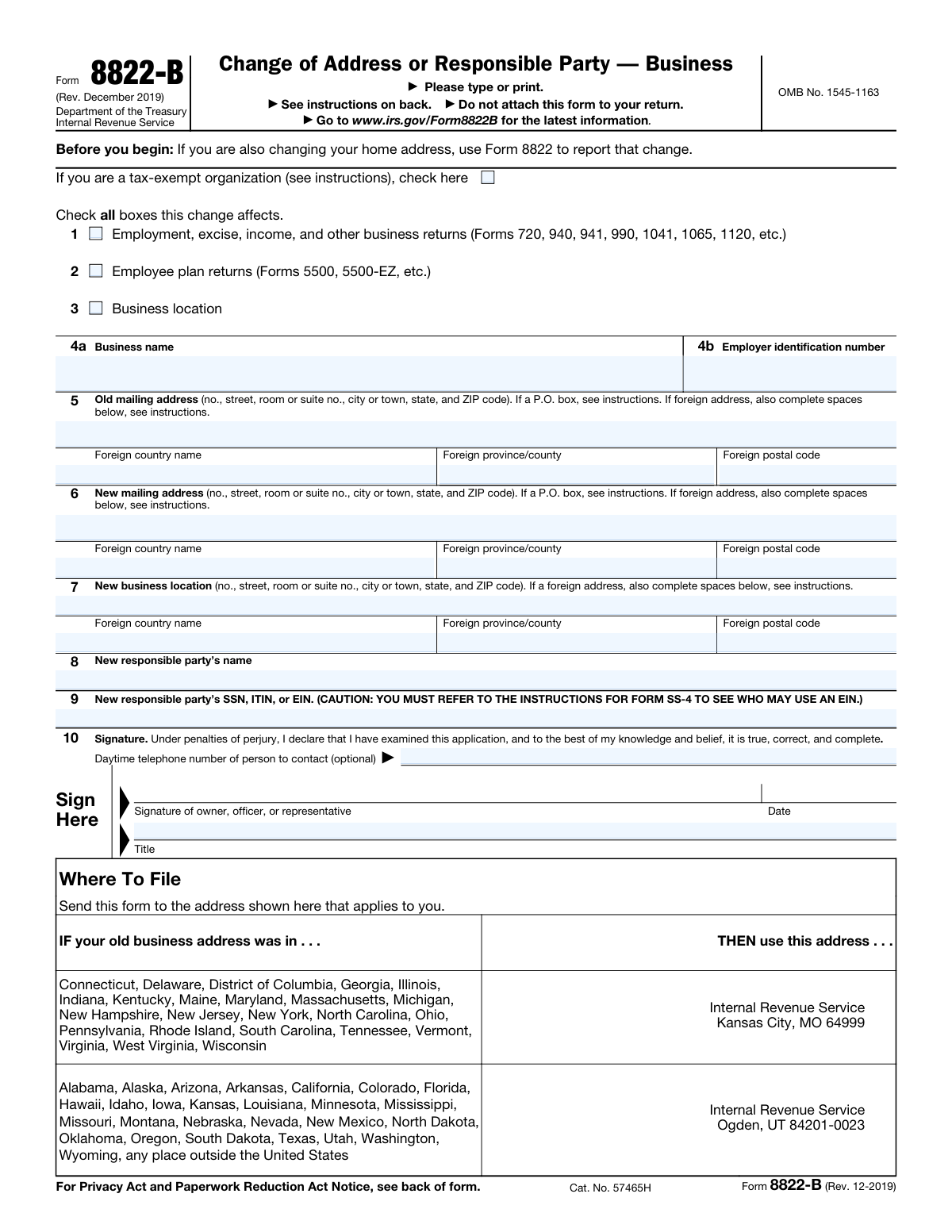
Yes! You can use AI to fill out Form 8822-B, Change of Address or Responsible Party — Business

Form 8822-B is an Internal Revenue Service form that businesses, tax-exempt organizations, and other entities use to notify the IRS of changes to their business mailing address, business location, or the identity of their “responsible party.” Keeping this information current helps ensure the IRS can send important notices and correspondence to the correct address and associate the EIN with the correct responsible individual. Entities with an EIN generally must report a responsible party change within 60 days, and processing typically takes several weeks. Today, this form can be filled out quickly and accurately using AI-powered services like Instafill.ai, which can also convert non-fillable PDF versions into interactive fillable forms.
Our AI automatically handles information lookup, data retrieval, formatting, and form filling.
It takes less than a minute to fill out 8822-B using our AI form filling.
Securely upload your data. Information is encrypted in transit and deleted immediately after the form is filled out.

Form specifications

Form name: Form 8822-B, Change of Address or Responsible Party — Business
Number of pages: 1
Language: English
Categories: business tax forms, tax forms, IRS forms, business forms
main-image

Instafill Demo: filling out a legal form in seconds

How to Fill Out 8822-B Online for Free in 2026

Are you looking to fill out a 8822-B form online quickly and accurately? Instafill.ai offers the #1 AI-powered PDF filling software of 2026, allowing you to complete your 8822-B form in just 37 seconds or less.
Follow these steps to fill out your 8822-B form online using Instafill.ai:
  1. 1 Go to Instafill.ai and upload Form 8822-B (or select it from the form library).
  2. 2 Use the AI prompt or guided questions to indicate what the change affects (business returns, employee plan returns, business location) and whether the entity is tax-exempt.
  3. 3 Enter the business name and Employer Identification Number (EIN) exactly as shown on IRS records.
  4. 4 Provide the old mailing address and the new mailing address (including foreign address details if applicable).
  5. 5 If applicable, enter the new business location address (physical location) and any foreign location details.
  6. 6 If changing the responsible party, enter the new responsible party’s name and SSN/ITIN/EIN, and add a contact phone number if desired.
  7. 7 Review the completed form for accuracy, e-sign or prepare the signature section for the authorized signer, then download/print and mail it to the correct IRS address listed for the old business address state (and attach power of attorney documentation if signing as a representative).

Our AI-powered system ensures each field is filled out correctly, reducing errors and saving you time.

Why Choose Instafill.ai for Your Fillable 8822-B Form?

Speed

Complete your 8822-B in as little as 37 seconds.

Up-to-Date

Always use the latest 2026 8822-B form version.

Cost-effective

No need to hire expensive lawyers.

Accuracy

Our AI performs 10 compliance checks to ensure your form is error-free.

Security

Your personal information is protected with bank-level encryption.

Frequently Asked Questions About Form 8822-B

Form 8822-B is used to notify the IRS of a change to a business’s mailing address, business location (physical address), or the identity of the business’s responsible party. It helps ensure the IRS sends notices and correspondence to the correct place and person.

Any entity with an EIN should file Form 8822-B when it changes its business mailing address, business location, or responsible party. The instructions note that entities must file even if they are not currently engaged in a trade or business.

No. If you are changing your personal/home address, use Form 8822 for that change, and use Form 8822-B for the business address/responsible party change.

Check the boxes for the types of filings or changes affected: business returns (like Forms 941, 1120, 1065, 990, etc.), employee plan returns (Forms 5500 series), and/or business location. Check all that apply so the IRS updates the correct records.

The “new mailing address” is where the IRS should send mail. The “new business location” is the business’s physical address; complete it when your physical location changes (and check the “Business location” box).

Yes, but generally you should enter a P.O. Box instead of a street address only if your post office does not deliver mail to your street address. Follow the form’s P.O. Box instructions for your situation.

If an address is outside the U.S., complete the foreign country name, foreign province/county, and foreign postal code fields for that address. Do not abbreviate the country name, and follow the country’s postal code format.

A responsible party is the person who controls, manages, or directs the entity and its funds and assets (see Form SS-4 instructions for details). If your entity has an EIN and the responsible party changes, you must report the change on lines 8 and 9 within 60 days.

Enter the responsible party’s SSN or ITIN, or in limited cases an EIN (the form cautions you to review the Form SS-4 instructions to determine who may use an EIN). Use the identification number that applies to the responsible party under those rules.

An officer, owner, general partner, LLC member manager, plan administrator, fiduciary, or an authorized representative may sign. If a representative signs, they must attach a copy of their power of attorney (for example, Form 2848).

No. The form specifically says not to attach it to your return; you must mail it to the IRS address listed under “Where To File,” based on your old business address.

Mail it to the IRS address shown in the “Where To File” table based on the state (or location) of your old business address. Old addresses in the listed eastern/midwestern states go to Kansas City, MO 64999; old addresses in the listed western/southern states or outside the U.S. go to Ogden, UT 84201-0023.

Processing generally takes 4 to 6 weeks for the IRS to update your address or responsible party information. Times can vary, so consider mailing it as soon as the change occurs.

Yes. AI form-filling services like Instafill.ai can help auto-fill fields (such as addresses, EIN, and responsible party details) to save time and reduce typos, but you should still review everything for accuracy before signing and mailing.

You can upload the Form 8822-B PDF to Instafill.ai, provide your business details, and let it auto-populate the form fields for review and download. If your copy is a flat/non-fillable PDF, Instafill.ai can convert it into an interactive fillable form so you can complete it cleanly before printing and mailing to the IRS.

Compliance 8822-B
Validation Checks by Instafill.ai

1
Requires at least one change type checkbox to be selected
Validates that the filer checked at least one box under “Check all boxes this change affects” (business returns, employee plan returns, and/or business location). This is important because the IRS needs to know which accounts/filings the change should be applied to. If none are selected, the submission should be rejected or flagged as incomplete and routed for correction.
2
Business name presence and legal-name quality check
Ensures the Business name field is present and contains a plausible legal entity name (not blank, not only punctuation, and not obviously a person-only entry like a single first name). The IRS uses the legal name to match the EIN and apply the change to the correct entity. If the name is missing or clearly invalid, the form should fail validation and require resubmission.
3
EIN format validation (Employer Identification Number)
Validates that the EIN is provided and matches the standard EIN format (9 digits, optionally with a hyphen in the pattern NN-NNNNNNN). This prevents mis-keyed identifiers that would cause the change to be applied to the wrong taxpayer or not applied at all. If the EIN fails format checks, the submission should be blocked and the user prompted to correct it.
4
Old mailing address completeness and structure validation
Checks that the old mailing address includes the minimum required components for the address type: for U.S. addresses, street/PO box, city, state, and ZIP; for foreign addresses, the foreign country name plus appropriate locality/postal code fields. The old address is used for identity matching and routing to the correct IRS processing center. If incomplete, the form should be flagged because the IRS may be unable to verify or process the change.
5
New mailing address required and complete when address change is implied
Validates that a new mailing address is provided and complete when the submission indicates an address change (generally expected for Form 8822-B unless only responsible party is changing). For U.S. addresses, require city/state/ZIP; for foreign addresses, require country and foreign postal code fields as applicable. If the new mailing address is missing or incomplete, the submission should fail because the IRS cannot update the mailing address.
6
U.S. vs foreign address mutual exclusivity (old/new/business location)
Ensures that for each address block (old mailing, new mailing, new business location), the form is internally consistent: either a U.S. address is provided (with state + ZIP) or a foreign address is provided (with country and foreign postal code), but not both. This prevents ambiguous addresses and downstream mailing/processing errors. If both sets are populated or neither set is sufficient, validation should fail and require correction.
7
State and ZIP code format validation for U.S. addresses
Validates that U.S. state entries are valid USPS state/territory abbreviations and that ZIP codes are 5 digits or ZIP+4 (##### or #####-####). Correct state/ZIP formatting is critical for IRS correspondence delivery and for determining the correct filing address (Kansas City vs Ogden) based on the old business address state. If invalid, the system should reject the address or prompt for standardized corrections.
8
P.O. Box usage reasonableness check
Flags cases where the address line appears to be a P.O. Box and also includes a street delivery address in a conflicting way (e.g., both a PO Box and a street number), or where the PO Box is malformed (missing box number). The form instructions restrict PO Box usage to situations where street delivery is not available, and inconsistent entries can cause mailing failures. If detected, the submission should be flagged for review or require the user to choose a single deliverable mailing format.
9
Business location address required only when 'Business location' box is checked
Validates conditional completeness: if the “Business location” change type is checked, the New business location address must be provided and complete; if it is not checked, the New business location fields should be blank. This prevents accidental updates to physical location data and ensures required data is present when a location change is requested. If the condition is violated, the form should be rejected or returned for correction.
10
Responsible party name/ID conditional requirement and pairing
Ensures that if the New responsible party’s name is provided, the New responsible party’s SSN/ITIN/EIN is also provided (and vice versa), since lines 8 and 9 must be reported together for a responsible party change. This pairing is essential for IRS identity verification and proper account updates. If one is missing, validation should fail and the user should be prompted to complete both fields.
11
Responsible party TIN format validation (SSN/ITIN/EIN)
Validates that the responsible party’s identification number is a plausible SSN/ITIN/EIN format: 9 digits with optional hyphens, and not all zeros or obviously invalid repeated digits. Correct TIN formatting reduces processing delays and prevents misassociation with the wrong individual/entity. If the TIN fails validation, the submission should be blocked and corrected before acceptance.
12
Signature presence and signer role/title completeness
Checks that the form is signed and dated, and that a Title is provided for the signer (owner/officer/representative) to support authorization. The IRS will not process changes from unauthorized third parties, and missing signature/date/title undermines the perjury declaration and authorization. If signature/date/title are missing, the submission should be rejected as invalid.
13
Signature date format and non-future date validation
Validates that the signature date is a valid calendar date in an acceptable format and is not in the future. A valid date is needed to establish timeliness and processing order, and future dates can indicate data entry errors or invalid attestations. If the date is invalid or future-dated, the form should be flagged or rejected until corrected.
14
Daytime telephone number format validation (optional field)
If a daytime telephone number is provided, validates it contains a valid phone pattern (e.g., 10 digits for U.S. numbers, allowing common separators and optional country code) and is not clearly malformed (too short/long, non-numeric content beyond separators). While optional, a valid contact number improves IRS ability to resolve issues quickly. If invalid, the system should prompt correction but may allow submission if the field is truly optional.
15
Tax-exempt organization checkbox consistency with return types selected
Performs a reasonableness check that if the tax-exempt organization box is checked, the selected change types and context are consistent (e.g., business returns may include Form 990; employee plan returns may still apply, but the entity should not appear to be an individual). This helps catch misclassification that could lead to misrouting or incorrect account handling. If inconsistent signals are detected, the submission should be flagged for review rather than automatically rejected.

Common Mistakes in Completing 8822-B

Using the wrong form for a personal (home) address change

People often file Form 8822-B when they moved personally, but the IRS requires Form 8822 for home address changes. This can delay updates and cause IRS notices to keep going to the old address. Avoid this by confirming whether the change is for a business entity (8822-B) or an individual/home address (8822). AI-powered tools like Instafill.ai can prompt the correct form choice based on your situation and prevent misfiling.

Not checking the correct “change affects” boxes (or checking none)

Filers frequently forget to check which areas the change applies to (business returns, employee plan returns, business location), assuming the IRS will infer it from the addresses entered. Missing or incorrect boxes can lead to partial updates (for example, payroll filings updated but plan filings not) and continued mismatched records. Avoid this by checking every box that applies to the entity’s filings and location change, not just one. Instafill.ai can validate that at least one relevant box is selected and flag inconsistencies (e.g., business location address entered but “Business location” not checked).

Entering a DBA/trade name instead of the legal business name on IRS records

A common error is listing a brand name or “doing business as” name rather than the exact legal name associated with the EIN. This can cause IRS matching issues, processing delays, or the change being applied to the wrong entity record. Avoid it by copying the name exactly as shown on the EIN assignment letter (CP 575) or the most recent IRS correspondence/return. Instafill.ai can standardize and cross-check the business name format against stored entity data to reduce mismatches.

Incorrect EIN format or using the wrong identification number

People sometimes enter an SSN instead of the business EIN, transpose digits, omit digits, or use an EIN for a different related entity. An incorrect EIN can prevent the IRS from applying the change, or worse, attach the update to the wrong account. Avoid this by verifying the EIN from official IRS documents and entering all 9 digits in the correct order. Instafill.ai can validate EIN length/format and catch common digit-entry errors before submission.

Mixing up old vs. new mailing address fields

Filers often put the new address in the “Old mailing address” line (or vice versa), especially when copying from emails or moving documents quickly. This can result in the IRS “updating” the record to the wrong address and continuing to send mail to an unintended location. Avoid this by double-checking that line 5 is the prior address currently on IRS records and line 6 is the new address going forward. Instafill.ai can highlight side-by-side comparisons and warn if the “old” address looks newer (e.g., matches current address on file).

Improper P.O. Box usage and missing suite/room details

Many filers use a P.O. box even when street delivery exists, or they forget to include apartment/room/suite numbers, which the IRS specifically asks for. Missing unit details can cause returned mail, delayed notices, and problems receiving time-sensitive IRS correspondence. Avoid this by following the form’s P.O. box rule (use it only if the post office doesn’t deliver to the street address) and always including suite/room numbers when applicable. Instafill.ai can enforce address completeness and formatting (including unit designators) to reduce undeliverable mail.

Incorrect handling of foreign address fields (country/province/postal code)

For non-U.S. addresses, people often leave the foreign country/province/postal code blank, abbreviate the country name, or incorrectly place the postal code in the U.S. ZIP field. This can lead to mail delivery failures and processing delays because the IRS needs the foreign components in the designated spaces. Avoid this by following the country’s postal format, writing the full country name (no abbreviations), and completing the foreign fields only when the address is outside the U.S. Instafill.ai can detect foreign addresses and automatically route/format the data into the correct foreign address fields.

Filling out “New business location” without checking the Business location box (or vice versa)

A frequent mismatch is entering a new physical location on line 7 but forgetting to check the “Business location” box, or checking the box but leaving line 7 blank. This can cause the IRS to update only the mailing address and not the physical location, or to treat the submission as incomplete. Avoid this by ensuring the checkbox selection and the line 7 address content align. Instafill.ai can run consistency checks so the form can’t be finalized with contradictory selections.

Reporting a responsible party change incorrectly or missing the 60-day requirement

Filers often misunderstand who qualifies as a “responsible party,” enter a nominee/employee instead of the true controlling individual/entity, or forget that entities with an EIN must report responsible party changes within 60 days. Incorrect responsible party information can create compliance issues and may complicate IRS communications and account access. Avoid this by reviewing the Form SS-4 instructions for the definition and entering the correct person/entity and their proper SSN/ITIN/EIN. Instafill.ai can prompt eligibility guidance and validate that line 9 is present when line 8 is completed.

Entering the wrong ID type on line 9 (SSN/ITIN/EIN) or leaving it blank

People sometimes enter the business EIN again on line 9 when the responsible party should provide an SSN/ITIN, or they leave line 9 empty after providing a name. This can cause the IRS to reject or delay the responsible party update because the identification number is required to match the responsible party record. Avoid this by confirming whether the responsible party is an individual (SSN/ITIN) or an entity allowed to use an EIN per SS-4 instructions, and entering the correct number. Instafill.ai can validate the expected ID pattern and ensure line 9 is completed when line 8 is filled.

Missing signature/title/date or using an unauthorized signer (no power of attorney attached)

A very common rejection reason is an unsigned form, missing date/title, or a third party (accountant/assistant) signing without attaching a valid power of attorney (e.g., Form 2848). The IRS may refuse to process the change from an “unauthorized” party, delaying address updates and risking missed notices. Avoid this by ensuring an authorized owner/officer/partner/LLC member manager/fiduciary signs, includes title and date, and attaching POA documentation when a representative signs. Instafill.ai can flag missing signature blocks and remind representatives to attach POA before submission (and if you’re working from a flat non-fillable PDF, Instafill.ai can convert it into a fillable version to reduce signature/field omissions).
Saved over 80 hours a year

“I was never sure if my IRS forms like W-9 were filled correctly. Now, I can complete the forms accurately without any external help.”

Kevin Martin Green

Your data stays secure with advanced protection from Instafill and our subprocessors

Robust compliance program

Transparent business model

You’re not the product. You always know where your data is and what it is processed for.

ISO 27001, HIPAA, and GDPR

Our subprocesses adhere to multiple compliance standards, including but not limited to ISO 27001, HIPAA, and GDPR.

Security & privacy by design

We consider security and privacy from the initial design phase of any new service or functionality. It’s not an afterthought, it’s built-in, including support for two-factor authentication (2FA) to further protect your account.

Fill out 8822-B with Instafill.ai

Worried about filling PDFs wrong? Instafill securely fills form-8822-b-change-of-address-or-responsible-party-business forms, ensuring each field is accurate.