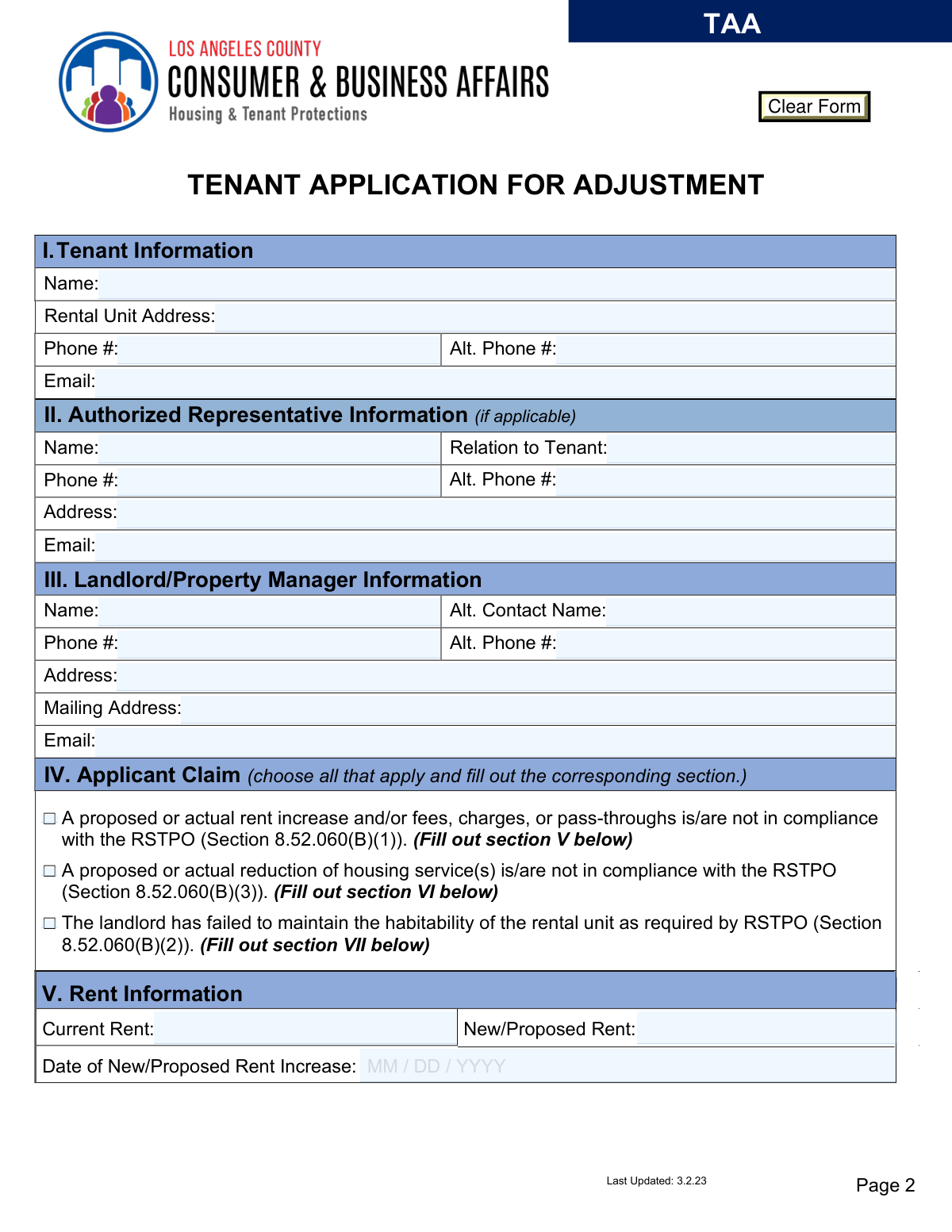
Yes! You can use AI to fill out Los Angeles County Department of Consumer and Business Affairs Tenant Application for Adjustment

The Tenant Application for Adjustment (TAA) is a formal document used by tenants in Los Angeles County to file a claim with the Department of Consumer and Business Affairs (DCBA) when they believe their landlord has violated the Rent Stabilization Program. This includes issues like unlawful rent increases, reduction in housing services, or failure to maintain a habitable living space. Filing this application is a critical step for tenants seeking a legal adjustment to their rent or other obligations. Today, this form can be filled out quickly and accurately using AI-powered services like Instafill.ai, which can also convert non-fillable PDF versions into interactive fillable forms.
Our AI automatically handles information lookup, data retrieval, formatting, and form filling.
It takes less than a minute to fill out TAA using our AI form filling.
Securely upload your data. Information is encrypted in transit and deleted immediately after the form is filled out.

Form specifications

Form name: Los Angeles County Department of Consumer and Business Affairs Tenant Application for Adjustment
Number of pages: 4
Language: English
Categories: IRS forms, business forms, IRS business forms, tenant forms, consumer forms
main-image

Instafill Demo: How to fill out PDF forms in seconds with AI

How to Fill Out TAA Online for Free in 2026

Are you looking to fill out a TAA form online quickly and accurately? Instafill.ai offers the #1 AI-powered PDF filling software of 2026, allowing you to complete your TAA form in just 37 seconds or less.
Follow these steps to fill out your TAA form online using Instafill.ai:
  1. 1 Navigate to Instafill.ai and upload or select the Los Angeles County Tenant Application for Adjustment (TAA) form.
  2. 2 Use the AI assistant to accurately fill in your personal details under 'Tenant Information' and, if applicable, the 'Authorized Representative Information'.
  3. 3 Provide the complete contact information for your landlord or property manager in Section III.
  4. 4 In Section IV, check the boxes that correspond to your claim(s), such as illegal rent increases, reduction in services, or habitability issues, and fill out the required details in the subsequent sections.
  5. 5 Compose a clear and detailed explanation of your claim in the 'Claim Details' section, providing all relevant facts and timelines.
  6. 6 Gather and upload all necessary supporting documents, such as rent receipts, notices, and correspondence with your landlord. The AI can help you attach these files to your application.
  7. 7 Carefully review the entire application for accuracy, then electronically sign and date the form before submitting it to the DCBA as per the instructions.

Our AI-powered system ensures each field is filled out correctly, reducing errors and saving you time.

Why Choose Instafill.ai for Your Fillable TAA Form?

Speed

Complete your TAA in as little as 37 seconds.

Up-to-Date

Always use the latest 2026 TAA form version.

Cost-effective

No need to hire expensive lawyers.

Accuracy

Our AI performs 10 compliance checks to ensure your form is error-free.

Security

Your personal information is protected with bank-level encryption.

Frequently Asked Questions About Form TAA

This form is for tenants in Los Angeles County to request an adjustment in their rent or other obligations if they believe their landlord has violated the Rent Stabilization and Tenant Protections Ordinance (RSTPO).

Tenants living in a rental unit covered by the LA County Rent Stabilization Program should file this form if they are experiencing issues like an illegal rent increase, a reduction in housing services, or unaddressed habitability problems.

Yes, you must file the application with the Department of Consumer and Business Affairs (DCBA) within 180 days from the date you knew, or reasonably should have known, about the landlord's potential violation.

Yes, for claims about reduced services or habitability, you must first give your landlord written notice and a reasonable time to fix the issue. For habitability claims, you must also file a complaint with the proper enforcement agency (e.g., Public Health) before submitting this application.

You must attach documents that support your claim, such as your lease agreement, rent receipts, notices of rent increases, and copies of any written notices you sent to your landlord. Failing to provide documents may cause your application to be rejected.

You can submit the completed application and all supporting documents to the DCBA by email, mail, fax, or in person. The specific contact information is listed in the form's instructions.

You can address multiple issues on one application. In Section IV, check all the boxes that apply to your situation and fill out the corresponding sections for each claim you are making.

Use this section to clearly explain the reasons for your claim(s). Provide a timeline of events, describe the problem in detail, and mention the supporting documents you have attached.

Yes, an authorized representative, such as a lawyer or advocate, can complete the form on your behalf. They must provide their own contact information in Section II of the application.

Not necessarily. The form states that under the California Public Records Act, the information and documents you submit may be subject to public disclosure unless specifically exempt by law.

Yes, services like Instafill.ai use AI to help you accurately auto-fill forms like this one. These tools can save you time and help reduce errors.

Simply upload the Tenant Application for Adjustment PDF to the Instafill.ai platform. The AI will make the form fillable online, and you can provide your information to have it completed automatically and ready for submission.

If you have a non-fillable or 'flat' PDF, you can use a service like Instafill.ai. It can convert the document into an interactive, fillable form that you can easily complete on your computer.

Compliance TAA
Validation Checks by Instafill.ai

1
Ensures Tenant Information is Complete
This check verifies that the Tenant Name, Rental Unit Address, and a primary Phone Number in Section I are all filled out. This information is fundamental for identifying the applicant and the property in question, and for all future communication. If this information is missing, the application cannot be processed and will be rejected for incompleteness.
2
Requires At Least One Applicant Claim Selection
Validates that the user has selected at least one checkbox in Section IV (Applicant Claim). The entire purpose of the form is to file a claim, so without a selection, the application has no basis. If no claim is selected, the form submission should be blocked and the user prompted to choose the reason for their application.
3
Conditional Requirement for Rent Information (Section V)
This check ensures that if the 'Rent Increase' claim is checked in Section IV, then the 'Current Rent', 'New/Proposed Rent', and 'Date of New/Proposed Rent Increase' fields in Section V are all completed. This information is essential to evaluate the validity of a rent-related claim. Failure to provide these details will result in an incomplete claim and prevent proper review.
4
Conditional Requirement for Housing Service Reduction Information (Section VI)
Verifies that if the 'Reduction of housing service(s)' claim is checked in Section IV, the applicant must complete Section VI, including the date the reduction occurred and whether written notice was provided. This data is critical for establishing a timeline and verifying that the tenant followed the required procedures. An application with this claim checked but Section VI left blank would be considered incomplete.
5
Conditional Requirement for Habitability Complaint Information (Section VII)
Ensures that if the 'failed to maintain the habitability' claim is checked in Section IV, the applicant must complete all parts of Section VII. This includes the date the concern began and answering the questions about providing notice to the landlord and filing a complaint with an enforcement agency. These are procedural prerequisites for the claim to be considered by the DCBA.
6
Validates All Date Formats
This check confirms that all date fields on the form are entered in a valid MM/DD/YYYY format. Consistent and correct date formatting is crucial for data integrity and accurately establishing timelines for the claim. If a date is entered incorrectly (e.g., 'Feb 3, 2023' or '2023-02-03'), the user should be prompted to correct the format before submission.
7
Verifies 180-Day Filing Window
This validation checks that the primary date of the incident (Date of New/Proposed Rent Increase, Date of Service Reduction, or when Habitability Concerns Began) is within 180 days of the application submission date. The form instructions explicitly state this deadline. An application filed outside this window is not compliant with LACC Chapter 8.52.060(B) and may be rejected.
8
Logical Rent Increase Amount
For a rent increase claim, this check verifies that the 'New/Proposed Rent' value in Section V is greater than the 'Current Rent' value. It is a logical impossibility for a rent increase claim to have a new rent that is less than or equal to the current rent. This prevents data entry errors and ensures the claim is logical on its face.
9
Logical Date Sequence for Landlord Notices
This check ensures that the date a tenant provided written notice to the landlord (in Sections VI and VII) is on or after the date the issue itself began. A notice cannot be provided before an issue exists. This validation prevents logical errors in the application timeline and ensures the sequence of events is plausible.
10
Requirement for Claim Details Explanation
Validates that the 'Claim Details' text area in Section VIII is not empty if any claim has been selected in Section IV. The checkboxes indicate the type of claim, but the narrative explanation is required to understand the specific circumstances and facts of the case. An application without this explanation lacks the necessary detail for an investigation to begin.
11
Validates Email Address Format
This check verifies that any email address entered in the Tenant, Authorized Representative, or Landlord sections follows the standard '[email protected]' format. Correct email formatting is essential for ensuring electronic communications and notices are successfully delivered. An invalid format would lead to communication failures and processing delays.
12
Ensures Signature Section is Complete
This validation confirms that the 'Print Name', 'Signature', and 'Date' fields in Section IX are all completed. The signature and printed name legally attest to the truthfulness of the application under penalty of perjury. An unsigned application is not legally valid and will be rejected.
13
Prerequisite Check for Habitability Claims
Based on the form instructions, this check verifies that if a habitability claim is made, the applicant has answered 'Yes' to both providing written notice to the landlord and filing a complaint with an enforcement agency in Section VII. These actions are required prior to submitting the application. If the applicant answers 'No' to either, the system should warn them that their application may be rejected for failing to meet procedural requirements.
14
Ensures Landlord Information is Provided
This check verifies that the Landlord/Property Manager's Name and at least one address (physical or mailing) are provided in Section III. The department cannot act on a claim without being able to identify and contact the other party involved. Missing landlord information would halt the entire process, so it is a critical component for a submittable application.

Common Mistakes in Completing TAA

Filing Without Fulfilling Prerequisites

Applicants for 'Reduction in Housing Service(s)' or 'Habitability Complaints' often submit this form without first providing written notice to their landlord and allowing reasonable time for a correction. For habitability issues, they also frequently forget to file a complaint with the proper enforcement agency beforehand, as required. This failure to complete required prior steps is a primary reason for immediate application rejection. To avoid this, carefully follow the instructions in Step 3 and Sections VI/VII, ensuring all required notices and complaints are filed and documented before submitting this application.

Neglecting to Attach Supporting Documentation

Tenants often submit the application without the required evidence, such as rent receipts, lease agreements, photos, or copies of written notices sent to the landlord. The form explicitly states that a lack of supporting documents can lead to the application being rejected or denied. To prevent this, gather all relevant paperwork listed on Page 4 before you begin, and ensure clear, digital or physical copies are attached to your submission.

Providing Vague Information in Claim Details

In Section VIII, applicants may write a brief or emotional summary instead of a clear, factual account of the issue, lacking specific dates, events, and details. This weakens the claim, as the department cannot properly assess the violation without a factual basis. To create a strong claim, provide a chronological timeline of events, reference specific conversations, and clearly state how the landlord's action or inaction violates the ordinance.

Inconsistent Claim Selection and Section Completion

A common error is checking a box in Section IV ('Applicant Claim') but failing to fill out the corresponding detailed section (V, VI, or VII). For example, a tenant might claim an illegal rent increase but leave the 'Current Rent' and 'New/Proposed Rent' fields in Section V blank. This incomplete information makes it impossible to process the claim and will result in delays or rejection. Always double-check that for every claim you select, you have fully completed the required follow-up section.

Submitting an Illegible, Hand-Filled Application

Since this form is a non-fillable PDF, many applicants print it and fill it out by hand, sometimes with poor handwriting. If the department cannot read the names, addresses, dates, or claim details, they cannot process the application, leading to rejection. To ensure legibility, print clearly in block letters or use a tool like Instafill.ai, which can convert flat PDFs into fillable forms, allowing you to type your information directly for a clean, professional submission.

Omitting the Signature, Printed Name, or Date

The signature in Section IX is a legal declaration under penalty of perjury, making it one of the most critical parts of the form. Applicants sometimes forget to print their name, sign, or date the application, which legally invalidates the entire submission. Always review the final page carefully to ensure you have printed your name, provided a physical signature, and written the current date before submitting.

Entering Incomplete Landlord/Property Manager Information

Applicants may not know their landlord's official mailing address or full legal name, providing only a property manager's name or an incorrect address. This can significantly delay the process, as the department must be able to officially contact the landlord. To avoid this, check your lease agreement for the landlord's official name and mailing address and enter it precisely in Section III.

Submitting the Application After the 180-Day Deadline

The instructions state the application must be filed within 180 days from when the tenant knew or should have known about the violation. Many tenants wait too long or are unaware of this strict deadline, causing their application to be automatically denied for being untimely. To avoid this, calculate the deadline as soon as a potential violation occurs and submit the form well before the 180-day period expires.

Using Incorrect or Inconsistent Date Formats

The form specifies a MM/DD/YYYY format for all date fields, but applicants often use different formats like 'March 5, 2023' or '5/3/23'. This inconsistency can cause data entry errors and confusion for the processing staff, potentially delaying the case. To prevent this, strictly adhere to the two-digit month, two-digit day, and four-digit year format for all dates. AI-powered form filling tools like Instafill.ai can automatically validate and format dates correctly to prevent these errors.

Providing Insufficient Tenant Contact Information

Tenants may omit their email address or an alternate phone number in Section I, thinking only one contact method is necessary. However, if the department cannot reach the applicant for clarifying questions, the application may be delayed or denied due to missing information. Always provide multiple forms of contact, including a primary phone number and an email address, and check them regularly for communications from the DCBA.
Saved over 80 hours a year

“I was never sure if my IRS forms like W-9 were filled correctly. Now, I can complete the forms accurately without any external help.”

Kevin Martin Green

Your data stays secure with advanced protection from Instafill and our subprocessors

Robust compliance program

Transparent business model

You’re not the product. You always know where your data is and what it is processed for.

ISO 27001, HIPAA, and GDPR

Our subprocesses adhere to multiple compliance standards, including but not limited to ISO 27001, HIPAA, and GDPR.

Security & privacy by design

We consider security and privacy from the initial design phase of any new service or functionality. It’s not an afterthought, it’s built-in, including support for two-factor authentication (2FA) to further protect your account.

Fill out TAA with Instafill.ai

Worried about filling PDFs wrong? Instafill securely fills los-angeles-county-department-of-consumer-and-business-affairs-tenant-application-for-adjustment forms, ensuring each field is accurate.