
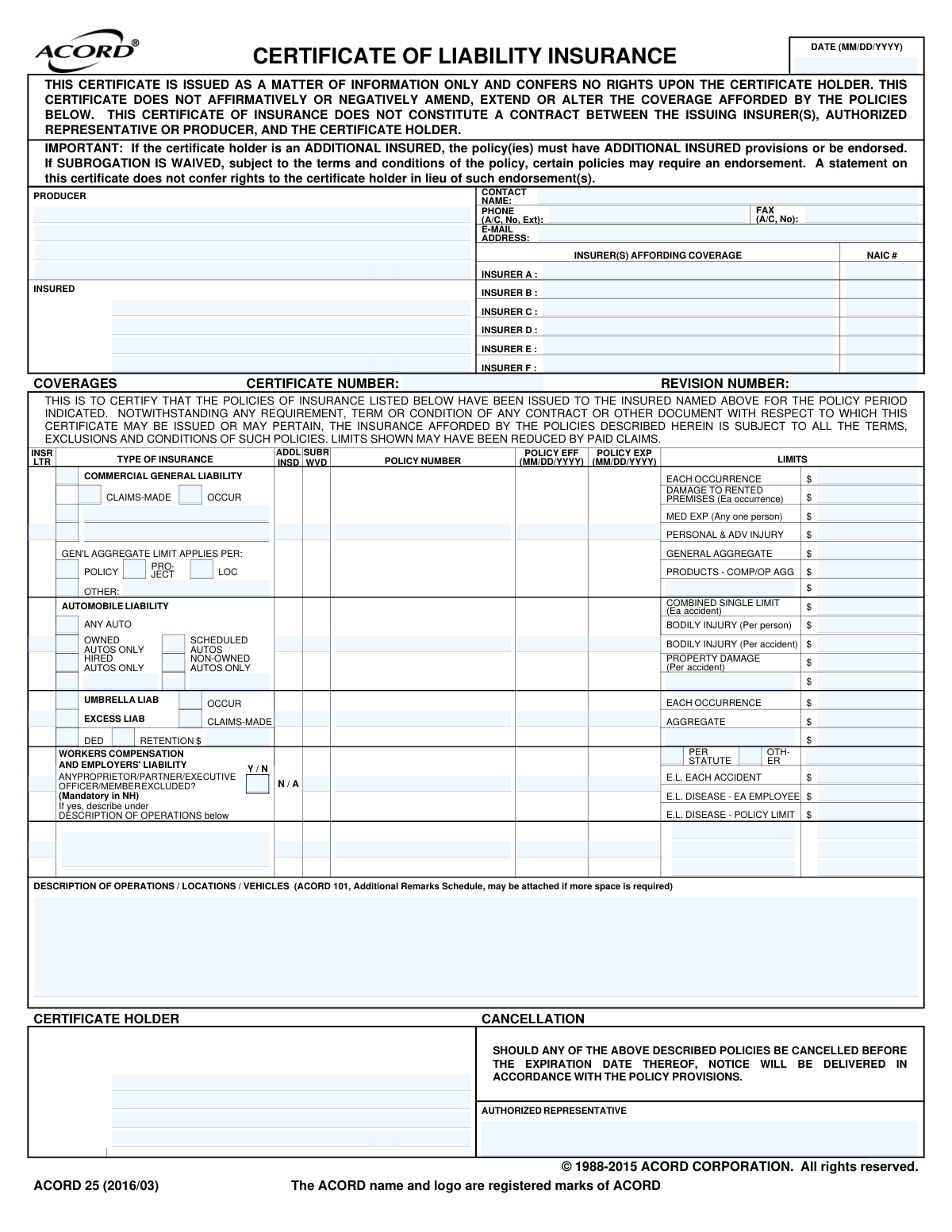
Yes! You can use AI to fill out ACORD 25, Certificate of Liability Insurance (2016/03)
Don't type 129 fields by hand. Tell our AI about yourself, or upload a document you already have, and it fills every field in seconds. You check it, then download, print or sign.
The AI does the filling. You just check it.
No typing into boxes, nothing to install.
What this form asks for
The AI fills all of it, from your answers or your documents.
The AI checks your answers before you download
14 checks built for this form, so a wrong date or a missing answer is caught before anyone else sees it.
This check ensures that for each listed policy, the 'Policy Expiration Date' is chronologically after the 'Policy Effective Date'. A policy cannot expire before it starts, so this validation is fundamental for data integrity. If this validation fails, it indicates a data entry error that makes the policy period invalid and could lead to incorrect assumptions about coverage duration.
This validation verifies that the 'Certificate Date' falls within the active period of at least one of the listed insurance policies. The certificate should be issued on a date when coverage is in force. A failure suggests the certificate may be certifying coverage that is not currently active, which is misleading and legally problematic.
This check validates that the 'Insurer Letter' (e.g., A, B, C) entered for any coverage line corresponds to an insurer whose name is defined in the 'INSURER(S) AFFORDING COVERAGE' section. This is crucial for correctly identifying which company is providing which coverage. If the letter does not match a defined insurer, the certificate is ambiguous and fails to properly link a policy to its carrier.
This validation ensures that the 'NAIC Number' entered for each insurer is a valid 5-digit numeric code. The National Association of Insurance Commissioners (NAIC) number is a standard identifier for insurance companies, and an incorrect format can prevent proper identification and verification of the insurer's status. An invalid NAIC number suggests a data entry error or that an incorrect insurer is listed.
This rule checks that if the 'Other' box is selected for the 'GEN'L AGGREGATE LIMIT APPLIES PER' section in Commercial General Liability, the corresponding text field ('CGL Row 1 - Other Coverage Details') must contain a description. Selecting 'Other' without providing an explanation leaves the basis of the aggregate limit undefined. This ambiguity can lead to disputes over how the policy limits are applied.
This validation ensures that if the 'Any Proprietor/Partner/Executive Officer/Member Excluded' field is marked 'Y' (Yes), then the 'Description of Operations' text box must contain an explanation. The form explicitly states 'If yes, describe under DESCRIPTION OF OPERATIONS below'. Failing to provide this description makes it unclear who is excluded from coverage, which is critical information for the certificate holder.
And 8 more checks
- Mutually Exclusive CGL Policy Basis
- Producer Information Completeness
- Insured Information Completeness
- Standard Date Format (MM/DD/YYYY)
- Automobile Liability Limit Exclusivity
- Workers' Compensation Limit Specification
- Valid Currency Format for Limit Amounts
- Insurer Name Presence for Listed Coverages
Let AI fill out your ACORD 25
No typing. Every field filled in seconds, checked, ready to sign.
How to Fill Out ACORD 25 Online for Free in 2026
What the AI walks you through.
- Navigate to Instafill.ai and upload your ACORD 25 PDF or select it from the template library.
- Provide the Producer (your insurance agent/broker) and Insured (your business) information for the AI to populate the top sections.
- Enter the names and NAIC numbers for each insurance carrier providing coverage (Insurer A, B, C, etc.).
- Input the details for each policy type, including policy numbers, effective/expiration dates, and coverage limits for Commercial General Liability, Automobile Liability, and others.
- Specify the Certificate Holder, which is the person or entity requesting proof of your insurance.
- Add any required text in the 'Description of Operations / Locations / Vehicles' section and provide the name of the authorized representative.
- Review all the information populated by the AI for accuracy, then download, print, or share the completed Certificate of Liability Insurance.
Common Mistakes in Completing ACORD 25
The ones the AI is built to catch.
Mismatching Insurer Letter and Name
Using a DBA Instead of the Legal Entity Name
Incorrectly Checking 'ADDL INSD' or 'SUBR WVD' Boxes
Leaving the 'Description of Operations' Blank or Vague
Entering Incorrect Policy Effective or Expiration Dates
Confusing the 'Producer' with the 'Insurer'
Misplacing or Omitting Liability Limit Amounts
Omitting the Insurer's NAIC Number
Improperly Checking Auto Liability Coverage Types
Failing to Specify How the General Aggregate Limit Applies
Issuing an Unsigned or Non-Fillable Document
Frequently Asked Questions About ACORD 25
Is it really free for 7 days?
Can I fill other forms too?
How do I cancel?
How does the AI fill out ACORD 25?
What happens to my information?
How complex is ACORD 25 to fill out?
What is the purpose of the Certificate of Liability Insurance (ACORD 25) form?
Who is supposed to fill out this form?
What is the difference between the 'Insured' and the 'Certificate Holder'?
What information do I need to have ready to get this certificate?
What does it mean if the 'ADDL INSD' (Additional Insured) box is checked?
What is a 'Waiver of Subrogation' (SUBR WVD)?
Does this certificate change or alter my insurance policy?
Where do I list specific project details or vehicle information?
What is the NAIC number and where do I find it?
How long does it typically take to get a completed Certificate of Liability Insurance?
My client sent me a PDF of this form, but it's not fillable. What can I do?
Can AI tools help me fill out the ACORD 25 form?
How can I fill out this form online using Instafill.ai?
Get your ACORD 25 filled out by AI
$0 today. Cancel before Nov 1 and you pay nothing.
Other forms like this one
insurance forms: Form 1095-A, Health Insurance Marketplace Statement, Form SSA-4-BK, Application for Child's Insurance Benefits, Form SSA-10, Application for Widow's or Widower's Insurance Benefits, Form 1095-C, Employer-Provided Health Insurance Offer and Coverage, National Integrity Life Insurance Company Ownership Change Request Form (NI-77-0039-2505), Record of Advice and Needs Analysis (Non-Life Insurance — Personal and Commercial Lines), Form 7206 (2025), Self-Employed Health Insurance Deduction, Continental American Insurance Company (CAIC) / Aflac Group Critical Illness Claim Form (with Attending Physician’s Statement, HIPAA Authorization to Obtain Information, and Electronic Funds Transaction Authorization), Prudential Group Disability Insurance – Education and Employment History Form (GL.2009.009, Ed. 06/2017), acord-25-201603-certificate-of-liability-insurance-1, Brotherhood Mutual Insurance Company Ministry Driver Screening Form (A99), Assurity Life Insurance Company Disability Claim Form — Attending Physician’s Statement, Amateur Sports / Activities Accident Insurance Quote Request Form (Philadelphia Insurance Companies), Martial Arts Studio General Liability and Property Application (Fitness and Wellness Insurance / Philadelphia Insurance Companies) (03/2011), The Prudential Insurance Company of America Group Disability Insurance – Education and Employment History Form (GL.2009.009, Ed. 06/2017), VA Form 29-357, Claim for Disability Insurance Benefits (Government Life Insurance), CMS-1500 (02-12), Health Insurance Claim Form (NUCC Approved) (OMB 0938-1197), Prudential Group Disability Insurance – Education and Employment History Form (GL.2009.009, Ed. 06/2017), HDFC ERGO General Insurance Company Limited – Request for Cashless Hospitalisation for Health Insurance (Policy Part – C), Beneficiary Designation/Change - Principal Life Insurance Company
ACORD forms: ACORD 84, Dwelling Fire Application (2013/09), ACORD 140 (2014/12), Property Section (Attach to ACORD 125), ACORD 36, Agent/Broker of Record Change, ACORD 131, Umbrella / Excess Liability Section, ACORD 125, Commercial Insurance Application and ACORD 143, Transportation Section, ACORD 125, Commercial Insurance Application, ACORD 125, Commercial Insurance Application, Applicant Information Section, ACORD 27, Evidence of Property Insurance, ACORD 24, Certificate of Property Insurance, ACORD 28, Evidence of Commercial Property Insurance, ACORD 141, Commercial Insurance Application - Crime Section, ACORD 140, Property Section, ACORD 80, Homeowner Application, ACORD 82, Watercraft Application, ACORD 85, Mobile Home Application, ACORD 160, Property Loss Notice, ACORD 75, Insurance Binder, ACORD 83, Personal Umbrella Application, ACORD 137 CA, Commercial Auto Application - California, ACORD 81, Personal Inland Marine Application (2012/02)
business insurance forms: Application for Specific Project Insurance Coverage, Transamerica Life Insurance Company - New Business Cover Sheet, AXIS MEDIA/PROFESSIONAL INSURANCE® PRODUCERS LIABILITY NEW BUSINESS APPLICATION, ACORD 125, Commercial Insurance Application, ACORD 125, Commercial Insurance Application, Applicant Information Section, ACORD 127, Business Auto Section, ACORD 159, Business Income Worksheet, ACORD 810, Business Income / Extra Expense / Rental Value, ACORD 25 (2010/05), Certificate of Liability Insurance
liability insurance forms: Argonaut Insurance Company, AEIG Instructors and Trainers Liability Application, acord-25-201603-certificate-of-liability-insurance-1, Martial Arts Studio General Liability and Property Application (Fitness and Wellness Insurance / Philadelphia Insurance Companies) (03/2011), National Fire & Marine Insurance Company Physicians Professional Liability Application, AXIS MEDIA/PROFESSIONAL INSURANCE® PRODUCERS LIABILITY NEW BUSINESS APPLICATION, Argonaut Insurance Company, Equine Instructors and Trainers Liability Application, Physician's Professional Liability Insurance Application, General Liability and Builder's Risk Insurance Application, ACORD 131, Umbrella / Excess Liability Section, ACORD 25 (2010/05), Certificate of Liability Insurance, ACORD 126 (2016/09), Commercial General Liability Section, ACORD 126 (2009/08), Commercial General Liability Section, ACORD 25, Certificate of Liability Insurance (2025/12)
Let AI fill out your ACORD 25
Your trial starts once a card is added. You pay nothing before Nov 1.
Our AI already knows this form, all 129 fields of it. Skip the typing: tell it about yourself, or upload what you have, and it fills the whole form in seconds.
- AI fills every field on the form, tables and checkboxes included
- No typing into boxes: answer a few questions, or upload a document you already have, an old copy of this form, a photo of a document
- The AI checks the answers; you review and change anything before you download
- Download the finished PDF, print it, or sign it online
- Encrypted, and never used to train AI
Cancel before Nov 1 and you pay nothing.
A card is needed to start the trial. Cancel in two clicks from your account.
Terms · Privacy