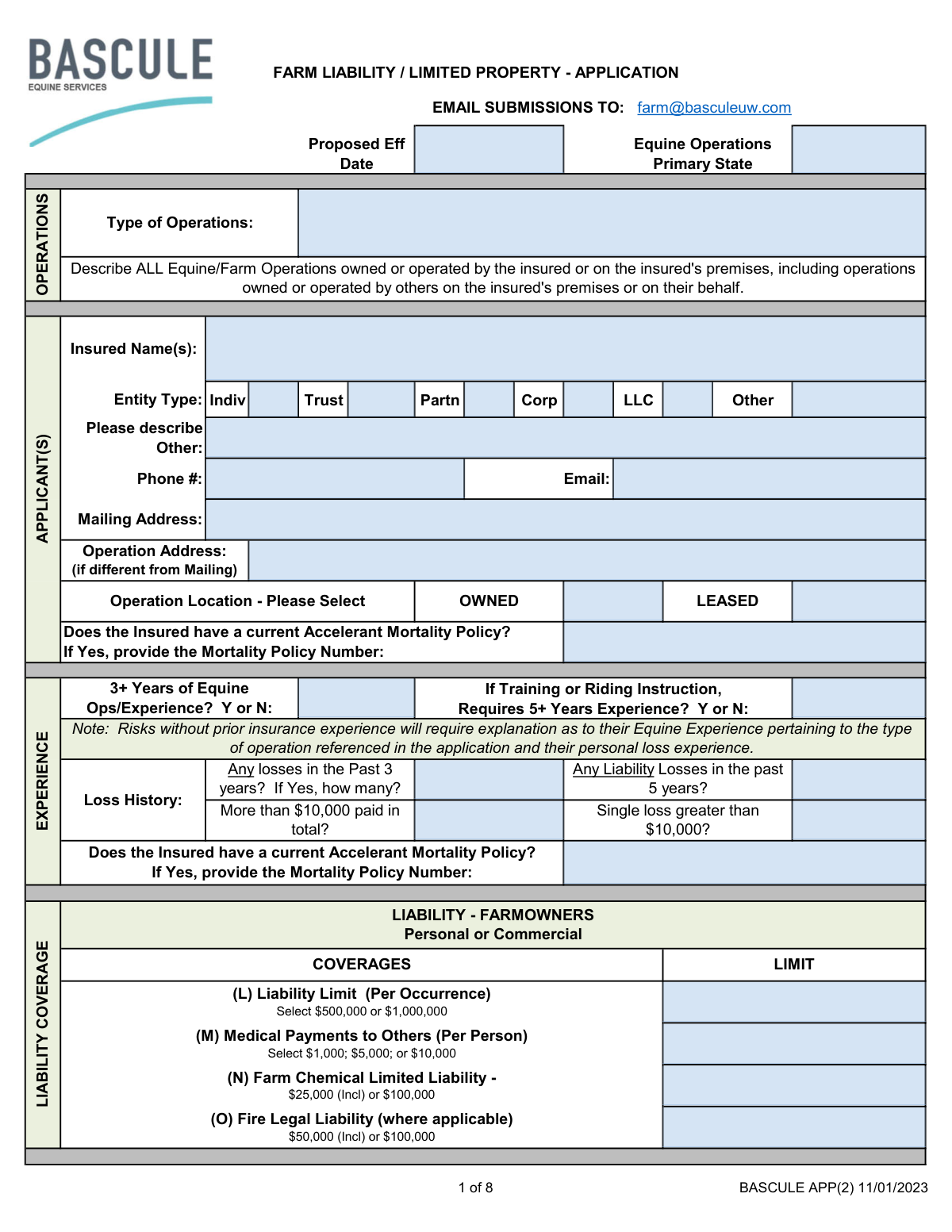
Yes! You can use AI to fill out FARM LIABILITY / LIMITED PROPERTY - APPLICATION

This is a comprehensive application for obtaining Farm Liability and Limited Property insurance, with a strong focus on equine-related exposures. It is used by farm owners and operators to detail their operations, including boarding, training, breeding, and events, to secure appropriate liability coverage for potential risks. Filling out this detailed form is crucial for underwriters to assess risk and determine policy terms. Today, this form can be filled out quickly and accurately using AI-powered services like Instafill.ai, which can also convert non-fillable PDF versions into interactive fillable forms.
Our AI automatically handles information lookup, data retrieval, formatting, and form filling.
It takes less than a minute to fill out BASCULE APP(2) using our AI form filling.
Securely upload your data. Information is encrypted in transit and deleted immediately after the form is filled out.

Form specifications

Form name: FARM LIABILITY / LIMITED PROPERTY - APPLICATION
Number of pages: 8
Language: English
Categories: property forms
main-image

Instafill Demo: How to fill out PDF forms in seconds with AI

How to Fill Out BASCULE APP(2) Online for Free in 2026

Are you looking to fill out a BASCULE APP(2) form online quickly and accurately? Instafill.ai offers the #1 AI-powered PDF filling software of 2026, allowing you to complete your BASCULE APP(2) form in just 37 seconds or less.
Follow these steps to fill out your BASCULE APP(2) form online using Instafill.ai:
  1. 1 Navigate to Instafill.ai and upload or select the Farm Liability / Limited Property Application.
  2. 2 Provide essential applicant information, including the insured's name, entity type, contact details, and the physical address of the operation.
  3. 3 Use the AI assistant to detail all equine and farm operations, such as boarding, training, riding instruction, breeding, and any shows or events held on the premises.
  4. 4 Select the desired liability coverage limits, including options for farmowners liability, excess liability, and specific coverages like Care, Custody, and Control (CCC).
  5. 5 Answer the detailed questionnaires regarding premises safety, risk management protocols, loss history, and the use of contracts and waivers.
  6. 6 Review all the information populated by the AI for accuracy and completeness, then electronically sign and date the application to finalize your submission.

Our AI-powered system ensures each field is filled out correctly, reducing errors and saving you time.

Why Choose Instafill.ai for Your Fillable BASCULE APP(2) Form?

Speed

Complete your BASCULE APP(2) in as little as 37 seconds.

Up-to-Date

Always use the latest 2026 BASCULE APP(2) form version.

Cost-effective

No need to hire expensive lawyers.

Accuracy

Our AI performs 10 compliance checks to ensure your form is error-free.

Security

Your personal information is protected with bank-level encryption.

Frequently Asked Questions About Form BASCULE APP(2)

This application is used to apply for farm liability and limited property insurance for operations involving horses. It is designed for individuals or businesses that own or operate equine facilities, offer services like boarding or training, or host equine events.

Any individual or business entity (like a corporation or LLC) seeking liability and property insurance for their equine-related operations should complete this form. This includes horse owners, boarding stables, riding instructors, and facilities hosting horse shows.

The 'Exposures' section is where you detail all your business activities, such as boarding, training, riding instruction, or horse shows. You must provide information like the number of horses, students, and annual receipts for each activity to help the insurer assess your risk.

Applicants generally need at least three years of equine operations experience. If your services include training or riding instruction, a minimum of five years of experience in those specific areas is required.

This is an optional coverage that protects you if a non-owned horse in your care is injured or dies and you are found legally responsible. You must select a coverage limit per horse and for the policy total based on the value of the horses you handle.

Answering 'Yes' to activities like 'Agritainment,' overnight camps, or having unfenced pools may require additional review by an underwriter. These activities could make your operation ineligible for this specific policy, so it's best to discuss them with the agent.

You must use written, signed contracts for activities like boarding, training, and events that include specific legal wording, such as a hold harmless clause. You will be required to provide copies of these contracts before the insurance coverage can be finalized.

You must obtain a Hold Harmless agreement and a Certificate of Insurance from each independent instructor. Their insurance must name you as an Additional Insured and have liability limits that match or exceed your own policy limits.

After filling out and signing the application, you should email the completed form to [email protected]. This submission email address is listed at the top of the first page.

Yes, services like Instafill.ai use AI to help you accurately auto-fill form fields, which can save you time and help reduce errors. This is especially useful for long and detailed applications like this one.

Simply upload the form's PDF to the Instafill.ai platform. The AI will analyze the document, identify all the fields, and provide an interactive interface for you to fill in your information quickly and accurately.

If you have a non-fillable or 'flat' PDF, you can use a service like Instafill.ai to instantly convert it into an interactive, fillable form. This allows you to easily type your information directly into the fields before saving or submitting it.

You must disclose any insurance losses from the past 3 years and any liability-specific losses from the past 5 years. Be prepared to state the number of losses and whether any single loss or the total paid amount exceeded $10,000.

Use the 'FARM PERSONAL PROPERTY' section on page 2 to list each item you want to insure. You will need to provide a description, the desired limit of insurance, and select a deductible for each item.

Compliance BASCULE APP(2)
Validation Checks by Instafill.ai

1
Validates Proposed Effective Date Format and Timeline
This check ensures the 'Proposed Eff Date' is entered in a valid date format (e.g., MM/DD/YYYY) and is not a date in the past. A valid future date is essential for correctly establishing the policy's start of coverage. An invalid or past date will prevent the policy from being issued correctly and must be corrected before submission.
2
Ensures Consistency of Named Insured Across Application
This validation verifies that the 'Named Insured' field is identical on all pages where it appears. Consistency is critical for legal and contractual accuracy, ensuring the correct entity is covered under the policy. Mismatched names will cause the application to be flagged for manual review to prevent legal ambiguity in the final policy document.
3
Validates Entity Type Selection and 'Other' Description
This check ensures that exactly one 'Entity Type' (Indiv, Trust, Partn, Corp, LLC, Other) is selected. If 'Other' is chosen, the 'Please describe Other' field must be completed. This information is fundamental for determining the legal nature of the insured, which affects liability and coverage; failure to provide this will halt the application process.
4
Enforces Conditional 5+ Year Experience for Training/Instruction
This validation checks if the 'Type of Operations' description includes 'Training' or 'Riding Instruction'. If it does, the 'Requires 5+ Years Experience?' question must be answered 'Y'. This is a critical underwriting rule to ensure high-risk operations are managed by experienced individuals, reducing liability exposure. A 'N' response for this operation type will flag the application for mandatory underwriter review or declination.
5
Validates Completeness of Loss History Details
This check ensures that if the applicant answers 'Yes' to 'Any losses in the Past 3 years?', the corresponding 'how many?' field is populated with a positive integer. Accurate loss history is crucial for risk assessment and premium calculation. An incomplete or illogical entry will require the applicant to provide the missing details before the risk can be properly evaluated.
6
Requires Mortality Policy Number When Applicable
This validation rule verifies that if the applicant answers 'Yes' to 'Does the Insured have a current Accelerant Mortality Policy?', the 'Mortality Policy Number' field is filled. This information is needed to verify existing coverage and potentially coordinate benefits or apply discounts. Failure to provide the policy number when indicated will result in an incomplete application and require follow-up.
7
Validates Format of Applicant Phone and Email
This check ensures the 'Phone #' is in a recognizable phone number format and the 'Email' contains a valid email address structure (e.g., [email protected]). Correct contact information is essential for all communication regarding the application, policy documents, and billing. Invalid formats will trigger an error, requiring the user to correct the entry before proceeding.
8
Ensures Exposure Details are Provided When an Exposure is Indicated
This validation rule checks all exposure sections (e.g., Boarding, Training, Riding Instruction). If an exposure is marked as 'Yes' or 'Y', all associated detail fields (such as '# Horses', 'Receipts', '# Students') must be completed. This data is essential for calculating the premium and understanding the scope of risk, so missing details for a declared exposure will flag the application as incomplete.
9
Enforces Completion of Spectator Section Based on Response
This check verifies that if the 'Spectators? (Y or N)' field in the 'Horse Shows / Events / Clinics' section is answered 'Y', then the subsequent spectator details (like grandstand capacity) must be filled out. Spectator presence significantly increases liability risk, and this information is critical for underwriting. An incomplete spectator section will require correction before the application can be reviewed.
10
Flags Applications with Potential Ineligible Exposures for Review
This validation checks the responses in the 'REFERRAL / INELIGIBLE EXPOSURE(S)' section. If any question (e.g., 'Agritainment', 'Hunting or Rough Stock Events') is answered 'Y', the application must be flagged for mandatory underwriter review. These exposures are often outside standard coverage and may lead to declination, so the system should prevent automatic processing and escalate these applications.
11
Requires Explanation for 'No' Answers in Premises and Contracts Sections
This check validates that for any question answered with 'N' in the 'PREMISE(S) / OPERATIONS' and 'CONTRACTS' sections, a corresponding explanation is provided in the 'ADDITIONAL INFORMATION / REMARKS' section. These questions represent minimum safety and legal standards. A 'N' response without explanation indicates a failure to meet underwriting requirements and must be reviewed by an underwriter.
12
Verifies Independent Instructor Insurance and Contract Requirements
This check creates a logical link between two sections. If 'Independent Instructors' is answered 'YES' in the Exposures section, the system must verify that the question regarding them providing a Hold Harmless and Certificate of Insurance in the Contracts section is also answered 'Y'. This ensures that the liability risk posed by third-party instructors is properly managed. A 'N' response would be a critical failure of risk management and would require immediate underwriter intervention.
13
Validates Selection of Liability and CCC Coverage Limits
This check ensures that for each coverage with a list of options (e.g., 'Liability Limit', 'Medical Payments', 'Equine CCC'), the value entered is one of the specific options listed on the form. For example, the 'Liability Limit' must be either '$500,000' or '$1,000,000'. This prevents invalid data entry and ensures the policy is quoted and issued with a valid, offered coverage limit.
14
Conditional Requirement for Operation Address
This validation ensures that the 'Operation Address' field is only filled out if it is different from the 'Mailing Address'. If the two addresses are identical, the 'Operation Address' field should be left blank to avoid redundant data entry. This check maintains data cleanliness and follows the form's explicit instructions.
15
Ensures Applicant and Agent Signatures are Dated
This validation confirms that both the 'Signature of Applicant(s)' and 'Agent Signature' fields are accompanied by a valid, non-future date. The signature date legally binds the applicant to the statements made in the application as of that day. A missing or invalid date can render the application legally incomplete and must be corrected before binding coverage.

Common Mistakes in Completing BASCULE APP(2)

Incomplete Description of Operations

Applicants often fail to list all equine and farm operations, especially smaller side-businesses or activities conducted by others on their property. The form explicitly asks for 'ALL' operations, and omitting one can leave a significant exposure uninsured. This oversight can lead to a denied claim for an incident related to the unlisted operation. To avoid this, carefully inventory every activity that occurs on the premises, regardless of its size or frequency, and list it in the 'Type of Operations' section.

Using an Incorrect or Inconsistent 'Named Insured'

Applicants frequently enter a farm's trade name instead of the full legal name of the individual or business entity (e.g., 'Happy Trails Farm' instead of 'Happy Trails Farm, LLC'). This can create ambiguity and may result in the policy not covering the correct legal entity in the event of a lawsuit. Furthermore, the 'Named Insured' field appears on multiple pages, and inconsistencies across these entries can cause processing delays. Always use the full, correct legal name and ensure it is identical on every page of the application.

Misinterpreting 'Receipts' as Net Profit

Throughout the 'Exposures' section, the form asks for 'Receipts' for various activities like boarding, training, and sales. A common error is to report net profit instead of total gross revenue. Underwriters use gross receipts to gauge the size and risk of an operation, so under-reporting can lead to an inaccurate premium and, if discovered during a claim, could be considered material misrepresentation, potentially voiding coverage. Always report the total income generated from an activity before deducting any expenses.

Leaving Detail Fields Blank After a 'Yes' Answer

The form contains many conditional fields, such as asking for the number of horses and receipts after an applicant indicates 'Yes' to a boarding exposure. Applicants often check 'Yes' but neglect to fill in the subsequent details. The form explicitly states, 'Any field left blank will indicate "No Exposure"', meaning the underwriter will assume the activity doesn't exist, leaving a critical coverage gap. To prevent this, meticulously complete all required fields associated with any 'Yes' answer. AI-powered tools like Instafill.ai can help by flagging these incomplete conditional sections before submission.

Providing Vague or Inaccurate Loss History

The 'Loss History' section asks for specific details about losses within distinct timeframes (3 and 5 years) and amounts. Applicants often provide vague answers like 'one small claim' or confuse the dates and amounts. This lack of clarity forces the underwriter to request more information, delaying the quoting process. Before filling out the form, review your records to provide precise dates, descriptions, and payout amounts for all losses as requested.

Failing to Fully Describe Farm Personal Property

When scheduling items like horse trailers or ATVs on Page 2, people often provide generic descriptions like 'trailer' and an estimated value. This can lead to being underinsured and can complicate the claims process. For high-value items, it is crucial to provide detailed descriptions, including make, model, year, and serial or VIN number, along with an accurate replacement cost value to ensure proper coverage.

Ignoring or Misrepresenting 'Referral/Ineligible Exposures'

On Page 5, the form lists high-risk activities like 'Agritainment,' 'Pony Parties,' or 'Overnight Camps' that require special underwriter review. An applicant might be tempted to answer 'No' to avoid scrutiny or a potential declination, even if they conduct these activities. This is a serious misrepresentation that can lead to the policy being voided and a major claim being denied. Always answer these questions truthfully and provide any required additional information to your underwriter.

Not Explaining 'No' Answers on Required Checklists

The checklists on pages 5 and 6 regarding premises safety and contract provisions state that any 'N' (No) responses must be described. Applicants frequently check 'N' without providing the mandatory explanation. This automatically flags the application as incomplete, halting the underwriting process until the applicant provides the necessary details. To ensure a smooth process, always provide a thorough explanation in the 'Additional Information / Remarks' section for any 'N' answers.

Confusing 'Additional Insured' with 'Loss Payee'

When adding 'Additional Interests' on Page 2, applicants often misunderstand the distinction between an Additional Insured (AI) and a Loss Payee (LP). An AI is typically a person or entity who needs liability protection under your policy (e.g., a property owner where you host an event), while an LP is an entity with a financial interest in your property (e.g., a bank with a lien on your horse trailer). Incorrectly listing these can lead to contractual defaults or uncovered liability. Clarify the required status with the entity requesting to be added before completing this section.

Skipping the 'Contracts' Section Requirements

Page 6 outlines specific clauses that must be included in contracts for boarding, training, and other services, requiring a 'Y' or 'N' response for each. Applicants may rush through this section or answer 'Y' without verifying their contracts actually contain the required language, such as the State Equine Activity Liability Act wording. During a claim investigation, if the required contracts or clauses are found to be missing, it could jeopardize coverage. Ensure all your legal agreements meet these requirements before submitting the application. Since this form is a non-fillable PDF, a tool like Instafill.ai can convert it into a fillable version, making it easier to navigate and complete these complex checklist sections accurately.
Saved over 80 hours a year

“I was never sure if my IRS forms like W-9 were filled correctly. Now, I can complete the forms accurately without any external help.”

Kevin Martin Green

Your data stays secure with advanced protection from Instafill and our subprocessors

Robust compliance program

Transparent business model

You’re not the product. You always know where your data is and what it is processed for.

ISO 27001, HIPAA, and GDPR

Our subprocesses adhere to multiple compliance standards, including but not limited to ISO 27001, HIPAA, and GDPR.

Security & privacy by design

We consider security and privacy from the initial design phase of any new service or functionality. It’s not an afterthought, it’s built-in, including support for two-factor authentication (2FA) to further protect your account.

Fill out BASCULE APP(2) with Instafill.ai

Worried about filling PDFs wrong? Instafill securely fills farm-liability-limited-property-application forms, ensuring each field is accurate.