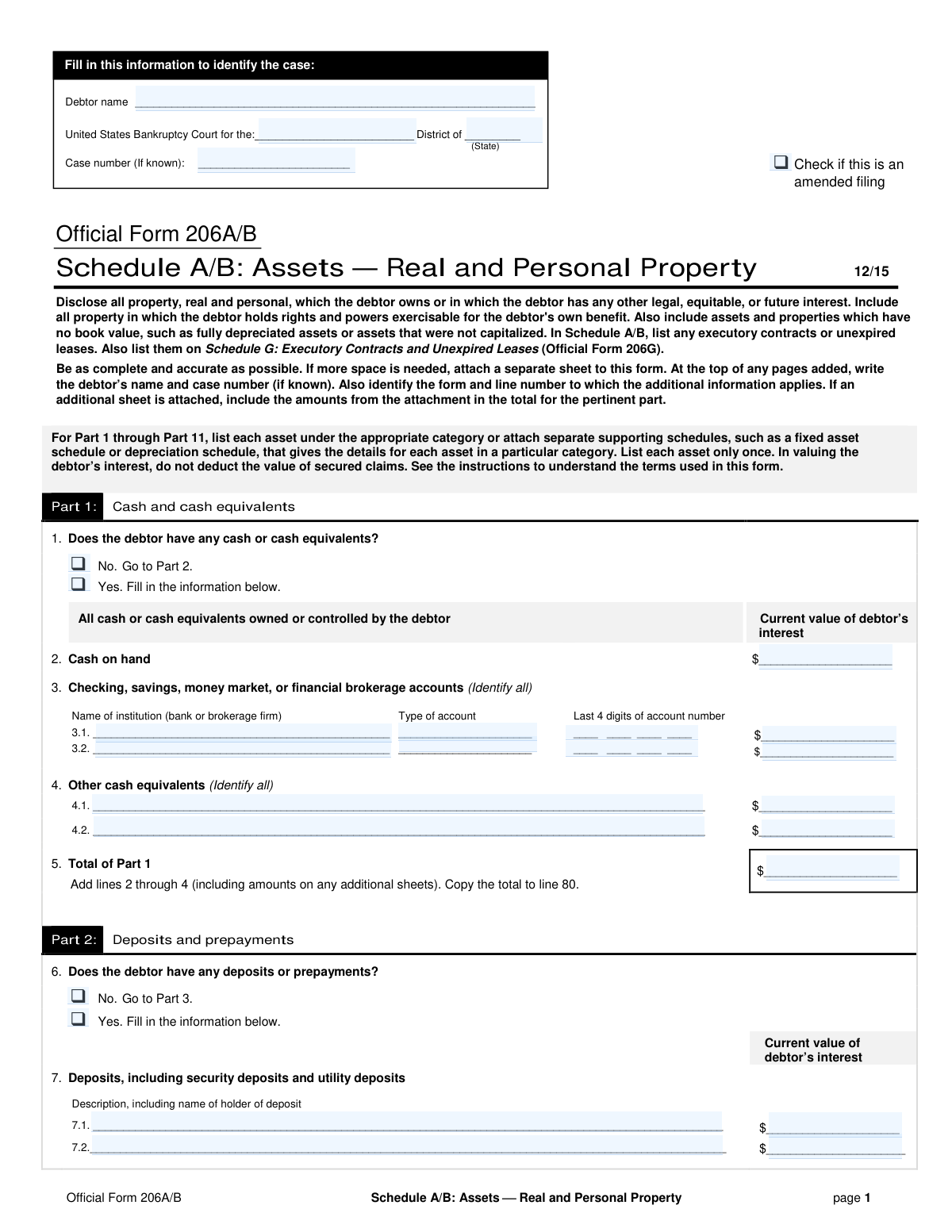
Yes! You can use AI to fill out Official Form 206A/B, Schedule A/B: Assets — Real and Personal Property

Official Form 206A/B, also known as Schedule A/B: Assets — Real and Personal Property, is a mandatory document in United States bankruptcy proceedings. Debtors use this form to provide a complete and detailed inventory of all their assets, including cash, real estate, vehicles, investments, and other personal belongings. This schedule is critical for the bankruptcy trustee and creditors to understand the full scope of the debtor's estate. Today, this form can be filled out quickly and accurately using AI-powered services like Instafill.ai, which can also convert non-fillable PDF versions into interactive fillable forms.
Our AI automatically handles information lookup, data retrieval, formatting, and form filling.
It takes less than a minute to fill out Official Form 206A/B using our AI form filling.
Securely upload your data. Information is encrypted in transit and deleted immediately after the form is filled out.

Form specifications

Form name: Official Form 206A/B, Schedule A/B: Assets — Real and Personal Property
Number of pages: 8
Filled form examples: Form Official Form 206A/B Examples
Language: English
Categories: property forms
main-image

Instafill Demo: How to fill out PDF forms in seconds with AI

How to Fill Out Official Form 206A/B Online for Free in 2026

Are you looking to fill out a OFFICIAL FORM 206A/B form online quickly and accurately? Instafill.ai offers the #1 AI-powered PDF filling software of 2026, allowing you to complete your OFFICIAL FORM 206A/B form in just 37 seconds or less.
Follow these steps to fill out your OFFICIAL FORM 206A/B form online using Instafill.ai:
  1. 1 Navigate to Instafill.ai and upload your Schedule A/B form, or select it from their library of official documents.
  2. 2 Enter the debtor's name and case information at the top of the form, including the relevant bankruptcy court district.
  3. 3 Proceed through Parts 1-11, systematically listing all assets in the appropriate categories, such as cash, investments, real property, vehicles, and collectibles.
  4. 4 For each asset, provide the required details, including a description, net book value (if available), valuation method, and the current value of the debtor's interest.
  5. 5 Use the AI-powered tool to accurately transfer the total values from each part to the summary section in Part 12.
  6. 6 Carefully review the entire completed form to ensure all assets are disclosed and all information is accurate and complete.
  7. 7 Download the finalized Schedule A/B form, ready for filing with the bankruptcy court.

Our AI-powered system ensures each field is filled out correctly, reducing errors and saving you time.

Why Choose Instafill.ai for Your Fillable Official Form 206A/B Form?

Speed

Complete your Official Form 206A/B in as little as 37 seconds.

Up-to-Date

Always use the latest 2026 Official Form 206A/B form version.

Cost-effective

No need to hire expensive lawyers.

Accuracy

Our AI performs 10 compliance checks to ensure your form is error-free.

Security

Your personal information is protected with bank-level encryption.

Frequently Asked Questions About Form Official Form 206A/B

This form is used in bankruptcy cases to provide a complete and accurate list of all the debtor's assets. You must disclose all real and personal property in which you have any legal, equitable, or future interest.

The debtor, who is the person or business filing for bankruptcy, must complete this form to declare all of their assets to the court.

Yes, the form requires you to disclose all property, regardless of its book value. This includes fully depreciated assets or assets that were not capitalized.

You should list the current market value of your interest in the property. Importantly, you should not deduct the value of any secured claims or loans against the property when stating this value.

If more space is needed, you can attach a separate sheet to the form. Be sure to write your name, case number, and the specific form and line number the additional information applies to at the top of the page.

Your home or any other real estate you own should be listed in Part 9: Real Property. Your vehicles, such as cars, trucks, or motorcycles, should be listed in Part 8: Machinery, equipment, and vehicles.

Yes, any executory contracts or unexpired leases must be listed on Schedule A/B, typically in Part 11 if not specified elsewhere. You must also list them on Schedule G: Executory Contracts and Unexpired Leases.

This is a catch-all section for any property not listed in the previous 10 parts. Examples include tax refunds, potential lawsuits (causes of action), interests in trusts, and other miscellaneous items like season tickets.

No, for security purposes, the form only asks for the last 4 digits of your account numbers in Part 1.

Part 12 is a summary section where you copy the total values from each of the preceding parts. This provides a final total value for all your personal and real property.

Yes, services like Instafill.ai use AI to help you accurately auto-fill form fields, which can save you time and help prevent errors.

You can upload the form's PDF to Instafill.ai, which will make it an interactive, fillable document. You can then type your information directly into the fields and use AI-powered suggestions to complete it quickly.

If you have a non-fillable or 'flat' PDF, you can use a service like Instafill.ai. It can convert the document into an interactive, fillable form that you can easily complete online.

Compliance Official Form 206A/B
Validation Checks by Instafill.ai

1
Conditional Section Completion
Checks that if a user answers 'Yes' to a question asking if they have a certain type of asset (e.g., Part 1, Question 1: 'Does the debtor have any cash or cash equivalents?'), then at least one corresponding asset detail line is filled out. This ensures that the form is complete and avoids situations where a user indicates they have assets but fails to list them. If validation fails, the user should be prompted to either provide the asset details or change their answer to 'No'.
2
Part Total Calculation Accuracy
Verifies that the total value for each part of the form (e.g., Line 5 'Total of Part 1') is the correct sum of all individual asset values listed within that part. This is crucial for the accuracy of the final summary and the overall bankruptcy filing. A failure would indicate a mathematical error, and the system should automatically recalculate the total or flag the field for user correction.
3
Summary Section Cross-Reference Integrity
Ensures that the values copied into the Part 12 Summary (lines 80-90) exactly match the calculated totals from their respective parts earlier in the form (e.g., the value on line 80 must equal the value on line 5). This check maintains consistency and prevents transcription errors between sections. If a mismatch is found, the system should alert the user and suggest auto-filling the summary with the correct calculated totals.
4
Final Summary Calculation
Validates that the 'Total of all property on Schedule A/B' (line 92) is the correct sum of the total personal property (line 91a) and the total real property (line 91b). This is the final and most critical calculation on the form, representing the debtor's entire estate. An error here would fundamentally misrepresent the debtor's assets, so a failure must be flagged and corrected before submission.
5
Accounts Receivable Value Calculation
For Accounts Receivable in Part 3 (line 11) and Notes Receivable in Part 11 (line 71), this check verifies that the 'Current value' equals the 'face amount' minus the 'doubtful or uncollectible accounts'. This ensures the asset's value is reported correctly according to the form's instructions. If the calculation is incorrect, the system should highlight the discrepancy and suggest the correct calculated value.
6
Uncollectible Amount Logical Constraint
Validates that the 'doubtful or uncollectible accounts' amount (in Part 3 and Part 11) is less than or equal to the corresponding 'face amount'. It is logically impossible to have more uncollectible debt than the total amount owed. If this validation fails, an error message should be displayed, preventing the user from entering an invalid value.
7
Financial Account Number Format
Checks that the 'Last 4 digits of account number' field in Part 1 (line 3) contains exactly four numeric digits. This ensures the data is in the correct format for proper identification without revealing sensitive information. If the input is not four digits or contains non-numeric characters, the field should be flagged with a format error.
8
Inventory Date Validity
Verifies that the 'Date of the last physical inventory' in Part 5 (lines 19-22) is a valid date in MM/DD/YYYY format and is not a date in the future. This ensures the provided information is historically accurate and plausible. An invalid format or a future date should trigger an error message prompting the user to correct the entry.
9
Ownership Percentage Range
Validates that the '% of ownership' field for non-publicly traded stock in Part 4 (line 15) is a numeric value between 0 and 100, inclusive. This ensures the ownership stake is reported as a valid percentage. Any value outside this range or non-numeric input should result in a validation error.
10
Header Information Consistency Across Pages
Ensures that the 'Debtor Name' and 'Case number (if known)' fields are identical on every page of the form. This is critical for document integrity and ensures that all pages are correctly associated with the same case, especially if pages are separated. If a discrepancy is found, the system should warn the user and suggest applying the information from the first page to all subsequent pages.
11
Conditional Field Requirement for Recently Purchased Property
In Part 5 (line 25) and Part 6 (line 35), if the 'Yes' box for property purchased within 20 days is checked, this validation verifies that the subsequent 'Book value,' 'Valuation method,' and 'Current value' fields are all filled. This is important as recent purchases receive special scrutiny in bankruptcy proceedings. If 'Yes' is checked but the details are missing, the system should prompt the user to complete the required fields.
12
Vehicle Identification Number Completeness
For assets listed in Part 8 (lines 47, 48, 49), this check validates that the 'General description' field contains an identification number (VIN, HIN, or N-number) as instructed on the form. These unique identifiers are essential for legally identifying specific assets like cars, boats, and planes. A missing identifier should trigger a warning, reminding the user to include this critical information.
13
Mutually Exclusive Checkbox Selection
For every question on the form that provides a 'Yes' and a 'No' checkbox (e.g., Part 1, Question 1), this validation ensures that only one of the two options is selected. This prevents ambiguous or contradictory answers. If both or neither are selected for a required question, the system should prompt the user to make a single, definitive choice.
14
Real vs. Personal Property Summary Categorization
In the Part 12 Summary, this check verifies that the total from Part 9 'Real property' (line 88) is correctly placed in the real property column (line 91b), and all other totals (lines 80-87 and 89-90) are placed in the personal property column (line 91a). This proper categorization is fundamental to the legal treatment of assets in bankruptcy. Mis-categorization should be flagged as an error to be corrected.

Common Mistakes in Completing Official Form 206A/B

Providing Incomplete Vehicle or Vessel Identification

In Part 8, people often list just the make and model of a vehicle but omit the required year, make, model, and full Vehicle Identification Number (VIN) or Hull Identification Number (HIN). This happens due to oversight or not having the information readily available, making it difficult for the trustee to verify the asset and its value. This can cause delays or require filing an amended schedule. To avoid this, gather all vehicle titles and registrations before filling out the form and enter the full details; AI-powered tools like Instafill.ai can also validate the format of VINs to ensure they are entered correctly.

Omitting Security Deposits and Prepayments

Debtors frequently forget to list assets like security deposits for rental properties, utility company deposits, or prepayments for insurance or leases in Part 2. These are often small amounts paid long ago and are easily overlooked when compiling assets. Failure to disclose these assets is a violation of bankruptcy law and can lead to legal penalties, as they are considered property of the bankruptcy estate. To prevent this, carefully review all active leases and service agreements for any deposits or prepaid amounts before filing.

Confusing Book Value with Current Market Value

The form asks for both 'Net book value' and 'Current value' in several sections. A common error is to list the depreciated book value from accounting records instead of the required 'current value,' which is the fair market price the asset would sell for today. This misrepresents the true value of the estate, which can lead to objections from creditors or the trustee. To avoid this, research the current resale value for items (e.g., Kelley Blue Book for cars, recent sales for real estate) and list that as the current value.

Failing to Specify the Asset Valuation Method

Many sections of the form require the debtor to state the 'Valuation method used for current value' (e.g., 'appraisal,' 'KBB,' 'market comparison'). Filers often leave this column blank or write a vague term like 'estimate.' This lack of transparency can trigger scrutiny from the trustee, who needs to understand how the debtor arrived at the asset's value. To avoid this, be specific about your method, for example, 'Kelley Blue Book Private Party Value' for a car or 'Professional Appraisal dated MM/DD/YYYY' for real estate.

Incomplete Disclosure of All Financial Accounts

In Part 1, debtors sometimes only list their primary checking and savings accounts, forgetting others like PayPal, Venmo, cryptocurrency wallets, or small brokerage accounts. This omission, even if unintentional, constitutes a false statement on a federal document and can have severe consequences, including denial of bankruptcy discharge. It's crucial to list every single account where cash or cash equivalents are held, regardless of the balance. Before filing, review all financial apps and statements from the past year to ensure every account is included.

Omitting Header Information on Subsequent Pages

This form is eight pages long, and each page has a header for the debtor's name and case number. A very common mistake is to fill this out on the first page but forget it on the subsequent pages. If pages become separated, it can create confusion and administrative delays in processing the case file. To prevent this, complete the header on every single page before filling out the rest of the form. Tools like Instafill.ai can automatically populate this repetitive information across all pages after it's entered once.

Ignoring or Undervaluing Intangible Business Assets

For business debtors, Part 10 (Intangibles and Intellectual Property) is frequently filled out incorrectly or skipped entirely. Assets like customer lists, domain names, patents, trademarks, and 'goodwill' have value and must be listed. Business owners may not realize these are considered assets or may struggle to assign a value, leading them to omit them. This can be seen as hiding assets and can jeopardize the entire bankruptcy case. If unsure, consult with an appraiser specializing in business valuation to determine a reasonable current value.

Making Mathematical Errors in the Part 12 Summary

Part 12 requires the filer to copy the totals from each of the preceding 11 parts and then sum them up. Errors are common, such as incorrectly transcribing a total from a previous page or making a mistake when adding the columns. These errors lead to an incorrect total asset value, which can cause filing deficiencies and require amendments. Double-check all calculations manually or use software that can perform the summations automatically. AI-powered tools like Instafill.ai can prevent these errors by automating calculations and data transfer between sections.

Forgetting Contingent and Future Assets

In Part 11, people frequently forget to list contingent assets—those they might receive in the future. This includes potential tax refunds, rights to a lawsuit (even if not yet filed), and interests in a family trust or inheritance. Because the value is not yet certain, people mistakenly believe they don't need to be disclosed. Failure to list these can result in losing the right to that asset later. It is essential to list any potential claim or future interest, even if the value is listed as 'unknown' pending determination.

Improperly Attaching and Referencing Additional Sheets

When more space is needed, filers often attach extra pages but fail to follow instructions: writing the debtor’s name and case number at the top, identifying the form and line number, and including the totals in the main form's summary. An improperly labeled attachment can be lost or disregarded, leading to an incomplete disclosure. If the form is a non-fillable PDF, a tool like Instafill.ai can convert it to a fillable version with expandable fields, reducing the need for messy attachments.
Saved over 80 hours a year

“I was never sure if my IRS forms like W-9 were filled correctly. Now, I can complete the forms accurately without any external help.”

Kevin Martin Green

Your data stays secure with advanced protection from Instafill and our subprocessors

Robust compliance program

Transparent business model

You’re not the product. You always know where your data is and what it is processed for.

ISO 27001, HIPAA, and GDPR

Our subprocesses adhere to multiple compliance standards, including but not limited to ISO 27001, HIPAA, and GDPR.

Security & privacy by design

We consider security and privacy from the initial design phase of any new service or functionality. It’s not an afterthought, it’s built-in, including support for two-factor authentication (2FA) to further protect your account.

Fill out Official Form 206A/B with Instafill.ai

Worried about filling PDFs wrong? Instafill securely fills official-form-206ab-schedule-ab-assets-real-and-personal-property forms, ensuring each field is accurate.