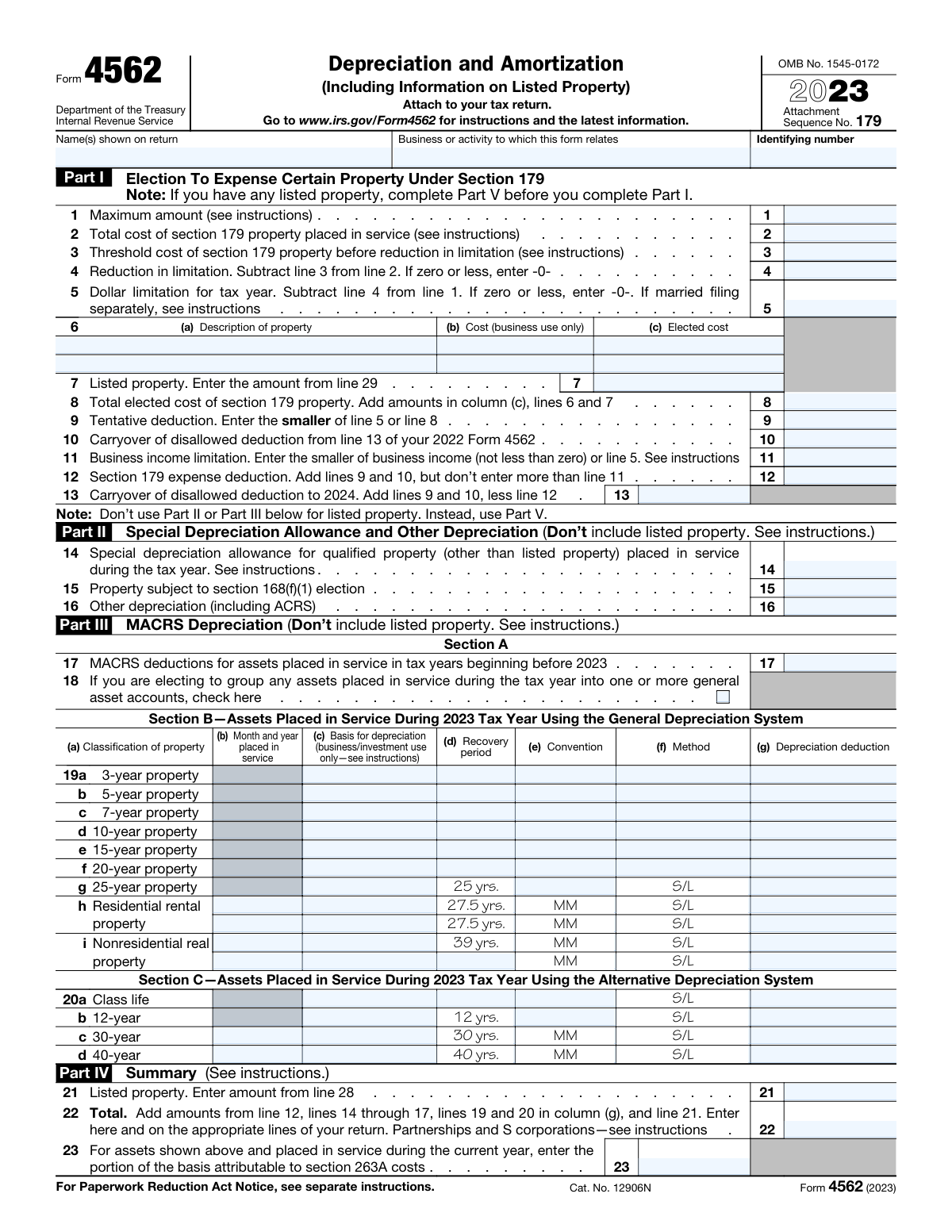
Yes! You can use AI to fill out Form 4562, Depreciation and Amortization (Including Information on Listed Property)
IRS Form 4562 is the federal tax form used to report depreciation and amortization for business or income-producing property, including elections to expense certain assets under Section 179 and to claim special depreciation (bonus depreciation) when applicable. It also captures MACRS depreciation calculations and requires additional disclosures for “listed property,” such as passenger vehicles, where business-use substantiation and usage details may be required. The form is important because it supports and documents the depreciation/amortization deductions that reduce taxable income and ensures compliance with IRS rules and limitations (for example, Section 179 income limits and auto depreciation caps).
Our AI automatically handles information lookup, data retrieval, formatting, and form filling.
It takes less than a minute to fill out Form 4562 using our AI form filling.
Securely upload your data. Information is encrypted in transit and deleted immediately after the form is filled out.
Form specifications
| Form name: | Form 4562, Depreciation and Amortization (Including Information on Listed Property) |
| Number of pages: | 2 |
| Filled form examples: | Form Form 4562 Examples |
| Language: | English |
Instafill Demo: filling out a legal form in seconds
How to Fill Out Form 4562 Online for Free in 2026
Are you looking to fill out a FORM 4562 form online quickly and accurately? Instafill.ai offers the #1 AI-powered PDF filling software of 2026, allowing you to complete your FORM 4562 form in just 37 seconds or less.
Follow these steps to fill out your FORM 4562 form online using Instafill.ai:
- 1 Enter taxpayer information (name(s) as shown on the return, identifying number) and specify the business or activity the depreciation/amortization relates to.
- 2 Complete Part V first if you have listed property (e.g., vehicles): provide business-use percentage, placed-in-service dates, basis, method/convention, depreciation, and answer substantiation questions (and vehicle mileage/use details if required).
- 3 Fill out Part I (Section 179) by listing eligible property, entering costs and elected amounts, and calculating the Section 179 deduction subject to annual limits, phase-outs, and the business income limitation (including any carryovers).
- 4 Complete Part II to claim any special depreciation allowance and other depreciation for non-listed property, and report any property subject to a section 168(f)(1) election if applicable.
- 5 Complete Part III (MACRS) by entering assets by class life/recovery period, placed-in-service dates, basis, convention, method, and computing depreciation under the General Depreciation System or Alternative Depreciation System as applicable.
- 6 Complete Part VI (Amortization) by listing amortizable costs, start dates, code sections, amortization periods, and the current-year amortization amount.
- 7 Finish Part IV (Summary) by totaling Section 179, depreciation, and listed property amounts, then transfer the final total to the appropriate line(s) on your tax return and attach Form 4562 to the return.
Our AI-powered system ensures each field is filled out correctly, reducing errors and saving you time.
Why Choose Instafill.ai for Your Fillable Form 4562 Form?
Speed
Complete your Form 4562 in as little as 37 seconds.
Up-to-Date
Always use the latest 2026 Form 4562 form version.
Cost-effective
No need to hire expensive lawyers.
Accuracy
Our AI performs 10 compliance checks to ensure your form is error-free.
Security
Your personal information is protected with bank-level encryption.
Frequently Asked Questions About Form Form 4562
Form 4562 is used to claim deductions for depreciation and amortization, including the Section 179 expense deduction and certain special depreciation allowances. It also reports depreciation details for “listed property,” such as vehicles used for business.
You generally file Form 4562 if you are claiming depreciation, Section 179 expensing, special depreciation allowance, amortization, or if you are reporting listed property (like business vehicles). Attach it to your federal income tax return for the year.
Attach Form 4562 to your tax return. It is not typically filed as a standalone form.
You’ll need details for each asset or cost, such as description, date placed in service, cost/basis, business-use percentage (if applicable), and the depreciation method/recovery period. For vehicles, you’ll also need mileage and records supporting business use.
Section 179 lets you elect to expense (deduct immediately) the cost of qualifying property placed in service during the year, subject to limits. In Part I, you list the property on line 6 and enter the elected cost, then the form applies the annual dollar limit and business income limitation.
Listed property (such as automobiles) has special rules and must be calculated in Part V first. The Section 179 amount for listed property flows from Part V (line 29) to Part I (line 7).
Listed property includes automobiles and certain other vehicles, certain aircraft, and property used for entertainment, recreation, or amusement. These items require additional reporting in Part V.
They ask whether you have evidence to support the business/investment use claimed and whether that evidence is written. You should keep contemporaneous records (like mileage logs) to substantiate business use if requested.
The form notes that for those vehicles you complete only 24a and 24b, columns (a) through (c) of Section A, all of Section B, and Section C if applicable. You generally do not complete the full depreciation columns for that vehicle under this instruction.
Enter total business/investment miles (excluding commuting) on line 30, commuting miles on line 31, and other personal miles on line 32, then total miles on line 33. You also answer availability and ownership-use questions on lines 34–36 for each listed vehicle.
Not always. If you answer “Yes” to one of the employer exception questions in Section C (lines 37–41), you generally don’t complete Section B for the covered employee vehicles.
It’s an additional depreciation deduction allowed for certain qualified property placed in service during the year, subject to eligibility rules. Part II is for qualified property that is not listed property, while Part V line 25 is for qualified listed property used more than 50% in a qualified business use.
Do not use Part II or Part III for listed property; listed property is handled in Part V. Parts II and III are used for depreciation of non-listed property, including MACRS depreciation in Part III.
The overall total depreciation and Section 179 deduction is summarized on Part IV, line 22, which you enter on the appropriate line(s) of your return. Listed property depreciation totals flow from Part V line 28 to Part IV line 21, and then into line 22.
Part VI is used to claim amortization deductions for certain costs over a set period (for example, costs amortized under a specific code section). You list the description, start date, amortizable amount, code section, amortization period/percentage, and the current-year amortization amount.
Compliance Form 4562
Validation Checks by Instafill.ai
1
Tax Year and Form Version Consistency (2023 Form 4562)
Validates that the submission is for Form 4562 (2023) and is attached to a 2023 tax return (or a fiscal year beginning in 2023, as applicable). This is important because Section 179 limits, bonus depreciation rules, and other thresholds can change by year. If the tax year on the return does not align with the form year, the system should flag the mismatch and require correction or the correct-year form.
2
Taxpayer Identification and Header Completeness
Ensures the header fields are present and non-empty: taxpayer name(s) as shown on return, business/activity to which the form relates, and identifying number (SSN/EIN). These fields are required to associate the depreciation/amortization schedules to the correct taxpayer and activity. If any are missing or malformed, the submission should be rejected or routed to an exception workflow for remediation.
3
Identifying Number Format Validation (SSN/EIN)
Validates that the identifying number matches an acceptable SSN format (9 digits, optionally with hyphens) or EIN format (9 digits, typically XX-XXXXXXX). Correct formatting reduces downstream matching errors and prevents misapplied schedules. If the value fails format checks, the system should block submission and prompt for a corrected SSN/EIN.
4
Numeric Field Type and Non-Negative Constraints for Amount Lines
Checks that all monetary and numeric lines (e.g., lines 1–5, 7–17, 19–23, 25–29, 42–44) contain valid numeric values and do not include invalid characters. Amounts that represent costs, basis, deductions, and miles must be non-negative, with the only exception being line 4’s instruction to enter “-0-” when zero or less (which should be treated as 0, not a negative number). If invalid numeric types or prohibited negatives are detected, the system should fail validation and identify the specific line(s).
5
Section 179 Line 4 Calculation Validation (Reduction in Limitation)
Validates that line 4 equals line 2 minus line 3, and if the result is zero or less it is recorded as 0 per the form instruction (“enter -0-”). This ensures the phase-out reduction is computed correctly before determining the allowable Section 179 limit. If the computed value does not match the entered value, the system should flag the discrepancy and require recalculation.
6
Section 179 Line 5 Calculation and Floor-at-Zero Rule
Checks that line 5 equals line 1 minus line 4, and if the result is zero or less it is entered as 0. This is critical because line 5 drives the maximum Section 179 deduction before business income limitation. If line 5 is inconsistent with lines 1 and 4 or is negative, validation should fail and the user should be prompted to correct the computation.
7
Section 179 Elected Cost Rollup (Lines 6/7 to Line 8)
Ensures line 8 equals the sum of elected costs in Part I line 6 column (c) plus line 7 (listed property Section 179 amount from line 29). This prevents under/overstating the total elected Section 179 cost. If line 8 does not equal the computed sum, the system should flag the mismatch and require correction.
8
Section 179 Tentative Deduction Min-Test (Line 9)
Validates that line 9 equals the smaller of line 5 or line 8, as required by the form. This ensures the tentative deduction does not exceed the dollar limitation. If line 9 exceeds either line 5 or line 8, the submission should be blocked until corrected.
9
Section 179 Business Income Limitation and Final Deduction (Lines 11–13)
Checks that line 11 is the smaller of business income (not less than zero) or line 5, and that line 12 equals lines 9 + 10 but does not exceed line 11. Also validates that line 13 equals (line 9 + line 10 − line 12) and is not negative. If any of these constraints fail, the system should flag the specific line and require corrected inputs or supporting business income data.
10
Listed Property Evidence Questions Required When Listed Property Is Present (24a/24b)
If any listed property depreciation or Section 179 is claimed (e.g., line 21, line 28, or line 29 is greater than 0, or any Section A listed property rows are populated), validates that question 24a is answered Yes/No and, if 24a is Yes, that 24b is also answered Yes/No. These answers are required to support substantiation requirements for listed property. If missing or logically inconsistent (e.g., 24b answered when 24a is No), the system should flag the issue and require correction.
11
Listed Property Date Placed in Service Format and Tax-Year Alignment (Part V, Section A)
Validates that each listed property item’s “Date placed in service” is a valid date and falls within the taxpayer’s 2023 tax year (or the fiscal year covered by the return). This is important because depreciation methods and eligibility depend on placed-in-service timing. If a date is invalid or outside the tax year, the system should reject the row and require a corrected date or confirmation of the correct tax year.
12
Listed Property Business Use Percentage Range and >50% Classification Logic
Checks that business/investment use percentage is between 0 and 100 (inclusive) for each listed property item, and that items treated as “more than 50%” (line 26) truly exceed 50%, while items on line 27 are 50% or less. This classification affects eligibility for certain depreciation rules and limitations. If percentages are out of range or misclassified, validation should fail and the system should require reclassification or corrected percentages.
13
Listed Property Basis for Depreciation Consistency (Cost, Business-Use Basis, and Section 179)
Validates that the basis for depreciation (Part V, Section A column (e)) does not exceed cost or other basis (column (d)) and is consistent with the business-use percentage (column (c)) where applicable. Also checks that elected Section 179 cost (column (i)) does not exceed the business-use basis and is only applied where business use supports it. If basis or elected amounts exceed allowable limits, the system should flag the specific asset row and require corrected basis/election amounts.
14
Vehicle Miles Logical Consistency (Lines 30–33) and Non-Negative Miles
For each vehicle in Section B, validates that lines 30, 31, and 32 are non-negative integers (or whole numbers) and that line 33 equals the sum of lines 30 through 32. This ensures the mileage log totals are internally consistent and supports the claimed business-use percentage. If totals do not reconcile or any miles are negative/non-numeric, the system should fail validation and request corrected mileage entries.
15
Listed Property Rollups to Page 1 (Lines 28→21 and 29→7)
Validates that line 28 (sum of listed property depreciation in column (h), lines 25–27) matches line 21 on page 1, and that line 29 (sum of elected Section 179 cost for listed property) matches line 7 on page 1. These cross-page links are critical to ensure totals flow correctly into the overall depreciation and Section 179 computations. If the values do not match, the system should flag the cross-reference error and require synchronization.
16
Overall Total Depreciation/Amortization Summary Reconciliation (Line 22 and Line 44)
Checks that line 22 equals the sum of line 12, lines 14–17, all applicable Part III column (g) amounts (lines 19 and 20), and line 21, and that amortization totals in Part VI line 44 equal the sum of column (f) entries. This ensures the final amounts reported to the return are complete and mathematically correct. If reconciliation fails, the system should identify which component(s) are missing or inconsistent and prevent finalization until corrected.
Common Mistakes in Completing Form 4562
Many filers start with Part I and enter Section 179 amounts without first determining whether any assets are “listed property” (e.g., passenger vehicles) that must be handled in Part V. This often leads to overstated Section 179 elections or depreciation because listed property has extra substantiation rules and limitations. To avoid this, identify any listed property up front and complete Part V first, then carry the correct totals to Part I line 7 and Part IV line 21.
A common misunderstanding is to depreciate vehicles and other listed property in the MACRS tables (Part III) or bonus depreciation section (Part II). This can cause incorrect depreciation methods, missed luxury auto limits, and mismatched totals when the IRS expects listed property to flow through Part V. To avoid it, route all listed property depreciation and any related Section 179 election through Part V, then transfer the results to lines 21 and 7 as instructed.
People frequently enter the full purchase price in columns that require business/investment use only (e.g., Part I line 6(b), Part III column (c), Part V column (e)). This overstates depreciation and Section 179 because personal-use portions are not deductible. To avoid this, compute the business-use percentage first and multiply the asset’s cost/basis by that percentage before entering amounts in “business use only” fields.
Filers often confuse purchase date with “placed in service” date, or leave the month/year blank in Part III column (b) and Part V column (b). The placed-in-service date drives the correct convention (half-year, mid-quarter, mid-month) and the first-year depreciation amount, so errors can materially change the deduction. To avoid this, use the date the asset was first ready and available for business use, and enter the month and year exactly as required.
A frequent error is selecting the wrong property class in Part III Section B (lines 19a–19i), such as treating equipment as 3-year property or mixing up 27.5-year residential rental property with 39-year nonresidential real property. Misclassification leads to the wrong recovery period and depreciation method, which can trigger notices or require amended returns. To avoid this, match each asset to IRS class life guidance and confirm whether the asset is real property, land improvements, or personal property.
Taxpayers often enter a Section 179 deduction on line 12 that exceeds the business income limitation on line 11, or forget to include prior-year carryovers on line 10. This can result in disallowed deductions and mismatched carryover amounts year to year. To avoid this, compute business income per the instructions, cap the current-year deduction at line 11, and track carryovers carefully so line 13 (carryover to 2024) reconciles.
Many filers enter the maximum Section 179 amount on line 1 and jump straight to electing costs without calculating the required reduction when total qualifying property placed in service exceeds the threshold (lines 2–4). This can overstate the allowable deduction and create an IRS adjustment. To avoid this, total all Section 179-eligible property placed in service for the year, compute the reduction on line 4, and ensure line 5 reflects the reduced dollar limitation.
People often check “Yes” to having evidence (or leave the questions blank) without maintaining adequate mileage logs or written records, especially for vehicles. If audited, lack of contemporaneous documentation can cause the IRS to disallow the business-use percentage and related depreciation/Section 179. To avoid this, keep detailed records (mileage logs, calendars, receipts) and answer 24a/24b accurately based on what you can substantiate.
In Part V Section B, it’s common to enter inconsistent mileage figures where line 33 does not equal lines 30–32, or to mistakenly include commuting miles in business miles. Inconsistencies can undermine the credibility of the business-use percentage and lead to disallowance or requests for clarification. To avoid this, compute totals from a log, keep categories separate, and verify that line 33 equals the sum of lines 30, 31, and 32 for each vehicle.
A frequent mechanical error is failing to carry Part V line 28 to Part IV line 21, Part V line 29 to Part I line 7, or incorrectly summing all components into Part IV line 22. This creates internal inconsistencies that can trigger processing delays or IRS correspondence. To avoid this, complete each part in order, then double-check every cross-reference and ensure line 22 equals the sum of the specified lines and columns.
Filers often leave line 23 blank even when they capitalize additional costs into asset basis under the uniform capitalization rules (common in certain production/resale businesses). This can cause basis and depreciation to be understated or reported inconsistently with other schedules. To avoid this, determine whether Section 263A applies to your business and, if so, track and report the portion of basis attributable to 263A costs for assets placed in service during the year.
Saved over 80 hours a year
“I was never sure if my IRS forms like W-9 were filled correctly. Now, I can complete the forms accurately without any external help.”
Kevin Martin Green
Your data stays secure with advanced protection from Instafill and our subprocessors
Robust compliance program
Transparent business model
You’re not the product. You always know where your data is and what it is processed for.
ISO 27001, HIPAA, and GDPR
Our subprocesses adhere to multiple compliance standards, including but not limited to ISO 27001, HIPAA, and GDPR.
Security & privacy by design
We consider security and privacy from the initial design phase of any new service or functionality. It’s not an afterthought, it’s built-in, including support for two-factor authentication (2FA) to further protect your account.
Fill out Form 4562 with Instafill.ai
Worried about filling PDFs wrong? Instafill securely fills form-4562-depreciation-and-amortization-including forms, ensuring each field is accurate.