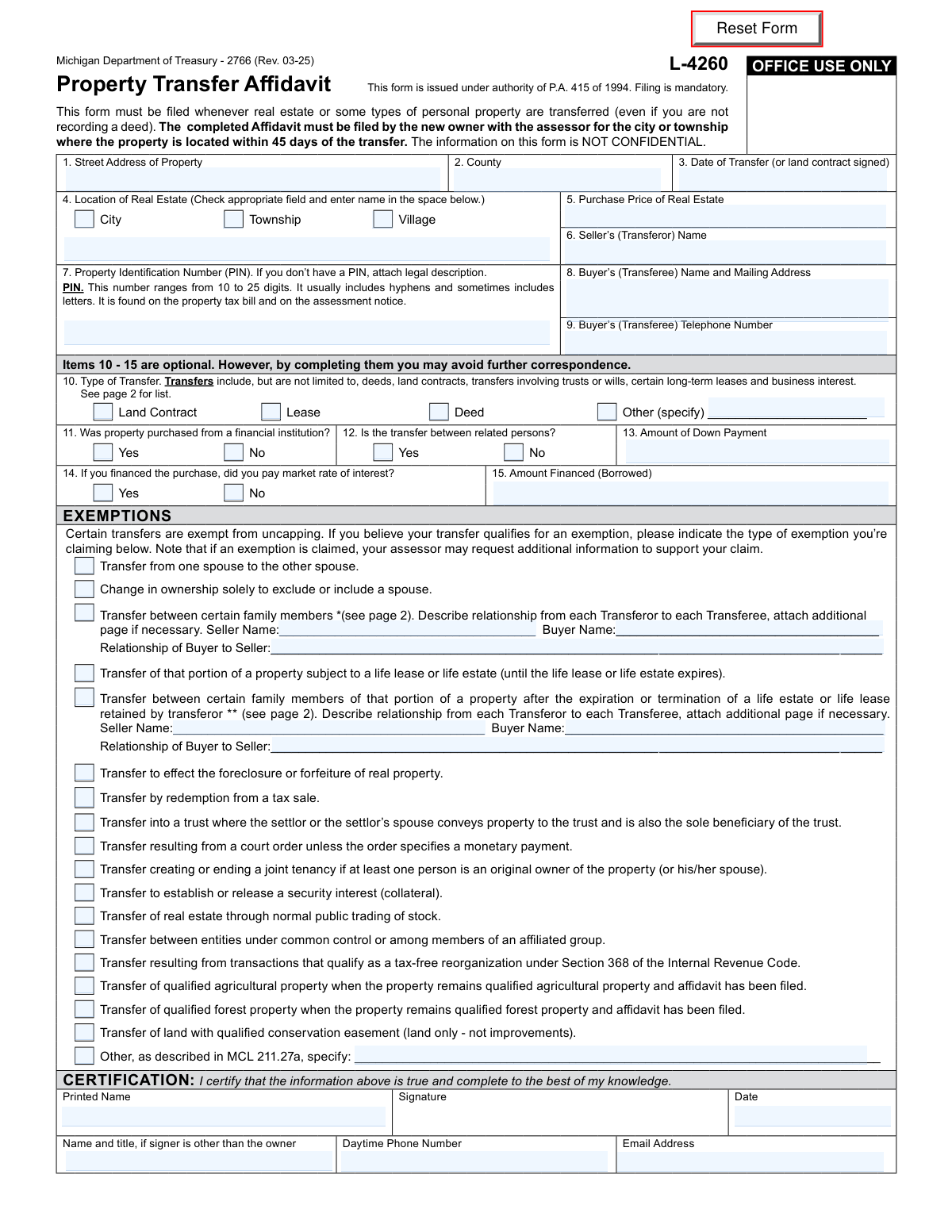
Yes! You can use AI to fill out Form L-4260, Property Transfer Affidavit
Michigan Form L-4260, the Property Transfer Affidavit, is a mandatory document that new property owners must file with their local city or township assessor within 45 days of a real estate transfer. This form notifies the assessor of the change in ownership, which is crucial for updating property tax records and assessing the property's taxable value. Today, this form can be filled out quickly and accurately using AI-powered services like Instafill.ai, which can also convert non-fillable PDF versions into interactive fillable forms.
Our AI automatically handles information lookup, data retrieval, formatting, and form filling.
It takes less than a minute to fill out L-4260 using our AI form filling.
Securely upload your data. Information is encrypted in transit and deleted immediately after the form is filled out.
Form specifications
| Form name: | Form L-4260, Property Transfer Affidavit |
| Number of pages: | 1 |
| Language: | English |
| Categories: | property transfer forms, transfer forms, property forms |
Instafill Demo: How to fill out PDF forms in seconds with AI
How to Fill Out L-4260 Online for Free in 2026
Are you looking to fill out a L-4260 form online quickly and accurately? Instafill.ai offers the #1 AI-powered PDF filling software of 2026, allowing you to complete your L-4260 form in just 37 seconds or less.
Follow these steps to fill out your L-4260 form online using Instafill.ai:
- 1 Navigate to a service like Instafill.ai and upload or select the Michigan Property Transfer Affidavit (Form L-4260).
- 2 Use the AI assistant to input the property's location details, including the street address, county, and Property Identification Number (PIN).
- 3 Provide the transfer details, such as the date of transfer, purchase price, and the seller's (transferor's) name.
- 4 Enter the buyer's (transferee's) full name, mailing address, and telephone number.
- 5 Answer the optional questions regarding the nature of the transfer, such as whether it was from a financial institution or between related persons.
- 6 Review the list of exemptions and check any that apply to your transfer to potentially avoid property tax uncapping, providing additional details as required.
- 7 Carefully review all auto-filled information for accuracy, then certify the form with your printed name, signature, and date before downloading the completed affidavit for filing.
Our AI-powered system ensures each field is filled out correctly, reducing errors and saving you time.
Why Choose Instafill.ai for Your Fillable L-4260 Form?
Speed
Complete your L-4260 in as little as 37 seconds.
Up-to-Date
Always use the latest 2026 L-4260 form version.
Cost-effective
No need to hire expensive lawyers.
Accuracy
Our AI performs 10 compliance checks to ensure your form is error-free.
Security
Your personal information is protected with bank-level encryption.
Frequently Asked Questions About Form L-4260
This form is used to notify the local city or township assessor of a change in property ownership. It is mandatory whenever real estate or certain types of personal property are transferred in Michigan.
The new owner (referred to as the buyer or transferee) is required to file the completed Property Transfer Affidavit.
You must file this form with the local assessor within 45 days of the date of transfer.
Failure to file within 45 days can result in penalties, including additional taxes from the date of transfer, interest, and a daily fine of $5 to $20 until it is filed.
The PIN is a 10- to 25-digit number found on your property tax bill or assessment notice. If you cannot find the PIN, you must attach a legal description of the property to the form.
No, items 10 through 15 regarding the type of transfer and financing are optional. However, completing them may help you avoid additional questions from the assessor's office.
Certain property transfers, such as between spouses or into a specific type of trust, are exempt from having their taxable value reassessed or 'uncapped'. If your transfer qualifies, you should claim the exemption on the form to avoid a potential increase in property taxes.
Yes, you must still file the form. However, a transfer to a child may qualify for an exemption from uncapping, which you should indicate in the 'EXEMPTIONS' section.
No, the form explicitly states that the information provided is NOT CONFIDENTIAL.
You must file the completed form with the assessor for the city or township where the property is located.
Yes, services like Instafill.ai use AI to accurately auto-fill form fields, which can save you time and help prevent errors.
You can upload the PDF to Instafill.ai, which will make it fillable online. You can then type your information directly into the fields and use the AI-powered auto-fill feature to complete it quickly.
You can use a service like Instafill.ai, which can convert flat, non-fillable PDFs into interactive forms that you can easily complete and sign on your computer.
Compliance L-4260
Validation Checks by Instafill.ai
1
Mandatory Field Completion
This check verifies that all mandatory fields, such as Street Address, County, Date of Transfer, Purchase Price, Seller's Name, Buyer's Name and Address, and all Certification fields, are filled out. Filing is mandatory, and incomplete forms can be rejected by the assessor's office, leading to delays and potential penalties. A failed validation will prevent form submission and highlight the required fields that are missing information.
2
Date of Transfer Chronology and Format
This validation ensures the 'Date of Transfer' is entered in a valid date format (e.g., MM/DD/YYYY) and is not a future date. An incorrect or future date would be invalid for a property transfer that has already occurred, which is the purpose of this affidavit. If the date is invalid, the user will be prompted to correct it before submission, ensuring accurate records for tax assessment purposes.
3
Property Identification Number (PIN) Format
This check validates that the Property Identification Number (PIN) conforms to the specified format of 10 to 25 characters, which may include digits, hyphens, and letters. The PIN is critical for uniquely identifying the property in municipal records, and an incorrectly formatted number could lead to the transfer being misapplied or rejected. Failure will trigger an error message explaining the correct format and character requirements.
4
Exclusive Location Type Selection
This validation ensures that exactly one of the 'City', 'Township', or 'Village' checkboxes is selected and that the corresponding location name field is not empty. A property must be located in one and only one of these municipal types for correct jurisdiction and assessment. If this rule is violated (e.g., none or multiple boxes are checked, or the name is missing), the form will prompt the user to make a single, complete selection.
5
Financial Consistency of Purchase Price
This check verifies that the sum of the 'Amount of Down Payment' and the 'Amount Financed (Borrowed)' equals the 'Purchase Price of Real Estate'. While these fields are optional, if they are filled, they should be logically consistent to provide a clear financial picture of the transaction. A mismatch could indicate a data entry error, and the system should display a warning to the user to review the financial figures.
6
Conditional Family Exemption Details
This validation ensures that if an exemption for 'Transfer between certain family members' is claimed, the associated 'Seller Name', 'Buyer Name', and 'Relationship of Buyer to Seller' fields are all completed. Claiming this exemption requires providing specific proof of the relationship to the assessor. If the exemption is checked but the details are missing, the submission will be blocked until the required information is provided.
7
Specification for 'Other' Selections
This check ensures that if the 'Other (specify)' checkbox is selected under 'Type of Transfer' or 'Exemptions', the corresponding text field is filled in. Selecting 'Other' without providing a description leaves the form incomplete and prevents the assessor from understanding the nature of the transfer or exemption. A failed validation will require the user to either provide a description or select a different option.
8
Certification Date Logic
This validation confirms that the 'Date' in the certification section is on or after the 'Date of Transfer'. A person cannot certify the details of a transfer before the transfer has legally occurred. This check prevents logical impossibilities and ensures the affidavit's legal integrity, prompting the user to correct the date if it precedes the transfer date.
9
Buyer's Telephone Number Format
This check validates that the 'Buyer’s (Transferee) Telephone Number' is in a recognizable phone number format (e.g., 10 digits with optional formatting like parentheses or hyphens). A valid phone number is essential for the assessor's office to contact the new owner if further information is needed. If the format is invalid, the user will be asked to correct the entry to ensure communication channels are open.
10
Buyer's Mailing Address Completeness
This validation inspects the 'Buyer’s (Transferee) Name and Mailing Address' field to ensure it contains essential components of a complete address, such as a street, city, state, and ZIP code. An incomplete address will prevent the buyer from receiving important correspondence from the assessor, including future tax bills and notices. The system will flag an incomplete entry and prompt the user to provide a full mailing address.
11
Purchase Price Numerical Validity
This check ensures that the 'Purchase Price of Real Estate' is a valid, non-negative numerical value. The purchase price is a key data point for assessment, and entering text or a negative number would be invalid. This validation prevents data corruption and ensures the financial information is usable, forcing the user to enter a proper currency or numerical value.
12
Conditional Financing Information Logic
This validation enforces the rule that the questions 'If you financed the purchase, did you pay market rate of interest?' and 'Amount Financed' are only answerable if the user has indicated 'Yes' to 'Was property purchased from a financial institution?'. This prevents irrelevant or contradictory information from being submitted. If the condition is not met, these fields should be disabled or hidden to guide the user correctly.
13
Email Address Format Validation
This check ensures the 'Email Address' provided in the certification section follows the standard '[email protected]' format. A valid email is crucial for modern, efficient communication between the assessor's office and the property owner. An invalid format would render the email address useless, so the system will prompt for correction upon detecting a formatting error.
14
Exemption Party Name Consistency
This check compares the 'Seller Name' and 'Buyer Name' entered in a family-related exemption section with the primary 'Seller’s (Transferor) Name' and 'Buyer’s (Transferee) Name' fields. The names should match to ensure the exemption claim is consistent with the overall transaction parties. A mismatch could indicate an error or a more complex transfer, triggering a warning for the user to verify the names.
Common Mistakes in Completing L-4260
The form must be filed with the local assessor within 45 days of the transfer. Many new owners are unaware of this mandatory deadline or lose track of it during the chaos of moving. Missing this deadline results in significant penalties, including a fine of $5 to $20 per day (up to a maximum of $200-$1,000) and the levy of any additional taxes and interest that would have been due from the date of transfer. To avoid this, new owners should mark the transfer date on a calendar and file the affidavit immediately after closing.
The PIN is a critical identifier for the property, but its long and complex format (10-25 digits with letters and hyphens) leads to frequent typos. Some people leave it blank if they can't find it, failing to attach the required legal description as an alternative. An incorrect or missing PIN will cause the assessor's office to reject the form or delay processing, potentially leading to late-filing penalties. Always copy the PIN directly from a recent property tax bill or assessment notice to ensure accuracy.
The 'Exemptions' section allows certain transfers to avoid a property tax assessment 'uncapping,' which is very appealing to filers. However, people often check a box, such as for a family or trust transfer, without fully meeting the strict legal criteria outlined on page 2 of the form. This leads to the exemption being denied, a full tax uncapping, and potential audits or fines for improper claims. To prevent this, carefully read the specific requirements for each exemption or consult a legal professional before claiming one.
Filers are often confused about which date to use in Item 3, sometimes entering the date they made an offer, the closing date, or the date the deed was recorded. The form specifies the 'Date of Transfer (or land contract signed),' which is the date the legal ownership interest was conveyed. Using the wrong date is critical because it starts the 45-day filing clock; an incorrect date can inadvertently make your filing late, triggering penalties. Refer to the date on the executed deed or land contract to ensure accuracy.
When claiming an exemption for a transfer between family members, the form requires describing the relationship between the seller and buyer. Filers often write a vague term like 'family' or 'relative,' which is insufficient for the assessor. The exemption only applies to specific relationships (e.g., parent, child, grandchild, sibling). This ambiguity forces the assessor to send a request for more information, delaying the process and potentially jeopardizing the exemption. Always state the precise relationship, such as 'Mother to Daughter' or 'Grandfather to Grandson'.
The form asks for the Purchase Price (Item 5), Down Payment (Item 13), and Amount Financed (Item 15). A common mistake is a simple mathematical error where the down payment and financed amount do not add up to the total purchase price. This inconsistency acts as a red flag for the assessor, who will likely send a letter requesting clarification. To avoid this, double-check that Item 13 + Item 15 equals Item 5 before submitting the form.
In Item 8, the form requests the buyer's name and mailing address. New owners frequently list the address of the property they just purchased, even if they have not moved in yet or use a different address (like a P.O. Box) for mail. This can cause them to miss crucial correspondence from the assessor, including assessment notices, tax bills, or requests for additional information. Always provide the address where you reliably receive mail to ensure timely communication.
Forgetting to sign and date the certification section is a simple but critical error that completely invalidates the form. An unsigned affidavit is not a legal attestation and will be rejected by the assessor's office. This requires the filer to resubmit the form, which can easily cause them to miss the 45-day filing deadline and incur penalties. Always perform a final check to ensure the form is signed and dated before mailing or delivery.
In the rush to complete the form, the new owner (buyer) sometimes forgets to completely fill out the seller's information in Item 6. This field is mandatory for the assessor to properly record the chain of title and verify the transfer. Leaving it blank or providing an incomplete name will result in the form being returned for correction. To avoid rejection, ensure the seller's full legal name, as it appears on the deed, is entered correctly.
A property's mailing address city is not always the same as its taxing jurisdiction, which can be a township or village. In Item 4, filers must check the correct box (City, Township, or Village) and write its name. Checking the wrong box or writing the wrong name can cause the affidavit to be sent to the incorrect assessor's office. This mistake can lead to major delays and late-filing penalties once the error is discovered and the form is rerouted. This information can be verified on a prior tax bill. AI-powered tools like Instafill.ai can help auto-populate and validate jurisdictional data to prevent this error.
Saved over 80 hours a year
“I was never sure if my IRS forms like W-9 were filled correctly. Now, I can complete the forms accurately without any external help.”
Kevin Martin Green
Your data stays secure with advanced protection from Instafill and our subprocessors

Robust compliance program
Transparent business model
You’re not the product. You always know where your data is and what it is processed for.
ISO 27001, HIPAA, and GDPR
Our subprocesses adhere to multiple compliance standards, including but not limited to ISO 27001, HIPAA, and GDPR.
Security & privacy by design
We consider security and privacy from the initial design phase of any new service or functionality. It’s not an afterthought, it’s built-in, including support for two-factor authentication (2FA) to further protect your account.
Fill out L-4260 with Instafill.ai
Worried about filling PDFs wrong? Instafill securely fills form-l-4260-property-transfer-affidavit forms, ensuring each field is accurate.