Yes! You can use AI to fill out Official Form 106D, Schedule D: Creditors Who Have Claims Secured by Property
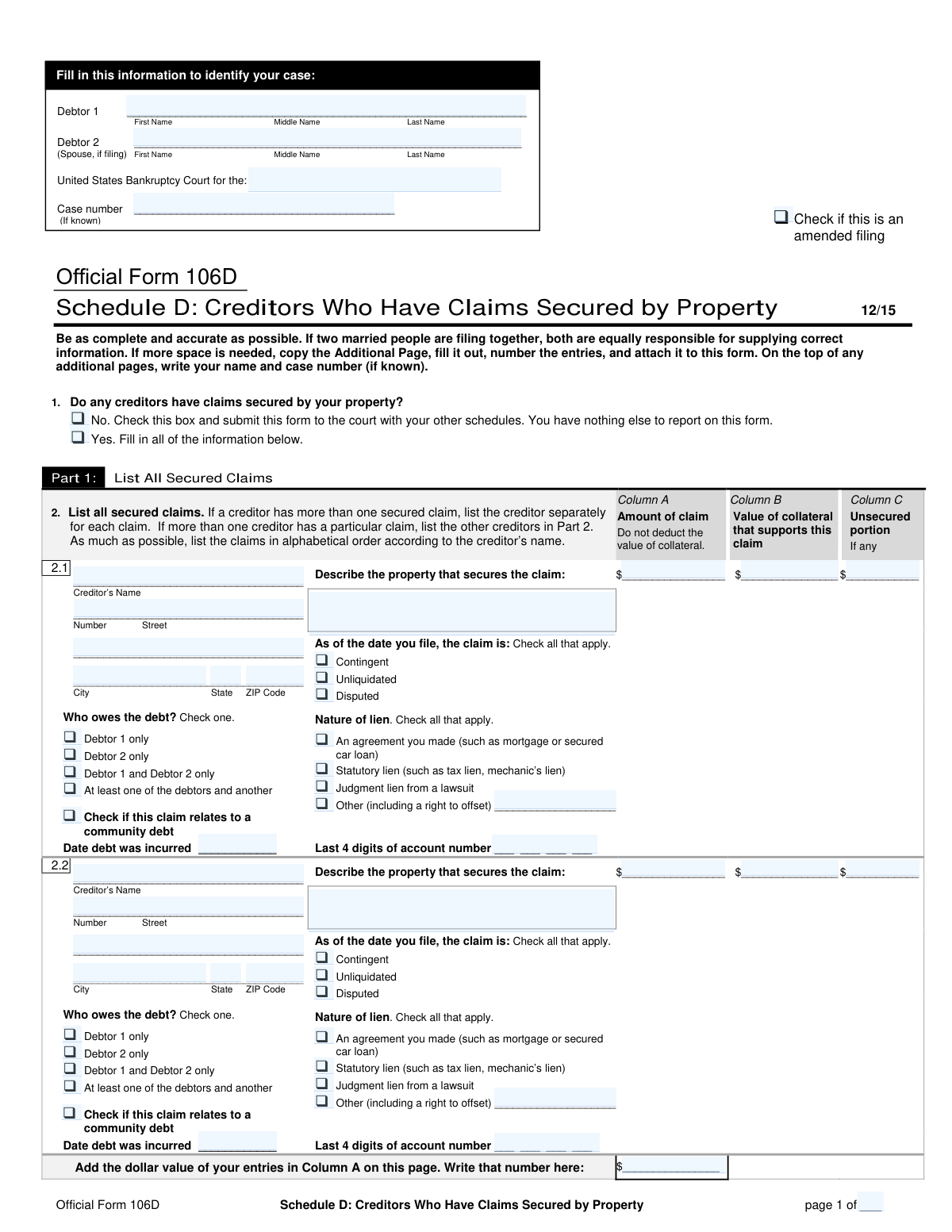
Official Form 106D, also known as Schedule D, is a crucial document filed in a United States bankruptcy case. Its purpose is for the debtor to declare all creditors who hold a secured claim, meaning the debt is backed by collateral such as a house, car, or other property. This detailed listing helps the court and trustees understand the debtor's financial obligations tied to specific assets. Today, this form can be filled out quickly and accurately using AI-powered services like Instafill.ai, which can also convert non-fillable PDF versions into interactive fillable forms.
Our AI automatically handles information lookup, data retrieval, formatting, and form filling.
It takes less than a minute to fill out Official Form 106D using our AI form filling.
Securely upload your data. Information is encrypted in transit and deleted immediately after the form is filled out.
Form specifications
| Form name: | Official Form 106D, Schedule D: Creditors Who Have Claims Secured by Property |
| Number of pages: | 3 |
| Filled form examples: | Form Official Form 106D Examples |
| Language: | English |
| Categories: | VA claim forms, credit forms, SEC forms, property forms |
Instafill Demo: How to fill out PDF forms in seconds with AI
How to Fill Out Official Form 106D Online for Free in 2026
Are you looking to fill out a OFFICIAL FORM 106D form online quickly and accurately? Instafill.ai offers the #1 AI-powered PDF filling software of 2026, allowing you to complete your OFFICIAL FORM 106D form in just 37 seconds or less.
Follow these steps to fill out your OFFICIAL FORM 106D form online using Instafill.ai:
- 1 Navigate to Instafill.ai and upload your PDF of Form 106D or select it from their template library.
- 2 Provide the debtor's name(s) and bankruptcy case information in the header section of the form.
- 3 Indicate whether you have any creditors with claims secured by your property. If yes, proceed to Part 1.
- 4 For each secured claim, use the AI assistant to enter the creditor's details, the amount of the claim, the value of the collateral, the nature of the lien, and the date the debt was incurred.
- 5 If any other parties, such as collection agencies, need to be notified about a debt listed in Part 1, complete Part 2 with their contact information.
- 6 Review all the auto-filled information for accuracy, ensuring all creditor details, claim amounts, and property descriptions are correct.
- 7 Once complete, download, save, or print your filled Official Form 106D, ready for submission to the bankruptcy court.
Our AI-powered system ensures each field is filled out correctly, reducing errors and saving you time.
Why Choose Instafill.ai for Your Fillable Official Form 106D Form?
Speed
Complete your Official Form 106D in as little as 37 seconds.
Up-to-Date
Always use the latest 2026 Official Form 106D form version.
Cost-effective
No need to hire expensive lawyers.
Accuracy
Our AI performs 10 compliance checks to ensure your form is error-free.
Security
Your personal information is protected with bank-level encryption.
Frequently Asked Questions About Form Official Form 106D
This form is used during a bankruptcy filing to list all creditors who have a secured claim against your property. A secured claim is a debt backed by collateral, such as a mortgage on a house or a loan for a car.
Anyone filing for bankruptcy who has debts secured by property must complete this form. If you have no secured debts, you only need to check the 'No' box in question 1 and submit the form with your other schedules.
The 'Amount of claim' is the total amount you owe the creditor on the date you file for bankruptcy. The 'Value of collateral' is the current market value of the specific property that secures that debt.
The unsecured portion is the amount of the debt that exceeds the value of the collateral. To calculate it, subtract the 'Value of collateral' (Column B) from the 'Amount of claim' (Column A); if the value is zero or less, there is no unsecured portion.
A claim is 'contingent' if it depends on a future event, 'unliquidated' if the exact amount owed is not yet determined, and 'disputed' if you disagree with the creditor about the debt's validity or amount. You should check all boxes that apply.
Use Part 2 to list any other parties that need to be notified about a debt already listed in Part 1. This includes collection agencies, co-creditors, or the creditor's attorney.
If you run out of space, use the 'Additional Page' provided with the form. Number the new entries sequentially (e.g., 2.3, 2.4, etc.) and attach the page to the main form.
You must list each secured claim as a separate entry in Part 1. For example, a mortgage and a car loan from the same bank should be listed as two distinct items.
A lien from an 'agreement' is one you voluntarily entered into, like a mortgage or car loan. A 'judgment lien' is an involuntary lien placed on your property by a court as the result of a lawsuit.
If filing jointly, you are both responsible for providing accurate information. For each debt, you must specify who owes it: Debtor 1, Debtor 2, both debtors, or if it is a community debt.
Yes, services like Instafill.ai use AI to accurately auto-fill form fields, which can save you significant time and help prevent errors. This is especially useful for complex forms with repetitive information.
You can use a service like Instafill.ai to fill out your form online. Simply upload the PDF, and the platform will convert it into a fillable format that you can complete, save, and print from your browser.
If you have a non-fillable or 'flat' PDF, you can upload it to a platform like Instafill.ai. The service uses AI to recognize the fields and will automatically convert the document into an interactive, fillable form.
Compliance Official Form 106D
Validation Checks by Instafill.ai
1
Conditional Requirement for Secured Claims
This check ensures that if the user answers 'Yes' to question 1 ('Do any creditors have claims secured by your property?'), then at least one creditor entry in Part 1 is fully completed. Conversely, if 'No' is checked, Part 1 must be empty. This prevents incomplete submissions and ensures the form's core question is answered logically. A failure would prompt the user to either provide creditor details or select 'No'.
2
Unsecured Portion Calculation Logic
This validation verifies the mathematical accuracy of Column C ('Unsecured portion'). The value in Column C must equal the 'Amount of claim' (Column A) minus the 'Value of collateral' (Column B), but only if Column A is greater than Column B. If the collateral value is greater than or equal to the claim amount, the unsecured portion must be zero or blank. This ensures the financial data is accurate for bankruptcy proceedings.
3
Date Debt Incurred Format and Plausibility
This check validates that the 'Date debt was incurred' field contains a valid date in a recognized format (e.g., MM/DD/YYYY). It also ensures the date is not in the future. Accurate dating is crucial for establishing the timeline of debts. An invalid format or a future date would trigger an error, requiring the user to correct the entry.
4
Account Number Last 4 Digits Format
This validation ensures that any field for 'Last 4 digits of account number' contains exactly four numeric digits. This standardizes the data for identification purposes while protecting the debtor's full account information. Submissions with fewer or more than four digits, or non-numeric characters, would be rejected for correction.
5
Conditional 'Other Lien' Description
This check enforces that if the 'Other (including a right to offset)' checkbox is selected under 'Nature of lien', the corresponding text field for describing the lien is not left empty. This is important for providing complete and unambiguous information about the type of security. If the box is checked and the description is missing, the form submission will be flagged as incomplete.
6
Debtor Liability Consistency
This validation cross-references the 'Who owes the debt?' selection with the filers listed at the top of the form. For example, if only 'Debtor 1' is filing (Debtor 2 is blank), then options like 'Debtor 2 only' or 'Debtor 1 and Debtor 2 only' are invalid. This maintains logical consistency throughout the legal document. An inconsistency would require the user to correct the selection.
7
Creditor Entry Completeness in Part 1
For each secured claim entry started in Part 1 (e.g., a creditor name is provided), this check ensures all mandatory associated fields are also filled out. This includes the creditor's full address, amount of claim, collateral value, and property description. This prevents partial, unusable entries and ensures all necessary data for a listed creditor is captured. A failure would highlight the missing fields for the specific entry.
8
Part 2 Referential Integrity Check
This validation ensures that the line number entered in Part 2 ('On which line in Part 1 did you enter the creditor?') corresponds to a valid, existing entry in Part 1. For example, if a user enters '2.5', the system checks that a claim '2.5' actually exists. This is critical for correctly linking additional parties, like collection agencies, to the primary creditor. An invalid reference would result in an error.
9
ZIP Code Format Validation
This check verifies that all ZIP Code fields for creditor addresses are in a valid format, typically 5 digits or 9 digits (ZIP+4). Correctly formatted ZIP codes are essential for mail delivery and ensuring all parties are properly notified by the court. An invalid format would prevent submission until corrected.
10
Column A Page Total Calculation
This validation automatically calculates and verifies the sum of all 'Amount of claim' entries (Column A) on a single page against the value entered in the page total field. This serves as an arithmetic check to prevent manual calculation errors by the filer. If the user-entered total does not match the calculated sum, an alert will be shown to prompt a correction.
11
Primary Debtor Identification
This check ensures that the 'Debtor 1 Name' field in the case identification section at the top of the form is not empty. The primary debtor's name is the most fundamental piece of information for identifying the case and the filer. A submission without this information would be fundamentally invalid and rejected immediately.
12
Page Numbering Consistency
This validation checks the 'page __ of __' fields for logical consistency. It ensures the current page number is not greater than the total number of pages, and that the total number of pages is consistent across all submitted pages of the form. This is important for document integrity and ensuring the court receives the complete schedule. A mismatch would flag the document for review.
Common Mistakes in Completing Official Form 106D
Filers often make arithmetic errors when subtracting the collateral value (Column B) from the claim amount (Column A), or they fill in a value when the collateral is worth more than the debt. This misrepresents the debtor's financial situation and can lead to objections from the trustee or creditors, requiring corrected filings. To avoid this, carefully calculate Column A minus Column B, and only enter a value if it is greater than zero; otherwise, leave it blank or enter $0.
The form explicitly instructs filers not to deduct the collateral's value from the total claim amount in Column A, but many do so instinctively. This error understates the creditor's full claim and provides inaccurate information to the court, which can cause delays and require amendments. Always enter the full, outstanding balance of the debt in Column A, regardless of the collateral's value.
Debtors frequently use generic descriptions like 'car' or 'property' instead of specific identifiers. A vague description makes it difficult for the court and trustee to identify which asset secures a particular debt, potentially leading to disputes over the automatic stay or treatment of the asset. Always provide detailed information, such as the full property address for real estate or the make, model, and VIN for a vehicle.
These legal terms are often misunderstood, leading filers to check the wrong boxes or none at all. For example, a debtor might incorrectly mark a debt as 'disputed' simply because they disagree with the interest rate. Misclassifying a claim can have serious legal consequences, affecting its treatment in the bankruptcy plan and its potential for discharge. If you are unsure, it is critical to seek legal advice to classify claims correctly.
When a debt is with a collection agency, the original creditor must be listed in Part 1 and the agency in Part 2. Filers often forget to list the collection agency, meaning the agency does not receive legal notice of the bankruptcy. This can result in the agency continuing collection efforts in violation of the automatic stay, causing significant stress and potential legal issues for the debtor.
Filers must list the current fair market value of the collateral, but often use the purchase price, an old appraisal, or a rough guess. An incorrect valuation directly impacts the calculation of the secured and unsecured portions of the claim, which can trigger objections from the trustee or creditors. Research the current market value for similar items in similar condition to provide an accurate estimate.
The instructions require listing each secured claim separately, even if they are with the same creditor (e.g., a mortgage and a car loan from the same bank). Filers sometimes group these into a single entry, which confuses the record and makes it impossible to track which asset secures which loan. This can lead to the schedule being deemed deficient, requiring an amendment to separate each claim properly.
Using a general customer service address instead of the specific address for legal notices, or making a simple typo, is a frequent error. If the address is wrong, the creditor will not receive proper legal notice of the bankruptcy filing. This can result in the debt not being discharged, allowing the creditor to resume collection activities after the case is closed.
When using additional pages to list more creditors, filers often forget to write their name and case number at the top of each page as instructed. If an un-labeled page becomes separated from the main document, the court will not be able to associate it with the case. This would render the filing incomplete and could jeopardize the discharge of the debts listed on the missing page.
Debtors sometimes find a flat, non-fillable version of the form and fill it by hand, resulting in illegible entries, misaligned text, and calculation errors. This can lead to the court clerk rejecting the filing or data being entered incorrectly into the court's system. AI-powered form-filling tools like Instafill.ai can convert non-fillable PDFs into interactive forms, ensuring all data is legible, properly formatted, and validated to prevent such issues.
In a joint case, it is crucial to correctly check whether Debtor 1, Debtor 2, or both are liable for each debt. Filers may mistakenly assume all debts are joint or fail to check any box, creating ambiguity. This error affects each debtor's personal liability and can lead to complications with creditors or the trustee regarding who is responsible for the debt post-bankruptcy.
Saved over 80 hours a year
“I was never sure if my IRS forms like W-9 were filled correctly. Now, I can complete the forms accurately without any external help.”
Kevin Martin Green
Your data stays secure with advanced protection from Instafill and our subprocessors

Robust compliance program
Transparent business model
You’re not the product. You always know where your data is and what it is processed for.
ISO 27001, HIPAA, and GDPR
Our subprocesses adhere to multiple compliance standards, including but not limited to ISO 27001, HIPAA, and GDPR.
Security & privacy by design
We consider security and privacy from the initial design phase of any new service or functionality. It’s not an afterthought, it’s built-in, including support for two-factor authentication (2FA) to further protect your account.
Fill out Official Form 106D with Instafill.ai
Worried about filling PDFs wrong? Instafill securely fills official-form-106d-schedule-d-creditors-who-have-claims-secured-by-property forms, ensuring each field is accurate.



