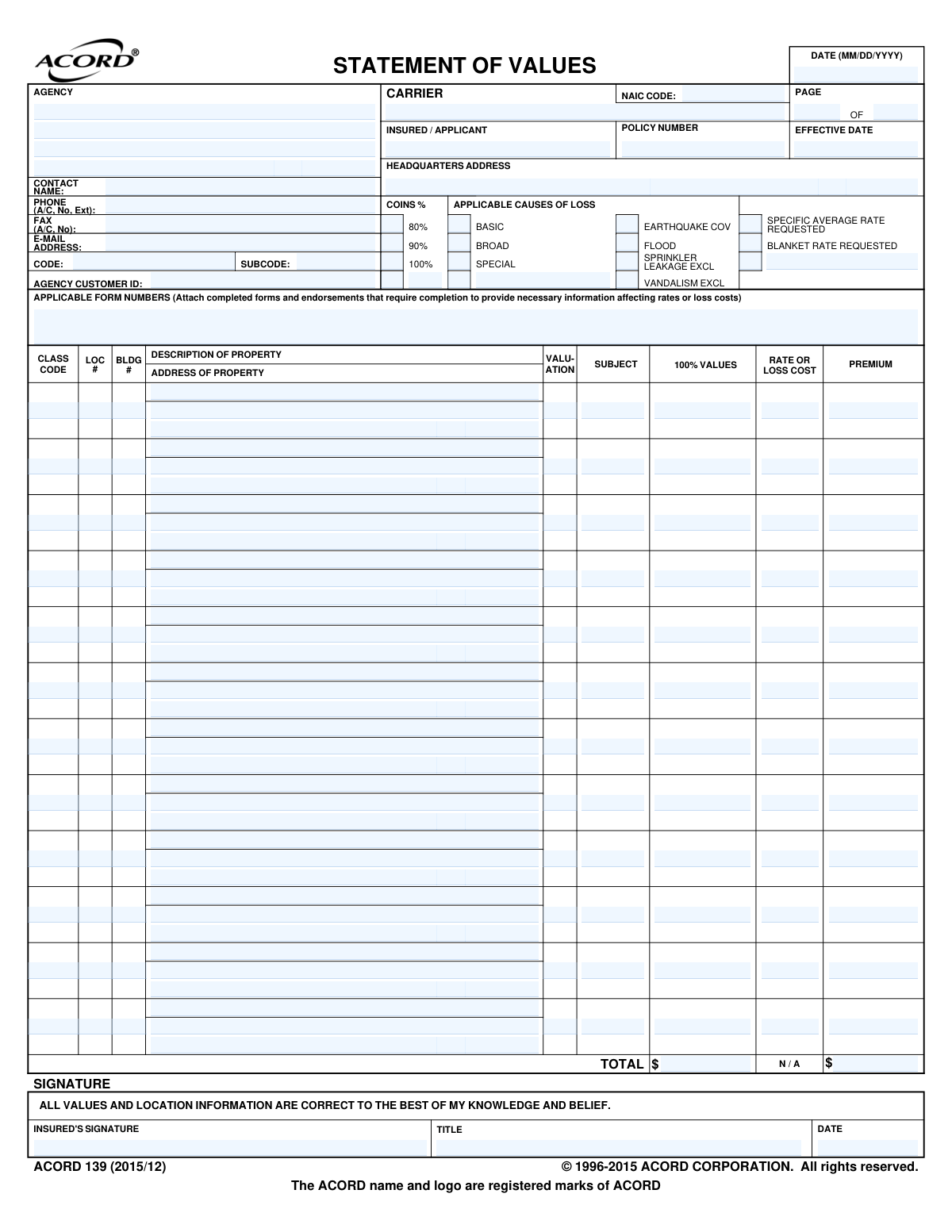
Yes! You can use AI to fill out ACORD 139, Statement of Values

ACORD Form 139, known as the Statement of Values, is a crucial document for obtaining commercial property insurance. It provides a detailed schedule of locations and their corresponding values, including buildings, contents, and business interruption figures, allowing underwriters to accurately assess risk and calculate premiums. Today, this form can be filled out quickly and accurately using AI-powered services like Instafill.ai, which can also convert non-fillable PDF versions into interactive fillable forms.
ACORD 139 is part of the commercial insurance forms and property insurance forms categories on Instafill.
Our AI automatically handles information lookup, data retrieval, formatting, and form filling.
It takes less than a minute to fill out ACORD 139 using our AI form filling.
Securely upload your data. Information is encrypted in transit and deleted immediately after the form is filled out.

Form specifications

Form name: ACORD 139, Statement of Values
Number of fields: 205
Number of pages: 1
Language: English
main-image

Instafill Demo: How to fill out PDF forms in seconds with AI

How to Fill Out ACORD 139 Online for Free in 2026

Are you looking to fill out a ACORD 139 form online quickly and accurately? Instafill.ai offers the #1 AI-powered PDF filling software of 2026, allowing you to complete your ACORD 139 form in just 37 seconds or less.
Follow these steps to fill out your ACORD 139 form online using Instafill.ai:
  1. 1 Navigate to Instafill.ai and upload your ACORD 139 form or select it from their template library.
  2. 2 Use the AI assistant to automatically populate basic information such as the Insured/Applicant name, policy number, and agency details.
  3. 3 Enter the address and location details for each property being insured in the designated columns.
  4. 4 Input the specific 100% values for the building, contents, and other coverages for each location listed.
  5. 5 Select the applicable causes of loss (e.g., Basic, Broad, Special) and the desired coinsurance percentage.
  6. 6 Review all the information entered by the AI and manually added values to ensure complete accuracy across all properties.
  7. 7 Electronically sign and date the form before downloading or directly sharing it with your insurance agent or carrier.

Our AI-powered system ensures each field is filled out correctly, reducing errors and saving you time.

Why Choose Instafill.ai for Your Fillable ACORD 139 Form?

Speed

Complete your ACORD 139 in as little as 37 seconds.

Up-to-Date

Always use the latest 2026 ACORD 139 form version.

Cost-effective

No need to hire expensive lawyers.

Accuracy

Our AI performs 10 compliance checks to ensure your form is error-free.

Security

Your personal information is protected with bank-level encryption.

Frequently Asked Questions About Form ACORD 139

This form is used to provide a detailed list of properties and their values to an insurance carrier. It helps the insurer accurately assess risk and calculate the premium for commercial property coverage.

The applicant or insured business owner, often with the help of their insurance agent, must complete this form when applying for or renewing a commercial property insurance policy that covers multiple locations or has significant values.

This refers to the full replacement cost of the property at today's prices, including the building, contents, and any other insured items. You must provide the total value, not a partial amount, to ensure you are properly insured.

Each property location and building should be listed on a separate row in the main table. If you have more properties than will fit on one page, use additional pages and number them correctly in the 'PAGE OF' section.

This section specifies the types of perils or events you want your property to be insured against, such as Basic, Broad, or Special coverage. You should select the coverage that best fits your needs and risk tolerance.

Coinsurance is a clause that requires you to insure your property for a certain percentage (e.g., 80%, 90%) of its total value. Meeting this requirement helps you avoid a penalty on partial loss claims.

Typically, the applicant provides the property information and values, while the insurance carrier or agent will calculate and fill in the rate and premium columns. It's best to leave these blank unless instructed otherwise by your agent.

The 'CLASS CODE' relates to the building's construction and occupancy and is often determined by the insurance company. You should fill in all the information you know and work with your insurance agent to complete technical fields like this.

Your signature certifies that all the values and location information provided are correct to the best of your knowledge. Inaccurate values can lead to being underinsured and may result in claim penalties.

It is helpful to have recent property appraisals, a list of all business locations, and an inventory of major equipment or contents. This documentation will help you accurately determine the '100% Values' for each property.

Yes, services like Instafill.ai use AI to accurately auto-fill form fields from your existing data. This can save significant time and reduce errors, especially when listing many properties.

You can use a service like Instafill.ai to upload the PDF and fill it out on your computer. Instafill.ai allows you to easily type information into the fields, save your progress, and download the completed form.

If you have a non-fillable or 'flat' PDF, you can use a tool like Instafill.ai. It can convert the static PDF into an interactive, fillable form that you can complete digitally.

Compliance ACORD 139
Validation Checks by Instafill.ai

1
Validates Date Format (MM/DD/YYYY)
Checks that all date fields, including 'DATE', 'EFFECTIVE DATE', and the signature 'DATE', adhere to a strict MM/DD/YYYY format. This validation ensures data consistency and prevents errors in processing policy timelines and legal documents. If the format is incorrect, the system should halt submission and prompt the user for correction.
2
Verifies Phone Number Structure
Ensures that the Agency and Insured phone number fields follow a standard North American format, such as (###) ###-####, including the area code and an optional extension. This is crucial for ensuring the contact information is valid and can be used by automated dialers or for manual contact. An invalid format would trigger an error message requesting correction.
3
Validates Email Address Format
Checks if the 'E-MAIL ADDRESS' fields for both the agency and the insured contain a valid email format (e.g., [email protected]). This validation is essential for ensuring that digital communications, such as policy documents, billing notices, or other notifications, can be successfully delivered. A failed validation would prevent form submission until a valid email is provided.
4
Ensures Insured/Applicant Name is Provided
Verifies that the 'INSURED / APPLICANT' name field is not empty. This is a fundamental piece of information required to identify the policyholder and is legally necessary for the insurance contract to be valid. The form submission must be blocked if this critical field is left blank.
5
Confirms Property Values are Numeric
Validates that all entries in the '100% VALUES' column are valid numeric or currency figures, without any text or special characters other than currency symbols and separators. This value is the basis for determining coverage amounts and premiums, so it must be a number. Non-numeric entries would lead to calculation errors and an incorrect policy, so the system must reject them.
6
Verifies Sum of Property Values
Performs a cross-field check to ensure the 'TOTAL$' amount at the bottom of the '100% VALUES' column correctly equals the sum of all individual property values listed in the table. This acts as a crucial safeguard against manual calculation errors and ensures the total declared value is accurate. A mismatch would flag the column for review and correction.
7
Validates Page Numbering Logic
Checks the 'PAGE X OF Y' fields to ensure that the current page number (X) is a positive integer and is less than or equal to the total number of pages (Y). This helps maintain document integrity, especially for multi-page submissions, and ensures no pages are missing. An illogical entry, such as 'Page 3 of 2', would indicate a document assembly error.
8
Validates Coinsurance Percentage Selection
Ensures that the selected or entered 'COINS %' is one of the valid options presented on the form (80%, 90%, or 100%). This percentage is a critical factor in calculating premiums and determining payout conditions in the event of a claim. An invalid or missing percentage would make the policy terms ambiguous and must be corrected before processing.
9
Checks Logical Consistency of Effective Date
Verifies that the 'EFFECTIVE DATE' is not in the past and is on or after the main 'DATE' the form was prepared. This business rule prevents the creation of policies with illogical or unintentionally retroactive start dates that could create legal and financial complications. The system should flag any date that violates this rule for user review.
10
Confirms Insured's Signature is Present
Validates that the 'INSURED'S SIGNATURE' field has been signed, either digitally or by capturing an image of a wet signature. The signature is required to affirm the statement that all information is correct and to make the document legally binding. A missing signature renders the form incomplete and invalid for processing.
11
Validates NAIC Code Format
Checks that the 'NAIC CODE' field contains a 5-digit numeric code. The National Association of Insurance Commissioners (NAIC) code is a standard identifier for insurance companies, and an incorrect format can lead to misrouting or processing delays. This validation ensures the carrier can be correctly identified in regulatory and administrative systems.
12
Ensures Property Address is Complete for Each Entry
Verifies that for every row in the values table that contains a monetary figure in the '100% VALUES' column, the corresponding 'ADDRESS OF PROPERTY' field is also filled out. A value without a location is meaningless for property insurance. This check ensures each insured asset is clearly identified, which is essential for risk assessment and underwriting.
13
Requires At Least One Cause of Loss Selection
Validates that for each property listed, at least one option under 'APPLICABLE CAUSES OF LOSS' (BASIC, BROAD, or SPECIAL) has been selected. This selection defines the scope of coverage for the property. A submission without this information is incomplete, as the type of coverage is a fundamental component of the policy.
14
Verifies Total Premium Calculation
Checks if the 'TOTAL$' value under the 'PREMIUM' column is the sum of all individual premium amounts listed for each property. This serves as an arithmetic check to ensure accuracy in the final premium calculation. If the totals do not match, it indicates a potential data entry or calculation error that needs to be resolved.

Common Mistakes in Completing ACORD 139

Understating or Overstating Property Values

Applicants often report the market value or purchase price of a property instead of its current replacement cost, which is what insurance policies typically cover. Understating values can trigger a significant coinsurance penalty during a claim, leaving the business underinsured. Overstating values results in paying unnecessarily high premiums for coverage that cannot be collected. To avoid this, use recent appraisals or a replacement cost estimator tool to determine the correct values for the '100% VALUES' column.

Providing Incomplete or Inaccurate Property Addresses

Mistakes such as typos, incorrect zip codes, or missing suite numbers in the 'ADDRESS OF PROPERTY' field are extremely common. An inaccurate address can lead to a property being incorrectly rated or, in a worst-case scenario, not being covered at all because the carrier has no record of insuring that specific location. Always verify each address against official records before submission to ensure there is no ambiguity about which properties are covered.

Misunderstanding the Coinsurance Clause

Many applicants select a coinsurance percentage (e.g., 80%, 90%) without fully understanding that it requires them to insure the property to that percentage of its total value. Failure to meet this requirement can result in a substantial penalty on partial loss claims, drastically reducing the payout. It is crucial to select a coinsurance percentage that aligns with the accuracy of the stated values to avoid financial penalties.

Omitting Specific Value Types like Contents or Business Income

A frequent error is to only list the building's value in the '100% VALUES' grid, while forgetting to include separate values for Business Personal Property (Contents) and Business Income (BI). This oversight means those exposures are not being insured, leaving the business vulnerable to major financial loss if contents are destroyed or operations are halted. Ensure every applicable value column is completed for each location to secure comprehensive coverage.

Incorrectly Calculating Total Values

Manually summing a long list of property values in the 'TOTAL$' field is highly susceptible to human error. An incorrect total misrepresents the overall exposure to the underwriter, which can delay policy issuance and affect the calculation of blanket limits or overall rates. Using automated tools like Instafill.ai can prevent this by performing calculations automatically, ensuring accuracy across the entire statement.

Using Incorrect Construction Class Codes

The 'CLASS CODE' field, which specifies a building's construction type (e.g., Frame, Masonry), is a primary factor in determining the premium rate. Applicants often guess or use outdated information, leading to inaccurate pricing. If the carrier discovers the wrong code during an inspection or claim, it can lead to back-charged premiums or other coverage complications.

Omitting Building Identifiers for Multi-Building Locations

When a single address ('LOC #') contains multiple structures, applicants often fail to assign a unique 'BLDG #' to each one. This creates ambiguity, making it unclear which building corresponds to which set of values. This confusion can significantly complicate and delay claims processing, especially if only one of several buildings is damaged.

Forgetting the Signature and Date

An unsigned or undated Statement of Values is not a valid legal declaration and will be rejected by the insurance carrier. This simple oversight is a common cause of processing delays, as the submission is incomplete until it is properly signed by the insured. The signature attests that all information is correct to the best of the applicant's knowledge, making it a mandatory final step.

Providing Vague Property Descriptions

Using generic terms like 'Building' in the 'DESCRIPTION OF PROPERTY' field provides no value to the underwriter. This lack of detail makes it difficult to assess the risk associated with the property's use and occupancy. A clear description, such as 'Two-story office building' or 'Steel-frame warehouse with cold storage', is essential for accurate risk assessment and pricing.

Making Errors While Manually Filling a Non-Interactive Form

This ACORD form is often a flat, non-fillable PDF, forcing users to fill it out by hand. This manual process leads to illegible handwriting, data entry errors, and misaligned information, which can cause significant delays and mistakes during data entry by the carrier. AI-powered tools like Instafill.ai can convert these non-fillable PDFs into interactive forms, which helps prevent manual errors and ensures data is entered cleanly and accurately.
Saved over 80 hours a year

“I was never sure if my IRS forms like W-9 were filled correctly. Now, I can complete the forms accurately without any external help.”

Kevin Martin Green

Your data stays secure with advanced protection from Instafill and our subprocessors

Robust compliance program

Transparent business model

You’re not the product. You always know where your data is and what it is processed for.

ISO 27001, HIPAA, and GDPR

Our subprocesses adhere to multiple compliance standards, including but not limited to ISO 27001, HIPAA, and GDPR.

Security & privacy by design

We consider security and privacy from the initial design phase of any new service or functionality. It’s not an afterthought, it’s built-in, including support for two-factor authentication (2FA) to further protect your account.

Fill out ACORD 139 with Instafill.ai

Worried about filling PDFs wrong? Instafill securely fills acord-139-statement-of-values forms, ensuring each field is accurate.