Yes! You can use AI to fill out ACORD 152, Commercial Inland Marine Section
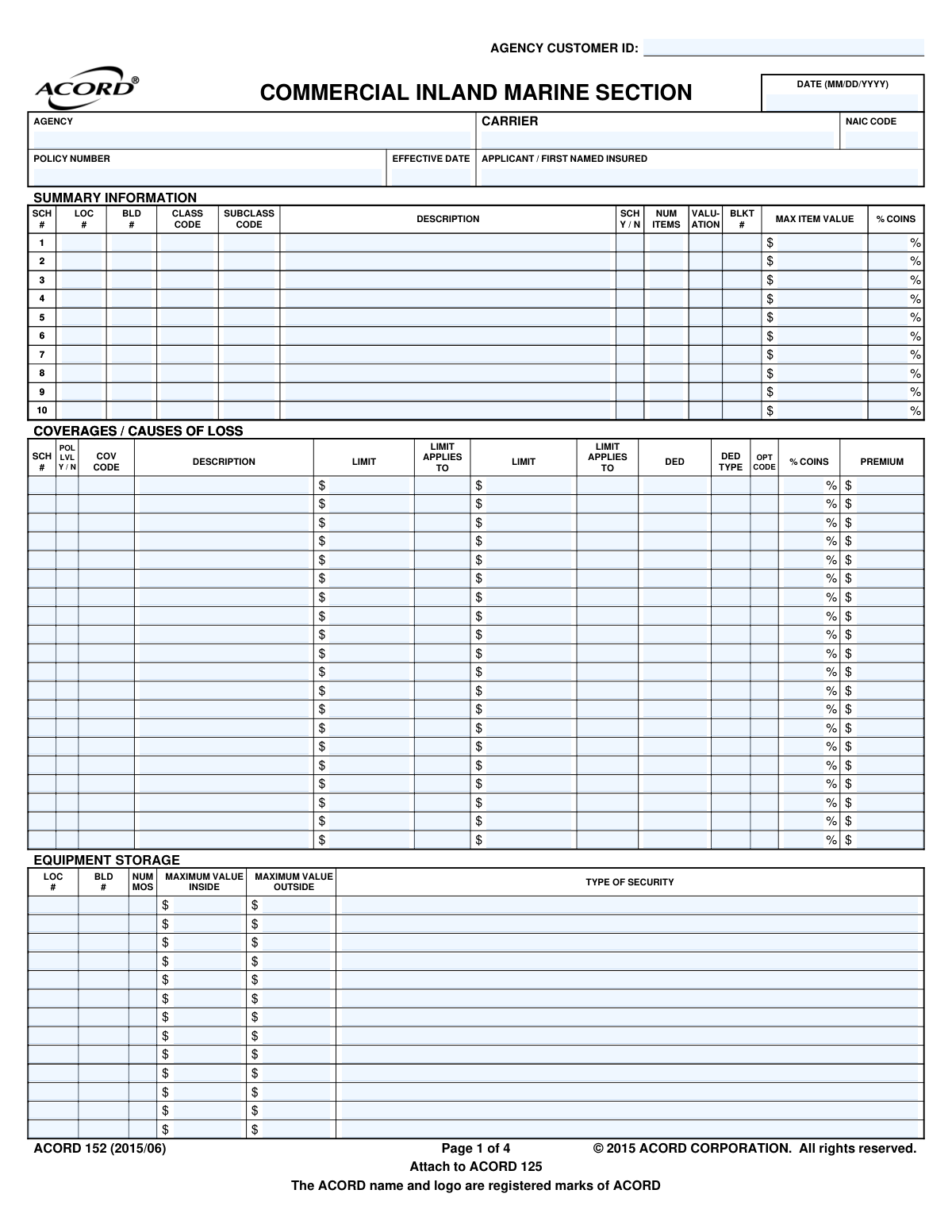
ACORD Form 152, the Commercial Inland Marine Section, is a standardized insurance application used to apply for coverage on property that is mobile, in transit, or instrumental to a business's operations. It allows applicants to provide detailed information about specific items, their values, storage, and the desired coverage limits and deductibles. Today, this form can be filled out quickly and accurately using AI-powered services like Instafill.ai, which can also convert non-fillable PDF versions into interactive fillable forms.
ACORD 152 is part of the
commercial insurance forms category on Instafill.
Our AI automatically handles information lookup, data retrieval, formatting, and form filling.
It takes less than a minute to fill out ACORD 152 using our AI form filling.
Securely upload your data. Information is encrypted in transit and deleted immediately after the form is filled out.
Form specifications
| Form name: | ACORD 152, Commercial Inland Marine Section |
| Number of fields: | 780 |
| Number of pages: | 1 |
| Language: | English |
More forms in Commercial insurance forms
Instafill Demo: How to fill out PDF forms in seconds with AI
How to Fill Out ACORD 152 Online for Free in 2026
Are you looking to fill out a ACORD 152 form online quickly and accurately? Instafill.ai offers the #1 AI-powered PDF filling software of 2026, allowing you to complete your ACORD 152 form in just 37 seconds or less.
Follow these steps to fill out your ACORD 152 form online using Instafill.ai:
- 1 Navigate to Instafill.ai and upload your ACORD 152 form or select it from the template library.
- 2 Enter the applicant, agency, and basic policy information, including the effective date and policy number if known.
- 3 Complete the 'Scheduled Items' section by listing each piece of equipment with its description, manufacturer, model, year, serial number, and value.
- 4 Define the insurance terms in the 'Coverages / Causes of Loss' section, specifying limits, deductibles, and coinsurance percentages.
- 5 Disclose any 'Additional Interest' parties, such as lienholders or loss payees, along with their contact details and interest in the property.
- 6 Answer the 'General Information' questions about equipment usage, such as whether it is rented, used underground, or operated afloat.
- 7 Review the AI-populated form for accuracy, then have the producer and applicant provide their digital signatures to finalize the application.
Our AI-powered system ensures each field is filled out correctly, reducing errors and saving you time.
Why Choose Instafill.ai for Your Fillable ACORD 152 Form?
Speed
Complete your ACORD 152 in as little as 37 seconds.
Up-to-Date
Always use the latest 2026 ACORD 152 form version.
Cost-effective
No need to hire expensive lawyers.
Accuracy
Our AI performs 10 compliance checks to ensure your form is error-free.
Security
Your personal information is protected with bank-level encryption.
Frequently Asked Questions About Form ACORD 152
The ACORD 152, or Commercial Inland Marine Section, is an insurance application used to obtain coverage for business property that is mobile or in transit, such as contractor's tools and equipment. It is typically submitted as an attachment to the main commercial insurance application, ACORD 125.
Businesses that own, lease, or are responsible for mobile equipment and property that is moved between locations should complete this form. This is common for contractors, photographers, and other professionals who transport valuable tools and equipment for their work.
For each piece of equipment you want to insure, you must provide a detailed description, including the manufacturer, model, year, and serial number. You will also need to state its value, purchase date, and whether it is new or used.
An 'Additional Interest' is a person or entity, other than the insured, who has a financial stake in the property, such as a bank that provided a loan for the equipment. You must list them to ensure their interest is protected under the policy, as they may be entitled to payment in the event of a loss.
Scheduled coverage insures specific, individual items that are listed on the form with their own value, while blanket coverage provides a single limit for a group of items without listing each one individually. Your agent can help you decide which is more appropriate for your property.
Yes, on page 2 under 'General Information - Equipment', you must answer the question 'Equipment rented, loaned from others...'. This is crucial information for the insurer to accurately assess risk and determine the correct coverage and premium.
Valuation refers to how the value of your property will be determined in case of a claim, typically either 'Actual Cash Value' (ACV) which accounts for depreciation, or 'Replacement Cost' (RC) which does not. The choice affects your premium and how much you would receive after a loss.
If you have more items than can be listed on the 'Scheduled Items' page, you can attach additional copies of page 3 or a separate schedule document. Ensure all pages are clearly numbered and referenced within the application.
You will typically complete this form with your insurance agent or producer. They will then submit it to the insurance carrier as part of your complete application package for a new policy or a policy change.
Yes, services like Instafill.ai use AI to auto-fill form fields accurately and save time. This can be especially helpful for repetitive information and ensuring details from your records are entered correctly.
To fill this form online, you can upload the ACORD 152 PDF to the Instafill.ai platform. The AI will make the form fillable, and you can use its features to quickly populate your business information and equipment schedules before downloading the completed document.
If you have a flat or non-fillable PDF, you can use a service like Instafill.ai to help. The platform can convert non-fillable PDFs into interactive forms that you can easily complete on your computer.
Both the applicant (an authorized representative of your business) and the insurance producer (your agent) must sign and date the form. The signature confirms that the information provided is true and complete to the best of your knowledge.
Compliance ACORD 152
Validation Checks by Instafill.ai
1
Validate Policy Effective Date
This check ensures the 'EFFECTIVE DATE' (Policy_EffectiveDate_A) is a valid date in MM/DD/YYYY format and is not in the past. This is critical for establishing the correct start of the coverage period. A failed validation would mean the policy cannot be bound as the inception date is invalid, requiring the user to correct the date before submission.
2
Mandatory Applicant and Producer Signatures
Verifies that both the 'APPLICANT'S SIGNATURE' (NamedInsured_Signature_A) and 'PRODUCER'S SIGNATURE' (Producer_AuthorizedRepresentative_Signature_A) fields are not empty. These signatures are legally required to bind the application and confirm the information's accuracy. If either signature is missing, the form is incomplete and cannot be processed, triggering an error to collect the required authorization.
3
Conditional Explanation for General Information Questions
Checks the 'GENERAL INFORMATION - EQUIPMENT' section. If any of the questions (e.g., 'EQUIPMENT RENTED, LOANED TO OTHERS') are answered 'Y' (Yes), this validation ensures the corresponding 'EXPLAIN' field is not empty. This is crucial for underwriters to assess additional risks associated with equipment usage. A failure would prompt the user to provide the necessary explanation for all 'Yes' responses.
4
NAIC Code Format and Validity
Ensures the 'NAIC CODE' (Insurer_NAICCode_A) is a 5-digit numeric value. This code is a standard identifier for insurance companies, and its accuracy is essential for regulatory reporting and correct routing of the application. An invalid format would cause processing delays and potential misidentification of the carrier, so the system should reject non-conforming entries.
5
Scheduled Item Date Logic
This validation compares the 'PURCHASE DATE' (PropertyItem_ItemDetail_PurchaseDate) and 'MODEL YEAR' (PropertyItem_ItemDetail_ModelYear) for each scheduled item. The 'PURCHASE DATE' cannot be in the future, and the 'MODEL YEAR' cannot be a year after the current year. This prevents data entry errors and ensures the provided information is logical for valuation and underwriting purposes.
6
Consistency of Item Value and Insurance Amount
For each entry in the 'SCHEDULED ITEMS' section, this check verifies that the 'AMOUNT OF INSURANCE' (PropertyItemCoverage_ContractorsEquipment_LimitAmount) does not exceed the 'ITEM VALUE' (PropertyItem_ItemDetail_ItemValueAmount). Insuring an item for more than its value is a moral hazard and is typically not permitted. If this validation fails, the user must adjust the amounts to be logical and compliant with underwriting rules.
7
Additional Interest Completeness
If an 'ADDITIONAL INTEREST' section is filled out (i.e., 'NAME AND ADDRESS' is provided), this check ensures that the 'INTEREST' type (e.g., Lienholder, Loss Payee) is selected and the 'LIEN AMOUNT' is provided. This information is critical for correctly identifying and protecting the financial interests of third parties in the insured property. A failure would require the user to complete the mandatory fields for the additional interest.
8
Coinsurance Percentage Range
Validates that all 'COINS' percentage fields (e.g., PropertySummary_CoinsurancePercent_A) contain a numeric value between 0 and 100. Coinsurance is a key factor in calculating premiums and claim payments, so an incorrect value can have significant financial consequences. The system should flag any values outside this range for correction.
9
Coverage and Premium Correlation
In the 'COVERAGES / CAUSES OF LOSS' grid, if a 'PREMIUM' amount is entered for a line item, this validation ensures that a 'LIMIT' and 'COV CODE' (Coverage Code) are also specified for that same line. A premium cannot be calculated or applied without knowing what coverage and limit it corresponds to. This check prevents incomplete coverage entries and ensures accurate policy rating.
10
Florida National Producer Number Requirement
This check is conditional based on the state of business. If the policy is being written for a risk in Florida, it verifies that the 'NATIONAL PRODUCER NUMBER' (Producer_NationalIdentifier_A) is provided, as explicitly required on the form. This is a state-specific compliance requirement. Failure to provide it would block submission for Florida-based policies until the NPN is entered.
11
Applicant and Agency Name Presence
Ensures that the 'APPLICANT / FIRST NAMED INSURED' (NamedInsured_FullName_A) and 'AGENCY' (Producer_FullName_A) fields are not empty. These are fundamental identifiers for the policyholder and the agency of record. The application is meaningless without this information, so a failed validation would halt the process until these core details are supplied.
12
Scheduled Item Minimum Data
If a row is started in the 'SCHEDULED ITEMS' section, this validation ensures that at least the 'DESCRIPTION', 'ITEM VALUE', and 'AMOUNT OF INSURANCE' are provided. This prevents the submission of empty or incomplete item rows which would be impossible to underwrite. A failure would prompt the user to either complete the required fields for the item or delete the incomplete row.
13
Additional Interest Phone and Email Format
Verifies that if a phone number (AdditionalInterest_Primary_PhoneNumber_A) or email address (AdditionalInterest_Primary_EmailAddress_A) is entered in the 'ADDITIONAL INTEREST' section, it follows a standard format. For example, the phone number should contain 10 digits and the email must include an '@' symbol and a domain. This ensures contact information is usable for communication regarding the policy or claims.
Common Mistakes in Completing ACORD 152
Applicants frequently omit critical identifying information in the 'Scheduled Items' section, such as the 'ID # / SERIAL #', 'Manufacturer', or 'Model Year'. This often happens when the information is not readily available during form completion. Missing these details can lead to significant delays in underwriting, incorrect rating, and potential disputes or denial of a claim, as the insurer cannot uniquely identify the covered piece of equipment.
Providing a generic description like 'Excavator' or 'Generator' instead of a specific one (e.g., '2022 Caterpillar 336 Hydraulic Excavator') is a common error. Underwriters need precise details to assess the risk and value accurately. Vague descriptions force the underwriter to request more information, delaying the quoting process and potentially resulting in inaccurate coverage or premiums.
Users often misunderstand the relationship between the 'VALUATION' type (e.g., Actual Cash Value, Replacement Cost) and the 'ITEM VALUE' or 'AMOUNT OF INSURANCE' listed. For example, they might list the original purchase price for an older item but select 'Actual Cash Value' as the valuation method, leading to confusion. This discrepancy can result in being underinsured and facing significant financial loss after a claim, as the payout will be based on the policy's valuation terms, not the listed value.
In the 'GENERAL INFORMATION - EQUIPMENT' section, applicants often check 'Y/N' but neglect to provide the mandatory explanation in the 'REMARKS' section for any 'YES' answer. This is a critical omission, as these questions address high-risk scenarios like renting equipment to others or working afloat. Failure to explain can lead to automatic application rejection or, worse, denial of a claim if the undisclosed activity is a factor in the loss.
This section is prone to errors, such as failing to provide the full legal name and address of the lienholder or loss payee, omitting the 'REFERENCE / LOAN #', or incorrectly identifying the type of interest. These mistakes can jeopardize the contractual obligations with a lender, as the insurer cannot properly notify or protect the interested party. To avoid this, double-check all loan documents for the correct information and ensure it is transcribed perfectly.
The form requires specific codes in fields like 'CLASS CODE', 'SUBCLASS CODE', and 'COV CODE' which correspond to standardized industry classifications. Applicants or agents sometimes leave these blank or enter descriptive text instead of the proper code. This prevents automated processing and requires manual intervention, slowing down the entire application-to-issuance timeline.
This complex form uses 'SCH #' and 'ITEM #' to link information across different sections, such as connecting a scheduled item on page 3 to an 'Additional Interest' on page 2. A common mistake is using inconsistent or incorrect numbers, making it impossible for the underwriter to determine which lienholder belongs to which piece of equipment. This creates ambiguity in the policy and can lead to serious issues during a claim settlement.
The 'COINS %' (Coinsurance) field is often misunderstood or left blank. This percentage represents the minimum proportion of the item's value that must be insured to avoid a penalty on partial losses. Entering an incorrect value or failing to meet the required insurance-to-value can result in a coinsurance penalty, meaning the applicant would receive a much smaller claim payment than expected.
On the final page, producers may forget to include their signature, 'NATIONAL PRODUCER NUMBER' (which is explicitly required in states like Florida), or their state license number. This is an administrative error that can bring the entire process to a halt. The application is not considered legally submitted without the proper producer attestation, causing rejections and delays.
Applicants often struggle to correctly differentiate between items that should be covered under a blanket limit versus those that need to be individually scheduled. They might list a high-value, unique item under a blanket limit or fail to schedule it at all, which may violate policy terms. This can lead to inadequate coverage for key equipment, as blanket coverage often has a lower per-item limit and may not be sufficient for specialized assets.
Saved over 80 hours a year
“I was never sure if my IRS forms like W-9 were filled correctly. Now, I can complete the forms accurately without any external help.”
Kevin Martin Green
Your data stays secure with advanced protection from Instafill and our subprocessors

Robust compliance program
Transparent business model
You’re not the product. You always know where your data is and what it is processed for.
ISO 27001, HIPAA, and GDPR
Our subprocesses adhere to multiple compliance standards, including but not limited to ISO 27001, HIPAA, and GDPR.
Security & privacy by design
We consider security and privacy from the initial design phase of any new service or functionality. It’s not an afterthought, it’s built-in, including support for two-factor authentication (2FA) to further protect your account.
Fill out ACORD 152 with Instafill.ai
Worried about filling PDFs wrong? Instafill securely fills acord-152-commercial-inland-marine-section forms, ensuring each field is accurate.