Yes! You can use AI to fill out ACORD 159, Business Income Worksheet

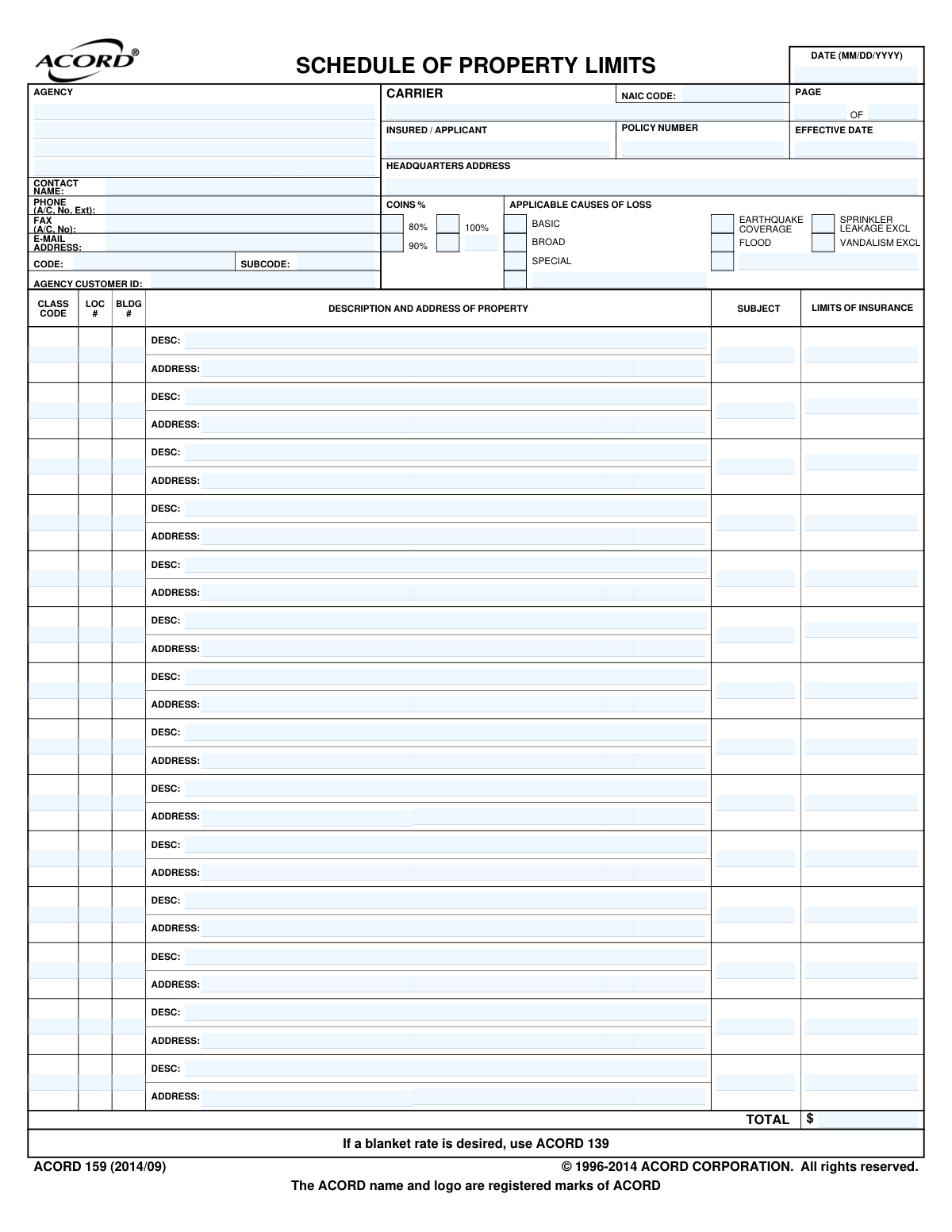
ACORD 159 is a standardized insurance form used by agents and carriers to document a schedule of property limits for a business. It provides a detailed breakdown of property values, locations, and desired coverage, which is crucial for underwriting commercial property and business income insurance. Today, this form can be filled out quickly and accurately using AI-powered services like Instafill.ai, which can also convert non-fillable PDF versions into interactive fillable forms.
ACORD 159 is part of the business insurance forms, commercial insurance forms and property insurance forms categories on Instafill.
Our AI automatically handles information lookup, data retrieval, formatting, and form filling.
It takes less than a minute to fill out ACORD 159 using our AI form filling.
Securely upload your data. Information is encrypted in transit and deleted immediately after the form is filled out.

Form specifications

Form name: ACORD 159, Business Income Worksheet
Number of fields: 183
Number of pages: 1
Language: English
main-image

Instafill Demo: How to fill out PDF forms in seconds with AI

How to Fill Out ACORD 159 Online for Free in 2026

Are you looking to fill out a ACORD 159 form online quickly and accurately? Instafill.ai offers the #1 AI-powered PDF filling software of 2026, allowing you to complete your ACORD 159 form in just 37 seconds or less.
Follow these steps to fill out your ACORD 159 form online using Instafill.ai:
  1. 1 Navigate to Instafill.ai and upload or select the ACORD 159 Business Income Worksheet.
  2. 2 Provide the agency, carrier, and insured/applicant information, including names, addresses, and policy details.
  3. 3 Specify the coverage details, including the desired coinsurance percentage and the applicable causes of loss (e.g., Basic, Broad, Special).
  4. 4 Complete the 'Schedule of Property Limits' by entering the address, description, class code, and insurance limit for each business property.
  5. 5 Use the AI tool to accurately list multiple property locations and their corresponding values, ensuring all fields are correctly populated.
  6. 6 Review all the information entered by the AI for accuracy, making any necessary corrections to ensure the property schedule is complete.
  7. 7 Download, print, or securely submit the completed ACORD 159 form to the relevant parties.

Our AI-powered system ensures each field is filled out correctly, reducing errors and saving you time.

Why Choose Instafill.ai for Your Fillable ACORD 159 Form?

Speed

Complete your ACORD 159 in as little as 37 seconds.

Up-to-Date

Always use the latest 2026 ACORD 159 form version.

Cost-effective

No need to hire expensive lawyers.

Accuracy

Our AI performs 10 compliance checks to ensure your form is error-free.

Security

Your personal information is protected with bank-level encryption.

Frequently Asked Questions About Form ACORD 159

This form is used to list multiple business properties and their corresponding insurance limits for a commercial property policy. It helps insurers understand the specific values at each location to determine coverage and premiums.

This form is typically completed by an insurance agent or broker on behalf of a business owner (the applicant) who is applying for commercial property insurance covering multiple locations or significant assets.

You will need the full address for each property, a description of what is being insured (e.g., building, contents), and the desired insurance limit for each item. You should also know the desired coinsurance percentage and causes of loss coverage.

For each property you want to insure, enter its full address, a brief description, and the specific insurance limit amount in a separate row. If you have more properties than spaces, use an additional copy of the form.

This section specifies what types of events or perils the policy will cover, such as fire, theft, or natural disasters. You can select from standard levels like Basic, Broad, or Special, or add specific coverages like Earthquake and Flood.

The Coinsurance percentage (e.g., 80%, 90%) is the amount of insurance you agree to carry relative to the total value of your property. Fulfilling this requirement helps ensure you receive the full amount for a partial loss.

A blanket limit provides a single insurance limit that applies across multiple properties, rather than listing separate limits for each. If you desire this type of coverage, the ACORD 139 form is used to detail it.

Your insurance agent or broker will submit this worksheet to the insurance carrier as part of your complete commercial insurance application. It provides the underwriter with the property details needed to issue a policy.

Yes, services like Instafill.ai use AI to help you complete forms like the ACORD 159 accurately and efficiently. These tools can auto-fill recurring information, saving you time and reducing the risk of errors.

You can use a service like Instafill.ai to upload the ACORD 159 PDF and fill it out directly in your web browser. The platform provides an intuitive interface to enter your information into the correct fields and then download the completed document.

If you have a flat, non-fillable PDF, you can use a service like Instafill.ai to make it interactive. Simply upload your file, and the AI will automatically detect and create fillable fields for you to complete online.

These codes are used by insurance carriers for rating and identification purposes. Your insurance agent will typically provide or help you determine the correct codes for your property's construction type (Class), location number (Loc), and building identifier (Bldg).

Compliance ACORD 159
Validation Checks by Instafill.ai

1
Verifies Sum of Property Limits Matches Total
This validation calculates the sum of all individual property limit amounts (`StatementOfValues_Premises_LimitAmount_A` through `_N`) and compares it to the value in the `StatementOfValues_Premises_TotalLimitAmount_A` field. This is a critical integrity check to ensure the total declared value is accurate and matches the itemized schedule. A mismatch should generate a high-priority error, blocking submission until the discrepancy is resolved.
2
Validates Date Fields for Format and Plausibility
Checks that `Form_CompletionDate_A` and `Policy_EffectiveDate_A` are in a valid MM/DD/YYYY format and represent actual calendar dates. This ensures data consistency and prevents errors in policy term calculations. A submission with an invalid date format should be rejected, while a date in the distant past or far future might be flagged for manual review.
3
Ensures Valid NAIC Code Format
Validates that the `Insurer_NAICCode_A` field contains a 5-digit numeric code. The NAIC code is a standard, unique identifier for insurance carriers, and an incorrect format can lead to misidentification of the carrier and processing failures. Submissions with invalid NAIC codes should be flagged for correction.
4
Enforces Single Coinsurance Percentage Selection
Verifies that only one of the primary coinsurance percentage indicators (`EightyPercentIndicator`, `NinetyPercentIndicator`, `OneHundredPercentIndicator`, `OtherIndicator`) is selected. Selecting multiple options is logically inconsistent and would make the policy terms ambiguous. If more than one is selected, the form should display an error and require the user to choose only one option.
5
Requires Percentage for 'Other' Coinsurance
Checks that if `StatementOfValues_Coinsurance_OtherIndicator_A` is selected, the corresponding `StatementOfValues_Coinsurance_OtherPercent_A` field is not empty and contains a valid numeric percentage. This ensures that selecting the 'Other' option results in a specific, usable value for rating and policy issuance. Failure to provide the percentage should prevent submission.
6
Requires Description for 'Other' Cause of Loss
Validates that if `StatementOfValues_CauseOfLoss_OtherIndicator_A` or `_B` is selected, the corresponding description field (`_OtherDescription_A` or `_B`) is not empty. This is crucial for understanding the specific, non-standard coverage being requested. A missing description makes the selection meaningless and should trigger an error requiring user input.
7
Ensures Completeness of Listed Properties
For each property row (A through N), this check verifies that if an address (`CommercialStructure_PhysicalAddress_LineOne_X`) is provided, then the corresponding limit of insurance (`StatementOfValues_Premises_LimitAmount_X`) is also provided. This prevents incomplete property entries which are unusable for underwriting and rating. Incomplete rows should be flagged, requiring the user to either complete the data or clear the row.
8
Requires Insured/Applicant Name
Confirms that the `NamedInsured_FullName_A` field is not empty. The insured's name is the most fundamental piece of information on the form, identifying the policyholder. A submission without this information is incomplete and cannot be processed, so it should be rejected outright.
9
Validates Producer Email Address Format
This check ensures that the `Producer_ContactPerson_EmailAddress_A` field contains a string that conforms to standard email address format (e.g., '[email protected]'). Proper email formatting is crucial for communication and sending automated notifications regarding the policy or submission status. An invalid format should trigger an error, requiring the user to correct it before submission.
10
Validates State/Province Code Format
This validation checks that all `CommercialStructure_PhysicalAddress_StateOrProvinceCode_X` fields contain a valid two-letter abbreviation. Using standardized state codes is essential for address validation, tax calculation, and proper risk assessment. An invalid code should trigger an error and suggest valid options if possible.
11
Verifies Limit of Insurance is a Numeric Value
Ensures that all `StatementOfValues_Premises_LimitAmount_X` fields, as well as the total, contain only positive numeric characters representing a currency amount. Non-numeric data in these fields would cause calculation errors and prevent proper policy rating. The system should reject any non-numeric input for these fields.
12
Validates Pagination Integrity
Ensures that the `Form_CurrentPageNumber_A` is a positive integer that is less than or equal to the `Form_TotalPageNumber_A`. This simple check prevents data loss from missing pages and ensures the received document is complete. A mismatch should flag the submission for manual review to ensure all pages have been received and processed correctly.

Common Mistakes in Completing ACORD 159

Inconsistent Location and Building Identifiers

This form requires unique 'LOC #' and 'BLDG #' for each property listed. Applicants often reuse numbers, leave them blank, or create a non-sequential system, which happens when manually transcribing from different sources. This ambiguity can lead to misapplication of coverage limits or confusion during a claim, potentially leaving a high-value location underinsured. To avoid this, assign a clear, unique, and sequential identifier for each distinct location and building being insured.

Using a Mailing Address for a Physical Property

Applicants sometimes enter their corporate headquarters or a P.O. Box in the 'ADDRESS' field for a specific property, instead of its actual physical location. This mistake is critical because insurance is location-specific; coverage is tied to the address on the policy. An incorrect address can mean a property is not actually covered, leading to a complete denial of a claim. Always use the precise street address for each property listed in the schedule.

Misunderstanding Coinsurance Percentage

The 'COINS %' selection (e.g., 80%, 90%, 100%) is a crucial and often misunderstood field. Applicants may select a percentage without understanding its impact, often choosing the one that seems to offer the lowest premium. This can lead to a significant coinsurance penalty if the property is underinsured at the time of a loss, meaning the policyholder will have to pay a much larger portion of the loss out-of-pocket. It is vital to discuss this with an insurance professional to choose a percentage that aligns with the property's valuation.

Manual Calculation Errors in Total Limits

The form requires summing up the 'LIMITS OF INSURANCE' for all listed properties to arrive at a 'TOTAL'. When dealing with numerous locations, the risk of manual arithmetic error is high. A simple miscalculation can result in an incorrect total insured value, affecting the overall policy premium and potentially leaving the business exposed if the total limit is too low. Using a spreadsheet or an automated tool to sum the values before entry is a reliable way to prevent this.

Omitting or Using Incorrect Property Codes

Fields like 'CLASS CODE' and 'SUBJECT' (Subject of Insurance) require specific industry-standard codes to classify the property and the type of coverage requested. Applicants often lack access to or knowledge of these codes and may leave the fields blank or guess. Incorrect codes can lead to improper risk assessment by the carrier, resulting in inaccurate premiums or, in a worst-case scenario, a policy that doesn't cover the intended exposures.

Selecting Inappropriate 'Causes of Loss' Coverage

The checkboxes for 'APPLICABLE CAUSES OF LOSS' (Basic, Broad, Special) define what perils the policy covers. An applicant might select 'Basic' to minimize cost, not realizing it excludes many common risks like theft or water damage. This misunderstanding becomes a major issue during a claim, which may be denied if the cause of loss is not covered under the selected form. Always review the differences between these coverage levels to ensure the policy adequately protects the business's assets.

Incomplete Agency or Producer Information

The top section of the form requires detailed agency information, including 'AGENCY CUSTOMER ID', 'CODE', and 'SUBCODE'. This data is essential for the insurance carrier to identify the submitting agency and link the application to the correct account. Omitting this information can bring the underwriting process to a halt, causing significant delays as the carrier must manually track down the source of the submission.

Data Formatting Errors

The form specifies formats for certain fields, such as 'DATE (MM/DD/YYYY)'. Users often enter data in different formats (e.g., DD-MM-YY, YYYY/MM/DD) out of habit, which can cause errors when the data is ingested into the carrier's digital systems. These inconsistencies can lead to processing delays or incorrect effective dates on the policy. AI-powered form-filling tools like Instafill.ai can help prevent this by automatically validating and formatting data to match the required specifications.

Failing to Properly Paginate Multi-Location Schedules

The 'PAGE X OF Y' fields are frequently overlooked, especially when the schedule spans multiple pages. If pages are not numbered correctly, a page could be lost or processed out of order, resulting in some properties being unintentionally omitted from the policy. This could leave millions of dollars in property value uninsured. For any submission longer than one page, it is critical to ensure the page numbers are filled out accurately.

Ambiguous or Vague Property Descriptions

The 'DESC:' field next to each address is for describing the property. Applicants often provide generic descriptions like 'Building' or 'Warehouse', which is insufficient when a single location has multiple structures. A vague description creates ambiguity for underwriters and can cause confusion during a claim adjustment. The description should be specific enough to uniquely identify the insured property, such as 'North-facing brick warehouse' or 'Two-story office building'.
Saved over 80 hours a year

“I was never sure if my IRS forms like W-9 were filled correctly. Now, I can complete the forms accurately without any external help.”

Kevin Martin Green

Your data stays secure with advanced protection from Instafill and our subprocessors

Robust compliance program

Transparent business model

You’re not the product. You always know where your data is and what it is processed for.

ISO 27001, HIPAA, and GDPR

Our subprocesses adhere to multiple compliance standards, including but not limited to ISO 27001, HIPAA, and GDPR.

Security & privacy by design

We consider security and privacy from the initial design phase of any new service or functionality. It’s not an afterthought, it’s built-in, including support for two-factor authentication (2FA) to further protect your account.

Fill out ACORD 159 with Instafill.ai

Worried about filling PDFs wrong? Instafill securely fills acord-159-business-income-worksheet forms, ensuring each field is accurate.