Yes! You can use AI to fill out Application for Specific Project Insurance Coverage
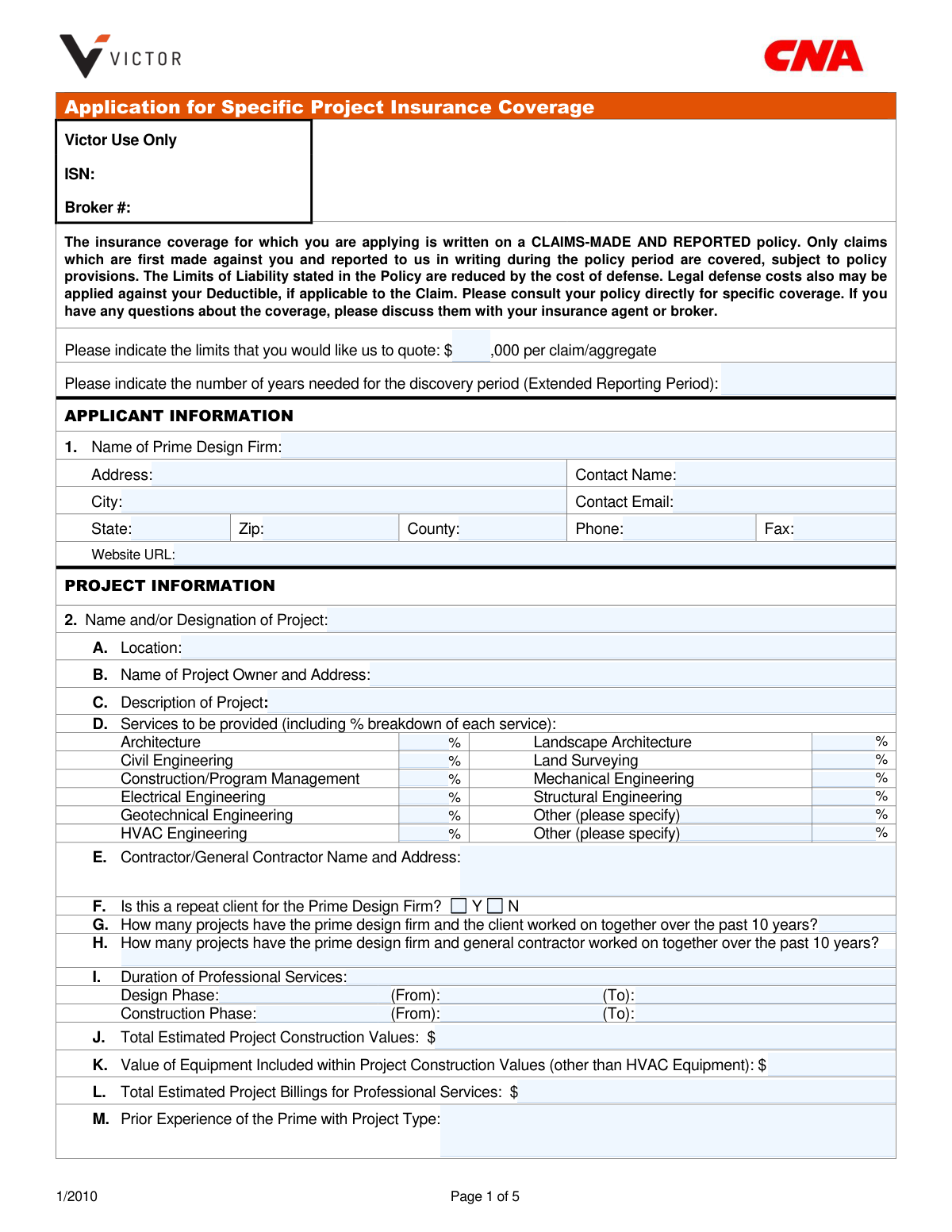
This form is an application used by prime design firms to secure project-specific professional liability insurance coverage. It gathers detailed information about the applicant firm, the project itself, the entire design team, and the firm's risk management practices and claims history. This information is crucial for underwriters to assess the risk and determine the terms and pricing for a claims-made insurance policy. Today, this form can be filled out quickly and accurately using AI-powered services like Instafill.ai, which can also convert non-fillable PDF versions into interactive fillable forms.
Our AI automatically handles information lookup, data retrieval, formatting, and form filling.
It takes less than a minute to fill out Victor Specific Project Insurance Application using our AI form filling.
Securely upload your data. Information is encrypted in transit and deleted immediately after the form is filled out.
Form specifications
| Form name: | Application for Specific Project Insurance Coverage |
| Number of pages: | 5 |
| Language: | English |
| Categories: | insurance forms, insurance application forms |
Instafill Demo: How to fill out PDF forms in seconds with AI
How to Fill Out Victor Specific Project Insurance Application Online for Free in 2026
Are you looking to fill out a VICTOR SPECIFIC PROJECT INSURANCE APPLICATION form online quickly and accurately? Instafill.ai offers the #1 AI-powered PDF filling software of 2026, allowing you to complete your VICTOR SPECIFIC PROJECT INSURANCE APPLICATION form in just 37 seconds or less.
Follow these steps to fill out your VICTOR SPECIFIC PROJECT INSURANCE APPLICATION form online using Instafill.ai:
- 1 Navigate to Instafill.ai and upload or select the Application for Specific Project Insurance Coverage form.
- 2 Use the AI assistant to accurately fill in the Applicant Information section with your prime design firm's details.
- 3 Complete the Project Information section, providing specifics about the project's name, location, owner, scope, services, and financial values.
- 4 Detail the Design Team Information, including all consultants, their services, and their respective professional liability insurance coverage.
- 5 Answer all questions regarding risk management, integrated project delivery (IPD), and provide a thorough claims history as requested.
- 6 Ensure your insurance agent or broker completes their required section with their license and contact information.
- 7 Carefully review all entered data for accuracy, then have a principal or officer of the firm sign and date the Representation section to certify the application.
Our AI-powered system ensures each field is filled out correctly, reducing errors and saving you time.
Why Choose Instafill.ai for Your Fillable Victor Specific Project Insurance Application Form?
Speed
Complete your Victor Specific Project Insurance Application in as little as 37 seconds.
Up-to-Date
Always use the latest 2026 Victor Specific Project Insurance Application form version.
Cost-effective
No need to hire expensive lawyers.
Accuracy
Our AI performs 10 compliance checks to ensure your form is error-free.
Security
Your personal information is protected with bank-level encryption.
Frequently Asked Questions About Form Victor Specific Project Insurance Application
This is an application for prime design firms, such as architects and engineers, to obtain project-specific professional liability insurance coverage for a particular construction project.
This type of policy covers only those claims that are first made against you and reported in writing to the insurance company during the active policy period. Claims made or reported before or after this period are not covered.
The discovery period, also known as an Extended Reporting Period (ERP), is an optional extension you can purchase. It allows you to report claims for a specified number of years after the policy has expired, for incidents that occurred while the policy was active.
The Prime Design Firm is the main company, such as the lead architect or engineer, that holds the primary contract with the project owner for design services.
You must list all consultants hired for the project, their services, their percentage of fees, and their professional liability insurance details, including the insurer, limits, and deductible. For uninsured consultants, you may need to provide an audited financial statement.
You are required to submit a copy of the signed professional agreement between the project owner and your firm. If you have a history of claims, you must also provide a current loss run report.
You must disclose any claims made against your firm or its consultants in the past ten years by answering 'Yes' to question 12. You will need to attach a separate sheet with detailed information for each claim as well as a loss run report.
Yes, you must disclose any act, error, unresolved dispute, or circumstance that could potentially become a claim under question 13. Failure to report such knowledge can result in the denial of a future claim.
The application must be signed and dated by a principal, partner, or officer of the prime design firm applying for coverage.
No, that section is to be completed by your insurance agent or broker. They will provide their agency information and license numbers.
Yes, services like Instafill.ai use AI to accurately auto-fill form fields with your saved information, which can save significant time and help prevent errors.
You can upload the form to the Instafill.ai platform, and its AI will automatically identify and populate the fields with your firm's details, project data, and other relevant information you have stored.
If you have a non-fillable or 'flat' PDF, you can use a tool like Instafill.ai. It can convert the document into an interactive, fillable form that you can easily complete and sign online.
After submission, the insurance provider (Victor) will review your application to evaluate the project's risk and determine eligibility for coverage. They will then provide a quote for the insurance premium, or they may request additional information.
Compliance Victor Specific Project Insurance Application
Validation Checks by Instafill.ai
1
Validates Sum of Service Percentages
This check ensures that the sum of all percentages entered for the services breakdown in section 2.D (Architecture, Civil Engineering, etc.) equals exactly 100%. This is crucial for the underwriter to have a complete and accurate understanding of the scope of work being insured. If the total is not 100%, the application is incomplete and provides a skewed view of the project's risk profile, preventing accurate quoting.
2
Verifies Chronological Project Phase Dates
This check confirms that for both the Design Phase and Construction Phase in section 2.I, the 'To' date is not earlier than the 'From' date. This ensures logical and accurate project timeline data, which is fundamental for determining the policy period and potential exposure. An illogical date range would make it impossible to assess the duration of risk and would require correction before the application can be processed.
3
Ensures 'Other' Selections are Explained
This validation ensures that if the user selects an 'Other' option for fields like 'Type of Contract' or 'Method of Delivery', the corresponding text field explaining the choice is not left empty. This information is vital for risk assessment, as non-standard contracts or delivery methods can introduce unique liabilities. Failure to provide details will result in an incomplete application and a request for clarification.
4
Validates Consistency of Repeat Client Data
This rule cross-references the 'Repeat Client' status (2.F) with the number of projects worked on together (2.G). If the applicant indicates this is not a repeat client ('No'), the project count must be zero. Conversely, if it is a repeat client ('Yes'), the project count must be a positive number. This check ensures data integrity and helps underwriters accurately assess the strength of the client-firm relationship.
5
Ensures Project Financial Values are Logical
This validation confirms that the 'Value of Equipment' (2.K) is less than or equal to the 'Total Estimated Project Construction Values' (2.J). It is logically impossible for a component's value to exceed the total project value it is part of. This check prevents data entry errors and ensures the financial details of the project are sound for accurate risk and premium calculation.
6
Requires Documentation for Prior Claims
This check enforces the requirement that if the applicant answers 'Yes' to having prior claims (Question 12), they must provide the specified details, typically as an attached loss run report. This information is non-negotiable for underwriting, as past claims are a primary indicator of future risk. An application with a 'Yes' answer but no supporting documentation is considered incomplete and cannot be evaluated.
7
Requires Explanation for Potential Claim Circumstances
This rule mandates that if an applicant answers 'Yes' to Question 13, indicating awareness of a circumstance that could lead to a claim, they must provide a detailed explanation as instructed. This disclosure is critical for underwriting as it pertains to known, but not yet filed, potential liabilities that may be excluded from coverage. Failure to provide this explanation renders the application incomplete and misleading.
8
Validates Timeliness of Application Signature
This rule checks that the date provided with the principal's signature is recent, specifically within one month of the application's submission date, as stated in the form's note. This ensures that the information provided is current and that the applicant's representations are timely. An outdated signature would invalidate the application, as circumstances could have materially changed, requiring a new, re-certified submission.
9
Ensures Applicant Information is Complete
This validation confirms that all essential fields within the 'Applicant Information' section (Name, Address, City, State, Zip, Contact Name, Contact Email, Phone) are filled out. This data is fundamental for identifying the entity seeking insurance and establishing a point of contact. An application missing this core information is fundamentally incomplete and cannot be processed.
10
Validates Email Address Format
This validation ensures that the email addresses entered in the 'Contact Email' fields for both the applicant and the agent follow a standard format (e.g., [email protected]). Correct email addresses are essential for all communication regarding the application, quotes, and policy documents. An invalid format would prevent contact and delay or halt the application process.
11
Verifies Financial Fields are Numeric
This check ensures that the inputs for 'Total Estimated Project Construction Values,' 'Total Estimated Project Billings,' and other monetary fields are valid numerical values. These figures are critical for calculating financial exposure and determining the insurance premium. Non-numeric characters would cause calculation errors and prevent the generation of an accurate quote.
12
Ensures Agent License is Not Expired
This validation checks that the agent's 'License Expiration Date' is a future date, not a date in the past. Submitting an application through an agent with an expired license is a compliance and legal risk for the insurer. The system should flag any expired license dates to ensure the broker is currently authorized to conduct business.
13
Validates US Phone Number Format
This check verifies that all phone and fax number fields are entered in a consistent, valid US format, such as a 10-digit number with optional formatting characters (e.g., (555) 555-5555). This ensures the data is clean and usable for communication purposes by the insurance provider. Incorrectly formatted numbers can lead to failed communication attempts, delaying the application process.
14
Validates State and Zip Code Format
This check ensures the 'State' field contains a valid two-letter postal abbreviation and the 'Zip' field contains a valid 5-digit or 9-digit ZIP code. Correct and standardized location data is essential for determining jurisdiction, assessing regional risks, and for mailing physical documents. Mismatched or invalid formats can cause processing and communication errors.
Common Mistakes in Completing Victor Specific Project Insurance Application
The form asks for liability limits in thousands (e.g., '$___,000'). Applicants often enter the full numerical value, such as '1,000,000' instead of '1,000'. This formatting error can lead to a quote for an incorrect, and drastically different, coverage amount. To avoid this, carefully read the field's formatting instructions and only enter the number representing the thousands.
In Section 2D, applicants must break down the services provided by percentage. A frequent error is providing percentages that do not add up to exactly 100%. This happens due to simple miscalculation or estimation and will cause the application to be flagged for correction, delaying the quoting process. Before submitting, sum all percentages to ensure they total 100%.
The application explicitly requires several attachments, such as the 'Owner/Prime professional agreement' (Section 2N) and supplemental sheets for claims history (Section 12). Applicants often overlook these requirements, submitting an incomplete package. An incomplete application cannot be processed, leading to significant delays. Create a checklist of all required documents before you begin filling out the form.
Answering 'Yes' to questions about past claims (Section 12) or knowledge of potential claim circumstances (Section 13) is critical. A common and serious mistake is failing to provide the complete, detailed information requested on a separate sheet. This omission can be interpreted as misrepresentation and could lead to denial of a future claim or even policy cancellation. Always provide a full and transparent explanation for any affirmative answers in this section.
Applicants sometimes confuse 'Total Estimated Project Construction Values' (Section 2J) with 'Total Estimated Project Billings for Professional Services' (Section 2L). The former refers to the total cost of building the project, while the latter is only the fees your firm will earn. Entering the wrong values can distort the risk profile and result in an inaccurate insurance quote. Carefully distinguish between total project cost and your firm's fees.
Section 3 requires detailed information about all consultants on the design team, including their services, fees, and their own professional liability insurance. Applicants often leave this section incomplete because they don't have the information readily available. This missing data prevents the insurer from assessing the full project risk and will halt the application process. Gather all consultant details before starting the application to ensure a smooth process.
The final page requires a signature from a 'Principal, Partner or Officer' and must be dated within one month of submission. Two common errors occur here: an unauthorized employee signs the form, or the signature date is too old. Either mistake can invalidate the entire application, forcing you to start over. Ensure the correct individual signs and dates the form immediately before submission.
In sections like 'Type of Contract' (2N) and 'Method of Delivery' (2O), there is an 'Other' option that requires a written explanation. Applicants frequently check 'Other' but neglect to provide the necessary details. This leaves the underwriter with unanswered questions about the project's structure and risk. If you select 'Other', always fill in the corresponding text field with a clear and concise explanation.
In Section 2I, applicants must provide start and end dates for the Design and Construction phases. Mistakes include using inconsistent date formats (e.g., MM/DD/YY vs. MM-DD-YYYY) or entering illogical timelines, such as an end date that occurs before the start date. These errors require clarification and delay the application. AI-powered form filling tools like Instafill.ai can help prevent these errors by standardizing date formats and flagging logical inconsistencies.
Several questions (e.g., #4-7 regarding ownership interest, mergers, or bankruptcy) are simple 'Yes/No' questions that require a detailed explanation on a separate sheet if 'Yes' is selected. Applicants often check 'Yes' but forget to attach the required supplemental document with the full particulars. This is considered an incomplete answer and will require follow-up from the broker or underwriter, delaying the quote. Since this form is a non-fillable PDF, tools like Instafill.ai can convert it into a fillable version and help manage reminders for required attachments.
Saved over 80 hours a year
“I was never sure if my IRS forms like W-9 were filled correctly. Now, I can complete the forms accurately without any external help.”
Kevin Martin Green
Your data stays secure with advanced protection from Instafill and our subprocessors

Robust compliance program
Transparent business model
You’re not the product. You always know where your data is and what it is processed for.
ISO 27001, HIPAA, and GDPR
Our subprocesses adhere to multiple compliance standards, including but not limited to ISO 27001, HIPAA, and GDPR.
Security & privacy by design
We consider security and privacy from the initial design phase of any new service or functionality. It’s not an afterthought, it’s built-in, including support for two-factor authentication (2FA) to further protect your account.
Fill out Victor Specific Project Insurance Application with Instafill.ai
Worried about filling PDFs wrong? Instafill securely fills application-for-specific-project-insurance-coverage forms, ensuring each field is accurate.