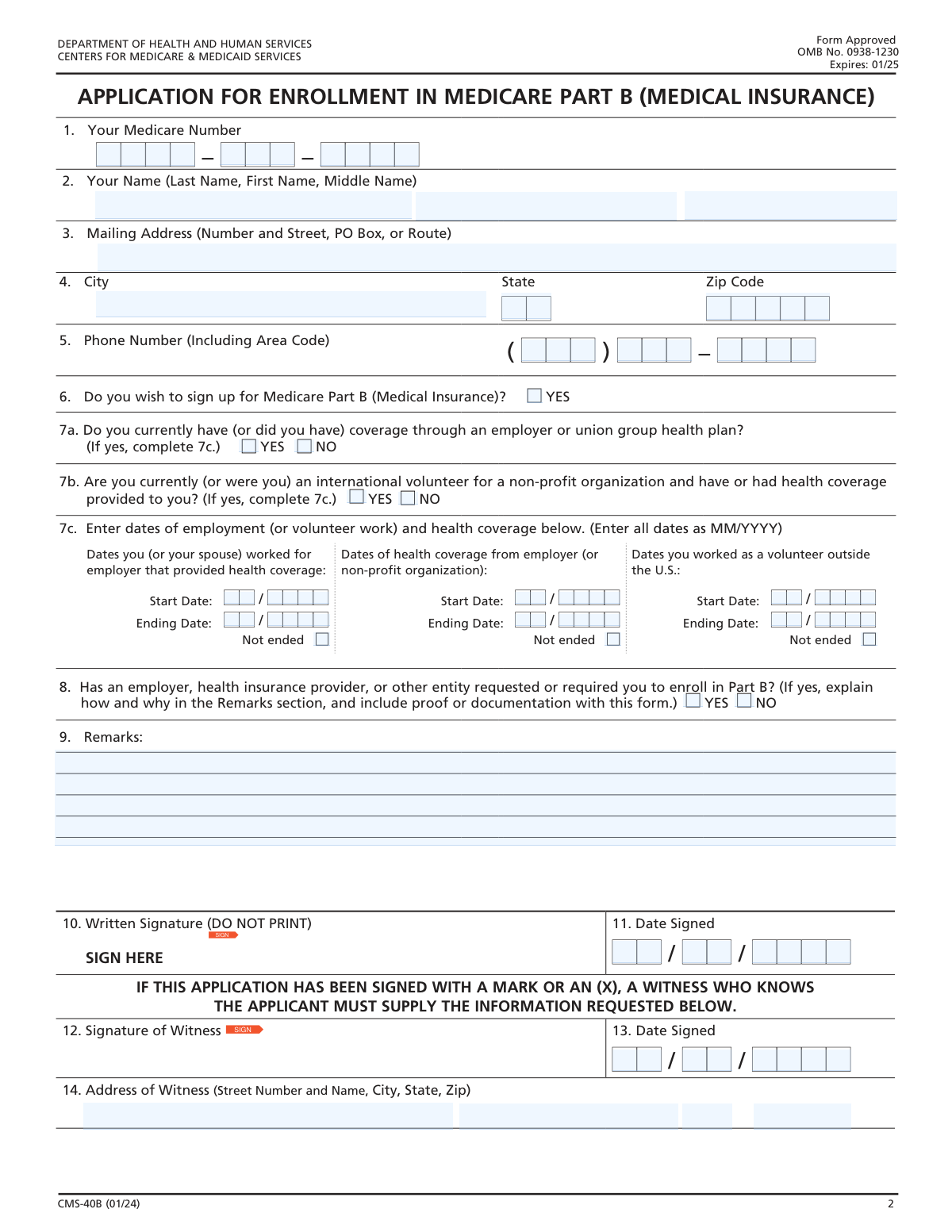
Yes! You can use AI to fill out Form CMS-40B, Application for Enrollment in Medicare Part B (Medical Insurance)
Form CMS-40B, Application for Enrollment in Medicare Part B, is a vital document for Medicare beneficiaries who have Part A coverage but need to sign up for Part B (Medical Insurance) outside of their initial enrollment period. It's used during the General Enrollment Period or a Special Enrollment Period to gain access to medical services like doctor visits and outpatient care, which are not covered by Part A alone. Today, this form can be filled out quickly and accurately using AI-powered services like Instafill.ai, which can also convert non-fillable PDF versions into interactive fillable forms.
CMS-40B is part of the
CAR forms, CMS forms, EDI enrollment forms, enrollment application forms, enrollment forms, insurance application forms, insurance forms, Medi-Cal forms, medical enrollment forms, medical forms, medical insurance forms, Medicare application forms, Medicare enrollment forms, Medicare forms, L.A. Care forms and VA medical forms categories on Instafill.
Our AI automatically handles information lookup, data retrieval, formatting, and form filling.
It takes less than a minute to fill out CMS-40B using our AI form filling.
Securely upload your data. Information is encrypted in transit and deleted immediately after the form is filled out.
Form specifications
| Form name: | Form CMS-40B, Application for Enrollment in Medicare Part B (Medical Insurance) |
| Number of fields: | 48 |
| Number of pages: | 2 |
| Language: | English |
More forms in CAR forms
Instafill Demo: How to fill out PDF forms in seconds with AI
How to Fill Out CMS-40B Online for Free in 2026
Are you looking to fill out a CMS-40B form online quickly and accurately? Instafill.ai offers the #1 AI-powered PDF filling software of 2026, allowing you to complete your CMS-40B form in just 37 seconds or less.
Follow these steps to fill out your CMS-40B form online using Instafill.ai:
- 1 Navigate to Instafill.ai and upload your CMS-40B form, or select it from their library of templates.
- 2 Provide your personal details, including your name, address, and Medicare Number, as prompted by the AI assistant.
- 3 Answer the questions about your enrollment decision and any current or past group health plan coverage.
- 4 If applicable, enter the dates of your employment and health coverage history in the designated fields.
- 5 Review all the information entered for accuracy, ensuring all required fields are completed.
- 6 Securely e-sign the application directly on the platform and add the current date.
- 7 Download the completed CMS-40B form and submit it to your local Social Security office as instructed.
Our AI-powered system ensures each field is filled out correctly, reducing errors and saving you time.
Why Choose Instafill.ai for Your Fillable CMS-40B Form?
Speed
Complete your CMS-40B in as little as 37 seconds.
Up-to-Date
Always use the latest 2026 CMS-40B form version.
Cost-effective
No need to hire expensive lawyers.
Accuracy
Our AI performs 10 compliance checks to ensure your form is error-free.
Security
Your personal information is protected with bank-level encryption.
Frequently Asked Questions About Form CMS-40B
This form is an application to enroll in Medicare Part B (Medical Insurance) for individuals who already have Medicare Part A (Hospital Insurance) but did not sign up for Part B initially.
You should not use this form if you are applying for Medicare for the first time and do not have Part A. In that case, you should contact the Social Security Administration to apply.
You will need your Medicare Number, your current address, and your phone number. If you are applying under a Special Enrollment Period, you may also need dates of employment and health coverage.
Send your completed and signed Form CMS-40B to your local Social Security office. If you have questions about where to send it, call Social Security at 1-800-772-1213.
A late enrollment penalty is an extra cost added to your monthly Part B premium if you didn't sign up when you were first eligible. The penalty can increase your premium by 10% for each full 12-month period you were eligible but not enrolled.
The Initial Enrollment Period (IEP) is your first 7-month window to sign up. The General Enrollment Period (GEP) is from January 1 to March 31 each year for those who missed their IEP. A Special Enrollment Period (SEP) allows you to enroll outside these times due to specific life events, like losing employer health coverage.
Yes, if you are applying for an SEP based on current employment, your employer must also fill out and return the 'Request for Employment Information' form (CMS-L564) along with your CMS-40B application.
A witness signature is required only if you are unable to sign your name and instead mark the signature line with an 'X'. The witness must then sign, date, and provide their address.
Use the 'Remarks' section to provide any additional information that clarifies your application, such as explaining why an employer required you to enroll in Part B or providing extra details about your employment history.
The estimated time to complete this form is about 15 minutes. This includes time for reviewing instructions, gathering the necessary information, and completing the application.
Yes, services like Instafill.ai use AI to accurately auto-fill form fields, which can save you time and help reduce errors.
You can use Instafill.ai to upload the form, and its AI will help you fill out the fields interactively. This makes it easy to complete the application on your computer before printing it for signature and submission.
If you have a non-fillable or 'flat' PDF, you can upload it to a service like Instafill.ai. It can convert the document into an interactive, fillable form that you can complete on your computer.
Compliance CMS-40B
Validation Checks by Instafill.ai
1
Medicare Number Presence and Format
This check ensures that the Medicare Number field (1) is not empty and conforms to the expected structure. The Medicare Number is the primary identifier for the applicant's existing Part A coverage, and its absence or incorrect format would prevent the system from locating the correct record. If validation fails, the application cannot be processed and must be returned to the applicant for correction.
2
Applicant Name Completeness
Validates that the First Name and Last Name fields (2) are both populated. A full name is legally required to identify the applicant and match them to their Medicare record. An application without a complete name is considered incomplete and cannot be processed until the information is provided.
3
Part B Enrollment Intent Confirmation
Verifies that the 'YES' box for question 6 ('Do you wish to sign up for Medicare Part B?') is checked. The entire purpose of this form is to enroll in Part B, so a 'NO' answer or no answer at all invalidates the application's intent. If 'YES' is not selected, the form submission should be rejected as it does not represent an application for enrollment.
4
Conditional Requirement for Employment/Coverage Dates
This check ensures that if the applicant answers 'YES' to either question 7a or 7b, then at least one set of dates in section 7c is provided. This information is critical for determining if the applicant qualifies for a Special Enrollment Period (SEP) and can avoid late enrollment penalties. Failure to provide these dates when required will result in an incomplete application, delaying the enrollment decision.
5
Logical Date Chronology in Section 7c
For any date range provided in section 7c, this validation confirms that the 'Ending Date' is not earlier than the 'Start Date'. An ending date that precedes a start date is a logical impossibility and indicates a data entry error. This check prevents the processing of nonsensical data, and a failure would require the applicant to correct the dates before their SEP eligibility can be determined.
6
Mutually Exclusive Fields in Section 7c
Ensures that for any given period in section 7c, if the 'Not ended' checkbox is selected, the corresponding 'Ending Date' (Month and Year) fields are left empty. An applicant cannot simultaneously have an end date and have the coverage be ongoing. This prevents contradictory data entry and ensures clarity; a failure would flag the entry for review and correction.
7
Conditional Requirement for Remarks Section
This validation checks that if the applicant answers 'YES' to question 8 ('Has an employer... required you to enroll in Part B?'), the 'Remarks' section (9) is not empty. The form explicitly requires an explanation for a 'YES' answer to assess potential improper coordination of benefits. If this rule is violated, the application is considered incomplete and may be delayed pending receipt of the required explanation.
8
Applicant Signature Presence
Confirms that the applicant's signature field (10) is not blank. A signature is a legal requirement that attests to the accuracy of the information provided and formally requests enrollment. An unsigned application is legally invalid and cannot be processed under any circumstances.
9
Valid Signature Date
This check verifies that the 'Date Signed' in field 11 is a complete and valid date (MM/DD/YYYY) and is not a date in the future. The signature date establishes the official application date, which is critical for determining enrollment periods and coverage start dates. An invalid or future date would render the application timing ambiguous and require correction.
10
Conditional Requirement for Witness Information
Validates that if the applicant's signature in field 10 is a mark (e.g., an 'X'), then the witness signature (12), date (13), and address (14) fields are all completed. This is a legal requirement to attest that the mark was made by the applicant. If the signature is a mark and the witness information is missing, the application is legally incomplete and cannot be accepted.
11
Witness Information Prohibition
This is the inverse of the previous check, ensuring that if the applicant provides a full, written signature in field 10, the witness information fields (12, 13, 14) are empty. Witness information is only required when the applicant cannot sign their name, and its presence otherwise could cause confusion. While not a critical failure, it would flag the form for manual review to ensure there wasn't a misunderstanding.
12
Phone Number Format and Completeness
Ensures the phone number provided in field 5 consists of 10 digits (a 3-digit area code and a 7-digit number). A complete and valid phone number is essential for the Social Security Administration to contact the applicant if there are questions or issues with the application. An incomplete or improperly formatted number could delay processing if contact is necessary.
13
State and ZIP Code Format
This validation verifies that the 'State' field (4) contains a valid 2-letter postal abbreviation and the 'Zip Code' field contains a 5-digit numeric value. Correct and properly formatted address information is crucial for all official correspondence, including approval notices and the delivery of the new Medicare card. An error could result in critical mail being lost or delayed.
14
Date Format for Section 7c
Verifies that all date entries in section 7c (Start Date and Ending Date) strictly adhere to the specified MM/YYYY format. Consistent date formatting is essential for automated processing and accurate calculation of coverage periods for SEP eligibility. Incorrect formats (e.g., using DD/MM/YYYY or text) would cause processing errors and require manual intervention or applicant correction.
Common Mistakes in Completing CMS-40B
Applicants often enter their Social Security Number instead of their Medicare Number, or they may transpose digits. Since this form is for individuals who already have Medicare Part A, the Medicare Number is essential for locating the existing record. An incorrect number will cause the application to be delayed or rejected until the applicant can be correctly identified.
The signature line in section 10 explicitly states 'DO NOT PRINT,' yet many applicants print their name out of habit instead of providing a written signature. An application with a printed name in the signature box is considered unsigned and legally invalid. This will result in the form being returned and will significantly delay the enrollment process.
Section 7 is critical for determining eligibility for a Special Enrollment Period (SEP) and avoiding late penalties, but it is frequently filled out incorrectly. Applicants may confuse dates of employment with dates of health coverage, fail to complete section 7c after answering 'YES' to 7a, or mistakenly list COBRA or retiree plans, which do not qualify for the SEP based on current employment. These errors can lead to a denial of the SEP and the imposition of a lifelong Late Enrollment Penalty.
The form requires different date formats in different sections, which often leads to errors. Section 7c requires dates in MM/YYYY format, while the signature date in section 11 requires a full MM/DD/YYYY format. Applicants may use the wrong format, provide incomplete dates, or use a two-digit year, causing ambiguity and potential processing delays while the agency seeks clarification.
The instructions note that applicants applying for a Special Enrollment Period based on current employment must also submit form CMS-L564, the 'Request for Employment Information.' Many applicants overlook this requirement and submit only the CMS-40B. Submitting an incomplete application package will halt the process until all necessary documents are received, delaying the start of Part B coverage.
Applicants sometimes enter a nickname, a new married name not yet updated with Social Security, or a slightly different version of their legal name in section 2. The form requires the name to be written exactly as it appears on the Social Security or Medicare card. A name mismatch will cause a failure in identity verification, leading to processing delays while the agency confirms the applicant's identity.
The first page clearly states this form is for people who already have Medicare Part A and now want to add Part B. However, individuals applying for Medicare for the very first time sometimes fill it out by mistake. Using the wrong application for one's situation results in an automatic rejection and wasted time, potentially causing the applicant to miss their Initial Enrollment Period.
When an applicant has a complex situation, such as being required by an employer to enroll (Question 8) or having multiple periods of past coverage, they often fail to use the 'Remarks' section to provide a clear explanation. Without this context, the processing agent may lack the information needed to make a correct eligibility determination. This can lead to delays, requests for more information, or an incorrect denial.
This form is often available online as a non-fillable PDF, forcing applicants to print and complete it by hand. Poor or illegible handwriting can make names, numbers, and dates impossible to decipher accurately. This leads to data entry errors on the government's end, which can result in rejected applications or critical mail being sent to the wrong address. AI-powered tools like Instafill.ai can convert such PDFs into fillable versions, allowing users to type their information for maximum clarity.
If an applicant is unable to sign their name and uses a mark like an 'X' in section 10, the form requires a witness to complete sections 12, 13, and 14. A common mistake is for the applicant to make a mark but fail to have a witness sign, or for the witness to omit their address or the date. An improperly witnessed mark invalidates the signature, causing the application to be rejected.
Saved over 80 hours a year
“I was never sure if my IRS forms like W-9 were filled correctly. Now, I can complete the forms accurately without any external help.”
Kevin Martin Green
Your data stays secure with advanced protection from Instafill and our subprocessors

Robust compliance program
Transparent business model
You’re not the product. You always know where your data is and what it is processed for.
ISO 27001, HIPAA, and GDPR
Our subprocesses adhere to multiple compliance standards, including but not limited to ISO 27001, HIPAA, and GDPR.
Security & privacy by design
We consider security and privacy from the initial design phase of any new service or functionality. It’s not an afterthought, it’s built-in, including support for two-factor authentication (2FA) to further protect your account.
Fill out CMS-40B with Instafill.ai
Worried about filling PDFs wrong? Instafill securely fills form-cms-40b-application-for-enrollment-in-medicare-part-b-medical-insurance-1 forms, ensuring each field is accurate.