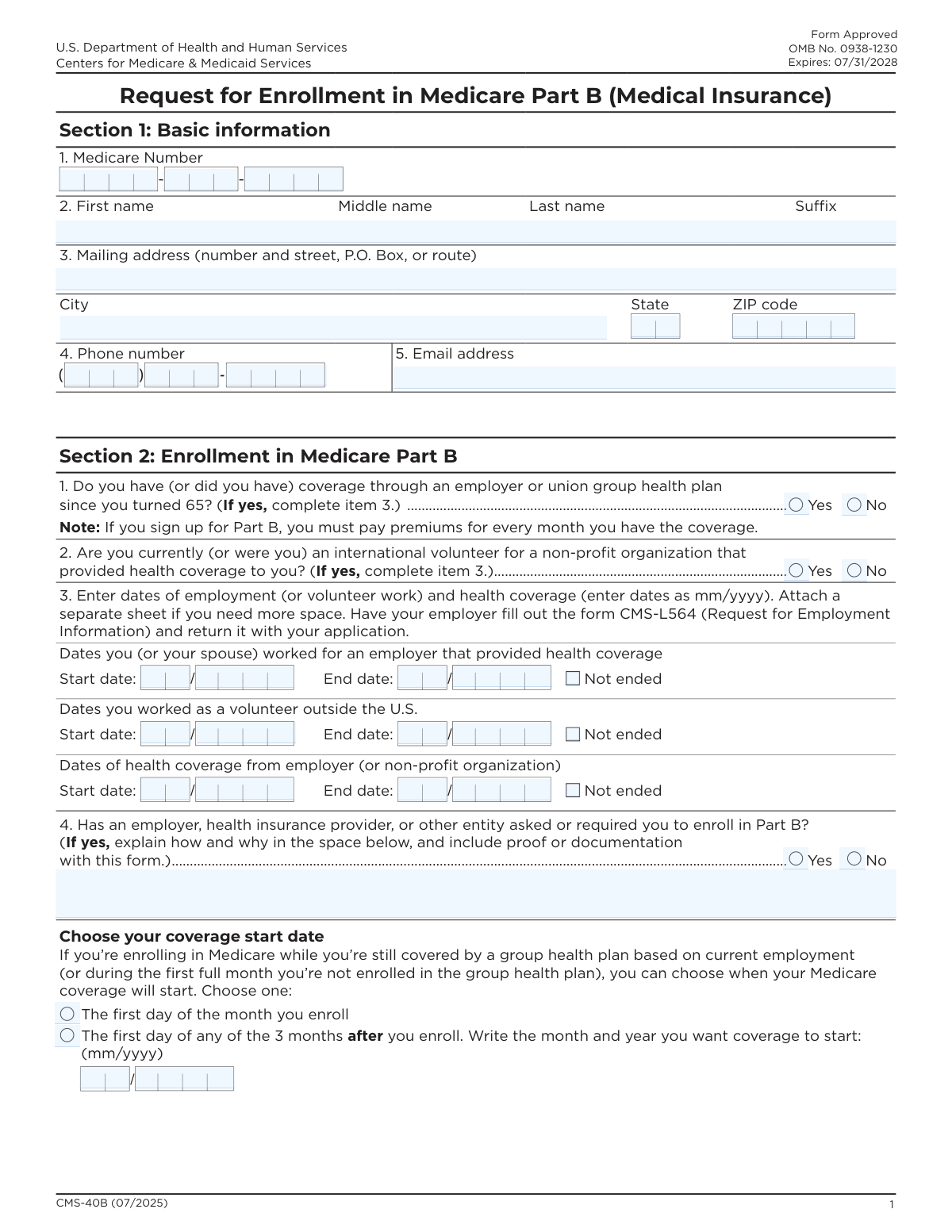
Yes! You can use AI to fill out Form CMS-40B, Request for Enrollment in Medicare Part B (Medical Insurance)
Form CMS-40B, Request for Enrollment in Medicare Part B, is a U.S. government application submitted to the Social Security Administration. It is specifically for individuals who are already enrolled in Medicare Part A and wish to sign up for Part B medical insurance during their Initial Enrollment Period, a Special Enrollment Period, or the General Enrollment Period. Today, this form can be filled out quickly and accurately using AI-powered services like Instafill.ai, which can also convert non-fillable PDF versions into interactive fillable forms.
Our AI automatically handles information lookup, data retrieval, formatting, and form filling.
It takes less than a minute to fill out CMS-40B using our AI form filling.
Securely upload your data. Information is encrypted in transit and deleted immediately after the form is filled out.
Form specifications
| Form name: | Form CMS-40B, Request for Enrollment in Medicare Part B (Medical Insurance) |
| Number of pages: | 3 |
| Language: | English |
| Categories: | insurance forms, medical forms, CAR forms, VA medical forms, Medi-Cal forms, medical insurance forms, CMS forms, medical request forms, enrollment forms, insurance request forms, L.A. Care forms, Medicare forms |
Instafill Demo: How to fill out PDF forms in seconds with AI
How to Fill Out CMS-40B Online for Free in 2026
Are you looking to fill out a CMS-40B form online quickly and accurately? Instafill.ai offers the #1 AI-powered PDF filling software of 2026, allowing you to complete your CMS-40B form in just 37 seconds or less.
Follow these steps to fill out your CMS-40B form online using Instafill.ai:
- 1 Navigate to Instafill.ai and upload or select the CMS-40B form.
- 2 Provide your basic information in Section 1, including your Medicare Number, full name, and mailing address.
- 3 In Section 2, answer the questions regarding your history with employer or union group health plans to determine your eligibility for a Special Enrollment Period.
- 4 If applicable, enter the dates of your employment and health coverage, and select your desired coverage start date.
- 5 Carefully review all the information pre-filled by the AI to ensure accuracy and completeness.
- 6 Electronically sign and date the form in Section 3 to certify your application.
- 7 Download the completed form and submit it by mail or fax to your local Social Security office as instructed.
Our AI-powered system ensures each field is filled out correctly, reducing errors and saving you time.
Why Choose Instafill.ai for Your Fillable CMS-40B Form?
Speed
Complete your CMS-40B in as little as 37 seconds.
Up-to-Date
Always use the latest 2026 CMS-40B form version.
Cost-effective
No need to hire expensive lawyers.
Accuracy
Our AI performs 10 compliance checks to ensure your form is error-free.
Security
Your personal information is protected with bank-level encryption.
Frequently Asked Questions About Form CMS-40B
Form CMS-40B is an application to enroll in Medicare Part B (Medical Insurance). It is for individuals who already have Medicare Part A and wish to add Part B coverage.
You should use this form if you already have Medicare Part A and are enrolling in Part B during your Initial Enrollment Period, the General Enrollment Period (Jan 1 - Mar 31), or a Special Enrollment Period.
No, you cannot use this form if you do not have Medicare Part A. You must contact the Social Security Administration (SSA) to apply for Medicare for the first time.
In Section 2, you must provide the dates of your employment and health coverage if you had a group health plan since turning 65. You will also need your employer to complete and submit Form CMS-L564, 'Request for Employment Information'.
If your employment and health coverage have not ended, you should enter the start date and check the 'Not ended' box in Section 2. You must still submit the CMS-L564 form completed by your employer.
Yes, if you are enrolling while still covered by a group health plan, you can choose for your coverage to start on the first day of the month you enroll or on the first day of any of the next three months.
You must mail or fax your completed form to your local Social Security office. You can find the contact information for your local office by visiting SSA.gov/locator.
Yes, enrolling in Part B requires you to pay a monthly premium for every month you have the coverage. This is noted on the form before you choose your coverage start date.
If you have a non-fillable PDF, you can use a service like Instafill.ai. It can convert flat PDFs into interactive, fillable forms, allowing you to type your information directly into the fields.
Yes, services like Instafill.ai use AI to help you accurately auto-fill form fields. This can save you time and reduce the chance of making errors on your application.
To use Instafill.ai, you upload the CMS-40B form to their platform. The AI will make the form fillable, and you can enter your information to have it completed automatically before downloading it for submission.
If the applicant signs with a mark (X), a witness who knows the applicant must also sign the form in Section 3. The witness must provide their full name and the date they signed.
The CMS-L564, 'Request for Employment Information,' is a separate form that your employer must complete. It verifies your group health plan coverage and is required if you are enrolling in Part B during a Special Enrollment Period.
For assistance, you can call the Social Security Administration at 1-800-772-1213 or contact your local State Health Insurance Assistance Program (SHIP) for free, unbiased counseling.
Compliance CMS-40B
Validation Checks by Instafill.ai
1
Medicare Number Completeness and Format
This check verifies that all three parts of the Medicare Number field in Section 1 are filled out. It ensures that the applicant has provided their full Medicare number, which is essential for identifying their existing Part A record. If any part of the number is missing, the application cannot be processed and will be rejected for being incomplete.
2
Applicant Name Completeness
This validation ensures that at least the 'First name' and 'Last name' fields in Section 1 are populated. A full legal name is required for positive identification of the applicant within the Social Security and Medicare systems. An application submitted without a complete name cannot be matched to a record and will be flagged for correction.
3
Conditional Requirement for Employment/Volunteer Dates
This check validates that if the applicant answers 'Yes' to question 1 or 2 in Section 2 (regarding employer/union or volunteer health coverage), then the corresponding date fields in question 3 are completed. This information is critical for determining eligibility for a Special Enrollment Period (SEP) and avoiding late enrollment penalties. Failure to provide these dates when required will result in an incomplete application that cannot be processed for SEP.
4
Date Range Chronology
This validation ensures that for any date range provided in Section 2, Item 3 (employment, volunteer work, or health coverage), the 'Start date' is chronologically before the 'End date'. This prevents logical errors in the data that would make it impossible to calculate coverage periods correctly. If an end date is earlier than its corresponding start date, the form will be rejected for containing contradictory information.
5
Mutual Exclusivity of End Date and 'Not Ended' Checkbox
This check verifies that for each date range in Section 2, Item 3, the user has not simultaneously provided an 'End date' and checked the 'Not ended' box. These two options are mutually exclusive, as one indicates a finished period and the other indicates an ongoing one. If both are selected for the same period, it creates an ambiguity that prevents processing, and the form will be returned for clarification.
6
Conditional Requirement for Enrollment Explanation
This validation ensures that if an applicant checks 'Yes' for Section 2, Item 4 (indicating they were asked or required to enroll in Part B), the corresponding explanation text field is not empty. This explanation is required for regulatory and compliance purposes to understand potential issues with employer or provider practices. Without the explanation, the response is incomplete and may trigger a follow-up inquiry or delay processing.
7
Coverage Start Date Selection Exclusivity
This check ensures that the applicant has selected only one of the two available 'Choose your coverage start date' options in Section 2. The applicant can choose either the month of enrollment or a future month, but not both. Selecting both options makes the applicant's intent unclear and will cause the form to be flagged as invalid until a single choice is made.
8
Conditional Requirement for Specified Coverage Start Date
This validation confirms that if the applicant selects the option to start coverage in 'any of the 3 months after you enroll', they must fill in the corresponding month and year fields. This information is necessary to set the correct coverage effective date. If the checkbox is selected but the date is missing, the application is incomplete and cannot be processed until the desired start date is specified.
9
Applicant Signature and Date Completeness
This is a critical check to ensure that the applicant's signature is present and that the 'Date signed' field in Section 3 is fully completed (mm/dd/yyyy). A signature legally attests to the accuracy of the information provided, and the date establishes the timeline of the application. An unsigned or undated form is legally invalid and will be immediately rejected.
10
Signature Date Validity
This validation checks that the 'Date signed' in Section 3 is not a future date. The signature date must be the current date or a date in the past to be considered valid. A future date is a logical impossibility and indicates a data entry error, which will cause the form to be rejected for correction.
11
Conditional Requirement for Witness Information
This check ensures that if the applicant's signature is made by a mark (X), then the 'Name of witness', 'Signature of witness', and 'Date signed' fields for the witness are all completed. A witness is legally required to validate a signature by mark. If the applicant signs with a mark but the witness information is missing, the signature is not legally binding and the form will be rejected.
12
ZIP Code Format Validation
This check verifies that the 'ZIP code' provided in Section 1 is in a valid format, either a 5-digit code (e.g., '12345') or a 9-digit ZIP+4 code (e.g., '12345-6789'). An accurate and properly formatted ZIP code is essential for ensuring mail from Medicare and Social Security is delivered correctly. An invalid format could lead to processing delays or lost correspondence.
Common Mistakes in Completing CMS-40B
Applicants often overlook the signature field in Section 3, or they sign but forget to write the date. An unsigned or undated application is considered incomplete and will be immediately rejected, causing significant delays in enrollment. To avoid this, always perform a final review of the form, paying special attention to Section 3 to ensure your signature and the current date in mm/dd/yyyy format are present before submission.
If you are enrolling during a Special Enrollment Period based on employer group health plan coverage, you must submit a completed CMS-L564 'Request for Employment Information' form along with this CMS-40B. People often forget this separate form, which must be filled out by their employer. Without the CMS-L564, the Social Security Administration cannot verify your eligibility for the Special Enrollment Period, leading to rejection of your application or enrollment in a less favorable period.
Applicants sometimes mistakenly enter their Social Security Number instead of their Medicare Number in Section 1. The Medicare Number is a unique identifier found on your Medicare card and is required to process the enrollment. Using the wrong number will cause a data mismatch and lead to the rejection of your form, delaying your Part B coverage. Always reference your red, white, and blue Medicare card to ensure you are entering the correct number exactly as it appears.
In Section 2, the form asks for both the dates you worked and the dates you had health coverage, which may not be identical. An applicant might have started a job before their health benefits kicked in. Entering incorrect dates can affect the determination of your Special Enrollment Period eligibility. Carefully check your records from your employer or benefits administrator to provide the precise start and end dates for both employment and the health plan coverage itself.
When filling out the employment or coverage dates in Section 2, applicants with ongoing employment or coverage often leave the 'End date' fields blank but also forget to check the 'Not ended' box. This ambiguity forces the processing agent to guess your status, which will delay your application while they request clarification. If your employment or coverage is still active, you must leave the end date fields blank and check the corresponding 'Not ended' box.
In Section 2, if an applicant chooses to delay their coverage start date, they must check the second box AND write in the specific month and year they want coverage to begin. A common error is checking the box but leaving the month/year fields blank. This makes your intention unclear and will halt the processing of your application until the information is clarified, potentially causing you to miss your desired start date. AI-powered form fillers like Instafill.ai can help prevent this by flagging the required fields when the corresponding checkbox is selected.
The form specifies different date formats for different sections: 'mm/yyyy' for employment/coverage history and 'mm/dd/yyyy' for the signature date. Applicants frequently use the wrong format, such as including the day for employment history, which can cause data entry errors and processing delays. It is crucial to pay close attention to the format specified for each field. Using a tool like Instafill.ai can help by automatically formatting dates correctly as you enter them.
Question 1 in Section 2 asks if you had employer group health plan coverage 'since you turned 65.' Some people who are currently retired or unemployed answer 'No' because they don't have the coverage now, even if they had it previously after turning 65. Answering this incorrectly can cause you to miss your Special Enrollment Period, potentially resulting in a late enrollment penalty and a gap in coverage. You must consider all coverage you've had since your 65th birthday.
Applicants must enter their full legal name in Section 1 exactly as it appears on their Social Security and Medicare records. Using a nickname, a shortened version of a name, or a name changed through marriage but not updated with Social Security will cause a name mismatch in the system. This leads to processing delays while the agency attempts to verify your identity. Always use your official name as shown on your government-issued cards.
If an applicant is unable to sign their name and instead makes a mark (X) in the signature box, the form requires a witness to also sign and date the form. Forgetting to have a witness sign is a frequent oversight that invalidates the application. The form will be returned, and the enrollment process will be delayed until a properly witnessed form is submitted. Ensure a witness is present and signs if you are signing with a mark.
This form is often available online as a flat, non-fillable PDF, leading to applicants printing it and filling it out by hand, which can result in illegible handwriting and data entry errors. This makes it difficult for the Social Security office to process the information accurately, causing delays or rejections. To avoid this, you can use a service like Instafill.ai, which can convert any non-fillable PDF into an interactive, fillable form, ensuring all your entries are clear, legible, and correctly formatted.
Saved over 80 hours a year
“I was never sure if my IRS forms like W-9 were filled correctly. Now, I can complete the forms accurately without any external help.”
Kevin Martin Green
Your data stays secure with advanced protection from Instafill and our subprocessors

Robust compliance program
Transparent business model
You’re not the product. You always know where your data is and what it is processed for.
ISO 27001, HIPAA, and GDPR
Our subprocesses adhere to multiple compliance standards, including but not limited to ISO 27001, HIPAA, and GDPR.
Security & privacy by design
We consider security and privacy from the initial design phase of any new service or functionality. It’s not an afterthought, it’s built-in, including support for two-factor authentication (2FA) to further protect your account.
Fill out CMS-40B with Instafill.ai
Worried about filling PDFs wrong? Instafill securely fills form-cms-40b-request-for-enrollment-in-medicare-part-b-medical-insurance forms, ensuring each field is accurate.