Yes! You can use AI to fill out Medicare Enrollment Application - Medicare Diabetes Prevention Program (MDPP) Suppliers, Form CMS-20134

Form CMS-20134 is a Centers for Medicare & Medicaid Services (CMS) enrollment application required for organizations seeking to become Medicare Diabetes Prevention Program (MDPP) suppliers, including in-person, in-person with distance learning, and online MDPP supplier types. The form collects comprehensive information including supplier identification, location details, ownership and managing control data, coach rosters, billing agency information, and certification statements from authorized officials. It is also used by existing MDPP suppliers to reactivate, revalidate, voluntarily terminate, or update their Medicare enrollment information. Today, this lengthy and detailed form can be filled out quickly and accurately using AI-powered services like Instafill.ai, which can also convert non-fillable PDF versions into interactive fillable forms.
Our AI automatically handles information lookup, data retrieval, formatting, and form filling.
It takes less than a minute to fill out CMS-20134 using our AI form filling.
Securely upload your data. Information is encrypted in transit and deleted immediately after the form is filled out.

Form specifications

Form name: Medicare Enrollment Application - Medicare Diabetes Prevention Program (MDPP) Suppliers, Form CMS-20134
Number of pages: 1
Language: English
Categories: CAR forms, healthcare provider forms, CMS forms, enrollment forms, L.A. Care forms, enrollment application forms, Medicare forms
main-image

Instafill Demo: How to fill out PDF forms in seconds with AI

How to Fill Out CMS-20134 Online for Free in 2026

Are you looking to fill out a CMS-20134 form online quickly and accurately? Instafill.ai offers the #1 AI-powered PDF filling software of 2026, allowing you to complete your CMS-20134 form in just 37 seconds or less.
Follow these steps to fill out your CMS-20134 form online using Instafill.ai:
  1. 1 Navigate to Instafill.ai and upload the CMS-20134 form PDF or select it from the available form library to begin the AI-assisted filling process.
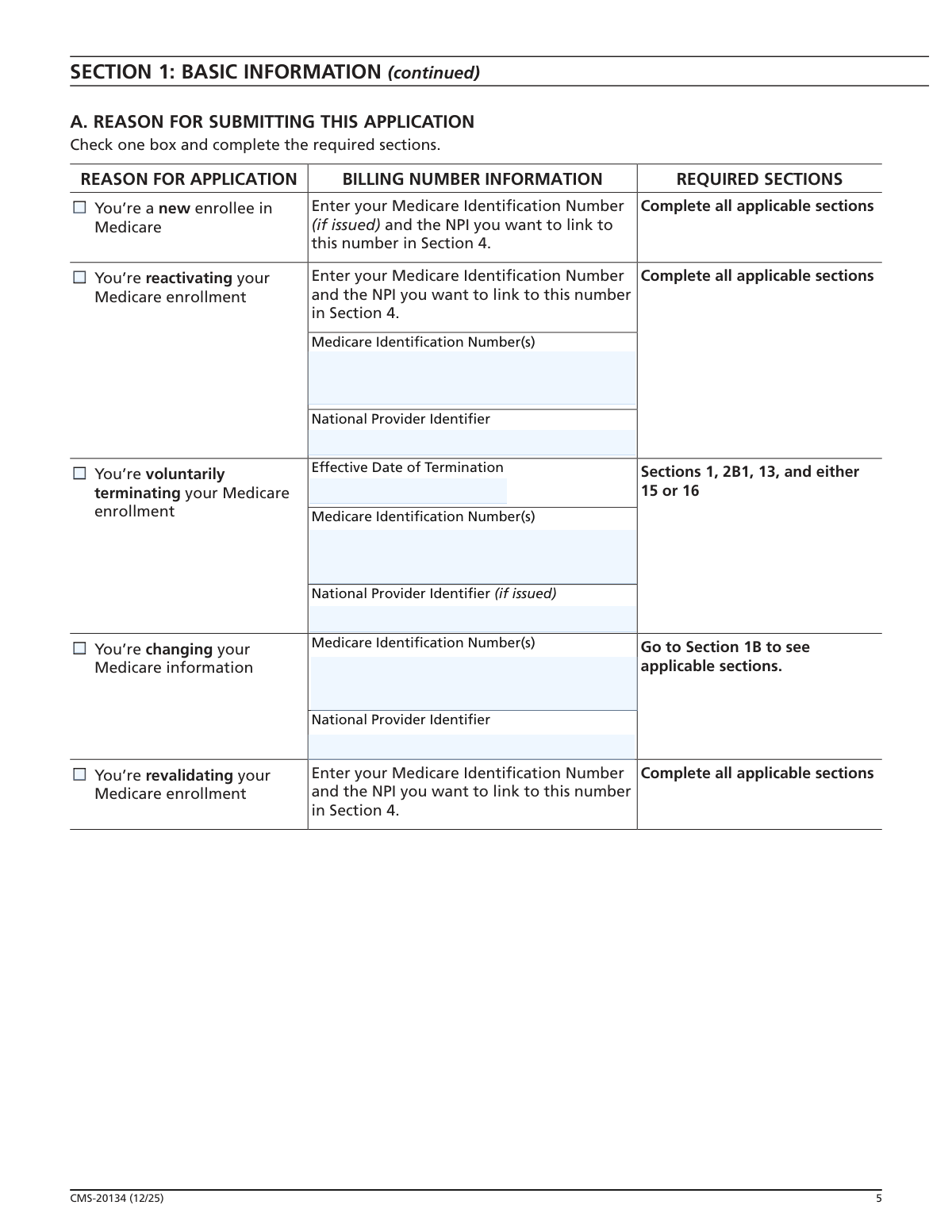
  2. 2 Complete Section 1 by selecting your reason for submitting the application (new enrollment, reactivation, voluntary termination, change of information, or revalidation) and checking all applicable change categories in Section 1B.
  3. 3 Fill out Section 2 with your supplier type, legal business name, tax identification number, recognition status and organizational code, and correspondence address, ensuring the legal business name matches your IRS tax documents exactly.
  4. 4 Complete Sections 3 through 8 as applicable, including final adverse legal actions, MDPP location information (administrative locations and community settings), ownership and managing control information for both organizations and individuals, the coach roster with required NPI and SSN details, and any billing agency information.
  5. 5 Review and complete Section 13 with contact person information, then carefully read Section 14 regarding penalties for falsifying information to ensure full understanding before signing.
  6. 6 Have the authorized official(s) complete and sign Section 15's Certification Statement, and optionally designate delegated officials in Section 16, ensuring all signatures are original and in ink as required.
  7. 7 Gather all required supporting documents listed in Section 17 (such as MDPP recognition certificate, IRS confirmation letter, and CMS-588 EFT form), then submit the completed application package to your designated Medicare Administrative Contractor (MAC).

Our AI-powered system ensures each field is filled out correctly, reducing errors and saving you time.

Why Choose Instafill.ai for Your Fillable CMS-20134 Form?

Speed

Complete your CMS-20134 in as little as 37 seconds.

Up-to-Date

Always use the latest 2026 CMS-20134 form version.

Cost-effective

No need to hire expensive lawyers.

Accuracy

Our AI performs 10 compliance checks to ensure your form is error-free.

Security

Your personal information is protected with bank-level encryption.

Frequently Asked Questions About Form CMS-20134

Form CMS-20134 is the Medicare Enrollment Application for Medicare Diabetes Prevention Program (MDPP) Suppliers. Any organization that wants to furnish MDPP services and bill Medicare must complete this form, including those already enrolled in Medicare under a different supplier type. This applies to In-Person, In-Person with Distance Learning, and Online MDPP Suppliers.

Yes. To enroll as an MDPP supplier, your organization must have either CMS MDPP preliminary recognition or full CDC Diabetes Prevention Recognition Program (DPRP) Recognition. You must submit a copy of your Certificate or Determination Letter demonstrating this recognition status along with your application.

Yes. Both the MDPP supplier and its coaches must obtain their required NPIs before completing and submitting this application. You can apply for an NPI online at NPPES.cms.hhs.gov. Applying for an NPI is a separate process from Medicare enrollment.

You must send the completed application with original signatures and all required supporting documentation to your designated Medicare Administrative Contractor (MAC). The MAC that services your state is responsible for processing your enrollment application. To find the mailing address for your designated MAC, visit CMS.gov/medicare/enrollment-renewal/providers-suppliers.

Mandatory documents for all applicants include: a copy of your MDPP Preliminary or Full DPRP Recognition Certificate, written IRS confirmation of your Tax Identification Number (e.g., IRS Form CP 575), and a completed Form CMS-588 for Electronic Funds Transfer Authorization. Additional documents may be required depending on your situation, such as an IRS Determination Letter for non-profits, adverse legal action documentation, or a bank statement if Medicare payments are sent to a lending institution.

You would submit this application if you are a new Medicare enrollee, reactivating your Medicare enrollment, voluntarily terminating your enrollment, changing your Medicare enrollment information (e.g., adding a location or coach), or revalidating your enrollment. Check the appropriate reason in Section 1A and complete the required sections accordingly.

MDPP suppliers must revalidate their enrollment every five years. The Medicare fee-for-service contractor will notify you when it is time to revalidate — do not submit a revalidation application until you have been contacted by the contractor.

Changes in ownership, changes to the coach roster, and final adverse legal action history must be reported within 30 days. All other changes to enrollment information must be reported within 90 days. These timeframes are established in 42 C.F.R. § 424.205(d)(5).

An Authorized Official is an appointed official — such as a chief executive officer, chief financial officer, general partner, chairman of the board, or direct owner — who has been granted legal authority to enroll the organization in Medicare and commit it to abide by Medicare laws and regulations. Only an Authorized Official may sign the initial enrollment application or a revalidation application. All signatures must be original and in ink; faxed, photocopied, or stamped signatures will not be accepted.

A Delegated Official is an individual authorized by an Authorized Official to report changes and updates to the supplier's Medicare enrollment record. Having a Delegated Official is optional; however, if none is assigned, only the Authorized Official(s) can make changes to the supplier's Medicare status. A Delegated Official must have an ownership or control interest in, or be a W-2 managing employee of, the supplier — independent contractors cannot serve as Delegated Officials.

For each coach, you must provide their first name, last name, Social Security Number, date of birth, and NPI. You must also ensure that no coach on your roster meets any of the ineligibility criteria, such as having Medicare billing privileges revoked, being excluded from federal health care programs, or having certain felony convictions within the previous 10 years. Including an ineligible coach may result in enrollment denial or revocation.

Deliberately falsifying information on this application can result in serious criminal, civil, and administrative penalties. These include fines up to $250,000 and imprisonment up to five years for individuals under 18 U.S.C. § 1001, civil penalties under the False Claims Act, denial or revocation of Medicare billing privileges, and exclusion from the Medicare program. Organizations may face fines up to $500,000.

Yes. You can use the online Provider Enrollment, Chain and Ownership System (PECOS) to apply for or change your MDPP enrollment information instead of submitting a paper application. For more information, visit CMS.gov/medicare/enrollment-renewal/providers-suppliers.

Yes — AI-powered services like Instafill.ai can help you accurately auto-fill the CMS-20134 form fields, saving time and reducing errors. If you have a flat, non-fillable PDF version of this form, Instafill.ai can also convert it into an interactive fillable form so you can complete it digitally before printing and signing.

After submission, the Medicare fee-for-service contractor will review your application, verify that all coaches are eligible, and may conduct a site visit to verify compliance with MDPP supplier standards. If requested, you must also submit a fingerprint background check within 30 days. The contractor will then notify you in writing of its enrollment decision. You must respond to any requests for additional documentation within 30 days.

Compliance CMS-20134
Validation Checks by Instafill.ai

1
Legal Business Name Matches IRS Tax Documentation
Validates that the Legal Business Name entered in Section 2B1 exactly matches the name on file with the IRS as confirmed by the submitted IRS confirmation document (e.g., IRS Form CP 575). This check is critical because discrepancies between the application name and IRS records can cause payment delays or denials. If the names do not match, the application will be flagged for correction before processing can continue, as the MAC uses this information to verify the supplier's tax identity.
2
Tax Identification Number Format Validation
Ensures the Tax Identification Number (TIN) entered in Section 2B1 conforms to the standard IRS format of nine digits, typically formatted as XX-XXXXXXX for Employer Identification Numbers (EINs) or XXX-XX-XXXX for Social Security Numbers used by sole proprietors. An incorrectly formatted or incomplete TIN will prevent the MAC from verifying the supplier's identity with the IRS. Failure to provide a valid TIN will result in the application being returned or delayed.
3
National Provider Identifier (NPI) Format and Type Validation
Validates that all NPIs entered throughout the application are exactly 10 digits in length and conform to the Luhn algorithm check digit standard as assigned by NPPES. Additionally, this check verifies that the correct NPI type is used: Type 1 (individual) for sole proprietors and Type 2 (organizational) for corporations, partnerships, and LLCs, as specified in the billing number information section. Submitting an incorrect NPI type or a malformed NPI number will result in enrollment denial or processing delays, as the NPI must be obtained and validated before the application is submitted.
4
Supplier Type Selection Completeness
Confirms that exactly one supplier type has been selected in Section 2A from the three available options: In-Person MDPP Supplier, In-Person with Distance Learning MDPP Supplier, or Online MDPP Supplier. The form instructions specify that if a supplier operates as more than one type, a separate application must be submitted for each type. If no supplier type is selected or multiple types are checked on a single application, the application is considered incomplete and will not be processed.
5
Reason for Application Selection and Required Sections Completion
Verifies that exactly one reason for application has been selected in Section 1A (new enrollee, reactivation, voluntary termination, change of information, or revalidation) and that all required sections corresponding to that reason have been completed as specified in the Section 1A table. For example, a voluntary termination requires an Effective Date of Termination and completion of Sections 1, 2B1, 13, and either 15 or 16. Incomplete section coverage based on the selected reason will result in the application being returned for correction.
6
Date Format Consistency Across All Date Fields
Validates that all date fields throughout the application (including Incorporation Date, Recognition Status Effective Date, Expiration/Renewal Date, coach start/end dates, ownership acquisition dates, and signature dates) are entered in the required mm/dd/yyyy format. Dates entered in any other format (e.g., mm/yyyy, yyyy-mm-dd, or written out) will be flagged as invalid. Incorrectly formatted dates can cause processing errors and may result in incorrect effective dates being applied to enrollment records.
7
Administrative Location Address Cannot Be a P.O. Box
Checks that the street addresses provided in Section 4A for administrative locations and community settings are physical street addresses and do not contain P.O. Box entries. The form explicitly states that a P.O. Box is not acceptable for location addresses, as the MAC must be able to conduct site visits to verify compliance with supplier standards under 42 C.F.R. § 424.205(d). Similarly, medical record storage addresses in Section 4C must also be physical addresses, not P.O. boxes or drop boxes.
8
Correspondence Address Cannot Be a Billing Agency Address
Validates that the correspondence address provided in Section 2B3 is the supplier's own address and not the address of any billing agency listed in Section 8. The form explicitly prohibits using a billing agency's address as the correspondence address, as the MAC needs to be able to contact the supplier directly for enrollment-related communications. If the correspondence address matches the billing agency address entered in Section 8, the application must be corrected before submission.
9
Social Security Number Format Validation for Individuals
Ensures that all Social Security Numbers (SSNs) entered for individuals in Section 6A (owners, officers, directors, managing employees) and Section 7 (coaches) conform to the standard nine-digit format XXX-XX-XXXX. The form states that the name, date of birth, and SSN of each person listed must match the information on file with the Social Security Administration. An improperly formatted or missing SSN will prevent identity verification and result in the application being returned, as SSNs are required for all authorized and delegated officials.
10
Coach Required Fields Completeness Validation
Verifies that all required fields for each coach listed in Section 7 are fully completed, including First Name, Last Name, Social Security Number, Date of Birth, and NPI. The form marks all five of these fields as required for each coach entry. Missing any of these fields for a coach will prevent the MAC from verifying coach eligibility against exclusion databases, which is a mandatory step in the enrollment review process under 42 C.F.R. § 424.205(d)(3) and (e).
11
Final Adverse Legal Action Disclosure Completeness
Validates that Section 3 is answered completely for the organization, and that Sections 5B and 6B are answered for each owning/managing organization and individual respectively. If the answer to the adverse legal action question is 'Yes,' the validation checks that the subsequent detail fields (action type, date, action taken by, and resolution) are all populated and that supporting documentation is attached. Incomplete disclosure of adverse legal actions, even those that were expunged or are under appeal, constitutes a material omission that can result in enrollment denial or revocation.
12
Authorized Official Signature and Title Validation
Confirms that Section 15 contains at least one authorized official's complete information including First Name, Last Name, Title/Position, Telephone Number, and a dated original signature. The title must correspond to an eligible authorized official role such as CEO, CFO, general partner, chairman of the board, or direct owner. The signature date must not be prior to the application completion date. Applications signed by delegated officials for initial enrollment or revalidation will be rejected, as only authorized officials have the authority to sign these application types.
13
Delegated Official Employment Status and Authorization Validation
When a delegated official is listed in Section 16, validates that the W-2 Employee checkbox is appropriately marked or that the individual has an ownership or control interest in the supplier, since independent contractors are explicitly prohibited from serving as delegated officials. Additionally, checks that the authorized official's countersignature assigning the delegation is present and dated in Section 16. A delegated official who does not meet the eligibility criteria or whose delegation is not properly authorized by an authorized official's signature cannot legally bind the supplier.
14
Recognition Status Organizational Code and Expiration Date Presence
Validates that the Recognition Status section (Section 2B2) contains a valid CDC Organizational Code, an Effective Date, and an Expiration/Renewal Date, and that at least one of the three MDPP delivery type checkboxes (In-person, In-person with Distance Learning, or Online) is marked 'Yes' to correspond with the supplier type selected in Section 2A. The recognition status must be current and not expired, as maintaining MDPP preliminary or full CDC DPRP recognition is a mandatory supplier standard under 42 C.F.R. § 424.205(d)(1). An expired or missing recognition status will result in enrollment denial.
15
Ownership Interest Threshold and Organization vs. Individual Section Routing
Validates that all entities with 5 percent or more ownership interest, managing control, or partnership interest are reported in the correct section: organizations in Section 5 and individuals in Section 6. The check also verifies that for corporations, all officers and directors are listed in Section 6 regardless of ownership percentage, and that all partners in a partnership are listed regardless of their ownership percentage falling below the 5 percent threshold. Misrouting an organization to Section 6 or an individual to Section 5, or omitting required owners, constitutes an incomplete application and may trigger additional scrutiny or denial.
16
Supporting Documentation Checklist Completeness
Verifies that all mandatory supporting documents listed in Section 17 are indicated as attached, including the CDC MDPP Recognition Certificate or Determination Letter, IRS written confirmation of TIN matching the Legal Business Name, and a completed CMS-588 Electronic Funds Transfer Authorization form (unless the supplier already receives EFT payments with no banking changes). Conditional documents such as the IRS non-profit determination letter, Form 8832 for disregarded entities, and adverse action documentation must also be included when applicable. Submitting the application without required supporting documentation is one of the most common causes of enrollment delays and will result in the MAC requesting the missing items within a 30-day response window.

Common Mistakes in Completing CMS-20134

Using the 'Doing Business As' name instead of the Legal Business Name

Many applicants enter their commonly used trade name or DBA name in the Legal Business Name field in Section 2B1, rather than the exact legal name registered with the IRS. This mismatch causes significant delays because the MAC must verify that the legal business name matches IRS tax documents exactly. Always use the precise name as it appears on your IRS CP 575 or other IRS confirmation letter, and enter the DBA name only in the designated 'Other Name' field. Tools like Instafill.ai can help flag this discrepancy before submission.

Submitting the application without first obtaining an NPI

A common and critical mistake is submitting the CMS-20134 before the MDPP supplier and all its coaches have obtained their National Provider Identification Numbers (NPIs). The form explicitly requires NPIs to be obtained through NPPES before the application is completed. Submitting without valid NPIs will result in rejection or significant processing delays. Ensure all coaches have their Type 1 NPIs and the organization has its Type 2 NPI registered at NPPES.cms.hhs.gov before filling out any section of this application.

Reporting the wrong NPI type for the organization or individual

Applicants frequently confuse Type 1 (individual) and Type 2 (organizational) NPIs. Sole proprietors must report their Type 1 NPI, while corporations, partnerships, and other organizations must report a Type 2 NPI. Entering the wrong NPI type causes verification failures and enrollment delays. Review the NPI type guidance in the Billing Number Information section carefully, and confirm your NPI type in NPPES before entering it on the application. Instafill.ai can help validate NPI format and type consistency across all sections.

Providing a P.O. Box as a physical location address

Section 4 explicitly prohibits the use of P.O. Boxes for administrative locations, community settings, and medical record storage addresses. Applicants sometimes enter a P.O. Box because it is their primary mailing address, not realizing that a specific street address is required for physical locations. This results in the application being returned or rejected. Always provide the full street address as recorded by the United States Postal Service, and use the correspondence address field in Section 2B3 for any mailing address that differs from the physical location.

Failing to complete all required sections based on the reason for application

The form has a complex matrix in Sections 1A and 1B that specifies which sections must be completed depending on the reason for submission (new enrollment, reactivation, change of information, etc.). Many applicants skip required sections or complete unnecessary ones, leading to incomplete applications that are returned for correction. Carefully review the 'Required Sections' table in Section 1A and the checklist in Section 1B before starting, and ensure every applicable section is fully completed. Instafill.ai can guide users through the correct section requirements based on their enrollment reason.

Omitting or incorrectly reporting Final Adverse Legal Actions

Applicants sometimes fail to disclose all required final adverse legal actions in Section 3, either because they believe expunged records don't need to be reported, or because they are unaware that the reporting requirement covers all owners, officers, directors, and managing employees. The form explicitly states that all applicable final adverse legal actions must be reported regardless of expungement or pending appeals. Failure to disclose can result in denial of enrollment or future revocation. Review all categories listed in Section 3A and 3B thoroughly and attach all required documentation for each disclosed action.

Using non-original, stamped, faxed, or photocopied signatures

A very common reason for application rejection is submitting signatures that are not original ink signatures. The form clearly states in Sections 15 and 16 that all signatures must be original and signed in ink (blue ink preferred), and that stamped, faxed, or photocopied signatures will not be accepted. Applicants who scan and email or fax the completed form often have their applications rejected on this basis alone. Always submit the original signed paper application by mail to the designated MAC, and never submit a photocopy of a signed page.

Having the wrong person sign as the Authorized Official

Section 15 requires the signature of an Authorized Official, defined as an appointed official such as a CEO, CFO, general partner, or chairman of the board who has been granted legal authority to enroll the organization in Medicare. Many applicants have a staff member, billing agent, or delegated official sign the initial enrollment application, which is not permitted. Only an Authorized Official may sign the initial enrollment or revalidation application. Additionally, the Authorized Official must be reported in Section 6 of the application, and if not previously established, Section 6 must be completed for that individual.

Failing to report all owners, officers, directors, and managing employees in Sections 5 and 6

Applicants frequently underreport ownership and managing control information by only listing the primary owner and overlooking indirect owners, all corporate officers and directors, managing employees, and all partners regardless of ownership percentage. Section 6 requires all individuals with 5% or greater direct or indirect ownership, all officers and directors of corporations, all managing employees, and all partners to be listed. Missing individuals can trigger requests for additional information, delay processing, or result in denial. For each person or organization omitted, a separate copy of the relevant section must be completed.

Incorrectly classifying locations as administrative locations vs. community settings

In Section 4, applicants often misclassify their service delivery locations, particularly when a location serves dual purposes. The key distinction is whether the MDPP supplier is the primary operator of the space and whether coaches are based or dispatched from that location — if so, it is an administrative location even if it also functions as a community setting. Additionally, Online and In-person with Distance Learning MDPP Suppliers must always select 'Administrative location.' Misclassification can affect compliance with supplier standards under 42 C.F.R. § 424.205(d)(4) and may trigger issues during the site visit.

Failing to submit the CMS-588 Electronic Funds Transfer form

Medicare requires all payments to be made via electronic funds transfer (EFT), and the CMS-588 form must be submitted with the enrollment application unless the supplier already receives electronic payments and is not changing banking information. Many new applicants are unaware of this requirement and submit the CMS-20134 without the CMS-588, causing payment setup delays even after enrollment is approved. Check the supporting documents list in Section 17 carefully and include a completed CMS-588 with your application package if this is a new enrollment or a banking information change.

Entering incorrect or incomplete coach information in Section 7

Section 7 requires the full legal name, Social Security Number, date of birth, and NPI for every coach on the roster, and applicants frequently omit one or more of these required fields or enter nicknames instead of legal names. Additionally, applicants sometimes add coaches who have not yet been verified for eligibility, or fail to report the correct date (start date for new coaches, change date for modifications, or end date for deletions). Including an ineligible coach can result in enrollment denial under 42 C.F.R. § 424.530(a)(1) or revocation under 42 C.F.R. § 424.535(a)(1). Verify each coach's eligibility and ensure all required fields are complete before submission.
Saved over 80 hours a year

“I was never sure if my IRS forms like W-9 were filled correctly. Now, I can complete the forms accurately without any external help.”

Kevin Martin Green

Your data stays secure with advanced protection from Instafill and our subprocessors

Robust compliance program

Transparent business model

You’re not the product. You always know where your data is and what it is processed for.

ISO 27001, HIPAA, and GDPR

Our subprocesses adhere to multiple compliance standards, including but not limited to ISO 27001, HIPAA, and GDPR.

Security & privacy by design

We consider security and privacy from the initial design phase of any new service or functionality. It’s not an afterthought, it’s built-in, including support for two-factor authentication (2FA) to further protect your account.

Fill out CMS-20134 with Instafill.ai

Worried about filling PDFs wrong? Instafill securely fills medicare-enrollment-application-medicare-diabetes-prevention-program-mdpp-suppliers-form-cms-20134 forms, ensuring each field is accurate.



