
Yes! You can use AI to fill out Form DS-1843, Medical History and Examination for Individuals Age 12 and Older
Don't type 304 fields by hand. Tell our AI about yourself, or upload your current passport, and it fills every field in seconds. You check it, then download, print or sign.
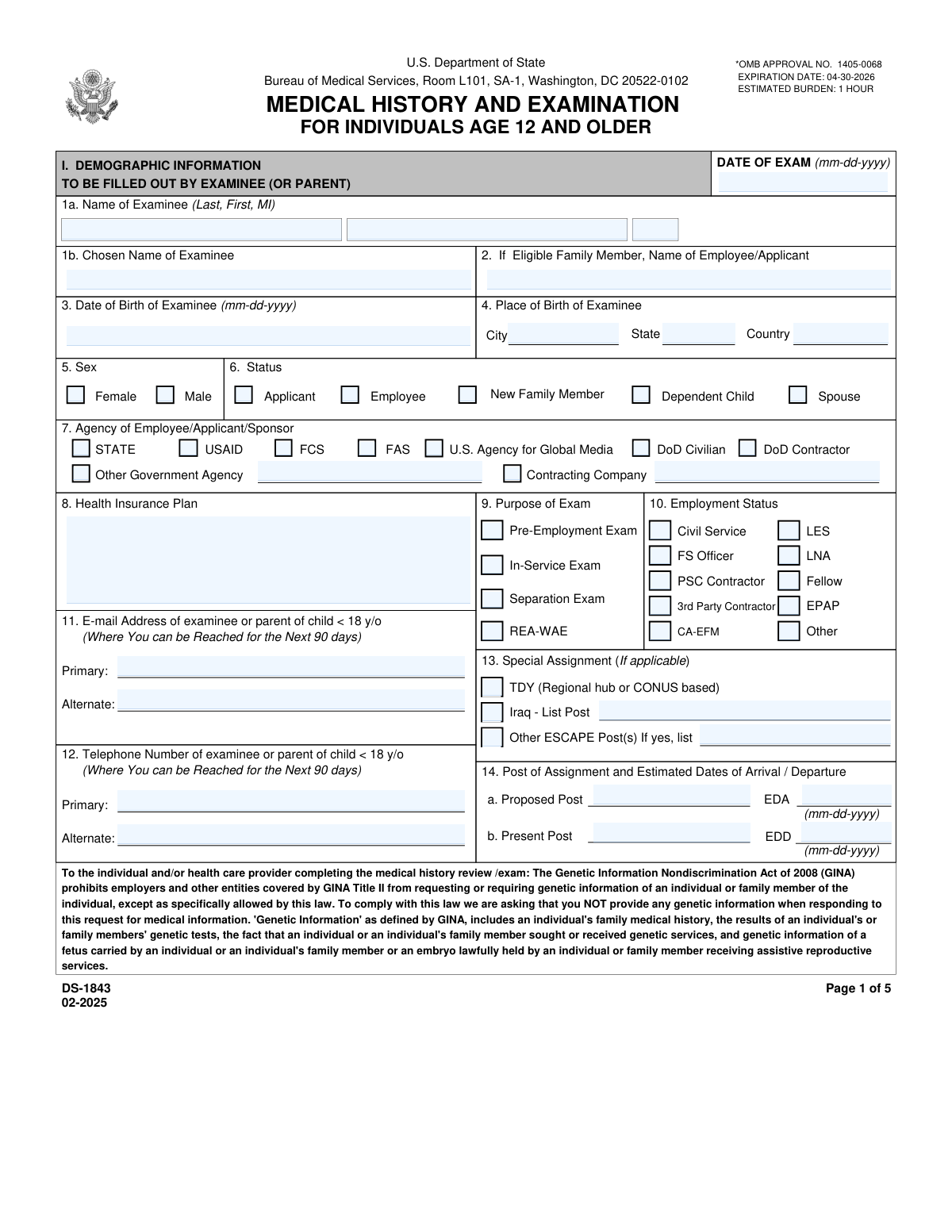
The AI does the filling. You just check it.
No typing into boxes, nothing to install.
What this form asks for
The AI fills all of it, from your answers or your documents.
The AI checks your answers before you download
14 checks built for this form, so a wrong date or a missing answer is caught before anyone else sees it.
This check calculates the examinee's age using the 'Date of Birth' and the 'Date of Exam'. It then verifies that the calculated age is 12 years or older, as specified by the form title 'FOR INDIVIDUALS AGE 12 AND OLDER'. This is crucial for ensuring the correct form is used for the examinee's age group. If the age is less than 12, the submission should be blocked and the user directed to the appropriate form for younger individuals.
This is a logical consistency check that validates the 'Date of Exam' (page 1) occurs after the 'Date of Birth of Examinee' (Field 3). This prevents nonsensical data entry, such as an examination date that precedes the person's birth. If this validation fails, it indicates a data entry error that must be corrected before the form can be processed.
This validation ensures that for every 'Yes' answer to questions 1-36 in Section II (Medical History), the corresponding 'Explanations' field (Section IIA) is not empty. This is critical for the medical clearance process, as a simple 'Yes' without context is insufficient for evaluation. A failure would prompt the user to provide a detailed explanation for each affirmative answer before submission.
This check ensures that the value entered in the 'Primary E-mail Address' field (Field 11) conforms to a standard email format (e.g., [email protected]). This is important for ensuring the agency can reliably contact the examinee for follow-up information or to communicate the results of the medical clearance. An invalid format would trigger an error message requiring the user to correct the entry.
This check verifies that the 'Primary Telephone Number' (Field 12) is entered in a valid and recognizable format, including country code and area code. Proper formatting is essential for communication, especially for international assignments. If the number does not match expected patterns, the system should prompt the user to correct it to ensure contact can be made.
This check is triggered based on the examinee's age. If the calculated age is 50 years or older, the system verifies that an ECG tracing file has been attached as required by Section X, item 4. This ensures compliance with age-based screening protocols. If the examinee is 50+ and the file is missing, the submission is flagged as incomplete.
And 8 more checks
- Conditional Requirement for Lipid Profile Attachment
- Conditional Requirement for Chest X-Ray Attachment
- Logical Check for Pregnancy Question
- Verifies Completeness of Required Lab Report Attachments
- Ensures Examinee Signature and Date are Present
- Logical Check for Post Assignment Dates
- Verifies Selection of Examinee Status
- Verifies Selection of Agency or Company
Let AI fill out your DS-1843
No typing. Every field filled in seconds, checked, ready to sign.
How to Fill Out DS-1843 Online for Free in 2026
What the AI walks you through.
- Navigate to Instafill.ai and upload or select Form DS-1843.
- Complete the demographic information in Section I, including name, date of birth, contact details, and assignment information.
- Fill out the detailed medical history questionnaire in Section II, answering all questions and providing written explanations for any 'Yes' answers.
- List all current medications, drug allergies, and past hospitalizations or operations in Sections III and IV.
- Have a qualified medical examiner complete the clinical evaluation (Sections VII-IX) and record all required laboratory analysis results in Section X, ensuring all lab reports are attached.
- Review the entire form for accuracy, then the examinee (or parent) must sign and date Section V, and the medical examiner must sign and date the final page.
- Submit the completed, signed form along with all required attachments as a single PDF file via email or fax as instructed on the form.
Common Mistakes in Completing DS-1843
The ones the AI is built to catch.
Incomplete 'Yes' Answer Explanations
Failure to Attach Required Lab Reports
Incorrect Date Formatting
Missing Information on Subsequent Pages
Providing Prohibited Genetic Information
Incomplete Medication and Allergy Lists
Missing or Illegible Signatures
Submitting Non-English or Unidentified Lab Reports
Using Temporary or Soon-to-be-Obsolete Contact Information
Incorrect Name Order
Frequently Asked Questions About DS-1843
Is it really free for 7 days?
Can I fill other forms too?
How do I cancel?
How does the AI fill out DS-1843?
What happens to my information?
How complex is DS-1843 to fill out?
What is the purpose of Form DS-1843, and who needs to complete it?
What documents do I need to submit along with the DS-1843 form?
How recent do my laboratory tests need to be?
I answered 'Yes' to some questions in the Medical History section. What do I need to do?
How do I submit the completed Form DS-1843 and my medical reports?
What is the GINA notice on the first page about?
Who needs to sign the form and where?
Is a chest x-ray always required?
Can I use an AI tool to help me fill out this form?
How can I fill out the DS-1843 form online using Instafill.ai?
What should I do if the DS-1843 PDF I have is not fillable?
Why does the form ask for contact information valid for the next 90 days?
Is providing my medical information on this form mandatory?
What is the medical examiner's responsibility when completing this form?
Get your DS-1843 filled out by AI
$0 today. Cancel before Nov 1 and you pay nothing.
Other forms like this one
medical forms: Form OWCP-915, Claim for Medical Reimbursement, Form 8994, Employer Credit for Paid Family and Medical Leave, Form OF-178, Certificate of Medical Examination, Form N-648, Medical Certification for Disability Exceptions, U.S. Coast Guard Form CG-719K, Application for Medical Certificate, The Department of Medical Assistance Services Applied Behavior Analysis Preservice Service Authorization Request Form (Effective Dates of Service 09/01/2025 and after), State of Illinois Department of Children and Family Services Medical Report on an Adult in a Child Care Facility (CFS 602), Carer Payment and Carer Allowance – Medical Report (SA431) for a child under 16 years, Medically Prescribed Treatment (Non-Medication) Form — Provider Treatment Order Form | Office of School Health | School Year 2025–2026, VA Form 10-7959f-2, Foreign Medical Program (FMP) Claim Cover Sheet, Department of Medical Assistance Services Applied Behavior Analysis (97155, Et al.) Initial Service Authorization Request Form, Applied Behavior Analysis Concurrent Service Authorization Request Form (CPT Codes 97153, 97154, 97155, 97156, 97157, 97158, 0373T) – Virginia Department of Medical Assistance Services, Department of Medical Assistance Services Enhanced Services Individual Service Plan (ISP) Template, Scheduled Medical Leave of Absence (MLOA) - BLET 13, Admissions Application, School of Diagnostic Imaging, Mills-Peninsula Medical Center, Albany Medical Center 2024 Benefits Guide, Form BWC-1141, Request for Medical Information, VA Form 21P-8416, Medical Expense Report, Medicare Enrollment Application for Durable Medical Equipment, Prosthetics, Orthotics, and Supplies (DMEPOS) Suppliers, CMS-855S, Form HFS 2243, Provider Enrollment Application Illinois Medical Assistance Program
VA medical forms: Form OWCP-915, Claim for Medical Reimbursement, Form 8994, Employer Credit for Paid Family and Medical Leave, Form OF-178, Certificate of Medical Examination, Form N-648, Medical Certification for Disability Exceptions, U.S. Coast Guard Form CG-719K, Application for Medical Certificate, The Department of Medical Assistance Services Applied Behavior Analysis Preservice Service Authorization Request Form (Effective Dates of Service 09/01/2025 and after), State of Illinois Department of Children and Family Services Medical Report on an Adult in a Child Care Facility (CFS 602), Carer Payment and Carer Allowance – Medical Report (SA431) for a child under 16 years, Medically Prescribed Treatment (Non-Medication) Form — Provider Treatment Order Form | Office of School Health | School Year 2025–2026, VA Form 10-7959f-2, Foreign Medical Program (FMP) Claim Cover Sheet, Department of Medical Assistance Services Applied Behavior Analysis (97155, Et al.) Initial Service Authorization Request Form, Applied Behavior Analysis Concurrent Service Authorization Request Form (CPT Codes 97153, 97154, 97155, 97156, 97157, 97158, 0373T) – Virginia Department of Medical Assistance Services, Department of Medical Assistance Services Enhanced Services Individual Service Plan (ISP) Template, Scheduled Medical Leave of Absence (MLOA) - BLET 13, Admissions Application, School of Diagnostic Imaging, Mills-Peninsula Medical Center, Albany Medical Center 2024 Benefits Guide, Form BWC-1141, Request for Medical Information, VA Form 21P-8416, Medical Expense Report, Medicare Enrollment Application for Durable Medical Equipment, Prosthetics, Orthotics, and Supplies (DMEPOS) Suppliers, CMS-855S, Form HFS 2243, Provider Enrollment Application Illinois Medical Assistance Program
Medi-Cal forms: Form OWCP-915, Claim for Medical Reimbursement, Form 8994, Employer Credit for Paid Family and Medical Leave, Form OF-178, Certificate of Medical Examination, Form N-648, Medical Certification for Disability Exceptions, U.S. Coast Guard Form CG-719K, Application for Medical Certificate, The Department of Medical Assistance Services Applied Behavior Analysis Preservice Service Authorization Request Form (Effective Dates of Service 09/01/2025 and after), State of Illinois Department of Children and Family Services Medical Report on an Adult in a Child Care Facility (CFS 602), Carer Payment and Carer Allowance – Medical Report (SA431) for a child under 16 years, Medically Prescribed Treatment (Non-Medication) Form — Provider Treatment Order Form | Office of School Health | School Year 2025–2026, VA Form 10-7959f-2, Foreign Medical Program (FMP) Claim Cover Sheet, ABA Authorization Request (Medi-Cal) – Initial and Concurrent Requests, Department of Medical Assistance Services Applied Behavior Analysis (97155, Et al.) Initial Service Authorization Request Form, Applied Behavior Analysis Concurrent Service Authorization Request Form (CPT Codes 97153, 97154, 97155, 97156, 97157, 97158, 0373T) – Virginia Department of Medical Assistance Services, Department of Medical Assistance Services Enhanced Services Individual Service Plan (ISP) Template, Scheduled Medical Leave of Absence (MLOA) - BLET 13, Admissions Application, School of Diagnostic Imaging, Mills-Peninsula Medical Center, Albany Medical Center 2024 Benefits Guide, Form BWC-1141, Request for Medical Information, VA Form 21P-8416, Medical Expense Report, Medicare Enrollment Application for Durable Medical Equipment, Prosthetics, Orthotics, and Supplies (DMEPOS) Suppliers, CMS-855S
Let AI fill out your DS-1843
Your trial starts once a card is added. You pay nothing before Nov 1.
Our AI already knows this form, all 304 fields of it. Skip the typing: tell it about yourself, or upload what you have, and it fills the whole form in seconds.
- AI fills every field on all 5 pages, tables and checkboxes included
- No typing into boxes: answer a few questions, or upload your current passport, an old copy of this form, a photo of a document
- The AI checks the answers; you review and change anything before you download
- Download the finished PDF, print it, or sign it online
- Encrypted, and never used to train AI
Cancel before Nov 1 and you pay nothing.
A card is needed to start the trial. Cancel in two clicks from your account.
Terms · Privacy