Yes! You can use AI to fill out ABA Authorization Request (Medi-Cal) – Initial and Concurrent Requests
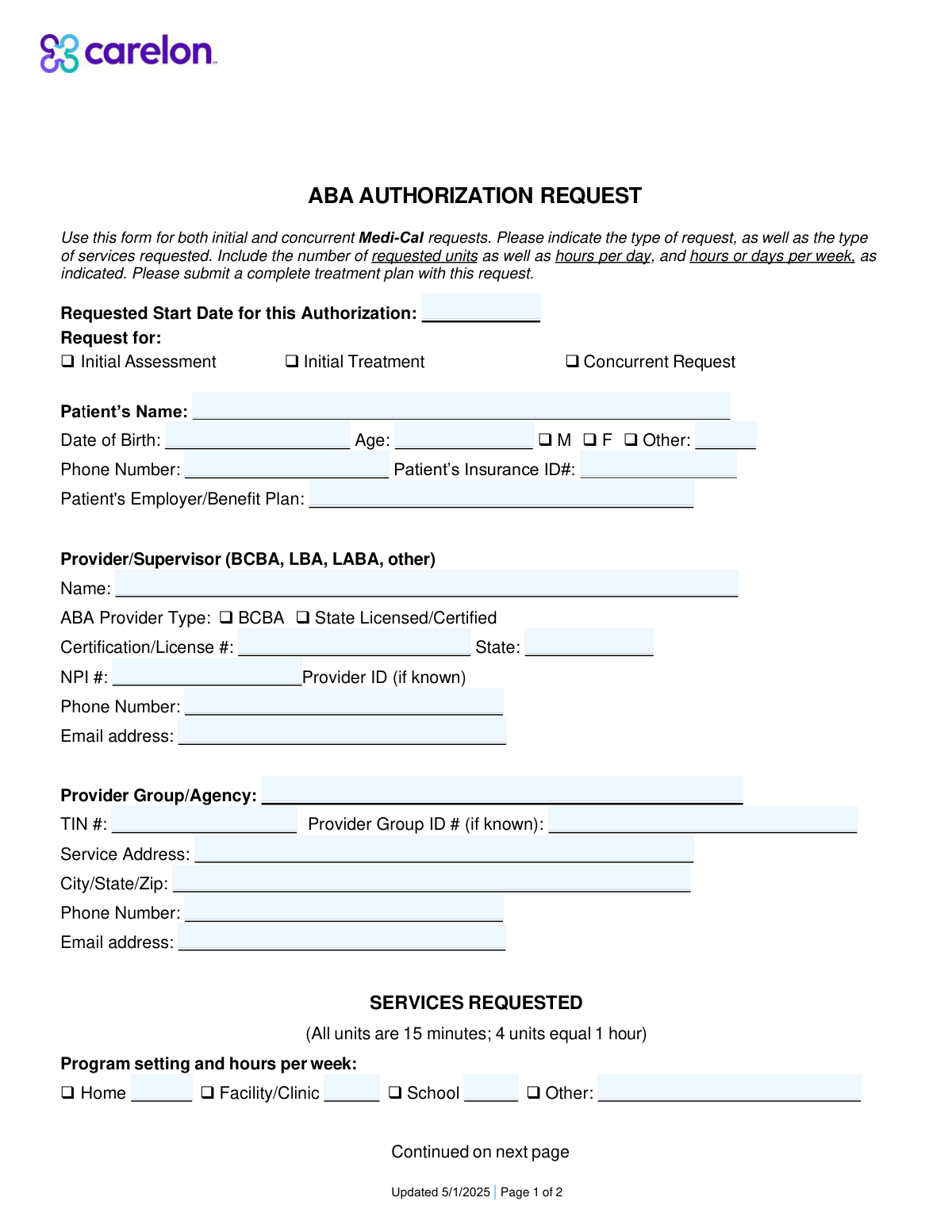
The ABA Authorization Request is a two-page utilization management form used by providers to request Medi-Cal authorization for ABA-related services, including assessments (e.g., H0031), treatment planning/reassessment (H0032), direct 1:1 therapy (H2019), protocol modification/supervision (H2012), group social skills treatment (H0014), and family training (S5111). It captures patient demographics, insurance details, provider credentials (license/certification, NPI), service location, program setting, and the requested units/hours needed to support medical necessity and treatment planning. Submitting it with a complete treatment plan helps payers determine coverage and approve the appropriate level of care. Today, this form can be filled out quickly and accurately using AI-powered services like Instafill.ai, which can also convert non-fillable PDF versions into interactive fillable forms.
Our AI automatically handles information lookup, data retrieval, formatting, and form filling.
It takes less than a minute to fill out ABA Authorization Request using our AI form filling.
Securely upload your data. Information is encrypted in transit and deleted immediately after the form is filled out.
Form specifications
| Form name: | ABA Authorization Request (Medi-Cal) – Initial and Concurrent Requests |
| Number of pages: | 2 |
| Language: | English |
| Categories: | healthcare forms, medical authorization forms, health insurance forms, Medi-Cal forms, ABA forms, authorization forms |
Instafill Demo: filling out a legal form in seconds
How to Fill Out ABA Authorization Request Online for Free in 2026
Are you looking to fill out a ABA AUTHORIZATION REQUEST form online quickly and accurately? Instafill.ai offers the #1 AI-powered PDF filling software of 2026, allowing you to complete your ABA AUTHORIZATION REQUEST form in just 37 seconds or less.
Follow these steps to fill out your ABA AUTHORIZATION REQUEST form online using Instafill.ai:
- 1 Go to Instafill.ai and upload the ABA Authorization Request form (PDF) or select it from the form library.
- 2 Enter or import patient information (name, DOB, age, gender, phone, insurance ID, employer/benefit plan) and confirm accuracy.
- 3 Add provider/supervisor details (name, provider type, license/certification number and state, NPI, phone, email) and provider group/agency information (TIN, group ID, service address, contact info).
- 4 Choose the request type (Initial Assessment, Initial Treatment, or Concurrent Request) and enter the requested start date for the authorization.
- 5 Specify the program setting (home, facility/clinic, school, other) and enter the hours per week for each applicable setting.
- 6 Complete the services requested section by selecting applicable codes (H0031, H0032, H2019, H2012, H0014, S5111) and entering units requested and hours per week/month as required (noting units are in 15-minute increments).
- 7 Use Instafill.ai to validate required fields, check unit/hour consistency, attach or reference the treatment plan as needed, then export/download the completed form for submission.
Our AI-powered system ensures each field is filled out correctly, reducing errors and saving you time.
Why Choose Instafill.ai for Your Fillable ABA Authorization Request Form?
Speed
Complete your ABA Authorization Request in as little as 37 seconds.
Up-to-Date
Always use the latest 2026 ABA Authorization Request form version.
Cost-effective
No need to hire expensive lawyers.
Accuracy
Our AI performs 10 compliance checks to ensure your form is error-free.
Security
Your personal information is protected with bank-level encryption.
Frequently Asked Questions About Form ABA Authorization Request
This form is used to request Medi-Cal authorization for Applied Behavior Analysis (ABA) services. It can be used for both initial requests and concurrent (ongoing) requests.
The ABA provider/supervisor (e.g., BCBA or state licensed/certified provider) or the provider group/agency typically completes and submits the form. Patient/guardian information is included, but the clinical provider is usually responsible for the request details and supporting documents.
Select âInitial Assessmentâ when requesting the first assessment, âInitial Treatmentâ when requesting to start treatment services, and âConcurrent Requestâ when requesting continued services for an existing patient. Choose the option that matches the patientâs current stage of care.
Itâs the date you want the authorization period to begin. Use the earliest realistic date that aligns with your treatment plan and expected payer processing time.
Youâll need the patientâs name, date of birth, age, gender (or âOtherâ), phone number, and insurance ID number. The form also asks for the patientâs employer/benefit plan if applicable.
The form requests the provider/supervisor name, provider type (e.g., BCBA or state licensed/certified), license/certification number and state, NPI, and contact information. It also asks for the provider group/agency name, TIN, service address, and agency contact details (and provider/group IDs if known).
Each unit equals 15 minutes of service time. To convert hours to units, multiply hours by 4 (for example, 10 hours = 40 units).
Check the setting(s) where services will occur (Home, Facility/Clinic, School, or Other) and enter the hours per week for each selected setting. If services occur in multiple settings, list hours for each to reflect the full weekly schedule.
H0031 is the initial behavior identification assessment and includes activities like testing, observation, interviews, interpretation, and report/treatment plan development. The form notes units are in 15-minute increments with a maximum of 32 units.
H0032 covers treatment planning or reassessment by a BCBA and is billed in 15-minute units. The form indicates up to 32 units per authorization period unless a Medical Necessity Criteria (MNC) rationale is provided for additional units.
For H2019, enter the hours per week and the total units requested for technician-delivered treatment under supervision. For H2012, enter hours per week and units requested for treatment with protocol modification (often used for BCBA/BCaBA/QAS work, including face-to-face supervision with the patient).
H0014 is for group adaptive behavior treatment (such as a social skills group) delivered face-to-face with two or more patients. Use it when requesting group-based services and include the hours per week and units requested.
S5111 is parent/guardian training provided by a BCBA/BCaBA/QAS, with or without the patient present. The form asks for hours per month and the corresponding units requested (in 15-minute increments).
Yesâthis form instructs you to submit a complete treatment plan with the request. Including supporting assessment results and clinical rationale can help avoid delays or requests for additional information.
YesâAI tools like Instafill.ai can help auto-fill form fields accurately from your provided information and save time. If the PDF is flat/non-fillable, Instafill.ai can convert it into an interactive fillable form and then help you complete it online.
Compliance ABA Authorization Request
Validation Checks by Instafill.ai
1
Requested Start Date is present, valid, and not unreasonably far in the past/future
Validate that the Requested Start Date is provided and is a real calendar date in an accepted format (e.g., MM/DD/YYYY). The date should not be unreasonably far in the past (e.g., before today minus an allowed backdate window) or excessively far in the future, based on payer rules. If invalid or missing, the request should be rejected or pended because the authorization period cannot be established.
2
Patient name completeness and character validation
Ensure Patientâs Name is present and contains at least a first and last name, with reasonable characters (letters, spaces, hyphens, apostrophes) and no placeholder text (e.g., 'N/A', 'Unknown'). This reduces mismatches with eligibility/claims systems and prevents duplicate records. If validation fails, the submission should be pended for correction to avoid misidentification.
3
Date of Birth is a valid date and Age matches DOB
Validate that Patientâs Date of Birth is present and a valid date, and compute the patientâs age as of the submission date (or requested start date) to confirm it matches the entered Age within an acceptable tolerance (e.g., ±1 year if only whole years are captured). This prevents demographic inconsistencies that can cause eligibility and medical necessity review issues. If the DOB is invalid or the age mismatch is significant, the form should be flagged and returned for correction.
4
Patient age is within plausible bounds for ABA services
Check that Age is numeric and within a plausible human range (e.g., 0â120) and optionally within program/payer constraints for ABA benefits if applicable. Implausible ages often indicate data entry errors (e.g., transposed digits) that can derail authorization review. If out of range, the submission should be pended and require confirmation/correction.
5
Gender selection consistency (including 'Other' specification)
Validate that a gender option is selected and that 'Other Gender' is required only when 'Other' is selected, and must be blank when 'Other' is not selected. This ensures consistent demographic capture and avoids contradictory entries. If 'Other' is selected without a specification (or specified when not selected), the submission should be pended for correction.
6
Patient phone number format validation
Ensure Patientâs Phone Number is present and matches an accepted phone format (e.g., 10 digits for US numbers, allowing punctuation and optional country code). Phone numbers are critical for care coordination and resolving authorization questions quickly. If invalid or missing, the request should be pended because outreach may be impossible.
7
Patient Insurance ID format and non-placeholder validation
Validate that Patientâs Insurance ID# is present, meets expected length/character constraints (often alphanumeric), and is not a placeholder (e.g., '000000', 'TBD'). Correct member IDs are essential for eligibility verification and linking the authorization to the correct beneficiary. If invalid, the submission should be rejected or pended until a valid ID is provided.
8
Provider/Supervisor identity and credential fields are complete and consistent
Require Provider/Supervisor Name and ensure at least one provider type/credential pathway is satisfied (e.g., BCBA or State Licensed/Certified). If a credentialed provider is indicated, Certification/License # and State must be present and plausibly formatted (e.g., state abbreviation for State). If missing or inconsistent, the request should be pended because supervision/clinical responsibility cannot be verified.
9
NPI number is 10 digits and passes the NPI Luhn check
Validate that the NPI Number is exactly 10 digits and passes the standard NPI check-digit algorithm (Luhn variant). This prevents downstream claim/authorization matching failures and reduces provider identification errors. If the NPI fails validation, the submission should be pended and the provider must correct the NPI.
10
Provider and agency email address format validation
Validate that Provider/Supervisor Email Address and Provider Group/Agency Email Address (if provided/required) follow standard email formatting rules and do not contain spaces or invalid characters. Email is often used for requesting missing documentation and sending determinations. If invalid, the submission should be pended or the email field should be corrected before acceptance.
11
TIN number format validation (EIN/SSN length and digits)
Ensure the Provider Group/Agency TIN # is present (if the agency is provided) and is 9 digits (allowing hyphen formatting), and is not an obvious placeholder (e.g., 123456789). Correct TINs are required for contracting, payment, and entity identification. If invalid, the request should be pended because the billing entity cannot be reliably identified.
12
Service address completeness and City/State/ZIP validation
Validate that Service Address and City/State/Zip are present and that ZIP code is 5 digits (or ZIP+4) and state is a valid US state abbreviation. Accurate service location is required for network validation, jurisdiction rules, and potential site-of-service requirements. If incomplete or invalid, the submission should be pended for correction.
13
Program setting hours per week are numeric, non-negative, and at least one setting is populated
Validate that Home/Facility-Clinic/School/Other Setting Hours per Week fields (when used) are numeric and non-negative, and that at least one setting has hours > 0 to indicate where services will occur. This ensures the request includes a clear service delivery plan and supports utilization review. If all settings are blank/zero or any value is negative/non-numeric, the submission should be pended.
14
CPT/HCPCS selection requires corresponding units/hours and vice versa
For each service line (H0031, H0032, H2019, H2012, H0014, S5111), validate that if units/hours are entered then the service is selected/indicated, and if the service is selected then the required quantity fields are completed. This prevents orphaned quantities and ambiguous requests that cannot be authorized. If mismatched, the submission should be pended and the requester must align selections with quantities.
15
Units requested are integers and within stated maximums (H0031/H0032 up to 32 unless justification)
Validate that all 'Units Requested' fields are whole numbers (since units are 15-minute increments) and non-negative. Specifically enforce the stated caps for H0031 and H0032 (up to 32 units) unless an additional medical necessity criteria (MNC) rationale field/workflow is present and completed. If units exceed limits without justification, the request should be pended or partially denied per policy.
16
Hours-to-units consistency check (4 units = 1 hour) for services with both fields
For H2019, H2012, H0014, and S5111 where both hours and units are captured, validate that Units Requested equals Hours * 4 (allowing minor rounding rules only if explicitly defined). This ensures internal consistency and prevents over/under-requesting due to conversion errors. If inconsistent, the submission should be flagged and pended for correction before review.
Common Mistakes in Completing ABA Authorization Request
People often forget to check a request type box or check multiple boxes because the form is used for both initial and concurrent requests. This can cause the request to be routed incorrectly, delayed, or returned for clarification. To avoid this, confirm whether you are requesting an initial assessment, initial treatment, or a concurrent (ongoing) authorization and select only the applicable option. AI-powered form filling tools like Instafill.ai can prompt for the missing selection and reduce contradictory checkbox entries.
A common error is leaving the requested start date blank or entering a date that conflicts with the authorization period, assessment timing, or documentation submission date. Missing/incorrect dates can trigger processing delays or result in an authorization that starts later than intended. Double-check the date format and ensure the start date aligns with the treatment plan and payer requirements. Instafill.ai can help by validating date formats and flagging dates that appear inconsistent or incomplete.
Applicants frequently enter a nickname, transpose digits in the date of birth, or provide an age that doesnât match the DOB. These mismatches can cause eligibility verification failures and lead to denials or requests for correction. Use the patientâs legal name as it appears on insurance records, enter DOB carefully, and calculate age based on todayâs date (or the requested start date if required by your workflow). Instafill.ai can auto-calculate age from DOB and standardize names to reduce mismatch errors.
Because the form includes M/F/Other with a separate âOtherâ specification, people often check âOtherâ and forget to fill in the description, or they leave all gender options blank. This can create incomplete demographic records and may slow intake or claims matching in some systems. If âOtherâ is selected, always provide the requested specification; otherwise select M or F as appropriate. Instafill.ai can enforce conditional logic so the âOther Genderâ field is required only when âOtherâ is selected.
Many users confuse the Patientâs Insurance ID# on page 1 with the Patient ID# field on page 2, or they enter a member ID where a plan/group identifier is expected. This can prevent the payer from matching the request to the correct member record, causing delays or denials. Copy the ID exactly as shown on the insurance card/eligibility system and keep the same identifier consistent across both pages. Instafill.ai can help by mapping the same verified member ID into all relevant fields and flagging inconsistent IDs.
A frequent issue is leaving out the certification/license number, entering the wrong issuing state, or providing an NPI that doesnât match the named provider/supervisor. This can lead to credentialing verification failures and the authorization being rejected or pended. Ensure the provider type is selected (e.g., BCBA vs State Licensed/Certified), the license/cert number is accurate, the state is correct, and the NPI corresponds to the same individual. Instafill.ai can validate NPI formatting (10 digits) and help standardize credential fields to reduce mismatches.
Because the form asks for phone/email for both the individual provider/supervisor and the provider group/agency, people often duplicate one set of contact details in both sections or leave one section blank. This can cause communication failures (e.g., requests for additional information going to the wrong party) and slow approvals. Confirm which phone/email belongs to the supervising clinician versus the agency billing/administrative contact, and complete both sections if applicable. Instafill.ai can reduce this by keeping separate profiles for individual clinicians and organizations and auto-filling the correct contact fields.
Users commonly enter a TIN with missing digits, include extra characters, or confuse the TIN with another internal ID; the âProvider Group ID (if known)â is also often left blank even when available. Incorrect tax/organization identifiers can cause payer system mismatches and delay authorization or payment setup. Enter the 9-digit TIN exactly as registered and only fill the Provider Group ID if you have the payer-assigned value. Instafill.ai can format-check TINs and help prevent transposed-digit errors through validation.
People often provide the agencyâs corporate mailing address instead of the actual service location, or they omit suite/unit numbers and ZIP+4 details when required by internal workflows. Incorrect service location information can create network/location verification issues and may affect where services are authorized to occur. Use the physical service address where treatment will be delivered and ensure City/State/Zip are complete and consistent. Instafill.ai can standardize addresses and validate ZIP/state combinations to reduce returned forms.
The form states that all units are 15 minutes (4 units = 1 hour), but many submissions list hours in the units field or provide unit totals that donât match the stated hours per week/month. This can result in incorrect authorized amounts, payer requests for recalculation, or denials for exceeding limits. Always convert hours to units (hours Ă 4) and ensure the units requested align with the frequency (per week or per month) and the authorization period. Instafill.ai can automatically convert hours to units and flag discrepancies between hours and units.
For H0031 and H0032, the form notes a maximum of 32 units (with H0032 allowing more only with MNC rationale), but people often request higher totals without including the required medical necessity (MNC) explanation. This can lead to partial approvals, denials, or a request for additional documentation. Keep requests within the stated limits unless you are submitting the required rationale and supporting documentation. Instafill.ai can warn when requested units exceed common caps and prompt you to attach or reference the needed MNC rationale.
Saved over 80 hours a year
âI was never sure if my IRS forms like W-9 were filled correctly. Now, I can complete the forms accurately without any external help.â
Kevin Martin Green
Your data stays secure with advanced protection from Instafill and our subprocessors

Robust compliance program
Transparent business model
Youâre not the product. You always know where your data is and what it is processed for.
ISO 27001, HIPAA, and GDPR
Our subprocesses adhere to multiple compliance standards, including but not limited to ISO 27001, HIPAA, and GDPR.
Security & privacy by design
We consider security and privacy from the initial design phase of any new service or functionality. Itâs not an afterthought, itâs built-in, including support for two-factor authentication (2FA) to further protect your account.
Fill out ABA Authorization Request with Instafill.ai
Worried about filling PDFs wrong? Instafill securely fills aba-authorization-request-medi-cal-initial-and-concurrent-requests forms, ensuring each field is accurate.