Yes! You can use AI to fill out Medically Prescribed Treatment (Non-Medication) Form — Provider Treatment Order Form | Office of School Health | School Year 2025–2026
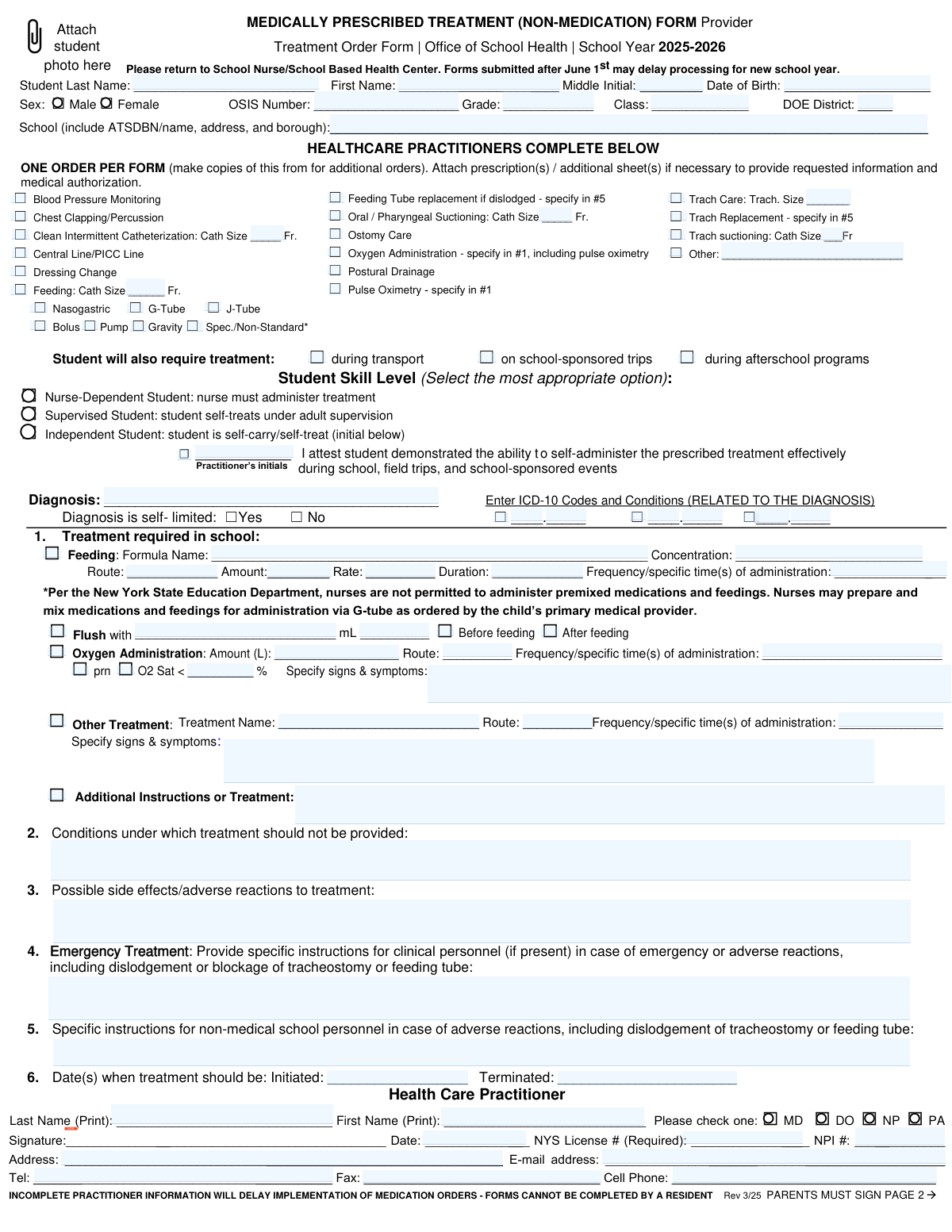
This is an Office of School Health (OSH) school-year treatment order and consent packet used to document a student’s medically prescribed non-medication procedures that must be performed in school (and optionally during transport, trips, and afterschool programs). A licensed health care practitioner completes the clinical order details (procedure type, parameters, contraindications, side effects, emergency instructions, and start/end dates), and a parent/guardian signs consent and supply responsibilities so the school can implement the plan. It is important because incomplete or late practitioner/parent information can delay services and because the orders typically expire at the end of the school year. Today, this form can be filled out quickly and accurately using AI-powered services like Instafill.ai, which can also convert non-fillable PDF versions into interactive fillable forms.
Our AI automatically handles information lookup, data retrieval, formatting, and form filling.
It takes less than a minute to fill out Medically Prescribed Treatment (Non-Medication) Form (OSH 2025–2026) using our AI form filling.
Securely upload your data. Information is encrypted in transit and deleted immediately after the form is filled out.
Form specifications
| Form name: | Medically Prescribed Treatment (Non-Medication) Form — Provider Treatment Order Form | Office of School Health | School Year 2025–2026 |
| Number of pages: | 2 |
| Filled form examples: | Form Medically Prescribed Treatment (Non-Medication) Form (OSH 2025–2026) Examples |
| Language: | English |
| Categories: | medical forms, medical provider forms, school forms, VA medical forms, Medi-Cal forms, health treatment forms |
Instafill Demo: filling out a legal form in seconds
How to Fill Out Medically Prescribed Treatment (Non-Medication) Form (OSH 2025–2026) Online for Free in 2026
Are you looking to fill out a MEDICALLY PRESCRIBED TREATMENT (NON-MEDICATION) FORM (OSH 2025–2026) form online quickly and accurately? Instafill.ai offers the #1 AI-powered PDF filling software of 2026, allowing you to complete your MEDICALLY PRESCRIBED TREATMENT (NON-MEDICATION) FORM (OSH 2025–2026) form in just 37 seconds or less.
Follow these steps to fill out your MEDICALLY PRESCRIBED TREATMENT (NON-MEDICATION) FORM (OSH 2025–2026) form online using Instafill.ai:
- 1 Go to Instafill.ai and upload the Medically Prescribed Treatment (Non-Medication) Provider Treatment Order Form (or select it from the form library).
- 2 Enter the student identification details (name, DOB, sex, OSIS number, grade/class, district, and full school/DBN and address).
- 3 Have the healthcare practitioner complete the order section by selecting the required procedure(s) and specifying all required parameters (e.g., catheter/trach sizes, feeding method, oxygen amount/route, frequency, and signs/symptoms).
- 4 Add clinical safety details: diagnosis and ICD-10 codes, conditions when treatment should not be provided, possible side effects/adverse reactions, and emergency instructions for clinical and non-medical staff.
- 5 Fill in treatment start and end dates, then complete practitioner credentials and contact information (MD/DO/NP/PA, signature/date, NYS license number, NPI, address, phone/fax/email).
- 6 Complete the parent/guardian page: consent acknowledgments, contact information, alternate emergency contact, and parent/guardian signature/date (and any self-treatment confirmations if applicable).
- 7 Use Instafill.ai to validate required fields, generate a clean final PDF, e-sign where allowed, and download/submit the completed form to the school nurse or School Based Health Center.
Our AI-powered system ensures each field is filled out correctly, reducing errors and saving you time.
Why Choose Instafill.ai for Your Fillable Medically Prescribed Treatment (Non-Medication) Form (OSH 2025–2026) Form?
Speed
Complete your Medically Prescribed Treatment (Non-Medication) Form (OSH 2025–2026) in as little as 37 seconds.
Up-to-Date
Always use the latest 2026 Medically Prescribed Treatment (Non-Medication) Form (OSH 2025–2026) form version.
Cost-effective
No need to hire expensive lawyers.
Accuracy
Our AI performs 10 compliance checks to ensure your form is error-free.
Security
Your personal information is protected with bank-level encryption.
Frequently Asked Questions About Form Medically Prescribed Treatment (Non-Medication) Form (OSH 2025–2026)
This form authorizes the NYC DOE Office of School Health (OSH) and school health staff to provide specific non-medication treatments to a student during the 2025–2026 school year (e.g., tube feeding, suctioning, oxygen, catheterization). It documents the provider’s orders and the parent/guardian’s consent.
A licensed health care practitioner (MD, DO, NP, or PA) must complete and sign the provider order section, and a parent/guardian must complete and sign the consent section (page 2). The form is not valid without both parts.
Return the completed form to the School Nurse or the School Based Health Center (SBHC). If you’re unsure who that is, contact the school’s main office and ask for the health office.
Submit it as early as possible; the form notes that submissions after June 1 may delay processing for the new school year. Late submission can delay when services start in September.
No—this form states “ONE ORDER PER FORM.” Use separate copies for additional treatment orders, and each student must have their own form.
You’ll need the student’s name, date of birth, sex, OSIS number, grade, class/homeroom, DOE district, and full school information (ATS/DBN, name, address, and borough). Providing complete school details helps OSH route the order correctly.
The practitioner must print their name, check their credential (MD/DO/NP/PA), sign and date the form, and include a NYS license number (required) and NPI number. Incomplete practitioner information can delay implementation.
No. The form explicitly states it cannot be completed by a resident; it must be completed by an authorized licensed practitioner (MD/DO/NP/PA).
The provider should specify the exact treatment details such as route, amount, rate, duration, and frequency/specific times. For oxygen, include liters, route (e.g., nasal cannula), schedule or PRN parameters (like O2 sat threshold), and signs/symptoms to watch for.
Check the boxes for “during transport,” “on school-sponsored trips,” and/or “during afterschool programs” if the student will need the treatment in those settings. This helps the school plan staffing and safety coverage beyond the classroom day.
Nurse-Dependent means a nurse must administer the treatment; Supervised means the student self-treats with adult supervision; Independent means the student can self-carry/self-treat. For Independent status, the practitioner must initial attesting the student demonstrated the ability to self-administer effectively.
The provider should give step-by-step emergency instructions for clinical personnel in the Emergency Treatment section, and separate, clear instructions for non-medical school personnel in the next section. If replacement is authorized (feeding tube or trach), the provider should specify details in the referenced instruction area (#5).
Parents/guardians must provide all required medical supplies/equipment, and they must be new, unopened, in the original packaging, labeled with the student’s name and date of birth, and unexpired. You must also notify the school immediately if treatment instructions change.
Yes. The form states the treatment instructions/orders expire at the end of the student’s school year (which may include summer session) or when a new form is submitted—whichever is earlier.
Yes—AI tools can help organize and auto-fill form fields to save time and reduce missed fields; services like Instafill.ai use AI to auto-fill form fields accurately. To use it online, upload the PDF to Instafill.ai, review the extracted fields (student info, parent contacts, provider details), and then export a completed copy for signatures and submission to the school nurse/SBHC.
If the PDF is “flat” (non-fillable), you can still complete it by printing and writing neatly, or use a tool that converts it into a fillable form. Instafill.ai can convert non-fillable PDFs into interactive fillable forms so you can type directly into the correct fields before printing/signing.
Compliance Medically Prescribed Treatment (Non-Medication) Form (OSH 2025–2026)
Validation Checks by Instafill.ai
1
Student identity fields are complete and minimally valid (name + DOB + OSIS)
Validates that Student Last Name, Student First Name, Date of Birth, and OSIS Number are present because these are the core identifiers used to match the order to the correct student record. Names should not be only whitespace and should meet basic character rules (letters, hyphen, apostrophe allowed). If any of these are missing or invalid, the submission should be rejected or routed to manual review because the order cannot be safely applied to the correct student.
2
Date fields use a valid date format and represent real calendar dates
Checks that all date fields (Student DOB, Treatment Initiated, Treatment Terminated, Practitioner Signature Date, Parent/Guardian Date Signed, OSH Received/Reviewed dates if captured) parse as valid dates (e.g., MM/DD/YYYY) and are not impossible dates. This prevents downstream processing errors and misinterpretation of treatment timelines. If a date fails validation, the system should flag the specific field and block submission until corrected.
3
DOB is logically plausible and consistent with grade level
Validates that the student’s Date of Birth is not in the future and falls within a plausible school-age range (e.g., 3–22 years old, configurable). Also checks for gross inconsistencies between DOB and Grade (e.g., a 5-year-old in grade 12) to catch data entry mistakes. If inconsistent, the form should be flagged for correction or manual verification before orders are implemented.
4
Sex selection is mutually exclusive and not blank
Ensures exactly one of the Sex checkboxes (Male/Female) is selected, since the form presents a binary choice and double-selection creates ambiguity. This supports accurate student record matching and reporting. If neither or both are selected, the submission should be rejected with a clear error message.
5
OSIS Number format validation (numeric length and characters)
Checks that OSIS Number contains only digits and matches the expected length for the district (commonly 9 digits, but should be configurable). This reduces mismatches and failed integrations with DOE/OSH systems. If the OSIS format is invalid, the system should prevent submission or require confirmation via manual review.
6
School identification completeness (DBN/ATS code, name, borough, district)
Validates that the school information is sufficiently complete to route the order: School ATS/DBN or Name, Borough, and District should be present (and DBN/ATS should match expected patterns if provided). This is important because services and staffing depend on correct school routing. If incomplete or malformed, the form should be flagged and not forwarded for implementation until corrected.
7
At least one healthcare procedure/treatment is selected (one order per form rule)
Ensures the practitioner has selected at least one procedure/treatment checkbox (e.g., feeding, oxygen, trach care, catheterization, etc.) or filled a clearly defined 'Other' procedure. The form states 'ONE ORDER PER FORM', so the system should also detect if multiple unrelated orders are selected and prompt the user to submit separate forms when required by policy. If no treatment is selected, the submission should be rejected as incomplete.
8
Conditional catheter/tube size fields required and numeric when corresponding procedure is checked
When procedures requiring sizes are selected (e.g., Oral/Pharyngeal Suctioning, Trach suctioning, Trach care, Clean Intermittent Catheterization, Feeding cath size), validates that the size field is present and numeric (French size for catheters; trach size in expected numeric format). This is critical for safe execution of procedures and supply matching. If missing or non-numeric, the system should block submission and highlight the dependent field.
9
Feeding method consistency (tube type and delivery method dependencies)
If any feeding delivery method is selected (Bolus/Pump/Gravity/Spec.-Non-Standard), validates that at least one tube type (Nasogastric, G-Tube, J-Tube) or a feeding order is also indicated, since delivery method without route is ambiguous. If Spec./Non-Standard is checked, requires a description of the special method. If inconsistent, the system should require correction before acceptance.
10
Feeding order details completeness when 'Feeding: Formula' is selected
When Feeding: Formula is checked under 'Treatment required in school', validates that Formula Name, Concentration, Route, Amount, Rate, Duration, and Frequency/Specific Times are all provided and not placeholders. These details are necessary to administer feedings safely and consistently. If any required feeding detail is missing, the submission should be rejected and the missing fields listed.
11
Flush instructions validation (volume and timing required when flush is indicated)
If a flush is indicated (flush checkbox or flush volume field is used), validates that Flush volume is a positive number in mL and that timing is specified (Before feeding and/or After feeding, or an explicit timing instruction). This prevents incomplete tube-feeding orders that could cause blockage or hydration issues. If flush data is partial (e.g., volume without timing), the system should block submission until completed.
12
Oxygen administration order completeness and PRN threshold logic
When Oxygen Administration is selected, validates that Oxygen Amount (L), Route, and Frequency/Specific Times are provided. If PRN is checked or an O2 saturation threshold is used, requires a numeric threshold percentage (typically 50–100) and associated signs/symptoms to guide staff. If required oxygen parameters are missing or out of range, the form should be rejected for safety reasons.
13
Student skill level selection is mutually exclusive and attestation required for Independent
Ensures exactly one skill level is selected (Nurse-Dependent, Supervised, or Independent) to avoid conflicting care expectations. If Independent Student is selected, requires the practitioner attestation/initials field to be completed because the form explicitly requires confirmation of self-administration ability. If multiple levels are selected or attestation is missing for Independent, the submission should be blocked.
14
Treatment initiation/termination dates are ordered and within the school year window
Validates that Treatment Initiated is on or before Treatment Terminated when both are provided, and that dates fall within a reasonable window for the stated school year (2025–2026), allowing configurable grace periods (e.g., summer session). This prevents expired or future-inappropriate orders from being implemented. If dates are reversed or outside allowed bounds, the system should flag and require correction.
15
Practitioner credentials completeness and format (type, license, NPI, signature/date)
Checks that practitioner printed name, credential type (exactly one of MD/DO/NP/PA), NYS License Number (required), signature, and signature date are present. Also validates NPI format if provided (10 digits) and that license/NPI are not obviously invalid (non-numeric where numeric expected). If required credential elements are missing, the form should be rejected because orders cannot be legally implemented.
16
Parent/guardian consent section completeness (signature, date, contact numbers, emergency contact)
Validates that Parent/Guardian Name, Parent/Guardian Signature, and Date Signed are present because consent is required to store and administer treatments at school. Also checks that at least one reachable phone number is provided (daytime/home/cell) and that Alternate Emergency Contact includes name, relationship, and phone number in a valid phone format. If consent or minimum contact information is missing, the submission should be blocked and returned for completion.
Common Mistakes in Completing Medically Prescribed Treatment (Non-Medication) Form (OSH 2025–2026)
People often leave the OSIS number blank, use a nickname instead of the name on school records, or enter a DOB that doesn’t match what the school has on file. This happens because families and providers may be working from different documents or copying from memory. The consequence is delayed matching to the correct student record and slower implementation of services. Avoid this by copying the student’s name/DOB/OSIS directly from official school records; AI-powered tools like Instafill.ai can help by validating formats and flagging mismatches before submission.
A common error is writing only the school name (or only the DBN) and skipping the address and borough, even though the form requests all of it. This typically happens when the person assumes the nurse already knows the school or the student is transferring. Missing school identifiers can cause routing errors and processing delays, especially in large districts. To avoid it, enter ATS/DBN plus the full school name, address, and borough exactly as requested; Instafill.ai can auto-format and ensure required subfields aren’t skipped.
Providers sometimes check several unrelated procedures and write multiple separate orders in the narrative sections, even though the form instructs one order per form. This happens because the checklist invites multiple selections and clinicians try to consolidate paperwork. The result is confusion about what is actually authorized, which can trigger follow-up calls and delays. Avoid this by completing separate copies for distinct orders and attaching additional sheets/prescriptions when needed; if the form is a flat non-fillable PDF, Instafill.ai can convert it into a fillable version to make creating multiple copies easier.
Many submissions have boxes checked for suctioning, catheterization, trach care, or feeding but omit the catheter size (Fr), trach size, route, or other required details. This often happens when the person assumes the school already has the equipment details or the provider forgets the “specify” prompts. Without these specifics, staff cannot safely perform the procedure and the order may be considered incomplete. Avoid this by filling every “Size ___ Fr.” and “Trach Size ___” field and including route and equipment details; Instafill.ai can prompt for missing dependent fields when a checkbox is selected.
Feeding orders are frequently incomplete—e.g., formula name is listed but concentration, amount (mL), rate, duration, and exact times are missing. This happens because providers may document feeding plans in shorthand or assume “per home regimen” is sufficient. The consequence is that the school cannot implement the feeding safely or consistently, leading to delays and requests for clarification. Avoid this by specifying formula name, concentration (e.g., kcal/oz), route (G/NG/J), amount, rate, duration, and exact frequency/times; Instafill.ai can help standardize units and ensure all required feeding fields are completed.
A common mistake is checking oxygen administration and/or PRN but not providing an O2 saturation threshold (e.g., “O2 Sat < 92%”) and the signs/symptoms that should trigger oxygen use. This happens because PRN instructions are often documented informally in clinical settings. In school, unclear parameters create safety risk and may prevent staff from administering oxygen at all until clarified. Avoid this by including flow rate (L/min), route (nasal cannula/mask/trach), whether continuous vs PRN, the exact O2 sat threshold, and observable symptoms; Instafill.ai can enforce completion of these linked fields when PRN is selected.
Sections for emergency treatment instructions and specific steps for non-medical personnel are often left blank or filled with vague statements like “call 911” without device-specific steps (e.g., dislodged trach/tube). This happens because providers assume only nurses will respond, but the form explicitly asks for guidance for different staff roles. Missing instructions can delay appropriate response during an emergency and may require the form to be returned for completion. Avoid this by providing step-by-step actions for clinical staff and separate, plain-language steps for non-medical staff, including what to do for dislodgement/blockage; Instafill.ai can remind users when these high-risk sections are empty.
People sometimes check “Independent Student” but forget the practitioner attestation/initials, or they select “Nurse-Dependent” while also indicating the student will self-treat. This happens because the skill-level section has multiple options and the attestation requirement is easy to miss. The consequence is that self-treatment may not be authorized, which can change staffing needs and delay implementation. Avoid this by selecting only the single most appropriate skill level and ensuring the practitioner initials the attestation when “Independent” is chosen; Instafill.ai can flag inconsistent selections and missing initials.
Submissions often include a general diagnosis description but no ICD-10 codes, or codes are entered without required letters/decimals (or the checkbox lines are left ambiguous). This happens because ICD-10 coding may not be readily available at the time of signing or the form layout is confusing. Incomplete diagnosis/coding can slow review, affect eligibility determinations, and trigger requests for clarification. Avoid this by entering the primary diagnosis plus correctly formatted ICD-10 codes (e.g., J45.909) and related conditions; Instafill.ai can validate ICD-10 patterns and reduce formatting errors.
A frequent delay-causer is missing NYS license number, missing NPI, unchecked credential type (MD/DO/NP/PA), or a missing signature/date. This happens when office staff pre-fills parts and the clinician signs quickly, or when a stamp is used without all required fields. The form explicitly warns that incomplete practitioner information will delay implementation and that residents cannot complete the form. Avoid this by verifying all practitioner identity fields are complete and legible before submission; Instafill.ai can require these fields and format phone numbers/emails consistently.
Families often return only the provider page, forget the parent/guardian signature/date, or leave phone/email fields blank. This happens because the form is multi-page and the “PARENTS MUST SIGN PAGE 2” note is easy to overlook. Without consent and reliable contact information, the school may be unable to store/administer supplies or reach a guardian, delaying services. Avoid this by completing and signing the parent/guardian section, providing daytime/home/cell numbers, and listing an alternate emergency contact; Instafill.ai can help ensure page-2 fields are not missed and can prefill consistent contact details.
Saved over 80 hours a year
“I was never sure if my IRS forms like W-9 were filled correctly. Now, I can complete the forms accurately without any external help.”
Kevin Martin Green
Your data stays secure with advanced protection from Instafill and our subprocessors

Robust compliance program
Transparent business model
You’re not the product. You always know where your data is and what it is processed for.
ISO 27001, HIPAA, and GDPR
Our subprocesses adhere to multiple compliance standards, including but not limited to ISO 27001, HIPAA, and GDPR.
Security & privacy by design
We consider security and privacy from the initial design phase of any new service or functionality. It’s not an afterthought, it’s built-in, including support for two-factor authentication (2FA) to further protect your account.
Fill out Medically Prescribed Treatment (Non-Medication) Form (OSH 2025–2026) with Instafill.ai
Worried about filling PDFs wrong? Instafill securely fills medically-prescribed-treatment-non-medication-form-provider-treatment-order-form-office-of-school-health-school-year forms, ensuring each field is accurate.



