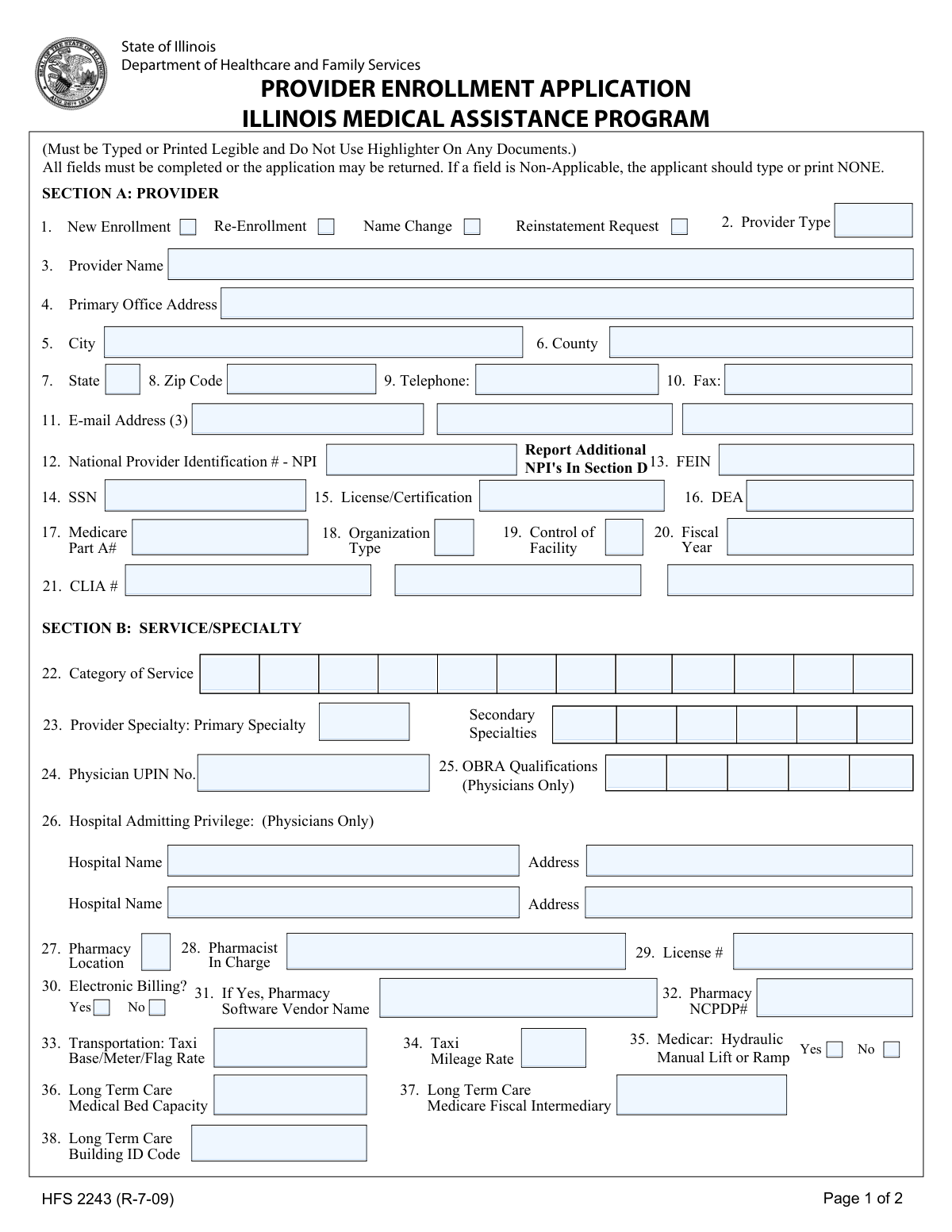
Yes! You can use AI to fill out Form HFS 2243, Provider Enrollment Application Illinois Medical Assistance Program
Form HFS 2243 is the official application for healthcare providers to enroll, re-enroll, or make changes to their status within the Illinois Medical Assistance Program. It is submitted to the Illinois Department of Healthcare and Family Services to ensure providers meet the state's requirements for participation and reimbursement for services rendered to Medicaid patients. Today, this form can be filled out quickly and accurately using AI-powered services like Instafill.ai, which can also convert non-fillable PDF versions into interactive fillable forms.
Our AI automatically handles information lookup, data retrieval, formatting, and form filling.
It takes less than a minute to fill out HFS 2243 using our AI form filling.
Securely upload your data. Information is encrypted in transit and deleted immediately after the form is filled out.
Form specifications
| Form name: | Form HFS 2243, Provider Enrollment Application Illinois Medical Assistance Program |
| Number of pages: | 1 |
| Language: | English |
| Categories: | medical forms, medical provider forms, VA medical forms, Medi-Cal forms, enrollment forms, medical assistance forms, enrollment application forms |
Instafill Demo: How to fill out PDF forms in seconds with AI
How to Fill Out HFS 2243 Online for Free in 2026
Are you looking to fill out a HFS 2243 form online quickly and accurately? Instafill.ai offers the #1 AI-powered PDF filling software of 2026, allowing you to complete your HFS 2243 form in just 37 seconds or less.
Follow these steps to fill out your HFS 2243 form online using Instafill.ai:
- 1 Navigate to Instafill.ai and upload or select the HFS 2243 Provider Enrollment Application.
- 2 Use the AI assistant to automatically populate Section A with your provider details, including name, address, NPI, and license numbers.
- 3 Complete Section B by specifying your service category, specialties, and any other relevant qualifications like hospital admitting privileges or pharmacy details.
- 4 Provide information on any former participation or change of ownership in Section C and list any additional NPIs in Section D.
- 5 Enter the correct payee and billing information in Section E, ensuring the TIN and NPI details are accurate for payment processing.
- 6 Carefully review the entire application, then complete the certification in Section F by providing a digital signature, date, and printed name.
- 7 Download your completed, signed HFS 2243 form, ready for submission to the Illinois Department of Healthcare and Family Services.
Our AI-powered system ensures each field is filled out correctly, reducing errors and saving you time.
Why Choose Instafill.ai for Your Fillable HFS 2243 Form?
Speed
Complete your HFS 2243 in as little as 37 seconds.
Up-to-Date
Always use the latest 2026 HFS 2243 form version.
Cost-effective
No need to hire expensive lawyers.
Accuracy
Our AI performs 10 compliance checks to ensure your form is error-free.
Security
Your personal information is protected with bank-level encryption.
Frequently Asked Questions About Form HFS 2243
This form is used by healthcare providers to enroll, re-enroll, request reinstatement, or report a name change for participation in the Illinois Medical Assistance Program.
Any healthcare provider or organization, such as a physician, pharmacy, long-term care facility, or medical transportation service, that wants to be reimbursed for services provided to Illinois Medicaid recipients must complete this application.
Your application may be returned if any fields are left blank, which will delay the enrollment process. If a field is not applicable to you, you must type or print 'NONE' in that space.
Section A contains information about the provider and the primary location where services are rendered. Section E is for the information of the person or entity receiving payment, which could be a different billing address or corporate office.
Enter your primary NPI in Section A (Field 12). All additional NPIs should be listed in Section D.
A FEIN (Federal Employer Identification Number) is for businesses, while an SSN (Social Security Number) is for individuals. Use the FEIN if you are enrolling as an organization or group practice, and the SSN if you are enrolling as an individual provider.
In Section C, you must indicate that there is a change of ownership, provide the effective date, and list the former provider's name and number.
An authorized representative of the enrolling provider or organization must sign the form. This individual certifies that all information is true and that the provider complies with all federal and state laws.
Applications are often returned for being incomplete, using a highlighter, or being illegible. Ensure every field is filled out (using 'NONE' where needed) and that the form is typed or printed clearly.
These are specific identification numbers related to your provider type. Your CLIA number is from your lab certification, the DEA number is for prescribing controlled substances, and the NCPDP number is for pharmacies.
Yes, services like Instafill.ai use AI to accurately auto-fill form fields with your saved information, which can save time and help prevent errors.
You can upload the form to a platform like Instafill.ai. This allows you to fill out the form on your computer, save your progress, and securely store your information for future use on other forms.
If you have a non-fillable or 'flat' PDF, you can use a tool like Instafill.ai to convert it into an interactive, fillable form. This allows you to type your information directly into the fields for a clean and legible application.
Compliance HFS 2243
Validation Checks by Instafill.ai
1
NPI Number Format Validation
This check verifies that the National Provider Identification (NPI) numbers in fields 12, 41, and 51 are exactly 10 digits long and contain only numeric characters. The NPI is a unique identifier for health care providers, and an incorrect or improperly formatted number will lead to claim rejections and payment delays. If the value is not a 10-digit number, the application should be flagged for correction.
2
Payee TIN and Type Consistency
This validation ensures that the Taxpayer Identification Number (TIN) provided in the Payee Information section (Field 50) is consistent with the 'TIN Type Code' selected in Field 49. If the type code indicates 'SSN', the value must be a 9-digit number; if it indicates 'FEIN', the value must also be a 9-digit number. This is critical for tax reporting and payment processing, and a mismatch will cause failures with IRS verification and prevent successful enrollment.
3
DEA Number Format
Verifies that the DEA number in Field 16 follows the standard format of two letters followed by seven digits (e.g., AX1234567). The Drug Enforcement Administration number is required for providers who prescribe controlled substances. An invalid format indicates a data entry error that would prevent verification and could halt the enrollment process for prescribing providers.
4
Signature and Date Requirement
This check confirms that the application has been signed and dated in Section F. The signature legally certifies the accuracy of the provided information, and the date establishes when the certification was made. An unsigned or undated application is legally incomplete and must be returned to the applicant for completion.
5
Conditional Change of Ownership Date
If the 'Yes' box for 'Change of Ownership' (Field 39) is checked, this validation ensures that the 'Effective Date' field is populated with a valid, properly formatted date. This date is crucial for determining the transition of responsibility and billing privileges between the old and new owners. Failure to provide this date when required will leave the ownership transition ambiguous and stall the application.
6
Conditional Electronic Billing Information
This check enforces a logical rule for pharmacy providers. If 'Yes' is selected for 'Electronic Billing?' (Field 30), then the 'Pharmacy Software Vendor Name' (Field 31) must be completed. This information is necessary for setting up and troubleshooting electronic claims submission. An application with 'Yes' selected but no vendor name provided is incomplete and requires follow-up.
7
Enrollment Type Selection
Validates that at least one of the checkboxes in Field 1 (New Enrollment, Re-Enrollment, Name Change, Reinstatement Request) has been selected. This selection defines the purpose of the application and dictates the workflow for processing it. An application without an enrollment type selected cannot be processed as the intent is unclear.
8
General Field Completeness
This validation scans all fields on the form to ensure none are left blank. According to the form's instructions, every field must either contain a value or the word 'NONE' if it is not applicable. This rule ensures the applicant has reviewed and acknowledged every required piece of information, preventing incomplete submissions from entering the system.
9
SSN and FEIN Format Validation
This check verifies that the Social Security Number (Field 14) and Federal Employer Identification Number (Field 13) are valid 9-digit numbers. These numbers are fundamental for identity verification and tax purposes. Submitting an incorrectly formatted SSN or FEIN will cause verification failures and delay the entire enrollment process.
10
Physician-Specific Field Requirement
This is a conditional check based on the provider's specialty. If the 'Provider Specialty' in Field 23 indicates the applicant is a physician, this validation ensures that the 'OBRA Qualifications' (Field 25) and 'Hospital Admitting Privilege' (Field 26) sections are filled out or explicitly marked as 'NONE'. This information is mandatory for credentialing physicians, and its absence would render their application incomplete.
11
Zip Code Format
Ensures that all zip code fields (e.g., Fields 8 and 48) contain a valid 5-digit or 9-digit (ZIP+4) numeric format. Correct zip codes are essential for mail delivery, service area verification, and data accuracy. An invalid format can lead to returned mail and incorrect provider directory listings.
12
CLIA Number Format
This check validates that the CLIA number in Field 21 is a 10-character alphanumeric string, which is the standard format for a Clinical Laboratory Improvement Amendments certificate. This is mandatory for any provider performing lab testing. An invalid CLIA number would prevent the provider from being reimbursed for laboratory services.
13
Printed Name for Signature
This validation confirms that the 'Printed name of person signing above' field in Section F is completed whenever the 'Signature' field is present. An illegible signature can create ambiguity about the authorized signer. The printed name provides clear identification of the individual who certified the application, which is necessary for legal and auditing purposes.
Common Mistakes in Completing HFS 2243
The form instructions explicitly state that all fields must be completed, and if a field is not applicable, the applicant must enter 'NONE'. Many applicants leave non-applicable fields blank out of habit, which leads to an incomplete application. This will cause the application to be returned, significantly delaying the enrollment process. To avoid this, carefully review every field and enter 'NONE' where appropriate.
Applicants often enter the practice's 'Doing Business As' (DBA) name in Section A but list a different legal entity name or individual's name in the Payee Information (Section E). This discrepancy between the servicing provider and the entity receiving payment, along with mismatched Tax IDs, will cause payment rejections. Ensure the name and SSN/FEIN in Section E match the legal entity registered with the IRS for tax purposes to guarantee proper payment.
A frequent error is providing an SSN for an incorporated entity (which requires an FEIN) or vice-versa. This often happens in Section E (Payee Information) where the TIN Type Code (Field 49) must correctly correspond to the number entered in Field 50. A mismatch will cause validation failure with the IRS and halt the application process until corrected. AI-powered tools like Instafill.ai can help prevent this by validating number formats and ensuring consistency across the form.
While the primary NPI is entered in Section A, many applicants forget to list all additional associated NPIs in Section D. This is crucial for group practices where individual practitioners have their own NPIs, or for organizations with multiple service locations. Failure to report all relevant NPIs can lead to claim denials for services rendered by unlisted providers. Always double-check if any other NPIs need to be associated with the main application.
Forgetting to sign and date the application in Section F is a simple but critical error that results in immediate rejection. Furthermore, the signature must belong to an individual with the legal authority to bind the provider or organization to the terms of the agreement. An unauthorized signature can invalidate the entire application. Always ensure the correct person signs, dates, and legibly prints their name.
The form explicitly requires information to be 'Typed or Printed Legible' and warns 'Do Not Use Highlighter'. Handwritten applications that are difficult to read can lead to data entry errors by the processing agency, causing incorrect provider details in the system. Using a highlighter can obscure information when the document is scanned, leading to rejection. To avoid this, type directly into the form; if the PDF is not fillable, a tool like Instafill.ai can convert it into a fillable version.
Applicants sometimes enter a P.O. Box in the 'Primary Office Address' field (Field 4) for mail convenience. However, provider enrollment typically requires a physical service location for credentialing and site visit purposes. Using a P.O. Box will likely result in a request for more information or rejection. Always provide the full street address of the primary physical location where services are rendered.
The form contains fields that are only required for certain provider types, such as 'Hospital Admitting Privilege' for physicians (Field 26). While non-physicians should write 'NONE', physicians often mistakenly skip this section entirely. This omission makes the application incomplete for that provider type and will cause it to be returned for correction. Applicants must carefully read the labels for each field to determine if it applies to them.
In Section B, applicants may enter a general or non-standard description for their 'Provider Specialty' (Field 23). Medicaid programs rely on specific taxonomy codes and recognized specialty designations for proper provider classification and reimbursement. Using vague terms like 'General Practice' instead of a specific specialty can lead to incorrect enrollment or processing delays. It is best to use the official specialty designation recognized by Illinois HFS.
When an application involves a 'Change of Ownership' (Field 39), it is mandatory to provide the effective date and the 'Former Provider Number' and 'Former Provider Name' (Field 40). Applicants often overlook this section, which is critical for ensuring a seamless transition of the provider number and billing history. Missing this information disrupts continuity and can delay the new owner's ability to bill for services.
Saved over 80 hours a year
“I was never sure if my IRS forms like W-9 were filled correctly. Now, I can complete the forms accurately without any external help.”
Kevin Martin Green
Your data stays secure with advanced protection from Instafill and our subprocessors

Robust compliance program
Transparent business model
You’re not the product. You always know where your data is and what it is processed for.
ISO 27001, HIPAA, and GDPR
Our subprocesses adhere to multiple compliance standards, including but not limited to ISO 27001, HIPAA, and GDPR.
Security & privacy by design
We consider security and privacy from the initial design phase of any new service or functionality. It’s not an afterthought, it’s built-in, including support for two-factor authentication (2FA) to further protect your account.
Fill out HFS 2243 with Instafill.ai
Worried about filling PDFs wrong? Instafill securely fills form-hfs-2243-provider-enrollment-application-illinois-medical-assistance-program forms, ensuring each field is accurate.