Yes! You can use AI to fill out Indiana Health Coverage Programs (IHCP) Managed Care Entity (MCE) Provider Enrollment Form
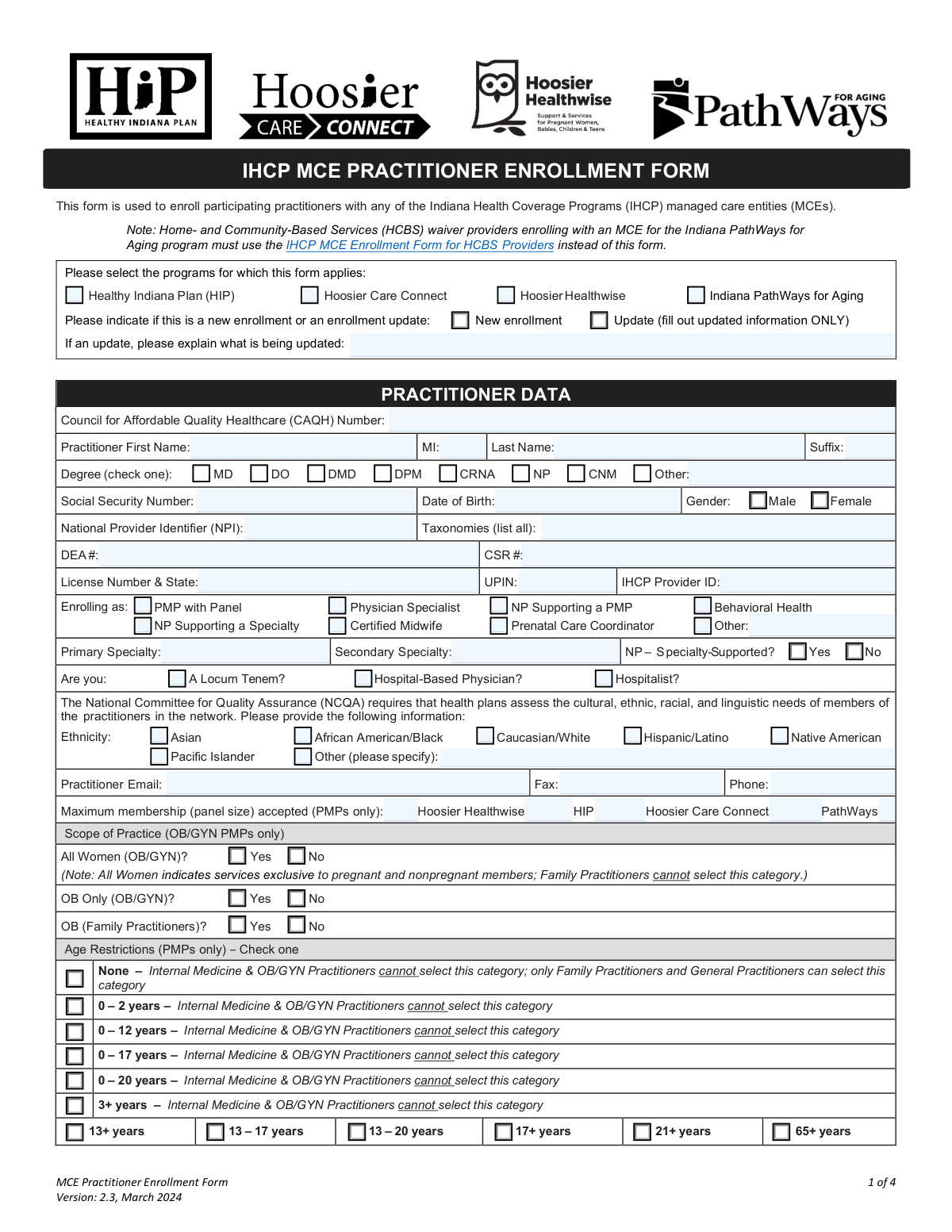
The Indiana Health Coverage Programs (IHCP) Managed Care Entity (MCE) Provider Enrollment Form is a detailed application for healthcare practitioners to join or update their status within the network of Indiana's Managed Care Entities, which administer programs like the Healthy Indiana Plan (HIP) and Hoosier Healthwise. Completing this form accurately is crucial for providers to become credentialed and eligible for reimbursement for services rendered to members of these plans. Today this form can be filled out quickly and accurately using AI-powered services like Instafill.ai, which can also convert non-fillable PDF versions into interactive fillable forms.
Our AI automatically handles information lookup, data retrieval, formatting, and form filling.
It takes less than a minute to fill out IHCP MCE Provider Enrollment using our AI form filling.
Securely upload your data. Information is encrypted in transit and deleted immediately after the form is filled out.
Form specifications
| Form name: | Indiana Health Coverage Programs (IHCP) Managed Care Entity (MCE) Provider Enrollment Form |
| Number of pages: | 4 |
| Filled form examples: | Form IHCP MCE Provider Enrollment Examples |
| Language: | English |
| Categories: | CAR forms, enrollment forms, health care forms, health forms, managed care forms, L.A. Care forms |
Instafill Demo: How to fill out PDF forms in seconds with AI
How to Fill Out IHCP MCE Provider Enrollment Online for Free in 2026
Are you looking to fill out a IHCP MCE PROVIDER ENROLLMENT form online quickly and accurately? Instafill.ai offers the #1 AI-powered PDF filling software of 2026, allowing you to complete your IHCP MCE PROVIDER ENROLLMENT form in just 37 seconds or less.
Follow these steps to fill out your IHCP MCE PROVIDER ENROLLMENT form online using Instafill.ai:
- 1 Navigate to Instafill.ai and upload or select the IHCP MCE Provider Enrollment Form.
- 2 Allow the AI to scan the form and automatically populate fields with your saved personal, professional, and practice information.
- 3 Review and complete the practitioner information section, including your name, CAQH number, professional identifiers (NPI, DEA), and specialties.
- 4 Provide detailed information for your primary and any additional practice locations, including addresses, office hours, accessibility features, and contact persons.
- 5 Specify your enrollment role, PMP panel size limits, age restrictions, and hospital or delivery privileges.
- 6 Enter the correct pay-to and billing information, then review the attestation section.
- 7 Electronically sign and date the form before downloading, printing, or submitting it as required by the IHCP.
Our AI-powered system ensures each field is filled out correctly, reducing errors and saving you time.
Why Choose Instafill.ai for Your Fillable IHCP MCE Provider Enrollment Form?
Speed
Complete your IHCP MCE Provider Enrollment in as little as 37 seconds.
Up-to-Date
Always use the latest 2026 IHCP MCE Provider Enrollment form version.
Cost-effective
No need to hire expensive lawyers.
Accuracy
Our AI performs 10 compliance checks to ensure your form is error-free.
Security
Your personal information is protected with bank-level encryption.
Frequently Asked Questions About Form IHCP MCE Provider Enrollment
This form is used by healthcare practitioners to enroll as a new provider or to update existing information for Indiana's health coverage programs, including HIP, Hoosier Healthwise, Hoosier Care Connect, and Indiana PathWays for Aging.
Any healthcare practitioner, such as a physician (MD/DO), nurse practitioner (NP), or specialist, who wishes to participate in or update their details with the specified Indiana Medicaid managed care programs must complete this form.
No, if you are submitting an update, check the 'Update' box and fill out only the information that has changed. You must also provide a brief description of the changes in the 'Update Explanation' field.
A CAQH Number is a unique ID from the Council for Affordable Quality Healthcare used to streamline credentialing. This form requires you to enter your CAQH number in the practitioner information section.
Your individual National Provider Identifier (NPI) is unique to you as a practitioner. The Group NPI is a separate identifier that belongs to the practice, clinic, or organization you are associated with.
The form has dedicated sections for a primary practice location as well as first and second additional practice locations. You must provide the full details, including address, hours, and contact information, for each site where you see patients.
If you do not have hospital privileges, you should indicate 'No' in that section. The form then provides a separate section to specify if you have 'Relationship Privileges' with another physician at a specific hospital.
Before you begin, gather your personal and professional details, including your Social Security Number, CAQH number, NPI, DEA number, and professional license number. You will also need your practice group's NPI, IHCP Provider ID, and Tax ID Number (TIN).
If you are enrolling as a PMP, you must specify the maximum number of members (panel size) you will accept for each program, such as Hoosier Healthwise and HIP. You also need to indicate any age restrictions or scope of practice limitations for your panel.
A taxonomy code is a standard code used to identify your specialty. You must provide these codes for yourself and your practice group, which can be found on the National Plan and Provider Enumeration System (NPPES) NPI registry.
Yes, services like Instafill.ai use AI to accurately auto-fill form fields with your information. This can save you significant time and help reduce errors when completing lengthy enrollment forms.
Simply upload the form to the Instafill.ai platform. The AI will identify the fields, allowing you to use its features to automatically and accurately populate your personal, professional, and practice information.
If you have a non-fillable or 'flat' PDF, you can use a service like Instafill.ai. It can convert the non-fillable PDF into an interactive, fillable form that you can complete and save online.
Yes, you should complete the office hours fields for all days of the week for each practice location. If your office is closed on certain days, you should indicate 'Closed' or 'N/A' in those fields.
Compliance IHCP MCE Provider Enrollment
Validation Checks by Instafill.ai
1
Program Selection Completeness
This check ensures that at least one program checkbox (e.g., Healthy Indiana Plan, Hoosier Healthwise) has been selected. It is critical for routing the enrollment to the correct administrative body and ensuring the practitioner is credentialed for the intended programs. If no program is selected, the form submission will be rejected as incomplete.
2
Enrollment Type Exclusivity and Conditional Explanation
This validation verifies that exactly one of 'New enrollment' or 'Update' is selected. If 'Update' is selected, it also ensures the 'Update Explanation' field is not empty. This prevents ambiguity in the submission's purpose and guarantees that the nature of any update is clearly documented for processors. A failure would result in a request for clarification before the form can be processed.
3
Practitioner Name and Degree Completeness
This check confirms that 'Practitioner First Name' and 'Practitioner Last Name' are filled, and that at least one 'Practitioner Degree' is selected. These fields are fundamental for identifying the practitioner. If the 'Other' degree checkbox is selected, the 'Other Degree Specification' field must also be populated to ensure the practitioner's qualifications are accurately recorded.
4
Social Security Number (SSN) Format
This validation ensures the 'Social Security Number' field contains exactly nine digits and no other characters. A valid SSN is required for identity verification and compliance with federal regulations. An incorrectly formatted SSN will halt the enrollment process until a valid number is provided.
5
National Provider Identifier (NPI) Format
This check validates that the 'National Provider Identifier (NPI)' field contains exactly 10 digits. The NPI is a unique identifier for health care providers in the U.S., and its accuracy is essential for billing, claims processing, and tracking. Submissions with an invalid NPI format will be rejected.
6
Date of Birth Format and Plausibility
This validation verifies that the 'Date of Birth' is entered in the MM/DD/YYYY format and represents a valid, past date. It ensures the date is not in the future and is a plausible age for a practicing medical professional. This is crucial for identity verification and credentialing, and an invalid date will cause the submission to fail.
7
PMP Panel Information Requirement
This check is triggered if the 'PMP with Panel' enrollment role is selected. It ensures that at least one of the program-specific panel size fields (e.g., 'PMP Panel Size – Hoosier Healthwise') is filled with a numeric value. This information is vital for managing patient assignments and network capacity, and its absence would render the PMP enrollment incomplete.
8
Hospital Privileges Conditional Logic
This validation enforces conditional rules based on the 'Hospital Privileges' selection. If 'Yes' is checked, 'Hospital Name 1' must be provided. If 'No' is checked, one of the 'Relationship Privileges' options must be selected, and if 'Yes' is chosen for that, the related physician and hospital fields must be filled. This ensures a complete picture of the practitioner's admitting arrangements, which is a key credentialing requirement.
9
NP Specialty Support Consistency
This check ensures that if the 'NP Supporting a Specialty' enrollment role is selected, then either 'NP – Specialty-Supported? Yes' or 'NP – Specialty-Supported? No' must be checked. This logic prevents incomplete data for a specific enrollment path. Failure to provide this information leaves a critical aspect of the NP's role undefined, causing the submission to be flagged for correction.
10
Conditional Mailing Address Entry
This validation ensures that if 'Mailing Address Same as Primary Practice Address – No' is selected, the separate 'Mailing Address' field must be filled out. This rule prevents correspondence from being lost due to an unstated but different mailing address. A failure would result in the form being returned for completion.
11
Taxpayer ID Number (TIN) Format
This check validates that the 'Taxpayer ID Number (TIN)' in the Pay-To Information section is a 9-digit number. An accurate TIN is legally required for tax reporting and is essential for correct payment processing and remittance. An invalid format will prevent financial setup and cause the enrollment to be rejected.
12
Attestation Block Completeness
This validation verifies that the 'Printed Name', 'Title', 'Signature', and 'Date' fields in the final attestation block are all completed. The attestation is a legal declaration that the provided information is true and complete. An incomplete attestation block invalidates the entire submission, and it will be rejected immediately.
13
Weekend Hours Consistency
This check verifies that if 'Offer Weekend Hours – Yes' is selected for a practice location, then either the 'Saturday Office Hours' or 'Sunday Office Hours' field (or both) must contain a value. This ensures that claims of weekend availability are substantiated with actual hours. A mismatch would lead to inaccurate provider directory information and requires correction.
14
Conditional Language Specification
This validation ensures that if the 'Other (please specify)' checkbox is selected in the 'Languages Spoken' section, the corresponding 'Other Language(s) Specify' text field is not empty. The same logic applies to the 'Burmese (dialect)' selection and its specification field. This rule ensures that selections indicating 'other' are properly detailed, which is important for accurate provider directories and patient services.
Common Mistakes in Completing IHCP MCE Provider Enrollment
Practitioners often mistakenly enter their individual National Provider Identifier (NPI) or IHCP Provider ID in fields designated for the 'Group NPI' or 'Group IHCP Provider ID'. This happens because of the multiple identifier fields throughout the form for each practice location. This error leads to incorrect credentialing and billing linkages, causing payment delays and claim rejections. To avoid this, carefully distinguish between practitioner-specific sections and group-specific sections, ensuring the correct 10-digit NPI is used for each.
When submitting a change, users often check the 'Update' box but then proceed to fill out the entire form, or they forget to provide a summary in the 'Update Explanation' field. The instructions require only the updated information to be provided, and an explanation is mandatory. This mistake creates confusion for processors and can delay the update. To prevent this, only fill in the fields that have changed and always complete the 'Update Explanation' box with a clear description of the changes being made.
The form has complex conditional logic for hospital and delivery privileges, where answering 'No' to having privileges requires a subsequent answer about 'Relationship Privileges'. Applicants frequently miss this secondary question after selecting 'No', leaving a required section blank. This incomplete information halts the credentialing process until clarification is obtained. It is crucial to follow the form's logic step-by-step; if you answer 'No' to 'Hospital Privileges', you must then answer the questions about 'Relationship Privileges'.
Practitioners enrolling as a Primary Medical Provider (PMP) often overlook the sections specific to their role, such as 'PMP Panel Size by Program' and 'Age Restriction Categories'. Failing to specify panel capacity or age limits can lead to improper patient assignments or prevent assignments altogether. PMPs must carefully review the form and complete all sections marked '(PMPs only)' to ensure their practice is listed correctly in provider directories and patient assignment systems.
A frequent error is checking an 'Other' box (e.g., for Practitioner Degree, Ethnicity, or Languages Spoken) but failing to fill in the corresponding text field to specify the details. This omission makes the selection invalid and requires follow-up from the processing entity, delaying the enrollment. Always double-check that if you select an 'Other' option, you provide the necessary information in the adjacent field. AI-powered tools like Instafill.ai can help by flagging these empty required fields before submission.
The office hours for each day of the week are often entered in inconsistent formats, such as '9-5', '8am to 4pm', or simply 'Closed'. This lack of standardization complicates data entry and can lead to incorrect information in provider directories. To ensure clarity, use a consistent format like '8:00 AM – 5:00 PM' for all entries and use 'N/A' or 'Closed' for days the office is not open. If the form is a flat PDF, a tool like Instafill.ai can convert it to a fillable version with fields that can help guide proper formatting.
The 'License Number and State' field explicitly requires both the professional license number and the two-letter state abbreviation where it was issued. Applicants frequently provide only the license number, leaving out the state. This incomplete data can prevent or delay license verification, a critical step in the credentialing process. Always ensure you include the state abbreviation immediately following your license number (e.g., '12345678 IN').
When filling out the repetitive sections for multiple practice locations, it is easy to introduce errors or inconsistencies regarding addresses, contact information, or accessibility features. Data entry fatigue can lead to typos or copying incorrect information from one section to another. These discrepancies can cause confusion and require clarification, slowing down the enrollment for all listed locations. Carefully review each location's section for accuracy and consistency before submitting.
Users sometimes incorrectly assume the 'Billing (Pay-To) Address' is the same as the 'Service Location Address' and either enter the wrong information or skip the section. This is especially common for practices with a centralized billing office separate from their clinics. This error can cause payments to be sent to the wrong address, leading to significant financial and administrative problems. Verify the correct address for both service delivery and payment remittance and fill out both sections accurately.
Submitting the form without a signature, printed name, or date in the final attestation block is a critical error that invalidates the entire application. This often happens when filers focus on the complex details of the form and rush through the final page. An unsigned application will be immediately rejected, forcing the entire submission process to start over. Always complete the attestation block as the final step. Using an AI form-filler like Instafill.ai can help prevent this by reminding you of mandatory signature fields before finalizing the document.
Saved over 80 hours a year
“I was never sure if my IRS forms like W-9 were filled correctly. Now, I can complete the forms accurately without any external help.”
Kevin Martin Green
Your data stays secure with advanced protection from Instafill and our subprocessors

Robust compliance program
Transparent business model
You’re not the product. You always know where your data is and what it is processed for.
ISO 27001, HIPAA, and GDPR
Our subprocesses adhere to multiple compliance standards, including but not limited to ISO 27001, HIPAA, and GDPR.
Security & privacy by design
We consider security and privacy from the initial design phase of any new service or functionality. It’s not an afterthought, it’s built-in, including support for two-factor authentication (2FA) to further protect your account.
Fill out IHCP MCE Provider Enrollment with Instafill.ai
Worried about filling PDFs wrong? Instafill securely fills indiana-health-coverage-programs-ihcp-managed-care-entity-mce-provider-enrollment-form forms, ensuring each field is accurate.



