Yes! You can use AI to fill out CMS-588 Electronic Funds Transfer (EFT) Authorization Agreement Checklist
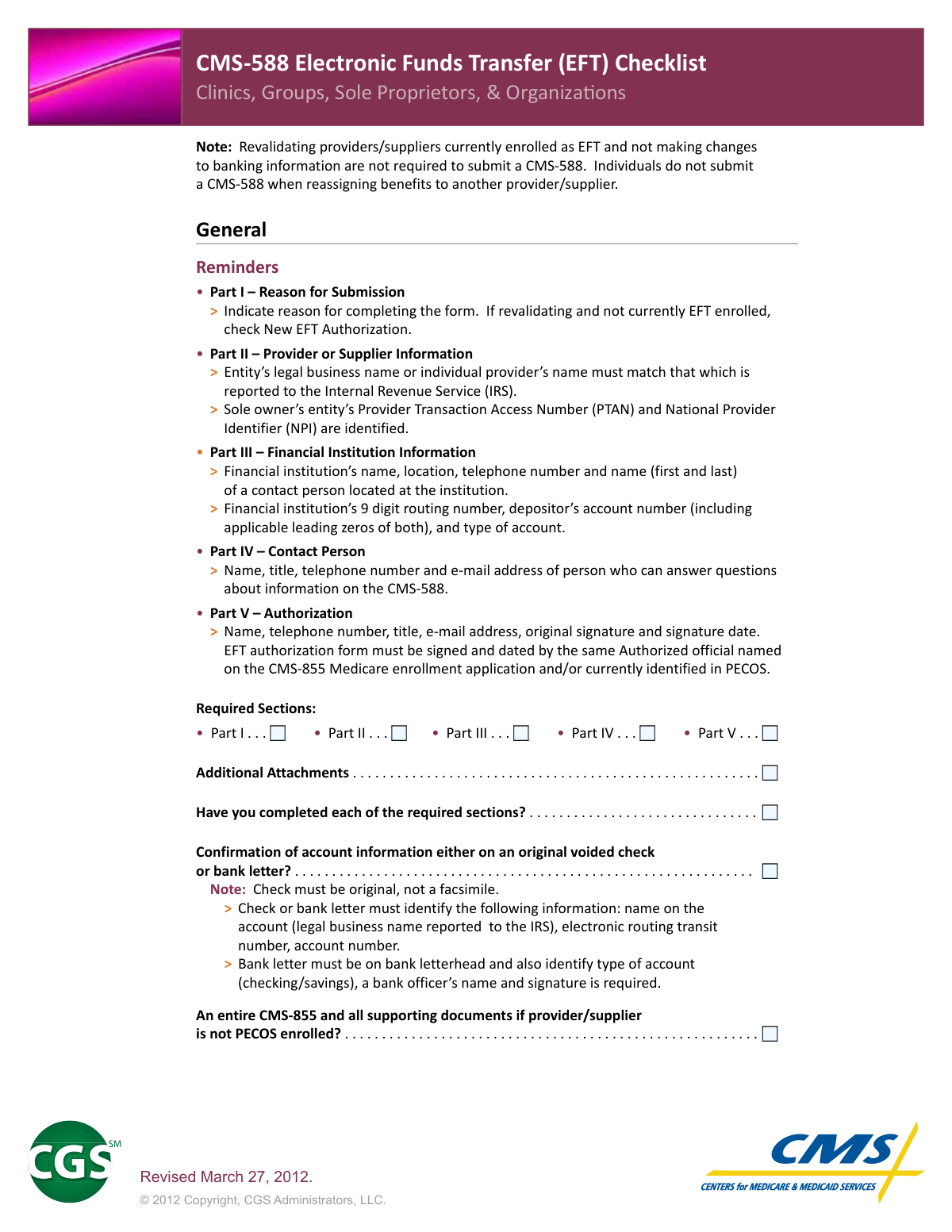
The CMS-588 is a Medicare form used by clinics, groups, sole proprietors, and organizations to set up, change, or authorize Electronic Funds Transfer (EFT) for Medicare reimbursement payments directly to their financial institution. It requires detailed provider information, financial institution details, and must be signed by the authorized official named on the CMS-855 Medicare enrollment application or identified in PECOS. The form must be accompanied by either an original voided check or a bank letter on official letterhead to verify account information. Today, this form can be filled out quickly and accurately using AI-powered services like Instafill.ai, which can also convert non-fillable PDF versions into interactive fillable forms.
CMS-588 is part of the
CMS forms, authorization forms, transfer forms, Medicare forms, funds transfer forms, electronic funds transfer forms, fund transfer forms, EFT authorization forms, healthcare payment forms, provider enrollment forms and EFT forms categories on Instafill.
Rather not fill this in by hand? Instafill is an online form filler that completes PDF forms automatically — upload the blank form, answer a few questions, and the AI fills every field.
Form specifications
| Form name: | CMS-588 Electronic Funds Transfer (EFT) Authorization Agreement Checklist |
| Number of pages: | 1 |
| Language: | English |
Our AI automatically handles information lookup, data retrieval, formatting, and form filling.
It takes less than a minute to fill out CMS-588 using our AI form filling.
Securely upload your data. Information is encrypted in transit and deleted immediately after the form is filled out.
Instafill Demo: How to fill out PDF forms in seconds with AI
How to Fill Out CMS-588 Online for Free in 2026
Are you looking to fill out a CMS-588 form online quickly and accurately? Instafill.ai offers the #1 AI-powered PDF filling software of 2026, allowing you to complete your CMS-588 form in just 37 seconds or less.
Follow these steps to fill out your CMS-588 form online using Instafill.ai:
- 1 Navigate to Instafill.ai and upload the CMS-588 form or select it from the available Medicare form library.
- 2 Complete Part I by indicating the reason for submission, such as New EFT Authorization, Change of EFT Information, or Revalidation.
- 3 Fill in Part II with the provider or supplier's legal business name (as reported to the IRS), PTAN, and NPI number.
- 4 Enter Part III financial institution information, including the bank's name, address, phone number, 9-digit routing number, depositor's account number, and account type (checking or savings).
- 5 Complete Part IV with the contact person's name, title, telephone number, and email address for questions about the form.
- 6 Fill in Part V with the authorized official's name, title, telephone number, email address, original signature, and signature date, ensuring it matches the authorized official on the CMS-855 or PECOS.
- 7 Attach a voided original check or official bank letter on bank letterhead, and submit the completed CMS-588 along with any required supporting documents.
Our AI-powered system ensures each field is filled out correctly, reducing errors and saving you time.
Why Choose Instafill.ai for Your Fillable CMS-588 Form?
Speed
Complete your CMS-588 in as little as 37 seconds.
Up-to-Date
Always use the latest 2026 CMS-588 form version.
Cost-effective
No need to hire expensive lawyers.
Accuracy
Our AI performs 10 compliance checks to ensure your form is error-free.
Security
Your personal information is protected with bank-level encryption.
Frequently Asked Questions About CMS-588
The CMS-588 is an Electronic Funds Transfer (EFT) Authorization form used by Medicare providers and suppliers to set up, change, or authorize direct deposit of Medicare payments into their bank accounts. It is specifically designed for Clinics, Groups, Sole Proprietors, and Organizations enrolled with CGS Medicare.
Clinics, groups, sole proprietors, and organizations that want to enroll in EFT, change their banking information, or are revalidating and not currently EFT enrolled must complete this form. Individuals who are reassigning benefits to another provider/supplier do NOT need to submit a CMS-588.
No. If you are a revalidating provider or supplier who is currently enrolled in EFT and are NOT making any changes to your banking information, you are not required to submit a CMS-588. However, if you are revalidating and not currently EFT enrolled, you should check 'New EFT Authorization' in Part I.
All five parts of the form are required: Part I (Reason for Submission), Part II (Provider or Supplier Information), Part III (Financial Institution Information), Part IV (Contact Person), and Part V (Authorization). All sections must be completed before submitting the form.
You must attach either an original voided check or a bank letter to confirm your account information. The check must be an original (not a facsimile), and if using a bank letter, it must be on official bank letterhead, identify the account type (checking or savings), and include a bank officer's name and signature.
Both the voided check and bank letter must include the legal business name on the account (as reported to the IRS), the electronic routing transit number, and the account number. Additionally, a bank letter must specify the account type (checking or savings) and include a bank officer's name and signature.
The form must be signed and dated by the same Authorized Official named on the CMS-855 Medicare enrollment application and/or currently identified in PECOS (Provider Enrollment, Chain, and Ownership System). The signature must be an original signature, not a copy.
Part II requires the entity's legal business name (or individual provider's name) exactly as it is reported to the IRS, along with the Sole Owner's Provider Transaction Access Number (PTAN) and National Provider Identifier (NPI).
Part III requires the financial institution's name, location, telephone number, and the first and last name of a contact person at the institution. You also need to provide the 9-digit routing number, the depositor's account number (including any leading zeros), and the type of account (checking or savings).
You only need to submit a complete CMS-855 and all supporting documents if the provider or supplier is not currently enrolled in PECOS. If you are already PECOS enrolled, the CMS-855 is not required as an additional attachment.
No. The voided check must be an original — facsimiles or photocopies are not accepted. If you cannot provide an original voided check, you may alternatively submit a bank letter on official bank letterhead with the required information and a bank officer's signature.
Yes, AI-powered services like Instafill.ai can help you accurately auto-fill the CMS-588 form fields, saving you time and reducing the risk of errors. These tools guide you through each section to ensure all required information is entered correctly before submission.
You can upload the CMS-588 PDF to Instafill.ai, and the AI will help you fill in all required fields — including provider information, banking details, and contact information — directly online. Once completed, you can download the filled form and attach your required documents before submitting to CGS Medicare.
If you have a flat, non-fillable version of the CMS-588 PDF, Instafill.ai can convert it into an interactive fillable form so you can complete it digitally. This eliminates the need to print and handwrite the form, making the process faster and more convenient.
Part IV requires the name, title, telephone number, and email address of a contact person who can answer questions about the form. Part V (Authorization) requires the authorized official's name, telephone number, title, email address, original signature, and the date the form was signed.
Compliance CMS-588
Validation Checks by Instafill.ai
1
Part I – Reason for Submission is Selected
Validates that at least one reason for submission checkbox in Part I has been selected by the submitter. This field is required to establish the purpose of the CMS-588 form (e.g., New EFT Authorization, Change of Banking Information). If no reason is selected, the form cannot be properly processed and will be returned or rejected by CGS Medicare.
2
Correct Reason for Submission Selected for Revalidating Providers
Checks that providers who are revalidating but are not currently EFT enrolled have selected 'New EFT Authorization' as their reason for submission. Revalidating providers who are already EFT enrolled and not changing banking information should not be submitting a CMS-588 at all. Selecting an incorrect reason can cause processing delays or misrouting of the enrollment action.
3
Legal Business Name Matches IRS Records
Validates that the entity's legal business name or individual provider's name entered in Part II exactly matches the name reported to the Internal Revenue Service (IRS). Abbreviated names, trade names, or DBAs are not acceptable substitutes for the full legal name. A mismatch between the submitted name and IRS records can result in payment delays, rejected EFT enrollments, or compliance issues.
4
Provider Transaction Access Number (PTAN) is Present and Valid
Ensures that the PTAN field in Part II is completed for sole owners and applicable entities, and that the value conforms to the expected alphanumeric format used by Medicare. The PTAN is a critical identifier that links the provider to their Medicare enrollment record. Missing or incorrectly formatted PTANs will prevent the EFT authorization from being matched to the correct provider account.
5
National Provider Identifier (NPI) is Present and Valid
Validates that the NPI entered in Part II is a 10-digit numeric value as required by the National Plan and Provider Enumeration System (NPPES). The NPI is a mandatory identifier for all healthcare providers submitting Medicare enrollment forms. An invalid or missing NPI will cause the form to be rejected, as it cannot be associated with a verified provider record.
6
Financial Institution Routing Number is 9 Digits
Checks that the financial institution's routing number entered in Part III is exactly 9 digits in length and contains only numeric characters, including any applicable leading zeros. The routing number is used to direct electronic funds transfers to the correct bank, and an incorrect or truncated number will result in failed or misdirected payments. Leading zeros must be preserved and not omitted.
7
Depositor Account Number Includes Leading Zeros
Validates that the depositor's account number in Part III is entered in full, including any applicable leading zeros, as it appears on the official bank account records. Omitting leading zeros is a common error that results in an invalid account number and failed EFT transactions. The system should flag account numbers that appear shorter than expected or that differ from the voided check or bank letter attachment.
8
Type of Account is Specified (Checking or Savings)
Ensures that the account type field in Part III is completed and indicates either 'Checking' or 'Savings.' The account type is required to properly route electronic funds transfers and must also be confirmed on the accompanying bank letter or voided check. Leaving this field blank or selecting an ambiguous value will result in processing delays or rejection of the EFT authorization.
9
Financial Institution Contact Information is Complete
Validates that Part III includes the financial institution's full name, physical location (address), telephone number, and the first and last name of a contact person at the institution. All sub-fields must be populated, as incomplete financial institution information prevents CGS Medicare from verifying account details if discrepancies arise. Missing contact information is a common cause of form rejection.
10
Part IV Contact Person Information is Fully Completed
Checks that Part IV contains the name, title, telephone number, and email address of the contact person who can answer questions about the CMS-588 submission. All four fields are required and must not be left blank. An incomplete contact section prevents CGS Medicare from reaching the appropriate person if clarification or additional documentation is needed during processing.
11
Part V Authorization Signature is an Original Signature
Validates that the signature provided in Part V is an original handwritten signature and not a facsimile, photocopy, or electronic reproduction. The authorized official must physically sign the form, as reproduced signatures are not accepted for Medicare EFT authorization. Submission of a non-original signature will result in automatic rejection of the form.
12
Authorized Official in Part V Matches CMS-855 or PECOS Record
Ensures that the name and title of the authorized official signing Part V match the authorized official named on the provider's CMS-855 Medicare enrollment application and/or currently identified in PECOS. A signature from an individual who is not the designated authorized official renders the form invalid. This check is critical for preventing unauthorized changes to banking information.
13
Signature Date in Part V is Present and Logically Valid
Validates that the signature date field in Part V is completed and contains a valid calendar date that is not in the future and is not unreasonably old (e.g., more than 90 days prior to submission). The date must correspond to when the authorized official actually signed the form. A missing or illogical date will cause the form to be flagged for manual review or returned to the submitter.
14
Voided Check or Bank Letter is Attached
Confirms that the submission includes either an original voided check or a bank letter as required documentation to verify the account information provided in Part III. The check must be an original and not a facsimile, and the bank letter must be on official bank letterhead. Without this attachment, the EFT authorization cannot be verified and the form will be considered incomplete.
15
Bank Letter Contains Required Elements (Letterhead, Account Type, Officer Signature)
If a bank letter is submitted in lieu of a voided check, validates that the letter is printed on official bank letterhead, identifies the type of account (checking or savings), includes the electronic routing transit number and account number, and bears the name and original signature of a bank officer. Any missing element from the bank letter renders it insufficient as verification documentation. An incomplete bank letter will require resubmission with a corrected document.
16
CMS-855 and Supporting Documents Included for Non-PECOS Enrolled Providers
Checks whether the submitting provider or supplier is enrolled in PECOS, and if not, validates that a complete CMS-855 enrollment application along with all required supporting documents is included with the CMS-588 submission. Providers not enrolled in PECOS cannot have their EFT authorization processed without the accompanying enrollment application. Failure to include the CMS-855 for non-PECOS providers will result in the entire submission being returned.
Common Mistakes in Completing CMS-588
Providers who are already enrolled in EFT and are simply revalidating their enrollment often unnecessarily submit a CMS-588, causing processing delays and confusion. The form is only required during revalidation if banking information is changing or if the provider is not currently EFT enrolled. To avoid this mistake, confirm your current EFT enrollment status before submitting, and only complete the CMS-588 if you are making changes to your banking information or enrolling in EFT for the first time.
Many filers fail to correctly indicate the reason for completing the form in Part I, particularly providers who are revalidating but not currently EFT enrolled. These providers should check 'New EFT Authorization' rather than a change or update option, which is a common source of confusion. Selecting the wrong reason can result in the form being processed incorrectly or rejected. Carefully read all available options and match your specific situation before checking any box.
In Part II, providers frequently enter a trade name, DBA name, or abbreviated version of their business name instead of the exact legal business name as reported to the IRS. This mismatch can cause the EFT enrollment to be rejected or delayed because Medicare cross-references the name with IRS records. Always use the precise legal name on file with the IRS, including proper punctuation and spelling, to ensure consistency. AI-powered form filling tools like Instafill.ai can help flag name discrepancies before submission.
Sole proprietors and entities sometimes leave the Provider Transaction Access Number (PTAN) or National Provider Identifier (NPI) blank, or enter an incorrect number in Part II. Both identifiers are required to properly link the EFT authorization to the correct Medicare enrollment record. An incorrect or missing PTAN or NPI can result in processing delays or the form being returned. Double-check both numbers against your Medicare enrollment documentation before submitting.
A very common error in Part III is entering a routing number with fewer than 9 digits, transposing digits, or confusing the routing number with the account number on a check. The routing number must be exactly 9 digits, and leading zeros must be included. An incorrect routing number will cause Medicare payments to be sent to the wrong account or rejected entirely. Verify the routing number directly with your financial institution or confirm it on a voided check before entering it.
Providers frequently drop leading zeros from their bank account number when completing Part III, not realizing that these zeros are significant and required. Omitting leading zeros results in an incorrect account number, which can cause failed deposits or misdirected payments. The form explicitly states that leading zeros for both the routing and account numbers must be included. Carefully copy the full account number exactly as it appears on your bank documentation, including any leading zeros.
Some filers leave the account type field in Part III blank or select the wrong type, which can cause EFT transactions to fail if the account type does not match what the bank has on record. This mistake often happens when providers assume the account type is obvious or unimportant. Confirm with your financial institution whether the account is classified as checking or savings before completing this field. This information must also be confirmed on the accompanying bank letter if one is provided.
A frequent and critical mistake is attaching a photocopied, scanned, or faxed image of a voided check rather than an original voided check. The form explicitly states that the check must be original, not a facsimile, and submitting a copy will result in the attachment being rejected. This can delay the entire EFT enrollment process. Always attach an original voided check, or alternatively provide a bank letter on official bank letterhead that meets all specified requirements.
When submitting a bank letter instead of a voided check, providers often submit letters that are missing one or more required elements, such as the bank letterhead, the type of account (checking/savings), or a bank officer's name and signature. An incomplete bank letter will be rejected, causing delays in EFT enrollment. Ensure the bank letter includes the account holder's legal name as reported to the IRS, the electronic routing transit number, the account number, the account type, and is signed by a bank officer on official letterhead.
Part V requires the original signature of the same Authorized Official named on the CMS-855 Medicare enrollment application and/or currently identified in PECOS, yet many providers have a different staff member, office manager, or unauthorized individual sign the form. This is one of the most common reasons for rejection, as the signature must match the authorized official on record. Verify who is listed as the Authorized Official in PECOS before the form is signed, and ensure that exact individual provides their original signature.
Providers sometimes forget to include the signature date in Part V, or they enter a date that predates or does not correspond to when the form was actually signed. An undated or incorrectly dated authorization form is considered incomplete and will be returned for correction. Always ensure the date entered in Part V matches the actual date the Authorized Official signed the form, and never pre-date or post-date the signature.
Providers who are not enrolled in PECOS must submit a complete CMS-855 enrollment application along with all supporting documents when submitting the CMS-588, but many overlook this requirement. Submitting the CMS-588 alone without the required CMS-855 will result in the EFT request being unable to be processed. Before submitting, confirm whether your organization is PECOS enrolled, and if not, gather and attach the full CMS-855 and all required supporting documentation. Tools like Instafill.ai can help create a submission checklist to ensure nothing is missed.
Saved over 80 hours a year
“I was never sure if my IRS forms like W-9 were filled correctly. Now, I can complete the forms accurately without any external help.”
Kevin Martin Green
Your data stays secure with advanced protection from Instafill and our subprocessors




Robust compliance program
Transparent business model
You’re not the product. You always know where your data is and what it is processed for.
ISO 27001, HIPAA, and GDPR
Our subprocesses adhere to multiple compliance standards, including but not limited to ISO 27001, HIPAA, and GDPR.
Security & privacy by design
We consider security and privacy from the initial design phase of any new service or functionality. It’s not an afterthought, it’s built-in, including support for two-factor authentication (2FA) to further protect your account.
Fill out CMS-588 with Instafill.ai
Worried about filling PDFs wrong? Instafill securely fills cms-588-electronic-funds-transfer-eft-authorization-agreement-checklist forms, ensuring each field is accurate.
