Yes! You can use AI to fill out MyMerrill® Client Order Entry Enrollment Form

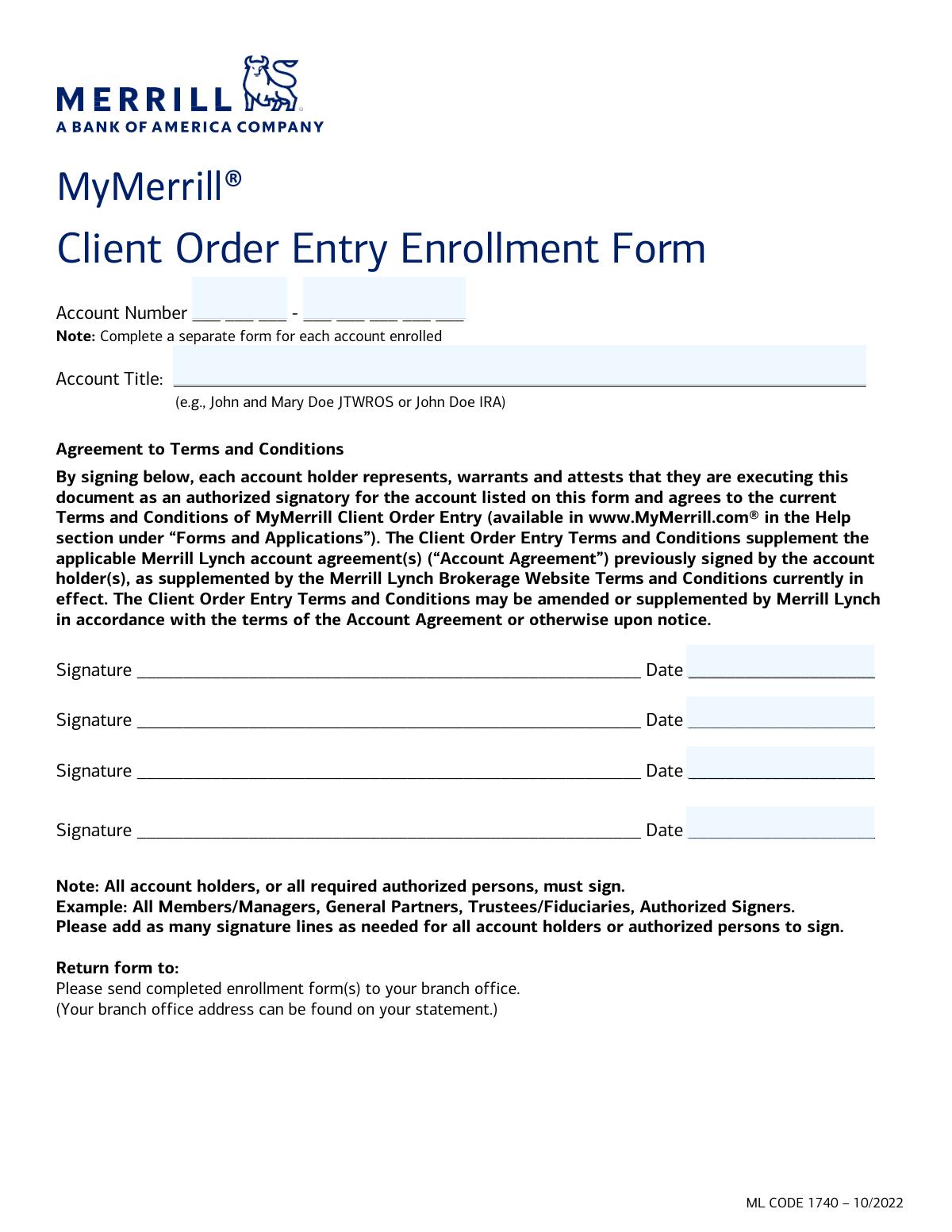
This form is an agreement for Merrill Lynch clients to enroll a specific account in the Client Order Entry service, which allows them to place trade orders through the MyMerrill® website. It is essential for clients who wish to manage their investments and execute trades online, and requires signatures from all account holders or authorized persons to be valid. Today, this form can be filled out quickly and accurately using AI-powered services like Instafill.ai, which can also convert non-fillable PDF versions into interactive fillable forms.
Our AI automatically handles information lookup, data retrieval, formatting, and form filling.
It takes less than a minute to fill out ML CODE 1740 using our AI form filling.
Securely upload your data. Information is encrypted in transit and deleted immediately after the form is filled out.

Form specifications

Form name: MyMerrill® Client Order Entry Enrollment Form
Number of pages: 1
Language: English
Categories: enrollment forms, Merrill forms
main-image

Instafill Demo: How to fill out PDF forms in seconds with AI

How to Fill Out ML CODE 1740 Online for Free in 2026

Are you looking to fill out a ML CODE 1740 form online quickly and accurately? Instafill.ai offers the #1 AI-powered PDF filling software of 2026, allowing you to complete your ML CODE 1740 form in just 37 seconds or less.
Follow these steps to fill out your ML CODE 1740 form online using Instafill.ai:
  1. 1 Navigate to Instafill.ai and upload or select the MyMerrill® Client Order Entry Enrollment Form.
  2. 2 Use the AI assistant to automatically fill in your Account Title and Account Number.
  3. 3 Carefully review the pre-filled account information to ensure it matches your Merrill Lynch statement.
  4. 4 Read the 'Agreement to Terms and Conditions' to understand the terms of the service.
  5. 5 Electronically sign the form in the designated signature field. Ensure all joint account holders or other required signatories also provide their e-signatures.
  6. 6 Enter the current date next to each signature.
  7. 7 Download the completed form and submit it to your Merrill Lynch branch office as instructed on the form.

Our AI-powered system ensures each field is filled out correctly, reducing errors and saving you time.

Why Choose Instafill.ai for Your Fillable ML CODE 1740 Form?

Speed

Complete your ML CODE 1740 in as little as 37 seconds.

Up-to-Date

Always use the latest 2026 ML CODE 1740 form version.

Cost-effective

No need to hire expensive lawyers.

Accuracy

Our AI performs 10 compliance checks to ensure your form is error-free.

Security

Your personal information is protected with bank-level encryption.

Frequently Asked Questions About Form ML CODE 1740

This form is used to enroll your Merrill Lynch account in the Client Order Entry service, which allows you to place trade orders online through the MyMerrill.com platform.

Any Merrill Lynch client who is already enrolled in MyMerrill® and wishes to gain the ability to place orders online for a specific account must complete this form.

Yes, the Client Order Entry service is not available to residents of certain countries or for certain types of fiduciary accounts. You must be enrolled in MyMerrill® to be eligible.

No, you must complete and submit a separate enrollment form for each individual account you wish to enroll in the Client Order Entry service.

You can find your full Account Number and the exact Account Title printed on your Merrill Lynch account statement. The form requires the first 3 and last 5 digits of the account number.

For a joint account, all account holders listed on the account must sign and date the form. The form provides multiple signature lines to accommodate this.

For trusts, partnerships, or other entities, all required authorized signers must sign the form. This may include all trustees, general partners, or authorized members/managers.

You should return the completed and signed form to your local Merrill Lynch branch office. You can find your branch office's address on your account statement.

By signing, you agree to the current Terms and Conditions of MyMerrill Client Order Entry, which supplement your main account agreement. These terms are available on MyMerrill.com.

If you need help, you can contact your financial advisor directly or call Merrill Lynch Client Support at 1-800-MERRILL (637-7455).

Yes, services like Instafill.ai use AI to accurately auto-fill form fields with your information, which can save you time and help reduce errors.

To fill this form online, you can upload the PDF to Instafill.ai. The platform will identify the fields, allowing you to type your information directly before printing the completed form for signature.

If you have a non-fillable or 'flat' PDF, you can use a service like Instafill.ai. It can convert the document into an interactive, fillable form that you can easily complete on your computer.

Processing times can vary after submission. You should monitor your MyMerrill account for the activation of order entry capabilities or contact your advisor for a status update.

Compliance ML CODE 1740
Validation Checks by Instafill.ai

1
Account Number Completeness
This check ensures that both the 3-digit prefix and the 5-digit suffix of the account number are provided. An incomplete account number prevents the system from identifying the correct account for enrollment. The form submission must be rejected if either part of the account number is missing.
2
Account Number Format Validation
Validates that the first part of the account number contains exactly three numeric digits and the second part contains exactly five numeric digits. This maintains the integrity of the required XXX-XXXXX format for backend processing. Submissions with non-numeric characters or incorrect lengths in either part should be flagged for user correction.
3
Account Number Existence Check
Verifies that the complete 8-digit account number corresponds to an active and valid Merrill Lynch account in the master database. This is a critical check to prevent enrollment attempts for non-existent or mistyped accounts. If the account number is not found, the submission must be rejected and the user prompted to verify their information.
4
Account Title Completeness
Ensures that the 'Account Title' field is not left blank. The account title is essential for verifying the account holder's identity and ensuring the correct account is being enrolled. A missing title would require manual intervention and significantly delay processing.
5
Account Title and Number Consistency
Cross-references the provided 'Account Title' with the official account title on record for the given 'Account Number'. This check prevents mismatches and potential fraud, ensuring the person completing the form is authorized for that specific account. A discrepancy should trigger a review or rejection of the form.
6
Minimum Signature Requirement
Validates that at least one signature field has been signed. As this form represents a legal agreement, it is void without a signature from an authorized person. The submission cannot be processed without at least one valid signature.
7
Signature and Date Pairing
Checks that for every signature provided on the form, the corresponding date field is also filled out. A signature without a date can be legally ambiguous regarding when the agreement was executed. The form should be considered incomplete if a signature is present but its associated date is missing.
8
Date Format Validation
Ensures that all provided dates are in a valid and consistent format, such as MM/DD/YYYY. An invalid date format can cause system errors and create ambiguity in legal records. The user should be prompted to correct any malformed dates before submission.
9
Date Reasonableness Check
Verifies that the signature dates are not in the future and are within a reasonable recent timeframe (e.g., not more than 180 days in the past). A future date is logically impossible, and a very old date might indicate the use of a stale form, requiring re-confirmation. This check ensures the agreement is current and valid.
10
Required Signatories Verification
Based on the account type (e.g., Joint Account, Trust), this check verifies if the required number of signatures are present. The form explicitly states all joint holders or authorized persons must sign. Failing to obtain all necessary signatures can render the enrollment legally invalid, so the form must be rejected if required signatures are missing.
11
Account Eligibility for Service
Confirms that the account type associated with the provided Account Number is eligible for the Client Order Entry service, as the instructions note some fiduciary accounts are excluded. This check prevents ineligible accounts from being enrolled, saving processing time and avoiding customer confusion. If the account is ineligible, the submission should be rejected with a clear explanation.
12
Duplicate Enrollment Prevention
Verifies that the account specified by the 'Account Number' is not already enrolled in the Client Order Entry service. This check prevents redundant processing and potential system errors that could arise from duplicate records. If the account is already enrolled, the user should be notified and the submission halted.

Common Mistakes in Completing ML CODE 1740

Missing Signatures on Joint or Entity Accounts

This error occurs when only one account holder signs a form for a joint account, or when not all required trustees or partners sign for an entity account. The form explicitly states that all account holders or authorized persons must sign, but people often overlook this in haste. An incompletely signed form is legally invalid and will be immediately rejected, causing significant delays in enrollment.

Entering an Inaccurate or Incomplete Account Title

Users often write an informal name (e.g., 'My Retirement Fund') instead of the exact legal account title (e.g., 'John Doe IRA'). This mismatch between the submitted form and the system's records will cause the application to be rejected for identification and compliance reasons. To avoid this, copy the Account Title precisely as it appears on your most recent Merrill Lynch account statement.

Incorrectly Formatting the Account Number

The form has separate fields for the first three and last five digits of the account number, but users may write the full 8-digit number in one box or misplace the digits. This happens due to rushing or not paying close attention to the field's structure. An incorrect account number prevents the system from identifying the account, leading to an automatic rejection and requiring you to resubmit the form.

Using One Form for Multiple Accounts

Clients with several accounts may try to list all of them on a single form to save time, directly violating the instruction to 'complete a separate form for each account enrolled'. This approach will cause the submission to be rejected entirely, forcing the client to start over and fill out individual forms for each account. Always use one dedicated form per account number.

Forgetting to Date Signatures

A signature is often considered incomplete without a corresponding date, but it's an easy detail to miss. Each signature line has a dedicated date field that must be filled out. An undated signature can invalidate the agreement, causing the form to be returned for correction and delaying the enrollment process.

Submitting the Form to the Wrong Address

The instructions specify returning the form to the 'branch office,' with the address found on an account statement. However, people may default to mailing it to a generic corporate headquarters address found online. This misrouting can cause the form to be lost or significantly delayed in reaching the correct processing department.

Illegible Handwriting

Since this is a non-fillable PDF, information must be handwritten, and poor penmanship can make account numbers and titles unreadable. This can lead to data entry errors by the processing team, resulting in rejection or, worse, actions being taken on the wrong account. To prevent this, use a tool like Instafill.ai to convert the flat PDF into a fillable version, allowing you to type information for perfect clarity.

Transposing Digits in the Account Number

This is a common manual data entry error where a user accidentally swaps the order of digits while writing the account number (e.g., writing '123-54321' instead of '123-45321'). Such a mistake makes it impossible to locate the correct account, leading to an immediate rejection of the form. Using an AI-powered form filler like Instafill.ai can prevent this by securely storing and accurately auto-filling your information.

Using an Outdated Version of the Form

Financial institutions frequently update their forms to reflect new terms or regulations, indicated by a version code like 'ML CODE 1740 – 10/2022'. A user might fill out an old version they saved previously or found through an unofficial source. Submitting an outdated form will result in rejection, requiring you to find and complete the current version from scratch.

Not Adding Extra Signature Lines When Needed

The form provides four signature lines but notes to 'add as many signature lines as needed'. For accounts with more than four authorized signers, such as a trust or partnership, users may fail to add the necessary extra lines or attach a signed addendum. This results in an incomplete set of signatures, making the form legally insufficient and causing it to be rejected.
Saved over 80 hours a year

“I was never sure if my IRS forms like W-9 were filled correctly. Now, I can complete the forms accurately without any external help.”

Kevin Martin Green

Your data stays secure with advanced protection from Instafill and our subprocessors

Robust compliance program

Transparent business model

You’re not the product. You always know where your data is and what it is processed for.

ISO 27001, HIPAA, and GDPR

Our subprocesses adhere to multiple compliance standards, including but not limited to ISO 27001, HIPAA, and GDPR.

Security & privacy by design

We consider security and privacy from the initial design phase of any new service or functionality. It’s not an afterthought, it’s built-in, including support for two-factor authentication (2FA) to further protect your account.

Fill out ML CODE 1740 with Instafill.ai

Worried about filling PDFs wrong? Instafill securely fills mymerrill-client-order-entry-enrollment-form forms, ensuring each field is accurate.