Yes! You can use AI to fill out Client Direct Series Change of Participant Form

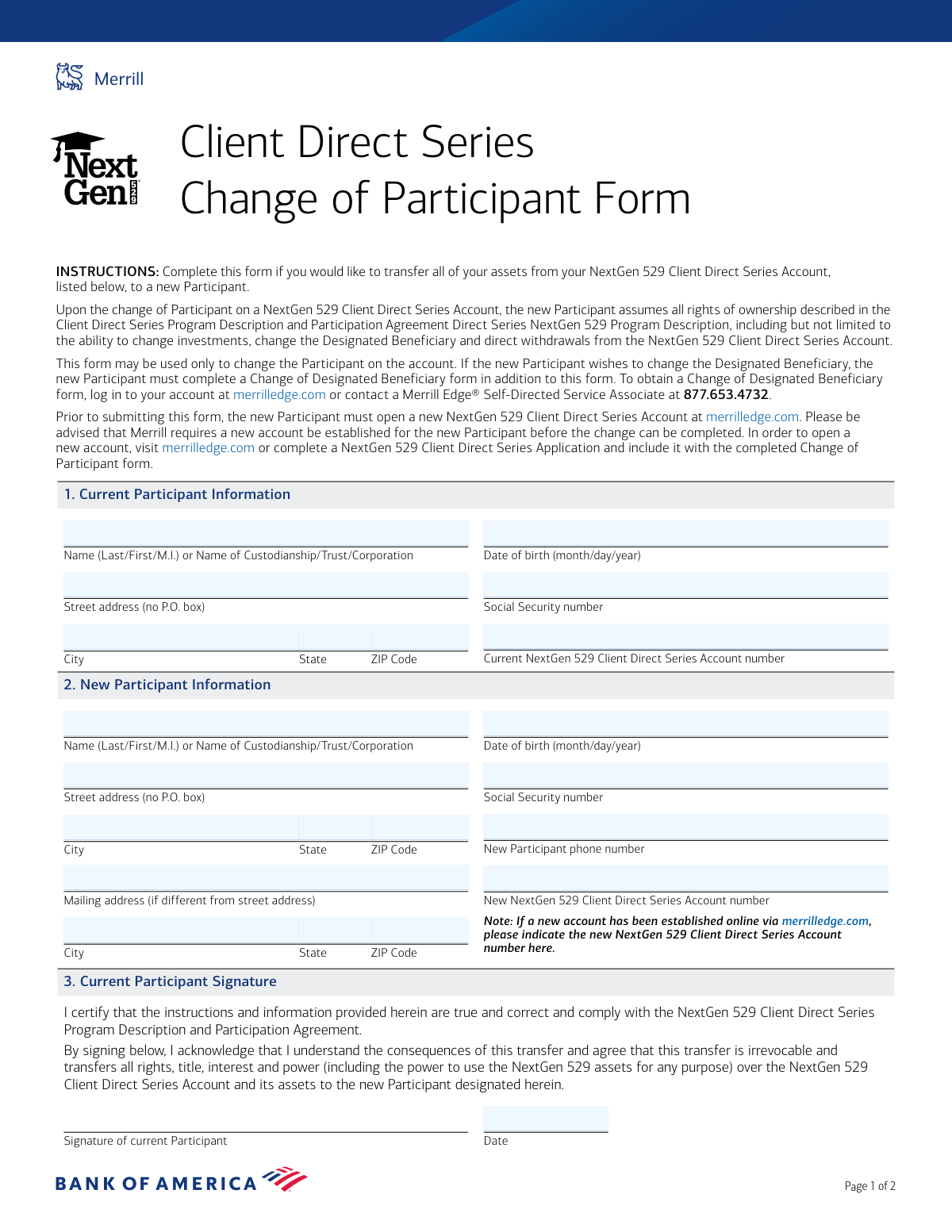
This form facilitates the legal transfer of all assets and ownership rights of a NextGen 529 Client Direct Series Account from the current participant to a new one. It is a crucial document for changing account ownership, requiring the new participant to have already established a new account with Merrill. Today, this form can be filled out quickly and accurately using AI-powered services like Instafill.ai, which can also convert non-fillable PDF versions into interactive fillable forms.
Our AI automatically handles information lookup, data retrieval, formatting, and form filling.
It takes less than a minute to fill out NextGen 529 Change of Participant Form using our AI form filling.
Securely upload your data. Information is encrypted in transit and deleted immediately after the form is filled out.

Form specifications

Form name: Client Direct Series Change of Participant Form
Number of pages: 1
Language: English
main-image

Instafill Demo: How to fill out PDF forms in seconds with AI

How to Fill Out NextGen 529 Change of Participant Form Online for Free in 2026

Are you looking to fill out a NEXTGEN 529 CHANGE OF PARTICIPANT FORM form online quickly and accurately? Instafill.ai offers the #1 AI-powered PDF filling software of 2026, allowing you to complete your NEXTGEN 529 CHANGE OF PARTICIPANT FORM form in just 37 seconds or less.
Follow these steps to fill out your NEXTGEN 529 CHANGE OF PARTICIPANT FORM form online using Instafill.ai:
  1. 1 Navigate to Instafill.ai and upload or select the Client Direct Series Change of Participant Form.
  2. 2 Use the AI assistant to accurately fill in Section 1 with the Current Participant's information, including name, address, date of birth, SSN, and account number.
  3. 3 Provide the New Participant's details in Section 2, such as their name, contact information, date of birth, SSN, and their new NextGen 529 account number.
  4. 4 In Section 3, the Current Participant must review the certification statement and provide their signature and the date.
  5. 5 In Section 4, the New Participant must review the terms and conditions and provide their signature and the date.
  6. 6 Review all entered information across the form for completeness and accuracy before finalizing.
  7. 7 Download the completed form and mail it to the Merrill Service and Operations address as specified in the instructions.

Our AI-powered system ensures each field is filled out correctly, reducing errors and saving you time.

Why Choose Instafill.ai for Your Fillable NextGen 529 Change of Participant Form Form?

Speed

Complete your NextGen 529 Change of Participant Form in as little as 37 seconds.

Up-to-Date

Always use the latest 2026 NextGen 529 Change of Participant Form form version.

Cost-effective

No need to hire expensive lawyers.

Accuracy

Our AI performs 10 compliance checks to ensure your form is error-free.

Security

Your personal information is protected with bank-level encryption.

Frequently Asked Questions About Form NextGen 529 Change of Participant Form

This form is used to transfer all assets and complete ownership of a NextGen 529 Client Direct Series Account from the current participant to a new participant.

Both the current participant (transferring ownership) and the new participant (receiving ownership) must provide their information and sign the form.

Yes, the new participant must open a new NextGen 529 Client Direct Series Account before this change can be processed. You can do this online at merrilledge.com or by including a new account application with this form.

The new participant assumes all rights of ownership, including the ability to change investments, change the designated beneficiary, and direct withdrawals from the account.

No, this form only changes the account participant (owner). The new participant must complete a separate 'Change of Designated Beneficiary' form to change the beneficiary.

You will need the current participant's full name, address, date of birth, Social Security number, and the current NextGen 529 Client Direct Series Account number.

You must provide the new participant's full name, address, date of birth, Social Security number, phone number, and their new NextGen 529 account number.

No, the signature section for the current participant explicitly states that the transfer is irrevocable and transfers all rights over the account to the new participant.

Mail the completed form to: Merrill/Service and Operations, MSC NJ2-140-02-13, P.O. Box 1501, Pennington, NJ 08534.

The form will be processed upon receipt and verification that the new participant has established a new account. A specific processing timeframe is not provided, so follow up if you have concerns about delays.

By signing, you acknowledge you have read the NextGen 529 Client Direct Series Program Description and Participation Agreement, as well as the Bank of America Privacy Policy.

Yes, services like Instafill.ai use AI to accurately auto-fill form fields with your information, which can save you time and help prevent errors.

You can upload the form to Instafill.ai, which will make it fillable online. You can then type your information, add your signature, and download the completed document.

Tools like Instafill.ai can convert flat, non-fillable PDFs into interactive forms. This allows you to easily type your information directly into the fields online.

Compliance NextGen 529 Change of Participant Form
Validation Checks by Instafill.ai

1
Current Participant SSN Format Validation
This check ensures that the Social Security Number provided for the current participant is in a valid 9-digit format (e.g., XXX-XX-XXXX or XXXXXXXXX). This is crucial for correctly identifying the participant and their account for tax reporting and legal purposes. If the format is invalid, the form cannot be processed, and the transfer will be rejected pending correction.
2
New Participant SSN Format Validation
This check verifies that the Social Security Number for the new participant is a valid 9-digit number. An accurate SSN is required to establish the new participant's ownership and for IRS tax reporting on the account. An invalid SSN will prevent the system from creating the link to the new owner and will cause the entire change request to fail.
3
Date of Birth Format and Plausibility
This validation confirms that both the current and new participant's Date of Birth fields are in a valid MM/DD/YYYY format and represent a plausible date (e.g., not in the future, and the person is not over 120 years old). Correct dates of birth are essential for identity verification and regulatory compliance. An invalid date will halt processing until a valid date is provided.
4
Prohibition of P.O. Boxes for Street Address
This check scans the 'Street address' fields for both the current and new participant to ensure they do not contain 'P.O. Box' or similar text. A physical address is a legal requirement for many financial accounts under federal law (USA PATRIOT Act) for identity verification. If a P.O. Box is detected, the form will be returned with instructions to provide a physical residential address.
5
Completeness of Current Participant Information
This validation ensures that all fields in the 'Current Participant Information' section (Name, Address, City, State, ZIP, DoB, SSN, Account Number) are filled out. Complete information is necessary to locate the correct account and verify the identity of the person authorizing the transfer. Missing information will result in the form being rejected as incomplete.
6
Completeness of New Participant Information
This check verifies that all required fields in the 'New Participant Information' section are complete. This is critical for establishing the new owner's legal rights to the account. If any information is missing (excluding the optional mailing address), the transfer cannot be executed, and the form will be rejected.
7
Signature Date Validity
This check ensures the dates next to both the current and new participant signatures are valid and are not in the future. The signature date legally records when the authorization was given. A future or invalid date would render the authorization legally questionable, causing the form to be rejected for correction.
8
Distinct Participant Identity Check
This validation compares the Social Security Number of the current participant with that of the new participant to ensure they are not the same. The purpose of the form is to transfer ownership to a different person or entity. If the SSNs match, it indicates a misunderstanding of the form's purpose, and the request will be flagged for clarification or rejection.
9
Distinct Account Number Check
This check verifies that the 'Current NextGen 529 Account number' and the 'New NextGen 529 Account number' are different. The process requires transferring assets from an existing account to a newly established one. If the account numbers are identical, the transfer is logically impossible, and the form will be rejected.
10
New Participant Minimum Age Verification
This validation uses the 'New Participant Date of Birth' to confirm that the individual is of legal age to own a financial account (typically 18 years old). This is a legal and compliance requirement to ensure the new owner can legally enter into the participation agreement. If the new participant is a minor, the form will be rejected, as a different process (e.g., custodial account) would be required.
11
New Participant Phone Number Format
This check ensures the 'New Participant phone number' is in a valid 10-digit format. A valid phone number is essential for communication regarding the account and for multi-factor authentication or identity verification purposes. An improperly formatted number will cause a processing failure and require correction.
12
ZIP Code Format Validation
This check validates that all ZIP code fields ('CurrentZip', 'NewZip', 'NewMailZip') are in a valid 5-digit or 9-digit (ZIP+4) format. Correct ZIP codes are essential for mail delivery and for verifying that the city and state are consistent with the address. An invalid ZIP code can lead to returned mail and processing delays.
13
Current Account Holder Verification
This is a backend check that cross-references the provided 'Current Name', 'Current SSN', and 'Current Account Number' against the firm's internal records. This is a critical security step to confirm that the person signing the form is the legitimate owner of the account and is authorized to make this change. A mismatch will immediately halt the process and may trigger a fraud alert.
14
New Account Existence Verification
This validation confirms that the 'New NextGen 529 Account number' provided actually exists in the system and is associated with the 'New Participant Name'. The form instructions state a new account must be opened prior to submission. This check ensures that prerequisite has been met, preventing the transfer from failing because the destination account doesn't exist.

Common Mistakes in Completing NextGen 529 Change of Participant Form

Submitting Without a New Participant Account Number

This form cannot be processed until the New Participant has opened their own NextGen 529 account. People often miss this prerequisite, leaving the 'New NextGen 529 Client Direct Series Account number' field blank and submitting the form. This will result in an automatic rejection and significant processing delays. To avoid this, the New Participant must first open an account online at merrilledge.com or by application, and then enter the newly assigned account number in Section 2.

Confusing the Participant with the Designated Beneficiary

Users mistakenly believe this form changes who the 529 plan is for (the Beneficiary), when it actually changes the account owner (the Participant). The form's instructions clearly state it is only for changing the Participant. This leads to confusion when the intended beneficiary change doesn't happen, requiring the new owner to submit a separate 'Change of Designated Beneficiary' form later. Always read the form's purpose carefully to ensure it matches your intent.

Incorrect or Transposed Account Numbers

A simple typo in either the 'Current' or 'New' account number field is a very common error that will halt the entire process. Users may accidentally transpose digits or copy the number incorrectly from a statement. This prevents Merrill from identifying the correct accounts for the transfer, leading to rejection. To prevent this, carefully double-check both account numbers against official account statements before submission.

Using a P.O. Box for a Physical Address

The form explicitly states 'no P.O. box' for the street address fields in both the Current and New Participant sections. This is a standard legal requirement for financial institutions to verify a physical residence. Submitting a P.O. Box in this field will cause the form to be returned. If you use a P.O. Box for mail, provide your physical street address in the main address field and enter the P.O. Box in the separate 'Mailing address' section.

Missing Signatures or Dates

The transfer is a legal agreement that requires signatures from both the Current Participant (Section 3) and the New Participant (Section 4). It is common for one party to forget to sign or date their section, especially when the form is mailed between them. An incomplete form is invalid and will be rejected immediately. To avoid this, create a checklist and confirm both signatures and dates are present before mailing the form to Merrill.

Illegible Handwriting Leading to Data Entry Errors

This form is a non-fillable PDF, meaning it must be printed and completed by hand. Poor or rushed handwriting can make names, addresses, and critical numbers (like SSNs and account numbers) impossible to read correctly. This leads to data entry mistakes on the processor's end, causing delays or failed identity verification. To avoid this, print legibly in all caps. Alternatively, AI-powered tools like Instafill.ai can convert flat PDFs into fillable forms, eliminating handwriting issues entirely.

Incorrect Social Security Number or Date of Birth

Mistyping a Social Security Number (SSN) or Date of Birth (DOB) is a frequent and critical error. This information is essential for identity verification and tax reporting purposes. A single incorrect digit will cause the application to fail verification checks, leading to rejection and requiring a complete resubmission. Always proofread these numbers carefully. Using a form-filling tool like Instafill.ai can help by validating data formats and reducing manual entry errors.

Using an Informal or Mismatched Name

Applicants sometimes enter a nickname, an initial instead of a middle name, or a slightly different version of their name than what is on file. The name provided in Sections 1 and 2 must be the full, legal name that exactly matches other official documents and the name used to open the Merrill accounts. A mismatch will cause the identity verification to fail, resulting in the form being rejected. Always use your full legal name as it appears on your driver's license or Social Security card.

Omitting a Separate Mailing Address When Necessary

The form provides a specific section for a mailing address if it differs from the new participant's physical street address. People often overlook this field, even if they receive mail at a P.O. Box or a different location. This can result in important account statements, tax documents, and other correspondence being sent to the wrong address and getting lost. To avoid this, carefully complete the 'Mailing address' section if, and only if, it is different from the street address.
Saved over 80 hours a year

“I was never sure if my IRS forms like W-9 were filled correctly. Now, I can complete the forms accurately without any external help.”

Kevin Martin Green

Your data stays secure with advanced protection from Instafill and our subprocessors

Robust compliance program

Transparent business model

You’re not the product. You always know where your data is and what it is processed for.

ISO 27001, HIPAA, and GDPR

Our subprocesses adhere to multiple compliance standards, including but not limited to ISO 27001, HIPAA, and GDPR.

Security & privacy by design

We consider security and privacy from the initial design phase of any new service or functionality. It’s not an afterthought, it’s built-in, including support for two-factor authentication (2FA) to further protect your account.

Fill out NextGen 529 Change of Participant Form with Instafill.ai

Worried about filling PDFs wrong? Instafill securely fills client-direct-series-change-of-participant-form forms, ensuring each field is accurate.