Yes! You can use AI to fill out Account Application for Merrill West Virginia Residents - The Hartford SMART529
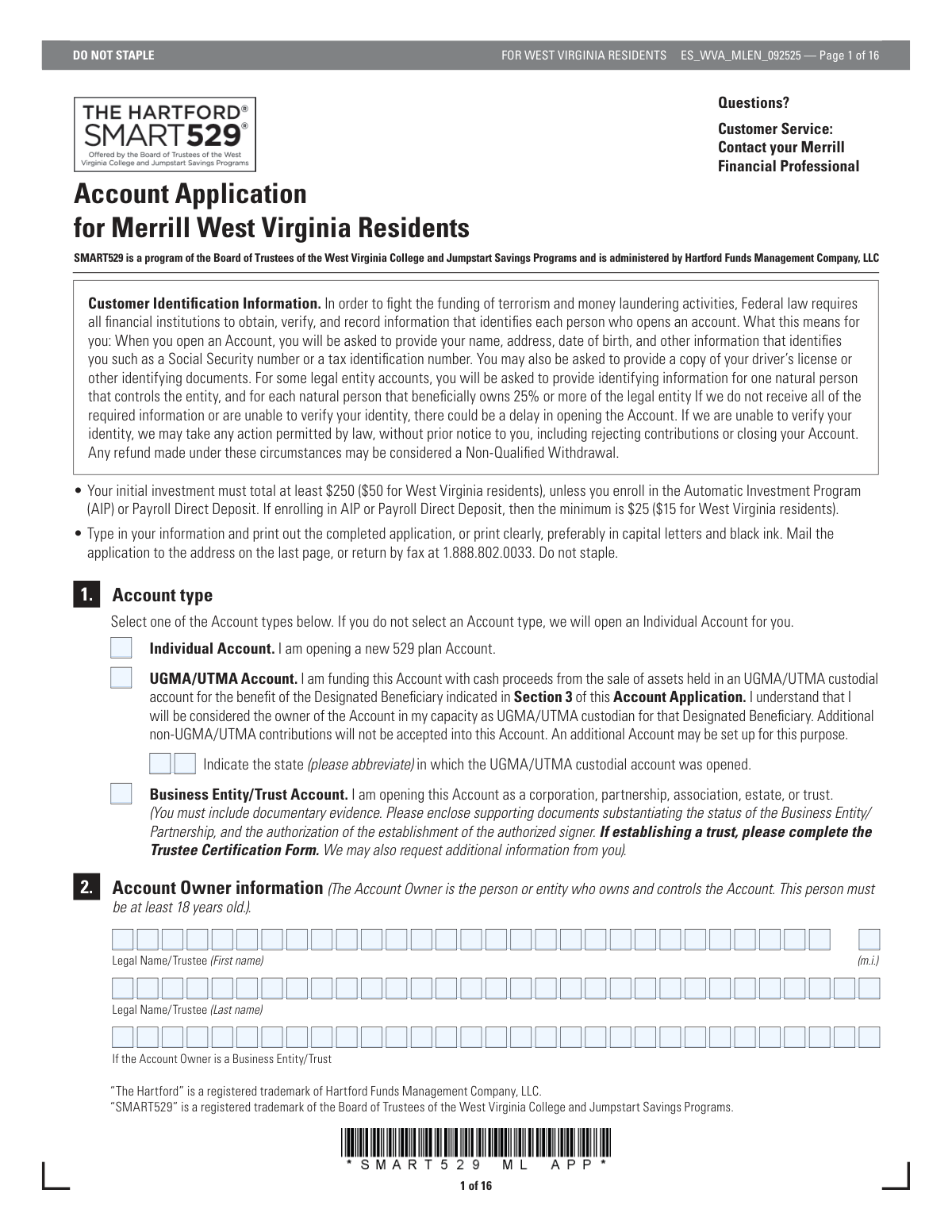
This form is an application for West Virginia residents to open a SMART529 college savings plan account through Merrill. It is a crucial document for individuals looking to invest in a tax-advantaged savings plan for future qualified higher education expenses for a designated beneficiary. Today, this form can be filled out quickly and accurately using AI-powered services like Instafill.ai, which can also convert non-fillable PDF versions into interactive fillable forms.
ES_WVA_MLEN_092525 is part of the
The Hartford forms, investment account forms, 529 plan forms, college savings forms, HART forms, Merrill forms, Hartford forms, financial application forms, 529 forms and account application forms categories on Instafill.
Rather not fill this in by hand? Instafill is an online form filler that completes PDF forms automatically — upload the blank form, answer a few questions, and the AI fills every field.
Form specifications
| Form name: | Account Application for Merrill West Virginia Residents - The Hartford SMART529 |
| Number of pages: | 1 |
| Language: | English |
Our AI automatically handles information lookup, data retrieval, formatting, and form filling.
It takes less than a minute to fill out ES_WVA_MLEN_092525 using our AI form filling.
Securely upload your data. Information is encrypted in transit and deleted immediately after the form is filled out.
Instafill Demo: How to fill out PDF forms in seconds with AI
How to Fill Out ES_WVA_MLEN_092525 Online for Free in 2026
Are you looking to fill out a ES_WVA_MLEN_092525 form online quickly and accurately? Instafill.ai offers the #1 AI-powered PDF filling software of 2026, allowing you to complete your ES_WVA_MLEN_092525 form in just 37 seconds or less.
Follow these steps to fill out your ES_WVA_MLEN_092525 form online using Instafill.ai:
- 1 Navigate to Instafill.ai and upload or select the 'Account Application for Merrill West Virginia Residents' form.
- 2 Complete Section 1 to select your account type, and Section 2 with the Account Owner's personal information, including name, SSN, and address.
- 3 Provide the Designated Beneficiary's details in Section 3, including their legal name, Social Security Number, and date of birth.
- 4 If applicable, provide information for a Successor Account Owner (Section 5) and your Merrill Advisor (Section 7).
- 5 Make your investment selections in Section 9, choosing your share class and allocating your investment percentages across the available portfolios.
- 6 Specify your contribution method in Section 10, such as by check, rollover, or Automatic Investment Program (AIP), and provide bank details in Section 11 if required.
- 7 Carefully review all entered information, then proceed to Section 13 to complete the W-9 certification and provide your final signature and date to authorize the account opening.
Our AI-powered system ensures each field is filled out correctly, reducing errors and saving you time.
Why Choose Instafill.ai for Your Fillable ES_WVA_MLEN_092525 Form?
Speed
Complete your ES_WVA_MLEN_092525 in as little as 37 seconds.
Up-to-Date
Always use the latest 2026 ES_WVA_MLEN_092525 form version.
Cost-effective
No need to hire expensive lawyers.
Accuracy
Our AI performs 10 compliance checks to ensure your form is error-free.
Security
Your personal information is protected with bank-level encryption.
Frequently Asked Questions About ES_WVA_MLEN_092525
This form is an application to open a SMART529 college savings plan account for residents of West Virginia through a Merrill Financial Professional. The SMART529 program is administered by Hartford Funds Management Company, LLC.
This form is specifically for West Virginia residents who wish to open a new SMART529 account with the assistance of a Merrill advisor. The account owner must be at least 18 years old.
The minimum initial investment for West Virginia residents is $50. However, if you enroll in the Automatic Investment Program (AIP) or Payroll Direct Deposit, the minimum is reduced to $15.
You will need to provide personal identification information for the account owner and beneficiary, including name, address, date of birth, and Social Security Number. For certain contribution methods, you will also need your bank account details and a voided check.
If you do not select an account type, the form states that an Individual Account will be opened for you by default.
A Successor Account Owner is a person you designate to take control of the account in the event of your death or disability. Naming one in Section 5 is optional but highly recommended to ensure a smooth transition of account management.
This program offers a one-time $100 incentive contribution for eligible beneficiaries who are West Virginia residents born or adopted on or after January 1, 2015. The account must be opened within one year of the child's birth or adoption to qualify.
Class A shares are suggested for holding periods of more than 4 years as they have an upfront sales charge but lower ongoing fees. Class C shares are suggested for shorter holding periods as they have no upfront charge but higher ongoing fees.
You can either mail the completed application to the address provided on the last page or fax it to 1.888.802.0033. The form explicitly states not to staple the pages together.
Section 11 is required only if you choose to make contributions via Electronic Fund Transfer (EFT) or the Automatic Investment Program (AIP) in Section 10. This information allows for the electronic transfer of funds from your bank to your new 529 account.
Yes, services like Instafill.ai use AI to accurately auto-fill form fields with your information, which can save you time and help reduce errors.
You can use a service like Instafill.ai to fill out this form online. Simply upload the PDF, and the platform will make it interactive so you can type your information directly into the fields before printing.
If your PDF is not fillable, you can use a tool like Instafill.ai to convert the flat PDF into an interactive, fillable form. This allows you to easily type your information instead of printing and filling it out by hand.
Compliance ES_WVA_MLEN_092525
Validation Checks by Instafill.ai
1
Account Owner Minimum Age Verification
This check verifies that the Account Owner is at least 18 years old by comparing the 'Birth Date' provided in Section 2 against the application submission date. This is a legal requirement for owning and controlling the account. If the applicant is under 18, the application will be rejected and the user will be prompted to provide information for an eligible adult.
2
Required Account Owner Information Completeness
Ensures that the Account Owner's Legal Name, Social Security Number or Taxpayer Identification Number (SSN/TIN), and full Birth Date in Section 2 are all provided. This information is mandatory for customer identification as required by Federal law to prevent fraud and money laundering. An incomplete application will be returned for completion, delaying the account opening process.
3
SSN/TIN Format Validation
Validates that the Social Security Number or Taxpayer Identification Number for the Account Owner (Section 2), Designated Beneficiary (Section 3), and Successor Account Owner (Section 5) is a valid 9-digit number. This is critical for tax reporting and identity verification. An invalid format will trigger an error, requiring the user to correct the number before submission.
4
Permanent Address P.O. Box Restriction
This check ensures that the 'Permanent Street Address' field in Section 2 for the Account Owner does not contain 'P.O. Box' or similar variations. A physical address is required by federal law for identity verification purposes. If a P.O. Box is detected, the form will prompt the user to provide a valid physical street address.
5
Designated Beneficiary Information Completeness
Verifies that the Designated Beneficiary's Legal Name, SSN/TIN, and Birth Date are all filled out in Section 3. This information is essential for establishing the beneficiary of the 529 plan and for tax purposes. Failure to provide this required information will prevent the account from being opened and the application will be considered incomplete.
6
Bright Babies Program Eligibility Logic
If the 'Bright Babies Program' checkbox is selected in Section 4, this validation confirms the Designated Beneficiary's date of birth is on or after January 1, 2015, and that the application is submitted within one year of the birth or adoption date. This ensures the account is eligible for the $100 incentive contribution. If the criteria are not met, a warning will be issued stating the account is not eligible for the program.
7
Successor Account Owner Conditional Validation
Checks that if any information is entered in the optional Section 5 (Successor Account Owner), then the full legal name and date of birth are provided. It also validates that the successor is at least 18 years old. This ensures that if a successor is designated, the information is complete and legally valid, preventing issues with account transition later. Incomplete entries will be flagged for correction.
8
Investment Allocation Total Percentage
This validation confirms that the sum of percentages for all selected investment options in Section 9 equals exactly 100% for the chosen share class. This is crucial for ensuring the entire contribution is allocated according to the owner's wishes. If the total is not 100%, the application will be flagged with an error, requiring the user to adjust the allocations.
9
Single Share Class Selection
Ensures that investment allocation percentages in Section 9 are entered into only one share class column (Class A, C, or E). Each account can only be associated with a single fee structure. If percentages are entered in multiple columns, the form will produce an error and require the user to select only one share class for their investments.
10
Customized Portfolio Minimum Selection
If the 'Customized Portfolio Option' checkbox is selected at the bottom of Section 9, this check verifies that at least two investment options have been assigned a percentage. The purpose of this option is to build a custom portfolio, which requires multiple funds. If fewer than two options are selected, a notification will prompt the user to either select more options or uncheck the Customized Portfolio box.
11
Initial Contribution Minimum Amount
Verifies that the initial contribution amount specified in Section 10 meets the minimum requirement for the selected method for a West Virginia resident (e.g., at least $50 for a check, $15 for AIP). This rule ensures the account is funded properly upon opening. If the amount is below the minimum, the user will be notified and must increase the contribution amount.
12
Bank Information Requirement for EFT/AIP
This check ensures that if 'Electronic Fund Transfer (EFT)' or 'Automatic Investment Program (AIP)' is chosen as a contribution method in Section 10, then the Bank Information in Section 11 is fully completed. This includes bank name, routing/account numbers, account type, and owner signature. Without this information, electronic transfers cannot be processed, so the application will be considered incomplete.
13
AIP Start Date Range Validation
If the Automatic Investment Program (AIP) is selected in Section 10, this validates that the day specified in the 'Start Date' is a number between 1 and 28. This rule is based on the program's processing constraints for scheduling automatic debits. An invalid day will result in an error, requiring the user to select a valid day of the month.
14
Final Account Owner Signature Presence
This is a critical final check to ensure the 'Signature of Account Owner' and the signature date are present in Section 13. The signature legally binds the account owner to the terms and conditions of the application and the program. An application without a signature is not legally valid and will be rejected immediately.
15
Class E Shares Eligibility Declaration
If any investment percentage is allocated to Class E Shares in Section 9, this validation verifies that eligibility is declared in Section 8d by checking the appropriate box (e.g., Employee, Affiliation, RIA). Class E shares are restricted and not available to the general public. If eligibility is not declared, an error will be shown, preventing the selection of Class E shares.
Common Mistakes in Completing ES_WVA_MLEN_092525
Applicants often make mathematical errors in Section 9, where investment percentages must total exactly 100%. Mistakes include miscalculations, using decimals instead of whole numbers, or leaving the section blank. An incorrect allocation will halt the application process, as the firm cannot proceed without clear investment direction, requiring them to contact you for clarification and delaying the account opening. To avoid this, double-check your math and ensure all chosen portfolio percentages are whole numbers that sum to 100%. Since this form is a non-fillable PDF, using a tool like Instafill.ai can convert it into a fillable version with built-in validation to automatically calculate totals and prevent such errors.
This form requires multiple signatures that are easy to miss, such as the main authorization in Section 14, the Fee Acknowledgment in Section 9 if choosing a non-suggested share class, and the joint bank account owner's signature in Section 11. An unsigned or partially signed application is legally invalid and will be rejected immediately, forcing the entire process to restart. Carefully review every page for signature lines before mailing, paying special attention to conditional signatures that depend on your other selections. AI-powered form fillers can highlight all required signature fields to ensure none are overlooked.
When setting up an Automatic Investment Program (AIP) or Electronic Fund Transfer (EFT) in Section 10, applicants must complete Section 11, which includes providing bank details and attaching a voided check or bank verification letter. People frequently select an electronic funding option but forget to attach the required document or use a prohibited 'starter check'. Without this verification, the bank link cannot be established, leading to the rejection of the funding setup and a delay in the initial investment. Always ensure a valid, non-starter voided check is taped to the application as instructed.
Mistyping a Social Security Number (SSN) or date of birth for the Account Owner (Section 2) or Designated Beneficiary (Section 3) is a frequent and serious error. These fields are marked as 'Required' and are essential for identity verification under Federal law. An incorrect SSN or birth date will cause a mismatch during the verification process, leading to significant delays or outright rejection of the application. To prevent this, slowly and carefully enter the numbers, then double-check them against official documents. AI form-filling tools like Instafill.ai can save and accurately populate this information, reducing the risk of manual data entry mistakes.
Applicants sometimes fail to select an account type in Section 1, causing it to default to an 'Individual Account', which may not suit their needs. Furthermore, those selecting 'UGMA/UTMA' or 'Business Entity/Trust' often forget to provide the mandatory supporting information, such as the state of origin for a UGMA/UTMA or the required documentary evidence for a trust. This leads to an improperly structured account or processing delays while the firm requests the missing documentation. Carefully read the descriptions for each account type and ensure all associated requirements are met before submission.
The application explicitly states in Section 2 that a P.O. Box is not acceptable for the 'Permanent Street Address'. Applicants sometimes overlook this instruction and provide a P.O. Box out of habit. This violates federal customer identification program requirements, and the application will be returned for a valid physical residential address, delaying the account opening. Always provide a complete physical street address in this field, and use the separate 'Mailing Address' section if you wish to receive mail at a P.O. Box.
In Section 9, the applicant must choose a share class (A, C, or E) for their investments, as each has a different fee structure. The form explicitly warns that applications received without a share class selection will be returned for completion. This oversight brings the entire application process to a halt. To avoid this, review the share class descriptions and table, make a selection, and ensure your investment percentages are entered in the correct column.
While Section 5 is marked 'Optional, but recommended,' many applicants skip it to save time. Failing to designate a Successor Account Owner means that in the event of the original owner's death, the account may be tied up in probate or require a lengthy legal process to transfer control. This can disrupt the beneficiary's education funding plan. Taking a few extra minutes to provide the required name and date of birth for a successor can prevent significant future complications.
Section 8 provides opportunities to reduce sales charges on Class A shares through Rights of Accumulation (ROA) or employer group eligibility. Many investors are unaware of these benefits or find it tedious to gather the required account numbers for existing investments. By not completing this section, they may end up paying higher fees than necessary, reducing their overall investment returns. Before filling out the form, gather statements for any other SMART529 or Hartford Mutual Fund accounts to see if you qualify for ROA.
When contributing by check (Section 10), two common mistakes occur: making the check payable to the wrong entity (e.g., 'Merrill' instead of 'SMART529') or submitting an amount below the minimum required ($250 for non-residents). An incorrectly written check cannot be deposited, and an insufficient contribution will not meet the account opening requirements. Both errors will result in the application being sent back, causing delays. Always write checks exactly as instructed and verify the minimum contribution amounts based on your residency status.
Applicants whose beneficiary is eligible for the $100 SMART529 Bright Babies grant (Section 4) often miss this opportunity by simply failing to check the certification box. People may rush past this section or not realize their beneficiary qualifies. This is a simple oversight that results in losing a free $100 contribution to the account. If the beneficiary is a West Virginia resident born or adopted after January 1, 2015, be sure to read the criteria and check the box to claim the incentive.
Saved over 80 hours a year
“I was never sure if my IRS forms like W-9 were filled correctly. Now, I can complete the forms accurately without any external help.”
Kevin Martin Green
Your data stays secure with advanced protection from Instafill and our subprocessors




Robust compliance program
Transparent business model
You’re not the product. You always know where your data is and what it is processed for.
ISO 27001, HIPAA, and GDPR
Our subprocesses adhere to multiple compliance standards, including but not limited to ISO 27001, HIPAA, and GDPR.
Security & privacy by design
We consider security and privacy from the initial design phase of any new service or functionality. It’s not an afterthought, it’s built-in, including support for two-factor authentication (2FA) to further protect your account.
Fill out ES_WVA_MLEN_092525 with Instafill.ai
Worried about filling PDFs wrong? Instafill securely fills account-application-for-merrill-west-virginia-residents-the-hartford-smart529 forms, ensuring each field is accurate.
