
Yes! You can use AI to fill out Enrollment Application
Don't type 54 fields by hand. Tell our AI about yourself, or upload a document you already have, and it fills every field in seconds. You check it, then download, print or sign.
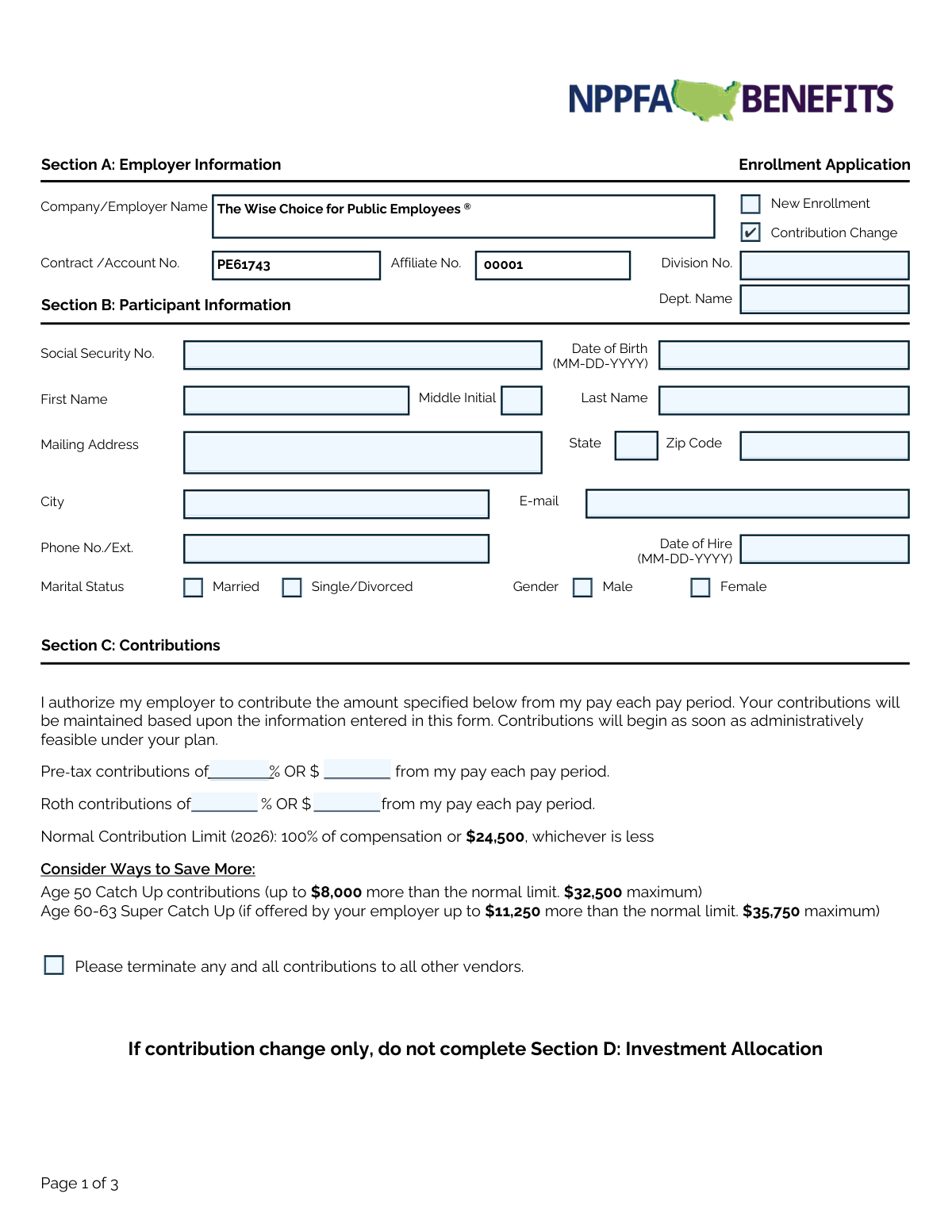
The AI does the filling. You just check it.
No typing into boxes, nothing to install.
What this form asks for
The AI fills all of it, from your answers or your documents.
The AI checks your answers before you download
12 checks built for this form, so a wrong date or a missing answer is caught before anyone else sees it.
This check ensures the Social Security Number in Section B is provided and follows the standard 9-digit format (XXX-XX-XXXX or XXXXXXXXX). The SSN is a critical unique identifier for creating the participant's account and for tax reporting purposes. If the SSN is missing for a new enrollment or is formatted incorrectly, the submission must be rejected to prevent account creation errors.
Validates that the participant has selected only one investment strategy in Section D. The user must either check the 'PortfolioXpress' box for an automated allocation or fill in the percentages for a 'Create Your Own Portfolio', but not both. This prevents ambiguity in how contributions should be invested. A failure would require the user to clarify their single intended investment choice.
If the participant chooses to 'Create Your Own Portfolio' in Section D, this check verifies that the sum of all entered percentages equals exactly 100%. This is crucial to ensure that 100% of the participant's contribution is allocated, leaving no funds uninvested and no allocation errors. If the total is not 100%, the form is invalid and must be corrected before processing.
For both Pre-tax and Roth contributions in Section C, this validation ensures the participant has entered either a percentage (%) or a dollar amount ($), but not both for the same contribution type. This rule prevents conflicting instructions for calculating the deduction from the participant's pay. If both are filled for a single contribution type, the form should be flagged for correction.
This check compares the 'Date of Birth' and 'Date of Hire' fields in Section B to ensure the hire date is logically after the birth date. It also can be used to verify that the employee meets a minimum age requirement (e.g., 18 years old) as of their hire date. This prevents data entry errors that would be nonsensical and could cause issues with eligibility calculations.
This validation enforces the instruction that Section D (Investment Allocation) must be completed for a 'New Enrollment' but should be skipped for a 'Contribution Change' only. This ensures new accounts are set up with investment instructions, while preventing unintended changes to existing allocations for simple contribution updates. An error would occur if a new enrollment has no allocation or a contribution change has an unnecessary one.
And 6 more checks
- Participant Signature and Date Requirement
- PortfolioXpress Target Year Requirement
- Date Field Format Validation
- Email Address Format Validation
- Age Eligibility for Catch-Up Contributions
- Completeness of Participant Information for New Enrollment
Let AI fill out your PE6174300001
No typing. Every field filled in seconds, checked, ready to sign.
How to Fill Out PE6174300001 Online for Free in 2026
What the AI walks you through.
- Navigate to Instafill.ai and upload or select the Enrollment Application form.
- Use the AI assistant to automatically fill in your employer's information in Section A, such as the company name and account number.
- Complete Section B by providing your personal participant information, including your name, Social Security Number, address, and date of birth.
- In Section C, specify your desired contribution amounts, indicating the percentage or dollar amount for pre-tax and/or Roth contributions.
- Choose your investment strategy in Section D, either by selecting a one-step diversified portfolio like PortfolioXpress or by creating your own custom portfolio from the available funds.
- Carefully review all the information you've entered for accuracy, then proceed to Section E to provide your digital signature and the date.
- Download, print, or submit your completed and signed Enrollment Application as required by your plan administrator.
Common Mistakes in Completing PE6174300001
The ones the AI is built to catch.
Selecting Both Automated and Manual Investment Options
Incorrect Sum of Custom Investment Allocations
Specifying Both Percentage and Dollar Amount for Contributions
Forgetting to Sign or Date the Application
Filling Out Investment Allocation for a Contribution Change Only
Entering an Incorrect or Illegible Social Security Number
Using an Incorrect Format for Dates
Leaving the Target Retirement Year Blank
Submitting a Form with Illegible Handwriting
Frequently Asked Questions About PE6174300001
Is it really free for 7 days?
Can I fill other forms too?
How do I cancel?
How does the AI fill out PE6174300001?
What happens to my information?
How complex is PE6174300001 to fill out?
What is this form used for?
Who needs to complete this form?
I only want to change my contribution amount. Do I need to fill out the entire form?
What is the difference between Pre-tax and Roth contributions in Section C?
What are the 'Catch Up' contributions mentioned in Section C?
What is PortfolioXpress in Section D?
If I choose PortfolioXpress, do I need to fill out the rest of Section D?
How do I submit the completed form?
When will my new enrollment or contribution change take effect?
What information do I need to have ready to fill out this form?
Can I use an AI tool to help me fill out this form?
How can I fill out this form online if it's a PDF?
The PDF I downloaded is not fillable. What can I do?
Get your PE6174300001 filled out by AI
$0 today. Cancel before Nov 2 and you pay nothing.
Other forms like this one
enrollment forms: Form CMS-855O, Medicare Enrollment Application, Form CMS-4040, Request for Enrollment in Medicare Part B, Form CMS-40B, Application for Enrollment in Medicare Part B, Providence Health Plan Out-of-Area Dependent Enrollment Form, Empower Enrollment Form, Empower Enrollment Form, Principal Life Insurance Company UCTIE INTERNATIONAL UNION 401(K) SAVINGS PLAN Enrollment Form, Northwell Residents Open Enrollment Benefits Guide 2026, University of Colorado 403(b) Plan – DSW Scudder Enrollment and Beneficiary Designation Form, Merrill Funds Transfer Service Enrollment Form, Funds Transfer Service Enrollment Form, Standing Letter of Authorization / Instruction Enrollment Form, Merrill RMD Service Enrollment and Authorization Form, Fidelity Investments Account Application/Enrollment Form and Beneficiary Designation, MyMerrill® Client Order Entry Enrollment Form, CMS-855I, Medicare Enrollment Application for Physicians and Non-Physician Practitioners, Form CMS-855R, Medicare Enrollment Application - Reassignment of Medicare Benefits, CMS-855R, Medicare Enrollment Application: Reassignment of Medicare Benefits, CMS-855R, Medicare Enrollment Application: Reassignment of Medicare Benefits, Medicare Enrollment Application for Durable Medical Equipment, Prosthetics, Orthotics, and Supplies (DMEPOS) Suppliers, CMS-855S
enrollment application forms: Form CMS-855O, Medicare Enrollment Application, Form CMS-40B, Application for Enrollment in Medicare Part B, Fidelity Investments Account Application/Enrollment Form and Beneficiary Designation, CMS-855I, Medicare Enrollment Application for Physicians and Non-Physician Practitioners, Form CMS-855R, Medicare Enrollment Application - Reassignment of Medicare Benefits, CMS-855R, Medicare Enrollment Application: Reassignment of Medicare Benefits, CMS-855R, Medicare Enrollment Application: Reassignment of Medicare Benefits, Medicare Enrollment Application for Durable Medical Equipment, Prosthetics, Orthotics, and Supplies (DMEPOS) Suppliers, CMS-855S, CMS-855B, Medicare Enrollment Application for Clinics/Group Practices and Other Suppliers, CMS-855A, Medicare Enrollment Application for Institutional Providers, Form CMS-855A, Medicare Enrollment Application for Institutional Providers, Medicare Enrollment Application - Medicare Diabetes Prevention Program (MDPP) Suppliers, Form CMS-20134, Form HFS 2243, Provider Enrollment Application Illinois Medical Assistance Program, Provider Enrollment Agreement (OHA 3975), Oregon Medicaid ID Application Form, Medical Baseline Allowance Application (Used for Medical Baseline Enrollment and Re-Certification), Blue Cross and Blue Shield of Texas Group Enrollment Application/Change Form, Form CMS-40B, Application for Enrollment in Medicare Part B (Medical Insurance) (01/24), Form CMS-18-F-5, Application for Medicare Part A (Hospital Insurance)
Let AI fill out your PE6174300001
Your trial starts once a card is added. You pay nothing before Nov 2.
Our AI already knows this form, all 54 fields of it. Skip the typing: tell it about yourself, or upload what you have, and it fills the whole form in seconds.
- AI fills every field on all 3 pages, checkboxes included
- No typing into boxes: answer a few questions, or upload a document you already have, an old copy of this form, a photo of a document
- The AI checks the answers; you review and change anything before you download
- Download the finished PDF, print it, or sign it online
- Encrypted, and never used to train AI
Cancel before Nov 2 and you pay nothing.
A card is needed to start the trial. Cancel in two clicks from your account.
Terms · Privacy