Yes! You can use AI to fill out Funds Transfer Service Enrollment Form
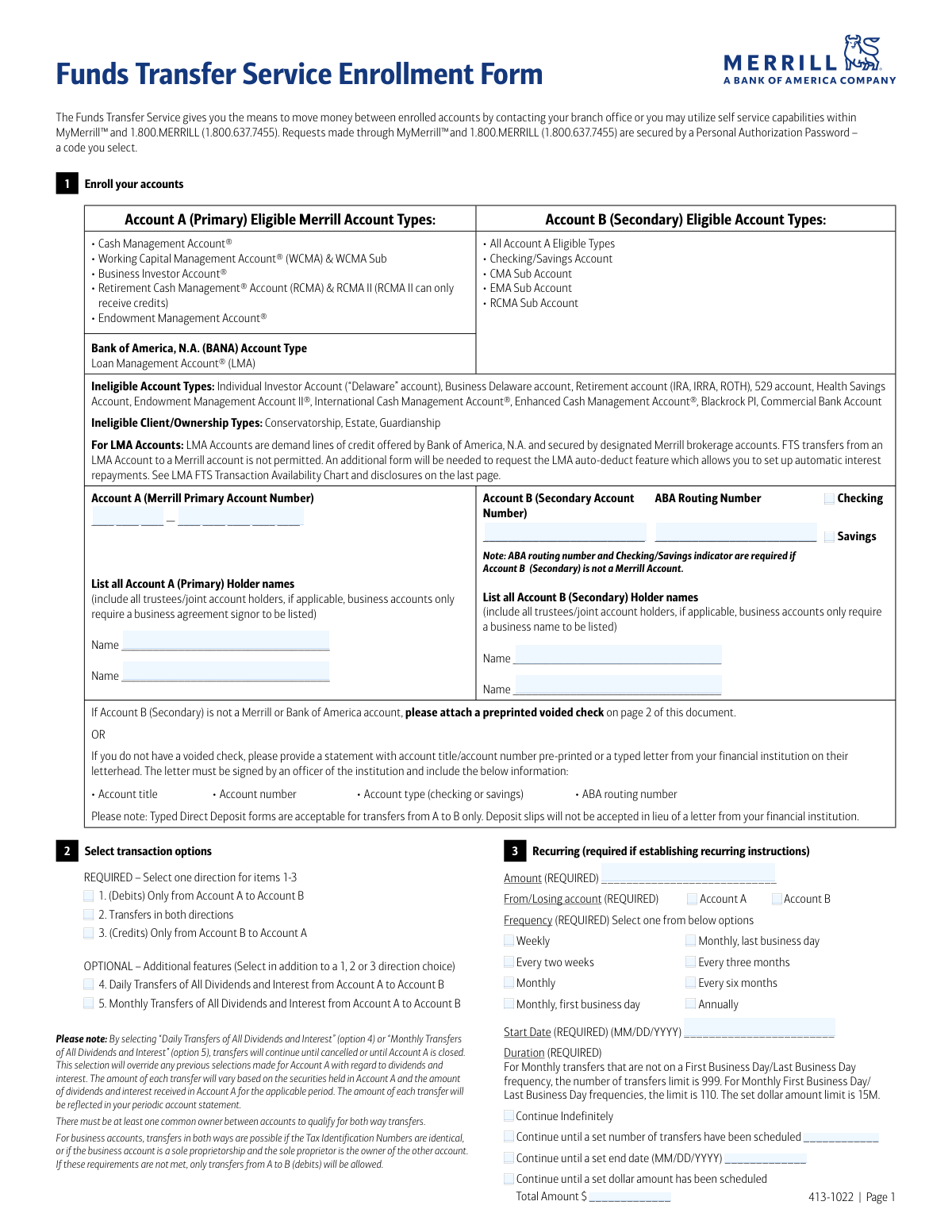
This form allows clients of Merrill Lynch and Bank of America to enroll in the Funds Transfer Service (FTS), enabling them to move money between a primary Merrill or BofA account and a secondary account, which can be at another financial institution. It is used to set up one-time or recurring transfers, specify transfer directions, and automate the movement of dividends and interest. Today, this form can be filled out quickly and accurately using AI-powered services like Instafill.ai, which can also convert non-fillable PDF versions into interactive fillable forms.
Our AI automatically handles information lookup, data retrieval, formatting, and form filling.
It takes less than a minute to fill out 413-1022 using our AI form filling.
Securely upload your data. Information is encrypted in transit and deleted immediately after the form is filled out.
Form specifications
| Form name: | Funds Transfer Service Enrollment Form |
| Number of pages: | 1 |
| Language: | English |
| Categories: | enrollment forms, transfer forms, funds transfer forms |
Instafill Demo: How to fill out PDF forms in seconds with AI
How to Fill Out 413-1022 Online for Free in 2026
Are you looking to fill out a 413-1022 form online quickly and accurately? Instafill.ai offers the #1 AI-powered PDF filling software of 2026, allowing you to complete your 413-1022 form in just 37 seconds or less.
Follow these steps to fill out your 413-1022 form online using Instafill.ai:
- 1 Navigate to Instafill.ai and upload or select the Funds Transfer Service Enrollment Form.
- 2 Provide the account details for your primary (Account A) and secondary (Account B) accounts, including account numbers, holder names, and routing numbers if applicable.
- 3 Select the desired transaction options, such as the direction of transfers (e.g., from A to B, B to A, or both ways) and any optional dividend sweep features.
- 4 If establishing recurring transfers, use the AI assistant to input the specific amount, frequency, start date, and duration for the automated payments.
- 5 Attach a digital copy of a voided check or bank letter if Account B is not a Merrill or Bank of America account.
- 6 Review all the information auto-populated by the AI for accuracy, ensuring all account numbers and names are correct.
- 7 Electronically sign and date the form in the designated signature fields before submitting it to your branch office.
Our AI-powered system ensures each field is filled out correctly, reducing errors and saving you time.
Why Choose Instafill.ai for Your Fillable 413-1022 Form?
Speed
Complete your 413-1022 in as little as 37 seconds.
Up-to-Date
Always use the latest 2026 413-1022 form version.
Cost-effective
No need to hire expensive lawyers.
Accuracy
Our AI performs 10 compliance checks to ensure your form is error-free.
Security
Your personal information is protected with bank-level encryption.
Frequently Asked Questions About Form 413-1022
This form is used to enroll in the Funds Transfer Service, which allows you to move money electronically between your primary Merrill account and a secondary account at Merrill, Bank of America, or another financial institution.
Eligible primary accounts include Merrill Cash Management Accounts (CMA) and Working Capital Management Accounts (WCMA), among others listed on the form. Retirement accounts like IRAs, 529 accounts, and Health Savings Accounts are not eligible.
You must attach a preprinted voided check for the secondary account (Account B). If you don't have a check, you can provide a bank statement or a signed letter from your bank on their letterhead that includes all required account details.
Yes, you can select 'Transfers in both directions' in Section 2. However, this is only possible if there is at least one common owner between both accounts or if the Tax ID numbers are identical for business accounts.
To set up a recurring transfer, you must complete all the required fields in Section 3. This includes specifying the amount, frequency, start date, and duration of the transfers.
Yes, there are specific restrictions for LMA accounts, such as not being able to transfer funds from an LMA account to a Merrill account. Refer to the 'Additional Guidelines and Disclosures' on the form for full details.
For single and joint accounts, only one account holder needs to sign. For trusts, certain fiduciary arrangements, or businesses, all required persons (trustees, authorized representatives) may need to sign.
These are optional features that automatically transfer all dividends and interest earned in Account A to Account B on a daily or monthly basis. Selecting one of these will override any previous dividend instructions for the account.
After completing and signing the form, you should submit it to your branch office. The instructions state to upload the document under your primary Merrill account (Account A).
Yes, you can cancel previously established transfers by using mymerrill.com, calling 1.800.MERRILL, or contacting your advisor.
Yes, services like Instafill.ai use AI to help you accurately auto-fill form fields with your information, which saves time and helps prevent errors.
You can use a service like Instafill.ai to easily fill this form online. Simply upload the document, and the tool will guide you in entering your information into the correct fields before you print for submission.
If you have a flat or non-fillable PDF, you can use a tool like Instafill.ai to convert it into an interactive, fillable form. This allows you to type your information directly onto the document instead of printing and filling it out by hand.
Compliance 413-1022
Validation Checks by Instafill.ai
1
Account A Eligibility Verification
This check verifies that the 'Account A (Merrill Primary Account Number)' corresponds to an eligible account type as listed in the form's guidelines (e.g., CMA, WCMA). It cross-references the account number against a database of Merrill accounts to ensure it is not an ineligible type, such as an IRA, 529, or Estate account. If the account is ineligible, the enrollment cannot proceed, preventing unauthorized or non-compliant transfers.
2
External Account B Requirements
This validation ensures that if 'Account B (Secondary Account Number)' is not a Merrill or Bank of America account, then both the 'ABA Routing Number' and an account type ('Checking' or 'Savings') are provided. These fields are essential for initiating ACH transfers to external institutions. Failure to provide this information for an external account will result in an incomplete submission and prevent the setup of transfers involving that account.
3
ABA Routing Number Format and Validity
This check validates that the provided 'ABA Routing Number' is exactly 9 digits long and conforms to the standard ABA checksum algorithm. This is critical for correctly identifying the destination financial institution for ACH transactions. An invalid or incorrectly formatted routing number will cause the transfer to fail, so this check prevents submission until a valid number is entered.
4
Mandatory Transaction Direction Selection
This validation ensures that the user has selected exactly one of the three required transaction direction options in Section 2: 'Only from Account A to Account B', 'Transfers in both directions', or 'Only from Account B to Account A'. The service cannot be established without a clear instruction on the permitted flow of funds. If zero or more than one option is selected, the form submission will be rejected.
5
Both-Way Transfer Ownership Verification
If 'Transfers in both directions' is selected, this check compares the holder names listed for Account A and Account B to confirm at least one common owner. As per the form's rules, bidirectional transfers are only permitted when there is common ownership or identical Tax IDs. If no common owner is found, the system should reject the 'both ways' selection and inform the user that only one-way transfers from A to B are allowed.
6
LMA to Merrill Transfer Prohibition
This check enforces the rule that transfers from a Loan Management Account (LMA) to a Merrill account are not permitted. If Account A is identified as an LMA account and Account B is a Merrill account, any selection allowing transfers from A to B (options 1 or 2) must be blocked. This prevents users from setting up a prohibited transaction type, ensuring compliance with the product's specific constraints.
7
Recurring Transfer Section Completeness
This validation activates if any field within the 'Recurring' section (Section 3) is filled out. It then verifies that all required fields within that section—Amount, From/Losing account, Frequency, Start Date, and Duration—are completed. This ensures that if a user intends to set up a recurring transfer, all necessary parameters are captured to define the instruction completely, preventing ambiguous or incomplete recurring schedules.
8
Recurring Start Date Chronology
This check ensures the 'Start Date' for a recurring transfer is a valid date in MM/DD/YYYY format and is not in the past. Attempting to schedule a transfer for a past date is a logical impossibility. This validation prevents such errors, ensuring that all scheduled transfers are set for a future date, which is required for the scheduling system to process them correctly.
9
Recurring Duration Logic Check
This validation ensures the 'Duration' fields for recurring transfers are logical. If 'Continue until a set end date' is chosen, it verifies the End Date is after the Start Date. If 'Continue until a set number of transfers' is chosen, it checks that the number is a positive integer and respects the limits (e.g., 110 for Monthly First/Last Business Day). This prevents the creation of impossible or invalid recurring transfer schedules.
10
Signature and Date Requirement
This check verifies that at least one signature field is accompanied by a corresponding, validly formatted date (MM/DD/YYYY). The signature and date are required to authorize the agreement and make it legally binding. A submission without a signature and date is considered incomplete and unauthorized, and will be rejected.
11
Account Holder Name Completeness
This validation ensures that the 'List all... Holder names' fields for both Account A and Account B are not left blank. This information is critical for verifying ownership, confirming authorization for transfers, and checking eligibility for certain transfer types (like 'both ways'). An omission of holder names would halt the verification process and result in the form being rejected for incompleteness.
12
External Account Documentation Check
This check flags submissions where Account B is an external account to ensure that supporting documentation (a voided check or bank letter) has been attached. While the system cannot read the check, it can verify that a file has been uploaded or a flag has been set indicating its physical attachment. This ensures compliance with the requirement to verify external account details before enabling transfers, reducing the risk of fraud or error.
Common Mistakes in Completing 413-1022
Applicants often attempt to enroll accounts that are explicitly listed as ineligible, such as IRAs, 529 plans, or Health Savings Accounts. This happens when they don't carefully review the eligibility guidelines on the first page. Submitting the form with an ineligible account will lead to immediate rejection and require the applicant to start the process over with a correct account.
A frequent error is selecting 'Transfers in both directions' when there is no common owner or identical Tax ID Number between Account A and Account B. The form's rules are strict on this to prevent unauthorized movements of funds. This mistake results in the request being downgraded to a one-way transfer (from A to B only) or outright rejection, causing delays. To avoid this, verify that at least one name or the TIN is an exact match on both accounts before selecting this option.
When Account B is not a Merrill or Bank of America account, applicants must attach a voided check or a specific type of bank letter, but this step is commonly missed. People either forget to attach the document or attach an unacceptable one, like a deposit slip. This omission will halt the enrollment process until the correct documentation is provided, delaying the ability to transfer funds. Always double-check attachment requirements for external accounts.
When setting up a recurring transfer in Section 3, it's common for users to fill out some fields but miss others, such as the 'Amount', 'Frequency', 'Start Date', or 'Duration'. Since all these fields are required to schedule a transfer, any missing information will render the entire recurring setup invalid. To prevent this, carefully complete every required field in Section 3 if you wish to establish an automated transfer.
Applicants often misunderstand the signature requirements, which vary by account type. For example, a single signature is sufficient for a joint account, but all trustees may need to sign for a trust account. Providing the wrong number of signatures can lead to rejection for compliance reasons, requiring the form to be re-signed and resubmitted. Carefully read the instructions in Section 4 to determine the exact signature requirements for your specific account ownership structure.
Simple data entry errors, like transposing digits in the Account B number or the ABA Routing Number, are extremely common. Such a mistake will cause transfers to fail or, in a worst-case scenario, be sent to an incorrect account. To avoid this, meticulously double-check the numbers against your bank statement or check. AI-powered form-filling tools like Instafill.ai can help prevent these errors by validating number formats and reducing manual entry.
Users with LMA accounts sometimes try to set up a transfer from their LMA (Account A) to a Merrill account (Account B). However, the form and disclosures explicitly state this type of transfer is not permitted. This error occurs from not reading the LMA-specific guidelines and results in the transfer request being denied. Always consult the 'LMA FTS Transaction Availability Chart' before attempting to enroll an LMA account.
The form requires listing all account holders for Account A and Account B, but people sometimes only list the primary holder. This can create verification issues, especially when trying to establish eligibility for two-way transfers based on common ownership. Failing to list all owners can cause processing delays while the financial institution requests clarification. Ensure all joint owners, trustees, or business signatories are listed exactly as they appear on account statements.
In Section 2, applicants are required to select only one option for the primary transfer direction (options 1, 2, or 3). A common mistake is checking multiple boxes, such as selecting both 'Only from Account A to Account B' and 'Transfers in both directions'. This creates ambiguity and will cause the form to be returned for correction. To avoid this, choose only one of the first three options that best suits your transfer needs.
Applicants may select the optional dividend sweep (options 4 or 5) believing it is a temporary instruction that aligns with the duration set in Section 3. However, the form states that these sweeps 'continue until cancelled or until Account A is closed,' overriding other duration settings. This misunderstanding can lead to unintended, long-term transfers of all dividends and interest. Be aware that this is an indefinite instruction that must be actively canceled if no longer desired.
Saved over 80 hours a year
“I was never sure if my IRS forms like W-9 were filled correctly. Now, I can complete the forms accurately without any external help.”
Kevin Martin Green
Your data stays secure with advanced protection from Instafill and our subprocessors

Robust compliance program
Transparent business model
You’re not the product. You always know where your data is and what it is processed for.
ISO 27001, HIPAA, and GDPR
Our subprocesses adhere to multiple compliance standards, including but not limited to ISO 27001, HIPAA, and GDPR.
Security & privacy by design
We consider security and privacy from the initial design phase of any new service or functionality. It’s not an afterthought, it’s built-in, including support for two-factor authentication (2FA) to further protect your account.
Fill out 413-1022 with Instafill.ai
Worried about filling PDFs wrong? Instafill securely fills funds-transfer-service-enrollment-form forms, ensuring each field is accurate.