Yes! You can use AI to fill out Merrill Letter of authorization — Read Only and Trading or Ownership

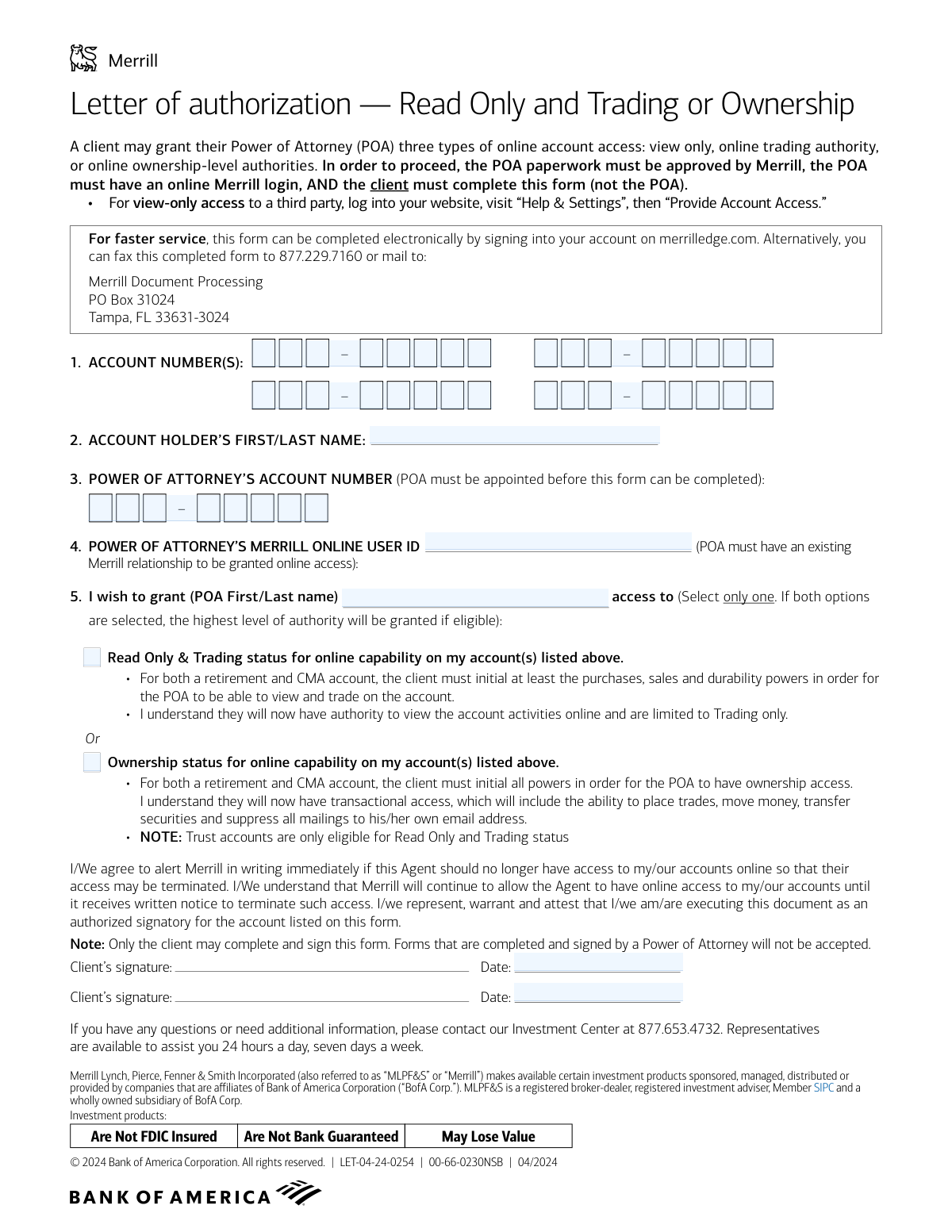
This form is a Letter of Authorization from Merrill used by an account holder to grant their designated Power of Attorney (POA) online access to their investment accounts. It specifies the level of authority given, which can range from view-only access to trading capabilities or full ownership-level permissions. Completing this form is a critical step in formally enabling a POA to manage or monitor accounts online on the client's behalf. Today, this form can be filled out quickly and accurately using AI-powered services like Instafill.ai, which can also convert non-fillable PDF versions into interactive fillable forms.
Our AI automatically handles information lookup, data retrieval, formatting, and form filling.
It takes less than a minute to fill out LET-04-24-0254 using our AI form filling.
Securely upload your data. Information is encrypted in transit and deleted immediately after the form is filled out.

Form specifications

Form name: Merrill Letter of authorization — Read Only and Trading or Ownership
Number of pages: 1
Language: English
Categories: authorization forms, trading forms, Merrill forms
main-image

Instafill Demo: How to fill out PDF forms in seconds with AI

How to Fill Out LET-04-24-0254 Online for Free in 2026

Are you looking to fill out a LET-04-24-0254 form online quickly and accurately? Instafill.ai offers the #1 AI-powered PDF filling software of 2026, allowing you to complete your LET-04-24-0254 form in just 37 seconds or less.
Follow these steps to fill out your LET-04-24-0254 form online using Instafill.ai:
  1. 1 Navigate to Instafill.ai and upload the Merrill Letter of Authorization form or select it from their template library.
  2. 2 Provide the account holder's information, including your full name and the relevant Merrill account number(s).
  3. 3 Enter the Power of Attorney's (POA) details, such as their name, Merrill account number, and existing Merrill Online User ID.
  4. 4 Select the desired level of online access you wish to grant the POA by checking either 'Read Only & Trading status' or 'Ownership status'.
  5. 5 Carefully review all the information you've entered to ensure it is accurate and complete.
  6. 6 As the account holder, electronically sign and date the form in the designated client signature fields.
  7. 7 Submit the completed and signed form electronically through the Merrill Edge portal or via fax or mail as per the form's instructions.

Our AI-powered system ensures each field is filled out correctly, reducing errors and saving you time.

Why Choose Instafill.ai for Your Fillable LET-04-24-0254 Form?

Speed

Complete your LET-04-24-0254 in as little as 37 seconds.

Up-to-Date

Always use the latest 2026 LET-04-24-0254 form version.

Cost-effective

No need to hire expensive lawyers.

Accuracy

Our AI performs 10 compliance checks to ensure your form is error-free.

Security

Your personal information is protected with bank-level encryption.

Frequently Asked Questions About Form LET-04-24-0254

This form allows you, the account holder, to grant your designated Power of Attorney (POA) specific online access to your Merrill accounts for either trading or full ownership-level activities.

Only the client (the account holder) can complete and sign this form. Merrill will not accept forms that are completed or signed by the Power of Attorney.

Before starting, ensure your main POA paperwork is approved by Merrill and that your POA has their own Merrill account number and online user ID. You will need your account number(s) and your POA's information to complete the form.

'Read Only & Trading' allows your POA to view account activity and place trades online. 'Ownership' status is a higher level of authority that includes trading, moving money, transferring securities, and managing mail preferences.

For the fastest service, complete the form electronically on merrilledge.com. Alternatively, you can fax the signed form to 877.229.7160 or mail it to the Merrill Document Processing center.

If you select both the 'Read Only & Trading' and 'Ownership' options, Merrill will grant the highest level of authority for which the account is eligible, which is typically 'Ownership' status.

Yes, but please note that Trust accounts are only eligible for 'Read Only and Trading' status. You cannot grant full 'Ownership' status for a Trust account.

Your POA must have an existing Merrill relationship and an online User ID before you can grant them online access using this form. They will need to establish an account with Merrill first.

To terminate your POA's online access, you must notify Merrill in writing. Their access will remain active until Merrill receives and processes your written termination notice.

No, this form is for trading or ownership-level access. For simple view-only access, log into your account, visit 'Help & Settings', and then select 'Provide Account Access' to set it up online.

Yes, services like Instafill.ai use AI to accurately auto-fill form fields with your information. This can save you time and help prevent errors when completing the document.

You can upload the PDF to Instafill.ai, which will make it an interactive, fillable form. The AI can then help you populate the fields with your account details and your POA's information before you print it for signing.

If you have a non-fillable or 'flat' PDF, you can use a service like Instafill.ai. Simply upload the file, and the platform will convert it into an interactive, fillable form that you can complete on your computer.

You must obtain this information directly from your Power of Attorney. It is a required piece of information that confirms they have an existing online relationship with Merrill.

Compliance LET-04-24-0254
Validation Checks by Instafill.ai

1
Verify Account Holder's Name Matches Account Number
This check ensures the 'Account Holder’s First/Last Name' provided on the form matches the name registered to the client 'Account Number(s)'. This is a critical security measure to confirm the identity of the person authorizing the access and prevent fraudulent submissions. If the names do not match, the form must be rejected and flagged for manual review.
2
Validate Client Account Number Existence and Status
The system must verify that at least one client 'Account Number' is provided and that each number corresponds to a valid, active Merrill account. This validation prevents processing errors due to typos or the use of closed or incorrect account numbers. A failure here means the authorization cannot be linked to any account and the form is invalid.
3
Confirm POA's Merrill Online User ID is Valid
This validation checks the 'Power of Attorney’s Merrill Online User ID' against Merrill's user database to confirm it is an active and valid ID. The form explicitly states the POA must have an existing online login, making this a non-negotiable prerequisite. If the User ID is not found or is inactive, the request cannot be fulfilled.
4
Cross-Validate POA's Identity
The system should verify that the provided 'POA First/Last name', 'POA Merrill Online User ID', and 'Power of Attorney’s Account Number' all correspond to the same individual in Merrill's records. This three-way check ensures the correct person is being granted access and mitigates risk from data entry errors or misidentification. A mismatch would require rejection and clarification.
5
Enforce Single Access Level Selection
This check ensures that the client has selected exactly one access level: either 'Read Only & Trading' or 'Ownership'. The form's instruction is to select only one, and enforcing this rule at the validation stage removes ambiguity in the client's intent. If zero or both options are checked, the form should be considered incomplete and returned for correction.
6
Enforce Trust Account Access Level Restriction
The system must identify if any of the client 'Account Number(s)' are designated as Trust accounts. If a Trust account is detected, this validation fails if the 'Ownership status' option is selected, as the form explicitly limits Trust accounts to 'Read Only and Trading status'. This prevents the granting of impermissible authority levels.
7
Validate Signature Date Plausibility
This check ensures the 'Date' field next to the client's signature is present, correctly formatted (e.g., MM/DD/YYYY), and represents a plausible date. The date cannot be in the future or unreasonably far in the past, as this could indicate an error or a stale, potentially revoked authorization. A valid date is essential for the legal timeline of the document.
8
Prevent Self-Authorization by POA
This validation compares the 'Account Holder’s First/Last Name' with the 'POA First/Last name'. If the names are identical, the form is flagged for immediate rejection or manual review. This is a crucial control to enforce the rule that the form must be completed by the client, not the Power of Attorney on their own behalf.
9
Verify Underlying POA Paperwork Approval
Before processing the online access request, the system must confirm that the legal Power of Attorney document appointing the specified POA has been received and approved by Merrill. The form states this is a mandatory prerequisite. If no approved POA paperwork is on file, this authorization form is invalid and must be rejected.
10
Mandatory Fields Completion Check
This validation verifies that all required fields are filled out, including the Account Holder's Name, at least one Client Account Number, the POA's full name, the POA's User ID, an access level selection, and a signature date. An incomplete form cannot be processed accurately and must be rejected, as missing information prevents proper authorization and setup.
11
Validate POA's Account Number Existence
This check confirms that the 'Power of Attorney’s Account Number' is a valid and active account within the Merrill system. This step helps to verify the POA's existing relationship with Merrill, which is a stated condition for granting online access. An invalid POA account number indicates a data error or that a prerequisite has not been met.
12
Validate Signatures for Joint Accounts
The system should determine if any of the listed client accounts are joint accounts. If a joint account is involved, this validation checks for the presence of two signatures and two corresponding dates, as suggested by the form layout. This ensures all required account holders have provided consent, which is a critical legal and compliance requirement for shared accounts.

Common Mistakes in Completing LET-04-24-0254

Power of Attorney Signing the Form

The form explicitly states that only the client (account holder) can complete and sign it, not the Power of Attorney (POA). POAs often mistakenly believe they should sign authorization forms, but doing so here will lead to immediate rejection and processing delays. To avoid this, the client must personally sign and date the form, as their signature is required to grant the authorization to the POA.

Submitting Before the POA is Approved by Merrill

A key prerequisite is that the underlying Power of Attorney paperwork must already be approved by Merrill before this form is submitted. Clients sometimes submit this online access form concurrently with or before the main POA documents are processed. This will cause the authorization to be rejected, as there is no approved POA on file to link the access to. Always confirm with Merrill that the POA is fully approved before submitting this form.

Missing or Incorrect POA Information

The form requires the POA's specific Merrill account number and online User ID to establish the link. Clients often leave this blank, guess the information, or provide an incorrect User ID, leading to processing failure. Before filling out the form, the client must obtain the exact, correct account number and User ID from their POA to ensure the linkage can be made successfully.

Selecting Both Access Level Checkboxes

The form requires selecting only one level of access, but some users check both boxes out of confusion. The instructions state that if both are selected, the highest level of authority ('Ownership') will be granted by default. This can inadvertently give the POA far more power than intended, such as the ability to move money. To prevent this, carefully read the descriptions and select only the single option that matches your intent.

Ignoring Special Requirements for Account Types

The form has specific rules, such as limiting Trust accounts to 'Read Only and Trading status' only. A client might incorrectly select 'Ownership' for a trust account, causing the request to be rejected. It is crucial to read the notes under each option to ensure your selection is valid for the account types you are listing, preventing processing delays.

Underestimating the 'Ownership' Access Level

Clients may select 'Ownership status' without fully grasping the extensive authority it grants, including the ability to move money, transfer securities, and suppress mailings. This can lead to unintended and significant actions on the account if the client only meant to grant viewing or trading privileges. To avoid this, carefully review the description and choose the more limited 'Read Only & Trading' option if full transactional control is not desired.

Forgetting a Required Signature on a Joint Account

The form provides two signature lines, which is critical for joint accounts where all owners may need to consent to grant access. It's a common oversight for only one owner to sign, which can render the form incomplete and invalid for jointly held assets. If the account is held jointly, ensure all required parties sign and date the form to avoid rejection.

Failing to List All Relevant Account Numbers

The authorization applies only to the account numbers listed on the form. Clients often forget to list all the accounts they want their POA to have access to, or they may make a transcription error when writing the numbers. This results in the POA having incomplete access, requiring another form to be submitted later. Double-check all account statements and carefully list every account number you wish to include.

Submitting a Paper Form with Illegible Handwriting

When the form is printed and filled out by hand for faxing or mailing, poor handwriting can make critical information like names and account numbers unreadable. This frequently leads to data entry errors or outright rejection of the form. To avoid this, print clearly in block letters or use the preferred electronic completion method on merrilledge.com. Since this is a non-fillable PDF, a tool like Instafill.ai can convert it into a fillable version to ensure all entries are typed and legible.

Omitting the Date Next to the Signature

Each signature line has a corresponding date field that must be filled out with the date of signing. A signature without a date can be considered invalid for legal and compliance purposes, causing the form to be rejected. This simple oversight is common but can cause unnecessary delays. Always ensure you write the current date in the space provided next to your signature.
Saved over 80 hours a year

“I was never sure if my IRS forms like W-9 were filled correctly. Now, I can complete the forms accurately without any external help.”

Kevin Martin Green

Your data stays secure with advanced protection from Instafill and our subprocessors

Robust compliance program

Transparent business model

You’re not the product. You always know where your data is and what it is processed for.

ISO 27001, HIPAA, and GDPR

Our subprocesses adhere to multiple compliance standards, including but not limited to ISO 27001, HIPAA, and GDPR.

Security & privacy by design

We consider security and privacy from the initial design phase of any new service or functionality. It’s not an afterthought, it’s built-in, including support for two-factor authentication (2FA) to further protect your account.

Fill out LET-04-24-0254 with Instafill.ai

Worried about filling PDFs wrong? Instafill securely fills merrill-letter-of-authorization-read-only-and-trading-or-ownership forms, ensuring each field is accurate.