Yes! You can use AI to fill out Fidelity Advisor Trading Authorization and Indemnification

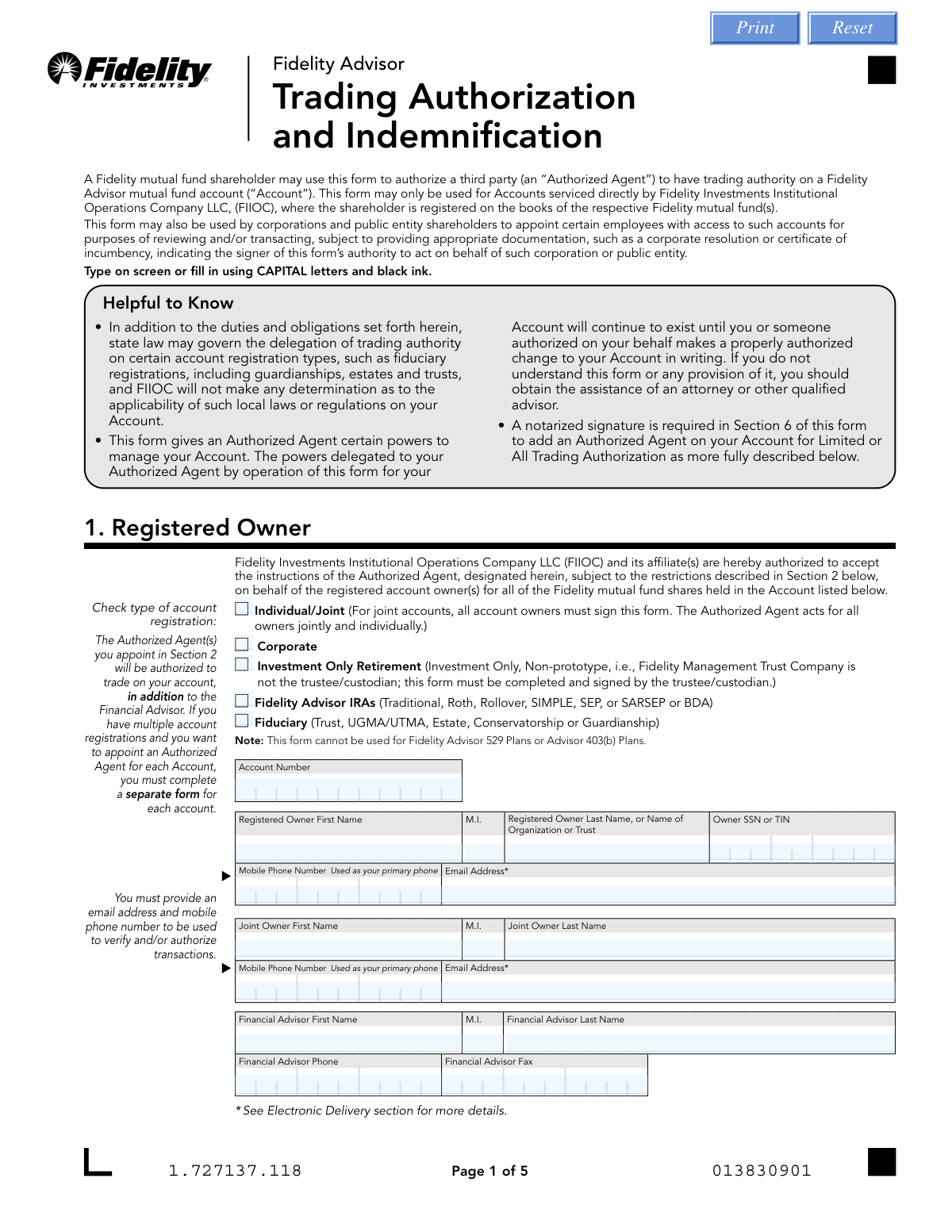
The Fidelity Advisor Trading Authorization and Indemnification form is an official Fidelity Investments document that enables mutual fund shareholders to designate one or more Authorized Agents with varying levels of trading authority—Inquiry Only, Limited Trading, or All Trading—over their Fidelity Advisor mutual fund accounts serviced by Fidelity Investments Institutional Operations Company LLC (FIIOC). The form is critical for shareholders who wish to delegate account management responsibilities to financial advisors, corporate officers, or other trusted third parties while establishing legal indemnification protections for FIIOC. It also authorizes the payment of financial advisory service fees directly from the account and requires notarization for Limited and All trading authority levels. Today, this form can be filled out quickly and accurately using AI-powered services like Instafill.ai, which can also convert non-fillable PDF versions into interactive fillable forms.
Our AI automatically handles information lookup, data retrieval, formatting, and form filling.
It takes less than a minute to fill out Fidelity Trading Authorization using our AI form filling.
Securely upload your data. Information is encrypted in transit and deleted immediately after the form is filled out.

Form specifications

Form name: Fidelity Advisor Trading Authorization and Indemnification
Number of pages: 1
Filled form examples: Form Fidelity Trading Authorization Examples
Language: English
main-image

Instafill Demo: filling out a legal form in seconds

How to Fill Out Fidelity Trading Authorization Online for Free in 2026

Are you looking to fill out a FIDELITY TRADING AUTHORIZATION form online quickly and accurately? Instafill.ai offers the #1 AI-powered PDF filling software of 2026, allowing you to complete your FIDELITY TRADING AUTHORIZATION form in just 37 seconds or less.
Follow these steps to fill out your FIDELITY TRADING AUTHORIZATION form online using Instafill.ai:
  1. 1 Navigate to Instafill.ai and upload the Fidelity Advisor Trading Authorization and Indemnification form or select it from the available form library.
  2. 2 Complete Section 1 by entering the registered account owner's information, including account number, name, SSN or TIN, mobile phone number, email address, and financial advisor details.
  3. 3 Complete Section 2 by selecting the appropriate level of trading authority (Inquiry Only, Limited, or All) for each Authorized Agent and entering their name, SSN, and date of birth.
  4. 4 Review and acknowledge the Authorized Agent representations in Section 3, then have each Authorized Agent sign and date the form.
  5. 5 Complete Section 5 by consenting to electronic delivery and confirming your email address for account-related communications.
  6. 6 Have the registered account owner(s) sign and date Section 6, and if adding Limited or All trading authority, obtain notarization from a Notary Public in the designated notarization sections.
  7. 7 Submit the completed form to Fidelity by uploading it through Accounts.Fidelity.com, sending via webfax to 888-321-7349, or mailing it to the FIIOC address provided on the form.

Our AI-powered system ensures each field is filled out correctly, reducing errors and saving you time.

Why Choose Instafill.ai for Your Fillable Fidelity Trading Authorization Form?

Speed

Complete your Fidelity Trading Authorization in as little as 37 seconds.

Up-to-Date

Always use the latest 2026 Fidelity Trading Authorization form version.

Cost-effective

No need to hire expensive lawyers.

Accuracy

Our AI performs 10 compliance checks to ensure your form is error-free.

Security

Your personal information is protected with bank-level encryption.

Frequently Asked Questions About Form Fidelity Trading Authorization

This form allows a Fidelity mutual fund shareholder to authorize a third party (called an 'Authorized Agent') to have trading authority on a Fidelity Advisor mutual fund account. It can also be used by corporations and public entities to grant certain employees access to review and/or transact on such accounts.

This form can be used by Fidelity mutual fund shareholders whose accounts are serviced directly by Fidelity Investments Institutional Operations Company LLC (FIIOC) and where the shareholder is registered on the books of the respective Fidelity mutual fund(s). It is also available for corporations and public entity shareholders to appoint authorized employees. Note that this form cannot be used for Fidelity Advisor 529 Plans or Advisor 403(b) Plans.

There are three levels: Inquiry Only (I), which allows the agent to only view account information with no financial transactions; Limited Trading Authorization (L), which permits inquiries, trades, exchanges, and redemptions to the registered account holder or pre-established bank account; and All (A), which includes all Limited authorizations plus the ability to request purchases, redemptions, exchanges, or transfers payable to any third party. Note that 'All' authorization is only available on certain account types such as corporate, partnerships, and nominee registrations.

A notarized signature is required in Section 6 when adding an Authorized Agent with 'Limited' or 'All' trading authorization levels. A notarized signature is NOT required for 'Inquiry Only' authorization. If a notarized signature is required, the form must be mailed rather than uploaded or faxed.

You can add up to five Authorized Agents on a single form, each with their own designated level of trading authority (Inquiry Only, Limited, or All). Each authorized individual must have their name, SSN, date of birth, and authority level specified.

Yes. If you have multiple account registrations and want to appoint an Authorized Agent for each account, you must complete a separate Trading Authorization and Indemnification form for each account.

Yes. By signing this form, you authorize FIIOC to act on instructions from your Authorized Agent with Limited or All Trading Authority to redeem shares from your account to pay financial advisory service fees. You are responsible for verifying the fee amount and accuracy of the fee calculation, as FIIOC will not make any determination about whether the fee is accurate or appropriate.

The trading authorization is a continuing one and remains in full force and effect until revoked by the registered owner(s) through a written notice received and accepted by FIIOC. It is also not affected by the subsequent disability or incapacity of the registered owner(s) until FIIOC is notified in writing. In the event of the account owner's death, FIIOC will terminate the Authorized Agent's authority upon receiving notice.

You can submit the form by uploading it through Accounts.Fidelity.com (under 'Manage Accounts, Other Services' > 'Upload Documents'), by fax to 888-321-7349, or by mail to Fidelity Investments Institutional Operations Company LLC, P.O. Box 770002, Cincinnati, OH 45277-0082 (or overnight to 100 Crosby Parkway, KC1G, Covington, KY 41015). Important: If an original notarized signature is required, the form must be mailed.

This form supports Individual/Joint accounts, Corporate accounts, Investment Only Retirement accounts, Fidelity Advisor IRAs (Traditional, Roth, Rollover, SIMPLE, SEP, or SARSEP or BDA), and Fiduciary accounts (Trust, UGMA/UTMA, Estate, Conservatorship, or Guardianship). It cannot be used for Fidelity Advisor 529 Plans or Advisor 403(b) Plans.

For corporate or public entity accounts, the signer must be an authorized officer with the power to appoint another employee or Authorized Agent, and must provide a corporate resolution or certificate of incumbency evidencing their authority to make such an appointment.

If no authority level is indicated for a listed individual, they will automatically default to Inquiry Only Authorization, which only allows them to view account information without making any financial transactions.

Yes, AI-powered services like Instafill.ai can help you accurately auto-fill the form fields, saving you time and reducing errors. If you have a flat, non-fillable PDF version of this form, Instafill.ai can also convert it into an interactive fillable form so you can complete it digitally.

To fill out this form online, visit Instafill.ai and upload the Fidelity Trading Authorization and Indemnification PDF. The AI will guide you through each field, auto-fill information where possible, and help ensure all required sections are completed correctly before you submit or print the form.

Financial Representatives can call 800-522-7297 for assistance, while Shareholders can call 877-208-0098. You can also visit accounts.fidelity.com for additional help. If you are unsure about any legal provisions in the form, Fidelity recommends consulting an attorney or other qualified advisor.

Compliance Fidelity Trading Authorization
Validation Checks by Instafill.ai

1
Account Number Format and Presence Validation
Validates that the RO_AcctNumber field is populated and conforms to Fidelity's expected account number format (typically a numeric string of a specific length). This field is critical because the entire form is tied to a specific account, and an invalid or missing account number means the trading authorization cannot be applied to any account. If this field is blank or improperly formatted, the form must be rejected and returned to the submitter.
2
Account Registration Type Selection Validation
Ensures that exactly one account registration type checkbox (Individual/Joint, Corporate, Investment Only Retirement, Fidelity Advisor IRAs, or Fiduciary) is selected in Section 1. The registration type governs which authorization levels are permissible and what additional documentation may be required. If no type is selected or multiple types are checked, the form cannot be processed correctly, as downstream rules such as 'All' authorization eligibility depend on this selection.
3
Registered Owner SSN/TIN Format Validation
Validates that the RO_OwnerSSN_TIN field is present and follows the correct format — either a 9-digit Social Security Number (SSN) formatted as XXX-XX-XXXX or a 9-digit Employer Identification Number (EIN) formatted as XX-XXXXXXX. This information is required for identity verification and tax reporting purposes. A missing or malformed SSN/TIN will prevent FIIOC from properly identifying the account owner and processing the authorization.
4
Registered Owner Email Address Format Validation
Checks that the RO_Email field contains a properly formatted email address (e.g., [email protected]) and that it does not match the email address of any listed Authorized Agent. The form explicitly states that the email address provided should not belong to the Authorized Agent or Representative, as it is used for electronic delivery consent and transaction verification. An invalid or agent-owned email address could result in the account owner not receiving critical account communications.
5
Mobile Phone Number Format Validation for Owner and Joint Owner
Validates that RO_MobileNumber and, if a joint owner is present, RO_JointMobileNumber are populated and follow a valid 10-digit U.S. phone number format (e.g., XXX-XXX-XXXX). The form explicitly designates the mobile number as the primary phone used to verify and/or authorize transactions. A missing or incorrectly formatted mobile number will prevent FIIOC from sending transaction verification messages, which is a required step in the authorization process.
6
Joint Owner Fields Completeness Consistency Check
Ensures that if any joint owner field (RO_JointAccountOwnerFirstName, RO_JointAccountOwnerLastName, RO_JointMobileNumber, or RO_JointEmail) is populated, then all required joint owner fields must also be completed. Additionally, if the Individual/Joint registration type is selected, the joint owner section should be reviewed for completeness. Partial joint owner information creates ambiguity about whether a second owner exists, which is critical because all joint account owners must sign the form.
7
Authorized Agent Name Completeness Validation
Verifies that for each Authorized Individual entry (1 through 5) where any field is populated, at minimum the first name, last name, SSN/TIN, and date of birth fields are all present. An Authorized Agent entry with only partial information (e.g., a name but no SSN) cannot be properly vetted or identified by FIIOC. Incomplete agent entries may result in unauthorized individuals gaining account access or the form being rejected entirely.
8
Authorized Agent SSN Format Validation
Validates that each populated AP/AGT_SSN_TIN field (01 through 05) conforms to the standard 9-digit SSN format (XXX-XX-XXXX). The SSN is used to uniquely identify each Authorized Agent and is required for regulatory and compliance purposes. A malformed or missing SSN for a listed agent will prevent FIIOC from completing identity verification and may expose the account to unauthorized access risks.
9
Authorized Agent Date of Birth Format and Reasonableness Validation
Checks that each populated API/AGT_DOB field (01 through 05) follows the MM-DD-YYYY date format and represents a plausible date of birth — specifically that the individual is at least 18 years of age and not older than a reasonable maximum age (e.g., 120 years). Date of birth is used for identity verification of the Authorized Agent. An improperly formatted or implausible date of birth will prevent proper agent identification and could flag the submission for manual review.
10
Authority Level Selection Per Authorized Agent Validation
Ensures that for each Authorized Individual entry where a name is provided, exactly one authority level (I = Inquiry Only, L = Limited Trading, or A = All) is selected. The form explicitly states that only one authority level may be chosen per authorized individual, and if no level is indicated, the individual defaults to Inquiry Only. Multiple selections or a missing selection for a named agent creates ambiguity about the scope of permissions granted and could result in incorrect access being applied to the account.
11
'All' Trading Authorization Restricted to Eligible Account Types
Validates that the 'All' (A) trading authorization level is not selected for any Authorized Agent when the account registration type is Individual/Joint, TOD, or any type of Fidelity Advisor IRA. The form explicitly states that 'All' trading authorization is only available on corporate, partnership, and nominee registrations. If an 'All' authorization is selected for an ineligible account type, the form must be flagged and returned, as processing it would grant impermissible transaction authority.
12
Notarization Required for Limited and All Trading Authorization Levels
Checks that if any Authorized Agent is assigned a 'Limited' (L) or 'All' (A) trading authorization level, the notarization sections (Notarization 1 and/or Notarization 2 in Section 6) are fully completed, including the notary's printed name, signature date, commission expiration date, state, county, and identification fields. A notarized signature is explicitly required by the form for these authorization levels. Without proper notarization, the form cannot be processed for Limited or All trading authority, and submission via upload (rather than mail) would also be invalid.
13
Notary Commission Expiration Date Validity Check
Validates that the N_CommissionExpires02 and N_CommissionExpires03 fields follow the MM-DD-YYYY format and that the commission expiration date is not in the past relative to the date the form was signed. A notarization performed by a notary whose commission has expired is legally invalid and would render the entire notarization section unacceptable. If the commission is expired, the form must be returned for re-notarization by a currently commissioned notary.
14
Authorized Agent Signature and Date Completeness Validation
Ensures that for each Authorized Individual listed in Section 2, a corresponding signature date (AAR_Date01 through AAR_Date05) is present in Section 3, and that all dates follow the MM-DD-YYYY format. The form explicitly states it cannot be processed without all signatures and dates. A missing or malformed signature date for any listed agent indicates the form is incomplete and must be returned to the submitter before processing can begin.
15
Registered Owner Signature Date Format and Presence Validation
Validates that the RO_Date field (and RO_Date02 for joint accounts) is populated and follows the MM-DD-YYYY format, and that the date is not a future date. The registered account owner's signature and date in Section 6 are mandatory for the form to be processed. A missing, future-dated, or improperly formatted signature date indicates the form is incomplete or potentially fraudulent, and it must be rejected and returned.
16
Corporate/Fiduciary Account Additional Documentation Requirement Check
Validates that when the account registration type is Corporate or Fiduciary (Trust, UGMA/UTMA, Estate, Conservatorship, or Guardianship), a flag or indicator is present confirming that supporting documentation (such as a corporate resolution or certificate of incumbency) has been attached. The form explicitly requires such documentation for corporate and public entity accounts to confirm the signer's authority to appoint an Authorized Agent. Without this documentation, the form cannot be accepted for corporate or fiduciary account types, regardless of whether all other fields are complete.

Common Mistakes in Completing Fidelity Trading Authorization

Selecting the wrong account registration type

Many filers fail to check the correct account registration type in Section 1 (e.g., checking 'Individual/Joint' when the account is a Trust or IRA), which can cause the form to be rejected or processed incorrectly. This mistake often happens because people are unfamiliar with how their account is legally registered. Importantly, the form cannot be used for Fidelity Advisor 529 Plans or Advisor 403(b) Plans, and submitting it for those account types will result in rejection. Always verify your exact account registration type by checking your account statement or contacting Fidelity before completing the form.

Choosing an incompatible trading authority level for the account type

'All' (A) trading authorization is only available on certain registration types such as corporate, partnerships, and nominee registrations — it is NOT available on individual/joint, TOD, or any type of Fidelity Advisor IRA accounts. Filers frequently select 'All' authority without realizing this restriction, causing the form to be rejected or defaulted to a lower authority level. If no authority level is indicated, the individual defaults to 'Inquiry Only,' which may not be what the account owner intended. Carefully review the authority level restrictions before making your selection, and tools like Instafill.ai can help flag incompatible selections automatically.

Failing to obtain a notarized signature for Limited or All trading authorization

A notarized signature in Section 6 is required when adding an Authorized Agent for 'Limited' or 'All' trading authorization levels, but many filers submit the form without notarization, causing it to be returned unprocessed. This mistake often occurs because filers overlook the notarization requirement or assume a regular signature is sufficient. Note that if a notary is required, the form must be mailed — it cannot be uploaded or faxed. Plan ahead to visit a notary before submitting, and ensure the notary completes all required fields including state, county, identification method, commission expiration date, and their stamp or seal.

Providing the Authorized Agent's email address instead of the account owner's email

Section 5 explicitly states that the email address provided should NOT be the Authorized Agent's or Representative's email address — it must be the registered account owner's email. This mistake is common because the Authorized Agent often assists in completing the form and inadvertently enters their own contact information. Using the wrong email address means the account owner will not receive electronic communications and consent confirmations, and it may also replace an existing correct email on file. Always ensure the email and mobile phone number fields in Section 1 belong to the registered account owner.

Failing to have all joint account owners sign the form

For joint accounts, all account owners must sign the form in Section 6, but it is very common for only one owner to sign, resulting in the form being rejected or returned. This happens because one owner often completes and submits the form without realizing the co-owner's signature is also required. The Authorized Agent then acts for all owners jointly and individually, so all parties must consent. Make sure every registered joint owner provides their printed name, signature, and date before submitting the form.

Entering an incorrectly formatted SSN, TIN, or date of birth

Fields for Owner SSN/TIN and Authorized Individual SSN and Date of Birth require specific formatting, and entering dashes, spaces, or incorrect digit counts is a frequent error that can cause processing delays or rejection. Dates must be entered in MM-DD-YYYY format, and SSNs must be complete nine-digit numbers. This mistake often occurs when filers are accustomed to different formatting conventions or rush through the form. AI-powered form filling tools like Instafill.ai can automatically validate and format SSNs, TINs, and dates to ensure they meet Fidelity's requirements.

Submitting a separate form for each authorized agent instead of listing all agents on one form

The form allows up to five Authorized Individuals to be listed in Section 2, but many filers mistakenly submit multiple separate forms — one per agent — for the same account, causing confusion and processing delays. Conversely, filers with multiple accounts sometimes submit only one form thinking it covers all accounts, when in fact a separate form is required for each account. Read the instructions carefully: list all authorized agents for a single account on one form, but complete a separate form for each different account number.

Not selecting whether you are adding or replacing Authorized Agents

Section 2 requires filers to indicate whether they are adding a new Authorized Agent in addition to previously authorized agents, or replacing all previously authorized agents with the new listing. Many filers skip this checkbox entirely, which creates ambiguity about whether existing authorizations should remain in effect or be revoked. Failing to make this selection can result in unintended parties retaining trading authority on the account. Always check the appropriate box to clearly communicate your intent to FIIOC.

Omitting required corporate documentation for corporate or public entity accounts

Corporate and public entity shareholders must provide supporting documentation — such as a corporate resolution or certificate of incumbency — to demonstrate the signer's authority to appoint an Authorized Agent, but this documentation is frequently omitted. Without it, the form cannot be processed regardless of how accurately it is completed. This mistake happens because filers focus on the form itself and overlook the accompanying document requirement. Prepare and attach the appropriate corporate authorization documents before submitting the form.

Leaving the account number field blank or entering it incorrectly

The account number in Section 1 is a critical identifier that links the trading authorization to the correct Fidelity account, yet it is frequently left blank or entered with transposed digits. Since a separate form must be completed for each account, an incorrect or missing account number means the authorization cannot be applied to the intended account. This error often occurs when filers are completing the form without their account statement in front of them. Always reference your official Fidelity account statement or online account portal to confirm the exact account number before completing the form, and tools like Instafill.ai can help pre-populate this field accurately.

Authorized Agents failing to sign and date Section 3

Section 3 requires each Authorized Agent listed in Section 2 to sign and date the form, confirming they understand and agree to the representations and obligations outlined. It is common for filers to complete Sections 1 and 2 thoroughly but neglect to have each Authorized Agent provide their own signature and date in Section 3, causing the form to be returned as incomplete. The form explicitly states it cannot be processed without all signatures and dates. Ensure every individual listed as an Authorized Agent reviews the representations in Section 3 and provides their own signature and date before submission.

Uploading or faxing a form that requires an original notarized signature

The form's submission instructions offer three options — upload, fax, or mail — but many filers choose the more convenient upload or fax option even when their form requires a notarized signature for Limited or All trading authorization. The form explicitly states that if an original notary is required, the form must be mailed; electronic or fax submissions of notarized forms will not be accepted. This mistake causes significant delays as the form must be resubmitted by mail. Always check whether your chosen authority level requires notarization, and if so, mail the original completed and notarized form to the appropriate FIIOC address.
Saved over 80 hours a year

“I was never sure if my IRS forms like W-9 were filled correctly. Now, I can complete the forms accurately without any external help.”

Kevin Martin Green

Your data stays secure with advanced protection from Instafill and our subprocessors

Robust compliance program

Transparent business model

You’re not the product. You always know where your data is and what it is processed for.

ISO 27001, HIPAA, and GDPR

Our subprocesses adhere to multiple compliance standards, including but not limited to ISO 27001, HIPAA, and GDPR.

Security & privacy by design

We consider security and privacy from the initial design phase of any new service or functionality. It’s not an afterthought, it’s built-in, including support for two-factor authentication (2FA) to further protect your account.

Fill out Fidelity Trading Authorization with Instafill.ai

Worried about filling PDFs wrong? Instafill securely fills fidelity-advisor-trading-authorization-and-indemnification forms, ensuring each field is accurate.