
Yes! You can use AI to fill out Fidelity Advisor Trading Authorization and Indemnification
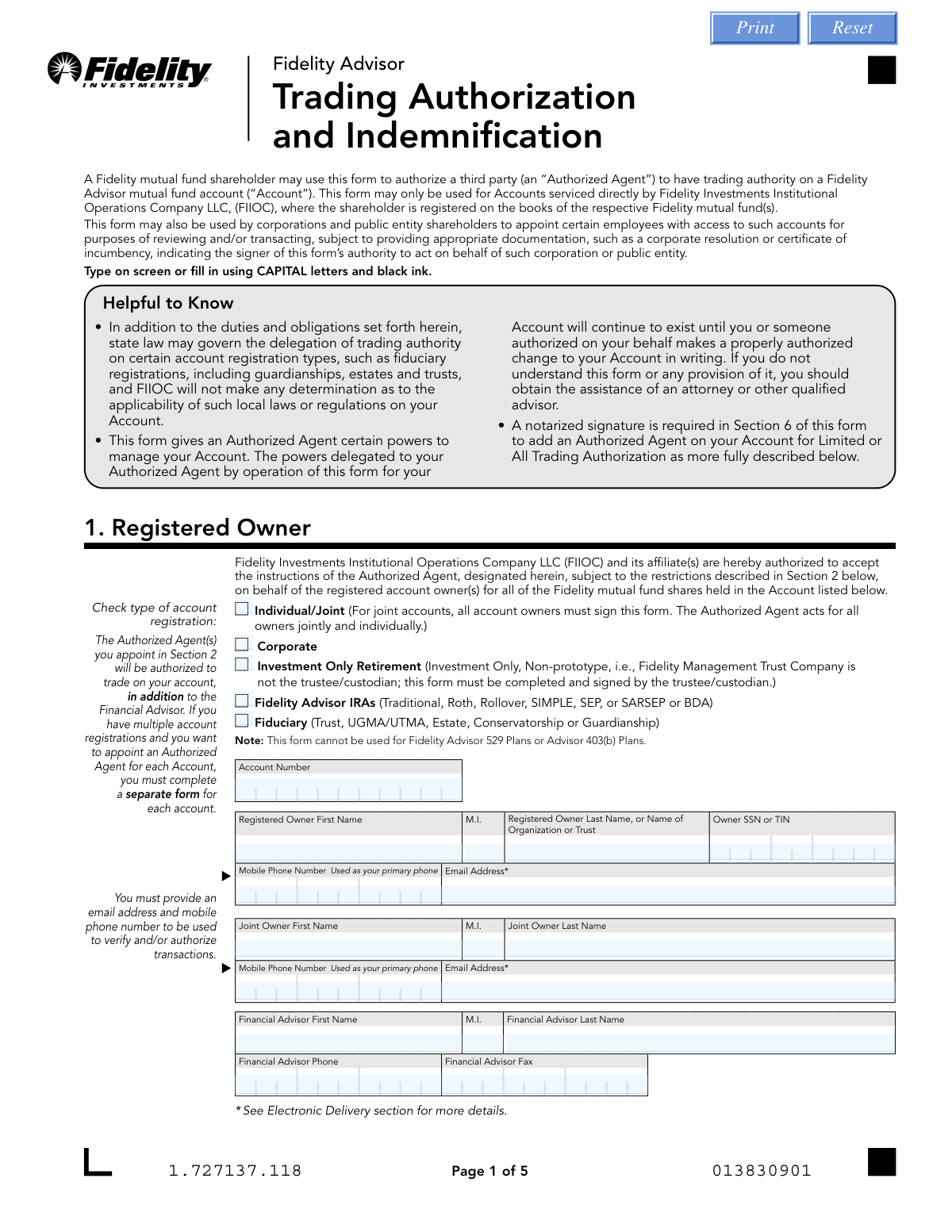
Don't type 87 fields by hand. Tell our AI about yourself, or upload a document you already have, and it fills every field in seconds. You check it, then download, print or sign.
The AI does the filling. You just check it.
No typing into boxes, nothing to install.
What this form asks for
The AI fills all of it, from your answers or your documents.
The AI checks your answers before you download
16 checks built for this form, so a wrong date or a missing answer is caught before anyone else sees it.
Validates that the RO_AcctNumber field is populated and conforms to Fidelity's expected account number format (typically a numeric string of a specific length). This field is critical because the entire form is tied to a specific account, and an invalid or missing account number means the trading authorization cannot be applied to any account. If this field is blank or improperly formatted, the form must be rejected and returned to the submitter.
Ensures that exactly one account registration type checkbox (Individual/Joint, Corporate, Investment Only Retirement, Fidelity Advisor IRAs, or Fiduciary) is selected in Section 1. The registration type governs which authorization levels are permissible and what additional documentation may be required. If no type is selected or multiple types are checked, the form cannot be processed correctly, as downstream rules such as 'All' authorization eligibility depend on this selection.
Validates that the RO_OwnerSSN_TIN field is present and follows the correct format — either a 9-digit Social Security Number (SSN) formatted as XXX-XX-XXXX or a 9-digit Employer Identification Number (EIN) formatted as XX-XXXXXXX. This information is required for identity verification and tax reporting purposes. A missing or malformed SSN/TIN will prevent FIIOC from properly identifying the account owner and processing the authorization.
Checks that the RO_Email field contains a properly formatted email address (e.g., [email protected]) and that it does not match the email address of any listed Authorized Agent. The form explicitly states that the email address provided should not belong to the Authorized Agent or Representative, as it is used for electronic delivery consent and transaction verification. An invalid or agent-owned email address could result in the account owner not receiving critical account communications.
Validates that RO_MobileNumber and, if a joint owner is present, RO_JointMobileNumber are populated and follow a valid 10-digit U.S. phone number format (e.g., XXX-XXX-XXXX). The form explicitly designates the mobile number as the primary phone used to verify and/or authorize transactions. A missing or incorrectly formatted mobile number will prevent FIIOC from sending transaction verification messages, which is a required step in the authorization process.
Ensures that if any joint owner field (RO_JointAccountOwnerFirstName, RO_JointAccountOwnerLastName, RO_JointMobileNumber, or RO_JointEmail) is populated, then all required joint owner fields must also be completed. Additionally, if the Individual/Joint registration type is selected, the joint owner section should be reviewed for completeness. Partial joint owner information creates ambiguity about whether a second owner exists, which is critical because all joint account owners must sign the form.
And 10 more checks
- Authorized Agent Name Completeness Validation
- Authorized Agent SSN Format Validation
- Authorized Agent Date of Birth Format and Reasonableness Validation
- Authority Level Selection Per Authorized Agent Validation
- 'All' Trading Authorization Restricted to Eligible Account Types
- Notarization Required for Limited and All Trading Authorization Levels
- Notary Commission Expiration Date Validity Check
- Authorized Agent Signature and Date Completeness Validation
- Registered Owner Signature Date Format and Presence Validation
- Corporate/Fiduciary Account Additional Documentation Requirement Check
Let AI fill out your Fidelity Trading Authorization
No typing. Every field filled in seconds, checked, ready to sign.
How to Fill Out Fidelity Trading Authorization Online for Free in 2026
What the AI walks you through.
- Navigate to Instafill.ai and upload the Fidelity Advisor Trading Authorization and Indemnification form or select it from the available form library.
- Complete Section 1 by entering the registered account owner's information, including account number, name, SSN or TIN, mobile phone number, email address, and financial advisor details.
- Complete Section 2 by selecting the appropriate level of trading authority (Inquiry Only, Limited, or All) for each Authorized Agent and entering their name, SSN, and date of birth.
- Review and acknowledge the Authorized Agent representations in Section 3, then have each Authorized Agent sign and date the form.
- Complete Section 5 by consenting to electronic delivery and confirming your email address for account-related communications.
- Have the registered account owner(s) sign and date Section 6, and if adding Limited or All trading authority, obtain notarization from a Notary Public in the designated notarization sections.
- Submit the completed form to Fidelity by uploading it through Accounts.Fidelity.com, sending via webfax to 888-321-7349, or mailing it to the FIIOC address provided on the form.
Common Mistakes in Completing Fidelity Trading Authorization
The ones the AI is built to catch.
Selecting the wrong account registration type
Choosing an incompatible trading authority level for the account type
Failing to obtain a notarized signature for Limited or All trading authorization
Providing the Authorized Agent's email address instead of the account owner's email
Failing to have all joint account owners sign the form
Entering an incorrectly formatted SSN, TIN, or date of birth
Submitting a separate form for each authorized agent instead of listing all agents on one form
Not selecting whether you are adding or replacing Authorized Agents
Omitting required corporate documentation for corporate or public entity accounts
Leaving the account number field blank or entering it incorrectly
Authorized Agents failing to sign and date Section 3
Uploading or faxing a form that requires an original notarized signature
Frequently Asked Questions About Fidelity Trading Authorization
Is it really free for 7 days?
Can I fill other forms too?
How do I cancel?
How does the AI fill out Fidelity Trading Authorization?
What happens to my information?
How complex is Fidelity Trading Authorization to fill out?
What is the Fidelity Trading Authorization and Indemnification form used for?
Who can use this form?
What are the three levels of trading authority I can grant to an Authorized Agent?
Is a notarized signature required to complete this form?
How many Authorized Agents can I add using this form?
Do I need to complete a separate form for each account?
Can I authorize my Authorized Agent to pay financial advisory fees from my account?
How long does the trading authorization remain in effect?
How do I submit the completed form to Fidelity?
What account types are supported by this form?
What documentation is required for corporate or public entity accounts?
What happens if I don't indicate a level of authority for an Authorized Agent?
Can I use AI tools like Instafill.ai to fill out this form?
How can I fill out this form online using Instafill.ai?
Who should I contact if I have questions about completing this form?
Get your Fidelity Trading Authorization filled out by AI
$0 today. Cancel before Nov 1 and you pay nothing.
Other forms like this one
authorization forms: Form I-765, Application for Employment Authorization, Form CMS-588, EFT Authorization Agreement, Form 8821, Tax Information Authorization, Form 8879, IRS e-file Signature Authorization, Form SSA-827, Authorization to Disclose Information, Form I-905, Application for Authorization to Issue Certification for Health Care Workers, Form G-1650, Authorization for ACH Transactions, Arizona Form 285, General Disclosure/Representation Authorization Form, Arizona Form 285-I, Individual Income Tax Disclosure/Representation Authorization Form, The Department of Medical Assistance Services Applied Behavior Analysis Preservice Service Authorization Request Form (Effective Dates of Service 09/01/2025 and after), Form CH-006: PA-BH-Res-PCS, Oregon Behavioral Health Support Program Plan of Care Authorization (Plan of Care Request for Behavioral Health Residential or Personal Care Services), Continental American Insurance Company (CAIC) / Aflac Group Critical Illness Claim Form (with Attending Physician’s Statement, HIPAA Authorization to Obtain Information, and Electronic Funds Transaction Authorization), HIPAA Authorization Form, Authorization for the Release of Protected Health Information, Form G-1450, Authorization for Credit Card Transactions, Prior Authorization (PA) Request Form – Adult Palliative Care (Alameda Alliance for Health), Alameda Alliance for Health Prior Authorization (PA) Request Form – Adult Palliative Care, Manulife Group Benefits Drug Prior Authorization Form – Mounjaro (Tirzepatide) (GL5197E), Manulife Group Benefits Drug Prior Authorization Form (Ozempic/Semaglutide) – GL5197E, Out-of-Network Pre-Authorization and Exception Request Form, Form SSA-827 (06-2024), Authorization to Disclose Information to the Social Security Administration (SSA)
Fidelity forms: Fidelity Funds Account Transfer of Assets Form, Fidelity Stock Plan Services (SPS) Transfer Request Form, How to Transfer Assets from Morgan Stanley to Fidelity Investments (Fidelity Stock Plan Services Guide), Fidelity Investments Transfer/Rollover/Exchange Form, Fidelity Investments Standing Transfer Instructions Form, Fidelity Charitable 144/145 Contribution Form, One-Time Withdrawal – IRA, Fidelity Investments, Fidelity Investments Transfer/Rollover Form, Fidelity Advisor 403(b) Distribution Request Form, Fidelity Advisor IRA Distribution Request for Automatic Rollover Accounts, Special Tax Notice: Your Rollover Options - Fidelity Investments, Fidelity Charitable Letter of Authorization, Fidelity Investment-Only (Non-Prototype) Retirement Account Application, Fidelity NetBenefits Send a Document Form, Fidelity NetBenefits Auditor's Guide: An Overview of Fidelity's 2024 Plan Year Reporting Package, Fidelity NetBenefits Distribution - Recurring Payments, Fidelity Investments® Beneficiary Distribution Form, Fidelity Investments Distribution Form, Fidelity One-Time Withdrawal Form — Nonretirement, Fidelity Investments Withdrawal — One-Time
trading forms: Merrill Letter of authorization — Read Only and Trading or Ownership, New Account Agreement - Trading Direct, Medicaid of Minnesota (Administered by HealthPartners of Minnesota) EDI Trading Partner Enrollment Form
Let AI fill out your Fidelity Trading Authorization
Your trial starts once a card is added. You pay nothing before Nov 1.
Our AI already knows this form, all 87 fields of it. Skip the typing: tell it about yourself, or upload what you have, and it fills the whole form in seconds.
- AI fills every field on all 5 pages, checkboxes included
- No typing into boxes: answer a few questions, or upload a document you already have, an old copy of this form, a photo of a document
- The AI checks the answers; you review and change anything before you download
- Download the finished PDF, print it, or sign it online
- Encrypted, and never used to train AI
Cancel before Nov 1 and you pay nothing.
A card is needed to start the trial. Cancel in two clicks from your account.
Terms · Privacy