Yes! You can use AI to fill out Form AOB-03, Private Equity Investment Authorization
Form AOB-03 is a document provided by Columbia Private Trust for account holders to formally instruct the custodian to make a private equity investment on their behalf. It captures essential details such as account owner information, specific investment instructions, funding methods, and required legal acknowledgments regarding the risks of non-deposit investment products. Today, this form can be filled out quickly and accurately using AI-powered services like Instafill.ai, which can also convert non-fillable PDF versions into interactive fillable forms.
AOB-03 is part of the
investment forms, authorization forms, financial authorization forms, private equity forms, investment authorization forms, investment management forms and private equity investment forms categories on Instafill.
Rather not fill this in by hand? Instafill is an online form filler that completes PDF forms automatically — upload the blank form, answer a few questions, and the AI fills every field.
Form specifications
| Form name: | Form AOB-03, Private Equity Investment Authorization |
| Number of pages: | 1 |
| Language: | English |
Our AI automatically handles information lookup, data retrieval, formatting, and form filling.
It takes less than a minute to fill out AOB-03 using our AI form filling.
Securely upload your data. Information is encrypted in transit and deleted immediately after the form is filled out.
Instafill Demo: How to fill out PDF forms in seconds with AI
How to Fill Out AOB-03 Online for Free in 2026
Are you looking to fill out a AOB-03 form online quickly and accurately? Instafill.ai offers the #1 AI-powered PDF filling software of 2026, allowing you to complete your AOB-03 form in just 37 seconds or less.
Follow these steps to fill out your AOB-03 form online using Instafill.ai:
- 1 Navigate to Instafill.ai and upload the AOB-03 form or select it from their template library.
- 2 Use the AI assistant to automatically fill in your Account Owner Information from your profile.
- 3 Complete the Investment Instructions section, specifying the investment name, amount, type, and any affiliations.
- 4 Provide the Company (Issuer) Contact Information and select your preferred Funding Instructions, either by check or wire transfer.
- 5 If applicable, check the box to authorize pre-authorized payments for capital commitments.
- 6 Carefully review the Acknowledgment & Signature section, then apply your secure digital signature and date to finalize the authorization.
- 7 Download, print, or securely email the completed and signed form directly from the platform to Columbia Private Trust.
Our AI-powered system ensures each field is filled out correctly, reducing errors and saving you time.
Why Choose Instafill.ai for Your Fillable AOB-03 Form?
Speed
Complete your AOB-03 in as little as 37 seconds.
Up-to-Date
Always use the latest 2026 AOB-03 form version.
Cost-effective
No need to hire expensive lawyers.
Accuracy
Our AI performs 10 compliance checks to ensure your form is error-free.
Security
Your personal information is protected with bank-level encryption.
Frequently Asked Questions About AOB-03
This form is used to authorize Columbia Private Trust to process a new or additional private equity investment, or to fund a capital call on your behalf for your self-directed account.
You need to complete this form if you are a Columbia Private Trust account owner and wish to direct the purchase of a private equity asset, such as private stock or a SAFE, within your account.
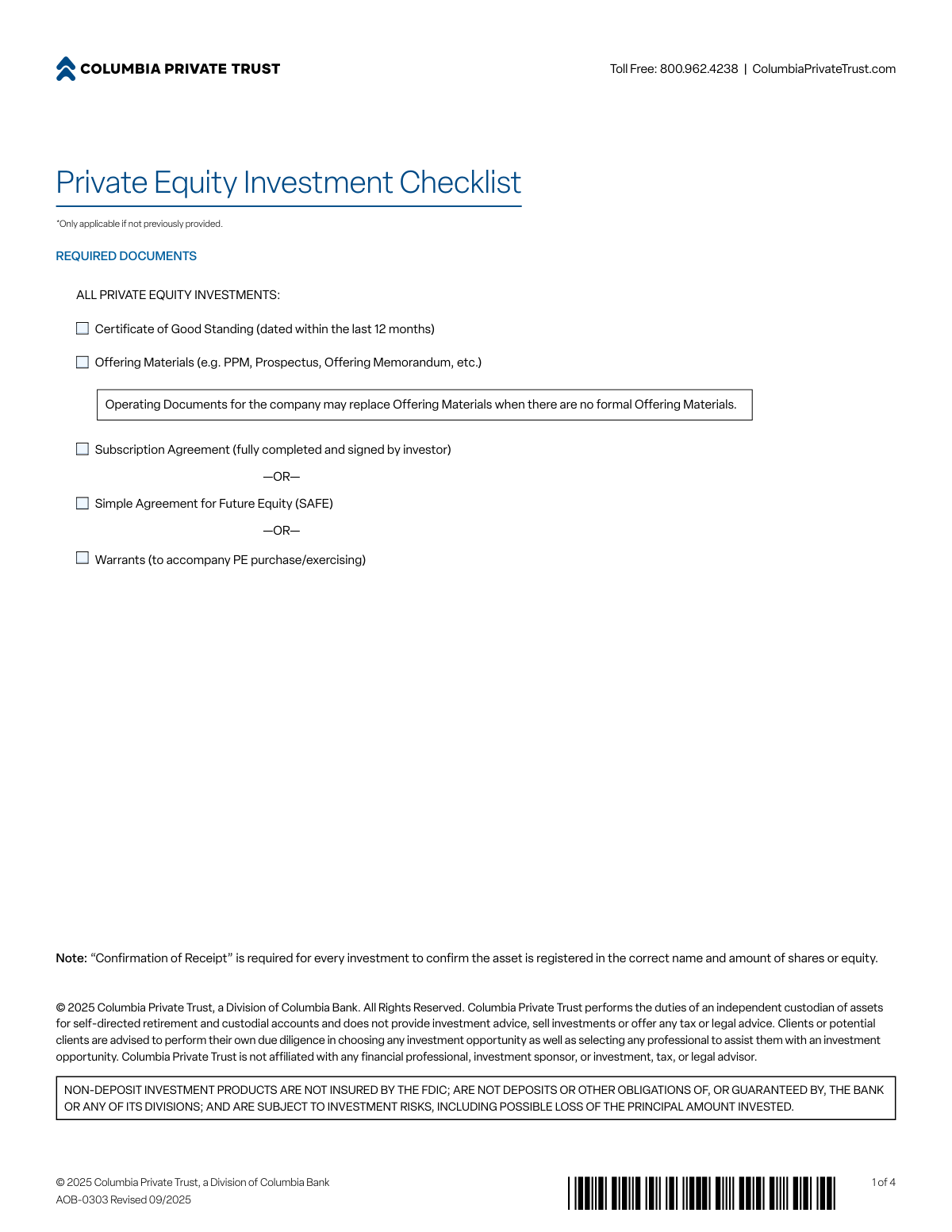
You must provide a Certificate of Good Standing, Offering Materials (like a PPM or Prospectus), and a fully executed Subscription Agreement, SAFE, or Warrants. If no formal offering materials exist, the company's Operating Documents may be substituted.
The 'Current Amount to be Funded Now' is the specific dollar amount you are investing at this moment. The 'Total Commitment Amount' is the total capital you have agreed to invest over time, which may be drawn down in future capital calls.
You must disclose this relationship in Section 2 and answer the follow-up questions. It is your responsibility to consult a tax advisor to ensure the investment is not a prohibited transaction under IRS Code Section 4975.
A capital call is a request from the investment sponsor to fund a portion of your total investment commitment. You can authorize a one-time capital call in Section 2 or pre-authorize all future capital calls for a specific investment in Section 3.
In Section 5, you must select either 'Check' or 'Wire' and provide all the necessary details, such as the payee name for a check or the bank name, ABA/Routing number, and account number for a wire.
You can email the completed package to [email protected], fax it to 303.614.7051, or mail it to the Columbia Private Trust Processing Center in Denver, CO.
No, the form explicitly states that non-deposit investment products are not insured by the FDIC, are not guaranteed by the bank, and are subject to investment risks, including the possible loss of principal.
If Columbia Private Trust cannot obtain the necessary documentation to confirm the investment is properly registered in your account's name, they may resign as the custodian for that asset, which could be a tax-reportable event.
By checking this box, you give Columbia Private Trust standing authorization to automatically fund all future capital calls for this investment as they are requested by the sponsor. You are responsible for ensuring sufficient cash is available in your account to cover these calls.
Yes, services like Instafill.ai use AI to accurately auto-fill form fields, which can help you complete the form quickly and save time.
You can use a service like Instafill.ai to fill out this form online. Simply upload the PDF, and the platform will allow you to type your information directly into the fields before printing for signature.
If your PDF is not interactive, you can use a tool like Instafill.ai. It can convert flat, non-fillable PDFs into interactive forms that you can easily complete on your computer.
Compliance AOB-03
Validation Checks by Instafill.ai
1
Account Number Consistency
This check verifies that the 'COLUMBIA PRIVATE TRUST ACCOUNT NO.' entered in Section 1 (Account Owner Information) is identical to the account number entered in Section 6 (Acknowledgment & Signature). This is critical for ensuring the authorization is applied to the correct account and prevents processing errors or misapplication of funds. If the numbers do not match, the submission will be rejected, and the user will be prompted to correct the discrepancy.
2
Investment Funding Calculation
Validates the mathematical relationship between the number of units, price per unit, and the total funding amount in Section 2. The system will multiply 'No. of Units/Shares' by 'Price per Unit/Share' and ensure the result equals the 'Current Amount to be Funded Now'. This check prevents typos and calculation errors that could lead to incorrect investment amounts being processed. A mismatch will trigger an error, requiring the user to review and correct the values.
3
Final Investment Amount Consistency
This validation ensures the 'INVESTMENT AMOUNT' listed in the final signature block (Section 6) matches either the 'Current Amount to be Funded Now' or the 'Total Commitment Amount' from Section 2. This serves as a final confirmation of the authorized financial transaction amount before execution. If the amounts are inconsistent, the form is considered ambiguous and will be flagged for correction to prevent financial errors.
4
Conditional Funding Instructions
This check enforces that if 'Wire' is selected in Section 5, all wire-related fields (Bank Name, ABA No., Bank Account Name, Bank Account No., Reference) must be completed. Conversely, if 'Check' is selected, the payee and mailing address fields must be filled. This ensures that the payment can be successfully processed without delays caused by missing information for the chosen funding method.
5
Conditional Disqualified Person Disclosure
This validation activates if the user checks the box confirming they are an officer, director, or employee of the investment entity. It then requires the user to complete all sub-questions regarding their role, management involvement, voting rights, and compensation. This is a crucial compliance check to document potential conflicts of interest under Internal Revenue Code Section 4975, and failure to provide details will halt the submission.
6
ABA Routing Number Format
This check specifically validates the 'ABA NO.' field in the Wire Instructions section. It ensures the entry is exactly 9 digits long and contains only numbers, conforming to the standard format for an American Bankers Association routing number. This is essential for the successful processing of domestic wire transfers, and an invalid format will cause the transfer to fail.
7
Required Fields Completeness
This is a global check that verifies all fields marked with an asterisk (*) have been filled out. It ensures that critical information like account owner details, investment specifics, and company contacts are not missing. Submitting an incomplete form would cause significant processing delays, so this check prevents the form from being submitted until all mandatory data is provided.
8
Email Address Format Validation
This check examines all email address fields on the form (in Sections 1 and 4) to ensure they follow a standard format (e.g., '[email protected]'). Valid email addresses are necessary for communication, sending confirmations, and delivering signed documents. An invalid format would lead to communication failures, so the user is prompted to correct the entry before submission.
9
Funding Deadline Is a Future Date
This validation ensures that the 'Funding Deadline' provided in Section 2 is a valid date that occurs in the future. A past date is illogical and would make the instruction impossible to fulfill as requested. This check prevents nonsensical data entry and ensures that the processing team receives a feasible deadline for the transaction.
10
Authorization Type Selection Logic
This check ensures that exactly one option is selected from the authorization type list ('New Purchase', 'Additional Purchase', 'Capital Call', 'Exchange'). Furthermore, if 'Exchange' is selected, it validates that the 'NAME OF INVESTMENT FROM WHICH EXCHANGING' and 'TOTAL AMOUNT OF INVESTMENT TO BE EXCHANGED' fields are completed. This logic prevents ambiguous or incomplete instructions regarding the nature of the transaction.
11
Percentage of Ownership Range
This validation confirms that the value entered for 'PERCENTAGE OF OWNERSHIP AFTER PURCHASE IS COMPLETE' is a numeric value between 0 and 100. This ensures the data is logical and within the possible range for an ownership stake. An entry outside this range would be erroneous and must be corrected before the form can be processed.
12
Total Commitment Amount Logic
This check is performed if a value is entered into the 'TOTAL COMMITMENT AMOUNT' field. It verifies that this amount is greater than or equal to the 'CURRENT AMOUNT TO BE FUNDED NOW'. It is illogical for the initial funding to exceed the total commitment. This validation prevents data entry errors and ensures the financial figures are consistent with the investment structure.
Common Mistakes in Completing AOB-03
Investors often overlook the checklist on the first page and fail to include essential documents like the Subscription Agreement, Offering Materials, or a recent Certificate of Good Standing. This is the most common reason for immediate rejection of the submission, causing significant processing delays until all required paperwork is provided. To prevent this, create a checklist and gather all documents before starting the form; since the form is a flat PDF, using a tool like Instafill.ai can help manage the submission by converting it to a fillable version and bundling it with attachments.
A frequent error is a mismatch between the 'No. of Units/Shares' multiplied by the 'Price Per Unit/Share' and the 'Current Amount to be Funded Now'. Investors also confuse the 'Current Amount to be Funded' with the 'Total Commitment Amount'. This discrepancy requires the processor to contact the investor for clarification, halting the transaction. Always double-check your calculations and ensure you understand the difference between the immediate funding amount and your total long-term commitment.
Investors who are officers, directors, or employees of the investment entity may mistakenly check the box confirming they are *not* affiliated, or they check the correct box but fail to complete the required follow-up questions. This is a critical compliance error that can have serious tax implications related to prohibited transactions under IRC Section 4975. It is crucial to answer this section accurately and consult a tax advisor if you have any affiliation with the company.
The Funding Instructions section is highly prone to error, with investors often entering incorrect ABA/Routing numbers, account numbers, or bank names. Submitting incomplete information or attaching instructions separately, as warned on the form, will delay funding due to extra verification steps. A single incorrect digit can cause the wire to fail, potentially jeopardizing the investment. Using a service like Instafill.ai can prevent these errors by securely saving and auto-filling verified banking details.
Applicants frequently select the wrong transaction type, such as choosing 'New Purchase' for a 'Capital Call' or vice-versa. A capital call requires a specific notice from the investment sponsor, which is often forgotten. This mistake leads to incorrect processing, as each transaction type has a different workflow and documentation requirement. Carefully review your investment documents to select the correct type and ensure you include all associated notices.
The signature page repeats fields like 'Name of Investment' and 'Investment Amount', and filers often leave them blank or enter information that conflicts with what they provided in Section 2. This happens due to form fatigue and creates ambiguity that must be resolved before processing. To avoid this, fill out every field, even if it seems redundant, and ensure the data matches the details on page 2, particularly whether the amount is the current funding or total commitment.
In Section 4, 'Company (Issuer) Contact Information', investors sometimes mistakenly enter their own contact details instead of the information for the company they are investing in. This prevents the custodian from being able to contact the investment issuer for verification and confirmation of purchase. Always provide the contact information for the fund manager or a representative of the company issuing the equity, not your own.
By checking the box in Section 3, the investor authorizes Columbia Private Trust to automatically fund all future capital calls up to the total commitment amount without requiring a new form for each call. Many investors check this for convenience without fully understanding they are creating a standing instruction for automatic payments. This can lead to unexpected debits from their account if they aren't tracking capital call notices, so it should only be selected if you are prepared to maintain sufficient cash and monitor the commitment.
The form explicitly requires a Certificate of Good Standing for the investment entity that is dated within the last 12 months. Investors may have an older certificate on file and submit it without checking the date, leading to a request for updated documentation. This delays the entire investment process. Always verify the date on the certificate before submission and request a new one from the relevant Secretary of State if it is more than a year old.
When selecting 'Exchange' as the transaction type, filers often fail to provide a clear and complete 'Name of Investment From Which Exchanging'. This ambiguity makes it impossible for the custodian to identify which existing asset in the account should be used for the exchange. To avoid delays, you must specify the exact name of the existing asset and the precise amount or percentage to be exchanged into the new asset.
Saved over 80 hours a year
“I was never sure if my IRS forms like W-9 were filled correctly. Now, I can complete the forms accurately without any external help.”
Kevin Martin Green
Your data stays secure with advanced protection from Instafill and our subprocessors




Robust compliance program
Transparent business model
You’re not the product. You always know where your data is and what it is processed for.
ISO 27001, HIPAA, and GDPR
Our subprocesses adhere to multiple compliance standards, including but not limited to ISO 27001, HIPAA, and GDPR.
Security & privacy by design
We consider security and privacy from the initial design phase of any new service or functionality. It’s not an afterthought, it’s built-in, including support for two-factor authentication (2FA) to further protect your account.
Fill out AOB-03 with Instafill.ai
Worried about filling PDFs wrong? Instafill securely fills form-aob-03-private-equity-investment-authorization forms, ensuring each field is accurate.
