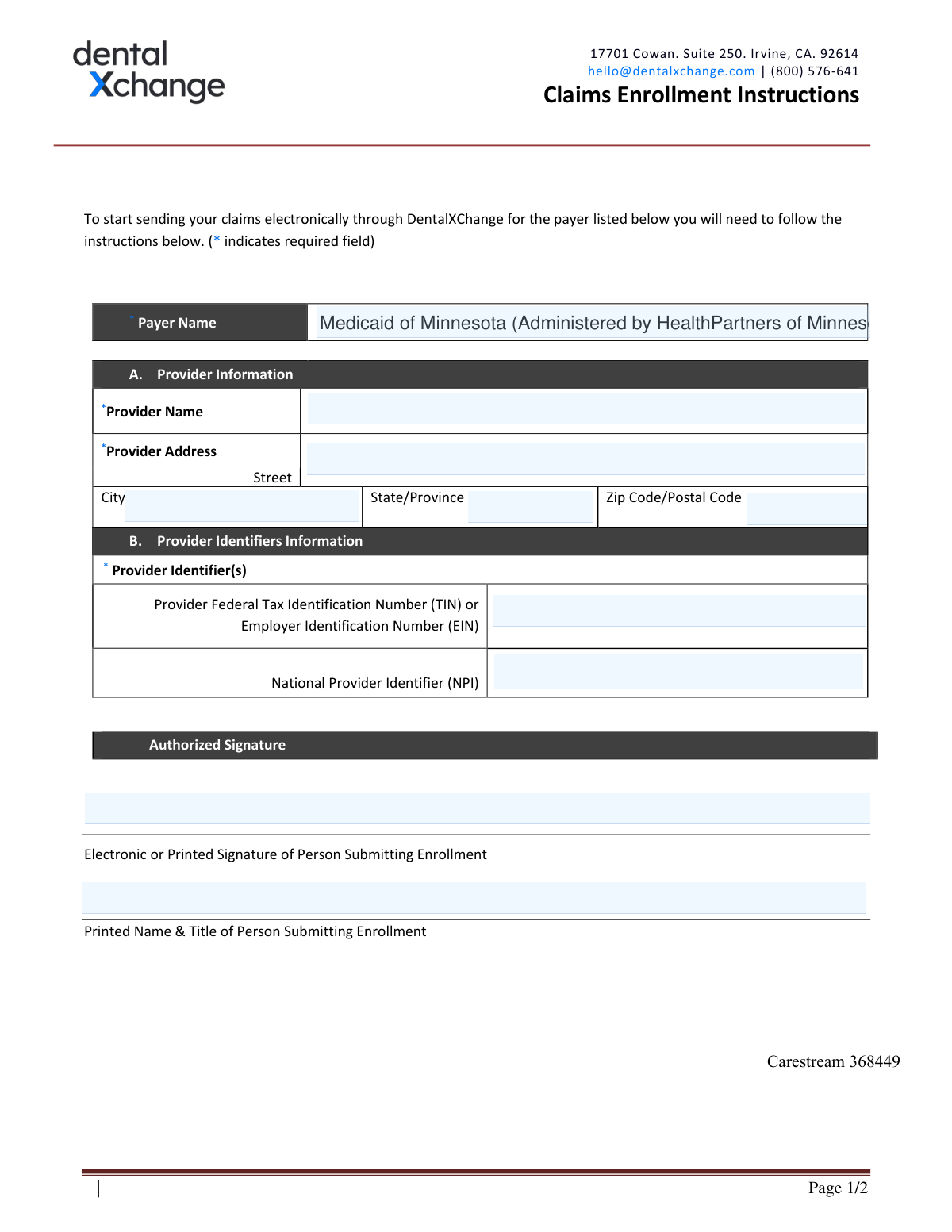
Yes! You can use AI to fill out Medicaid of Minnesota (Administered by HealthPartners of Minnesota) EDI Trading Partner Enrollment Form

The EDI Trading Partner Enrollment Form is a crucial document for healthcare providers who wish to submit claims electronically to Medicaid of Minnesota as administered by HealthPartners. By completing this form, providers establish a connection through a clearinghouse like DentalXChange, enabling efficient and secure transmission of billing information. Today, this form can be filled out quickly and accurately using AI-powered services like Instafill.ai, which can also convert non-fillable PDF versions into interactive fillable forms.
Our AI automatically handles information lookup, data retrieval, formatting, and form filling.
It takes less than a minute to fill out EDI Trading Partner Enrollment Form using our AI form filling.
Securely upload your data. Information is encrypted in transit and deleted immediately after the form is filled out.

Form specifications

Form name: Medicaid of Minnesota (Administered by HealthPartners of Minnesota) EDI Trading Partner Enrollment Form
Number of pages: 1
Language: English
Categories: Medicaid forms, enrollment forms, trading forms, health forms
main-image

Instafill Demo: How to fill out PDF forms in seconds with AI

How to Fill Out EDI Trading Partner Enrollment Form Online for Free in 2026

Are you looking to fill out a EDI TRADING PARTNER ENROLLMENT FORM form online quickly and accurately? Instafill.ai offers the #1 AI-powered PDF filling software of 2026, allowing you to complete your EDI TRADING PARTNER ENROLLMENT FORM form in just 37 seconds or less.
Follow these steps to fill out your EDI TRADING PARTNER ENROLLMENT FORM form online using Instafill.ai:
  1. 1 Navigate to Instafill.ai and upload the EDI Trading Partner Enrollment Form, or select it from their template library.
  2. 2 Use the AI assistant to automatically populate your provider information, including the legal name and full address.
  3. 3 Enter your Provider Identifiers, such as the Federal Tax Identification Number (TIN) and National Provider Identifier (NPI), into the designated fields.
  4. 4 Indicate the reason for submission (New, Change, or Cancel Enrollment) by checking the appropriate box.
  5. 5 Review all the information pre-filled by the AI for accuracy and make any necessary corrections.
  6. 6 Provide an authorized electronic signature and enter the printed name and title of the person submitting the enrollment to finalize the document.
  7. 7 Download, print, or securely submit the completed form as instructed by DentalXChange (e.g., upload, email, or fax).

Our AI-powered system ensures each field is filled out correctly, reducing errors and saving you time.

Why Choose Instafill.ai for Your Fillable EDI Trading Partner Enrollment Form Form?

Speed

Complete your EDI Trading Partner Enrollment Form in as little as 37 seconds.

Up-to-Date

Always use the latest 2026 EDI Trading Partner Enrollment Form form version.

Cost-effective

No need to hire expensive lawyers.

Accuracy

Our AI performs 10 compliance checks to ensure your form is error-free.

Security

Your personal information is protected with bank-level encryption.

Frequently Asked Questions About Form EDI Trading Partner Enrollment Form

This form is an EDI Trading Partner Enrollment application. It allows dental providers to register with DentalXChange to send claims electronically to Medicaid of Minnesota, as administered by HealthPartners.

Any dental provider who wants to submit claims electronically for Medicaid of Minnesota (administered by HealthPartners) through the DentalXChange platform must complete this form.

You will need your complete legal provider name, practice address, Federal Tax ID Number (TIN/EIN), and your National Provider Identifier (NPI). The form must also be signed by an authorized individual.

The Payer ID for Medicaid of Minnesota (Administered by HealthPartners of Minnesota) is 94267.

You must enter the complete legal name of the institution, corporate entity, practice, or individual provider. Do not use abbreviations or DBAs unless they are part of the legal name.

A TIN (Tax Identification Number) or EIN is used to identify a business for tax purposes. An NPI (National Provider Identifier) is a unique 10-digit ID for healthcare providers required for administrative and financial transactions under HIPAA.

You can submit the form by uploading it back into DDS Enroll, emailing it to [email protected], or faxing it to (800) 866-0006.

The payer estimates an approval timeframe of 2-3 business days from the date they receive your submission.

For enrollment questions, contact the DentalXChange Enrollment Department at (800) 576-6412 ext. 461 or via email at [email protected].

You can submit this form again and select 'Change Enrollment' as the reason for submission to update your information.

Yes, to stop sending claims electronically through this service, you can fill out the form and select 'Cancel Enrollment' as the reason for submission.

The form must be signed by an individual authorized by the provider to initiate, modify, or terminate an enrollment. This person must also print their name and title on the form.

Yes, services like Instafill.ai use AI to accurately auto-fill form fields with your saved information, which can save you significant time and reduce errors.

Simply upload the form to the Instafill.ai platform. The AI will identify the fields, and you can use your saved provider profile to populate the information in seconds before downloading the completed form.

You can use a service like Instafill.ai, which can convert flat, non-fillable PDFs into interactive, fillable forms. This allows you to easily type your information directly into the fields online.

Compliance EDI Trading Partner Enrollment Form
Validation Checks by Instafill.ai

1
Ensures Provider Name is the Full Legal Name
This validation checks that the 'Provider Name' field is not empty and, where possible, does not contain common abbreviations. The form requires the complete legal name for proper identification and contract processing. A missing or abbreviated name can lead to mismatched records and will cause the enrollment to be rejected pending correction.
2
Verifies Full Provider Address is Complete
This validation ensures that the Street, City, State, and Zip Code fields for the provider's address are all filled out. A complete physical address is a fundamental requirement for provider verification and official correspondence. An incomplete address will result in an immediate submission failure as the provider's location cannot be confirmed.
3
Validates State/Province Code Format
This check confirms that the 'State/Province' field contains a valid two-character code as specified by ISO 3166-2 (e.g., 'MN' for Minnesota). Using a standardized code is essential for system compatibility and accurate address processing. An invalid format will cause a validation error, preventing submission until a proper two-letter code is entered.
4
Validates ZIP Code Format
This validation ensures the 'Zip Code/Postal Code' field is in a valid format, such as a 5-digit or 9-digit (ZIP+4) number for US addresses. A correct ZIP code is critical for mail delivery and geographic data integrity. An incorrectly formatted ZIP code will trigger an error and block the form submission.
5
Validates City, State, and ZIP Code Consistency
This validation cross-references the entered City, State, and ZIP Code against a postal database to ensure they form a valid combination. This check prevents address errors that could lead to returned mail and significant delays in communication from the payer. A mismatch will flag the address as potentially invalid and require user review and correction before submission.
6
Validates TIN/EIN Format
This validation confirms that the provided 'Provider Federal Tax Identification Number (TIN)' is a 9-digit numeric value, optionally allowing for a standard hyphen (XX-XXXXXXX). This specific format is required by the IRS and is used to uniquely identify a business entity for financial transactions. Submitting an incorrectly formatted TIN/EIN will lead to immediate rejection of the enrollment.
7
Ensures National Provider Identifier (NPI) is Provided
This check ensures the 'National Provider Identifier (NPI)' field has been filled out, as it is a required field. The NPI is a standard unique identifier for healthcare providers required for all HIPAA-compliant administrative and financial transactions. Failure to provide an NPI will halt the enrollment process entirely.
8
Validates National Provider Identifier (NPI) Format
This validation verifies that the NPI is exactly 10 digits long and contains only numbers, as specified in the form instructions. The NPI has a standardized 10-digit format that is essential for it to be recognized by healthcare payment systems. An NPI with an incorrect length or non-numeric characters will fail validation and must be corrected.
9
Performs NPI Luhn Checksum Validation
This check applies the Luhn algorithm to the 10-digit NPI to verify its checksum, which helps detect common typographical errors during data entry. This is a standard integrity check for NPI numbers to ensure the provided number is mathematically valid. An NPI that fails the checksum validation is almost certainly incorrect and will be rejected.
10
Ensures Submitter's Printed Name is Provided
This validation confirms that the 'Printed Name of Person Submitting Enrollment' field is completed. This is necessary to identify the individual who is authorizing the enrollment on behalf of the provider. The form cannot be considered complete or legally binding without the name of the authorized submitter.
11
Ensures Submitter's Title is Provided
This check verifies that the 'Printed Title of Person Submitting Enrollment' field is filled out. The submitter's title, such as 'Office Manager' or 'Billing Director', helps establish their authority to act on behalf of the provider. Omitting the title can lead to questions about the legitimacy of the submission and may cause processing delays or rejection.
12
Verifies Presence of Authorized Signature
This check ensures that the 'Authorized Signature' field has been completed, whether by electronic signature, a typed name, or other digital means. The signature serves as legal confirmation that the submitted information is accurate and the submitter is authorized to complete the enrollment. A missing signature will render the application invalid and cause immediate rejection.

Common Mistakes in Completing EDI Trading Partner Enrollment Form

Using an Incorrect or Abbreviated Provider Name

This mistake occurs when staff use a common practice name (DBA) or an abbreviation instead of the full legal entity name registered with the IRS and NPI registry. This causes a mismatch with the provider's TIN/EIN and NPI records, leading to automatic rejection of the enrollment application. To avoid this, always use the complete legal name as it appears on official tax documents and NPI registration, and double-check it before submission.

Entering the Wrong Type of National Provider Identifier (NPI)

Providers often have both an individual (Type 1) NPI and an organizational (Type 2) NPI for their practice. It's easy to mistakenly enter the individual NPI when the form requires the group/organizational one for billing. This results in claim rejections because they are submitted under the wrong entity, halting all electronic claim submissions until a corrected enrollment is processed. Always verify if the enrollment is for an individual or a group and ensure the NPI type matches the legal provider name on the form.

Incorrect Federal Tax ID Number (TIN/EIN)

This is often a simple data entry error, such as transposing digits or entering a Social Security Number (SSN) for a corporate entity that uses an Employer Identification Number (EIN). The enrollment will be immediately rejected as the TIN/EIN will not match the legal provider name in IRS records, stopping the entire process. Carefully copy the TIN/EIN from official tax documents and have a second person review it. AI-powered form filling tools like Instafill.ai can also help by validating the format of the number entered.

Improperly Formatted Provider Address

Applicants may write out the full state name instead of the required two-character code, use a P.O. Box instead of a physical street address, or make typos in the zip code. The form's instructions specifically request the 'ISO 3166-2 Two Character Code' for the state. An incorrect address can lead to failed validation against the NPI registry and rejection of the application. To prevent this, use the two-letter state abbreviation and verify the full physical address against official records. Tools like Instafill.ai can auto-format addresses correctly.

Signature by an Unauthorized Person

For convenience, an office manager or administrative assistant who is not a legally authorized signatory for the provider entity may sign the form. This renders the form legally invalid and will cause it to be rejected upon review. This mistake requires the form to be re-submitted with the correct signature, restarting the entire approval process. Ensure the form is signed only by an individual legally authorized to enter into agreements for the provider entity, such as the owner or a corporate officer.

Omitting the Printed Name and Title of the Signatory

After signing the form, the submitter may forget to legibly print their full name and official title in the designated fields below the signature line. An illegible or missing printed name and title makes it impossible for the payer to verify the identity and authority of the person who signed. This will result in the form being returned as incomplete. Always complete all fields in the signature section, carefully printing your full name and job title.

Selecting the Incorrect Reason for Submission

An office that is already enrolled but needs to update its address or TIN might mistakenly select 'New Enrollment' instead of 'Change Enrollment.' This can create duplicate, conflicting profiles in the payer's system or inadvertently reset existing settings, leading to processing errors and payment disruptions. Carefully review the reason for submission and select 'Change Enrollment' for any updates to an existing profile.

Illegible Handwriting on a Manual Form

If the form is a non-fillable PDF, it must be printed and filled out by hand, where rushed handwriting can make critical information like names and ID numbers unreadable. The data entry team may misinterpret the information, leading to rejections, or simply return the form as illegible. To avoid this, print clearly in block letters. Alternatively, a service like Instafill.ai can convert the flat PDF into a fillable version, allowing you to type information for perfect clarity.

NPI and TIN Do Not Correspond to the Same Entity

This error occurs when the NPI provided belongs to one entity (e.g., an individual doctor's Type 1 NPI) while the TIN belongs to another (e.g., the group practice's EIN). Payers cross-reference these identifiers, and a mismatch indicates a fundamental error in identifying the billing provider, causing an automatic rejection. Before filling out the form, confirm that the legal name, NPI, and TIN all belong to the single, correct billing entity.
Saved over 80 hours a year

“I was never sure if my IRS forms like W-9 were filled correctly. Now, I can complete the forms accurately without any external help.”

Kevin Martin Green

Your data stays secure with advanced protection from Instafill and our subprocessors

Robust compliance program

Transparent business model

You’re not the product. You always know where your data is and what it is processed for.

ISO 27001, HIPAA, and GDPR

Our subprocesses adhere to multiple compliance standards, including but not limited to ISO 27001, HIPAA, and GDPR.

Security & privacy by design

We consider security and privacy from the initial design phase of any new service or functionality. It’s not an afterthought, it’s built-in, including support for two-factor authentication (2FA) to further protect your account.

Fill out EDI Trading Partner Enrollment Form with Instafill.ai

Worried about filling PDFs wrong? Instafill securely fills medicaid-of-minnesota-administered-by-healthpartners-of-minnesota-edi-trading-partner-enrollment-form forms, ensuring each field is accurate.