Yes! You can use AI to fill out New York State Medicaid Enrollment Form (EMEDNY-436701)

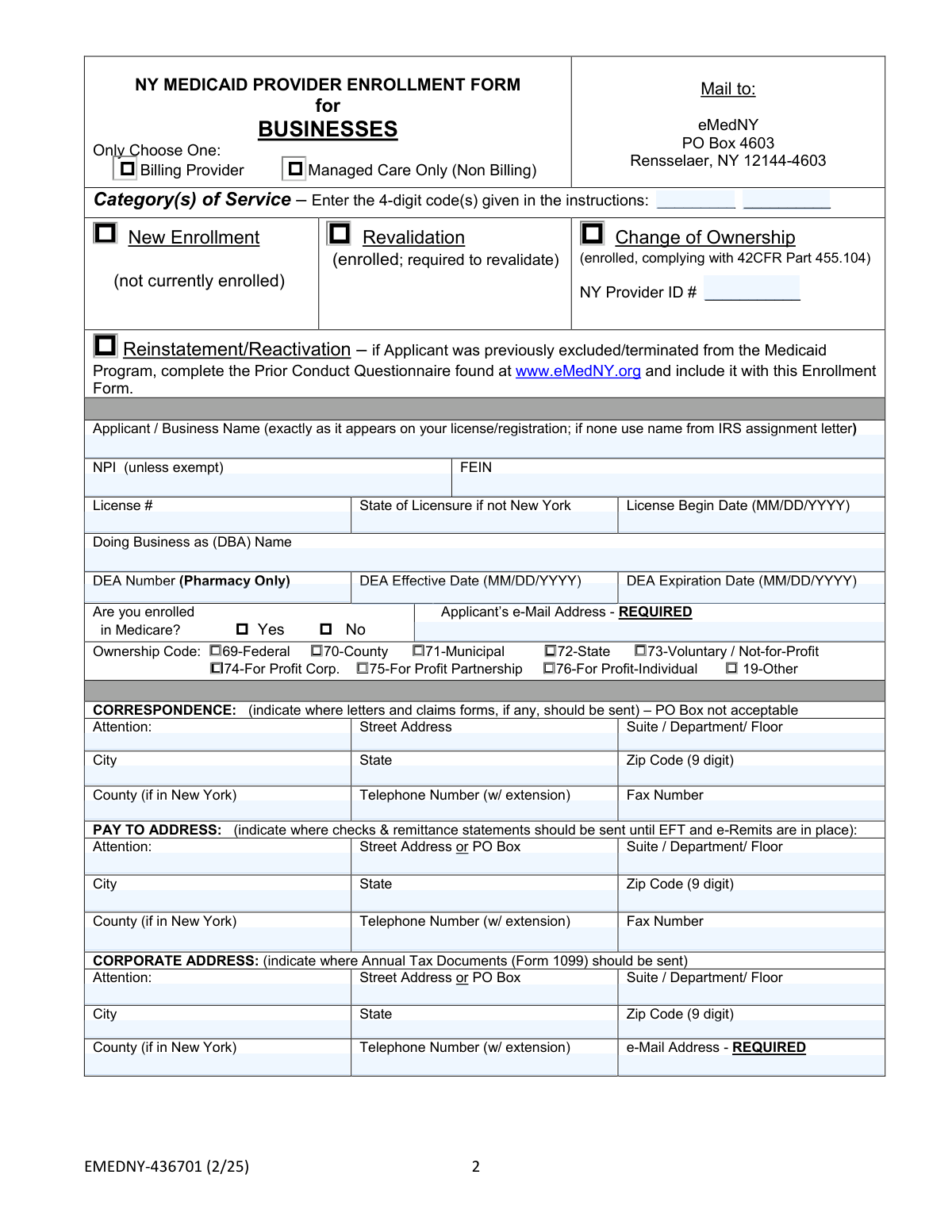
Form EMEDNY-436701 is the application for businesses seeking to enroll, revalidate, or report a change of ownership within the New York State Medicaid Program. Completing this form is a mandatory step for any business entity wanting to provide services to Medicaid beneficiaries and receive payment from the state. Today, this form can be filled out quickly and accurately using AI-powered services like Instafill.ai, which can also convert non-fillable PDF versions into interactive fillable forms.
Our AI automatically handles information lookup, data retrieval, formatting, and form filling.
It takes less than a minute to fill out EMEDNY-436701 using our AI form filling.
Securely upload your data. Information is encrypted in transit and deleted immediately after the form is filled out.

Form specifications

Form name: New York State Medicaid Enrollment Form (EMEDNY-436701)
Number of pages: 1
Language: English
Categories: Medicaid forms, New York forms, PA state forms, enrollment forms, New York State forms, NJ state forms
main-image

Instafill Demo: How to fill out PDF forms in seconds with AI

How to Fill Out EMEDNY-436701 Online for Free in 2026

Are you looking to fill out a EMEDNY-436701 form online quickly and accurately? Instafill.ai offers the #1 AI-powered PDF filling software of 2026, allowing you to complete your EMEDNY-436701 form in just 37 seconds or less.
Follow these steps to fill out your EMEDNY-436701 form online using Instafill.ai:
  1. 1 Navigate to Instafill.ai and upload or select the New York State Medicaid Enrollment Form.
  2. 2 Provide essential business information, including the applicant's legal name, FEIN, NPI, license details, and category of service.
  3. 3 Enter all required addresses, such as the correspondence, 'pay to', corporate, and service addresses.
  4. 4 Complete the detailed 'Disclosure of Ownership and Control' section, providing information on all owners, agents, and managing employees as required by federal regulations.
  5. 5 Answer the series of questions regarding prior conduct, sanctions, criminal history, and ownership changes for the applicant and associated individuals/entities.
  6. 6 Use the AI to review all entered information for completeness and accuracy, making any necessary corrections before finalizing.
  7. 7 Electronically sign and date the affirmation section to certify the accuracy of the provided information and agree to the program's terms before submission.

Our AI-powered system ensures each field is filled out correctly, reducing errors and saving you time.

Why Choose Instafill.ai for Your Fillable EMEDNY-436701 Form?

Speed

Complete your EMEDNY-436701 in as little as 37 seconds.

Up-to-Date

Always use the latest 2026 EMEDNY-436701 form version.

Cost-effective

No need to hire expensive lawyers.

Accuracy

Our AI performs 10 compliance checks to ensure your form is error-free.

Security

Your personal information is protected with bank-level encryption.

Frequently Asked Questions About Form EMEDNY-436701

This form is used by business entities to enroll in, revalidate, or reactivate their status as a provider with the New York State Medicaid program, allowing them to bill for services rendered to Medicaid beneficiaries.

Any business, including for-profit corporations, non-profits, and government agencies, that wants to become a service provider for the New York State Medicaid program must complete this form.

No. You are at financial risk if you provide services before your enrollment is successfully completed and approved, as payment will not be made for claims submitted before your authorized enrollment date.

The 'Correspondence' address is for general letters, the 'Pay To' address is where payment checks and remittance statements are sent, and the 'Corporate' address is used for sending annual tax documents like the Form 1099.

This section requires detailed information about all individuals and entities with ownership or control interest, including their names, addresses, SSN/FEIN, and relationships. Failure to complete this section will cause the application to be returned.

If you answer 'Yes' to any questions about prior sanctions, convictions, or license restrictions, you must also download, complete, and submit the 'Prior Conduct Questionnaire' from the eMedNY.org website along with this enrollment form.

Mail the fully completed form, with an original signature, to eMedNY, PO Box 4603, Rensselaer, NY 12144-4603.

It is a 4-digit code identifying your provider type. These codes are listed in the separate 'Instructions to Complete Enrollment Form' document, which you should review before filling out the application.

You may use a P.O. Box for the 'Pay To' and 'Corporate' addresses, but a physical street address is required for the 'Correspondence' and 'Service' addresses.

An authorized representative of the applicant business must sign the form. The signature must be an original and handwritten; stamped signatures are not accepted.

Failure to complete the form in its entirety will cause your application to be returned, delaying your enrollment. Knowingly providing false information can result in denial, termination, and prosecution under state and federal law.

Yes, services like Instafill.ai use AI to accurately auto-fill form fields with your saved information, which can save significant time and reduce errors on complex forms like this one.

Simply upload the NYS Medicaid Enrollment Form PDF to the Instafill.ai platform. The AI will make the form fillable and help you complete the fields using your securely stored business and personal information.

If you have a non-fillable or 'flat' PDF, you can use a service like Instafill.ai. It can convert the static PDF into an interactive, fillable form that you can easily complete on your computer before printing.

Compliance EMEDNY-436701
Validation Checks by Instafill.ai

1
Ensures Enrollment Type and Provider ID Consistency
This check verifies that if the applicant selects 'Revalidation' or 'Change of Ownership' as the enrollment type, the 'NY Provider ID #' field is populated. This is crucial because these enrollment types apply to existing providers, and the ID is necessary to locate and update the correct record. If the ID is missing for these selections, the form submission will be rejected as incomplete, preventing processing.
2
Validates National Provider Identifier (NPI) Format
This validation ensures that the National Provider Identifier (NPI) is a 10-digit number, unless the applicant is exempt. The check confirms the field contains only numerals and is the correct length, and can also include a checksum validation (Luhn algorithm) to catch typos. An invalid NPI will prevent proper identification in national healthcare systems and will cause the application to be returned for correction.
3
Verifies Federal Employer Identification Number (FEIN) Format
This check confirms that the Federal Employer Identification Number (FEIN) is a 9-digit number. It ensures the integrity of the tax identification number provided for the business entity. Submitting an incorrectly formatted FEIN can lead to issues with tax reporting (1099 forms) and payment processing, so the application will be flagged as invalid until a valid 9-digit number is provided.
4
Validates Date Formats and Chronological Logic
This check ensures all date fields (e.g., License Begin Date, Date of Birth, DEA dates) are entered in the specified MM/DD/YYYY format and represent valid dates. It also performs logical checks, such as verifying that a 'DEA Expiration Date' is chronologically after the 'DEA Effective Date'. Incorrect or illogical dates can cause legal and compliance issues, leading to application rejection.
5
Confirms Presence of Required Email Addresses
This validation verifies that the 'Applicant’s e-Mail Address' and the 'e-Mail Address' under the Corporate Address section are not empty. These fields are explicitly marked as 'REQUIRED' for communication purposes. Failure to provide a validly formatted email address will halt the enrollment process, as the system cannot proceed without a primary contact method.
6
Enforces PO Box Restriction for Physical Addresses
This check validates that the street address lines for the 'Correspondence Address' and 'Service Address' do not contain 'PO Box' or similar variations. The form explicitly forbids PO Boxes for these addresses, likely for site visit and official notice delivery requirements. An application with a PO Box in a restricted field will be considered non-compliant and returned for correction.
7
Validates 9-Digit ZIP Code Format
This check ensures that all ZIP code fields are populated with a 9-digit number, as specified on the form (e.g., XXXXX-XXXX or XXXXXXXXX). A complete 9-digit ZIP code is essential for accurate mail delivery and service area verification. Submissions with incomplete or incorrectly formatted ZIP codes will be flagged for correction to prevent communication and logistical errors.
8
Differentiates Between Individual (SSN) and Entity (FEIN) Identifiers
In the 'Disclosure of Ownership' section, this check ensures that if an individual owner is listed, their SSN is provided, and if a corporate entity is listed, its FEIN is provided. It prevents the mixing of personal and business tax identifiers. An entry with a missing or incorrect identifier type (e.g., an individual with a FEIN) will cause the disclosure section to be flagged as invalid, halting the application.
9
Validates Ownership Percentage is a Valid Number
This validation confirms that the '% of Ownership' field contains a numeric value between 0 and 100, inclusive. This is critical for determining control interest and complying with federal disclosure regulations (42 CFR Part 455.104). Any non-numeric input or a value outside the valid range will result in an error, requiring the applicant to correct the entry.
10
Flags Requirement for Prior Conduct Questionnaire
This check verifies if the applicant answered 'Yes' to any of the disclosure questions 1 through 4 in Section 6. If 'Yes' is selected, the system flags that a 'Prior Conduct Questionnaire' must be attached. This is a critical compliance step to ensure all past sanctions or legal issues are properly disclosed and reviewed, and failure to include the required questionnaire will render the application incomplete.
11
Ensures Conditional Fields for Ownership Change are Completed
This validation is triggered if the applicant answers 'Yes' to question 5 in Section 6 regarding a change of ownership in the last 12 months. It then verifies that the subsequent 'NY Medicaid ID or NPI' and 'Date of Ownership Change' fields are filled out. Missing this information would make it impossible to track the ownership history, so the form would be rejected pending completion of these dependent fields.
12
Verifies Supervising Professional for Specific Provider Types
This check determines if the applicant's 'Category(s) of Service' code corresponds to a Pharmacy, Laboratory, or Portable X-Ray provider. If it does, the system validates that the 'Name' and 'NPI' of the supervising professional on page 3 are provided. This is a regulatory requirement, and omitting this information for applicable provider types will result in an immediate rejection of the application.
13
Validates Social Security Number (SSN) Format
This check ensures that all Social Security Number (SSN) fields for individuals listed in the ownership and control sections contain a valid 9-digit number. The SSN is used for identity verification and background checks as required by federal regulations. An incorrectly formatted SSN will fail validation and must be corrected before the application can be processed.
14
Confirms Signature and Preparer Information is Present
This validation ensures the 'Applicant / Provider’s Signature' and the 'Name & Telephone Number of Person who Prepared Application' fields are not blank. The signature is a legal affirmation of the information's accuracy, and the preparer's contact is needed for any follow-up questions. An unsigned application or one missing preparer details is legally incomplete and will be rejected immediately.
15
Validates Category of Service Code Format
This check ensures the 'Category(s) of Service' field contains one or two codes, each being exactly four digits long and numeric. This code is fundamental to classifying the provider and determining the rules and reimbursement rates that apply to them. An invalid or incorrectly formatted code would make it impossible to categorize the provider, thus causing the application to fail.

Common Mistakes in Completing EMEDNY-436701

Incorrect or Missing Category of Service Code

Applicants often forget to enter the required 4-digit Category of Service code on page 2 or enter an incorrect one because they did not consult the separate instruction document. This omission or error prevents the application from being routed to the correct processing unit, causing significant delays or outright rejection. To avoid this, always download and carefully review the instructions to find the precise code for your business type before filling out the form.

Business Name Mismatch with Official Records

The form requires the business name to be entered 'exactly as it appears on your license/registration' or IRS assignment letter. A common error is using a common abbreviation, a 'Doing Business As' (DBA) name in the legal name field, or including/omitting suffixes like 'Inc.' or 'LLC' incorrectly. This mismatch leads to verification failures and application denial, requiring a complete resubmission. Double-check your official documents to ensure the name is identical.

Using P.O. Boxes for Prohibited Addresses

The form explicitly states that a P.O. Box is not acceptable for the 'Correspondence Address' and 'Service Address'. Many applicants overlook this detail and enter a P.O. Box out of habit, which results in the application being returned as incomplete. Always provide a physical street address for these sections to ensure compliance and prevent processing delays. The 'Pay To' and 'Corporate' addresses are the only sections where a P.O. Box may be permissible.

Providing Incomplete 5-Digit ZIP Codes

Throughout the application, fields for ZIP codes specify '(9 digit)'. Applicants frequently enter only the standard 5-digit ZIP code, which can lead to data entry errors and mail delivery issues for important correspondence, checks, and tax documents. To prevent this, use the USPS ZIP Code Lookup tool to find the full 9-digit ZIP+4 code for all addresses provided on the form. AI-powered form fillers like Instafill.ai can automatically find and format the correct 9-digit ZIP code.

Incomplete Ownership Disclosure Information

On the 'Disclosure of Ownership' section (page 4), the instructions specify to enter '0%' for zero ownership or 'None' if an NPI/Medicaid ID is not applicable. A frequent mistake is leaving these fields blank, which is considered an incomplete entry and will cause the application to be returned. Carefully follow the field-level instructions to ensure every required box contains a value, even if it is zero or 'None'.

Failing to Disclose All Managing Personnel

Section 5 requires the disclosure of all agents, managing employees, and individuals with control interest, such as board members and compliance officers. Applicants sometimes fail to list all required individuals or, if there are none, they leave the section blank instead of writing 'NONE' in the first name field as instructed. This omission violates federal disclosure regulations (42 CFR Part 455.104) and will result in the application being rejected.

Missing Required Attachments for Prior Conduct

On page 7, if an applicant answers 'Yes' to any of the first four questions regarding prior sanctions, convictions, or license restrictions, they must complete and attach the separate 'Prior Conduct Questionnaire'. A critical error is checking 'Yes' but failing to submit this required supplemental form. This automatically halts the enrollment process until the missing documentation is provided, causing major delays.

Using an Invalid or Stamped Signature

The signature block on page 8 explicitly requires an 'original; no stamps' signature. Submitting a form with a rubber-stamped signature, a digital signature on a printed copy, or a photocopied signature will invalidate the entire application. The form must be signed with an original ink ('wet') signature by an authorized individual to be considered legally binding and valid for processing.

Listing a Non-Enrolled Supervising Professional

For specific provider types like pharmacies or labs, the form requires identifying a supervising professional (e.g., Supervising Pharmacist) who must already be actively enrolled in the NY Medicaid program. Applicants often list a qualified professional who has not yet completed their own Medicaid enrollment. This creates a dependency that halts the business's application until the individual's enrollment is finalized, significantly extending the timeline.

Confusing Individual vs. Corporate Identifiers

The ownership disclosure section (page 4) requires different identifiers for individuals (SSN, DOB) and corporate entities (FEIN). A common data entry error is mixing these up, such as entering an SSN in the FEIN field for a parent company. Such mistakes cause data validation failures and can lead to the application being returned for correction. AI-powered tools like Instafill.ai can help prevent these errors by validating data formats for specific fields.

Submitting an Incomplete or Unfillable PDF

This form is a complex, multi-page document that must be completed in its entirety. Applicants often miss required fields scattered across the 8 pages, leading to an incomplete submission. Furthermore, if only a non-fillable 'flat' PDF is available, manual entry increases the risk of illegible handwriting and errors. Using a tool like Instafill.ai can convert the document into a smart, fillable form, guiding the user through all required fields to ensure completeness and legibility.
Saved over 80 hours a year

“I was never sure if my IRS forms like W-9 were filled correctly. Now, I can complete the forms accurately without any external help.”

Kevin Martin Green

Your data stays secure with advanced protection from Instafill and our subprocessors

Robust compliance program

Transparent business model

You’re not the product. You always know where your data is and what it is processed for.

ISO 27001, HIPAA, and GDPR

Our subprocesses adhere to multiple compliance standards, including but not limited to ISO 27001, HIPAA, and GDPR.

Security & privacy by design

We consider security and privacy from the initial design phase of any new service or functionality. It’s not an afterthought, it’s built-in, including support for two-factor authentication (2FA) to further protect your account.

Fill out EMEDNY-436701 with Instafill.ai

Worried about filling PDFs wrong? Instafill securely fills new-york-state-medicaid-enrollment-form-emedny-436701 forms, ensuring each field is accurate.