Yes! You can use AI to fill out Empower Enrollment Form
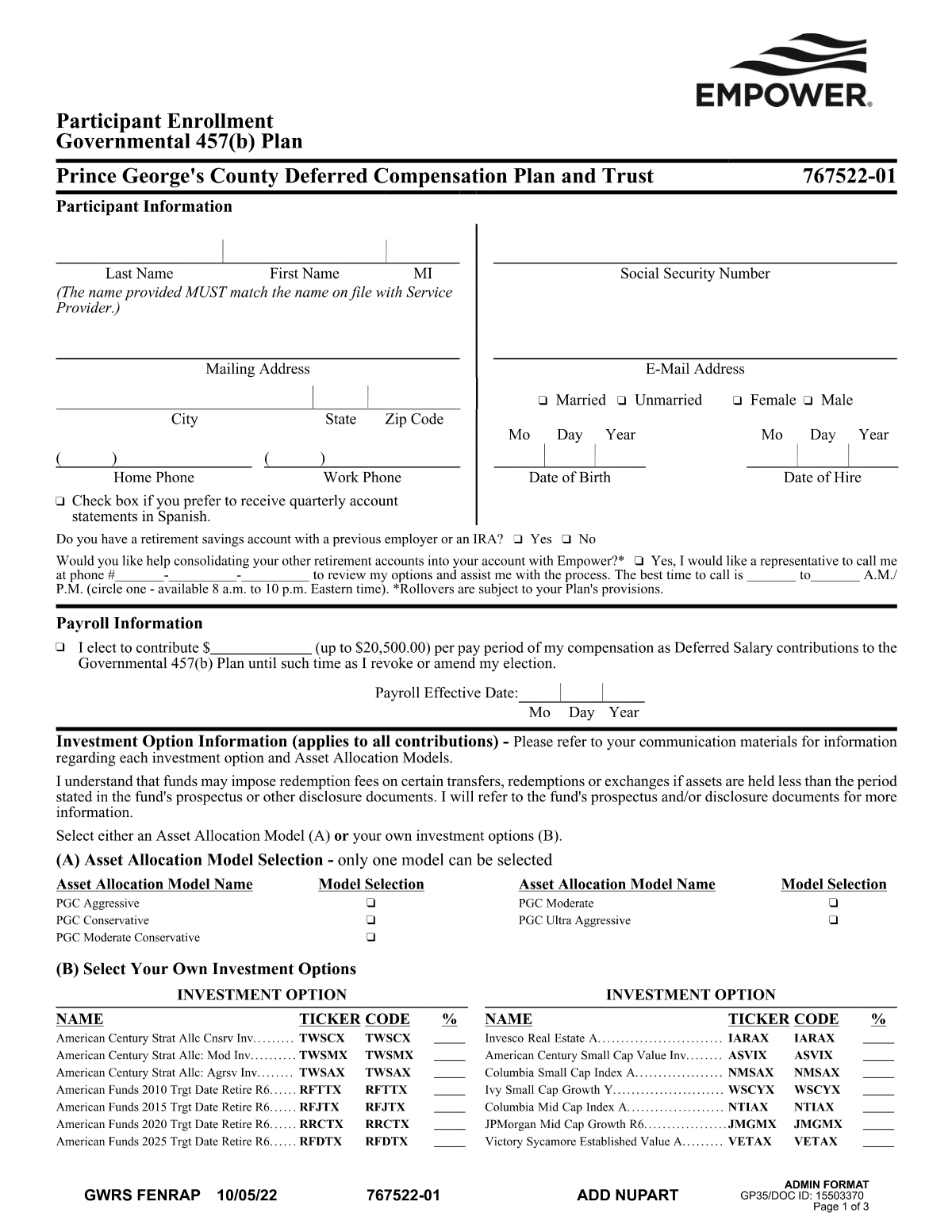
The Empower Enrollment Form is a document used by individuals to enroll in a retirement savings plan administered by Empower. It collects essential personal information, contribution details, and investment selections to establish a new retirement account. Today, this form can be filled out quickly and accurately using AI-powered services like Instafill.ai, which can also convert non-fillable PDF versions into interactive fillable forms.
Empower Enrollment Form is part of the
VA forms, HR forms, enrollment forms and Empower forms categories on Instafill.
Rather not fill this in by hand? Instafill is an online form filler that completes PDF forms automatically — upload the blank form, answer a few questions, and the AI fills every field.
Form specifications
| Form name: | Empower Enrollment Form |
| Number of pages: | 1 |
| Language: | English |
Our AI automatically handles information lookup, data retrieval, formatting, and form filling.
It takes less than a minute to fill out Empower Enrollment Form using our AI form filling.
Securely upload your data. Information is encrypted in transit and deleted immediately after the form is filled out.
Instafill Demo: How to fill out PDF forms in seconds with AI
How to Fill Out Empower Enrollment Form Online for Free in 2026
Are you looking to fill out a EMPOWER ENROLLMENT FORM form online quickly and accurately? Instafill.ai offers the #1 AI-powered PDF filling software of 2026, allowing you to complete your EMPOWER ENROLLMENT FORM form in just 37 seconds or less.
Follow these steps to fill out your EMPOWER ENROLLMENT FORM form online using Instafill.ai:
- 1 Navigate to Instafill.ai and upload your Empower Enrollment Form or select it from their template library.
- 2 Provide your personal information, such as your full name, address, Social Security number, and date of birth.
- 3 Enter your employment details as required by your plan sponsor.
- 4 Specify your contribution details, including the percentage or dollar amount you wish to contribute per pay period.
- 5 Indicate if you want assistance consolidating other retirement accounts into your new Empower account.
- 6 Review all the information pre-filled by the AI for accuracy, make any necessary corrections, and e-sign the document.
- 7 Download, print, or directly submit your completed enrollment form as instructed by your employer or Empower.
Our AI-powered system ensures each field is filled out correctly, reducing errors and saving you time.
Why Choose Instafill.ai for Your Fillable Empower Enrollment Form Form?
Speed
Complete your Empower Enrollment Form in as little as 37 seconds.
Up-to-Date
Always use the latest 2026 Empower Enrollment Form form version.
Cost-effective
No need to hire expensive lawyers.
Accuracy
Our AI performs 10 compliance checks to ensure your form is error-free.
Security
Your personal information is protected with bank-level encryption.
Frequently Asked Questions About Empower Enrollment Form
This form is used to enroll in your employer-sponsored retirement plan administered by Empower. Completing it allows you to start making contributions from your paycheck and investing for your retirement.
Any eligible employee who wants to participate in their company's retirement savings plan should complete this form. If you don't, you may not be enrolled or may be enrolled with default settings determined by the plan.
You will need your basic personal details like your full name, Social Security Number, date of birth, and contact information. You should also be prepared to name a beneficiary for your account.
This option is for those who have retirement accounts from previous jobs and wish to move (or 'roll over') that money into their new Empower account. If you select 'Yes,' an Empower representative will call you to help with the process.
No, consolidating your accounts is completely optional. However, many people do it to simplify managing their retirement savings in one place.
The form will ask for a percentage of your salary to contribute each pay period. Consider your budget and retirement goals, and be sure to contribute enough to get the full employer match if one is offered.
Most plans offer default investment options, like a Target-Date Fund, which is based on your age and expected retirement date. You can select this if you are unsure and can always change your investments later.
Designating a beneficiary ensures that your retirement savings are distributed to the person or people you choose in the event of your death. This helps your loved ones avoid a complex and lengthy legal process to claim the assets.
Typically, you will return the completed and signed form to your company's Human Resources or benefits department. Check the form or with your employer for specific submission instructions.
After you submit the form, it generally takes one to two pay cycles for your account to be activated and for contributions to begin. Empower will usually send a confirmation once your account is set up.
Yes, you can almost always change your contribution rate and investment choices after you are enrolled. You can typically make these changes by logging into your account on the Empower website.
Yes, services like Instafill.ai use AI to help you accurately auto-fill form fields with your information. This can save you time and help reduce errors.
You can upload the Empower Enrollment Form PDF to the Instafill.ai website. The platform allows you to fill in the fields interactively or use its AI to auto-populate your saved information before you download the completed form.
If you have a non-fillable or 'flat' PDF, you can use a tool like Instafill.ai. It can convert the document into an interactive, fillable form so you can easily type your answers directly into the fields.
Compliance Empower Enrollment Form
Validation Checks by Instafill.ai
1
Requires Phone Number if Consolidation Help is Requested
This is a conditional logic check based on the form's consolidation question. If the user selects 'Yes' to receiving help, this validation ensures that a phone number has been entered in the corresponding field. This is critical for an Empower representative to contact the user and provide the requested assistance. If 'Yes' is selected and the phone number is blank, an error message will appear, requiring the user to provide a number.
2
Ensures Account Consolidation Question is Answered
Based on the asterisk in the form, this check verifies that the mandatory question 'Would you like help consolidating your other retirement accounts?' has been answered with either 'Yes' or 'No'. This information is important for the service team to know whether follow-up is required. An unanswered question will halt the submission process until a selection is made.
3
Validates Social Security Number (SSN) Format and Issuance
This validation ensures the Social Security Number is entered in the correct XXX-XX-XXXX or XXXXXXXXX format and consists of nine digits. It also checks against known invalid SSN ranges (e.g., those with all zeros or starting with '9'). A valid and unique SSN is mandatory for tax reporting and to prevent duplicate accounts. If the SSN is invalid or malformed, the submission will be blocked until a valid number is provided.
4
Verifies Applicant's Age from Date of Birth
This check validates that the Date of Birth (DOB) is a real date and that the applicant meets the minimum age requirement to enroll in a retirement plan, typically 18 years old. It prevents enrollment of minors who are not legally eligible to enter into such a contract. An invalid date format or an age below the minimum threshold will trigger an error, prompting the user to correct the DOB.
5
Ensures Full Legal Name is Provided
This check verifies that the applicant has entered their full legal name, including first and last names, not just initials or a nickname. This is critical for legal and tax reporting purposes to ensure the account is correctly titled. Failure to provide a full legal name will result in a rejection of the form, requiring the user to correct the information.
6
Validates 10-Digit Phone Number Format
This check ensures any phone number field contains exactly 10 digits and optionally conforms to a standard format like (XXX) XXX-XXXX. This ensures the number is valid and usable for communication by representatives or automated systems. An incorrectly formatted number will trigger an error, asking the user to provide a valid 10-digit phone number.
7
Validates Email Address Syntax
This validation checks if the email address follows the standard '[email protected]' format. It looks for the presence of an '@' symbol and a period in the domain part. A valid email is crucial for electronic communication, account notifications, and paperless statement delivery. If the format is incorrect, the user will be prompted to re-enter their email address before proceeding.
8
Ensures Full Mailing Address is Provided
This validation confirms that all required components of the mailing address (street address, city, state, and ZIP code) are filled out. A complete address is essential for sending important legal notices, statements, and tax documents. Incomplete addresses can lead to returned mail and compliance issues, so the form will not be accepted until all required address fields are completed.
9
Validates U.S. ZIP Code Format and State Consistency
This check ensures the provided ZIP code is in a valid 5-digit (NNNNN) or 9-digit (NNNNN-NNNN) format. It also cross-references the ZIP code with the selected state for consistency, preventing mismatches like a California ZIP code with a New York state selection. Correct ZIP codes are crucial for mail deliverability and accurate geographic data.
10
Validates Hire Date is a Realistic Past Date
This validation ensures the employee's hire date is a valid date and is not set in the future. It also checks that the hire date occurs after the employee's 16th birthday based on their provided Date of Birth. This prevents data entry errors and ensures eligibility for the plan is based on a valid employment start date. A future or illogical date will be flagged for correction.
11
Ensures Total Beneficiary Allocation Equals 100%
This check verifies that the sum of the percentages assigned to all primary beneficiaries equals exactly 100%. This is a critical validation to ensure the participant's assets are fully and correctly allocated upon their death, avoiding legal ambiguity. If the total is less than or greater than 100%, the form will display an error and require the user to adjust the percentages.
12
Verifies Participant Signature is Present
This validation confirms that the participant has signed the form, either electronically or by hand on a scanned document. A signature is legally required to authorize the enrollment, agree to the plan's terms, and make the document binding. A missing signature will render the enrollment invalid, so the system will block submission until a signature is provided.
13
Validates Signature Date is Current and Logical
This check ensures the signature date is a valid, non-future date. It also confirms that the signature date is on or after the hire date, as an employee cannot enroll in a plan before they are officially employed. This maintains the logical and legal integrity of the enrollment timeline. An invalid or illogical date will be flagged, requiring the user to enter a correct date.
14
Prevents Participant from Being Their Own Beneficiary
This validation check ensures that the participant does not list themselves as a beneficiary. A person cannot inherit assets from themselves, so such a designation is legally invalid. The system should compare the beneficiary's name and SSN against the participant's information to prevent this error. If a match is found, the user will be prompted to designate a different individual.
Common Mistakes in Completing Empower Enrollment Form
Applicants often transpose digits or accidentally write an incorrect SSN due to rushing or memory lapse. An incorrect SSN is a critical error that will cause the application to fail identity verification, delaying account setup and potentially leading to serious tax reporting problems. Always double-check your SSN against your official card before submitting the form.
When selecting investment funds, the percentage allocations must sum to exactly 100%. People frequently make small math errors, causing the total to be 99% or 101%, which leads to form rejection. If rejected, your contributions may be placed in a default fund that doesn't match your risk tolerance. Carefully add up all percentages before submitting.
Many people leave beneficiary sections incomplete because they don't have the required information (like SSN or Date of Birth) readily available. Missing data can create significant legal hurdles and delays for your heirs when they need to claim the assets. It's crucial to gather all necessary details for your primary and contingent beneficiaries before you start filling out the form.
Forgetting to sign and date the form is one of the most common and easily avoidable mistakes. An unsigned application is legally invalid and will be immediately rejected, forcing you to restart the process. Always perform a final review of the entire form, paying special attention to the signature line at the end.
Applicants sometimes use a preferred nickname or omit a middle name/initial out of habit. Retirement and financial accounts require your full legal name as it appears on government-issued identification for verification purposes. Using an incorrect name will cause delays and require you to submit corrected paperwork.
The form asks for a phone number for a follow-up call about account consolidation. A simple typo or providing an old, inactive number means you will miss this important call and the opportunity to receive professional help with your rollover. Double-check the phone number you provide to ensure it is correct and the best one to reach you at.
Fields marked with an asterisk (*), like the question about consolidating accounts, are mandatory. People often skip them if they feel the question doesn't apply, leading to an incomplete application that cannot be processed. AI-powered tools like Instafill.ai can help by highlighting all required fields to ensure none are missed.
When filling out a paper PDF, rushed or messy handwriting can lead to data entry errors by the processing team. For example, a '1' might be read as a '7', causing errors in your address, contribution rate, or birth date. To avoid this, print clearly in block letters or use a tool like Instafill.ai, which can convert a non-fillable PDF into a cleanly typed, fillable form.
Entering your date of birth in the wrong format (e.g., DD-MM-YYYY instead of MM-DD-YYYY) or accidentally writing the current date is a frequent error. This can affect your eligibility for certain plan features and distribution rules. Pay close attention to the required format (e.g., MM/DD/YYYY) and verify the date is correct.
Similar to investment allocations, the percentages assigned to your primary beneficiaries must add up to 100%, and the same applies to your contingent beneficiaries. An incorrect total invalidates the designation, which could lead to your assets being distributed according to probate court rules rather than your wishes. Using a form-filling tool like Instafill.ai can help prevent this by automatically validating these calculations.
Saved over 80 hours a year
“I was never sure if my IRS forms like W-9 were filled correctly. Now, I can complete the forms accurately without any external help.”
Kevin Martin Green
Your data stays secure with advanced protection from Instafill and our subprocessors




Robust compliance program
Transparent business model
You’re not the product. You always know where your data is and what it is processed for.
ISO 27001, HIPAA, and GDPR
Our subprocesses adhere to multiple compliance standards, including but not limited to ISO 27001, HIPAA, and GDPR.
Security & privacy by design
We consider security and privacy from the initial design phase of any new service or functionality. It’s not an afterthought, it’s built-in, including support for two-factor authentication (2FA) to further protect your account.
Fill out Empower Enrollment Form with Instafill.ai
Worried about filling PDFs wrong? Instafill securely fills empower-enrollment-form forms, ensuring each field is accurate.
