Yes! You can use AI to fill out New York State Medicaid Enrollment Form

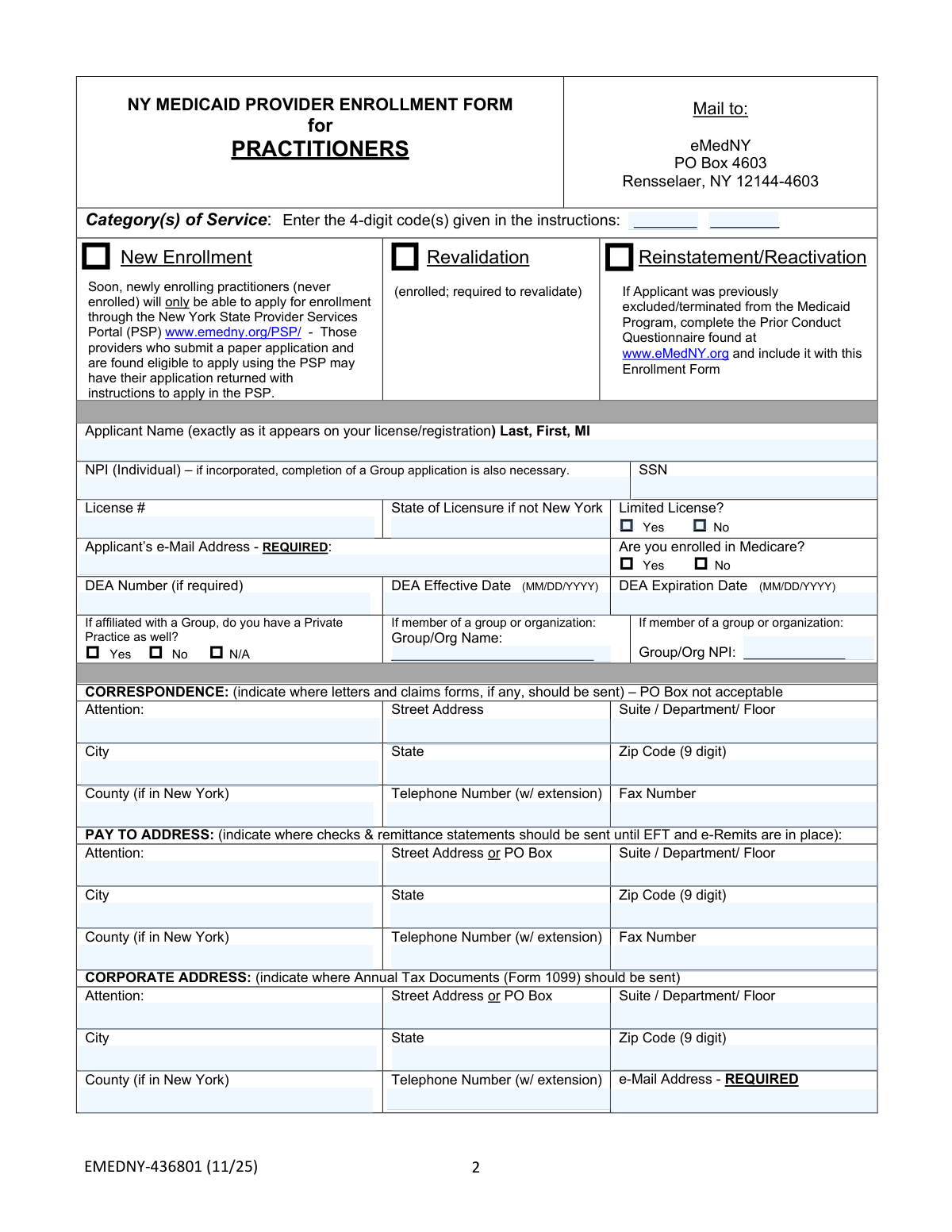
Form EMEDNY-436801 is the official application for healthcare practitioners seeking to enroll in the New York State Medicaid program. By completing this form, providers agree to comply with all state and federal regulations, which is a mandatory step to become eligible for payment for services rendered to Medicaid beneficiaries. Today, this form can be filled out quickly and accurately using AI-powered services like Instafill.ai, which can also convert non-fillable PDF versions into interactive fillable forms.
Our AI automatically handles information lookup, data retrieval, formatting, and form filling.
It takes less than a minute to fill out EMEDNY-436801 using our AI form filling.
Securely upload your data. Information is encrypted in transit and deleted immediately after the form is filled out.

Form specifications

Form name: New York State Medicaid Enrollment Form
Number of pages: 1
Language: English
Categories: Medicaid forms, New York forms, PA state forms, enrollment forms, New York State forms, NJ state forms
main-image

Instafill Demo: How to fill out PDF forms in seconds with AI

How to Fill Out EMEDNY-436801 Online for Free in 2026

Are you looking to fill out a EMEDNY-436801 form online quickly and accurately? Instafill.ai offers the #1 AI-powered PDF filling software of 2026, allowing you to complete your EMEDNY-436801 form in just 37 seconds or less.
Follow these steps to fill out your EMEDNY-436801 form online using Instafill.ai:
  1. 1 Navigate to Instafill.ai and upload or select the New York State Medicaid Enrollment Form (EMEDNY-436801).
  2. 2 Provide your personal and professional information, including your name, NPI, SSN, license number, and contact details.
  3. 3 Enter the required addresses, such as Correspondence, Pay To, Corporate, and all Service Address locations.
  4. 4 Complete the detailed 'Disclosure of Ownership and Control' section, providing information on all owners, managing employees, and subcontractors as required.
  5. 5 Answer the series of 'Yes/No' questions regarding prior conduct, sanctions, criminal history, and outstanding balances with the Medicaid program.
  6. 6 Review all the information populated by the AI to ensure accuracy and completeness across all sections of the form.
  7. 7 Electronically sign and date the affirmation statement, then download the completed form to mail to eMedNY.

Our AI-powered system ensures each field is filled out correctly, reducing errors and saving you time.

Why Choose Instafill.ai for Your Fillable EMEDNY-436801 Form?

Speed

Complete your EMEDNY-436801 in as little as 37 seconds.

Up-to-Date

Always use the latest 2026 EMEDNY-436801 form version.

Cost-effective

No need to hire expensive lawyers.

Accuracy

Our AI performs 10 compliance checks to ensure your form is error-free.

Security

Your personal information is protected with bank-level encryption.

Frequently Asked Questions About Form EMEDNY-436801

This form is used by individual healthcare practitioners to enroll, revalidate, or reactivate their status as a provider with the New York State Medicaid program, allowing them to be reimbursed for services.

Any individual practitioner, such as a doctor, therapist, or other licensed medical professional, who wants to provide services to New York Medicaid beneficiaries must complete this form to get paid.

You should apply online, as the form states that new practitioners will soon be required to use the NYS Provider Services Portal (PSP). Paper applications may be returned with instructions to apply online via www.emedny.org/PSP.

You are at financial risk for any services provided before your enrollment is successfully completed. The Department of Health will not pay for claims submitted for services furnished before your authorized enrollment date.

You will need your individual NPI number, Social Security Number (SSN), professional license number, and DEA number if applicable. A valid email address is also required.

Yes, this form is used for revalidation. You should check the 'Revalidation' box on page 2 of the application.

These addresses are for different functions: 'Correspondence' is for general letters, 'Pay To' is for receiving checks and remittance statements, and 'Corporate' is for your annual 1099 tax documents.

No, a P.O. Box is not acceptable for the Service Address or the Correspondence Address. You must provide a physical street address for these sections.

If you answer 'Yes' to any question regarding prior sanctions, convictions, or license restrictions, you must complete and submit the separate 'Prior Conduct Questionnaire' found on the eMedNY.org website.

For assistance with the enrollment form, you can contact the eMedNY Call Center at (800) 343-9000.

This form is for your individual enrollment. The form notes that if you are part of an incorporated group, a separate Group application is also necessary.

Yes, services like Instafill.ai use AI to help you accurately auto-fill form fields with your saved information. This can save you significant time and help prevent errors.

Simply upload the NYS Medicaid Enrollment Form to the Instafill.ai platform. The AI will make the document fillable and help you populate the fields quickly and accurately.

If you have a non-fillable PDF, you can use a service like Instafill.ai. It can convert flat PDFs into interactive, fillable forms that you can complete and sign electronically.

Compliance EMEDNY-436801
Validation Checks by Instafill.ai

1
Validates SSN Format and Presence
This check ensures that the Social Security Number (SSN) fields on pages 2 and 4 are filled in and formatted correctly as a 9-digit number. A valid SSN is critical for identity verification, tax reporting (1099 forms), and cross-referencing with federal databases as required by law. If the SSN is missing or invalid, the application cannot be processed and will be returned to the applicant for correction.
2
Ensures NPI is a Valid 10-Digit Number
This validation verifies that the individual National Provider Identifier (NPI) on page 2 is present and consists of exactly 10 digits. The NPI is the standard unique identifier for health care providers and is essential for billing and claims processing within the Medicaid system. An application with a missing or malformed NPI will be rejected as the provider cannot be uniquely identified for payment.
3
Verifies Required Email Address Format and Presence
This check confirms that the two fields marked 'e-Mail Address - REQUIRED' (on pages 2 and 3) contain a value that follows a standard email format (e.g., [email protected]). Email is a primary method for official communication, sending notifications, and directing providers to the online portal. Failure to provide a valid email address will result in the application being returned, as it violates a mandatory field requirement.
4
Checks for Logical DEA Date Sequence
This validation ensures that the 'DEA Expiration Date' is on or after the 'DEA Effective Date'. This logical check prevents data entry errors and confirms the provider has a currently valid, or future valid, DEA registration. An illogical date sequence would indicate an error and could cause delays or rejection while the information is clarified with the applicant.
5
Prohibits PO Box in Restricted Address Fields
This check scans the 'Street Address' fields for the Correspondence and Service Address sections to ensure they do not contain 'PO Box' or similar variations. Physical locations are required for site visits, credentialing, and official legal notices, which cannot be sent to a PO Box. If a PO Box is used in a restricted field, the form will be considered incomplete and returned for a valid street address.
6
Validates Service Address Completeness
This check ensures that for every Service Address block completed, the associated 'Telephone Number', 'Type of Practice', and 'Place of Service' fields are also filled out. This information is vital for understanding where and how the provider renders services, which impacts billing rules and network adequacy. Incomplete service address information will cause the application to be returned for completion.
7
Confirms All Disclosure Questions are Answered
This validation verifies that a 'Yes' or 'No' response has been provided for all five mandatory disclosure questions in Section 6 on page 5. These questions are required by federal regulations to screen for fraud, abuse, and prior sanctions. Answering all questions is a prerequisite for enrollment, and any missed question will result in the application being sent back.
8
Validates Conditional Unpaid Balance Amount
This check is triggered if the applicant answers 'Yes' to question 5 in Section 6 regarding unpaid balances owed to NY Medicaid. It ensures that the corresponding dollar amount field is filled in. This information is critical for the Office of the Medicaid Inspector General (OMIG) to review the application and determine enrollment eligibility. Failure to specify the amount will halt the review process.
9
Ensures Applicant Name Matches License Standard
This validation confirms the 'Applicant Name' field on page 2 is not empty and instructs the system to flag it for comparison against the name on the provider's professional license. The name must match exactly for credentialing and legal purposes. A discrepancy can lead to processing delays or denial until the applicant provides documentation to resolve the inconsistency.
10
Verifies Category of Service Code Format
This check ensures the 'Category(s) of Service' field contains one or more valid 4-digit numeric codes as specified in the form instructions. These codes define the provider's specialty and the types of services they are eligible to bill for. An incorrect or missing code means the provider cannot be enrolled for the correct service types, so the application would be returned for correction.
11
Validates 9-Digit ZIP Code Format
This check verifies that all ZIP code fields are populated in the specified 9-digit format (either XXXXX-XXXX or XXXXXXXXX). The full 9-digit ZIP code is used to ensure accurate mail delivery for payments, remittance statements, and other official correspondence, reducing the risk of lost documents. Incorrectly formatted ZIP codes will trigger a validation error, requiring correction before submission is accepted.
12
Checks for Valid Date of Birth
This validation confirms that all 'Date of Birth' fields (on pages 4 and 5) are completed in the MM/DD/YYYY format and represent a plausible date. The DOB is a key piece of personal information used for identity verification and background checks as part of the provider screening process. An invalid or missing DOB will cause the application to be rejected.
13
Ensures Enrollment Type is Selected
This check verifies that the applicant has selected one of the three enrollment options on page 2: 'New Enrollment', 'Revalidation', or 'Reinstatement/Reactivation'. This selection is fundamental as it dictates the entire workflow for processing the application. An application without an enrollment type selected cannot be routed or processed and will be immediately returned.
14
Flags Conditional Requirement for Reinstatement
This validation rule checks if the 'Reinstatement/Reactivation' option is selected. If it is, the system flags that the 'Prior Conduct Questionnaire' must be included with the submission. This is a critical check because past exclusion or termination requires additional scrutiny. If the questionnaire is missing, the application is considered incomplete and will be rejected pending its submission.

Common Mistakes in Completing EMEDNY-436801

Incorrect or Missing Category of Service Code

The form requires a specific 4-digit code for the Category of Service, which must be looked up in separate instructions. Applicants often guess, enter a text description, or leave it blank, leading to processing delays or incorrect provider categorization. To avoid this, carefully review the eMedNY instructions to find the exact code for your specialty before filling out the form.

Mismatched Applicant Name

The form requires the applicant's name 'exactly as it appears on your license/registration.' A common error is using a nickname, a shortened first name, or omitting a middle initial. This discrepancy causes a failure during license verification, leading to application rejection and requiring a complete resubmission. Always double-check your professional license and enter the name precisely as printed.

Using a 5-Digit ZIP Code Instead of 9-Digit

Multiple address sections (Correspondence, Pay To, Corporate, Service) specify a 'Zip Code (9 digit)'. Many applicants overlook this and enter the standard 5-digit ZIP code. Submitting an incomplete ZIP+4 code can cause processing errors, delay mail delivery, and lead to misrouted payments or tax documents. Use the USPS ZIP Code Lookup tool to find your full 9-digit code for each address.

Providing a PO Box for a Physical Address

The form explicitly states that a PO Box is not acceptable for the 'Correspondence Address' and 'Service Address' sections. Applicants may enter a PO Box out of habit, but this will result in the application being returned as a physical location is required for verification and potential site visits. Ensure you provide a valid street address for these sections.

Incomplete Disclosure of Ownership and Control

Page 4's 'Disclosure of Ownership and Control' section is complex and legally mandated. Applicants frequently fail to disclose all individuals with 5% or more ownership or misunderstand who qualifies as a 'managing employee.' Incomplete disclosure is a serious compliance issue that will cause the application to be returned and can lead to future audits or sanctions.

Forgetting the 'Prior Conduct Questionnaire'

On Page 5, if an applicant answers 'Yes' to any disclosure questions about prior sanctions or convictions, they must submit a separate 'Prior Conduct Questionnaire.' A frequent mistake is answering 'Yes' but failing to find and attach the additional form. This omission makes the application incomplete and guarantees its rejection, significantly delaying enrollment.

Mixing Up Address Types

The form requires three distinct addresses: Correspondence, Pay To, and Corporate. Applicants often get confused and enter the same address for all three or incorrectly place the payment address in the correspondence section. This can lead to checks being sent to the wrong location or tax documents being lost. Carefully read the description for each address type to ensure information is entered correctly.

Using an Invalid Signature

The signature line on Page 6 specifies '(original; no stamps)'. Applicants may use a signature stamp for convenience or a digital signature on a scanned copy, both of which will invalidate the application. The form must be printed and physically signed with a pen to be considered valid for submission.

Illegible Handwriting on a Non-Fillable PDF

This form is often available as a flat, non-fillable PDF, forcing applicants to fill it out by hand. This frequently results in illegible handwriting, leading to data entry errors, smudges, and mistakes that can cause the application to be rejected. To prevent this, AI-powered tools like Instafill.ai can convert the non-fillable PDF into an interactive, fillable form, ensuring all entries are clear and legible.

Omitting Required Email Addresses

The applicant's email on page 2 and the corporate email on page 2 are both marked as 'REQUIRED.' It is easy to overlook these fields when filling out a lengthy paper form. Missing a required email address can halt the application, as it is a primary method for official communication, notifications, and portal access.

Failing to Provide a Phone Number for Each Service Address

Page 3 requires a valid telephone number for each service address listed. When listing multiple practice locations, applicants sometimes forget to include a unique phone number for each one or leave the field blank entirely. This is a data validation failure that will cause the application to be returned, as Medicaid requires a direct contact number for every service location.

Submitting a Paper Form When Online Application is Required

The form warns that newly enrolling practitioners may be required to use the online Provider Services Portal (PSP). Applicants who are unaware of this or prefer paper may waste significant time having their application returned with instructions to re-apply online. Before starting, providers should check the eMedNY website to confirm if they are eligible and required to use the online system.
Saved over 80 hours a year

“I was never sure if my IRS forms like W-9 were filled correctly. Now, I can complete the forms accurately without any external help.”

Kevin Martin Green

Your data stays secure with advanced protection from Instafill and our subprocessors

Robust compliance program

Transparent business model

You’re not the product. You always know where your data is and what it is processed for.

ISO 27001, HIPAA, and GDPR

Our subprocesses adhere to multiple compliance standards, including but not limited to ISO 27001, HIPAA, and GDPR.

Security & privacy by design

We consider security and privacy from the initial design phase of any new service or functionality. It’s not an afterthought, it’s built-in, including support for two-factor authentication (2FA) to further protect your account.

Fill out EMEDNY-436801 with Instafill.ai

Worried about filling PDFs wrong? Instafill securely fills new-york-state-medicaid-enrollment-form forms, ensuring each field is accurate.