
Yes! You can use AI to fill out Form DOS-2156, New York State Housing Discrimination Disclosure Form
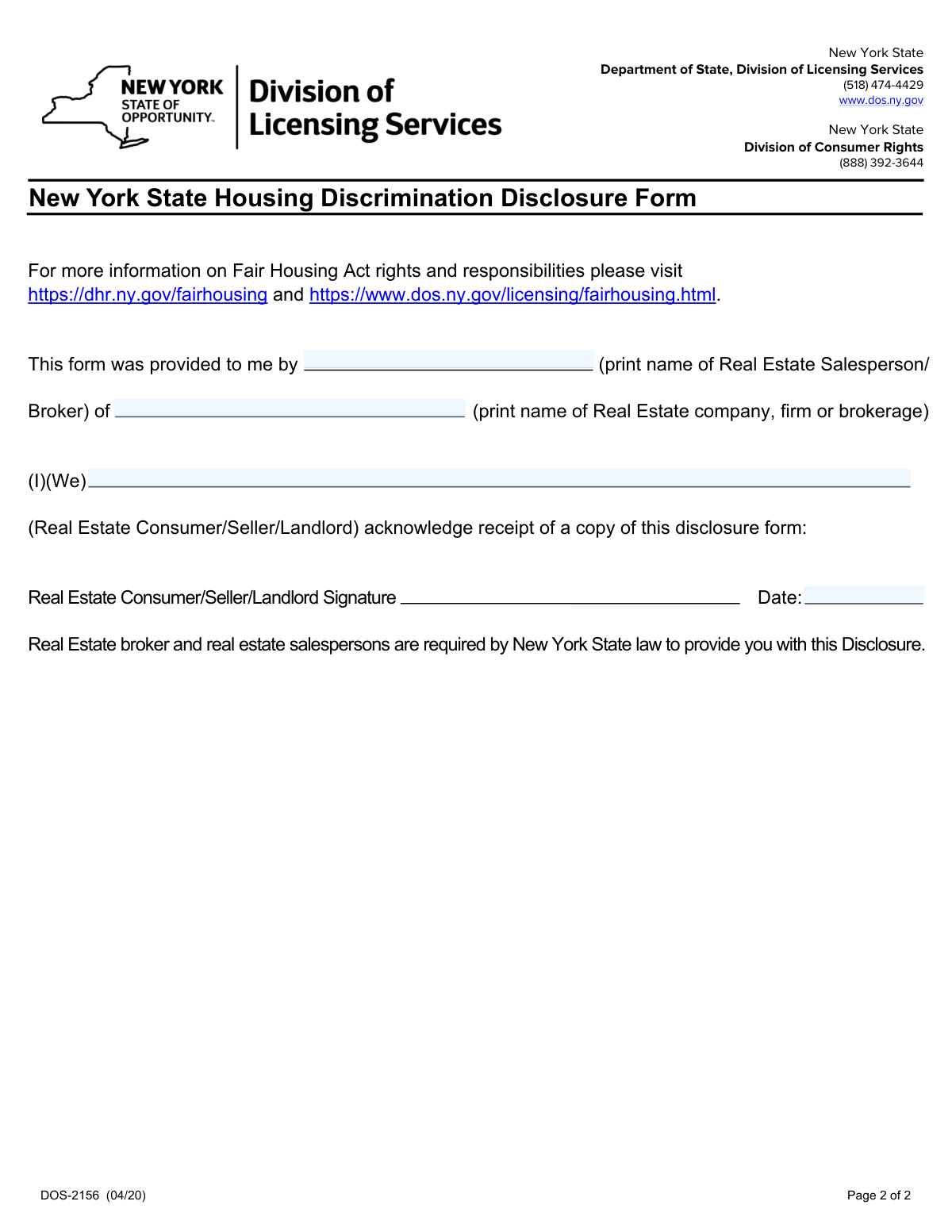
Don't type 4 fields by hand. Tell our AI about yourself, or upload a document you already have, and it fills every field in seconds. You check it, then download, print or sign.
The AI does the filling. You just check it.
No typing into boxes, nothing to install.
What this form asks for
The AI fills all of it, from your answers or your documents.
The AI checks your answers before you download
14 checks built for this form, so a wrong date or a missing answer is caught before anyone else sees it.
Checks that the 'Real Estate Salesperson or Broker Name' field is not empty. This is crucial for identifying the individual who provided the disclosure, which is a legal requirement for record-keeping and accountability. If this field is left blank, the submission is rejected and the user is prompted to enter the name.
Verifies that the salesperson's name contains only valid characters, such as letters, spaces, hyphens, and apostrophes, and does not contain numbers or excessive special symbols. This ensures data quality and prevents the submission of garbage or placeholder data. An invalid entry would trigger an error message asking the user to provide a valid name.
Confirms that the 'Real Estate Company, Firm, or Brokerage Name' field is filled out. Identifying the brokerage is as important as identifying the agent for compliance and liability purposes. A missing brokerage name will cause the validation to fail, requiring the user to complete the field before submission.
Scans the brokerage name for invalid characters while allowing for common business name elements like '&', ',', '.', 'Inc', and 'LLC'. This check prevents script injection or the entry of nonsensical data that is not part of a legitimate company name. If invalid characters are detected, the user will be notified to correct the company name.
Checks that the 'Real Estate Consumer/Seller/Landlord' name field is not left blank. The form serves as an acknowledgment of receipt by the consumer, so their name is essential to validate the entire document's purpose. Without a consumer name, the acknowledgment is meaningless and the form submission will be blocked.
Ensures the consumer name(s) field contains valid characters appropriate for personal names, such as letters, spaces, and commas. It should also gracefully handle the entry of multiple names, as indicated by the '(I)(We)' text on the form. This validation maintains data integrity and ensures the record accurately reflects all parties who acknowledged the disclosure.
And 8 more checks
- Prohibits Placeholder Text in Name Fields
- Ensures Acknowledgment Date is Provided
- Validates Acknowledgment Date Format
- Verifies Acknowledgment Date is a Valid Calendar Date
- Prevents Future Acknowledgment Dates
- Ensures Acknowledgment Date is After Form Revision
- Validates Minimum and Maximum Length for Salesperson Name
- Validates Minimum and Maximum Length for Brokerage Name
Let AI fill out your DOS-2156
No typing. Every field filled in seconds, checked, ready to sign.
How to Fill Out DOS-2156 Online for Free in 2026
What the AI walks you through.
- Navigate to Instafill.ai and upload the New York State Housing Discrimination Disclosure Form or select it from the template library.
- Use the AI-powered tool to enter the printed name of the real estate salesperson/broker and their company who provided the form.
- In the consumer acknowledgment section, provide the full name(s) of the real estate consumer, seller, or landlord receiving the disclosure.
- Carefully read the entire disclosure to understand your rights and the protections afforded by fair housing laws.
- Review all entered information for accuracy, then electronically sign and date the form to formally acknowledge receipt of the disclosure.
- Download, save, or share the completed and signed DOS-2156 form for your records and to provide to the necessary parties.
Common Mistakes in Completing DOS-2156
The ones the AI is built to catch.
Incomplete or Incorrect Broker/Agent Name
Using an Abbreviated Brokerage Name
Forgetting to Print Consumer Name(s)
Missing Acknowledgment from All Parties
Omitting the Signature Date
Illegible Handwriting
Signing Without Understanding the Document
Mismatching Agent and Brokerage Information
Failure to Retain a Copy
Using an Outdated Form Version
Frequently Asked Questions About DOS-2156
Is it really free for 7 days?
Can I fill other forms too?
How do I cancel?
How does the AI fill out DOS-2156?
What happens to my information?
How complex is DOS-2156 to fill out?
What is the purpose of the New York State Housing Discrimination Disclosure Form?
Who needs to sign this form?
Is this form a contract?
What information do I need to provide on this form?
What does my signature on this form mean?
Where do I submit this form after I sign it?
What should I do if I believe I have been a victim of housing discrimination?
What happens if I refuse to sign the disclosure form?
Are there any fees associated with this form or filing a complaint?
Can I use an AI tool to help me fill out this form?
How can I fill out the Housing Discrimination Disclosure Form online?
The PDF my agent sent me isn't fillable. What can I do?
What is 'steering' as mentioned on the form?
Who gives me this form?
Get your DOS-2156 filled out by AI
$0 today. Cancel before Nov 10 and you pay nothing.
Other forms like this one
disclosure forms: Arizona Form 285, General Disclosure/Representation Authorization Form, Arizona Form 285-I, Individual Income Tax Disclosure/Representation Authorization Form, State of Florida Department of Highway Safety and Motor Vehicles (FLHSMV) Form HSMV 82993, Separate Odometer Disclosure Statement and Acknowledgment, C.A.R. Form FLD, Lead-Based Paint and Lead-Based Paint Hazards Disclosure, Acknowledgment and Addendum (Revised 11/10), DS 1891, Applicant/Vendor Disclosure Statement (State of California Department of Developmental Services), New York State Department of State (Division of Licensing Services) Property Condition Disclosure Statement (DOS-1614-f), Moving your Vanguard funds to a Vanguard Brokerage Account Disclosure statement, Moving your Vanguard funds to a Vanguard Brokerage Account Disclosure statement, Selbstauskunft/ Vermögensaufstellung (Financial Self-Disclosure/Statement of Assets), Vermögensaufstellung / Selbstauskunft (Statement of Assets / Self-Disclosure), Selbstauskunft - vertraulich - (Financial Self-Disclosure), ADP Compensation and Fee Disclosure Statement, Cigna Out-of-Network Referral Disclosure Form, Kaiser Permanente Authorization for Use or Disclosure of Patient Health Information, Fidelity Roth Individual Retirement Account Custodial Agreement and Disclosure Statement, Oklahoma Real Estate Commission Residential Property Condition Disclosure Exemption Form (RPCD EXEMPTION FORM), Oklahoma Real Estate Commission, Disclosure of Broker Duties & Responsibilities, Oklahoma Appendix A, Residential Property Condition Disclosure Statement, Form AD, Disclosure Regarding Real Estate Agency Relationship, Oklahoma Residential Property Condition Disclosure Statement (Appendix A)
housing forms: Dakota County CDA New Admissions Informal Review Request Form (Housing Choice Voucher Program) and HUD Form 5382, Certification of Domestic Violence, Dating Violence, Sexual Assault, or Stalking, and Alternate Documentation, National Apartment Association (NAA) Rental Application for Residents and Occupants (Virginia) and Supplemental Rental Application for Units Under Government Regulated Affordable Housing Programs, Housing Agency Retirement Trust Form #190, Request to Withdraw a Rollover Account, The Housing Agency Retirement Trust 457(b) Deferred Compensation Plan Request For Distribution Form, Housing Agency Retirement Trust Transfer/Rollover Form, The Housing Agency Retirement Trust 457b Deferred Compensation Plan Change of Beneficiary Designation Form, Chicago Housing Authority Statement of Bidder’s Qualifications
discrimination forms: EEOC Form 5 (11/09), Charge of Discrimination, EEOC Form 5, Charge of Discrimination, Pro Se 7, Complaint for Employment Discrimination
New York forms: Form Summons, Supreme Court of New York, Affirmation of Service (New York) (January 2024), New York State Department of State (Division of Licensing Services) Property Condition Disclosure Statement (DOS-1614-f), New York State Department of Labor (NYSDOL) Division of Labor Standards Complaint Form (LS 223), New York State Department of Labor, Division of Labor Standards Complaint Form (LS 223), New York State Employment Application: Part 1 – Pre-Interview (Form #S1000), New York State Employment Application Form, New York Rental Application Form, New York State Deferred Compensation Plan Outgoing Rollover, New York State Deferred Compensation Plan Benefit Distribution Request, New York State Deferred Compensation Plan Direct Rollover to a Roth IRA, Petition for Letters of Administration (New York Surrogate's Court), New York State Comptroller Form RS 5127, Designation of Beneficiary with Contingent Beneficiaries, New York Life Investments Funds Individual Retirement Account Application and NYLIFE Securities LLC Investor Profile, New York State Medicaid Enrollment Form (EMEDNY-436701), New York State Medicaid Enrollment Form, New York State Department of Health Certificate of Qualification Questionnaire - Virology, New York State Certificate of Amendment of Articles of Organization, Form ST-120, New York State and Local Sales and Use Tax Resale Certificate, New York Vehicle Registration/Title Application
PA state forms: Form 1095-A, Health Insurance Marketplace Statement, Form W-2, Wage and Tax Statement, Form 593, Real Estate Withholding, Form 8938, Statement of Specified Foreign Financial Assets, Form CMS-2567, Statement of Deficiencies, Form 1098, Mortgage Interest Statement, Form 1098-T, Tuition Statement, Form 1099-S, Proceeds From Real Estate Transactions, Form 1098-E, Student Loan Interest Statement, Form DS-3053, Statement of Consent, Form DS-86, Statement of Non-Receipt of a U.S. Passport, Form DS-86, Statement of Non-Receipt of a U.S. Passport, Form 108, Statement of Intention, Form 107, Statement of Financial Affairs, Form 121, Statement About Your SSNs, Form 122A-1, Chapter 7 Statement of Current Monthly Income, Center for Infertility & Reproductive Surgery – New Patient Questionnaire and Patient/Guarantor Statement (Brigham and Women’s Hospital, Department of Obstetrics and Gynecology), Adult Travel Document Application for Stateless and Protected Persons in Canada (16 years of age or over) (PPTC 190), Form W-8IMY (Rev. October 2021), Certificate of Foreign Intermediary, Foreign Flow-Through Entity, or Certain U.S. Branches for United States Tax Withholding and Reporting, Form W-2, Wage and Tax Statement (2025)
New York State forms: New York State Department of State (Division of Licensing Services) Property Condition Disclosure Statement (DOS-1614-f), New York State Department of Labor (NYSDOL) Division of Labor Standards Complaint Form (LS 223), New York State Department of Labor, Division of Labor Standards Complaint Form (LS 223), New York State Employment Application: Part 1 – Pre-Interview (Form #S1000), New York State Employment Application Form, New York State Deferred Compensation Plan Outgoing Rollover, New York State Deferred Compensation Plan Benefit Distribution Request, New York State Deferred Compensation Plan Direct Rollover to a Roth IRA, New York State Comptroller Form RS 5127, Designation of Beneficiary with Contingent Beneficiaries, New York State Medicaid Enrollment Form (EMEDNY-436701), New York State Medicaid Enrollment Form, New York State Department of Health Certificate of Qualification Questionnaire - Virology, New York State Certificate of Amendment of Articles of Organization, Form ST-120, New York State and Local Sales and Use Tax Resale Certificate, Statement of Net Worth, Supreme Court of the State of New York, The University of the State of New York, The State Education Department, Office of the Professions, Division of Professional Licensing Services, Nurse Form 3F, Verification of Foreign Professional Licensure/Certification, New York State Department of Health Medicare Savings Program Application
NJ state forms: Form 1095-A, Health Insurance Marketplace Statement, Form W-2, Wage and Tax Statement, Form 593, Real Estate Withholding, Form 8938, Statement of Specified Foreign Financial Assets, Form CMS-2567, Statement of Deficiencies, Form 1098, Mortgage Interest Statement, Form 1098-T, Tuition Statement, Form 1099-S, Proceeds From Real Estate Transactions, Form 1098-E, Student Loan Interest Statement, Form DS-3053, Statement of Consent, Form DS-86, Statement of Non-Receipt of a U.S. Passport, Form DS-86, Statement of Non-Receipt of a U.S. Passport, Form 108, Statement of Intention, Form 107, Statement of Financial Affairs, Form 121, Statement About Your SSNs, Form 122A-1, Chapter 7 Statement of Current Monthly Income, Center for Infertility & Reproductive Surgery – New Patient Questionnaire and Patient/Guarantor Statement (Brigham and Women’s Hospital, Department of Obstetrics and Gynecology), Adult Travel Document Application for Stateless and Protected Persons in Canada (16 years of age or over) (PPTC 190), Form W-8IMY (Rev. October 2021), Certificate of Foreign Intermediary, Foreign Flow-Through Entity, or Certain U.S. Branches for United States Tax Withholding and Reporting, Form W-2, Wage and Tax Statement (2025)
state ID forms: Application for Renewal or Duplicate of Alabama Driver License or ID card, Form 1095-A, Health Insurance Marketplace Statement, Form W-2, Wage and Tax Statement, Form 593, Real Estate Withholding, Form 8938, Statement of Specified Foreign Financial Assets, Form CMS-2567, Statement of Deficiencies, Form 1098, Mortgage Interest Statement, Form 1098-T, Tuition Statement, Form 1099-S, Proceeds From Real Estate Transactions, Form 1098-E, Student Loan Interest Statement, Form DS-3053, Statement of Consent, Form DS-86, Statement of Non-Receipt of a U.S. Passport, Form 108, Statement of Intention, Form 107, Statement of Financial Affairs, Form 121, Statement About Your SSNs, Form 122A-1, Chapter 7 Statement of Current Monthly Income, Center for Infertility & Reproductive Surgery – New Patient Questionnaire and Patient/Guarantor Statement (Brigham and Women’s Hospital, Department of Obstetrics and Gynecology), Adult Travel Document Application for Stateless and Protected Persons in Canada (16 years of age or over) (PPTC 190), Form W-8IMY (Rev. October 2021), Certificate of Foreign Intermediary, Foreign Flow-Through Entity, or Certain U.S. Branches for United States Tax Withholding and Reporting, Form W-2, Wage and Tax Statement (2025)
Let AI fill out your DOS-2156
Your trial starts once a card is added. You pay nothing before Nov 10.
Our AI already knows this form, all 4 fields of it. Skip the typing: tell it about yourself, or upload what you have, and it fills the whole form in seconds.
- AI fills every field on both pages, checkboxes included
- No typing into boxes: answer a few questions, or upload a document you already have, an old copy of this form, a photo of a document
- The AI checks the answers; you review and change anything before you download
- Download the finished PDF, print it, or sign it online
- Encrypted, and never used to train AI
Cancel before Nov 10 and you pay nothing.
A card is needed to start the trial. Cancel in two clicks from your account.
Terms · Privacy