Yes! You can use AI to fill out Chicago Housing Authority Statement of Bidder’s Qualifications

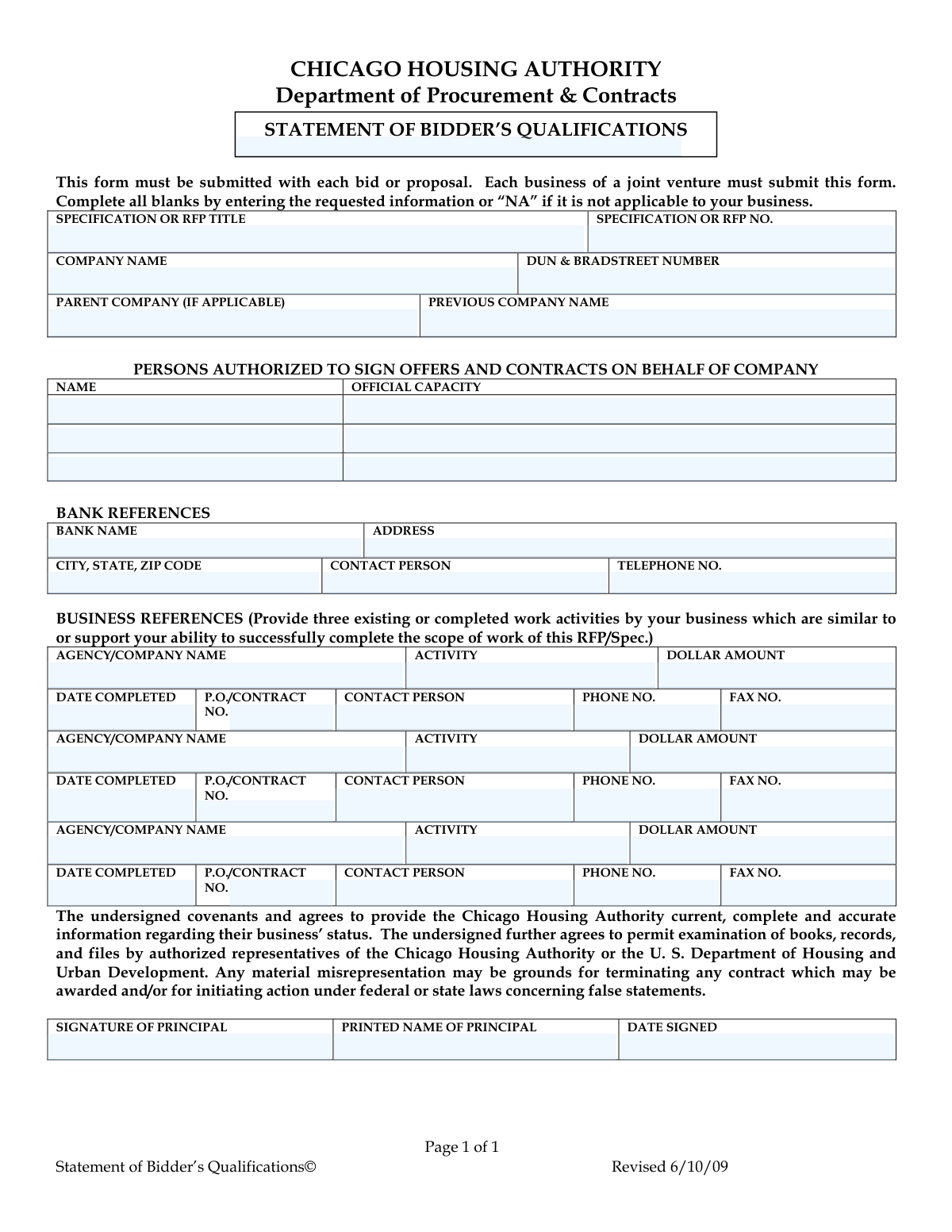
This form is used by the Chicago Housing Authority's Department of Procurement & Contracts to assess the qualifications of businesses bidding on contracts. It collects essential information about the company's identity, authorized personnel, financial references, and past performance on similar projects. Completing this form accurately is crucial for a bidder to be considered for a contract award. Today, this form can be filled out quickly and accurately using AI-powered services like Instafill.ai, which can also convert non-fillable PDF versions into interactive fillable forms.
Our AI automatically handles information lookup, data retrieval, formatting, and form filling.
It takes less than a minute to fill out CHA Statement of Bidder's Qualifications using our AI form filling.
Securely upload your data. Information is encrypted in transit and deleted immediately after the form is filled out.

Form specifications

Form name: Chicago Housing Authority Statement of Bidder’s Qualifications
Number of pages: 1
Language: English
Categories: housing forms, PA state forms, NJ state forms
main-image

Instafill Demo: How to fill out PDF forms in seconds with AI

How to Fill Out CHA Statement of Bidder's Qualifications Online for Free in 2026

Are you looking to fill out a CHA STATEMENT OF BIDDER'S QUALIFICATIONS form online quickly and accurately? Instafill.ai offers the #1 AI-powered PDF filling software of 2026, allowing you to complete your CHA STATEMENT OF BIDDER'S QUALIFICATIONS form in just 37 seconds or less.
Follow these steps to fill out your CHA STATEMENT OF BIDDER'S QUALIFICATIONS form online using Instafill.ai:
  1. 1 Navigate to Instafill.ai and upload the Statement of Bidder's Qualifications form or select it from their template library.
  2. 2 Use the AI assistant to automatically fill in your company's information, including legal name, DUN & Bradstreet number, and any parent or previous company names.
  3. 3 Provide the names and official titles of all persons authorized to sign offers and contracts for your company.
  4. 4 Enter your primary bank reference details, including the bank's name, address, and a contact person.
  5. 5 List three relevant business references, detailing the activity performed, contract value, completion date, and contact information for each.
  6. 6 Carefully review all the information populated by the AI for accuracy and completeness, making any necessary corrections.
  7. 7 Electronically sign and date the form in the principal's signature section before submitting it with your bid or proposal package.

Our AI-powered system ensures each field is filled out correctly, reducing errors and saving you time.

Why Choose Instafill.ai for Your Fillable CHA Statement of Bidder's Qualifications Form?

Speed

Complete your CHA Statement of Bidder's Qualifications in as little as 37 seconds.

Up-to-Date

Always use the latest 2026 CHA Statement of Bidder's Qualifications form version.

Cost-effective

No need to hire expensive lawyers.

Accuracy

Our AI performs 10 compliance checks to ensure your form is error-free.

Security

Your personal information is protected with bank-level encryption.

Frequently Asked Questions About Form CHA Statement of Bidder's Qualifications

This form is used by the Chicago Housing Authority (CHA) to evaluate your company's qualifications, experience, and financial stability. It helps the CHA determine if your business is capable of successfully performing the work for a specific bid or proposal.

Any business submitting a bid or proposal to the Chicago Housing Authority must complete and submit this form. If you are part of a joint venture, each individual business within the venture must submit its own separate form.

The Statement of Bidder's Qualifications must be submitted along with your main bid or proposal package. Follow the submission instructions detailed in the specific RFP or Specification documents provided by the CHA.

If a field is not applicable to your business, you must enter “NA” in that blank. Do not leave any fields empty to ensure your submission is considered complete.

You must provide three references for existing or completed work that is similar to the scope of work for the CHA contract you are bidding on. These references should demonstrate your company's ability to successfully complete the required tasks.

A DUNS number is a unique nine-digit identifier for businesses, and it is requested on this form. If your company has one, you must provide it; if not, you should enter 'NA'.

You should list the individuals within your company, such as a President, CEO, or other principal, who have the legal authority to enter into binding contracts on behalf of the business.

For a joint venture, each individual company that is part of the venture must complete and submit its own separate Statement of Bidder's Qualifications form.

The principal is a high-level owner or officer of the company who can legally bind the company and attest to the accuracy of the information provided. This is typically the same person or one of the people listed as authorized to sign contracts.

Yes, services like Instafill.ai use AI to accurately auto-fill form fields with your saved information, which can save you significant time and reduce errors. This is especially helpful for repetitive information like company details and references.

You can use a service like Instafill.ai to fill out the form online. Simply upload the PDF, and the platform will allow you to type directly into the fields, save your progress, and download the completed document.

If you have a non-fillable or 'flat' PDF, you can upload it to a platform like Instafill.ai. Their technology can convert the static document into an interactive, fillable form for you to complete online.

You need to provide the name, address, and phone number of your business's bank. You must also include the name of a contact person at the bank who can serve as a financial reference.

This information helps the CHA verify your company's history and track its performance, especially if your business has recently undergone a name change or restructuring. If you have never operated under a different name, simply enter 'NA'.

Compliance CHA Statement of Bidder's Qualifications
Validation Checks by Instafill.ai

1
Ensures RFP/Specification Number is Provided
This check verifies that the 'SPECIFICATION OR RFP NO.' field is not empty. This number is critical for associating the bidder's qualification statement with the correct procurement solicitation. If this field is missing, the submission cannot be correctly filed and may be rejected as non-responsive.
2
Validates DUNS Number Format
This validation ensures the 'DUN & BRADSTREET NUMBER' field contains either a valid 9-digit number or the string 'NA'. The DUNS number is a unique identifier for businesses, and an incorrect format can prevent automated verification. Failure to provide a correctly formatted number or 'NA' will halt processing until corrected.
3
Verifies Company Name is Present
This check confirms that the 'COMPANY NAME' field is filled out. The company's legal name is the primary identifier on the bid and subsequent contracts. A missing company name makes the entire form invalid, as it's impossible to know who the bidder is.
4
Checks for At Least One Authorized Person
This validation ensures that at least the first row for 'PERSONS AUTHORIZED TO SIGN OFFERS AND CONTRACTS' (both Name and Official Capacity) is completed. The form requires a designated individual who can legally bind the company. A submission without any authorized person listed is legally insufficient.
5
Validates Logical Consistency for Authorized Persons
This check ensures that if a 'Name' is entered for an authorized person, their corresponding 'Official Capacity' is also filled. An entry with a name but no title is incomplete and raises questions about the person's authority. This prevents incomplete data and ensures clarity on who is authorized and in what capacity.
6
Ensures Completeness of Bank Reference
This validation verifies that if a 'BANK NAME' is provided, all other fields in that reference block (Address, City/State/ZIP, Contact Person, Telephone No.) are also completed. A partial reference is unusable for due diligence and financial stability checks. The system should flag the submission as incomplete if any part of the provided reference is missing.
7
Validates Format of Telephone Numbers
This check confirms that all telephone number fields ('Bank Telephone No.', 'Phone No.', 'Fax No.') adhere to a standard format (e.g., (XXX) XXX-XXXX or XXXXXXXXXX). Proper formatting is essential for ensuring the contact numbers are valid and usable for communication and verification purposes. An invalid format could prevent the authority from contacting references.
8
Verifies Completeness of Each Business Reference
For each of the three business reference sections, this check ensures that if the 'AGENCY/COMPANY NAME' is filled, then all related fields like 'Activity', 'Dollar Amount', 'Date Completed', 'Contact Person', and 'Phone No.' are also filled. This prevents bidders from submitting partial, unverifiable references. An incomplete reference block provides no value and should be flagged.
9
Validates Business Reference Dollar Amount
This check ensures that the 'DOLLAR AMOUNT' field in each business reference contains a valid numeric or currency value. This value is key to assessing the scale and relevance of the bidder's past experience. Non-numeric entries would prevent proper evaluation and comparison, leading to a request for correction.
10
Validates Business Reference Completion Date
This validation confirms that the 'DATE COMPLETED' field for each business reference is a valid date and is not a future date. The date must be in the past to represent completed work, which is a key qualifier. A future or invalid date is a logical error and would render the reference invalid until corrected.
11
Ensures Signature Block is Fully Completed
This check verifies that the 'SIGNATURE OF PRINCIPAL', 'PRINTED NAME OF PRINCIPAL', and 'DATE SIGNED' fields are all filled. The signature block is required to legally certify the information provided. A missing signature, name, or date renders the entire document non-binding and invalid.
12
Cross-Validates Principal's Name with Authorized Persons List
This logical check compares the 'PRINTED NAME OF PRINCIPAL' from the signature block against the names listed in the 'PERSONS AUTHORIZED TO SIGN' section. This is crucial to confirm that the person signing the document has been explicitly granted the authority to do so. A mismatch could indicate an unauthorized signature, invalidating the submission.

Common Mistakes in Completing CHA Statement of Bidder's Qualifications

Leaving Fields Blank Instead of Using 'NA'

The form explicitly instructs bidders to 'Complete all blanks by entering the requested information or “NA” if it is not applicable'. Bidders often overlook this and leave fields like 'Parent Company' or 'Previous Company Name' empty. This can lead to the form being considered incomplete and may cause delays or rejection, as the reviewer cannot be sure if the information was omitted by mistake or is truly not applicable. To avoid this, carefully review every field and enter 'NA' where appropriate.

Providing Irrelevant Business References

The form requires references for work 'similar to or support your ability to successfully complete the scope of work'. A common error is listing projects that are unrelated to the specific RFP, which fails to demonstrate relevant experience. This mistake significantly weakens the bid, as it suggests the bidder may not have the required qualifications. Always select references that directly showcase your company's expertise for the specific project you are bidding on.

Incomplete or Vague 'Activity' Descriptions

In the Business References section, bidders sometimes provide overly brief or generic descriptions like 'Consulting Services' or 'General Construction'. This provides no meaningful insight into the actual work performed and its relevance to the RFP. A strong bid includes a concise but detailed description of the scope, challenges, and outcomes of the referenced project. This helps the CHA understand the depth and breadth of your experience.

Mismatched or Missing RFP Title/Number

Bidders, especially those submitting multiple proposals, may accidentally enter the wrong 'Specification or RFP Title' or 'No.', or leave them blank entirely. This creates immediate administrative confusion and can lead to the qualification statement being misfiled or associated with the wrong solicitation. To prevent this, always double-check the RFP title and number against the official solicitation documents before submitting. AI-powered tools like Instafill.ai can help by auto-populating these details consistently across all related forms.

Using a DBA Instead of the Legal Company Name

Companies often operate under a 'Doing Business As' (DBA) name, but list it in the 'Company Name' field, which requires the full legal entity name used for contracts. This can create legal and payment discrepancies, potentially invalidating the bid or causing significant delays if a contract is awarded. Always use the official legal name registered with the state and ensure it matches your DUNS number and other legal documents.

Listing an Unauthorized Signatory

The 'Persons Authorized to Sign Offers and Contracts' section is a legally binding declaration. A frequent mistake is listing a project manager or other staff member who lacks the actual corporate authority to enter into contracts. If the person who signs the final bid is not listed here, or if the people listed are not true principals or authorized agents, the entire submission can be deemed invalid. Always confirm who has legal signing authority within your company.

Incomplete or Outdated Reference Contact Information

Bidders may provide a general company phone number for a reference contact, or list a person who no longer works at the company. This prevents the CHA from verifying your past performance, which is a critical part of the evaluation. The inability to contact a reference is often viewed as negatively as a poor reference. Before submitting, always contact your references to confirm their current details and willingness to speak on your behalf.

Forgetting the Signature, Printed Name, or Date

The signature block is the final attestation that all information is true and accurate, but it is surprisingly easy to forget in the rush to submit. An unsigned or undated form is incomplete and will be rejected. Similarly, an illegible signature without a clear printed name can cause issues. Ensure the principal signs, prints their name clearly, and dates the form on the day of submission. If the form is a non-fillable PDF, a tool like Instafill.ai can convert it to a fillable version, making it easier to complete and sign digitally.

Failing to Submit a Form for Each Joint Venture Partner

The instructions clearly state, 'Each business of a joint venture must submit this form.' This requirement is often missed, with partners submitting only one form for the primary bidder. This results in an incomplete submission and automatic disqualification of the joint venture's bid. If bidding as a joint venture, ensure every partner company completes and submits their own separate Statement of Bidder's Qualifications.

Incorrect Formatting for Dollar Amounts or Dates

Simple data entry errors, such as misplacing a decimal in a 'Dollar Amount' or using an ambiguous date format (e.g., 01-02-03), can undermine credibility and cause confusion. A dollar amount that is wildly different from the project description looks careless, while unclear dates make it hard to assess the timeliness of your experience. Use consistent, clear formats (e.g., MM/DD/YYYY for dates) and double-check all numerical figures for accuracy. AI form-filling tools can help prevent these errors by automatically validating and standardizing data formats.
Saved over 80 hours a year

“I was never sure if my IRS forms like W-9 were filled correctly. Now, I can complete the forms accurately without any external help.”

Kevin Martin Green

Your data stays secure with advanced protection from Instafill and our subprocessors

Robust compliance program

Transparent business model

You’re not the product. You always know where your data is and what it is processed for.

ISO 27001, HIPAA, and GDPR

Our subprocesses adhere to multiple compliance standards, including but not limited to ISO 27001, HIPAA, and GDPR.

Security & privacy by design

We consider security and privacy from the initial design phase of any new service or functionality. It’s not an afterthought, it’s built-in, including support for two-factor authentication (2FA) to further protect your account.

Fill out CHA Statement of Bidder's Qualifications with Instafill.ai

Worried about filling PDFs wrong? Instafill securely fills chicago-housing-authority-statement-of-bidders-qualifications forms, ensuring each field is accurate.