Yes! You can use AI to fill out The Housing Agency Retirement Trust 457(b) Deferred Compensation Plan Request For Distribution Form
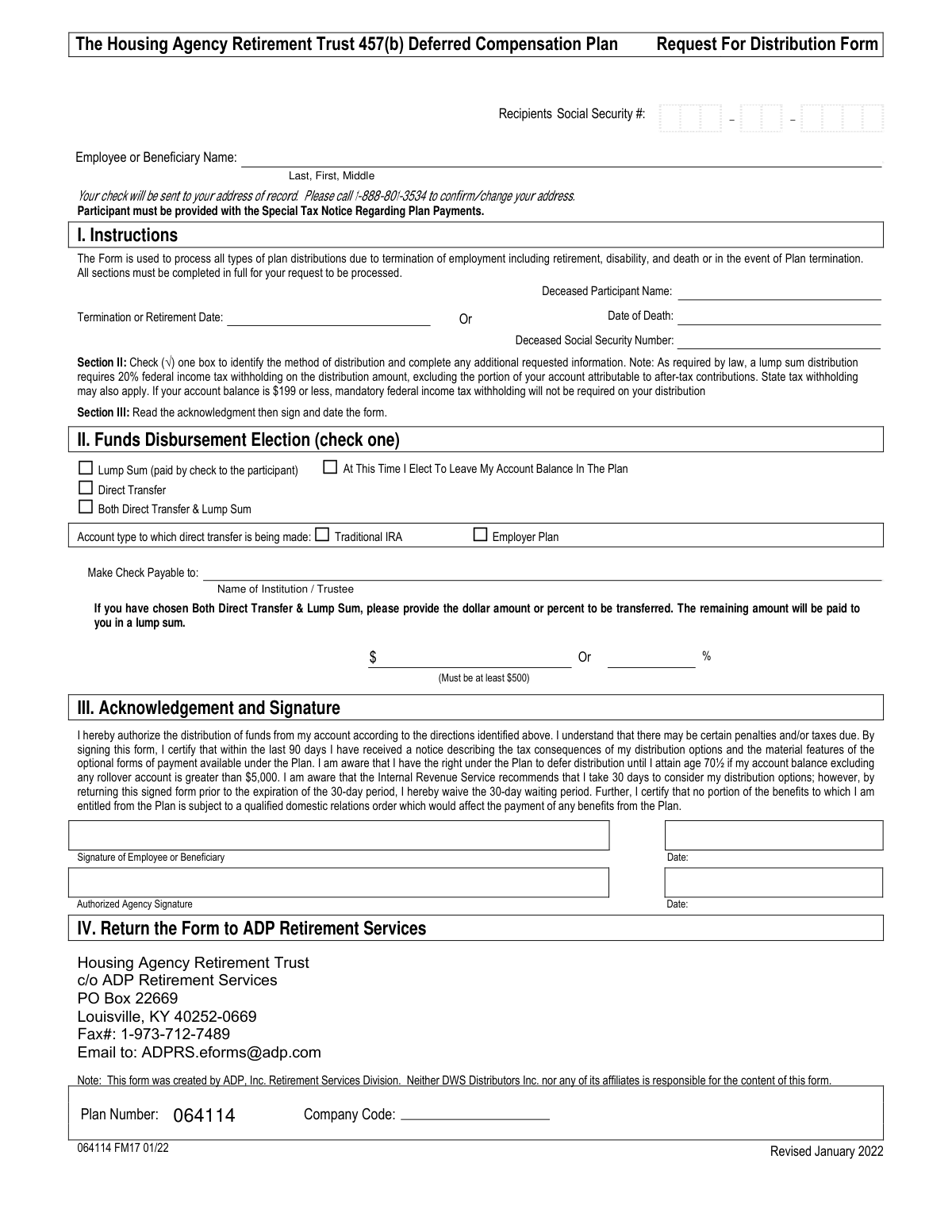
This form, also known as the 457(b) Termination Form, allows a participant of The Housing Agency Retirement Trust (HART) to request a distribution of their funds upon leaving employment. It is essential for specifying the method of disbursement, such as a lump sum payment or a direct transfer to another retirement account, and for acknowledging the associated tax implications. Today, this form can be filled out quickly and accurately using AI-powered services like Instafill.ai, which can also convert non-fillable PDF versions into interactive fillable forms.
HART 457(b) Request for Distribution Form is part of the
housing forms, EU agency forms, trust forms, retirement plan forms, distribution forms, housing agency forms, deferred compensation forms, 457 plan forms, retirement distribution forms and distribution request forms categories on Instafill.
Rather not fill this in by hand? Instafill is an online form filler that completes PDF forms automatically — upload the blank form, answer a few questions, and the AI fills every field.
Form specifications
| Form name: | The Housing Agency Retirement Trust 457(b) Deferred Compensation Plan Request For Distribution Form |
| Number of pages: | 1 |
| Language: | English |
Our AI automatically handles information lookup, data retrieval, formatting, and form filling.
It takes less than a minute to fill out HART 457(b) Request for Distribution Form using our AI form filling.
Securely upload your data. Information is encrypted in transit and deleted immediately after the form is filled out.
Instafill Demo: How to fill out PDF forms in seconds with AI
How to Fill Out HART 457(b) Request for Distribution Form Online for Free in 2026
Are you looking to fill out a HART 457(B) REQUEST FOR DISTRIBUTION FORM form online quickly and accurately? Instafill.ai offers the #1 AI-powered PDF filling software of 2026, allowing you to complete your HART 457(B) REQUEST FOR DISTRIBUTION FORM form in just 37 seconds or less.
Follow these steps to fill out your HART 457(B) REQUEST FOR DISTRIBUTION FORM form online using Instafill.ai:
- 1 Navigate to Instafill.ai and upload your HART 457(b) Request for Distribution Form or select it from the available templates.
- 2 Provide your personal details, such as your name and Social Security Number, and your termination or retirement date.
- 3 In Section II (Funds Disbursement Election), select your preferred method of distribution: Lump Sum, Direct Transfer, or a combination.
- 4 If you chose a Direct Transfer, enter the financial institution's name, the account type (e.g., Traditional IRA), and the amount or percentage to be transferred.
- 5 Carefully read the acknowledgment in Section III, then digitally sign and date the form to authorize the distribution.
- 6 Review the entire form for accuracy and completeness before finalizing.
- 7 Download the completed document and submit it to ADP Retirement Services using the email, fax, or mailing address provided on the form.
Our AI-powered system ensures each field is filled out correctly, reducing errors and saving you time.
Why Choose Instafill.ai for Your Fillable HART 457(b) Request for Distribution Form Form?
Speed
Complete your HART 457(b) Request for Distribution Form in as little as 37 seconds.
Up-to-Date
Always use the latest 2026 HART 457(b) Request for Distribution Form form version.
Cost-effective
No need to hire expensive lawyers.
Accuracy
Our AI performs 10 compliance checks to ensure your form is error-free.
Security
Your personal information is protected with bank-level encryption.
Frequently Asked Questions About HART 457(b) Request for Distribution Form
This form is used to request a distribution of your funds from the Housing Agency Retirement Trust (HART) 457(b) plan after your employment has ended due to retirement, disability, death, or plan termination.
Former employees with a balance in the HART 457(b) plan who wish to withdraw their funds should complete this form. It is also used by beneficiaries of deceased participants to claim benefits.
You have three options: receive a lump sum payment by check, request a direct transfer (rollover) to another retirement account like an IRA, or choose a combination of both a direct transfer and a lump sum payment.
Yes, the law requires a mandatory 20% federal income tax withholding on lump sum distributions. Additional state taxes may also apply.
In Section II, check the 'Direct Transfer' box and indicate whether the funds are going to a 'Traditional IRA' or an 'Employer Plan'. You must also write in the name of the financial institution receiving the funds.
Yes, select the 'Both Direct Transfer & Lump Sum' option in Section II. You must specify the dollar amount (minimum $500) or percentage to be transferred, and the remaining balance will be paid to you as a lump sum.
You can submit the form to ADP Retirement Services via mail, fax to 1-973-712-7489, or email to [email protected]. The full mailing address is provided in Section IV of the form.
The form states that you must call 1-888-801-3534 to confirm or change your address of record. Your check will be mailed to the address they have on file.
No, if your account balance is greater than $5,000, you have the option to leave your money in the plan and defer distribution until you reach age 70½.
The IRS gives you a 30-day right to consider your distribution options. By signing and returning this form, you are waiving that period and giving consent for your distribution to be processed without further delay.
You must complete the form with your information and also provide the deceased participant's name, Social Security Number, and date of death in the designated section.
If any required sections are not completed in full, your request will not be processed. This will cause a delay in receiving your distribution.
Yes, services like Instafill.ai use AI to help you accurately auto-fill form fields, which can save time and reduce the chance of errors.
Simply upload the form to the Instafill.ai platform. Its AI will identify the fields, allowing you to easily enter your information, sign electronically, and download the completed document.
You can use a service like Instafill.ai, which can convert flat, non-fillable PDFs into interactive, fillable forms that you can complete and sign directly on your device.
Compliance HART 457(b) Request for Distribution Form
Validation Checks by Instafill.ai
1
Validates Social Security Number Format
This check ensures the 'Recipients Social Security #' field contains a 9-digit number, formatted as either XXXXXXXXX or XXX-XX-XXXX. A valid SSN is critical for tax reporting (Form 1099-R) and identity verification. A failure will prevent form processing until a valid SSN is provided.
2
Ensures Recipient Name is Provided
Verifies that the 'Employee or Beneficiary Name' field is not empty and contains both a first and last name. A full name is required for proper identification of the account holder and to ensure the distribution check or transfer is made out to the correct individual. The form cannot be processed without this information.
3
Validates Termination Date Format and Plausibility
This check confirms that the 'Termination or Retirement Date' is a valid calendar date and is not in the future. This date is the legal trigger for distribution eligibility and is essential for compliance and record-keeping. An invalid or future date will halt the request for correction.
4
Exclusive Disbursement Method Selection
Ensures that exactly one of the four main disbursement options ('Lump Sum', 'Direct Transfer', 'Both', or 'Leave My Account Balance In The Plan') is selected. Selecting multiple or none of these options creates ambiguity in how to process the funds. The form will be rejected for clarification if this rule is violated.
5
Requires Signature and Signature Date
Verifies the presence of both the 'Signature of Employee or Beneficiary' and the corresponding 'Date'. The signature provides legal authorization for the transaction, and the date establishes when the authorization was given. Missing either of these fields invalidates the request and prevents processing.
6
Validates Direct Transfer Information Completeness
If 'Direct Transfer' or 'Both Direct Transfer & Lump Sum' is selected, this check ensures the 'Make Check Payable to' (institution name) and 'Account type' fields are completed. This information is mandatory to correctly route the funds to the receiving financial institution. Failure to provide these details will result in the rejection of the transfer request.
7
Validates Partial Distribution Amount Specificity
When 'Both Direct Transfer & Lump Sum' is chosen, this validation ensures that either a dollar amount OR a percentage is provided, but not both. Providing both creates a conflicting instruction for the fund's distribution. The form will be returned if both or neither field is filled.
8
Enforces Minimum Direct Transfer Amount
This check validates that if a dollar amount is specified for a partial transfer, the value is $500 or greater, as required by the form's instructions. This rule likely exists to manage administrative costs associated with small transfers. A value less than $500 will cause the request to be rejected.
9
Validates Percentage for Partial Transfer
If a percentage is provided for a partial transfer, this check ensures the value is a valid number greater than 0 and less than 100. A value of 0% or 100% would not constitute a partial distribution, making the 'Both' selection incorrect. An invalid percentage will require correction before processing.
10
Ensures Consistency of Beneficiary Information
This validation triggers if the 'Deceased Participant Name' field is populated. It ensures that the 'Date of Death' and 'Deceased Social Security Number' fields are also completed, as this information is required to process a death benefit claim. Incomplete beneficiary information will suspend the distribution pending clarification.
11
Validates Date of Death Plausibility
Checks that the 'Date of Death', if provided, is a valid calendar date and is not in the future. This date is a critical piece of legal documentation for processing a death benefit. An invalid or future date will be flagged as an error and will prevent the claim from moving forward.
12
Verifies 'Leave in Plan' Option Exclusivity
If the 'At This Time I Elect To Leave My Account Balance In The Plan' option is checked, this validation ensures no other disbursement options ('Lump Sum', 'Direct Transfer', 'Both') are selected. Choosing to leave funds in the plan is mutually exclusive with requesting a distribution. Conflicting selections will result in the form being rejected.
13
Requires Company Code for Processing
This check verifies that the 'Company Code' field has been filled out. This code is likely used to identify the specific employer plan within the larger retirement system, making it essential for correct account identification and processing. A missing company code will halt the request until it is provided.
14
Requires Direct Transfer Account Type
When 'Direct Transfer' or 'Both' is selected, this check ensures that one of the 'Account type' options ('Traditional IRA' or 'Employer Plan') is checked. This designation is crucial for tax purposes and for the receiving institution to correctly categorize the incoming funds. The form will be considered incomplete if this selection is missing.
Common Mistakes in Completing HART 457(b) Request for Distribution Form
This two-digit code, located in a small box at the bottom of the form, is crucial for identifying the specific housing agency the employee worked for. Because of its small size and location, it is frequently overlooked, leading to processing delays while the plan administrator tries to identify the correct sub-account. Always double-check the bottom of the form and enter the two-digit code provided by your employer to ensure your request is routed correctly.
The form requires you to check only one box in Section II: 'Lump Sum,' 'Direct Transfer,' or 'Both.' A common error is checking multiple incompatible options (like 'Lump Sum' and 'Direct Transfer' separately) or failing to check any box at all. This ambiguity forces the administrator to halt the process and contact you for clarification, delaying your distribution.
When choosing 'Direct Transfer' or 'Both,' it is essential to provide the full name of the receiving institution or trustee in the 'Make Check Payable to' field. People often leave this blank or provide an incomplete name, making it impossible for the funds to be transferred correctly. This results in a failed transaction and requires you to resubmit corrected paperwork.
If you select 'Both Direct Transfer & Lump Sum,' you must specify either the exact dollar amount or the percentage to be transferred, noting the dollar amount must be at least $500. A frequent mistake is leaving this section blank, providing both a dollar and percentage amount, or entering an amount below the minimum. This lack of clear instruction prevents the transaction from being processed until clarification is received.
The signature and date in Section III are a legal requirement, confirming your authorization and understanding of the tax implications. Submitting an unsigned or undated form is one of the most common reasons for immediate rejection. Your request is considered invalid without a signature, forcing you to resubmit the entire form and starting the process over.
The form explicitly states that lump sum checks are mailed to your 'address of record' and provides a phone number to verify or update it. A critical error is to assume the address on file is current without checking, especially if you have recently moved. This can lead to your distribution check being lost in the mail, causing significant delays and security risks.
When a beneficiary is filling out the form, they sometimes enter their own information but forget to complete the section for the deceased participant. It is crucial to provide the deceased participant's name, date of death, and Social Security Number for proper account identification. Missing this information makes it impossible to locate the correct account and process the death benefit claim.
The form includes an option to request a distribution in Section II and a separate checkbox at the bottom to 'Leave My Account Balance In The Plan.' A confusing mistake is to fill out distribution details and also check the box to leave the funds in the plan. These contradictory instructions will halt your request until a plan representative can contact you for clarification.
Since this form is a non-fillable PDF, it is often printed and completed by hand, leading to errors from illegible handwriting. Misinterpreting a Social Security Number or the financial institution's name can cause failed identity verification or misdirected funds. To prevent this, write clearly in block letters or use a tool like Instafill.ai, which can convert flat PDFs into digitally fillable forms for clean, accurate data entry.
The 'Termination or Retirement Date' in Section I is a mandatory field used to verify your eligibility for a distribution. People sometimes overlook this field, assuming the plan administrator already has the information. However, its absence on the form will delay processing as the administrator must manually verify your status and eligibility date before proceeding.
Saved over 80 hours a year
“I was never sure if my IRS forms like W-9 were filled correctly. Now, I can complete the forms accurately without any external help.”
Kevin Martin Green
Your data stays secure with advanced protection from Instafill and our subprocessors




Robust compliance program
Transparent business model
You’re not the product. You always know where your data is and what it is processed for.
ISO 27001, HIPAA, and GDPR
Our subprocesses adhere to multiple compliance standards, including but not limited to ISO 27001, HIPAA, and GDPR.
Security & privacy by design
We consider security and privacy from the initial design phase of any new service or functionality. It’s not an afterthought, it’s built-in, including support for two-factor authentication (2FA) to further protect your account.
Fill out HART 457(b) Request for Distribution Form with Instafill.ai
Worried about filling PDFs wrong? Instafill securely fills the-housing-agency-retirement-trust-457b-deferred-compensation-plan-request-for-distribution-form forms, ensuring each field is accurate.
