
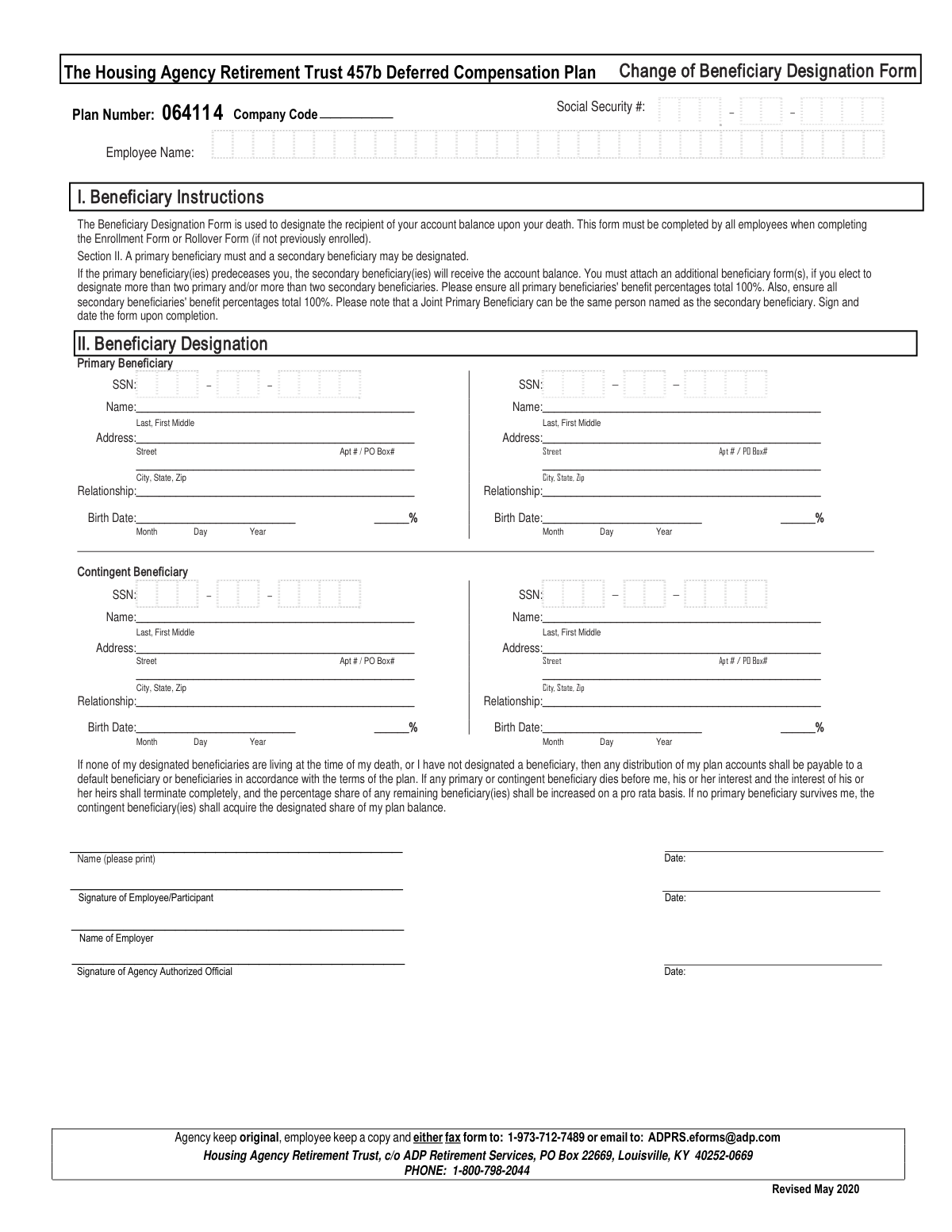
Yes! You can use AI to fill out The Housing Agency Retirement Trust 457b Deferred Compensation Plan Change of Beneficiary Designation Form
Don't type 85 fields by hand. Tell our AI about yourself, or upload a document you already have, and it fills every field in seconds. You check it, then download, print or sign.
The AI does the filling. You just check it.
No typing into boxes, nothing to install.
What this form asks for
The AI fills all of it, from your answers or your documents.
The AI checks your answers before you download
12 checks built for this form, so a wrong date or a missing answer is caught before anyone else sees it.
This check verifies that the sum of the percentages assigned to all primary beneficiaries equals exactly 100%. This is critical to ensure the entire account balance is distributed according to the employee's wishes without ambiguity. A failure would render the designation invalid, potentially causing distribution to default to the plan's rules rather than the employee's intent.
Validates that the employee's Social Security Number is present and follows the standard 9-digit format (XXX-XX-XXXX or XXXXXXXXX). The SSN is the primary unique identifier for the employee's account, and an incorrect or missing number will prevent the form from being processed and linked to the correct retirement plan. This ensures accurate record-keeping and legal validation of the designation.
Ensures that at least one primary beneficiary has been fully designated on the form. The form instructions explicitly state that a primary beneficiary must be designated. If no primary beneficiary is listed, the form is incomplete and cannot be processed, as its main purpose is to name a recipient for the account balance.
This validation applies only if one or more contingent beneficiaries are designated. It checks that the sum of their assigned percentages equals exactly 100%. This ensures a clear and complete distribution plan if no primary beneficiaries survive the employee. An incorrect total could lead to legal disputes and processing delays.
Verifies that the birth date for each designated beneficiary is a valid calendar date and is not a date in the future. This information is important for identity verification and for certain legal or plan-specific rules regarding beneficiary age. An invalid date can cause processing rejections and requires correction by the employee.
Confirms that the 'Signature of Employee/Participant' field has been signed. A signature is a legal requirement that authenticates the employee's instructions on the form. Without a signature, the beneficiary designation is not legally binding and will be rejected.
And 6 more checks
- Employee Signature Date Presence and Validity
- Primary Beneficiary Section Completeness
- Beneficiary Social Security Number Format
- Beneficiary Address Completeness
- Employee Name Presence
- Contingent Beneficiary Section Completeness
Let AI fill out your Beneficiary Designation Form
No typing. Every field filled in seconds, checked, ready to sign.
How to Fill Out Beneficiary Designation Form Online for Free in 2026
What the AI walks you through.
- Navigate to Instafill.ai and upload or select the Beneficiary Designation Form.
- Provide your personal details, including your full name and Social Security Number, in the employee section.
- Enter the full name, address, relationship, birth date, SSN, and benefit percentage for each Primary Beneficiary. Ensure the total percentage for all primary beneficiaries equals 100%.
- Optionally, repeat the process for any Contingent (Secondary) Beneficiaries you wish to name. Ensure their total percentage also equals 100%.
- Carefully review all entered information, paying close attention to names, Social Security Numbers, and benefit percentages to ensure accuracy.
- Sign and date the form in the designated employee signature field.
- Download the completed form and submit it to the appropriate entity via fax, email, or mail as per the form's instructions.
Common Mistakes in Completing Beneficiary Designation Form
The ones the AI is built to catch.
Incorrect Percentage Allocation
Using Vague or Informal Beneficiary Names
Forgetting the Employee Signature and Date
Neglecting to Name a Contingent Beneficiary
Illegible Handwriting
Missing Beneficiary Social Security Number
Incorrect Name Formatting
Providing an Incomplete Address
Not Updating Beneficiaries After Major Life Events
Frequently Asked Questions About Beneficiary Designation Form
Is it really free for 7 days?
Can I fill other forms too?
How do I cancel?
How does the AI fill out Beneficiary Designation Form?
What happens to my information?
How complex is Beneficiary Designation Form to fill out?
What is the purpose of the Beneficiary Designation Form?
Who is required to fill out this form?
What is the difference between a primary and a contingent beneficiary?
Do the percentages for my beneficiaries need to total 100%?
What should I do if I want to name more than two beneficiaries?
What happens if I don't name a beneficiary?
What information is required for each beneficiary?
How do I submit the completed form?
Does my employer need to sign this form?
What happens if one of my named beneficiaries dies before me?
Can I use an AI tool to help fill out this form?
How can I fill out this form online using a tool like Instafill.ai?
The PDF of this form I have is not fillable. What can I do?
How often should I review my beneficiary designations?
Get your Beneficiary Designation Form filled out by AI
$0 today. Cancel before Nov 3 and you pay nothing.
Other forms like this one
housing forms: Dakota County CDA New Admissions Informal Review Request Form (Housing Choice Voucher Program) and HUD Form 5382, Certification of Domestic Violence, Dating Violence, Sexual Assault, or Stalking, and Alternate Documentation, National Apartment Association (NAA) Rental Application for Residents and Occupants (Virginia) and Supplemental Rental Application for Units Under Government Regulated Affordable Housing Programs, Housing Agency Retirement Trust Form #190, Request to Withdraw a Rollover Account, The Housing Agency Retirement Trust 457(b) Deferred Compensation Plan Request For Distribution Form, Housing Agency Retirement Trust Transfer/Rollover Form, Chicago Housing Authority Statement of Bidder’s Qualifications, Form DOS-2156, New York State Housing Discrimination Disclosure Form
EU agency forms: Form I-566, Interagency Record of Request, Alabama Medicaid Agency ABA Therapy Assessment Form (6/20/19) — Behavior Assessment and Treatment Request (CPT 97151) for Applied Behavioral Analysis for Autism Spectrum Disorder, Housing Agency Retirement Trust Form #190, Request to Withdraw a Rollover Account, The Housing Agency Retirement Trust 457(b) Deferred Compensation Plan Request For Distribution Form, Housing Agency Retirement Trust Transfer/Rollover Form, Form AD, Disclosure Regarding Real Estate Agency Relationship, Form CMS-1572, Home Health Agency Survey and Certification Report
trust forms: Form 8855, Election To Treat a Qualified Revocable Trust, Private Trust (Mod(PT).2005), Form 3520 (Rev. December 2023), Annual Return To Report Transactions With Foreign Trusts and Receipt of Certain Foreign Gifts, Judicial Council of California Form DE-120, Notice of Hearing—Decedent's Estate or Trust, Judicial Council of California Form DE-120, Notice of Hearing—Decedent's Estate or Trust, Fidelity Change of Account Ownership — Mutual Fund Only Accounts (Changing to a Trust, Estate, Guardian, or Conservator Account), Fidelity Ownership Change to Trust, Fidelity Change of Account Registration — Changing to a Trust, Estate, Guardian, or Conservator Brokerage Account, Trusted Contact Authorization Form, I.B.E.W. & Electrical Industry Local 697 Money Purchase Plan and Trust Direct Rollover Request Form Due to Qualified Domestic Relations Order, Bechtel Trust & Thrift Plan Rollover Process, General Purpose Loan Application Packet, IW DC of SOV Annuity Trust, NYPD Superior Officers Council Annuity Trust Fund Plan Rollover Form, Trust Certification and Trustee Powers, Housing Agency Retirement Trust Form #190, Request to Withdraw a Rollover Account, The Housing Agency Retirement Trust 457(b) Deferred Compensation Plan Request For Distribution Form, Housing Agency Retirement Trust Transfer/Rollover Form, Qualified Retirement Plan and Trust Summary Plan Description, TIAA Trust, N.A. Private Asset Management, Request for a Direct Transfer From IRA Contracts, TIAA Trust Rollover From Your Retirement Plan (ERISA)
retirement plan forms: One-Time Withdrawal — Defined Contribution Retirement Plan, Automatic Withdrawals—Defined Contribution Retirement Plan, The Church of the Nazarene 403(b) Retirement Savings Plan Beneficiary Designation Form, Beneficiaries – Defined Contribution Retirement Plan, Vanguard Asset Transfer Authorization Form for the Emory University Retirement Plan, Vanguard Taking a Loan from Your Retirement Plan, Vanguard 403(b)(7) ERISA Retirement Plan Distribution Request (Retirement / Severance from Employment / Disability), Vanguard Termination Request Form - Officer, SS, SSA Retirement Plan, Vanguard Retirement Plan Beneficiary Designation - Phillips 66 Savings Plan, Instructions for Changing Your Beneficiary on your Emory Retirement Plan, BNSF Investment and Retirement Plan [401(k) Plan for Salaried Employees], Vanguard Rollover Form for Retirement Plans, Incoming Rollover Election for Elevator Constructors Annuity and 401(k) Retirement Plan, Incoming Rollover Election for The Heritage Group Retirement Savings Plan, Empower Retirement Plan Withdrawal Request Form, Incoming Rollover Election Form for International Dairy Queen, Inc. Retirement Savings Plan, Account Reduction Loan Application 401(a) Plan, Electrical Workers Local Union No. 369 Retirement Plan, TE Connectivity Retirement Savings and Investment Plan (RSIP) Transition Frequently Asked Questions, Inotiv, Inc. Retirement Plan Rollover Investment Direction Form, Principal Retirement Plan Beneficiary Designation
beneficiary designation forms: Beneficiary Designation for Seafarers International Union AGLIW 401(k) Plan, Fidelity Investments 403(b) Beneficiary Designation, Fidelity Advisor IRA Beneficiary Designation, Fidelity Investments Qualified Plan Beneficiary Designation, Fidelity Investments 403(b)/401(a) Beneficiary Designation, The Church of the Nazarene 403(b) Retirement Savings Plan Beneficiary Designation Form, Fidelity Investments Qualified Plan Beneficiary Designation, IRA/HSA Beneficiary Designation, Beneficiary Designation Form For IRA and 403(b)(7) Accounts, IRA Beneficiary Designation Form, Vanguard Retirement Plan Beneficiary Designation - Phillips 66 Savings Plan, Empower Beneficiary Designation Governmental 457(b) Plan, Beneficiary Designation 401(a) Plan, Form RS115, Beneficiary Designation, Beneficiary Designation 401(k) Plan, Empower Beneficiary Designation Form for WoodmenLife 401(k) Plan, Empower SRIP II Beneficiary Designation Form, Beneficiary Designation/Change - Principal Life Insurance Company, UTMA Beneficiary Designation (Uniform Transfers to Minor Act), Principal Retirement Plan Beneficiary Designation
housing agency forms: Housing Agency Retirement Trust Form #190, Request to Withdraw a Rollover Account, The Housing Agency Retirement Trust 457(b) Deferred Compensation Plan Request For Distribution Form, Housing Agency Retirement Trust Transfer/Rollover Form
deferred compensation forms: Incoming Transfer/Direct Rollover Governmental 457(b) Plan, City of Torrance Deferred Compensation Plan, New York State Deferred Compensation Plan Outgoing Rollover, New York State Deferred Compensation Plan Benefit Distribution Request, New York State Deferred Compensation Plan Direct Rollover to a Roth IRA, Separation from Employment Withdrawal Form for East Bay Regional Park District 457(b) Deferred Compensation Plan, The Housing Agency Retirement Trust 457(b) Deferred Compensation Plan Request For Distribution Form
457 plan forms: Oklahoma Pathfinder 457 Plan Incoming Transfer/Rollover Request Governmental 457(b) Plan, Incoming Transfer/Direct Rollover Governmental 457(b) Plan, Incoming Transfer/Direct Rollover Governmental 457(b) Plan, City of Torrance Deferred Compensation Plan, Beneficiary Account Withdrawal Request Governmental 457(b) Plan, Separation from Employment Withdrawal Form for East Bay Regional Park District 457(b) Deferred Compensation Plan, Empower Beneficiary Designation Governmental 457(b) Plan, The Housing Agency Retirement Trust 457(b) Deferred Compensation Plan Request For Distribution Form, Request for Distribution from Your 457(b) Governmental Plan
beneficiary change forms: 529 College Savings Plan Beneficiary Change Form, Beneficiary Designation/Change - Principal Life Insurance Company, Form DD 638-28, Beneficiary Change, Transamerica Beneficiary Change Form, 403(b) Custodial Account Beneficiary Designation Change Form, Change of Beneficiary Form, Fidelity Institutional 529 College Savings Plan Beneficiary Change, American Fidelity Change of Beneficiary Form, Bright Directions 529 Beneficiary Change Form, CollegeAdvantage Direct 529 Savings Plan Beneficiary Change Form, Nest 529 Beneficiary Change Form
Let AI fill out your Beneficiary Designation Form
Your trial starts once a card is added. You pay nothing before Nov 3.
Our AI already knows this form, all 85 fields of it. Skip the typing: tell it about yourself, or upload what you have, and it fills the whole form in seconds.
- AI fills every field on the form, checkboxes included
- No typing into boxes: answer a few questions, or upload a document you already have, an old copy of this form, a photo of a document
- The AI checks the answers; you review and change anything before you download
- Download the finished PDF, print it, or sign it online
- Encrypted, and never used to train AI
Cancel before Nov 3 and you pay nothing.
A card is needed to start the trial. Cancel in two clicks from your account.
Terms · Privacy