Yes! You can use AI to fill out National Apartment Association (NAA) Rental Application for Residents and Occupants (Virginia) and Supplemental Rental Application for Units Under Government Regulated Affordable Housing Programs
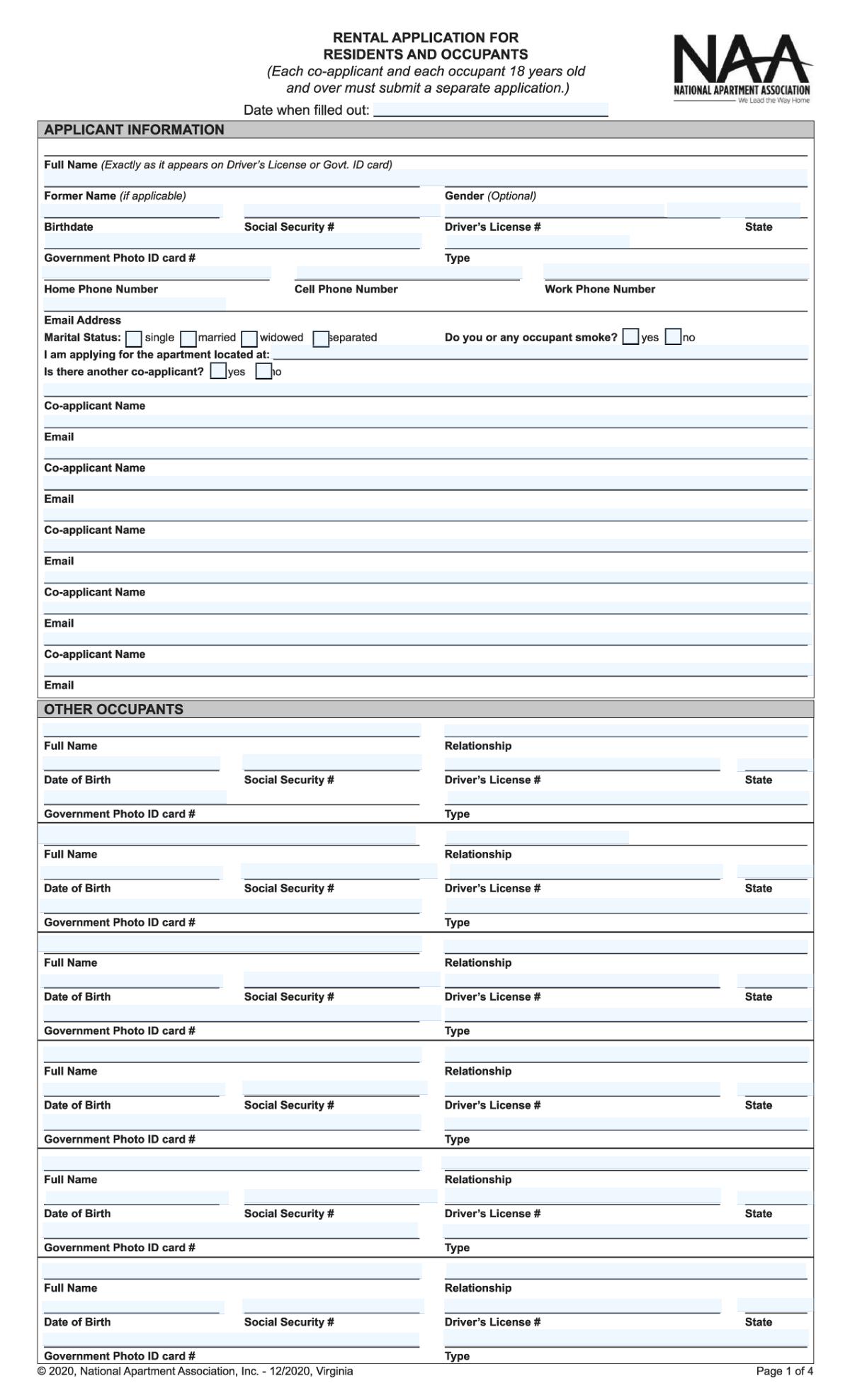
This is a standardized National Apartment Association rental application package used by property owners/agents to screen prospective tenants and document household members, rental history, employment/income, credit and criminal history disclosures, and required authorizations. It also includes a supplemental application used to determine eligibility for government-regulated affordable housing programs by collecting household composition, annual income, and assets. The form is important because it supports leasing decisions, compliance with program rules, and provides written consent for background/consumer reports and payment authorization. Today, this form can be filled out quickly and accurately using AI-powered services like Instafill.ai, which can also convert non-fillable PDF versions into interactive fillable forms.
Our AI automatically handles information lookup, data retrieval, formatting, and form filling.
It takes less than a minute to fill out NAA Rental Application (VA) + Affordable Housing Supplemental using our AI form filling.
Securely upload your data. Information is encrypted in transit and deleted immediately after the form is filled out.
Form specifications
| Form name: | National Apartment Association (NAA) Rental Application for Residents and Occupants (Virginia) and Supplemental Rental Application for Units Under Government Regulated Affordable Housing Programs |
| Number of pages: | 5 |
| Filled form examples: | Form NAA Rental Application (VA) + Affordable Housing Supplemental Examples |
| Language: | English |
| Categories: | apartment association forms |
Instafill Demo: filling out a legal form in seconds
How to Fill Out NAA Rental Application (VA) + Affordable Housing Supplemental Online for Free in 2026
Are you looking to fill out a NAA RENTAL APPLICATION (VA) + AFFORDABLE HOUSING SUPPLEMENTAL form online quickly and accurately? Instafill.ai offers the #1 AI-powered PDF filling software of 2026, allowing you to complete your NAA RENTAL APPLICATION (VA) + AFFORDABLE HOUSING SUPPLEMENTAL form in just 37 seconds or less.
Follow these steps to fill out your NAA RENTAL APPLICATION (VA) + AFFORDABLE HOUSING SUPPLEMENTAL form online using Instafill.ai:
- 1 Go to Instafill.ai and upload the NAA Rental Application PDF (and the Affordable Housing Supplemental, if required) or select it from the form library.
- 2 Let the AI detect and map fields (applicant info, co-applicants/occupants, residency, employment, income/assets, vehicles/pets, disclosures) and confirm the correct state/version (Virginia).
- 3 Enter or import your personal details and IDs (name, DOB, SSN, driver’s license/government ID, contact info), then add co-applicants and all occupants 18+ as needed.
- 4 Complete residency and employment sections (current/previous addresses, landlord/lender contacts, rent/own, employer details, dates, and gross monthly income) and add any additional income sources.
- 5 Answer credit/rental/criminal history questions and provide explanations where applicable; complete referral and emergency contact information, plus vehicle and pet details if relevant.
- 6 If applying under an affordable housing program, complete the supplemental household composition, student status, annual income categories, and assets (institutions, account numbers, cash values, and interest/dividends).
- 7 Review the application agreement, disclosures, and authorizations, then e-sign and download/share the completed packet with the property manager/owner.
Our AI-powered system ensures each field is filled out correctly, reducing errors and saving you time.
Why Choose Instafill.ai for Your Fillable NAA Rental Application (VA) + Affordable Housing Supplemental Form?
Speed
Complete your NAA Rental Application (VA) + Affordable Housing Supplemental in as little as 37 seconds.
Up-to-Date
Always use the latest 2026 NAA Rental Application (VA) + Affordable Housing Supplemental form version.
Cost-effective
No need to hire expensive lawyers.
Accuracy
Our AI performs 10 compliance checks to ensure your form is error-free.
Security
Your personal information is protected with bank-level encryption.
Frequently Asked Questions About Form NAA Rental Application (VA) + Affordable Housing Supplemental
This form is used by the property/management to screen applicants for a specific apartment unit, including verifying identity, rental history, employment/income, and other eligibility factors. It also collects information about all adults who will live in the unit.
Each co-applicant and each occupant age 18 or older must submit a separate application. Minors are typically listed under “Other Occupants” or household composition, but do not complete their own application.
Have your government ID (driver’s license or other photo ID), Social Security number, current and previous address details, landlord/lender contact info, employment history, and income documentation ready. You may also need vehicle and pet details if applicable.
The form requests SSN and driver’s license/government ID numbers to verify identity and run screening reports. If you have concerns, ask the leasing office whether an alternative verification method is allowed, but leaving required fields blank can delay or prevent processing.
Co-applicants are typically adults who will be financially responsible on the lease and must submit their own applications. “Other occupants” are people who will live in the unit (including adults and minors), and adults listed there may still be required to submit separate applications depending on management policy.
Enter the full property address and any unit/type information you have (building name, unit type, or unit number if known). If you’re unsure, confirm the exact unit/address with the leasing office to avoid mismatches during processing.
Check “Own” and list your lender (or mortgage company) where it asks for “Landlord/Lender Name,” along with the monthly payment and dates. If you own free and clear, you can note that in the lender field and provide any requested proof if management asks.
Use your move-in date for “From,” and leave the “To” date blank or write “Present,” depending on how the form is set up. Make sure the monthly payment and landlord/lender contact information are current.
Additional income can include benefits, child support/alimony, retirement income, consistent family support, or other verifiable sources. The form states income must be verified to be considered, so be prepared to provide documents (award letters, pay stubs, bank statements, or court orders).
If you have past credit issues and the form asks for an explanation, provide a brief, honest summary (what happened, when, and what has changed). Clear explanations can help management understand context, but approval decisions depend on the property’s screening criteria.
Check a box only if it applies to you or any listed occupant, and then provide the requested details (year, location, and type of issue/conviction). If you do not check an item, you are representing the answer is “no” for that item.
The Application Agreement states you will be notified of approval or non-approval within 10 days after the property receives a completed application. You should not assume approval until you receive actual notice.
The form distinguishes between an application fee (non-refundable) and an application deposit (refundable under certain conditions and credited toward the security deposit if approved and the lease is signed). The application will not be processed until the completed application(s) and required fees are received.
Unless the property authorizes otherwise in writing, you and all co-applicants must sign within 3 days after approval notice given in person or by telephone, or within 5 days after approval is mailed. Missing the deadline can end the agreement and affect how deposits are handled under Virginia law.
Only complete the supplemental form if you are applying for a unit under a government-regulated affordable housing program (or if the property instructs you to). It collects household composition, annual income, and assets to determine program eligibility.
Yes—AI form-filling services like Instafill.ai can help auto-fill fields from your information and documents, reducing manual typing and errors. You should still review everything for accuracy before signing and submitting.
Upload the PDF to Instafill.ai, then provide your details (and optionally supporting documents like ID and pay stubs) so the AI can map your information to the correct fields. Review the completed form, make edits if needed, and then download or submit it according to the property’s instructions.
If the PDF is “flat” (non-fillable), Instafill.ai can convert it into an interactive fillable form and then auto-fill the fields. This is especially helpful for scanned forms or PDFs that only allow printing.
Compliance NAA Rental Application (VA) + Affordable Housing Supplemental
Validation Checks by Instafill.ai
1
Application dates are valid and chronologically consistent
Validate that "Date when filled out" and signature dates (Applicant’s Signature Date, Applicant Date of Signing Application, Co-Applicant Date of Signing) are present where required and use an accepted date format (e.g., MM/DD/YYYY). Dates must not be in the future and signature dates should be on or after the date the application was filled out. If any date is missing, malformed, or inconsistent, the submission should be flagged as incomplete and prevented from moving to screening until corrected.
2
Applicant identity fields are complete and match legal-name expectations
Ensure Applicant Full Name is provided and contains at least a first and last name (no single-token names), and does not include obviously invalid characters (e.g., only numbers or symbols). If Applicant Former Name is provided, it should also meet the same name formatting rules. If validation fails, the application should be rejected or routed to manual review because identity verification and background checks depend on accurate legal names.
3
SSN format and uniqueness across household members
Validate that each Social Security Number field (applicant and all listed occupants/co-applicants where collected) is exactly 9 digits (optionally allowing hyphens) and is not a known invalid pattern (e.g., 000-00-0000, 123-45-6789). Also check that the same SSN is not reused across different people in the same submission. If an SSN is invalid or duplicated, the system should block submission or require correction because credit/criminal screening will fail or return mismatched results.
4
Birthdate and age eligibility checks for applicant and adult occupants
Validate that Applicant Birthdate and each occupant Date of Birth are valid calendar dates and not in the future. Enforce the form rule that each co-applicant and each occupant 18+ must submit a separate application by checking DOB-derived age; if an occupant is 18 or older, require a separate application indicator/workflow or flag for follow-up. If DOB is missing/invalid or an adult occupant is listed without the required separate application process, the submission should be marked incomplete.
5
Driver’s license / government ID completeness and state/type consistency
For the applicant and each occupant where ID is provided, validate that at least one government-issued ID is present (Driver’s License Number or Government Photo ID Card Number) and that the corresponding state (e.g., Driver’s License State) and ID type fields are populated when applicable. Enforce basic format rules (alphanumeric length bounds) and disallow placeholder values like "N/A" when an ID number is required for screening. If ID information is missing or inconsistent, route to manual review or block submission because identity verification cannot be completed.
6
Phone number format validation and minimum contact method requirement
Validate Home/Cell/Work phone numbers (including landlord/lender, employer, supervisor, and emergency contact phones) as valid NANP-style numbers (10 digits, allowing punctuation and country code if supported). Require at least one reliable applicant phone number (cell or home) to be present, and ensure emergency contact has at least one phone number or email. If phone numbers are malformed or no contact method exists, the application should be rejected as uncontactable.
7
Email address format and duplication checks
Validate Applicant Email and all co-applicant/emergency contact emails using standard email syntax rules (local@domain, valid TLD, no spaces). If multiple co-applicant email fields exist (e.g., Second Co-applicant Email 1 and Email 2), ensure they are not identical and do not duplicate the applicant’s email unless explicitly allowed. If an email is invalid or duplicates create ambiguity, the system should request correction to prevent missed notices and misrouted communications.
8
Co-applicant section logic: presence required when 'another co-applicant' is Yes
If the user indicates there is another co-applicant (Yes), require at least one co-applicant name and email to be completed, and ensure each listed co-applicant has both name and email (no partial rows). If the user indicates No, co-applicant fields should be empty or ignored to avoid accidental data carryover. If the logic fails, the submission should be flagged because co-applicants must be screened and notified properly.
9
Occupant rows must be internally complete when any occupant data is entered
For each "Other Occupant" row, if any field is filled (name, relationship, DOB, SSN, DL/ID), require the minimum set: Full Name, Relationship, and Date of Birth; and if SSN or ID is required by policy, enforce those as well. Prevent partially filled occupant entries that could hide household members or break screening. If a row is incomplete, the system should block submission or prompt the applicant to either complete the row or clear it.
10
Residency address completeness and ZIP/state format validation
Validate Current Home Address, City, State, and Zip Code are present and correctly formatted (State as 2-letter code; ZIP as 5 digits or ZIP+4). Apply the same checks to Previous Home Address fields when provided/required. If address components are missing or malformed, the application should be marked incomplete because residency verification and landlord contact depend on accurate addresses.
11
Residency date ranges and payment fields are valid and consistent
Validate Current and Previous residency From/To dates as valid dates with From <= To, and ensure To is blank or marked as current for the current address if the applicant still lives there. Monthly Payment must be a non-negative currency value and should be present when rent/own is selected. If date ranges overlap illogically or payment is missing/invalid, flag for correction because rental history and affordability evaluation rely on these values.
12
Rent vs Own selection is mutually exclusive and required for each residency
For both current and previous residency sections, enforce that exactly one of Rent or Own is selected (not both, not neither). This selection should drive required fields (e.g., landlord name/phone required for rent; lender name/phone required for own). If the selection is invalid or required dependent fields are missing, the submission should be blocked to prevent incorrect verification routing.
13
Employment information completeness and chronological consistency
If Present Employer is provided, require employer address, work phone, position, supervisor name/phone, start date, and gross monthly income; end date should be blank if still employed. For Previous Employer, require the same core fields when any previous employment data is entered, and ensure previous employment dates do not overlap with present employment in a contradictory way. If employment data is incomplete or dates are inconsistent, the application should be flagged because income verification and stability assessment cannot be performed.
14
Income and asset numeric validation (non-negative, currency, and totals consistency)
Validate all income and asset amount fields (gross monthly income, additional income amounts, supplemental income lines, asset cash values, and annual interest/dividends) as numeric currency values with no negative amounts and reasonable upper bounds to catch data-entry errors. Where totals are provided (e.g., Total Salary Income, Total Assets), verify they equal the sum of the component fields within a small tolerance. If numeric fields are invalid or totals don’t reconcile, the submission should be routed to correction/manual review to avoid incorrect eligibility determinations (especially for affordable housing programs).
15
Conditional explanation required for credit/rental/criminal history disclosures
If any rental/criminal history checkbox is selected (eviction, bankruptcy, sued for rent/property damage, conviction), require the corresponding explanation text to include the requested details (at minimum: year and location; and type of issue/conviction). If the applicant provides a credit problem explanation, ensure it is not empty/placeholder text and meets a minimum length to be meaningful. If explanations are missing when required, the application should be considered incomplete because the form states unchecked items are represented as "no" and checked items require context for decisioning.
Common Mistakes in Completing NAA Rental Application (VA) + Affordable Housing Supplemental
Applicants often use nicknames, omit middle names/initials, or change the order of first/last name even though the form requires the full legal name exactly as it appears on a Driver’s License or Government ID. This can cause identity-verification mismatches during screening and delay or derail processing. To avoid it, copy the name character-for-character from the ID (including suffixes like Jr./Sr./III). AI-powered form filling tools like Instafill.ai can help by standardizing name fields and flagging mismatches against stored identity data.
A very common misunderstanding is listing a co-applicant or adult occupant on the main form but not submitting a separate application for each person 18 and over, as required. This typically results in the application being considered incomplete and not processed until all required applications are received. To avoid it, confirm every adult who will live in the unit completes and signs their own application and provides their own SSN/ID details. Instafill.ai can help track required sub-applications and prompt for missing adult household members.
Applicants sometimes write only the property name, omit the unit number, or provide a partial address in the “I am applying for the apartment located at” field. This can lead to the application being routed to the wrong unit, incorrect pricing/deposit amounts, or delays while staff clarifies the intended unit. To avoid it, enter the full street address plus unit number (or unit type) exactly as provided by the leasing office. Instafill.ai can validate address formatting and ensure required components (street, city, state, zip, unit) are present.
Social Security numbers, driver’s license numbers, and government ID numbers are frequently mistyped (digit swaps, missing digits, extra spaces/dashes, or using an ITIN/other number without noting it). These errors can cause screening failures, inability to pull credit/background reports, or requests for resubmission. To avoid it, enter numbers carefully from the physical document and keep formatting consistent (only digits unless the ID number includes letters). Instafill.ai can automatically format and validate lengths/patterns to catch common typos before submission.
The form repeatedly asks for ID “Type” (e.g., Driver’s License, State ID, Passport) and the issuing state, but applicants often fill only the number. Missing type/state can prevent proper verification and slow down processing when staff must follow up. To avoid it, always pair the ID number with the correct ID type and issuing state for the applicant and each listed occupant. Instafill.ai can enforce completion rules so an ID number can’t be entered without its corresponding type/state.
Applicants often forget to check whether they rent or own, leave the “To” date blank for a previous address, or enter overlapping/incorrect date ranges. Inconsistencies can raise questions during landlord verification and may be treated as incomplete rental history, delaying approval. To avoid it, ensure each address has clear From/To dates (use “Present” or leave To blank only for the current address if allowed) and check the correct rent/own box for each residence. Instafill.ai can detect date overlaps and prompt for missing rent/own selections.
A frequent issue is providing a landlord name without a phone number, listing a friend/roommate instead of the actual landlord/property manager, or using an outdated contact. This can prevent verification of rental history and may lead to delays or denial if the history can’t be confirmed. To avoid it, provide the official landlord/lender name and a working phone number (and property name if applicable) for both current and previous residences. Instafill.ai can help by formatting phone numbers correctly and flagging missing contact fields.
The employment section requests gross monthly income, but applicants often enter take-home pay, hourly wage, annual salary, or a biweekly amount without converting it. This can cause the application to appear to not meet income requirements or trigger additional documentation requests. To avoid it, convert income to gross monthly (before taxes) and keep the same time basis across employment and additional income sections. Instafill.ai can automatically convert common pay frequencies to gross monthly and validate that the value aligns with the selected income type.
Applicants sometimes write a dollar amount but leave “Type” or “Source” blank (or use vague entries like “cash” or “side jobs” without documentation). Because the form states income must be verified to be considered, unverifiable entries may be excluded, reducing qualifying income. To avoid it, specify the income type (e.g., child support, pension, benefits) and the paying source/agency, and be prepared to provide proof. Instafill.ai can prompt for required source details and keep entries consistent with typical verification documents.
Many applicants either check nothing but forget that unchecked items are treated as “No,” or they check an item but fail to provide the required year, location, and type of incident/conviction. Missing explanations can be treated as incomplete or misleading, leading to follow-up requests or denial for non-disclosure. To avoid it, check only items that apply and provide complete details immediately for any checked item, including dates and locations. Instafill.ai can require an explanation field when a related checkbox is selected and ensure the explanation includes the key elements.
The form requires an emergency contact over 18 who will not be living with the applicant, but people often list a household member, a minor, or omit key contact details. This can force the leasing office to request a replacement contact and delay finalization. To avoid it, choose a non-occupant adult and provide full address plus at least one reliable phone number and email. Instafill.ai can flag conflicts when an emergency contact matches an occupant name and can validate phone/email formats.
Saved over 80 hours a year
“I was never sure if my IRS forms like W-9 were filled correctly. Now, I can complete the forms accurately without any external help.”
Kevin Martin Green
Your data stays secure with advanced protection from Instafill and our subprocessors

Robust compliance program
Transparent business model
You’re not the product. You always know where your data is and what it is processed for.
ISO 27001, HIPAA, and GDPR
Our subprocesses adhere to multiple compliance standards, including but not limited to ISO 27001, HIPAA, and GDPR.
Security & privacy by design
We consider security and privacy from the initial design phase of any new service or functionality. It’s not an afterthought, it’s built-in, including support for two-factor authentication (2FA) to further protect your account.
Fill out NAA Rental Application (VA) + Affordable Housing Supplemental with Instafill.ai
Worried about filling PDFs wrong? Instafill securely fills national-apartment-association-naa-rental-application-for-residents-and-occupants-virginia-and-supplemental-rental forms, ensuring each field is accurate.



