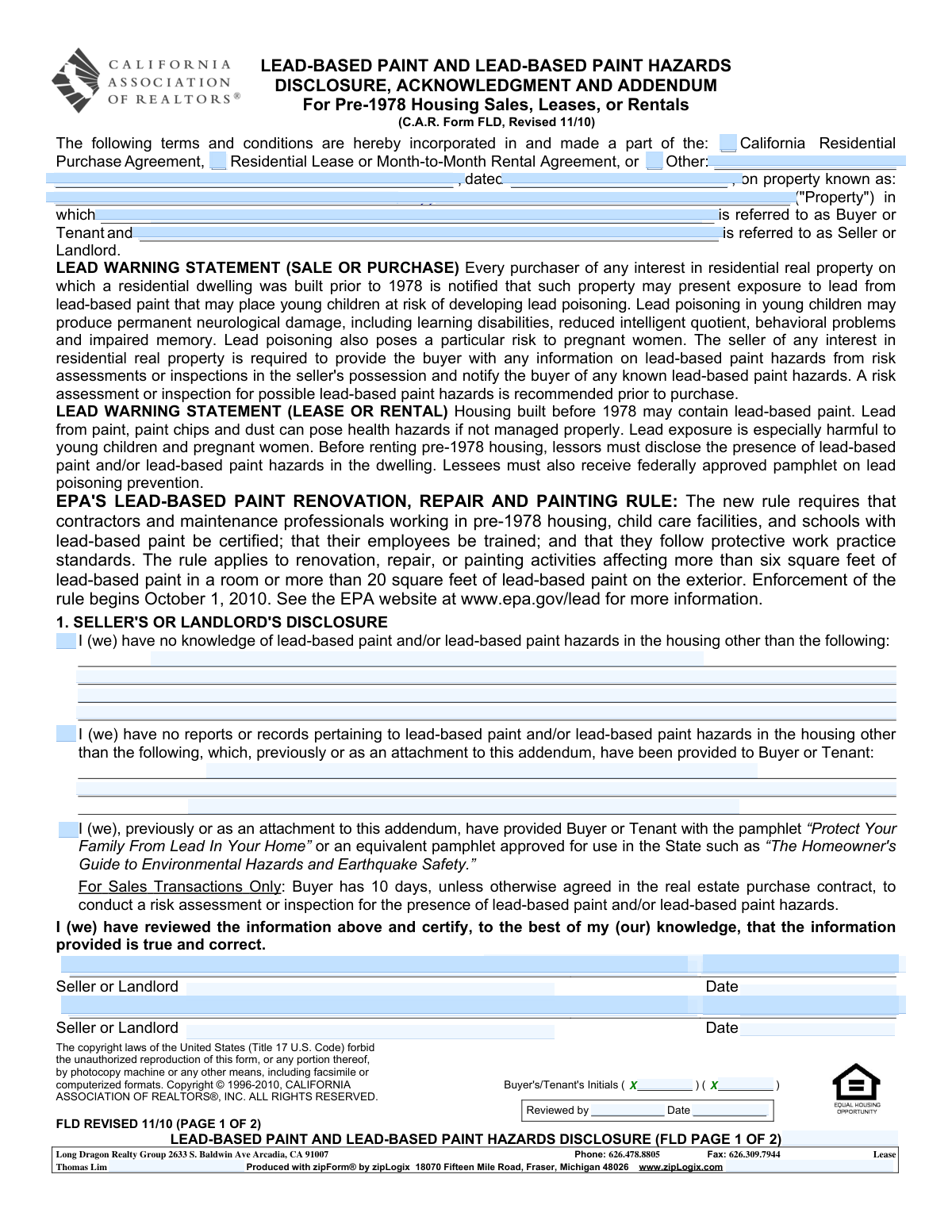
Yes! You can use AI to fill out C.A.R. Form FLD, Lead-Based Paint and Lead-Based Paint Hazards Disclosure, Acknowledgment and Addendum (Revised 11/10)

C.A.R. Form FLD is a standardized addendum used in California real estate transactions involving housing built before 1978 to comply with federal lead-based paint disclosure requirements (42 U.S.C. § 4852d). It requires the seller or landlord to disclose any known lead-based paint or lead-based paint hazards and provide any available reports/records, and it confirms delivery of the federally approved lead hazard pamphlet. The form also captures acknowledgments by the listing and cooperating agents regarding their compliance responsibilities. For sales, it documents the buyer’s 10-day opportunity (or waiver) to conduct a lead risk assessment or inspection, helping protect parties and reduce legal risk.
Our AI automatically handles information lookup, data retrieval, formatting, and form filling.
It takes less than a minute to fill out C.A.R. FLD using our AI form filling.
Securely upload your data. Information is encrypted in transit and deleted immediately after the form is filled out.

Form specifications

Form name: C.A.R. Form FLD, Lead-Based Paint and Lead-Based Paint Hazards Disclosure, Acknowledgment and Addendum (Revised 11/10)
Number of pages: 2
Filled form examples: Form C.A.R. FLD Examples
Language: English
Categories: CAR forms, disclosure forms, California realtor forms
main-image

Instafill Demo: filling out a legal form in seconds

How to Fill Out C.A.R. FLD Online for Free in 2026

Are you looking to fill out a C.A.R. FLD form online quickly and accurately? Instafill.ai offers the #1 AI-powered PDF filling software of 2026, allowing you to complete your C.A.R. FLD form in just 37 seconds or less.
Follow these steps to fill out your C.A.R. FLD form online using Instafill.ai:
  1. 1 Enter the transaction type and reference agreement (purchase agreement, residential lease/month-to-month rental, or other), including the agreement date and the full property address/location.
  2. 2 Complete Section 1 (Seller/Landlord Disclosure): indicate whether there is knowledge of lead-based paint/hazards and list any known hazards; list any reports/records provided (attach copies if applicable) and confirm delivery of the EPA-approved pamphlet.
  3. 3 If the transaction is a sale, confirm the buyer’s 10-day inspection/risk assessment period (or the period stated in the purchase contract) and ensure any attachments referenced are uploaded with the form.
  4. 4 Collect seller/landlord signatures and dates certifying the disclosures are true and correct (include all owners/landlords as required).
  5. 5 Complete Section 2 (Listing Agent Acknowledgment): enter agent/broker details, print name, and obtain signature and date confirming the agent informed the seller/landlord of obligations and ensured compliance.
  6. 6 Complete Section 3 (Buyer/Tenant Acknowledgment): confirm receipt of disclosures and pamphlet, select whether the buyer waives or retains the inspection right (sales only), and obtain buyer/tenant signatures and dates.
  7. 7 Complete Section 4 (Cooperating Agent Acknowledgment) if applicable, then review for completeness (initials, dates, attachments) and generate a final copy for all parties’ records.

Our AI-powered system ensures each field is filled out correctly, reducing errors and saving you time.

Why Choose Instafill.ai for Your Fillable C.A.R. FLD Form?

Speed

Complete your C.A.R. FLD in as little as 37 seconds.

Up-to-Date

Always use the latest 2026 C.A.R. FLD form version.

Cost-effective

No need to hire expensive lawyers.

Accuracy

Our AI performs 10 compliance checks to ensure your form is error-free.

Security

Your personal information is protected with bank-level encryption.

Frequently Asked Questions About Form C.A.R. FLD

This addendum is used to disclose known information and records about lead-based paint and lead hazards for residential properties built before 1978. It also documents that the required lead safety pamphlet was provided and that the parties acknowledged receipt.

The Seller/Landlord completes the disclosure section and signs, the Buyer/Tenant signs the acknowledgment section, and the Listing Agent and Cooperating Agent (if any) sign their acknowledgments. It is incorporated into a purchase agreement or lease/rental agreement for the property.

It is required for sales, leases, or rentals of housing built prior to 1978. The form is intended to be attached to and made part of the applicable purchase contract or lease agreement.

If the residential dwelling on the property was built before 1978, it is covered. If you are unsure, check public records, appraisal/MLS data, or ask the owner/agent to confirm the year built.

They must state whether they have any knowledge of lead-based paint or lead hazards and whether they have any reports or records (such as inspections or risk assessments). If they have any, they should list them and provide copies to the Buyer/Tenant (often as attachments).

They would indicate they have no knowledge of lead-based paint/hazards other than what is stated, and no reports or records other than what is listed (which may be none). They still must provide the required lead pamphlet and sign the certification.

The Seller/Landlord must provide any available lead-based paint/hazard reports or records in their possession and must provide the pamphlet “Protect Your Family From Lead In Your Home” (or an approved equivalent). The Buyer/Tenant acknowledges receiving these items in Section 3.

It is a federally approved lead hazard information pamphlet that explains risks and prevention. Yes—delivery of this pamphlet (or an approved equivalent) is required for pre-1978 housing transactions covered by the form.

For sales transactions, the Buyer generally has 10 days (unless the purchase contract states otherwise) to conduct a lead risk assessment or inspection. This is a right acknowledged in the form and can be exercised during that period.

Yes, for sales transactions the form includes an option for the Buyer to waive the right if the waiver box is checked. If it is not checked, the Buyer is acknowledging the right to conduct the assessment/inspection within the stated timeframe.

The form states that if delivery occurs after acceptance, the Buyer may have a right to cancel pursuant to the purchase contract. The Buyer must act within the time period specified in the contract to exercise that cancellation right.

They acknowledge they informed the Seller/Landlord (directly or through the listing agent) of the legal obligations under federal law (42 U.S.C. 4852d) and that they are aware of their responsibility to ensure compliance. They also certify, to the best of their knowledge, that the information provided is true and correct.

No. The form is a disclosure and acknowledgment document; it may state that the Seller/Landlord has no knowledge or that there are no reports. It warns that pre-1978 housing may contain lead-based paint and recommends an inspection/risk assessment, especially for purchases.

Yes, it applies to pre-1978 housing sales and leases/rentals. The 10-day inspection/risk assessment right and waiver language apply to sales transactions only, while the lease/rental warning emphasizes disclosure and pamphlet delivery before renting.

The top section is used to identify the underlying agreement (purchase agreement, lease, month-to-month rental, or other), the date of that agreement, and the property address/location. This ties the disclosure addendum to the correct transaction and property.

Compliance C.A.R. FLD
Validation Checks by Instafill.ai

1
Ensures the transaction type is selected and mutually exclusive (Sale vs Lease vs Other)
Validate that exactly one transaction type is clearly indicated (e.g., Purchase Agreement, Residential Lease/Month-to-Month, or Other) and that conflicting indicators (such as both “Lease” and “Purchase”) are not simultaneously selected. This matters because the form contains sale-only rights (10-day inspection) and lease-only warnings, and the applicable obligations differ. If validation fails, the submission should be rejected or routed for manual review to prevent applying the wrong legal disclosures.
2
Validates the underlying agreement reference (document type and agreement date) is complete
Check that the referenced agreement type (Purchase Agreement/Lease/Other) and the agreement date are present and in a valid date format (e.g., MM/DD/YYYY). This is important because the addendum must be tied to a specific contract to be enforceable and auditable. If missing or malformed, flag as incomplete and require correction before acceptance.
3
Property address completeness and format validation
Ensure the Property is identified with a complete address (street number, street name, city, state, and ZIP where applicable) and that it is not left blank or replaced with placeholders. The disclosure is property-specific; an incomplete address can invalidate the disclosure or misapply it to the wrong dwelling. If validation fails, block submission and request a corrected, complete property address.
4
Pre-1978 housing applicability confirmation
Validate that the form is only used for pre-1978 residential housing transactions, either by capturing/confirming the year built or an explicit applicability attestation. This matters because the federal lead disclosure requirements apply to housing built before 1978; using the form for newer properties can create compliance confusion. If the property is not pre-1978 or year built is unknown, require confirmation or route to compliance review.
5
Party role identification (Buyer/Tenant and Seller/Landlord) is present and consistent
Check that the parties are clearly identified and mapped to the correct roles (Buyer or Tenant; Seller or Landlord) consistent with the selected transaction type. This prevents mis-signatures (e.g., a tenant signing as buyer) and ensures the correct statutory duties are assigned. If roles are missing or inconsistent, the system should prevent finalization and prompt for correction.
6
Seller/Landlord disclosure section completion (knowledge and reports/records statements)
Validate that the Seller/Landlord disclosure in Section 1 is completed in a logically consistent way: either “no knowledge” is affirmed or specific known hazards are described; and either “no reports/records” is affirmed or the provided reports/records are listed/attached. This is critical because the disclosure must not be ambiguous about whether hazards or documents exist. If both “no” statements are left blank or contradictory information is entered, require clarification and resubmission.
7
Attachment and document delivery consistency check (reports/records and pamphlet)
If the form indicates that reports/records were provided “previously or as an attachment,” validate that attachments are actually included or that a prior-delivery reference (date/method) is captured. Also ensure the lead pamphlet delivery is acknowledged as provided. This matters for compliance evidence and auditability. If attachments are missing or delivery cannot be substantiated, flag as non-compliant and block completion until resolved.
8
Seller/Landlord signature and date presence and date format validation
Ensure each required Seller/Landlord signature line is completed (supporting multiple sellers/landlords) and that each signature has an associated date in a valid format. Signatures without dates weaken enforceability and complicate timelines for buyer cancellation rights. If any required signature/date is missing or invalid, the form should be marked incomplete and not accepted.
9
Buyer/Tenant acknowledgment signature(s) and date(s) validation
Validate that all buyers/tenants listed on the transaction have signed and dated Section 3, with dates in a valid format and not left blank. This is important because receipt of disclosures and pamphlet must be acknowledged by the receiving party(ies). If any buyer/tenant signature or date is missing, prevent submission and request completion.
10
Buyer inspection right selection logic (10-day right vs waiver) for sales transactions
For sales transactions, ensure the buyer either retains the 10-day inspection right or explicitly waives it via the checkbox, but not both and not neither. This is critical because the form provides a specific statutory/contractual right that must be clearly documented. If the selection is ambiguous or missing, require the user to choose one option before finalizing.
11
Initials fields validation (Buyer/Tenant initials count and presence)
Where the form includes Buyer/Tenant initials fields (e.g., “( ) ( )”), validate that the number of initials captured matches the number of buyers/tenants expected and that each is non-empty. Initials are often required to evidence review of key pages/clauses. If initials are missing or mismatched, flag for completion or manual review depending on jurisdictional policy.
12
Listing agent acknowledgment completion (printed name, license role, signature, date)
Validate that the Listing Agent section includes the agent’s printed name, role (associate-licensee or broker), signature, and date, all in proper formats. This matters because the agent has an affirmative duty to inform the seller/landlord and ensure compliance, and the acknowledgment documents that duty. If any element is missing, the submission should be considered incomplete and returned for correction.
13
Cooperating agent acknowledgment completion when applicable
If a cooperating agent/broker is involved (e.g., buyer’s agent or broker obtaining the offer), validate that Section 4 is completed with agent identification, signature, and date; if not applicable, require an explicit “N/A” indicator. This prevents leaving a required compliance attestation blank when a cooperating agent exists. If the system detects an agent on the transaction but Section 4 is empty, block completion until resolved.
14
Chronological consistency of dates across parties
Check that key dates are logically consistent: seller/landlord disclosure date should not be after buyer/tenant acknowledgment date unless the system captures late delivery and associated cancellation rights; agent acknowledgment dates should align with or follow the disclosure review. This is important for enforcing timelines (e.g., buyer cancellation windows) and for audit trails. If dates are out of order without an allowed exception, flag for compliance review and require correction or explanation.
15
Contact information format validation (phone and fax, if provided)
If phone or fax numbers are entered (e.g., brokerage contact lines), validate they conform to acceptable formats (e.g., 10-digit US numbers with optional separators) and are not concatenated or missing digits. Clean contact data is important for follow-up, notices, and audit communications. If invalid, prompt the user to correct formatting before submission or store as unverified with a warning depending on system policy.

Common Mistakes in Completing C.A.R. FLD

Leaving the transaction type and referenced agreement blank or inconsistent

People often forget to clearly indicate whether the disclosure is being incorporated into a Purchase Agreement, Lease/Month-to-Month Rental, or “Other,” or they check one option while the rest of the form is completed as if it were a different transaction. This creates ambiguity about which legal obligations apply (e.g., buyer inspection rights vs. tenant acknowledgments) and can delay acceptance or trigger re-signing. Avoid this by selecting exactly one transaction type (or clearly specifying “Other”) and ensuring the rest of the form (buyer/tenant language, waiver options) matches that selection.

Missing or incomplete property identification (address/city/state)

A very common error is leaving the “property known as” line incomplete, using a partial address, or omitting the city/state where the property is located. In multi-unit buildings, people also fail to include the unit number, which can make the disclosure non-specific. This can lead to compliance issues and disputes about whether the correct dwelling was disclosed. Avoid it by entering the full street address, unit number (if any), city, state, and ZIP exactly as shown on the lease/purchase contract.

Not filling in the agreement date or using mismatched dates

The form references an underlying agreement “dated ___,” but signers frequently leave that blank or enter a date that doesn’t match the executed purchase contract/lease. Date mismatches can create questions about whether the disclosure was timely delivered and whether cancellation rights or inspection periods were properly triggered. This often results in addendum corrections and re-execution. Avoid it by copying the effective date from the fully executed contract/lease and ensuring signature dates align with the delivery timeline.

Confusing the roles (Buyer vs. Tenant; Seller vs. Landlord)

Because the form is designed for both sales and rentals, people sometimes put the wrong party names in the wrong places or have the wrong parties sign (e.g., tenant signs on a buyer line, property manager signs as “Seller”). This can invalidate acknowledgments and create gaps in the required disclosure chain. It also complicates enforcement if a dispute arises. Avoid it by confirming the transaction type first, then ensuring the correct parties sign the correct sections (Seller/Landlord in Section 1, Buyer/Tenant in Section 3, agents in Sections 2 and 4).

Failing to complete Section 1 disclosures (no checkmarks, no attachments, no details)

In Section 1, sellers/landlords often leave the “no knowledge” and “no reports/records” statements unmarked and also fail to list known hazards or attach reports. Blank responses can be interpreted as incomplete disclosure rather than “none,” which can delay closing/lease execution and increase liability. The form expects an affirmative statement and, if applicable, a list of known hazards and provided documents. Avoid it by explicitly indicating whether there is knowledge and whether reports exist, and by listing/attaching all relevant documents when they do.

Not providing (or not documenting delivery of) the required lead pamphlet

A frequent compliance failure is stating the pamphlet was provided without actually delivering it, or delivering it but not documenting it on the form. This is especially common when documents are sent electronically and the sender assumes it “counts” without confirmation. Missing pamphlet delivery can create federal compliance issues and give the buyer/tenant grounds to challenge the transaction. Avoid it by delivering the EPA-approved pamphlet (“Protect Your Family From Lead In Your Home” or the approved state equivalent) and ensuring the form reflects that delivery, with dates consistent with the transaction timeline.

Not attaching or clearly identifying lead reports/records that were provided

When reports exist (risk assessments, inspections, prior remediation records), people often reference them vaguely (“see report”) without naming the document, date, or attaching it. This can cause confusion about what was actually delivered and whether the buyer/tenant received the complete set of records. In disputes, unclear document identification makes it hard to prove compliance. Avoid it by listing each report by title/type, date, and preparer (if known), and attaching the documents or clearly indicating where they are included in the disclosure package.

Misunderstanding the buyer’s 10-day inspection right and the waiver checkbox

Buyers sometimes assume the 10-day period is automatic and ignore contract modifications, or they check the waiver box without understanding they are giving up the right to conduct a lead risk assessment/inspection. Incorrectly handling this section can lead to missed deadlines, unintended waivers, or contract disputes about contingencies. It can also create delays if parties later realize the wrong option was selected. Avoid it by confirming the purchase contract’s agreed inspection timeframe and only checking the waiver box if the buyer intentionally chooses to waive, ideally after consulting their agent/advisor.

Missing initials, signatures, or dates for all required parties

This form requires signatures (and often initials) from multiple parties: Seller/Landlord, Buyer/Tenant, Listing Agent, and Cooperating Agent, each with dates. People frequently sign but forget to date, or only one of multiple sellers/buyers signs, or agent acknowledgments are left blank. Missing execution details can render the disclosure incomplete and force re-signing, delaying closing or move-in. Avoid it by using a checklist to confirm every signature line and date line is completed for every party shown on title/lease, including co-owners and co-tenants where applicable.

Agent sections left blank or signed by the wrong person/entity

Sections 2 and 4 are often overlooked, especially in rentals or when parties believe agent acknowledgments are optional. Another common issue is having an assistant, transaction coordinator, or unlicensed staff sign instead of the licensed agent/broker/associate-licensee indicated. This can create compliance gaps and brokerage liability, and may require corrective documentation. Avoid it by ensuring the correct licensed representative signs, prints their name, and dates the acknowledgment, and by completing both listing and cooperating agent sections when applicable.
Saved over 80 hours a year

“I was never sure if my IRS forms like W-9 were filled correctly. Now, I can complete the forms accurately without any external help.”

Kevin Martin Green

Your data stays secure with advanced protection from Instafill and our subprocessors

Robust compliance program

Transparent business model

You’re not the product. You always know where your data is and what it is processed for.

ISO 27001, HIPAA, and GDPR

Our subprocesses adhere to multiple compliance standards, including but not limited to ISO 27001, HIPAA, and GDPR.

Security & privacy by design

We consider security and privacy from the initial design phase of any new service or functionality. It’s not an afterthought, it’s built-in, including support for two-factor authentication (2FA) to further protect your account.

Fill out C.A.R. FLD with Instafill.ai

Worried about filling PDFs wrong? Instafill securely fills car-form-fld-lead-based-paint-and-lead-based-paint forms, ensuring each field is accurate.