
Yes! You can use AI to fill out Affirmation of Service (New York) (January 2024)
Don't type 30 fields by hand. Tell our AI about yourself, or upload a document you already have, and it fills every field in seconds. You check it, then download, print or sign.
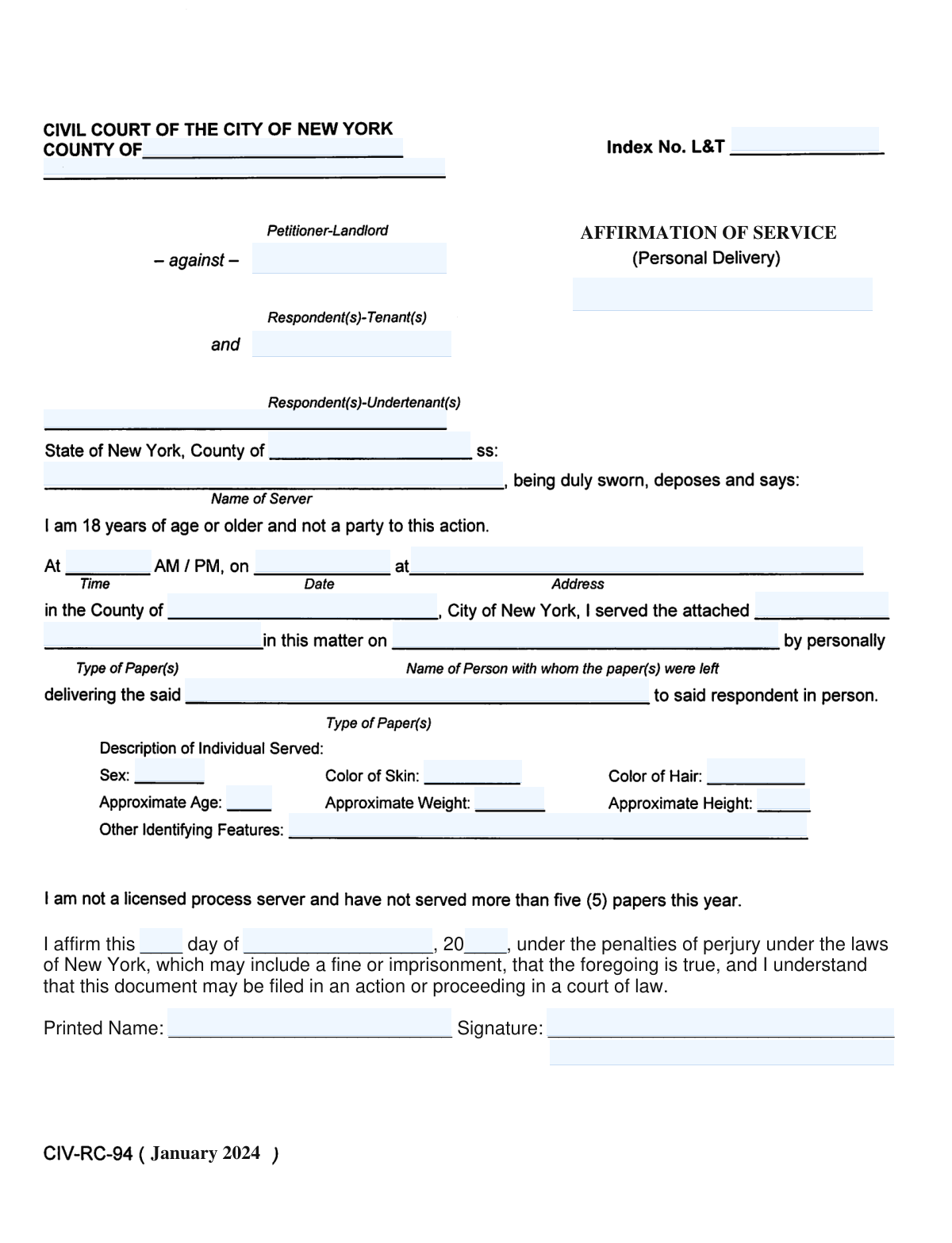
The AI does the filling. You just check it.
No typing into boxes, nothing to install.
What this form asks for
The AI fills all of it, from your answers or your documents.
The AI checks your answers before you download
14 checks built for this form, so a wrong date or a missing answer is caught before anyone else sees it.
Validates that the blank for "this ____ day" is completed and contains a numeric day value (e.g., 1–31). This is important because the day is part of the sworn date and is required to establish when the affirmation was made. If missing or non-numeric, the submission should be rejected or returned for correction because the affirmation date is incomplete.
Checks that the entered day is valid for the provided month and year (e.g., no 31 for April, no 30 for February, and February 29 only in leap years). This prevents impossible dates that could invalidate the affidavit or create filing disputes. If the day-month-year combination is invalid, the system should flag the date and require correction before acceptance.
Ensures the month blank is completed and matches an allowed month value (e.g., January–December, with controlled spelling). The month is required to form a complete affirmation date and avoid ambiguity in legal records. If the month is missing or not recognized, the form should not be accepted until a valid month is provided.
Validates that the year blank after "20____" is completed and results in a four-digit year (e.g., 2024, 2025). A complete year is necessary for legal timing, statute-related issues, and accurate court filing metadata. If the year is missing or not in the expected format, the system should block submission and request a corrected year.
Checks that the affirmation year is within a reasonable range (e.g., not earlier than a configured minimum such as 2000 and not later than today or a small configurable future tolerance). This reduces data entry errors like transposed digits and prevents affirmations dated implausibly. If out of range, the system should prompt the user to confirm or correct the year before proceeding.
Ensures that day, month, and year are all provided so the affirmation date is complete. A partial date undermines the enforceability and auditability of a sworn statement. If any component is missing, the system should mark the affirmation date as incomplete and prevent final submission.
And 8 more checks
- Printed Name Field Is Completed
- Printed Name Contains Valid Characters and Is Not Only Initials
- Signature Field Is Completed (Electronic or Captured Signature)
- Signature Method Meets System Policy Requirements
- Printed Name and Signature Name Consistency (If Typed Signature)
- Document Version/Heading Date Is Not Confused With Affirmation Date
- Perjury Acknowledgment/Attestation Confirmation (If Implemented as Checkbox)
- No Placeholder Text or Blank Lines Submitted as Values
Let AI fill out your Affirmation of Service
No typing. Every field filled in seconds, checked, ready to sign.
How to Fill Out Affirmation of Service Online for Free in 2026
What the AI walks you through.
- Enter the date of the affirmation by filling in the day, month, and year fields.
- Review the statement language to ensure it accurately reflects the service or facts you are affirming.
- Type or enter your full printed name in the "Printed Name" field.
- Apply your signature in the "Signature" field using an e-signature tool or by signing and uploading a scanned copy, as required.
- Double-check that all blanks are completed and that the information is truthful and consistent with the underlying service details.
- Download the completed affirmation and file or submit it according to the court or proceeding’s instructions (e-filing or paper filing).
Common Mistakes in Completing Affirmation of Service
The ones the AI is built to catch.
Leaving the day blank or using the wrong day format
Writing the month incorrectly or using a numeric month
Forgetting to fill in the year or using a two-digit year
Using a date that conflicts with the form version or the actual signing date
Missing signature or signing in the wrong place
Not printing the name or using an illegible printed name
Using a nickname or a name that doesn’t match the case records
Altering the perjury language or adding extra conditions
Signing without understanding what “under penalties of perjury” means
Using pencil, faint ink, or a signature that won’t reproduce well
Frequently Asked Questions About Affirmation of Service
Is it really free for 7 days?
Can I fill other forms too?
How do I cancel?
How does the AI fill out Affirmation of Service?
What happens to my information?
How complex is Affirmation of Service to fill out?
What is this “Affirmation of Service” form used for?
Who should sign the Affirmation of Service?
Do I need to fill out this form if I’m involved in a New York court case?
What information do I need to complete the date line?
What does “under the penalties of perjury” mean?
Do I need to have this form notarized?
What should I write for “Printed Name”?
Where do I sign on the form?
Can I type my name instead of signing by hand?
What document is the affirmation referring to when it says “the foregoing is true”?
What happens after I sign the Affirmation of Service?
How do I submit or file this affirmation?
How long does it take for the court to process this after filing?
What if I made a mistake on the date or my name after signing?
What if I’m not sure the statements are completely accurate?
Get your Affirmation of Service filled out by AI
$0 today. Cancel before Oct 31 and you pay nothing.
Other forms like this one
New York forms: Form Summons, Supreme Court of New York, New York State Department of State (Division of Licensing Services) Property Condition Disclosure Statement (DOS-1614-f), New York State Department of Labor (NYSDOL) Division of Labor Standards Complaint Form (LS 223), New York State Department of Labor, Division of Labor Standards Complaint Form (LS 223), New York State Employment Application: Part 1 – Pre-Interview (Form #S1000), New York State Employment Application Form, New York Rental Application Form, New York State Deferred Compensation Plan Outgoing Rollover, New York State Deferred Compensation Plan Benefit Distribution Request, New York State Deferred Compensation Plan Direct Rollover to a Roth IRA, Petition for Letters of Administration (New York Surrogate's Court), New York State Comptroller Form RS 5127, Designation of Beneficiary with Contingent Beneficiaries, New York Life Investments Funds Individual Retirement Account Application and NYLIFE Securities LLC Investor Profile, New York State Medicaid Enrollment Form (EMEDNY-436701), New York State Medicaid Enrollment Form, New York State Department of Health Certificate of Qualification Questionnaire - Virology, New York State Certificate of Amendment of Articles of Organization, Form ST-120, New York State and Local Sales and Use Tax Resale Certificate, New York Vehicle Registration/Title Application, Form DOS-2156, New York State Housing Discrimination Disclosure Form
Let AI fill out your Affirmation of Service
Your trial starts once a card is added. You pay nothing before Oct 31.
Our AI already knows this form, all 30 fields of it. Skip the typing: tell it about yourself, or upload what you have, and it fills the whole form in seconds.
- AI fills every field on the form, checkboxes included
- No typing into boxes: answer a few questions, or upload a document you already have, an old copy of this form, a photo of a document
- The AI checks the answers; you review and change anything before you download
- Download the finished PDF, print it, or sign it online
- Encrypted, and never used to train AI
Cancel before Oct 31 and you pay nothing.
A card is needed to start the trial. Cancel in two clicks from your account.
Terms · Privacy