Yes! You can use AI to fill out New York State Department of Health Certificate of Qualification Questionnaire - Virology
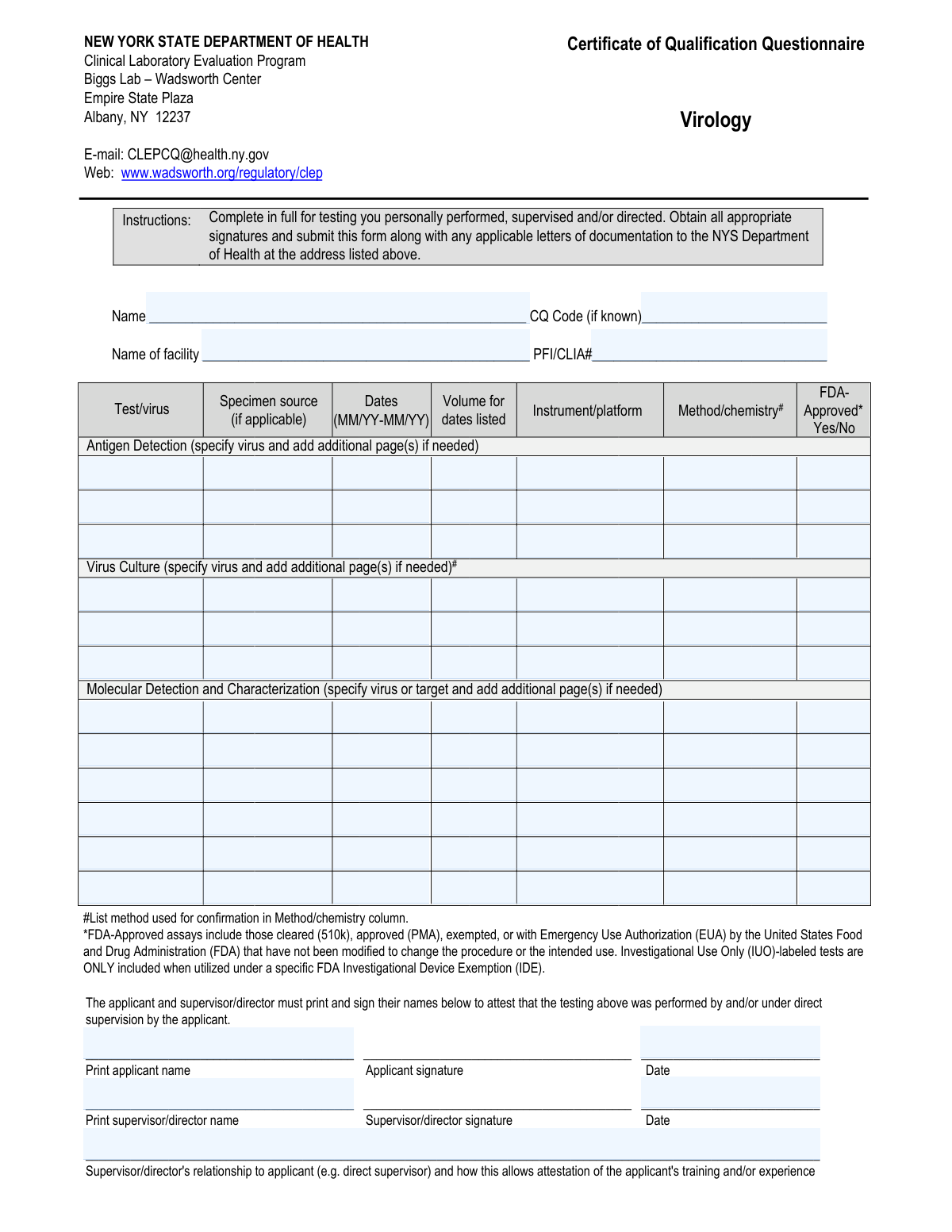
This form is a questionnaire from the New York State Department of Health's Clinical Laboratory Evaluation Program (CLEP) for individuals seeking a Certificate of Qualification in the specialty of Virology. Applicants use it to document their personal, supervised, or directed experience in specific virology testing categories, including antigen detection, virus culture, and molecular detection. Today, this form can be filled out quickly and accurately using AI-powered services like Instafill.ai, which can also convert non-fillable PDF versions into interactive fillable forms.
NYS DOH CQ Questionnaire - Virology is part of the
health department forms, health forms, NJ state forms, New York State forms, New York forms, PA state forms, state ID forms, Department of State forms and state health forms categories on Instafill.
Our AI automatically handles information lookup, data retrieval, formatting, and form filling.
It takes less than a minute to fill out NYS DOH CQ Questionnaire - Virology using our AI form filling.
Securely upload your data. Information is encrypted in transit and deleted immediately after the form is filled out.
Form specifications
| Form name: | New York State Department of Health Certificate of Qualification Questionnaire - Virology |
| Number of fields: | 93 |
| Number of pages: | 1 |
| Language: | English |
Instafill Demo: How to fill out PDF forms in seconds with AI
How to Fill Out NYS DOH CQ Questionnaire - Virology Online for Free in 2026
Are you looking to fill out a NYS DOH CQ QUESTIONNAIRE - VIROLOGY form online quickly and accurately? Instafill.ai offers the #1 AI-powered PDF filling software of 2026, allowing you to complete your NYS DOH CQ QUESTIONNAIRE - VIROLOGY form in just 37 seconds or less.
Follow these steps to fill out your NYS DOH CQ QUESTIONNAIRE - VIROLOGY form online using Instafill.ai:
- 1 Navigate to Instafill.ai and upload or select the Certificate of Qualification Questionnaire for Virology.
- 2 Provide your personal details, including your full name, facility name, and PFI/CLIA number, in the designated fields.
- 3 Enter your detailed experience for each testing category (Antigen Detection, Virus Culture, Molecular Detection), including the virus/target, dates, volume, instrument, and method.
- 4 Review all the information populated by the AI to ensure it accurately reflects your testing experience and qualifications.
- 5 Electronically or manually sign and date the form in the applicant section to attest to the accuracy of the information.
- 6 Have your supervisor or director complete their section by printing their name, signing, dating, and describing their relationship to you and their basis for attestation.
- 7 Download the completed form and submit it to the NYS Department of Health as per the instructions.
Our AI-powered system ensures each field is filled out correctly, reducing errors and saving you time.
Why Choose Instafill.ai for Your Fillable NYS DOH CQ Questionnaire - Virology Form?
Speed
Complete your NYS DOH CQ Questionnaire - Virology in as little as 37 seconds.
Up-to-Date
Always use the latest 2026 NYS DOH CQ Questionnaire - Virology form version.
Cost-effective
No need to hire expensive lawyers.
Accuracy
Our AI performs 10 compliance checks to ensure your form is error-free.
Security
Your personal information is protected with bank-level encryption.
Frequently Asked Questions About Form NYS DOH CQ Questionnaire - Virology
This form is used to document your personal experience in virology testing for the New York State Department of Health's Clinical Laboratory Evaluation Program (CLEP). It is a required part of the application process to obtain or maintain a Certificate of Qualification in Virology.
The form must be completed by the applicant seeking the Certificate of Qualification. Both the applicant and their supervisor or laboratory director must sign and date the form to attest to the applicant's experience.
For each test, you must provide the virus/target, specimen source, dates of testing, total volume of tests performed, the instrument/platform used, the method/chemistry, and whether the assay was FDA-Approved.
The form instructs you to "add additional page(s) if needed" for each testing category. You should create and attach a supplementary page that follows the same column format to list your additional experience.
An assay is considered FDA-Approved if it has been cleared (510k), approved (PMA), exempted, or granted Emergency Use Authorization (EUA). Investigational Use Only (IUO) tests are generally not considered approved unless used under a specific FDA exemption.
In this column, you should describe the analytical principle of the test, such as ELISA, real-time RT-PCR, or next-generation sequencing. The form also requires you to list any methods used for confirmation in this same column.
The CQ Code is optional and can be left blank if unknown. However, the PFI/CLIA number is required; you can typically get this number from your laboratory manager or supervisor.
You should submit the fully completed and signed form, along with any attachments, to the NYS Department of Health at the email or physical address provided at the top of the form.
The person signing must be in a position to attest to your training and experience, such as your direct supervisor or the laboratory director. They must also explain their relationship to you and how they can verify the information provided.
Yes, services like Instafill.ai use AI to accurately auto-fill form fields from your saved information, which can save time and reduce errors. Always review any auto-filled information for accuracy before submitting.
You can use a service like Instafill.ai to fill out the form online. Simply upload the PDF, and the platform will help you complete the fields with its AI-powered tools before you print it for signatures.
You can use a service like Instafill.ai, which can convert flat, non-fillable PDFs into interactive, fillable forms. This allows you to type your information directly into the fields for a cleaner, more professional submission.
Enter the total number of tests you personally performed, supervised, or directed for that specific assay during the time period you listed. This should be a whole number without any commas or decimals.
Compliance NYS DOH CQ Questionnaire - Virology
Validation Checks by Instafill.ai
1
Experience Row Integrity Check
For each row in the Antigen Detection, Virus Culture, and Molecular Detection tables, this validates that if the 'Test/virus' field is filled, then all other required fields in that same row ('Dates', 'Volume', 'Instrument/platform', 'Method/chemistry', 'FDA-Approved') must also be filled. This ensures that every documented experience is complete and provides a full picture of the test performed. A failure would result in an error message prompting the user to complete the specified row before submission.
2
PFI/CLIA Number Format Validation
This check ensures the 'PFI/CLIA#' field is not only present but also matches the expected format, which is typically an alphanumeric string of a specific length (e.g., 10 characters like the example '12D3456789') without spaces or special punctuation. This is critical for correctly identifying the facility with state and federal regulators. If the format is incorrect, the system will reject the entry and request the user to enter the number exactly as issued.
3
Date Range Format and Chronology
Validates that all 'Dates (MM/YY-MM/YY)' fields strictly follow the 'MM/YY-MM/YY' format. It also performs a logical check to ensure the end date is not earlier than the start date. This prevents nonsensical or incorrectly entered experience periods. A validation failure would highlight the specific date field and require the user to correct the format or the chronological order.
4
Sequential Experience Entry
This validation ensures that experience rows are filled sequentially within each section (Antigen, Culture, Molecular). For example, 'Antigen Detection Row 2' cannot contain data if 'Antigen Detection Row 1' is empty. This maintains the logical order and structure of the form, preventing gaps in the experience record. If violated, the user would be prompted to fill the preceding empty row first or move the data up.
5
Volume Field Numeric-Only Validation
This check verifies that all 'Volume for dates listed' fields contain only positive whole numbers. It prohibits the entry of commas, decimals, text, or negative values. This is important for ensuring the data is clean and can be used for quantitative analysis of the applicant's experience. An invalid entry will trigger an error message specifying that only whole numbers are allowed.
6
FDA-Approved Field Enumeration
This validation restricts the input for all 'FDA-Approved' fields to exactly 'Yes' or 'No'. It is case-sensitive as per the form's instructions. This ensures standardized, unambiguous data regarding the regulatory status of the assays listed. Any other entry will be flagged as invalid, forcing the user to select one of the two valid options.
7
Signature Date vs. Experience Date Logic
This check compares the 'Applicant signature date' and 'Supervisor/director signature' date against all end dates listed in the experience tables. The signature dates must be on or after the latest experience end date. This prevents the attestation from being signed before the documented experience was completed. If a signature date is too early, the system will display an error explaining that the form cannot be signed to attest to future or incomplete experience.
8
Mandatory Applicant and Facility Information
Verifies that the 'Applicant Full Name', 'Name of facility', and 'PFI/CLIA#' fields are not empty upon submission. These fields are fundamental for identifying the applicant and the location where the experience was gained. If any of these fields are left blank, the submission will be blocked until the required information is provided.
9
Complete Signature Block Attestation
This validation ensures that if a signature is provided by either the applicant or supervisor, the corresponding printed name and date fields are also filled out. For the supervisor, the 'Supervisor/director's relationship to applicant' explanation is also mandatory. This is crucial as an incomplete signature block invalidates the legal attestation. The system will prevent submission if any part of a used signature block is missing.
10
Signature Date Format and Validity
Ensures that the applicant and supervisor signature dates are entered in the strict 'MM/DD/YYYY' format and represent a valid calendar date (e.g., not 02/30/2023). This is essential for creating a legally sound and accurately time-stamped record of the attestation. An invalid format or date will result in an error message requiring correction.
11
Supervisor Relationship Explanation Requirement
This check confirms that the 'Supervisor/director's relationship to applicant' text field is not empty if the supervisor's signature and name are present. The explanation is a required component of the attestation, clarifying the basis for the supervisor's knowledge of the applicant's experience. If the supervisor's signature block is used but this explanation is missing, the form submission will be halted with a message indicating the field is required.
12
Future Date Prevention
This validation scans all date fields on the form, including both the 'MM/YY-MM/YY' experience ranges and the 'MM/DD/YYYY' signature dates, to ensure none of them are in the future. Experience and attestations must be based on past events. If a future date is detected, the system will flag the entry and require the user to input a date that is on or before the current date.
13
Applicant Name Consistency
This check compares the value entered in the 'Name' field in the header with the 'Print applicant name' field in the signature block. It ensures the applicant's name is consistent throughout the document. While minor variations could be allowed (e.g., presence/absence of middle initial), significant discrepancies would be flagged to prevent identity confusion. A mismatch would trigger a warning asking the user to verify the names are correct.
14
Conditional Row Requirement
This validation checks that if any field in an experience row is filled (e.g., 'Volume' or 'Instrument/platform'), the corresponding 'Test/virus' field for that row must also be filled. It prevents orphaned data where details of an experience are provided without identifying the test itself. If this check fails, the user will be prompted to either provide the 'Test/virus' name or clear the data from the rest of the row.
Common Mistakes in Completing NYS DOH CQ Questionnaire - Virology
Applicants often enter dates in formats other than the required MM/YY-MM/YY, such as using four-digit years or including days. This error occurs from not closely following the column header instructions and can lead to data entry rejection and processing delays. To avoid this, always use a two-digit month and two-digit year for both the start and end dates, separated by a hyphen (e.g., 03/21-09/22).
The 'Volume for dates listed' field requires a whole number, but applicants frequently include commas for large numbers (e.g., '1,500') or decimals. This is a common data entry habit that conflicts with the form's specific requirement for only digits. Such formatting errors can cause automated processing to fail, requiring manual correction and delaying the application.
A frequent mistake is entering a 'Test/virus' but then failing to complete all other required fields in that same row, such as 'Dates,' 'Volume,' or 'Instrument/platform.' This often happens when rushing and results in an incomplete record for that specific experience, which cannot be evaluated by the review board. If you list a test, ensure every corresponding field in that row is filled out completely.
The 'Method/chemistry#' column has a footnote requiring the inclusion of confirmatory methods, but this is easily overlooked. Applicants often list only the primary testing method (e.g., 'ELISA') without the required confirmation step (e.g., '; Western blot'). This omission provides an incomplete picture of the applicant's experience and may require the form to be returned for correction.
Applicants frequently enter the instrument's name (e.g., 'Applied Biosystems 7500') in the 'Method/chemistry' column, or vice-versa. This mistake stems from seeing the two concepts as linked, but the form requires distinct information for each. The 'Instrument' is the machine used, while the 'Method' is the scientific principle (e.g., 'RT-PCR', 'ELISA'); confusing them can lead to application rejection.
The form strictly requires the exact text 'Yes' or 'No' for FDA approval status, but users often enter variations like 'Y,' 'N,' 'Approved,' or leave it blank. This inconsistency can cause validation failures and requires manual review to standardize the data. To prevent this, type the full word 'Yes' or 'No' exactly as specified in the instructions for every relevant assay.
A critical error is forgetting to sign the form, omitting the date next to the signature, or having the printed name not match the signature. Both the applicant and the supervisor must sign and date their respective sections for the attestation to be valid. An incomplete signature section will automatically invalidate the submission, causing significant delays.
In the supervisor section, many simply write their title (e.g., 'Lab Director') without explaining how their position allows them to attest to the applicant's experience, as required. This fails to provide the necessary context for the reviewer to validate the attestation. The supervisor must provide a concise statement linking their role to their oversight of the applicant's work (e.g., 'Direct supervisor, responsible for reviewing all of the applicant's virology casework.').
The instructions for the PFI/CLIA number specify entering the code with 'no spaces or punctuation,' but applicants may add hyphens or spaces out of habit. This can cause mismatches when the number is cross-referenced in the state's database, delaying verification. To avoid this, carefully transcribe the number as a single alphanumeric string. AI-powered form filling tools like Instafill.ai can help by automatically validating and formatting such identifiers correctly.
Applicants often use internal lab jargon or incomplete names for instruments (e.g., '7500' instead of 'Applied Biosystems 7500') and viruses. This creates ambiguity for external reviewers who may not be familiar with the terminology. Always use full, standard nomenclature for viruses, manufacturers, and instrument models to ensure your experience is clearly understood.
The form instructs applicants to 'add additional page(s) if needed,' but some may try to cram extra information into the margins or omit experience that doesn't fit. This results in an incomplete or illegible application. If your experience exceeds the provided rows, you must attach a separate page with the same table format. If the form is a non-fillable PDF, a tool like Instafill.ai can convert it to a fillable version, making it easier to add information.
Saved over 80 hours a year
“I was never sure if my IRS forms like W-9 were filled correctly. Now, I can complete the forms accurately without any external help.”
Kevin Martin Green
Your data stays secure with advanced protection from Instafill and our subprocessors

Robust compliance program
Transparent business model
You’re not the product. You always know where your data is and what it is processed for.
ISO 27001, HIPAA, and GDPR
Our subprocesses adhere to multiple compliance standards, including but not limited to ISO 27001, HIPAA, and GDPR.
Security & privacy by design
We consider security and privacy from the initial design phase of any new service or functionality. It’s not an afterthought, it’s built-in, including support for two-factor authentication (2FA) to further protect your account.
Fill out NYS DOH CQ Questionnaire - Virology with Instafill.ai
Worried about filling PDFs wrong? Instafill securely fills new-york-state-department-of-health-certificate-of-qualification-questionnaire-virology forms, ensuring each field is accurate.