Yes! You can use AI to fill out New York State Employment Application: Part 1 – Pre-Interview (Form #S1000)

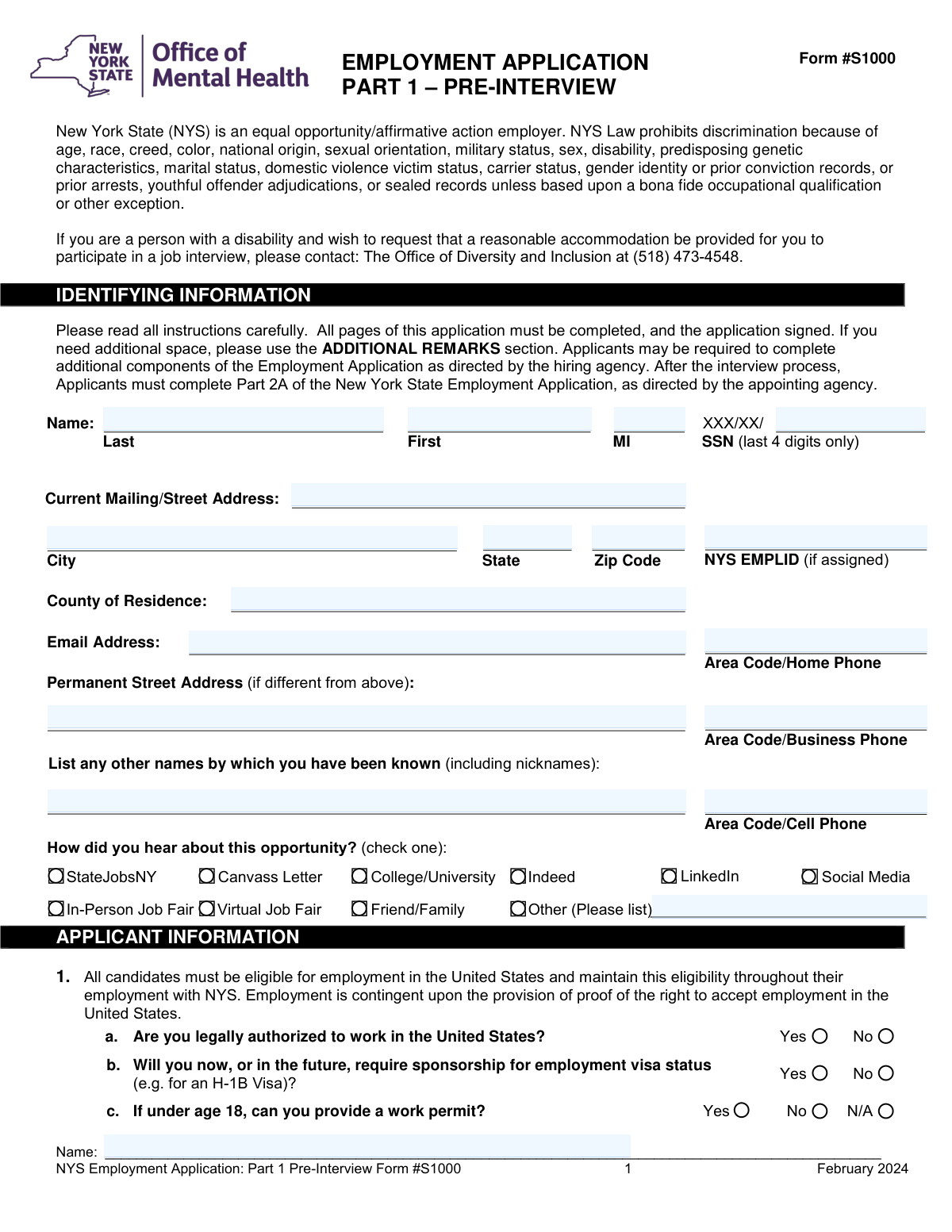
New York State Form #S1000 is the Part 1 (Pre-Interview) portion of the NYS Employment Application that agencies use to screen candidates and gather standardized background details prior to interviewing. It captures key information such as contact details, work authorization, driver’s license/professional licensure (if required), potential conflicts of interest, availability, education, employment/experience, and professional references, along with required affirmations and authorizations. Completing it accurately is important because NYS may verify the information with employers, schools, and other sources, and omissions or false statements can affect eligibility or employment status. Today, this form can be filled out quickly and accurately using AI-powered services like Instafill.ai, which can also convert non-fillable PDF versions into interactive fillable forms.
Our AI automatically handles information lookup, data retrieval, formatting, and form filling.
It takes less than a minute to fill out NYS Form S1000 (Part 1 Pre-Interview) using our AI form filling.
Securely upload your data. Information is encrypted in transit and deleted immediately after the form is filled out.

Form specifications

Form name: New York State Employment Application: Part 1 – Pre-Interview (Form #S1000)
Number of pages: 7
Language: English
main-image

Instafill Demo: filling out a legal form in seconds

How to Fill Out NYS Form S1000 (Part 1 Pre-Interview) Online for Free in 2026

Are you looking to fill out a NYS FORM S1000 (PART 1 PRE-INTERVIEW) form online quickly and accurately? Instafill.ai offers the #1 AI-powered PDF filling software of 2026, allowing you to complete your NYS FORM S1000 (PART 1 PRE-INTERVIEW) form in just 37 seconds or less.
Follow these steps to fill out your NYS FORM S1000 (PART 1 PRE-INTERVIEW) form online using Instafill.ai:
  1. 1 Go to Instafill.ai and upload the NYS Employment Application: Part 1 – Pre-Interview (Form #S1000) PDF (or select it from the form library).
  2. 2 Let the AI detect and map the fields, then confirm the form version/date (e.g., February 2024) and review any auto-identified sections.
  3. 3 Enter your identifying information (name, last 4 of SSN, addresses, county of residence, email, phone numbers, NYS EMPLID if applicable) and how you heard about the opportunity.
  4. 4 Complete applicant eligibility items (U.S. work authorization, visa sponsorship needs, and work permit if under 18).
  5. 5 Fill in position-related requirements as applicable (driver’s license details, CDL endorsements/restrictions, and any required professional licensure/certification information).
  6. 6 Provide job interests and availability, then complete education history, employment/experience (all periods including concurrent work), and professional references; add remarks/attachments if needed.
  7. 7 Review the affirmation and release authorization, e-sign and date where required, run Instafill.ai validation checks for missing fields, then download/submit the completed form per the hiring agency’s instructions.

Our AI-powered system ensures each field is filled out correctly, reducing errors and saving you time.

Why Choose Instafill.ai for Your Fillable NYS Form S1000 (Part 1 Pre-Interview) Form?

Speed

Complete your NYS Form S1000 (Part 1 Pre-Interview) in as little as 37 seconds.

Up-to-Date

Always use the latest 2026 NYS Form S1000 (Part 1 Pre-Interview) form version.

Cost-effective

No need to hire expensive lawyers.

Accuracy

Our AI performs 10 compliance checks to ensure your form is error-free.

Security

Your personal information is protected with bank-level encryption.

Frequently Asked Questions About Form NYS Form S1000 (Part 1 Pre-Interview)

Form #S1000 is the pre-interview employment application used by New York State agencies to collect your basic identifying information, eligibility to work, job interests, education, work history, and references. It helps the hiring agency screen candidates before or during the interview process.

Anyone applying for a New York State position that requires the NYS Employment Application Part 1 should complete it as directed by the hiring agency. You typically submit it before the interview or as part of the interview scheduling/screening process.

Yes—this form states that all pages must be completed and the application must be signed. If you need more room, use the “Additional Remarks” section or attach extra sheets where allowed.

The form requests only the last four digits to help identify your records while limiting exposure of your full SSN. Enter exactly the last four digits and leave the rest blank.

The NYS EMPLID field is only for applicants who have already been assigned a New York State Employee ID. If you do not have one, leave it blank.

Answer based on your current legal authorization to work in the U.S. and whether you will need employer sponsorship now or in the future (for example, an H-1B). Employment is contingent on providing proof of your right to work in the U.S.

If you are under 18, indicate whether you can provide a valid work permit; otherwise select “N/A.” This helps the agency confirm you can legally work if hired.

No—complete the driver’s license questions only if the position you are applying for requires operating a motor vehicle or heavy equipment. If driving is required and you don’t have a NYS-valid license, you may need to explain how you can meet the job’s transportation needs at the interview.

If the position requires licensure/certification, list the credential name, type/specialty, issuing authority, license number, issue/expiration dates, and any registration dates. You may be required to provide proof during screening, and you must disclose restrictions, suspensions, or revocations with details.

A relative includes someone in your household or parents, grandparents, spouse, siblings, children, aunts/uncles, nieces/nephews, and in-laws. If none work for the agency you’re applying to, check the box indicating you have no relatives employed there.

No—this form explicitly states that resumes will not be accepted in lieu of completing the Employment & Experience section. You must list all employment periods (including concurrent jobs) and include state/local government experience.

The form provides space for three professional references. For each, include the person’s name, relationship to you, address, telephone number, and email address.

You may be asked to provide proof of work authorization, diplomas/degrees you claim, and any professional licenses/certifications listed. Some positions may also require additional testing such as physical/medical exams or drug/alcohol tests.

Yes—the instructions state that after the interview process, applicants must complete Part 2A of the New York State Employment Application as directed by the appointing agency. Follow the agency’s instructions on timing and submission.

Yes—AI tools can help you complete the form faster and more accurately; services like Instafill.ai use AI to auto-fill form fields and reduce manual typing. If your PDF is flat/non-fillable, Instafill.ai can convert it into an interactive fillable form, then you can upload the PDF, map or confirm fields, and export a completed, ready-to-sign version.

Compliance NYS Form S1000 (Part 1 Pre-Interview)
Validation Checks by Instafill.ai

1
Required applicant identity fields are present and non-empty
Validates that Last Name, First Name, and SSN Last 4 Digits are provided, since these are core identifiers used to match the applicant to records and to prevent duplicate/ambiguous applications. Middle Initial may be blank, but if present must be valid (see separate check). If any required identity field is missing, the submission should be rejected with field-level errors and the applicant prompted to complete the missing items.
2
SSN last-4 format validation (exactly 4 digits)
Ensures the SSN field contains exactly four numeric digits (0-9) and does not include masking characters, spaces, or a full SSN. This is important for privacy compliance and consistent downstream matching. If validation fails, block submission and display a message indicating only the last four digits are allowed.
3
Middle Initial validation (single alphabetic character)
Checks that Middle Initial, if provided, is exactly one letter (A-Z) and not a full middle name, punctuation, or multiple characters. This prevents data quality issues in systems that store MI as a single-character field. If invalid, the system should request correction or allow the applicant to leave it blank.
4
Email address format and normalization
Validates that Email Address follows a standard email pattern (local-part@domain) and trims leading/trailing whitespace; optionally lowercases the domain portion for consistency. Email is a primary contact method and is often used for automated notifications. If invalid, prevent submission and require a corrected email.
5
Phone number format validation (home/business/cell)
Ensures each provided phone number contains a valid 10-digit US number (area code + 7-digit number), allowing common formatting characters like parentheses, spaces, and dashes. This reduces failed contact attempts and improves consistency for calling/texting workflows. If a phone field is populated but not valid, flag the specific phone field and require correction.
6
Current mailing address completeness (address, city, state, ZIP, county)
Checks that Current Mailing/Street Address, City, State, Zip Code, and County of Residence are all present and not placeholders. Address completeness is required for residency verification, correspondence, and eligibility rules that may depend on location. If any component is missing, the form should not be accepted until the address is complete.
7
State and ZIP code format validation
Validates State is either a two-letter US state/territory abbreviation or a recognized full state name, and ZIP is either 5 digits or ZIP+4 (#####-####). This prevents undeliverable mail and improves geocoding/region reporting. If invalid, return a clear error indicating the accepted formats.
8
Permanent address conditional requirement and difference check
If Permanent Street Address is provided, validate it is complete enough to be usable (not just 'same as above') and, when the applicant indicates it is different, it should not be identical to the current address fields. This avoids contradictory data and ensures the permanent address is meaningful when captured. If the permanent address is incomplete or duplicates the current address without need, prompt the applicant to either clear it or provide the correct permanent address.
9
How-did-you-hear selection: exactly one option and 'Other' text dependency
Validates that exactly one source checkbox is selected to support consistent reporting and analytics. If 'Other (Please list)' is selected, the 'Other source' text must be provided and must not be generic (e.g., 'N/A', 'none'). If multiple sources are selected or 'Other' lacks details, block submission and request correction.
10
Work authorization and sponsorship questions are answered consistently
Ensures Question 1a (authorized to work) and 1b (sponsorship required) each have exactly one response selected (Yes or No). Additionally, if 1a is 'No', the application should be flagged as ineligible for hire unless the process explicitly allows proceeding; if 1a is 'Yes' and 1b is 'Yes', the record should be flagged for immigration/sponsorship workflow. If responses are missing or contradictory (e.g., both Yes and No checked), prevent submission until corrected.
11
Under-18 work permit question requires a valid single selection
Validates that Question 1c has exactly one selection among Yes/No/N/A. This is important for compliance with child labor laws and to ensure the agency can request documentation when needed. If multiple options are selected or none are selected, the form should be returned for correction.
12
Driver license details required when license is marked 'Yes'
If the applicant answers 'Yes' to having a valid NYS driver license, require Licensing State, License Number, and License Expiration Date, and require exactly one license class selection (A/B/C/D/E/Other). This supports roles requiring vehicle operation and ensures the license can be verified. If any required driver license detail is missing or multiple classes are selected, block submission and highlight the missing/invalid fields.
13
Driver license expiration date is a valid date and not in the past
Validates that the License Expiration Date is a real calendar date in an accepted format (e.g., MM/DD/YYYY) and is not earlier than the submission date when the applicant claims the license is currently valid. This prevents accepting an application that asserts a valid license while providing an expired credential. If the date is invalid or expired, require correction or force the driver license question to 'No' with appropriate follow-up.
14
Professional license/certification section completeness and date logic
When any professional license/certification fields are provided (or when the position requires it in the workflow), require Name of License/Certificate, Issued By, License No., and relevant dates (Issue Date and/or Registration Date, plus Expiration/Registration Expiration if applicable). Also validate that Issue/Registration dates are not after their corresponding expiration dates. If incomplete or logically inconsistent, the submission should be flagged and the applicant required to correct dates or provide missing credential details.
15
License limitation/suspension disclosures require explanatory details
If 3b (limitations/restrictions) is 'Yes' or 3c (suspended/revoked) is 'Yes', require the Suspension/Revocation Details field to be populated with a meaningful explanation (minimum length and not just 'see attached' unless attachments are supported). This is critical for compliance screening and risk assessment. If details are missing, prevent submission and prompt the applicant to provide the required explanation.
16
Employment history entries: date format, ordering, and required subfields per entry
For each employment entry that has an employer name, require Address, Date Employed (start), To (end or 'Present' if supported), Supervisor’s Name, Supervisor’s Title, Telephone, Duties, and Reason(s) for Leaving. Validate dates are in a consistent format and that start date is not after end date; also ensure concurrent employment is representable (overlaps allowed) but each entry must be internally consistent. If any populated entry is missing required subfields or has invalid date logic, return errors for that specific employer block.

Common Mistakes in Completing NYS Form S1000 (Part 1 Pre-Interview)

Entering full SSN instead of last 4 digits

Applicants often type their full Social Security Number out of habit, even though this form explicitly requests only the last four digits. Providing the full SSN can create privacy/security risk and may require the agency to reject or redact the submission. To avoid this, enter exactly four digits (no dashes) and double-check you didn’t paste the full number; AI-powered tools like Instafill.ai can enforce field-length rules and prevent over-entry.

Name inconsistencies across sections (legal name vs. preferred name)

People frequently use a nickname in one place and a legal name in another (e.g., “Mike” vs. “Michael”), or forget to include a middle initial in the identifying section while using it elsewhere. This can cause record-matching issues with NYS systems (especially if an EMPLID exists) and slow down verification. Use your legal name exactly as you want it on official records and list nicknames/other names only in the “other names known” field; Instafill.ai can standardize names across repeated fields.

Leaving NYS EMPLID blank when previously assigned (or entering the wrong ID)

Applicants who have worked for NYS before sometimes forget they have an EMPLID, or they enter an employee number from a different system. This can delay background checks, employment history matching, and benefits/eligibility verification. If you have ever been assigned an NYS EMPLID, enter it exactly; if you’re unsure, leave it blank rather than guessing and confirm with the agency—Instafill.ai can flag suspicious ID formats and reduce typos.

Address errors: missing apartment/unit, mixing current vs. permanent address, or wrong county

A common issue is omitting apartment/unit numbers, entering a PO Box when a street address is needed for residency verification, or filling the permanent address even when it’s the same as the current address. Applicants also frequently select the wrong “County of Residence,” especially near county borders or after a recent move. These mistakes can cause mail to be undeliverable and can create eligibility or jurisdiction confusion; use your current physical mailing/street address, only complete the permanent address if different, and verify your county—Instafill.ai can validate address formatting and prompt for missing unit numbers.

Phone and email formatting problems (missing area code, typos, or using an unmonitored email)

Applicants often forget the area code, swap digits, or provide a work email they rarely check, which leads to missed interview scheduling calls or time-sensitive requests. The form requests area code + number for home/business/cell, and inconsistent formatting can make contact info hard to read. Use a reliable personal email, include area codes, and proofread for transposed digits; Instafill.ai can format phone numbers consistently and validate email structure.

Work authorization and sponsorship questions answered inconsistently

Some applicants check “Yes” for being authorized to work but also check “Yes” for needing sponsorship without understanding the distinction, or they leave one of the two questions blank. Inconsistencies can trigger follow-up screening and delay the hiring process. Answer both 1a and 1b carefully: authorization refers to current legal ability to work, while sponsorship refers to needing an employer-sponsored visa now or later; Instafill.ai can highlight contradictory selections before submission.

Driver license section completed incorrectly (or left incomplete when required)

Applicants sometimes answer “Yes” to having a valid NYS license but forget to provide class, licensing state, license number, or expiration date, or they list a non-NYS license while still checking “valid in NYS.” For roles requiring driving/heavy equipment, missing or mismatched details can disqualify candidates or delay appointment. Only complete the license details if the position requires it, and if you answer “Yes,” fill every related field accurately; Instafill.ai can enforce conditional logic so required subfields aren’t skipped.

Professional license/certification details missing dates, issuing authority, or restriction history

People often list a credential (e.g., RN, CPA) but omit the issuing authority, license number, issue/expiration dates, or registration dates, or they check “N/A” when they actually hold a license. If the position requires licensure, incomplete information can halt screening until proof is provided and may be treated as not meeting minimum qualifications. Provide the exact credential name, issuer, number, and all relevant dates, and disclose restrictions/suspensions with details when applicable; Instafill.ai can help format license numbers and ensure all required fields are completed.

Conflict-of-interest/relative employment section left blank instead of explicitly indicating none

Applicants frequently skip the relative-employment question when they have no relatives at the agency, forgetting to check the “no relatives” box. A blank response can be interpreted as incomplete and may require follow-up, slowing the process. Always either check the “no relative(s)” box or list the relative name and relationship clearly; Instafill.ai can prompt you to complete one of the two paths so the section isn’t left ambiguous.

Work availability and schedule grid filled out inconsistently (Yes/No conflicts or omissions)

The schedule section includes multiple Yes/No options (shift work, overtime, weekends, full-time/part-time/per diem, and duration types), and applicants often mark both Yes and No for the same line or leave lines blank. Conflicting availability can reduce interview chances or lead to being screened out for roles with specific scheduling needs. Mark only one option per line and ensure your selections match the job you’re pursuing; Instafill.ai can prevent mutually exclusive selections and highlight missing responses.

Employment history incomplete or replaced with a resume (despite the instruction)

A very common mistake is attaching a resume and leaving the Employment & Experience section partially blank, or failing to list all periods of employment, concurrent jobs, and state/local government experience. The form explicitly states resumes will not be accepted in lieu of completing this section, and omissions can be viewed as incomplete or as a credibility issue during verification. Enter each employer with dates (from/to), supervisor contact, duties, and reasons for leaving, and use additional sheets if needed; Instafill.ai can carry over structured resume data into the required fields and keep date formats consistent.
Saved over 80 hours a year

“I was never sure if my IRS forms like W-9 were filled correctly. Now, I can complete the forms accurately without any external help.”

Kevin Martin Green

Your data stays secure with advanced protection from Instafill and our subprocessors

Robust compliance program

Transparent business model

You’re not the product. You always know where your data is and what it is processed for.

ISO 27001, HIPAA, and GDPR

Our subprocesses adhere to multiple compliance standards, including but not limited to ISO 27001, HIPAA, and GDPR.

Security & privacy by design

We consider security and privacy from the initial design phase of any new service or functionality. It’s not an afterthought, it’s built-in, including support for two-factor authentication (2FA) to further protect your account.

Fill out NYS Form S1000 (Part 1 Pre-Interview) with Instafill.ai

Worried about filling PDFs wrong? Instafill securely fills new-york-state-employment-application-part-1-pre-interview-form-s1000 forms, ensuring each field is accurate.