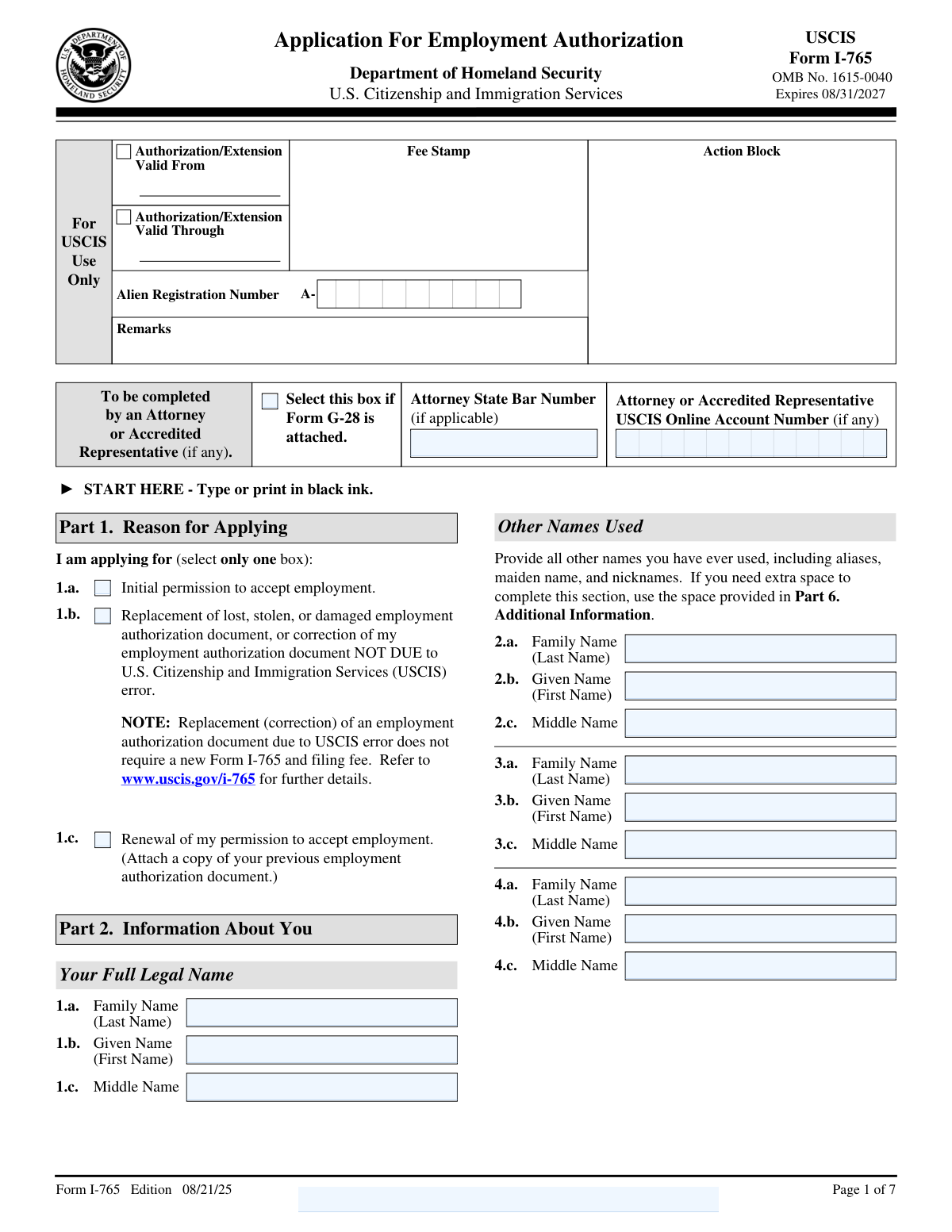
Yes! You can use AI to fill out Form I-765, Application For Employment Authorization
Form I-765, Application for Employment Authorization, is submitted to U.S. Citizenship and Immigration Services (USCIS) by certain foreign nationals who are eligible to work in the United States. The primary purpose of this form is to request an Employment Authorization Document (EAD), which serves as proof of the holder's authorization to work legally in the U.S. for a specific period. Today, this form can be filled out quickly and accurately using AI-powered services like Instafill.ai, which can also convert non-fillable PDF versions into interactive fillable forms.
Our AI automatically handles information lookup, data retrieval, formatting, and form filling.
It takes less than a minute to fill out I-765 using our AI form filling.
Securely upload your data. Information is encrypted in transit and deleted immediately after the form is filled out.
Form specifications
| Form name: | Form I-765, Application For Employment Authorization |
| Number of fields: | 161 |
| Number of pages: | 7 |
| Language: | English |
| Categories: | authorization forms, employment application forms, employment forms |
Instafill Demo: How to fill out PDF forms in seconds with AI
How to Fill Out I-765 Online for Free in 2026
Are you looking to fill out a I-765 form online quickly and accurately? Instafill.ai offers the #1 AI-powered PDF filling software of 2026, allowing you to complete your I-765 form in just 37 seconds or less.
Follow these steps to fill out your I-765 form online using Instafill.ai:
- 1 Navigate to Instafill.ai and upload or select Form I-765 from their library of official documents.
- 2 In Part 1, select your reason for applying, whether it's for initial permission, renewal, or replacement of your employment authorization.
- 3 Complete Part 2 by providing your personal information, including your full legal name, address, date of birth, and country of citizenship.
- 4 Enter your immigration details, such as your Alien Registration Number (A-Number), I-94 record number, and current immigration status.
- 5 In the 'Eligibility Category' section, enter the specific code that applies to your situation, which determines your basis for applying for work authorization.
- 6 Carefully review all the information pre-filled by the AI for accuracy, then complete the applicant's statement, sign, and date the form in Part 3.
- 7 Download the completed, signed form and gather all necessary supporting documents as specified in the form instructions before submitting it to USCIS.
Our AI-powered system ensures each field is filled out correctly, reducing errors and saving you time.
Why Choose Instafill.ai for Your Fillable I-765 Form?
Speed
Complete your I-765 in as little as 37 seconds.
Up-to-Date
Always use the latest 2026 I-765 form version.
Cost-effective
No need to hire expensive lawyers.
Accuracy
Our AI performs 10 compliance checks to ensure your form is error-free.
Security
Your personal information is protected with bank-level encryption.
Frequently Asked Questions About Form I-765
Form I-765, Application for Employment Authorization, is used by certain foreign nationals in the United States to request permission to work. If approved, USCIS issues an Employment Authorization Document (EAD), also known as a work permit.
Select 'initial permission' if it's your first time applying for an EAD. Choose 'renewal' if your current EAD is expiring or has expired. Select 'replacement' if your EAD was lost, stolen, damaged, or has an error not caused by USCIS.
Your eligibility category is a code based on your immigration status (e.g., (c)(8) for an asylum applicant). You must find the correct code by reading the official Form I-765 instructions on the USCIS website, as an incorrect category can lead to denial.
The A-Number is a unique identification number assigned by U.S. immigration authorities, typically starting with the letter 'A' followed by eight or nine digits. You can find it on previous immigration documents, such as notices from USCIS or a prior EAD.
You should provide your SSN in Item 13 if you have one. If you do not have an SSN but want one issued, USCIS can request one for you from the Social Security Administration if your I-765 is approved.
In Part 2, provide your U.S. mailing address in Item 5. Then, in Item 6, check 'No' to indicate your addresses are different and provide your U.S. physical address in Item 7.
As stated in Part 1, you must attach a copy of your previous Employment Authorization Document when applying for a renewal. You may need other documents based on your eligibility category, so always review the specific instructions on the USCIS website.
Use Part 6 if you need more space to answer a question, such as listing multiple other names you have used. Clearly indicate the page number, part number, and item number that your additional information refers to.
Only complete these sections if someone assisted you. If an interpreter translated the form for you, they must complete Part 4. If anyone other than you (the applicant) filled out the form, they must complete the preparer section in Part 5.
You should answer every question; if a question does not apply to you, write 'N/A'. The form states that USCIS may deny your application if it is not completely filled out, so it is crucial to be thorough.
Yes, services like Instafill.ai use AI to accurately auto-fill form fields, which can save time and help reduce errors. These tools can extract information from your documents to populate the form for you.
Simply upload the Form I-765 PDF to the Instafill.ai platform. It will become an interactive, fillable form that you can type your answers into directly, and you can use its AI features to assist with auto-filling information.
If you have a flat, non-fillable PDF, you can use a service like Instafill.ai to help. It can convert the non-fillable PDF into an interactive, fillable form online, allowing you to complete it on your computer instead of by hand.
Compliance I-765
Validation Checks by Instafill.ai
1
Reason for Applying Single Selection
This validation ensures that the applicant has selected exactly one box in Part 1, 'Reason for Applying'. The form requires the applicant to choose between 'Initial permission', 'Replacement', or 'Renewal'. Selecting more than one or none at all would make the application's purpose ambiguous and lead to its rejection for being improperly filed.
2
Applicant Full Legal Name Completeness
This check verifies that the 'Family Name (Last Name)' (Item 1.a) and 'Given Name (First Name)' (Item 1.b) in Part 2 are both completed. These fields are essential for identifying the applicant and matching the application to their identity documents. An application without a full name cannot be processed and will be rejected.
3
Conditional Physical Address Requirement
This validation checks if the applicant answered 'No' to Item 6 in Part 2, which asks if the mailing address is the same as the physical address. If 'No' is selected, the system must verify that the physical address fields in Item 7 (Street, City, State, ZIP Code) are all filled out. This is crucial for ensuring USCIS has a valid physical address on record, which may be required for background checks or other processing steps.
4
Date of Birth Format and Validity
This check ensures that the 'Date of Birth' in Part 2, Item 16, is provided in a valid 'mm/dd/yyyy' format and represents a logical, past date. This validation prevents data entry errors, such as transposed numbers or future dates, which would cause processing failures. Correct date of birth is critical for identity verification and eligibility determination.
5
Alien Registration Number (A-Number) Format
This validation verifies that if an 'Alien Registration Number (A-Number)' is entered in Part 2, Item 8, it consists of 7 to 9 digits. This ensures the number conforms to the standard format used by USCIS for tracking individuals. An incorrectly formatted A-Number can lead to processing delays or failure to link the application to the applicant's existing immigration file.
6
Renewal Application Prerequisite Check
This check is triggered if the applicant selects 'Renewal of my permission to accept employment' (Part 1, Item 1.c). The validation flags the application to ensure a copy of the applicant's previous Employment Authorization Document (EAD) is included. Failure to attach the previous EAD is a common reason for renewal application rejection, as it is required evidence.
7
STEM OPT Eligibility Fields Requirement
This validation ensures that if the eligibility category '(c)(3)(C)' is entered in Part 2, Item 27, then the corresponding STEM OPT fields (28.a Degree, 28.b Employer's Name, and 28.c Employer's E-Verify ID) are all completed. This information is mandatory for adjudicating a STEM OPT EAD application. Missing information in this section will result in a Request for Evidence (RFE) or denial.
8
Category-Specific Question Completion
This check verifies that if a specific eligibility category is chosen in Item 27, the subsequent required questions are answered. For example, if category '(c)(8)' is selected, Item 30 must be answered 'Yes' or 'No'. Similarly, for '(c)(35)' or '(c)(36)', Item 31.b must be answered. This ensures that all category-specific eligibility requirements are addressed by the applicant.
9
Category-Specific Receipt Number Requirement
This validation ensures that if eligibility category (c)(26), (c)(35), or (c)(36) is entered in Item 27, the corresponding receipt number field (Item 29 or 31.a) is filled out. These receipt numbers link the I-765 application to the underlying petition that grants eligibility. An application missing this crucial piece of evidence cannot be approved.
10
Interpreter Information Trigger
This check verifies that if the applicant selects box 1.b in Part 3 ('The interpreter named in Part 4...'), then all required fields in Part 4, 'Interpreter's Contact Information, Certification, and Signature,' are completed. This is a legal requirement to document who provided interpretation assistance. An incomplete Part 4 when indicated as used will result in the application being rejected.
11
Preparer Information Trigger
This validation ensures that if the applicant selects box 2 in Part 3 ('At my request, the preparer named in Part 5...'), then all required fields in Part 5, 'Contact Information, Declaration, and Signature of the Person Preparing this Application,' are completed. This is necessary for transparency and to hold the preparer accountable for their role. Failure to complete Part 5 when a preparer is used can lead to rejection and scrutiny of the application.
12
Applicant Signature and Date Mandate
This is a critical check to ensure that the applicant has signed and dated the application in Part 3, Items 7.a and 7.b. An unsigned application is legally invalid and will be immediately rejected by USCIS without further review. The signature date must also be present and cannot be a future date.
13
U.S. Mailing Address Completeness
This validation confirms that the essential components of the U.S. Mailing Address in Part 2, Item 5 (Street Number and Name, City or Town, State, and ZIP Code) are all provided. This address is used for all official correspondence, including the EAD card itself. An incomplete or incorrect address will cause critical documents to be lost, leading to significant delays and potential loss of status.
14
Applicant Statement Exclusive Selection
This check ensures that in Part 3, the applicant has selected either Item 1.a ('I can read and understand English') or Item 1.b ('The interpreter...read to me'), but not both. The form requires a single, clear declaration of how the applicant understood the questions. Selecting neither or both creates an ambiguity that can lead to the form being rejected for being improperly completed.
Common Mistakes in Completing I-765
Applicants often enter an incorrect code in Part 2, Item 27, due to the complexity of the options. This is a critical error that determines the entire basis for the application and the required evidence, frequently leading to immediate rejection. To avoid this, applicants must carefully read the official Form I-765 instructions to find the exact code that matches their immigration situation and double-check it before filing.
Applicants frequently provide a mailing address where they will not be residing in the coming months or fail to use the 'In Care Of Name' field when mail is received by someone else. This often results in the Employment Authorization Document (EAD) being lost, causing significant delays and requiring a new application and fee. Always use a stable, long-term address and verify it for accuracy before submitting.
Forgetting to physically sign the application in Part 3, Item 7.a is an automatic cause for rejection by USCIS, as an unsigned form is considered incomplete. Applicants sometimes forget this crucial step or sign in the wrong section, such as the preparer's block. Always review the form one last time before mailing, specifically to ensure your handwritten signature is in the correct box and dated properly.
After selecting an eligibility category in Item 27, many applicants overlook the subsequent questions (Items 28-31) that are required for their specific category. For example, a STEM OPT applicant under (c)(3)(C) must provide their employer's E-Verify information. Leaving these conditional fields blank when required will lead to a Request for Evidence (RFE) or denial, delaying the application process.
Applicants may enter a name that does not exactly match their passport or other legal documents, or they may forget to list all other names used, including maiden names and aliases, in Part 2. These discrepancies can cause confusion and trigger delays during background checks and identity verification. Ensure your full legal name in Part 1 is identical to your official documents and that all previously used names are listed completely.
In Part 1, applicants mistakenly select 'Renewal' for their first-ever EAD application or 'Initial permission' when they are renewing an existing one. This fundamental error misrepresents the purpose of the filing and can lead to processing delays or rejection. Carefully determine if you are applying for the first time, renewing, or replacing a lost card, and select only one of the three boxes.
Applicants often get confused between their 'Immigration Status at Your Last Arrival' (Item 24) and their 'Current Immigration Status or Category' (Item 25), sometimes entering the same information in both. For many, these statuses are different (e.g., arrived as a B-2 visitor, now has a pending asylum application). This error can misrepresent your immigration history and complicate adjudication, so it's vital to report each status accurately.
Data entry errors are common for crucial identifiers like the Alien Registration Number (A-Number), I-94 number, and Social Security Number (SSN). Applicants may transpose digits, omit the number entirely, or enter it in an incorrect format. These errors can halt the application, as these numbers are key to linking your file with other immigration records. AI-powered form filling tools like Instafill.ai can help prevent these errors by automatically validating data formats.
When needing extra space for items like 'Other Names Used,' applicants either fail to use Part 6 or use it incorrectly by omitting the required cross-reference. Each entry in Part 6 must clearly state the Page Number, Part Number, and Item Number the information pertains to. Forgetting this context makes the additional information difficult for the officer to process, potentially leading to an RFE or denial.
The instructions specify to 'Type or print in black ink,' but applicants sometimes use other colors or have handwriting that is difficult to read. This can lead to data entry errors by USCIS or cause the form to be rejected if critical information is illegible. To avoid this, it is highly recommended to type directly into the PDF; if the form is a non-fillable PDF, a tool like Instafill.ai can convert it into a fillable version to ensure clarity.
When an applicant's mailing address is different from their physical residence (e.g., using a P.O. Box), they must answer 'No' to Item 6 and provide their physical address in Item 7. Many people overlook this, leaving the physical address section blank even when required. This omission can lead to RFEs, as USCIS often requires a physical U.S. address for their records.
USCIS periodically updates its forms, and submitting an older version will result in an automatic rejection. Applicants often find an old PDF online and fill it out without checking the 'Edition' date printed at the bottom of the page. Always download the latest version of Form I-765 directly from the official USCIS website before you begin to ensure compliance and avoid rejection.
Saved over 80 hours a year
“I was never sure if my IRS forms like W-9 were filled correctly. Now, I can complete the forms accurately without any external help.”
Kevin Martin Green
Your data stays secure with advanced protection from Instafill and our subprocessors

Robust compliance program
Transparent business model
You’re not the product. You always know where your data is and what it is processed for.
ISO 27001, HIPAA, and GDPR
Our subprocesses adhere to multiple compliance standards, including but not limited to ISO 27001, HIPAA, and GDPR.
Security & privacy by design
We consider security and privacy from the initial design phase of any new service or functionality. It’s not an afterthought, it’s built-in, including support for two-factor authentication (2FA) to further protect your account.
Fill out I-765 with Instafill.ai
Worried about filling PDFs wrong? Instafill securely fills form-i-765-application-for-employment-authorization forms, ensuring each field is accurate.