Yes! You can use AI to fill out Application to Suspend Employment/Occupational Disabilities Related to Criminal Convictions (CN: 12535)

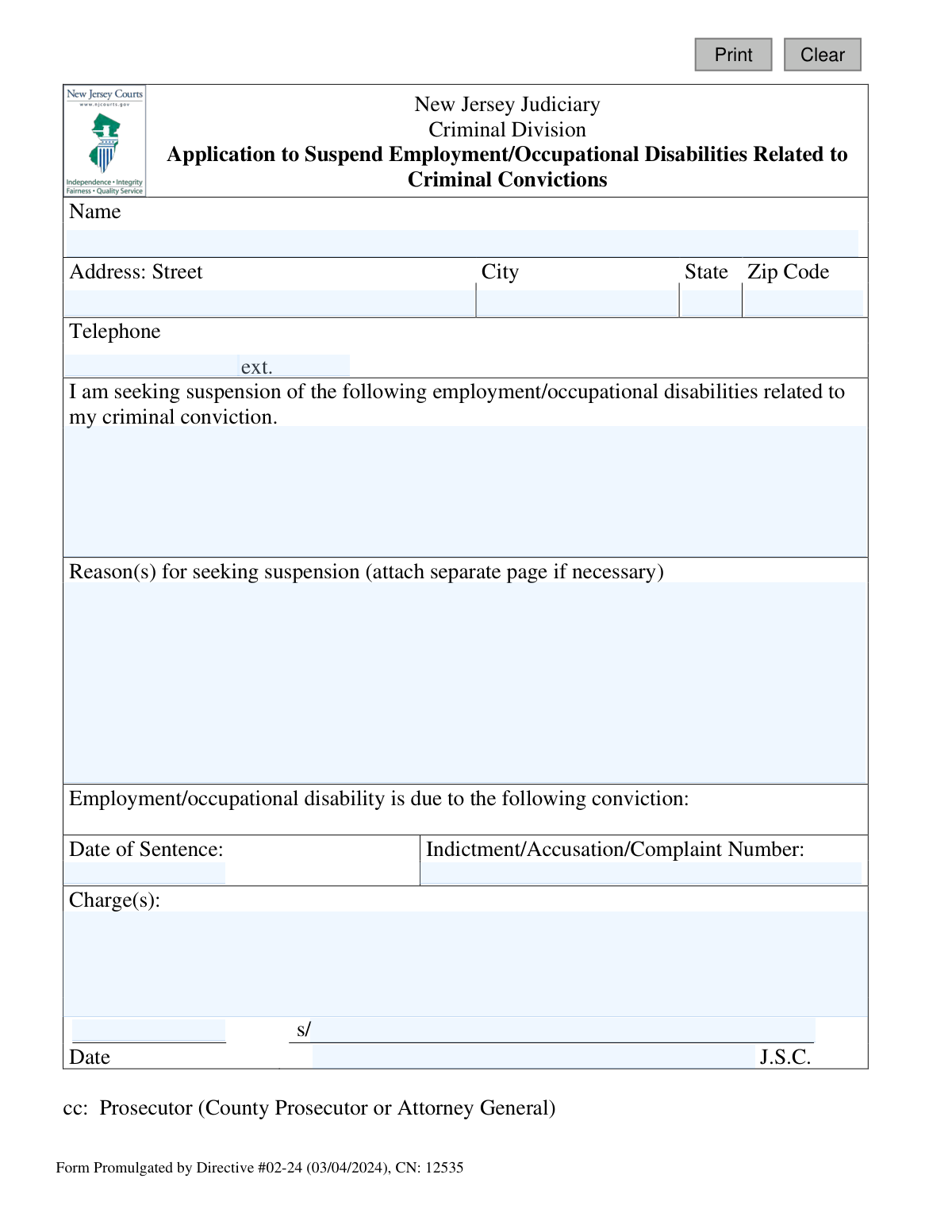
Form CN: 12535 is an official document from the New Jersey Judiciary used by individuals to formally request the suspension of professional or job-related restrictions that have been imposed due to a past criminal conviction. This application allows them to present their case to the court, detailing the conviction and the reasons why these disabilities should be lifted. Today, this form can be filled out quickly and accurately using AI-powered services like Instafill.ai, which can also convert non-fillable PDF versions into interactive fillable forms.
CN: 12535 is part of the employment application forms, New Jersey forms and self employment forms categories on Instafill.
Our AI automatically handles information lookup, data retrieval, formatting, and form filling.
It takes less than a minute to fill out CN: 12535 using our AI form filling.
Securely upload your data. Information is encrypted in transit and deleted immediately after the form is filled out.

Form specifications

Form name: Application to Suspend Employment/Occupational Disabilities Related to Criminal Convictions (CN: 12535)
Number of fields: 17
Number of pages: 1
Language: English
main-image

Instafill Demo: How to fill out PDF forms in seconds with AI

How to Fill Out CN: 12535 Online for Free in 2026

Are you looking to fill out a CN: 12535 form online quickly and accurately? Instafill.ai offers the #1 AI-powered PDF filling software of 2026, allowing you to complete your CN: 12535 form in just 37 seconds or less.
Follow these steps to fill out your CN: 12535 form online using Instafill.ai:
  1. 1 Navigate to Instafill.ai and upload or select the 'Application to Suspend Employment/Occupational Disabilities Related to Criminal Convictions' (Form CN: 12535).
  2. 2 Use the AI assistant to accurately input your personal details, including your full name, address, and telephone number.
  3. 3 Clearly specify the employment or occupational disabilities you are seeking to have suspended in the designated section.
  4. 4 Provide complete details of the related criminal conviction, including the date of sentence, indictment/complaint number, and the specific charges.
  5. 5 Compose a thorough explanation of your reasons for seeking the suspension, attaching a separate page if the provided space is insufficient.
  6. 6 Carefully review all auto-filled information for accuracy, then digitally sign and date the application in the appropriate fields.
  7. 7 Download the completed form to print and file with the New Jersey Judiciary, ensuring a copy is also sent to the relevant prosecutor as required.

Our AI-powered system ensures each field is filled out correctly, reducing errors and saving you time.

Why Choose Instafill.ai for Your Fillable CN: 12535 Form?

Speed

Complete your CN: 12535 in as little as 37 seconds.

Up-to-Date

Always use the latest 2026 CN: 12535 form version.

Cost-effective

No need to hire expensive lawyers.

Accuracy

Our AI performs 10 compliance checks to ensure your form is error-free.

Security

Your personal information is protected with bank-level encryption.

Frequently Asked Questions About Form CN: 12535

This form is used to ask the New Jersey Judiciary to remove legal barriers related to a past criminal conviction that are preventing you from obtaining a specific job or occupational license.

You should file this form if you have a criminal conviction in New Jersey that legally disqualifies you from an employment or licensing opportunity, and you wish to have that disqualification suspended by a judge.

You must provide the date of your sentence, the specific charges you were convicted of, and the Indictment, Accusation, or Complaint Number for the case.

This number is located on your official court documents, like the Judgment of Conviction. If you don't have these records, you can request them from the clerk's office of the court where you were sentenced.

In this section, you should clearly explain why you need the disability suspended, such as for a specific job offer or to apply for a professional license. Be sure to describe your rehabilitation efforts and qualifications for the position.

You should file the completed application with the Criminal Division of the Superior Court in the county where you were convicted. Remember to also send a copy to the County Prosecutor or Attorney General as indicated on the form.

Yes, the form explicitly states that a copy ('cc:') must be sent to the appropriate prosecutor's office. Failure to do so could delay or invalidate your application.

After filing, the court will review your application, the prosecutor will have a chance to respond, and a judge will ultimately decide whether to grant the suspension of your employment-related disabilities.

The form does not mention a filing fee, but court fees can vary. It is best to contact the Criminal Division clerk's office in the relevant county to confirm if any fees apply.

Yes, services like Instafill.ai use AI to help you accurately auto-fill form fields with your personal information, saving time and reducing the chance of errors.

You can upload the PDF to Instafill.ai, which will make the document fillable online. After entering your information and e-signing, you can download the completed form for printing and submission.

If you have a non-fillable or 'flat' PDF, you can use a service like Instafill.ai. It can convert the document into an interactive, fillable form that you can complete on your computer or phone.

Compliance CN: 12535
Validation Checks by Instafill.ai

1
Applicant Name Completeness
Verifies that the applicant's name field (`appName`) is not empty and contains at least a first and last name. This is the primary identifier for the individual submitting the application. An application without a complete name cannot be processed and will be rejected, requiring the user to provide the information.
2
Complete Mailing Address Required
Ensures that the street address (`appAddrStr`), city (`appAddrCity`), state (`appAddrSt`), and zip code (`appAddrZip`) fields are all filled out. A complete and valid address is mandatory for all official correspondence from the Judiciary and the Prosecutor's office. If any part of the address is missing, the submission will fail, as the court cannot guarantee communication with the applicant.
3
ZIP Code Format Validation
Checks that the 'Zip Code' field (`appAddrZip`) contains a valid 5-digit or 9-digit (ZIP+4) numeric value. Correct ZIP code formatting is essential for ensuring mail is deliverable and for maintaining data integrity within the court's systems. An incorrectly formatted ZIP code will trigger an error and must be corrected before submission.
4
US Phone Number Format
Validates that the 'Telephone' field (`appPh`) follows a standard 10-digit US phone number format. A valid contact number is crucial in case the court needs to contact the applicant for clarifications or scheduling. The system should reject entries with incorrect digit counts or non-numeric characters (after stripping common formatting).
5
Essential Descriptions Completeness
Verifies that the text fields for 'employment/occupational disabilities' (`seekDesc`), 'Reason(s) for seeking suspension' (`reasonDesc`), and 'Charge(s)' (`chargesDesc`) are not empty. These narrative sections form the core basis of the application and are required for a judge to make an informed decision. An application with any of these fields left blank is fundamentally incomplete and cannot be evaluated.
6
Sentence Date Format and Validity
Ensures the 'Date of Sentence' (`sentenceDt`) is a valid, correctly formatted date (e.g., MM/DD/YYYY). This validation also checks that the date is in the past and not a future date, as a sentence cannot have been imposed in the future. This date is critical for verifying the conviction details, so an invalid or future date will block submission.
7
Indictment Number Presence
Checks that the 'Indictment/Accusation/Complaint Number' field (`indictNum`) is not left blank. This number is the primary unique identifier for the criminal case within the New Jersey Judiciary's record system. Without this number, locating the correct case file is nearly impossible, so the application will be rejected as incomplete.
8
Signature Date Logic
Validates that the 'Signature Date' (`sigDt`) is a valid date and is not set to a future date. The date of signature legally attests to when the document was executed by the applicant. A future date is logically impossible and would invalidate the document, so the system must prevent such entries.
9
Chronological Order of Dates
Performs a cross-field validation to confirm that the 'Signature Date' (`sigDt`) is on or after the 'Date of Sentence' (`sentenceDt`). An application cannot be signed before the conviction it addresses has occurred. This check prevents logical errors in the application's timeline and ensures the document is coherent.
10
Printed Signature Name Consistency
Compares the printed name next to the signature (`sigNamePrint`) with the applicant's name at the top of the form (`appName`). While a perfect match isn't required (e.g., presence of a middle initial), the names should be substantially similar. This check helps confirm that the person signing the document is the same person applying, reducing the risk of error or fraud.
11
Valid State Abbreviation
Ensures the 'State' field (`appAddrSt`) contains a valid, two-letter postal abbreviation. Using a standardized state code is crucial for mail deliverability and for maintaining clean, consistent address data. The system should provide a dropdown or reject any entry that does not conform to the standard two-letter format.
12
Minimum Length for Reason Description
Checks if the 'Reason(s) for seeking suspension' field (`reasonDesc`) meets a minimum character count to encourage a substantive explanation. A one-word answer is insufficient for a judicial review of the applicant's request. If the entry is too short, the system should prompt the user to provide a more detailed reason for their application.

Common Mistakes in Completing CN: 12535

Entering Incorrect Conviction Details

Applicants often rely on memory and enter the wrong Indictment, Accusation, or Complaint number, or misstate the specific charges. This is a critical error because it prevents the court from locating the correct case file, leading to immediate rejection or significant delays. To avoid this, applicants must refer to official court documents or their judgment of conviction to get the exact details.

Forgetting to Serve the Prosecutor's Office

The form explicitly states 'cc: Prosecutor,' meaning a copy must be sent to the appropriate County Prosecutor or Attorney General. Applicants often overlook this step, assuming filing with the court is sufficient. This procedural error will halt the application, as the state has not been properly notified and given the opportunity to respond, resulting in dismissal until service is proven.

Providing a Vague Reason for Suspension

The 'Reason(s) for seeking suspension' section is often filled with generic statements like 'to get a job' instead of a compelling, detailed explanation. A weak justification makes it difficult for the judge to grant the suspension, as the applicant has not demonstrated sufficient rehabilitation or need. Applicants should clearly articulate how the conviction is a direct barrier to specific employment and why suspending the disability is warranted.

Failing to Specify the Occupational Disability

The form asks the applicant to identify the 'employment/occupational disabilities' they want suspended, but many people leave this vague. For example, instead of just 'employment,' they should specify 'inability to obtain a commercial driver's license' or 'bar from working in a school.' Without this specificity, the judge cannot issue a targeted order, making the application ineffective even if granted.

Submitting an Unsigned or Undated Application

In the rush to complete paperwork, applicants sometimes forget to sign and date the document on the designated lines. An unsigned application is legally invalid and will be immediately returned or rejected by the court clerk, forcing the applicant to refile. It is crucial to perform a final review of the form to ensure it is signed and dated correctly before submission.

Using Outdated or Incomplete Contact Information

People frequently move or change phone numbers and forget to update their records, leading them to enter old information on the form. If the court cannot contact the applicant to schedule hearings or request more information, the application may be dismissed for failure to prosecute. Always double-check that the address and phone number are current and legible before submitting.

Listing Arrests Instead of Convictions

Applicants may mistakenly list charges for which they were arrested but never convicted. This application specifically addresses disabilities arising from criminal convictions, not arrests that were dismissed or resulted in an acquittal. Listing non-conviction charges clutters the application and shows a misunderstanding of the process, potentially harming the applicant's credibility.

Using Illegible Handwriting

Many official forms are only available as non-fillable PDFs, forcing applicants to print and complete them by hand. Poor or rushed handwriting can make critical information like names, addresses, and case numbers unreadable to court staff, leading to data entry errors or rejection. Using a tool like Instafill.ai can convert a flat PDF into a fillable one, ensuring all entries are typed, clear, and professional.

Entering an Incorrect Date of Sentence

The 'Date of Sentence' is a key piece of data for identifying the correct record, but it is often entered incorrectly from memory. An inaccurate date can cause confusion and require the court to perform a manual search, delaying the application process. This date must be copied exactly from the official Judgment of Conviction document to ensure accuracy.

Misunderstanding the Form's Limited Scope

Some applicants mistakenly believe this form is for an expungement, which seals a criminal record. This application has a much narrower purpose: to suspend specific legal barriers to employment or occupational licensing caused by a conviction. This misunderstanding can lead to a misaligned 'Reason for seeking suspension' and ultimate denial, as the relief requested does not match what the form provides.
Saved over 80 hours a year

“I was never sure if my IRS forms like W-9 were filled correctly. Now, I can complete the forms accurately without any external help.”

Kevin Martin Green

Your data stays secure with advanced protection from Instafill and our subprocessors

Robust compliance program

Transparent business model

You’re not the product. You always know where your data is and what it is processed for.

ISO 27001, HIPAA, and GDPR

Our subprocesses adhere to multiple compliance standards, including but not limited to ISO 27001, HIPAA, and GDPR.

Security & privacy by design

We consider security and privacy from the initial design phase of any new service or functionality. It’s not an afterthought, it’s built-in, including support for two-factor authentication (2FA) to further protect your account.

Fill out CN: 12535 with Instafill.ai

Worried about filling PDFs wrong? Instafill securely fills application-to-suspend-employmentoccupational-disabilities-related-to-criminal-convictions-cn-12535 forms, ensuring each field is accurate.

Related forms by category

employment application forms Form I-765, Application for Employment Authorization, Form ETA-9089, Application for Permanent Employment Certification, Form AO 78, Application for Employment, Illinois State Board of Education (ISBE) Application for Employment (ISBE 61-08), HR-Pol-Rec&Res-04 Employment Application Form (Recruitment of Permanent Employees), City of Carlinville Application for Employment (An Equal Opportunity Employer), St. Paul’s Hospital Application for Employment (職位申請表) – SPHF-HRD-035, New York State Employment Application: Part 1 – Pre-Interview (Form #S1000), New York State Employment Application Form, Sidney Sussex College Cambridge, Application for Employment, Z83, Application for Employment in the Republic of South Africa Government Department, ENVIRONMENTAL MONITORING LABORATORY, LLC Employment Application, Brighton Police Department Police Officer Employment Application, Form OF-612, Optional Application for Federal Employment, King Faisal Specialist Hospital and Research Centre (General Organization) Employment Application Form, Form ETA-9089, Application for Permanent Employment Certification, King Faisal Specialist Hospital and Research Centre (General Organization) Employment Application Form, Form I-765, Application For Employment Authorization, State of New Jersey Application for Employment (Form DPF-663), Standard Application for Employment · + 3 more →
New Jersey forms State of New Jersey Alternate Benefit Program Withdrawal Request Acknowledgement Receipt, Horizon Blue Cross Blue Shield of New Jersey Applied Behavior Analysis Supplemental Information Form, State of New Jersey Application for Employment (Form DPF-663), New Jersey Judiciary Plea Form (Plea 01), Supplemental Plea Form for Certain Sexual Offenses: Megan’s Law/Parole Supervision for Life/Community Supervision for Life (Plea 05), Financial Questionnaire to Establish Indigency, New Jersey Judiciary Resource Family Information Form, Foreclosure Case Information Statement (FCIS) - Appendix XII-B2, New Jersey Judiciary Records Request Form, Superior Court of New Jersey, Application for Appeal and Order, FL Certification of Requested Background Checks for Kinship Legal Guardianship, Certification of Caregiver as to Knowledge of Identity and/or Location of Parents, FL Order Judgment for Kinship Legal Guardianship, New Jersey Judiciary Certification of Repair and Plea of Guilty, Uniform Summary Support Order (USSO), New Jersey Judiciary Volunteer Application (CN 10293), Application to Take the New Jersey Court Interpreter Oral Examination, New Jersey Judiciary Attorney Fee Arbitration Request, Order to Show Cause with Temporary Restraints Pursuant to Rule 4:52, Tax Court of New Jersey, State Tax Complaint · + 271 more →
self employment forms Form 204B, Statement of Self-Employment Income, Form SSA-820-BK, Work Activity Report - Self-Employment, Form DISC-002, Form Interrogatories—Employment Law