
Yes! You can use AI to fill out Illinois State Board of Education (ISBE) Application for Employment (ISBE 61-08)
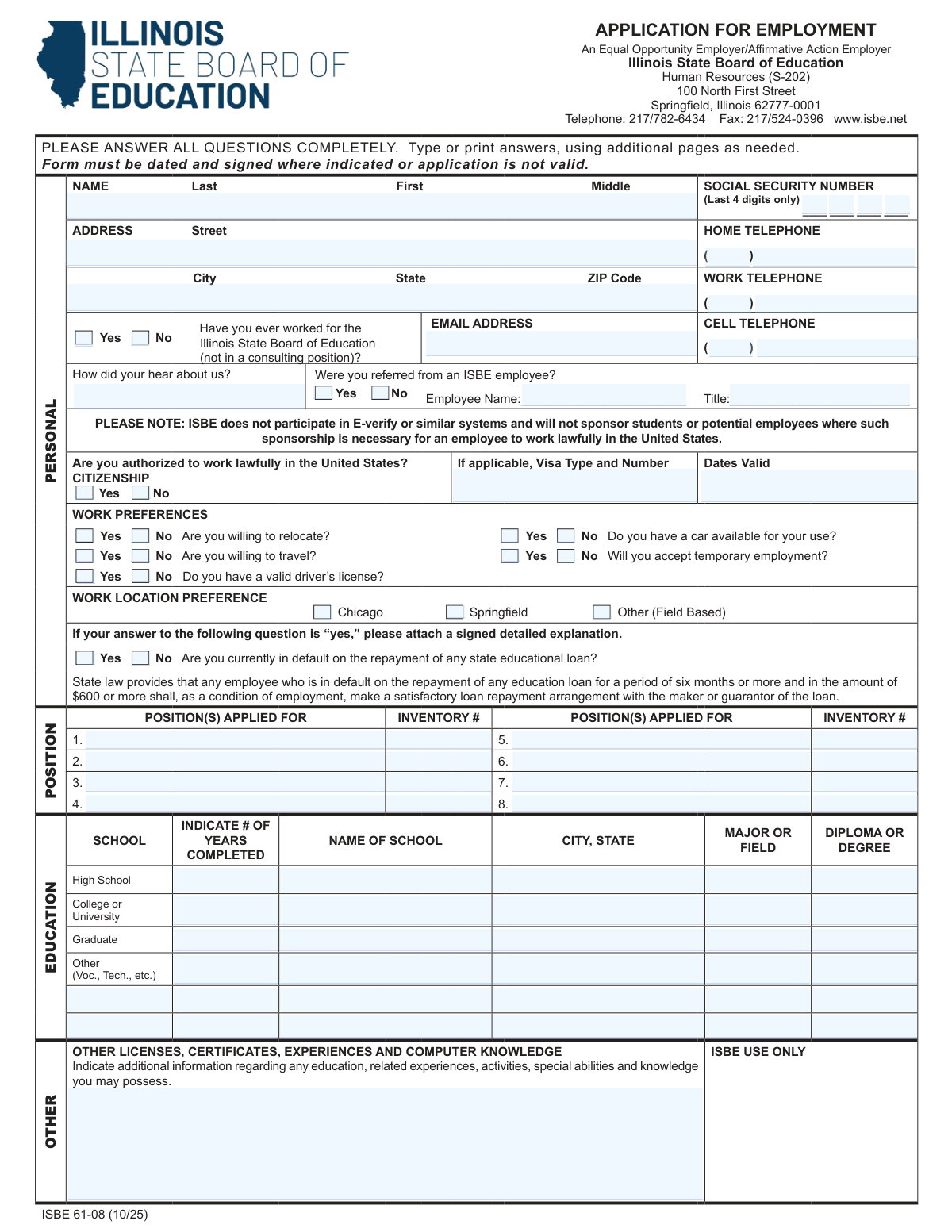
Don't type 181 fields by hand. Tell our AI about yourself, or upload a document you already have, and it fills every field in seconds. You check it, then download, print or sign.
The AI does the filling. You just check it.
No typing into boxes, nothing to install.
What this form asks for
The AI fills all of it, from your answers or your documents.
The AI checks your answers before you download
16 checks built for this form, so a wrong date or a missing answer is caught before anyone else sees it.
Validates that Last Name and First Name are provided (Middle optional unless the form requires it for matching) and that the name fields contain only reasonable characters (letters, spaces, hyphens, apostrophes) and are not placeholder text (e.g., 'N/A'). This is important for identity matching, background checks, and record creation. If validation fails, the submission should be rejected or returned for correction with a clear message indicating which name components are missing/invalid.
Ensures the Social Security Number field contains exactly 4 digits and does not include the full SSN, separators, or non-numeric characters. This protects sensitive data and aligns with the form’s instruction to provide only the last 4 digits. If validation fails, the system should block submission and prompt the applicant to enter only four digits (e.g., '1234').
Checks that Street, City, State, and ZIP Code are all present and that State is a valid US state/territory abbreviation (e.g., IL) and ZIP is either 5 digits or ZIP+4 (##### or #####-####). A complete, standardized address is required for correspondence and employment records. If validation fails, the system should flag the specific missing/invalid component and require correction before acceptance.
Validates that any provided phone numbers follow a consistent 10-digit US format (allowing common punctuation like parentheses and dashes) and are not obviously invalid (e.g., all zeros). This ensures HR can contact the applicant and reduces downstream data cleanup. If validation fails, the system should highlight the offending phone field(s) and require a corrected number or allow the field to be left blank if not required.
Ensures the email address is present (if required) and matches standard email syntax (local@domain) with a plausible domain and no spaces. Email is often the primary communication channel for interview scheduling and status updates. If validation fails, the system should prevent submission (if required) or flag the field and request a corrected email.
Checks that the applicant answers whether they are authorized to work lawfully in the United States (Yes/No) and enforces conditional requirements: if 'No' or if a visa is indicated as applicable, Visa Type, Visa Number, and Dates Valid must be provided in valid formats. This is critical because the form states ISBE will not sponsor and must ensure lawful work eligibility. If validation fails, the system should require completion/correction of visa fields or clarification of authorization status before submission.
And 10 more checks
- Work Preferences Yes/No Completeness
- Work Location Preference Selection Validation
- State Educational Loan Default Explanation Attachment Requirement
- Position Applied For and Inventory Number Pairing
- Education Section Completeness and Numeric Years Completed
- Work History Required Fields and Minimum Entry Enforcement
- Employment Dates Format and Chronological Consistency (Mo./Yr.)
- Supervisory Role Staff Count Conditional Requirement
- References Completeness, Non-Relative Attestation, and Phone Format
- Signature and Application Date Presence (Submission Validity)
Let AI fill out your ISBE 61-08
No typing. Every field filled in seconds, checked, ready to sign.
How to Fill Out ISBE 61-08 Online for Free in 2026
What the AI walks you through.
- Enter your personal information (name, last 4 digits of SSN, address, phone numbers, email) and indicate whether you have previously worked for ISBE (non-consulting).
- Complete eligibility and work preference questions, including work authorization/citizenship or visa details, willingness to relocate/travel, temporary work acceptance, car availability, and driver’s license status, plus preferred work location.
- Answer the state educational loan default question and attach a signed, detailed explanation if you answer “Yes.”
- List the position(s) you are applying for and the corresponding inventory number(s).
- Fill out your education history (schools, years completed, location, major/field, diploma/degree) and add any other licenses, certificates, relevant experience, and computer skills.
- Provide a complete work history starting with your current/most recent employer, including dates, addresses, job titles, supervisor information, duties, supervisory responsibilities, and reasons for leaving (attach additional pages if needed).
- Add three non-relative references, then sign and date the authorization/certification section; optionally complete the voluntary ethnicity and disability self-identification section and include any requested attachments (cover letter, resume, transcripts).
Common Mistakes in Completing ISBE 61-08
The ones the AI is built to catch.
Leaving required fields blank despite the “answer all questions completely” instruction
Providing more than the last 4 digits of the Social Security Number
Missing date and signature (invalid application)
Incorrect or incomplete phone number formatting
Unclear or inconsistent work authorization/citizenship information
Not attaching the required written explanation for state educational loan default
Failing to list position inventory numbers or listing the wrong position identifiers
Incomplete work history entries (dates, addresses, supervisor, duties, reason for leaving)
Using vague duty descriptions that don’t show scope, outcomes, or relevance
Supervisory question answered without providing number of staff
Listing inappropriate references (relatives, missing contact info, or unprepared references)
Misunderstanding the voluntary EEO/Disability section (over-sharing or leaving it inconsistent)
Frequently Asked Questions About ISBE 61-08
Is it really free for 7 days?
Can I fill other forms too?
How do I cancel?
How does the AI fill out ISBE 61-08?
What happens to my information?
How complex is ISBE 61-08 to fill out?
What is this form used for?
Who should fill out this application?
Do I have to answer every question on the application?
What makes my application invalid?
Why does the form ask for my Social Security number, and do I provide the full number?
What documents should I include with the application?
How do I complete the 'Position(s) Applied For' section and what is an inventory number?
What should I put in the work history section if I need more space?
What does 'Was position supervisory?' mean, and what number should I enter?
Can I list relatives as references?
What if I previously worked for ISBE?
What does ISBE mean by not participating in E-Verify and not sponsoring applicants?
What happens if I am in default on a state educational loan?
Do I have to complete the Voluntary Release of Ethnic Information and Disability section?
Where do I submit the completed application, and who can I contact with questions?
Get your ISBE 61-08 filled out by AI
$0 today. Cancel before Nov 1 and you pay nothing.
Other forms like this one
employment forms: Form I-765, Application for Employment Authorization, Form CMS L564, Request for Employment Info, Form OF-306, Declaration for Federal Employment, Form NYS DHR, Employment Complaint Form, Form AO 78, Application for Employment, Prudential Group Disability Insurance – Education and Employment History Form (GL.2009.009, Ed. 06/2017), HR-Pol-Rec&Res-04 Employment Application Form (Recruitment of Permanent Employees), City of Carlinville Application for Employment (An Equal Opportunity Employer), U.S. Equal Employment Opportunity Commission (EEOC) Form 453, Recommendation for Recognition, The Prudential Insurance Company of America Group Disability Insurance – Education and Employment History Form (GL.2009.009, Ed. 06/2017), St. Paul’s Hospital Application for Employment (職位申請表) – SPHF-HRD-035, U.S. Equal Employment Opportunity Commission (EEOC) Form 453, Recommendation for Recognition, Prudential Group Disability Insurance – Education and Employment History Form (GL.2009.009, Ed. 06/2017), Claim for Special Employment Advance (SU514), New York State Employment Application: Part 1 – Pre-Interview (Form #S1000), New York State Employment Application Form, Sidney Sussex College Cambridge, Application for Employment, Z83, Application for Employment in the Republic of South Africa Government Department, ENVIRONMENTAL MONITORING LABORATORY, LLC Employment Application, Vanguard 403(b)(7) ERISA Retirement Plan Distribution Request (Retirement / Severance from Employment / Disability)
education forms: Form 1099-Q, Payments From Qualified Education Programs, Prudential Group Disability Insurance – Education and Employment History Form (GL.2009.009, Ed. 06/2017), Income-Driven Repayment (IDR) Plan Request (PAYE, IBR, and ICR) — William D. Ford Federal Direct Loan (Direct Loan) Program and Federal Family Education Loan (FFEL) Programs (OMB No. 1845-0102), The Prudential Insurance Company of America Group Disability Insurance – Education and Employment History Form (GL.2009.009, Ed. 06/2017), Prudential Group Disability Insurance – Education and Employment History Form (GL.2009.009, Ed. 06/2017), Melbourne City College Australia Education Agent Application Form, Leaders Institute of Training and Education (LITE) Application for Enrolment, Loan Rehabilitation: Income and Expense Information, William D. Ford Federal Direct Loan (Direct Loan) Program/Federal Family Education Loan (FFEL) Program, Confirmation of Teaching Evidence, Form K-908-2085-E, Designation of Education Decision-Maker, Blue Shield of California Promise Health Plan Health Education Referral Form, Form 2, Certification of Professional Education, Form SY029 - Claim for Pensioner Education Supplement, Claim for Pensioner Education Supplement, Education Course Costs and Student Details Claim Form, CFS 431-1, Summary of the Child's Educational and Developmental Status, CFS 912, Referral Form for Life Skills/Financial Literacy Education
Illinois state forms: State of Illinois Department of Human Services (IDHS) – Bureau of Child Care and Development Child Care Application (Form IL444-3455), State of Illinois Department of Children and Family Services Medical Report on an Adult in a Child Care Facility (CFS 602), Illinois Advanced Practice Nurse Delegation of Prescriptive Authority for Controlled Substances (Delegation Statement)
PA state forms: Form 1095-A, Health Insurance Marketplace Statement, Form W-2, Wage and Tax Statement, Form 593, Real Estate Withholding, Form 8938, Statement of Specified Foreign Financial Assets, Form CMS-2567, Statement of Deficiencies, Form 1098, Mortgage Interest Statement, Form 1098-T, Tuition Statement, Form 1099-S, Proceeds From Real Estate Transactions, Form 1098-E, Student Loan Interest Statement, Form DS-3053, Statement of Consent, Form DS-86, Statement of Non-Receipt of a U.S. Passport, Form DS-86, Statement of Non-Receipt of a U.S. Passport, Form 108, Statement of Intention, Form 107, Statement of Financial Affairs, Form 121, Statement About Your SSNs, Form 122A-1, Chapter 7 Statement of Current Monthly Income, Center for Infertility & Reproductive Surgery – New Patient Questionnaire and Patient/Guarantor Statement (Brigham and Women’s Hospital, Department of Obstetrics and Gynecology), Adult Travel Document Application for Stateless and Protected Persons in Canada (16 years of age or over) (PPTC 190), Form W-8IMY (Rev. October 2021), Certificate of Foreign Intermediary, Foreign Flow-Through Entity, or Certain U.S. Branches for United States Tax Withholding and Reporting, Form W-2, Wage and Tax Statement (2025)
employment application forms: Form I-765, Application for Employment Authorization, Form AO 78, Application for Employment, HR-Pol-Rec&Res-04 Employment Application Form (Recruitment of Permanent Employees), City of Carlinville Application for Employment (An Equal Opportunity Employer), St. Paul’s Hospital Application for Employment (職位申請表) – SPHF-HRD-035, New York State Employment Application: Part 1 – Pre-Interview (Form #S1000), New York State Employment Application Form, Sidney Sussex College Cambridge, Application for Employment, Z83, Application for Employment in the Republic of South Africa Government Department, ENVIRONMENTAL MONITORING LABORATORY, LLC Employment Application, Brighton Police Department Police Officer Employment Application, Form OF-612, Optional Application for Federal Employment, King Faisal Specialist Hospital and Research Centre (General Organization) Employment Application Form, Form I-765, Application For Employment Authorization, State of New Jersey Application for Employment (Form DPF-663), Standard Application for Employment, NYS Employment Application: Part 1 Pre-Interview Form #S1000, Application for a Residency and Employment Rights Certificate, Application to Suspend Employment/Occupational Disabilities Related to Criminal Convictions (CN: 12535), Form ETA-9089 – Appendix A: Foreign Worker Information, Application for Permanent Employment Certification
education application forms: Leaders Institute of Training and Education (LITE) Application for Enrolment, Melbourne City College Australia Education Agent Application Form, New Jersey Judiciary, Board on Continuing Legal Education, Individual Attorney Application for CLE Credit, Supreme Court of New Jersey, Board on Continuing Legal Education, Application for an Extension of Time, Public Service Loan Forgiveness (PSLF) & TEPSLF Certification & Application
NJ state forms: Form 1095-A, Health Insurance Marketplace Statement, Form W-2, Wage and Tax Statement, Form 593, Real Estate Withholding, Form 8938, Statement of Specified Foreign Financial Assets, Form CMS-2567, Statement of Deficiencies, Form 1098, Mortgage Interest Statement, Form 1098-T, Tuition Statement, Form 1099-S, Proceeds From Real Estate Transactions, Form 1098-E, Student Loan Interest Statement, Form DS-3053, Statement of Consent, Form DS-86, Statement of Non-Receipt of a U.S. Passport, Form DS-86, Statement of Non-Receipt of a U.S. Passport, Form 108, Statement of Intention, Form 107, Statement of Financial Affairs, Form 121, Statement About Your SSNs, Form 122A-1, Chapter 7 Statement of Current Monthly Income, Center for Infertility & Reproductive Surgery – New Patient Questionnaire and Patient/Guarantor Statement (Brigham and Women’s Hospital, Department of Obstetrics and Gynecology), Adult Travel Document Application for Stateless and Protected Persons in Canada (16 years of age or over) (PPTC 190), Form W-8IMY (Rev. October 2021), Certificate of Foreign Intermediary, Foreign Flow-Through Entity, or Certain U.S. Branches for United States Tax Withholding and Reporting, Form W-2, Wage and Tax Statement (2025)
state ID forms: Application for Renewal or Duplicate of Alabama Driver License or ID card, Form 1095-A, Health Insurance Marketplace Statement, Form W-2, Wage and Tax Statement, Form 593, Real Estate Withholding, Form 8938, Statement of Specified Foreign Financial Assets, Form CMS-2567, Statement of Deficiencies, Form 1098, Mortgage Interest Statement, Form 1098-T, Tuition Statement, Form 1099-S, Proceeds From Real Estate Transactions, Form 1098-E, Student Loan Interest Statement, Form DS-3053, Statement of Consent, Form DS-86, Statement of Non-Receipt of a U.S. Passport, Form 108, Statement of Intention, Form 107, Statement of Financial Affairs, Form 121, Statement About Your SSNs, Form 122A-1, Chapter 7 Statement of Current Monthly Income, Center for Infertility & Reproductive Surgery – New Patient Questionnaire and Patient/Guarantor Statement (Brigham and Women’s Hospital, Department of Obstetrics and Gynecology), Adult Travel Document Application for Stateless and Protected Persons in Canada (16 years of age or over) (PPTC 190), Form W-8IMY (Rev. October 2021), Certificate of Foreign Intermediary, Foreign Flow-Through Entity, or Certain U.S. Branches for United States Tax Withholding and Reporting, Form W-2, Wage and Tax Statement (2025)
Let AI fill out your ISBE 61-08
Your trial starts once a card is added. You pay nothing before Nov 1.
Our AI already knows this form, all 181 fields of it. Skip the typing: tell it about yourself, or upload what you have, and it fills the whole form in seconds.
- AI fills every field on all 3 pages, tables and checkboxes included
- No typing into boxes: answer a few questions, or upload a document you already have, an old copy of this form, a photo of a document
- The AI checks the answers; you review and change anything before you download
- Download the finished PDF, print it, or sign it online
- Encrypted, and never used to train AI
Cancel before Nov 1 and you pay nothing.
A card is needed to start the trial. Cancel in two clicks from your account.
Terms · Privacy